


Manufacturing Inventory Management Software
Manufacturing inventory management software tracks raw materials, work-in-progress, and finished goods across your production operation. It replaces the spreadsheets and manual counts that work fine at first but break down as orders grow. This guide was last reviewed June 2025 and addresses owners and operations managers at 5-to-100-person shops already running on the accounting software and a mix of printed sheets.
Published 4 August 2026. Reviewed and updated 15 September 2026.
Book a callWhat Is Manufacturing Inventory Management Software?
Manufacturing inventory management software is a purpose-built tool that tracks stock at every stage of production. It knows what raw materials sit in your receiving area, what components are tied up in open jobs, and how many finished units are ready to ship. That is different from a general inventory tool, which just counts items in a warehouse. It is also different from a full ERP system, which manages finance, HR, and operations in one large platform.
Reviewed September 2026. Each figure comes from the assumptions stated beside it, so you can substitute your own and the arithmetic still holds.
The gap between those two extremes is where most small manufacturers actually live. You need more than a stockroom count, but you do not need a six-figure ERP migration.
Would you rather have it built around your operation?
The first look is free. If you would rather not compare products, describe how your operation already works and we build the system around it.
No build cost. You see it running on your own process first, and the monthly subscription starts only once it is live.
Book a callWhy Do Spreadsheets Stop Working as You Grow?
Most small manufacturers start the same way: the accounting software for accounting, spreadsheet for stock levels, and a printed pick list on the shop floor. That works until it does not.
The breaking points tend to arrive together. A customer calls about a late order. Someone checks the spreadsheet and sees 40 units on hand. The floor says 12.
No one knows which number is right. Meanwhile, a purchase order went out for parts you already had because the reorder column was not updated after last week's delivery.
None of this is a failure of effort. It is a natural result of a system built for a smaller operation.
As GS1, the body that sets global barcode standards, explains at gs1.org/standards/barcodes, scan-based identification exists precisely because manual data entry introduces errors at every touch point. When your team writes numbers by hand and types them again later, the error rate compounds with every step.
The fix is not to work harder on the spreadsheet. It is to stop asking a spreadsheet to do a job it was not built for.
What Does Manual Inventory Tracking Actually Cost You?
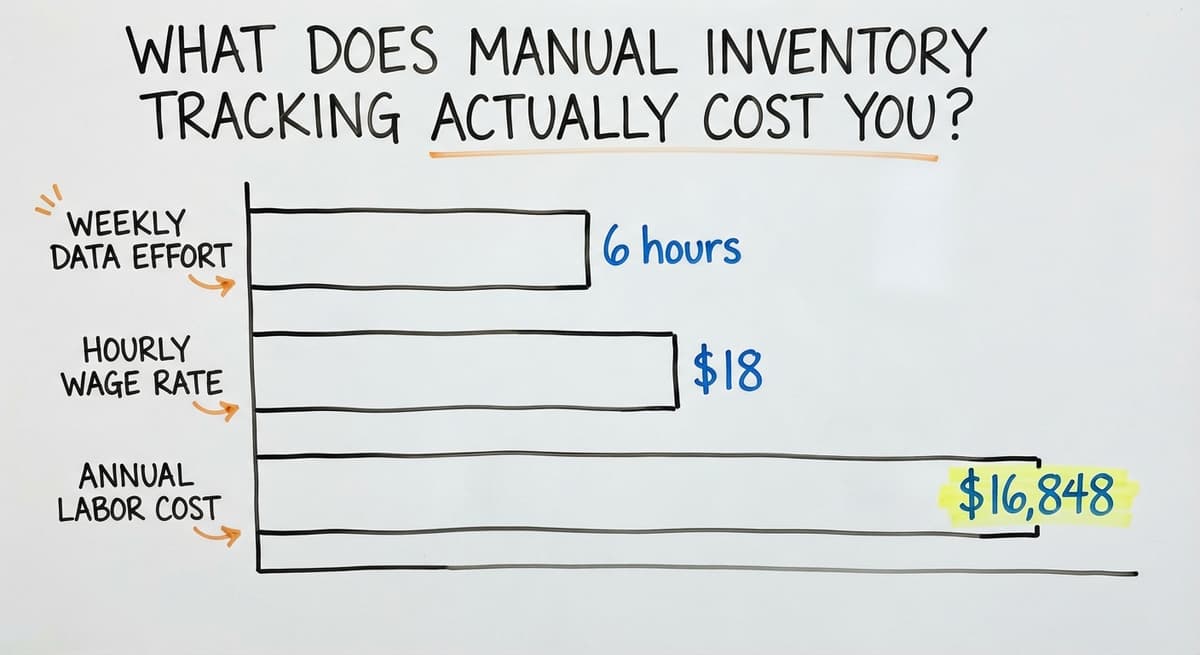
Manual inventory tracking costs more than most owners realize, and the bulk of it is invisible until you add it up. Consider 3 people each spending 6 hours a week on data entry, counts, and corrections.
According to the US Bureau of Labor Statistics, the median wage for stock clerks and order fillers runs around $18 per hour. That is roughly $16,848 a year in labor, before you count rework, stockouts, or the overtime that follows a missed order.
Stockouts carry their own cost: a lost sale, a rushed freight charge, or a customer who does not come back. Overstock ties up cash that could fund the next production run.
The US Census Bureau's Monthly Wholesale Trade data tracks inventories-to-sales ratios across sectors, and even small shifts in that ratio ripple through working capital.
The IRS adds a legal dimension. IRS Publication 538 states directly: "To figure taxable income, you must value your inventory at the beginning and end of each tax year." An inaccurate count is not just an operations problem. It is a compliance risk.
Good inventory software solves all three layers: labor, cash, and compliance.

Core Features Every Manufacturing Inventory System Should Have
Think of this section as a buyer checklist. Not every feature listed here matters equally for every shop. Match what you read to your actual workflow, not to a vendor's demo.
Real-Time Stock Level Tracking
Real-time stock level tracking means every person in the building sees the same number at the same time, without waiting for someone to update a spreadsheet.
Barcode scanning and mobile devices make this practical even on a busy floor. A scan at receiving updates the count immediately. A scan at the pick station reduces it. No clipboard, no end-of-day reconciliation, no conflicting versions.
This single feature removes the most common source of stockout surprises for small manufacturers.
Bill of Materials Management
A bill of materials, or BOM, is a list of every component needed to build one finished product. The software links each BOM to your raw materials stock.
When a production job opens, the system checks whether you have enough of each part. If you do not, it tells you before production starts, not after.
For a small cabinet maker, that might mean checking stock on hinges, drawer slides, and sheet goods before confirming a customer order. A missing component found early costs an email. Found on the assembly day, it costs a delay and possibly a discount.
Purchase Order and Receiving Workflows
Purchase order management connects what you buy to what you have. When stock falls below a set reorder point, the system flags it or creates a draft PO automatically.
When a delivery arrives, the receiving workflow matches it to the open order. Quantities that do not match get flagged before the supplier invoice is approved.
This two-step process cuts over-ordering and eliminates the surprise stockouts that come from deliveries that were assumed but never confirmed.
Is the comparison easier when one option is built for you?
Yes. Off-the-shelf means fitting your process to the software, and custom is the other way round. The first look costs nothing.
Book a callWhat Is Work-in-Progress Inventory and Why Is It Hard to Track?
Work-in-progress (WIP) inventory is material that has left your shelves but has not yet become a finished product. It is the hardest category to track manually because it moves, changes form, and often lives in multiple places at once.
Good software assigns materials to specific production jobs the moment they are pulled.
An operations manager can see, in real time, what is tied up in Job 204 versus Job 205. That visibility feeds cost reporting too: when a job closes, the system knows exactly what went into it.
Finished Goods, Lot Tracking, and Fulfillment
When production closes, finished goods move into their own inventory bucket. The system connects those units to open sales orders and shipping.
Lot tracking assigns a batch number to every group of items produced together. If a quality problem surfaces later, you can trace exactly which customers received units from that batch and act fast.
Lot tracking is required in food, pharma, and medical devices. It is useful in almost every other category for warranty and return management. The software also handles serial numbers and expiry dates where your products need them.
Reporting and Inventory Valuation
Accurate inventory valuation matters for two reasons: tax compliance and business decisions.
The 2 most common methods are FIFO (first in, first out, where the oldest stock is costed first) and average cost (where all units of a part carry the same blended cost). The right choice depends on your product type and your accountant's preference.
Common reports include stock turnover, carrying cost, dead stock, and cost of goods sold (COGS). When these feed directly into the accounting software, month-end close shrinks from a two-day exercise to a review.

What Types of Manufacturing Inventory Management Software Exist?
The 4 main categories differ in scope, cost, and how much your workflow has to change to fit them. Understanding the difference before you talk to a vendor saves significant time.
Standalone Inventory Tools
Standalone tools do one job: track stock. They are fast to set up, lower in cost, and easier for a small team to learn.
The trade-off is that manufacturing-specific features like BOM management and WIP tracking are limited or absent. They suit light assembly operations or businesses where the main pain is stockroom accuracy rather than production complexity.
ERP Systems with Inventory Modules
An ERP (enterprise resource planning) system manages the whole business: finance, operations, purchasing, and sometimes HR, in one platform. The inventory module is one piece of that larger system.
ERPs are powerful, but implementation takes months, costs more, and requires significant change across the organization. They suit manufacturers planning significant growth who can absorb that investment.
MRP Software for Production Planning
MRP software (material requirements planning) focuses on scheduling: it calculates what materials you need, and when, based on your production schedule and lead times.
MRP is more complex than standard inventory management and better suited to higher-volume operations with predictable demand. For a 10-person job shop, MRP is overkill. For a 60-person plant running repeat production runs, it may be the right fit.
Custom Inventory Software Built Around Your Workflow
Custom software is built around how your operation already works, rather than asking you to change your process to match a generic tool.
Custom does not mean starting from scratch or spending more than an ERP. A well-scoped custom build replaces only the painful manual parts: the spreadsheet hand-offs, the double-entry between systems, the count that no one trusts.
For job shops and make-to-order manufacturers with unique workflows, custom software fits better than any off-the-shelf option. The NIST Manufacturing Extension Partnership offers vendor-neutral guidance for small manufacturers evaluating exactly this kind of decision.

Can I Keep Using the accounting software If I Add Inventory Management Software?
Yes, and for most small manufacturers, that is the right approach. the accounting software handles accounting well. It was not built for complex inventory workflows, BOM management, or WIP tracking. Good inventory software integrates with the accounting software rather than replacing it.
Data that flows between the two systems includes COGS entries, PO records, and receiving transactions. Your accounting stays in the accounting software.
Your inventory operations move into a dedicated tool. The 2 systems talk to each other, so your books stay accurate without manual re-entry.
This hybrid approach avoids a full ERP migration and the cost and disruption that comes with it. Ask any vendor you evaluate to show you the accounting software connection live, not in a slide deck.
What does it look like running on your own process?
The first thing you see is it running on your own process, at no build cost. The subscription starts once it is live and doing the job, not before.
Book a call
How Do You Choose the Right Software for Your Operation?
Start with your biggest pain point, not a feature list. The right software solves your top 3 problems without creating new ones. Here is a practical path through the decision.
Map Your Workflow and Name Your Pain Points
Before you talk to any vendor, walk your floor and document how inventory actually moves. Where does a raw material enter the building? Who records it? Where does that record go? Ask the people who do the work, not just the managers who oversee it.
This step reveals the gaps. Common pain points include:
- Stockouts that only surface when production is already scheduled
- Overstock that ties up cash because no one tracks what was already ordered
- Manual data entry that takes hours and still produces errors
- WIP that disappears between the stockroom and the assembly bench
- Month-end counts that take days and still do not match the books
Rank your top 3. The right software solves those first.
Set a Budget Based on Total Cost, Not Sticker Price
Software cost includes the subscription or license fee, setup, training, and integration work. A cheap tool that does not connect to the accounting software may cost more in manual workarounds than a mid-range tool that does.
A custom build scoped tightly to your top pain points can come in well under the cost of an ERP, with a faster return.
The NIST MEP Supply Chain resources are a free starting point for manufacturers who want vendor-neutral help thinking through these trade-offs.
Evaluate Integration, Implementation, and Vendor Fit
Ask every vendor 3 things before you go further:
- Show me the accounting integration running live in a real account.
- Who does the implementation, and how long does it take for an operation like mine?
- Can I speak with a manufacturer of similar size who went live in the last 12 months?
A vendor who cannot answer clearly is a vendor to avoid. Watch for vague timelines, demos that show only the best-case scenario, and contracts with long lock-in periods and no clear exit.
The FTC's guidance on order fulfillment obligations is a useful reminder of what is at stake when your inventory count is wrong and a customer order ships late or not at all.
What Does a Good Implementation Look Like?
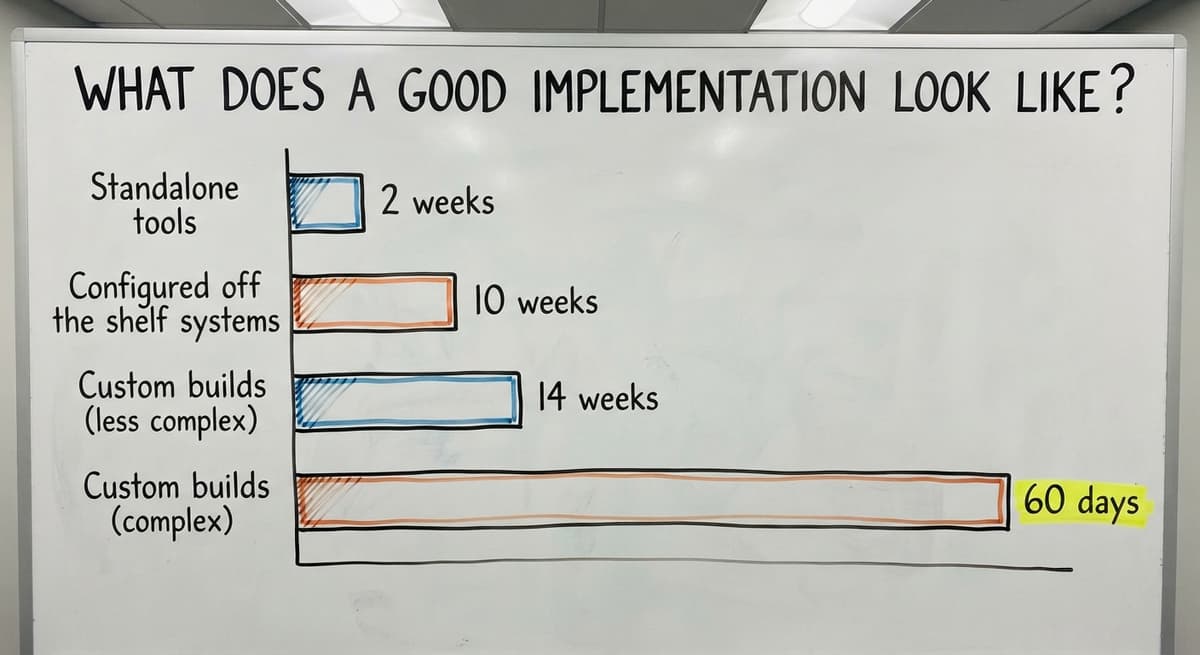
A good implementation starts with the vendor learning your operation before touching any software. The stages are: discovery, build or configure, test with real data, train the people who will use it daily, and go live.
A phased approach, where you solve the biggest problem first and expand later, gets you value faster and reduces risk.
Realistic timelines vary by type:
- Standalone tools: days to 2 weeks
- Configured off-the-shelf systems: 4 to 10 weeks
- Custom builds scoped to specific pain points: 6 to 14 weeks depending on complexity
The first 30 to 60 days after go-live involve adjustment. Data quality improves as the team uses the system consistently. Ongoing vendor support during this period matters as much as the launch itself. A vendor who disappears after go-live is a problem waiting to happen.

Getting Your Team to Use the Software
Adoption is the hardest part of any software rollout. Involve floor staff in the selection process early. People who helped choose the tool are more likely to use it.
Role-specific training, short and focused on the exact tasks each person does, works better than a single all-hands session.
Software built around existing habits is easier to adopt than software that demands new habits before it delivers any benefit. This is one of the strongest arguments for custom software in a job shop or make-to-order operation: the system fits the team rather than the other way around.
How Does Inventory Software Affect Cash Flow and Accuracy?
Accurate inventory data directly affects working capital. Overstock ties up cash. Understock loses sales and triggers emergency purchasing at premium prices. Automated reorder points mean you buy what you need, when you need it, at planned prices rather than urgent ones.
Cycle counts (counting a rotating subset of your inventory regularly rather than shutting down for a full physical count) keep accuracy high without the disruption of an annual wall-to-wall count.
Most operations that use software consistently can reach and hold inventory accuracy above 95 percent. Discrepancy reports show you where errors cluster, so you can fix the root cause rather than just correcting the number.
For multi-location operations, the same logic applies across sites. Materials stored at a second warehouse or a satellite location stay visible in the same system. Transfers between locations are recorded and reconciled automatically, which prevents double-counting and the confusion that comes from two separate spreadsheets.
Not sure this is the right shape for your operation?
The call is free. Describe how the work runs today. We map it on a call and show you what it would look like built around that, before you spend anything.
Book a callSigns Your Current System Is Holding You Back
Some signals are operational: frequent stockouts, slow order fulfillment, staff spending hours each week on data entry that still produces errors.
Others are financial: inventory write-offs at year end, missed quotes because you could not confirm material availability, high carrying costs on parts you did not know you already had.
If you recognize 3 or more of those signals, your current system is already costing you more than a software change would.
The question is not whether to act, but how to scope the change so it solves the real problem without rebuilding everything at once.
How Do You Build the Business Case for Inventory Software Investment?
Start with the numbers you already have, not industry averages. Count the staff hours spent each week on manual counts, data entry, and error correction. Multiply by their hourly rate.
Add the cost of your last 3 stockout events: lost revenue, rush freight, customer credits. Add the carrying cost of overstock you wrote off at year end.
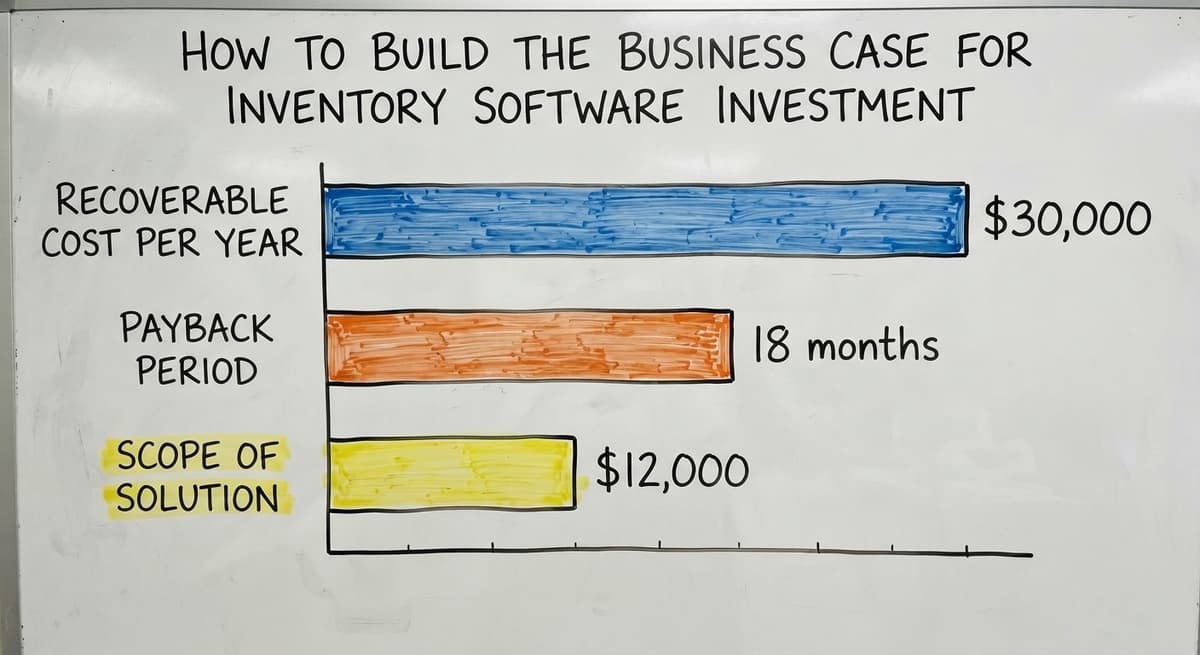
A conservative total is more persuasive than an optimistic one. If the math shows $30,000 a year in recoverable cost, a software investment that pays back in 18 months is an easy decision.
If it shows $12,000, the scope of the solution should match that number.
Present the case around outcomes: fewer stockouts, faster month-end close, less staff time on manual work. Those are the things a partner or board can evaluate without understanding the software at all.
Frequently Asked Questions
Questions About Fit and Functionality
What is the best inventory management software for manufacturing? There is no single best option. The right software depends on your production type, team size, and the systems you already use.
A job shop needs different features than a high-volume plant. Start by identifying your top 3 pain points, then find software that solves those without adding complexity you do not need.
What are the top 5 inventory management software options? The commonly cited options range from small-shop inventory apps to manufacturing suites and accounting packages with inventory add-ons.
Each suits a different operation size and workflow. None of them is the right answer for every manufacturer. Evaluate on fit to your process, accounting integration quality, and implementation support.
Can I use spreadsheet for inventory management? spreadsheet works at small scale, but it breaks down as order volume grows. It has no real-time updates, no barcode scanning, no BOM linking, and no audit trail.
Most manufacturers outgrow it between 20 and 50 orders a week. It is a reasonable starting point, not a long-term system.
Questions About Cost and Timing
How much does manufacturing inventory management software cost? Standalone tools start around $50 to $200 per month. Mid-range configured systems run $300 to $1,500 per month depending on users and features.
Custom builds are scoped by project and can range from a few thousand dollars to significantly more depending on complexity. Total cost of ownership includes setup, training, and integration, not just the subscription.
How long does it take to implement inventory software? Standalone tools can go live in days. Configured systems take 4 to 10 weeks.
Custom builds take 6 to 14 weeks depending on scope. A phased approach, where you solve the biggest problem first, gets you value faster than waiting for a full rollout.
Questions About Software Type and Approach
What is the difference between MRP software and inventory management software? Inventory management software tracks what you have. MRP (material requirements planning) software calculates what you need and when, based on your production schedule.
MRP is more complex and better suited to higher-volume operations with predictable demand. Most small manufacturers need good inventory tracking before they need MRP.
Is custom inventory software better than off-the-shelf for small manufacturers? For operations with unique workflows or hybrid setups, custom software fits better because it is built around how you already work.
Off-the-shelf tools are faster to deploy and lower in upfront cost. The right answer depends on how closely any available off-the-shelf tool matches your actual process, and how much workflow change your team can absorb.
What should I ask a vendor before signing a contract? Ask to see the accounting integration live. Ask who does the implementation and how long it takes.
Ask for references from manufacturers of similar size. Ask what happens to your data if you leave. A vendor who cannot answer those questions clearly is one to avoid.
Frequently asked questions
What is the best inventory management software for manufacturing?
There is no single best option. The right software depends on your production type, team size, and existing systems. A job shop needs different features than a high-volume plant.
Identify your top 3 pain points first, then find software that solves those without adding complexity you do not need. Fit matters more than brand name.
What are the top 5 inventory management software?
The commonly cited options range from small-shop inventory apps to manufacturing suites and accounting packages with inventory add-ons. Each suits a different operation size and workflow.
None is the right answer for every manufacturer. Evaluate on fit to your process, accounting integration quality, and the quality of implementation support the vendor provides.
What is the best software for inventory management?
For manufacturers, the best software is the one that tracks raw materials, WIP, and finished goods in a way your team will actually use.
Standalone tools suit simpler operations. Custom software suits shops with unique workflows. The deciding factors are the accounting software compatibility, ease of adoption, and whether the vendor understands manufacturing.
Can I use spreadsheet for inventory management?
Spreadsheet works at small scale but breaks down as order volume grows. It has no real-time updates, no barcode scanning, no BOM linking, and no audit trail.
Most manufacturers outgrow it somewhere between 20 and 50 orders a week. It is a reasonable starting point, not a long-term system for a growing operation.
How much does manufacturing inventory management software cost?
Standalone tools start around $50 to $200 per month. Configured mid-range systems run $300 to $1,500 per month. Custom builds are scoped by project.
Total cost includes setup, training, and integration, not just the subscription fee. A cheap tool that creates manual workarounds costs more than a mid-range tool that connects cleanly.
How long does it take to implement inventory software for a manufacturer?
Standalone tools can go live in days. Configured off-the-shelf systems take 4 to 10 weeks. Custom builds take 6 to 14 weeks depending on scope.
A phased approach, solving the biggest problem first, gets you value faster than waiting for a full rollout. Scope determines timeline more than vendor claims.
Is custom inventory software better than off-the-shelf for small manufacturers?
For operations with unique workflows or hybrid setups, custom software fits better because it is built around how you already work. Off-the-shelf tools deploy faster and cost less upfront.
The right answer depends on how closely any available tool matches your actual process and how much workflow change your team can absorb.
What is the difference between MRP, ERP, and inventory management software?
Inventory software tracks what you have and where. MRP adds the planning: it turns a production schedule and a bill of materials into what to buy and when.
ERP wraps both with accounting, sales, and HR in one suite. A small manufacturer needs inventory with MRP, not the suite.
What features are needed for lot and serial number traceability?
Lot or serial capture at receiving, consumption of specific lots on each work order, a finished-goods lot tied to its component lots, and a query that runs both ways: which products used this lot, and which lots went into this product. Recalls depend on the second query.
How can manufacturing software track raw materials and work in progress?
Raw material is scanned into stock at receiving, issued to a work order when production starts, and held as work in progress until the order completes, when the finished quantity is booked and the components consumed. Three scans, and the count is right at every stage.
How can manufacturers improve inventory accuracy and reduce waste?
Scan every issue to production instead of back-flushing from a standard, count the top 20 percent of components weekly, and track scrap per work order. Most shops find accuracy climbs from about 80 percent to over 97 percent within 3 months of scanning issues.
What is in a free first look?
A 30 minute call, your operation mapped, and a clear picture of what we would build. No obligation and nothing to install.
Book a callRelated guides
The rest of this guide, for the parts of the job this page does not cover.
Guides
- Manufacturing Inventory Software
- Manufacturing Inventory Management
- Inventory Management System for Manufacturing
- Warehouse Inventory Management Software
- Quickbooks Inventory Management Software
- Inventory and Warehouse Management Software
- Custom Inventory Management Software
- Multi Location Inventory Management Software
- Cost of Inventory Management Software
- Inventory Management Software Freeware
- Best Inventory Management Software for Small Businesses
- Free Inventory Management Software for Small Business
- Inventory Management Software Barcode Scanner
- Inventory Management Software with Barcode
- Free Inventory Management Software with Barcode Scanner
- Hvac Inventory Management Software
- Inventory Management Software for Schools
- Inventory Management Software Costs
- Manufacturing Serial Number
- Warehouse Stock Management Software
- Software for Warehouse Management System
- List of Warehouse Management Software