


Inventory Software Warehouse
Reviewed August 2026. Each figure comes from the assumptions stated beside it, so you can substitute your own and the arithmetic still holds.
Published 14 August 2026. Reviewed and updated 15 September 2026.
You built a working operation. Orders go out. Stock comes in. You know your floor. But at some point, the spreadsheet stops keeping up, and the gap between what the sheet says and what is actually on the shelf starts costing you real money.
The guide addresses the person running that operation. Not for a logistics director at a 500-person company.
For the owner or ops manager who runs a lean warehouse on basic accounting software and a shared drive, and wants to know whether inventory software for a warehouse is worth the trouble.
The short answer is yes. The longer answer is that it depends on which software, and how it is set up.
Book a callWhat Does Inventory Software for a Warehouse Actually Do?
Inventory software tracks what comes in, what goes out, and what is on hand. That is the whole job. It connects receiving, storage, picking, and shipping into one view so every person on the floor is working from the same numbers.
When a shipment arrives, the software logs it. When a picker pulls a SKU (a stock-keeping unit, meaning a unique product code), the software updates the count. When an order ships, the record closes. No one has to enter the same number twice.
That single source of truth is what most small warehouses are missing right now.
Would you rather have it built around your operation?
The first look is free. If you would rather not compare products, describe how your operation already works and we build the system around it.
No build cost. You see it running on your own process first, and the monthly subscription starts only once it is live.
Book a callWhy Do Spreadsheets and Paper Stop Working as You Grow?
Spreadsheets are not the problem. The problem is that a spreadsheet can only show you what someone typed in, and typing takes time. By the time someone updates the sheet, the floor has moved on.
Common breaking points include:
- Stock counts that do not match the pick list
- Orders going out twice or not at all
- Staff spending hours each week reconciling paper logs
- No way to know what is on hand without walking the floor
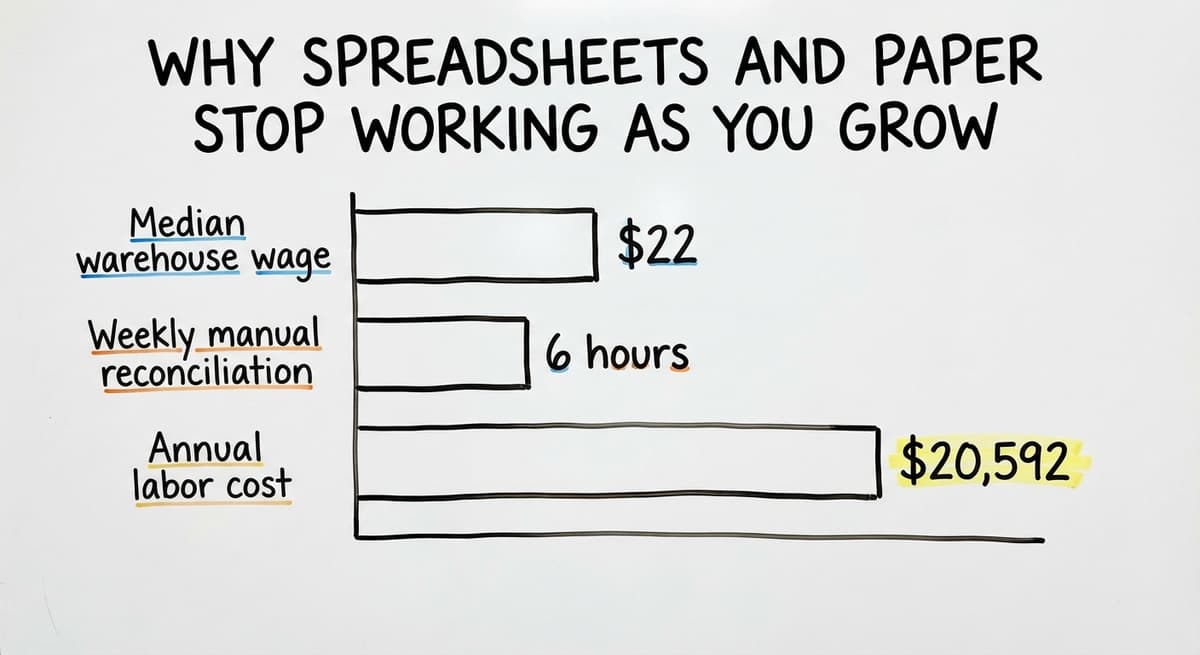
As the US Bureau of Labor Statistics reports, warehouse workers earn a median wage around $22 per hour.
Three people spending 6 hours a week on manual reconciliation is $20,592 a year in labor that produces no output. Someone still has to check the sheet on Monday.
OSHA notes that "The warehousing and storage industry includes establishments operating facilities for general merchandise, refrigerated goods, and other products." That breadth means the risks of a disorganized floor go beyond missed orders.
A paper-based system creates lag. Lag creates errors. Errors create unsafe conditions and unhappy customers.
You are not behind for running on spreadsheets. Most small warehouses start there. The question is if the lag now costs more than the fix.
What Are the Signs That My Warehouse Needs Inventory Software Now?
If your staff spends more time checking counts than filling orders, the operation has outgrown its current system. These are not technology failures. They are operational signals.
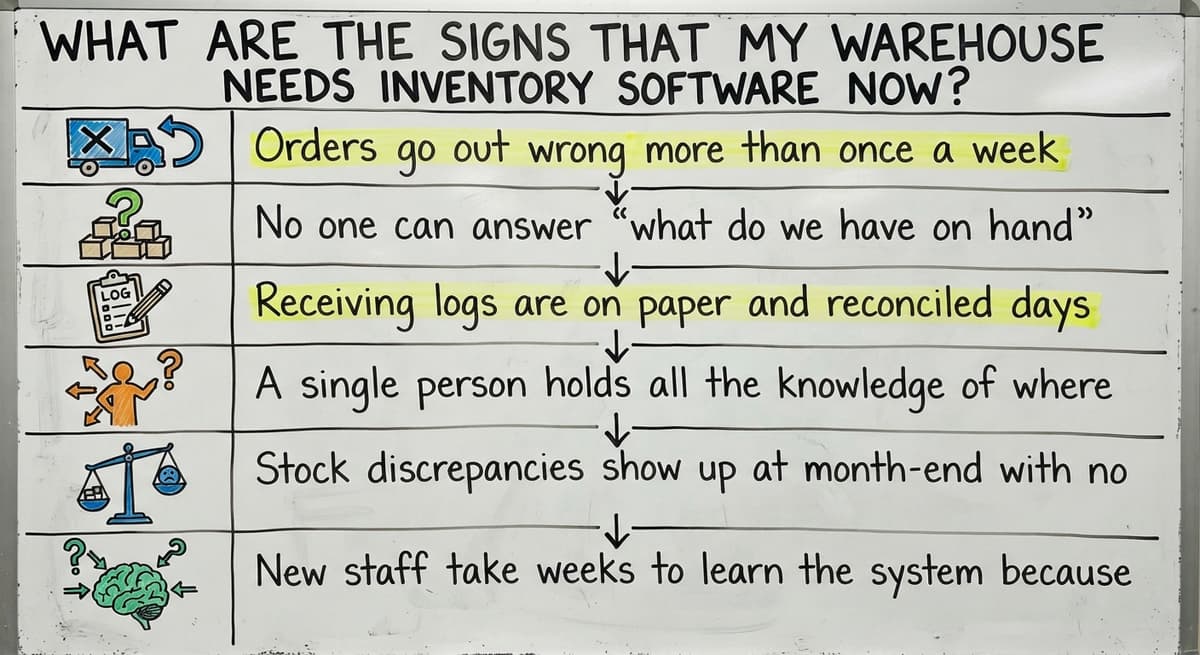
Recognizable signs include:
- Orders go out wrong more than once a week
- No one can answer "what do we have on hand" without walking the floor
- Receiving logs are on paper and reconciled days later
- A single person holds all the knowledge of where things are stored
- Stock discrepancies show up at month-end with no clear cause
- New staff take weeks to learn the system because it is not written down anywhere
Any one of these is manageable. All of them together means the operation is fragile.
How Does Inventory Software Fit Into a Warehouse Operation?
Software is not a replacement for the people doing the work. It gives them better information at each step.
Here is how a basic flow looks with warehouse inventory software in place:
- Receiving. A delivery arrives. The software matches it to the open purchase order. Staff scan or enter quantities. The system flags discrepancies immediately, not three days later.
- Put-away. The system assigns a bin location (a specific shelf or zone address). The item sits where the system says it is, not where someone remembers putting it.
- Picking. An order comes in. The software generates a pick list with SKU, bin location, and quantity. The picker follows the list. No guessing.
- Shipping. The packer confirms the order against the packing slip. Stock levels update. The order closes.
Each step produces a record. The record is instant, not end-of-day.
The Role of Your Accounting Software in a Warehouse Inventory Setup
Most small warehouses already run bookkeeping software for accounting, and they do not have to stop. Inventory software does not replace that software. It works alongside it.
The split is straightforward. Your accounting platform handles the financials: invoices, bills, payroll, tax records. Inventory software handles the floor: stock levels, pick lists, receiving logs, bin locations.
An accounting integration for warehouses means the two systems share data at the right moments.
When a purchase order is received and matched in the inventory system, that receipt flows into the accounting platform as a bill to pay. When an order ships, the sale posts. No double entry.
The IRS is clear on why the accounting side matters. IRS Publication 538 states: "To figure taxable income, you must value your inventory at the beginning and end of each tax year." Keeping your accounting records accurate is not optional. Inventory software makes that easier, not harder.
Custom Inventory Software vs Off-the-Shelf Solutions
Off-the-shelf tools target the average warehouse. Custom software fits yours.
| Factor | Off-the-Shelf | Custom-Built |
|---|---|---|
| Setup time | Weeks to months | Phased, starts with your pain point |
| Fit to your process | You adapt to the software | Software adapts to you |
| Pricing | Per-seat or tiered monthly | Fixed scope, known cost |
| Features | Many you will never use | Only what you need |
| Support | Ticket queue | Direct relationship |
Off-the-shelf tools require changing how you work to match the software. A custom warehouse system can match your existing process instead. For a small operation with a specific workflow, that difference matters more than any feature list.
Is the comparison easier when one option is built for you?
Yes. Off-the-shelf means fitting your process to the software, and custom is the other way round. The first look costs nothing.
Book a callWhat Does Off-the-Shelf Inventory Software Get Wrong for Small Warehouses?
Packaged warehouse management tools are not bad products. They target a larger customer than you.
Common frustrations small operations report:
- Modules that do not connect. Receiving is in one place, orders in another, and reports require an export.
- Pricing built for enterprise. Per-seat fees that double your cost as the team grows.
- Long rollouts. Implementation timelines measured in months, not weeks.
- Retraining cost. Staff who know the floor have to learn a new system designed by people who have never seen it.
Those products work well for the operations they have in mind. A warehouse running 20 to 100 staff is often not that operation.
What Should You Look for in Warehouse Inventory Software?
There are 8 practical criteria for a small or mid-size warehouse:
- Real-time stock levels. Any staff member can see current stock without calling the floor.
- Barcode or scan support. Reduces entry errors at receiving and picking.
- Order tracking. From purchase order through shipment, in one view.
- Reporting. Stock on hand, slow-moving items, shrinkage, turnover.
- User permissions. Staff see what they need. Managers see everything.
- Easy onboarding. A new hire can learn the basics in one shift.
- Low IT overhead. No server to maintain, no IT department required.
- No per-seat pricing. Growth should not trigger a bill increase.
The Warehousing Education and Research Council publishes benchmark measures for distribution center performance. Accuracy, cycle time, and order fill rate are the numbers that matter. Good software makes those numbers visible.
Does Barcode Scanning Actually Improve Inventory Accuracy?
Yes. Scanning is the end of the human error that happens when someone types a number by hand. A barcode scan confirms the right item at the right quantity in one step.
Manual entry requires a person to read a label, type a number, and not make a mistake. Scanning removes two of those three chances to get it wrong.
GS1, the global standards body for barcodes, sets the specifications that allow a label printed by one company to scan correctly at another. That standard is why a barcode on a vendor's case scans into your system without any setup.
Scan-to-confirm workflows work like this: the picker scans the item, scans the bin, and the system confirms the match. If the wrong item is scanned, the system flags it before it goes into the box.
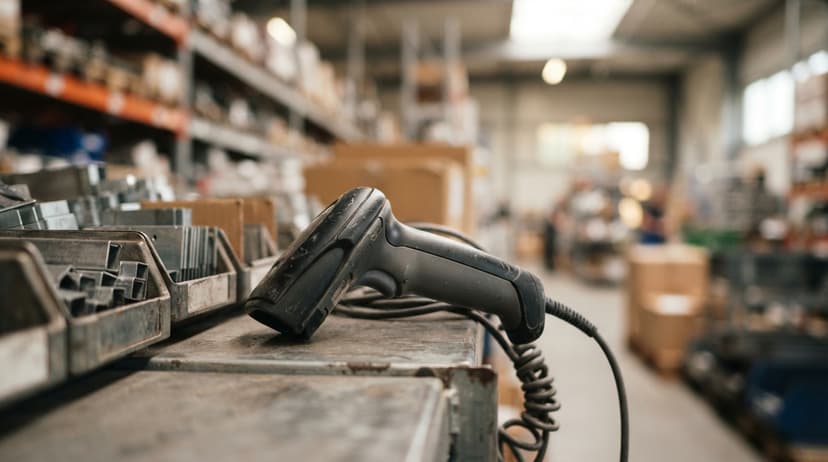
Modern barcode support does not require expensive hardware. A tablet or a mid-range mobile scanner is enough for most small warehouse setups.

Real-Time Stock Visibility Across the Warehouse
Real-time visibility means any staff member can see current stock levels from any screen, at any moment. No one has to walk the floor to answer a customer question. No one has to wait for the end-of-day count.
In practice, this reduces:
- Over-ordering because the buyer did not know stock was already in the building
- Stock-outs because no one caught a low-count item in time
- Customer service calls asking where an order is
Operations managers make faster calls when the data is current. Replacing a spreadsheet-based process with a live system is the single change that produces the most immediate return for most small warehouses.
Order Fulfillment and Pick List Management
Inventory software generates pick lists automatically from incoming orders. Staff do not have to build the list. They follow it.
The system can sort picks by bin location to reduce travel time on the floor. It can prioritize orders by ship date or customer priority. When the pick is complete, the packer confirms against the packing slip and the order closes.
The US Federal Trade Commission requires merchants to ship within the time stated at the point of sale. Accurate stock counts and automated pick lists are the operational backbone that makes that promise keepable.
What does it look like running on your own process?
The first thing you see is it running on your own process, at no build cost. The subscription starts once it is live and doing the job, not before.
Book a callReceiving and Purchase Order Tracking
Inbound shipments are where errors start. A delivery arrives, someone counts it by hand, writes it on a paper log, and the log gets entered into the system later. By then, the count may be wrong and the vendor has moved on.
Inventory software matches a delivery to the open purchase order at the dock. Staff confirm quantities. Discrepancies are flagged in the moment, not discovered at month-end. The paper receiving log goes away.
That receipt then flows back to the bookkeeping software as a bill ready to match. The accounting side stays clean without anyone doing extra work.

Reporting and Inventory Counts Made Simple
There are 5 reports warehouse managers actually use:
- Stock on hand. What do we have, right now, by SKU and location.
- Inventory turnover. How fast is each item moving.
- Slow-moving items. What has been sitting for 60 or 90 days.
- Shrinkage. What was expected versus what was found.
Cycle counts replace the annual full-stop physical inventory. Instead of shutting down the warehouse once a year to count everything, staff count a section of the floor each week.
The system tracks the areas already counted and flags anything that does not match. The annual count becomes a formality rather than a crisis.
How Does Implementation Work for a Small Warehouse?
The fear of a long, expensive rollout stops more small warehouses from acting than anything else. That fear is understandable and often based on stories about enterprise software projects.
A phased approach works differently:
- Start with the biggest pain point. For most operations, that is receiving or pick accuracy.
- Run the new system alongside the old one for a short period. Staff get comfortable without the operation stopping.
- Add features as the team is ready. Reporting, cycle counts, and integrations come after the core is stable.
The operation does not need to pause while the software is being set up. A well-scoped project for a compact warehouse can be live in weeks, not months.
How Do I Get My Warehouse Staff to Actually Use New Software?
Adoption is the real risk, not the technology. A system no one uses is worse than no system at all.
What makes software easy to adopt in a warehouse setting:
- Familiar language. If the team calls it a "pick sheet," the software should call it a pick sheet.
- Simple screens. One task per screen. No hunting through menus.
- Training that fits a shift. A 30-minute walkthrough at the start of a shift is more useful than a full-day class.
Custom-built software can be designed around how staff already work. That means less retraining and faster adoption. Off-the-shelf tools require staff to learn the vendor's language instead of their own.

Inventory Software for Wholesale Distributors
Software built for wholesale distribution is different: it handles 4 problems that standard warehouse tools do not. Large SKU counts, multiple vendors, and customer-specific pricing all need more structure than a basic inventory tracker provides.
Wholesale distributors running on accounting software and spreadsheets reach the limit when:
- A single customer order touches 40 or more SKUs
- Vendor lead times vary and need to be tracked per item
- Different customers get different prices for the same product
Inventory software handles these without requiring an ERP (an enterprise resource planning system, which is a much larger and more expensive platform).
The US Census Bureau's Monthly Wholesale Trade data tracks the inventories-to-sales ratio for wholesale firms nationally. That ratio tells a distributor if they are carrying too much stock relative to what they are selling.
Good inventory software makes that number visible at the item level, not just across the business.
Inventory Software for Fulfillment Centers
Software built for fulfillment centers is aimed at a different set of problems. A fulfillment center holds inventory for multiple clients.
The software has to track the stock that belongs to each client, process returns, handle kitting (assembling multiple items into one shipment), and connect to carrier systems.
Mixing client stock is the error that ends a fulfillment relationship. Software that tracks inventory by client, at the bin level, prevents that. It also produces the per-client reports that clients expect to see.
Fulfillment centers need faster, more granular tracking than a standard warehouse management system provides. The volume of transactions and the number of SKUs moving in and out each day demand a system built for that pace.
What is in a free first look?
A 30 minute call, your operation mapped, and a clear picture of what we would build. No obligation and nothing to install.
Book a callHow Much Does Warehouse Inventory Software Cost?
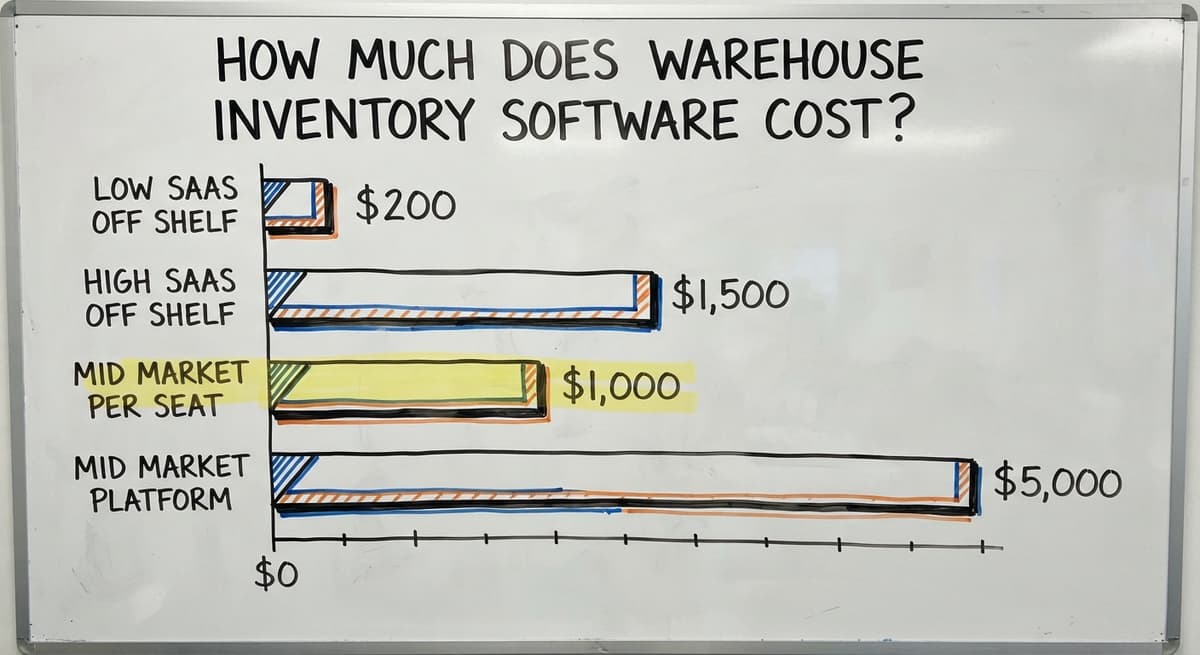
A realistic range is $50 to $2,000 a month, with no single right answer:
| Type | Typical Cost Structure | Watch For |
|---|---|---|
| SaaS off-the-shelf | $200 to $1,500 per month | Per-seat fees, add-on modules, annual increases |
| Mid-market platform | $1,000 to $5,000 per month | Long contracts, implementation fees on top |
| Custom-built | Fixed project scope | Higher upfront, no recurring per-seat cost |
The hidden cost of off-the-shelf is the total, not the base price. Per-user fees, add-on modules for features you assumed were included, and annual price increases can double the year-one cost within 3 years.
Custom software is a capital investment with a known scope. You pay once to build something that fits your operation. You do not pay again every time you hire a new picker.
Questions to Ask Before Choosing Inventory Software for Your Warehouse
There are 7 questions to bring to any vendor conversation:
- Does it connect to your accounting software, and how does that connection actually work?
- Can it be set up without a six-month project?
- Does it handle your specific workflow, or do you have to change how you work?
- Who supports it when something breaks, and how fast do they respond?
- What does the price look like in year 3, not just year 1?
- Is a custom-built option worth exploring for your operation?
A vendor who cannot answer these clearly is telling you something.
Red Flags When Evaluating Warehouse Inventory Software
There are 5 warning signs to watch for:
- Vague implementation timelines. "It depends" is not a timeline.
- Pricing that requires a sales call. If the number is not on the website, it is probably built for negotiation, not transparency.
- Demos that do not match your workflow. If the demo shows a warehouse that looks nothing like yours, ask to see your workflow specifically.
- Vendors who want you to change your process. The software should fit your operation. If the first conversation is about how you need to work differently, that is a signal.
- No local support. A ticket queue in another time zone is not support for a floor that runs at 6am.
Is Working with a Local Software Partner Better Than a National Platform?
A local partner can walk your floor, see your layout, and build around what they actually observe. A national platform is built for the average warehouse. Yours is not average.
The practical difference:
- A local partner asks about your receiving dock before writing a line of code
- A national platform assumes your process matches their template
- A local partner is reachable when something breaks on a Tuesday morning
- A distant provider routes you to a support queue
For operations in and around Columbus, Ohio, working with a partner who can be on-site is not a small thing. It changes what gets built and how fast problems get solved. That is not a pitch. It is how software gets done right for a specific operation.

What Happens After the Software Goes Live?
Going live is not the end. It is the start of the part that actually matters.
In the first weeks after launch, staff will find edge cases the setup did not cover. A product arrives with a new label format.
A customer requests a split shipment. A return comes back damaged. Good inventory software should be easy to adjust as these situations come up.
The relationship with the builder matters here. A custom-built system changes quickly: the person who built it knows exactly how it works. An off-the-shelf product requires a support ticket and a wait.
Expect small adjustments. Plan for them. They are not failures. They are the operation teaching the software what it actually needs.

Next Steps for Finding the Right Inventory Software for Your Warehouse
Inventory software for a warehouse does not have to mean replacing everything that works. It means replacing the parts that are causing daily pain, keeping the existing accounting software in place, and building something that fits how the operation already runs.
Before talking to any vendor, map your current pain points. Write down where time is lost, where errors happen, and what questions you cannot answer without walking the floor. That list is the brief for any software conversation.
If you want to explore a custom-built solution for your operation, start with a conversation. Bring your pain points. You do not need a technical background. You need to know your floor, and you already do.
Frequently asked questions
Frequently asked questions
What are the top 5 inventory management software?
There is no single right answer because the best fit depends on your operation size, workflow, and budget. Products that appear frequently in evaluations for warehouse operations range from simple small-business trackers to multi-channel retail tools, high-volume SKU managers, and dedicated third-party fulfillment systems.
Each has strengths for a specific type of operation. Some pair well with popular accounting software. Others suit growing multi-channel sellers, handle high-SKU environments well, or focus on third-party fulfillment.
For small or mid-size warehouses with specific workflows, a custom-built system is also worth evaluating alongside these packaged options.
Is the software an ERP or WMS?
Some enterprise systems are primarily ERP (enterprise resource planning) platforms. Many include a WMS (warehouse management system) module built into the larger suite. The two are different tools with different scopes. An ERP manages the whole business: finance, HR, procurement, and operations.
A WMS manages the warehouse floor specifically. Large enterprise vendors offer both, but most small and mid-size warehouses do not need an ERP. A standalone inventory software or WMS is a more practical and affordable starting point.
What are the four types of WMS?
The four types commonly described in warehouse management are: standalone WMS (a dedicated system focused only on warehouse operations), ERP-integrated WMS (a warehouse module built into a larger business platform such as a major enterprise resource planning suite), cloud-based WMS (a SaaS product accessed via browser with no on-site server), and supply chain management suite WMS (warehouse tools embedded in a broader logistics platform).
For small warehouses, a standalone or cloud-based WMS is the right starting point. ERP-integrated systems carry a cost and complexity that most small operations do not need.
Is WMS difficult to learn?
The answer depends on the system and how it is set up. Enterprise WMS platforms built for large operations can take months to learn. Simpler cloud-based tools or custom-built systems designed around how your team already works can be learned in days.
The key factor is whether the software uses the language and workflow your staff already knows.
A system that calls things by unfamiliar names or requires a new process for every task will be harder to adopt. A system built around your existing floor process will not.
Can I keep using your accounting software if I add inventory software?
Yes. Inventory software does not replace your accounting software. It works alongside it. That bookkeeping software handles your financials: invoices, bills, and tax records. The inventory system handles the floor: stock levels, pick lists, receiving, and bin locations.
An accounting integration connects the two so data flows automatically. When a purchase order is received in the inventory system, it posts to the accounting platform as a bill. When the order ships, the sale records. No double entry required.
How long does it take to implement warehouse inventory software?
A phased implementation for a compact warehouse can be live in 2 to 6 weeks for core functions. The timeline depends on how complex the operation is, whether data needs to be migrated from a spreadsheet, and how many integrations are required.
Enterprise off-the-shelf tools quote 3 to 6 months for full implementation. Custom-built systems scoped tightly to one pain point can go live faster because there is no unused feature set to configure.
What features do I actually need for a small or mid-size warehouse?
The core features that matter most are real-time stock levels, barcode scan support, purchase order receiving, pick list generation, and basic reporting (stock on hand, slow-moving items, shrinkage).
An accounting software integration matters if you are already using one for bookkeeping. User permissions matter if you have staff who should see only their own tasks. Everything beyond that is optional until the operation grows into it.
Is custom-built inventory software realistic for a small operation?
Yes, for the right operation. Custom software makes sense when your workflow is specific enough that off-the-shelf tools require significant changes to how you work, or when per-seat pricing from a packaged product would cost more over 3 years than a one-time build.
A custom build is scoped to your exact pain points, uses your language, and can be adjusted as the operation changes. The upfront cost is higher than a monthly SaaS fee, but the total cost over time is lower and the fit is always better.
What is the best warehouse inventory software for a small business?
The best choice is the one that fits how your operation already works rather than forcing you to change your process.
Look for a system that connects receiving, put-away, picking, and shipping into one view, integrates with your accounting tool, supports barcode scanning, and can be set up quickly without per-seat pricing that grows unpredictably as your team expands.
What is the difference between inventory software and a WMS?
Inventory software focuses on tracking what comes in, what goes out, and what is currently on hand, giving everyone the same numbers at each step.
A warehouse management system covers that same tracking plus broader floor operations like bin locations, pick paths, and staff workflows. For a modest-size operation, the practical difference comes down to how many of those extra features you actually need.
How much does warehouse inventory software cost?
Cost depends on the pricing model. Off-the-shelf tools are priced per seat or in tiers, meaning cost rises as your team grows and often includes features you will never use.
Custom-built software instead works from a fixed scope tied to your actual pain points, so the cost stays tied to what you need rather than to headcount or unused modules.
Which warehouse inventory systems support barcode scanning?
Systems built around a receiving, put-away, picking, and shipping flow support barcode scanning as the way staff confirm quantities and locations. When a delivery arrives, staff scan or enter quantities so discrepancies are flagged immediately.
During picking, scanning against the generated pick list confirms the correct SKU and bin location before an order ships, keeping stock counts accurate without manual double entry.
Not sure this is the right shape for your operation?
The call is free. Describe how the work runs today. We map it on a call and show you what it would look like built around that, before you spend anything.
Book a callRelated guides
The rest of this guide, for the parts of the job this page does not cover.
Guides
- Warehouse Inventory Management Software
- Warehouse Inventory Tracking Software
- Inventory and Warehouse Management Software
- Warehouse Inventory Software Programs
- Warehouse Receiving Software
- Warehouse Stock Management Software
- Software for Warehouse Management System
- List of Warehouse Management Software
- Online Warehouse Management Software
- Warehouse Stock Software
- Software Warehouse Management
- Warehouse Software System
- Quickbooks Inventory Management Software
- Custom Inventory Management Software
- Warehouse Inventory Management Systems
- Warehouse Inventory Systems
- Warehouse Inventory Management System
- Warehouse Inventory Tracking System
Common questions
- Which Software is Best for Warehouse Management?
- Why is Warehousing and Inventory Management Important
- How to Manage Inventory in a Warehouse
- What is the Best Warehouse Inventory Management System?
- What is the Difference Between Warehousing and Inventory Management
- How to Keep Track of Inventory in Warehouse