

Cloud Stock Management Software
Cloud stock management software is inventory software on a hosted server. Every scan or entry updates the stock record at once, from any device, for every user. For a wholesale distributor of 5 to 50 staff it replaces the spreadsheet and the lagging accounting count with one live number per SKU and location. Packaged, it costs $50 to $300 a month. Built around your own process, it costs $8,000 to $25,000 once.
This guide, reviewed in September 2026, covers what cloud stock management software does, how it differs from desktop tools, what a custom build adds, and what implementation costs in time. It addresses the owner or operations manager of a distributor still running stock on a spreadsheet, and it uses the numbers such an operation sees: 3 people, 6 hours a week each, reconciling counts that a live system would hold for them. Each figure comes from the assumptions stated beside it, so you can substitute your own and the arithmetic still holds.
Published 26 August 2026. Reviewed and updated 15 September 2026.
Reviewed August 2026. Each figure comes from the assumptions stated beside it, so you can substitute your own and the arithmetic still holds.
Book a callWhat Does Cloud Stock Management Software Do?
Cloud stock management software tracks inventory levels, movements, and locations from any device with an internet connection. That is the plain-language version.
A warehouse scanner, an office laptop, and a manager's phone all see the same numbers at the same time.
Spreadsheets require someone to update them manually and share the file. Desktop inventory tools store data on one machine, so everyone else is working from yesterday's picture.
Cloud-based inventory management removes both problems. The data lives online, updates the moment a scan or entry happens, and is visible to whoever needs it.
For a non-technical reader: think of it as a shared whiteboard that every person on your team can read and write on, no matter where they are standing.
Would you rather have it built around your operation?
The first look is free. If you would rather not compare products, describe how your operation already works and we build the system around it.
No build cost. You see it running on your own process first, and the monthly subscription starts only once it is live.
Book a callHow Does Cloud Stock Software Differ from Desktop Inventory Tools?
The core difference is where the data lives and who can see it.
Desktop tools lock data to one machine, which means warehouse staff, drivers, and office managers are never looking at the same numbers unless someone manually exports and shares a file.
Cloud systems store data online and update in real time across every user. No local server to maintain. No backup routine to remember. No file version confusion.
This matters for accounting accuracy too. The IRS is direct on the point: as stated in IRS Publication 538, "a business must keep books and records that clearly show income and expenses," which means your inventory records need to reflect what actually happened, not what someone entered two days later.
Cloud stock control software makes that possible because the record is created at the moment of movement, not reconstructed later from notes.
Why Are Wholesale Distributors Moving to the Cloud?
Wholesale distributors are moving to the cloud because growing order volume makes spreadsheets unreliable, and the cost of errors compounds faster than most owners expect.
When orders were small and predictable, one person could keep the spreadsheet current. Add a second warehouse, a second shift, or a seasonal spike, and the spreadsheet becomes a liability.
Staff in multiple locations need the same data simultaneously. They cannot wait for someone to update a shared file.
The double-entry problem is real. Entering stock movements into spreadsheet and then into the accounting software takes time and introduces errors. Those errors show up as phantom stock, overselling, or financial reports that do not match physical counts. Cloud-based inventory management eliminates the double-entry by syncing movements directly.
Scaling without adding headcount is also a driver. A cloud system handles more SKUs, more locations, and more orders without requiring a new hire to manage the data.
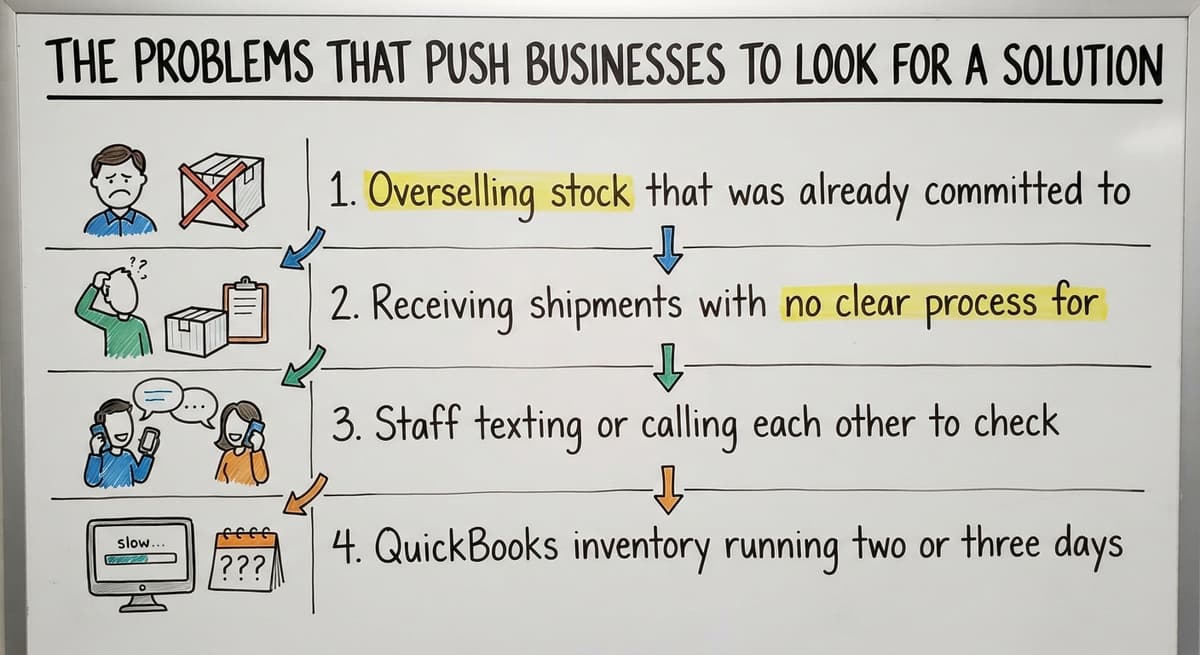
The Problems That Push Businesses to Look for a Solution
Most businesses do not go looking for warehouse inventory software because things are going well. They go looking after a painful event.
Common triggers include:
- Overselling stock that was already committed to another order
- Receiving shipments with no clear process for logging them
- Staff texting or calling each other to check whether something is in stock
- The accounting software inventory running two or three days behind what is physically on the shelf
Each of these has a direct cost. Overselling creates emergency freight and customer complaints. Unlogged receiving creates shrinkage and reconciliation headaches.
Stock-level phone calls are a tax on everyone's time. When the QuickBooks data lags, purchasing decides on stale numbers.

Core Features to Expect from Cloud Stock Management Software
Not every platform offers the same feature set, but a capable cloud stock management software should cover these fundamentals:
- Real-time stock level visibility across all locations
- Receive, pick, pack, and ship tracking
- Low-stock alerts and reorder triggers
- An audit trail showing who moved what and when
Real-Time Inventory Visibility
Every scan or entry updates the system instantly, which means managers see current stock without calling the warehouse and sales staff can confirm availability before making a promise to a customer.
The gap between physical stock and what the system shows is where most errors live.
Real-time visibility closes that gap. It also removes the need for daily or weekly stock counts just to know where things stand.
Is the comparison easier when one option is built for you?
Yes. Off-the-shelf means fitting your process to the software, and custom is the other way round. The first look costs nothing.
Book a callMulti-Location Stock Tracking
Distributors who split inventory between owned space and third-party storage run separate spreadsheets for each location. That creates reconciliation work every time stock moves between them.
Multi-location stock tracking lets you see every location from one screen. Transfers between locations create a clear record.
Each location shows its own levels without a separate file to maintain. This is one of the practical advantages that Inventory Management Software built for distribution handles better than retail-focused tools.
Receiving and Purchase Order Matching
Paper receiving logs get lost. They get misread. They sit on a dock for two days before someone enters the numbers.
Cloud stock software logs incoming shipments against open purchase orders at the moment of receipt. Shortages and overages are flagged before stock is put away, not discovered during a month-end count.
Receiving data flows directly into available inventory, so the system knows what is on the shelf as soon as the shipment is checked in.
Can Cloud Stock Management Software Work Alongside the accounting software?
Yes, and for most small distributors, working alongside the accounting software is exactly the right model.
The accounting software handles accounting and invoicing well. It is not built to track stock movements in real time, and it was never designed to be a warehouse management tool.
Cloud stock software sits alongside the accounting software rather than replacing it. Stock movements sync to the accounting software so financials stay accurate.
Each tool does what it does best: the stock system tracks physical movement, and the accounting software records the financial result. Accounting Integration for Distributors works this way in practice, connecting the two without requiring you to abandon either.
This matters because most small operations have years of accounting history in the accounting software. Replacing it entirely to gain inventory control is unnecessary.
Replacing spreadsheet Without Replacing Everything
Most small operations started tracking inventory in spreadsheets because nothing else fit their size or budget. The spreadsheet is not the problem.
The problem is that it cannot update in real time, cannot be used by multiple people simultaneously without conflicts, and cannot alert you when stock runs low.
Cloud stock software replaces the spreadsheet layer, not the whole operation. The accounting software stays. Existing supplier relationships stay.
Current workflows stay, with the manual steps removed. The goal is to eliminate the parts that cause errors, not to rebuild a business that is otherwise functioning.
This is the difference between a surgical fix and an ERP implementation. Custom Operational Software for Wholesale is built around this principle: identify what is broken, fix that, and leave what works alone.
What Can a Custom Cloud Stock Build Do That Off-the-Shelf Cannot?
Off-the-shelf stock control software is built for an average business. If your operation matches that average, it works well. Most wholesale distributors do not match the average.
Custom systems match the way your team already works. Fields reflect your product lines. Workflows reflect your receiving and picking process.
Reports answer the questions your operations manager actually asks. There are no unused modules cluttering the interface and no workarounds for the things the platform was not designed to handle.
Built Around Your Operation, Not the Other Way Around
A custom build starts by mapping how stock actually moves through your facility.
The software reflects that flow rather than asking your warehouse staff to learn someone else's idea of how a warehouse should work.
Training time drops when the system matches familiar processes. Resistance from the warehouse floor drops with it.
As your operation grows or changes, the software changes to match. That flexibility is something off-the-shelf platforms rarely offer without a significant upgrade cost.

Is Cloud Stock Management Software Right for a Small Operation?
Small wholesale distributors with five to fifty staff benefit from cloud-based inventory management just as much as large ones.
The cost of errors scales with order volume, not company size. A small operation making the same stock mistake repeatedly is losing money at the same rate per error as a large one.
The concern that cloud software is only for large companies comes from experience with enterprise platforms that are priced and scoped for enterprise problems.
A right-sized system costs less than the mistakes it prevents, and it does not require a dedicated IT team to run.
Wholesale Distribution Software built for small operations looks different from an ERP. It is focused, faster to implement, and designed to be used by a lean team without a manual.
What does it look like running on your own process?
The first thing you see is it running on your own process, at no build cost. The subscription starts once it is live and doing the job, not before.
Book a callWhat Does Implementation Actually Look Like?
Many businesses delay because they expect a long, expensive rollout that disrupts daily operations. That fear is reasonable when looking at ERP implementations, which take months before anyone sees a working system.
A focused build works differently. It targets only the manual parts causing the most pain. Implementation happens in stages so the team is not overwhelmed.
A local support partner can walk the warehouse with you rather than sending a remote consultant who has never seen your facility.
How Long Does It Take to Get Running?
How long it takes to get a cloud stock management system running depends on complexity, the number of locations involved, and what integrations are needed.
A focused first phase targeting one core problem can go live in weeks, not months.
Phased delivery lets the team adopt changes gradually. Staff learn one new process at a time rather than absorbing a complete system change overnight. This contrasts directly with ERP implementations where teams wait months before seeing any working output, then face a wall of new processes all at once.
Fulfilment Centre Software implementations that follow this phased model consistently show faster adoption and fewer post-launch issues.
Security and Access Control in Cloud Stock Systems
Cloud does not mean open to everyone. Role-based access lets warehouse staff see stock levels and movement records without exposing pricing, financials, or supplier terms.
The system backs data up automatically, with no IT involvement. Reputable cloud systems use encrypted connections and secure hosting.
For a small operation without a dedicated IT person, this is an advantage over a local server that requires someone to manage backups and security patches.
Reporting and Visibility for Operations Managers
Operations managers need fast answers. Digging through spreadsheets to find slow-moving stock or calculate turnover rates takes time that should be spent on decisions.
Cloud stock software surfaces stock levels, turnover rates, and slow movers on demand. Reports arrive in an inbox on a schedule, or answer a question the moment it comes up.
Better purchasing decisions follow from better data, and fewer emergency orders mean lower freight costs.

Common Mistakes When Choosing Cloud Stock Management Software
The wrong choice costs more than the software itself. It costs the time spent migrating data, training staff, and then switching again when the platform does not fit.
Common mistakes include:
- Choosing by feature count rather than fit to actual workflow
- Underestimating the effort required to migrate existing data cleanly
- Picking a tool built for retail e-commerce when the operation is wholesale distribution
- Ignoring the support model after go-live, then finding no one to call when something breaks
Questions to Ask Before You Commit to a Platform
Before signing up for any cloud stock management software, get clear answers to these:
- Does it connect to the accounting software the way we actually use the accounting software?
- Can it be configured to match our receiving and picking process?
- Who do we contact when something breaks?
- What does rollout look like for a team our size?
The support question is the one most buyers skip. A platform with strong features and no post-launch support leaves you managing problems alone.
What is in a free first look?
A 30 minute call, your operation mapped, and a clear picture of what we would build. No obligation and nothing to install.
Book a callThe Cost of Doing Nothing
Every stock error has a real cost. Lost sales from overselling. Emergency freight to cover a shortage. Customer complaints that take time to resolve and damage relationships that took years to build.
Staff time spent reconciling spreadsheets is not free either. If two people spend three hours a week on manual stock reconciliation, that is six hours of labour every week that produces no output.
A focused cloud system pays for itself by eliminating recurring errors, not by adding new capabilities that no one uses.
Businesses that delay do so until a painful event forces action. By that point, the cost of the delay is already paid.
How Do You Start Without Disrupting Your Current Operations?
Start by identifying the single biggest pain point in your current stock process. Not the full list of problems. One problem, the one that costs the most or happens most often.
Build or deploy a solution that addresses that one thing first. Prove value to the team before expanding scope.
A local partner can help you prioritise what to tackle first and sequence the work so daily operations are not disrupted while the system is being built.
This approach also gives the team a win early. When warehouse staff see that one frustrating process is gone, they are more receptive to the next phase.
What Makes a Cloud Stock Build Successful Long Term?
A successful cloud stock management system grows as the operation grows. That means the system needs to be built in a way that allows changes, not locked into a fixed configuration that requires a new product purchase every time the business evolves.
Staff buy-in comes from software that matches real work, not theoretical workflows designed by someone who has never picked an order. Ongoing support from the team that built the system matters more than how smooth launch day was.
Regular small improvements, made as the operation learns what works, beat a one-time big rollout that no one touches after the first month.
Next Steps for Wholesale Distributors Ready to Move Forward
Before shopping for software, map your current pain points. Write down where stock errors happen, where manual steps slow the team down, and where the accounting software data lags behind reality. That list is your requirements document.
The right cloud stock management software addresses your list, connects to the tools you already use, and is supported by people you can reach when something needs attention.
A conversation with a local expert costs nothing and usually surfaces options you had not considered.
If your operation is ready to remove the manual parts without rebuilding everything else, the next step is a straightforward one: describe the problem to someone who builds these systems, and find out what a focused solution looks like for your specific situation.
Frequently asked questions
What the manual process costs, in numbers
The arithmetic is worth doing before the software conversation. 3 people spending 6 hours a week between them chasing the same questions, at 22 dollars an hour, is 936 hours a year of paid time spent confirming what a system would already know. Over 3 years that is 2,808 hours.
Frequently asked questions
What is the best cloud inventory management software?
There is no single best answer because the right platform depends on your operation. For retail e-commerce, the store-led inventory platforms are well suited. For wholesale distribution running on the accounting software, a system that integrates directly with the accounting software and supports multi-location tracking is more relevant than a feature-rich retail platform.
For operations with specific workflows, a custom build fits better than any off-the-shelf option. The criteria that matter most are: fit to your actual process, quality of accounting integration, and the support model after go-live.
Is free cloud stock management software really free?
The free plans exist, but each comes with limits on orders per month, users, and integrations. For a small operation with low order volume, the free tier may be sufficient to start.
Most growing wholesale distributors will outgrow it and move to a paid plan. The free version also has limited accounting integration and no multi-location tracking, which are two features that matter most to distributors.
Which software is best for stock management?
The answer depends on what you are managing. Retail businesses with e-commerce channels use the store-led platforms. Wholesale distributors running on the accounting software are better served by platforms built for distribution, or by a custom system that maps to their specific receiving and picking workflows.
The best stock management software is the one your team will actually use consistently, not the one with the longest feature list.
What is the best software for inventory and stock management?
For small wholesale distributors, the most practical options are platforms that connect to the accounting software, support multi-location tracking, and can be configured to match your receiving process. A handful of distribution-focused platforms cover most of that market.
For operations with specific workflows that off-the-shelf tools cannot accommodate cleanly, a custom cloud stock management build is worth comparing on total cost, since the savings from eliminating manual errors offset the build cost within the first year.
Can cloud stock management software work alongside the accounting software?
Yes. Most cloud stock management platforms are designed to sit alongside the accounting software rather than replace it. Stock movements sync to the accounting software so your financial records stay accurate without double-entry.
The accounting software continues to handle accounting and invoicing while the stock system handles real-time inventory tracking, receiving, and warehouse movements.
How long does it take to implement cloud stock management software?
A focused first phase targeting one core problem, such as receiving or real-time stock visibility, can go live in weeks. More complex builds involving multiple locations, custom workflows, and deep accounting integration take longer.
The key factor is scope: a phased approach that addresses one pain point at a time is consistently faster and causes less disruption than trying to implement everything at once.
Is cloud stock software suitable for a small wholesale distributor?
Yes. Small distributors with five to fifty staff benefit from cloud-based inventory management just as much as larger operations. The cost of stock errors does not scale with company size; it scales with order volume.
A right-sized cloud stock system costs less than the recurring mistakes it prevents and does not require a dedicated IT team to maintain.
How do I start moving to cloud stock management without disrupting operations?
Identify the single biggest pain point in your current stock process and address that one thing first. A phased approach lets your team adopt one change at a time rather than learning a complete new system overnight.
Working with a local implementation partner who can walk your warehouse with you reduces disruption and speeds adoption.
What is the best cloud stock management software for a small business?
The one that fits the receiving and picking process the team already runs and connects to the accounting package already in use.
For under 2 locations and under 2,000 SKUs a packaged tool at $50 to $300 a month is enough; past that, or with a non-standard workflow, a build around your own process costs less over 3 years.
How much does cloud inventory software cost?
Packaged tools run $50 to $300 a month for a small team, rising with users and locations.
A custom cloud build scoped to one operation runs $8,000 to $25,000 once, with $100 to $400 a month for hosting and support after.
Can cloud stock management software track multiple warehouses?
Yes, and that is the main reason to move from a desktop tool.
Each location holds its own count per SKU, transfers move stock between them, and the head office sees every location on one screen without waiting for an emailed spreadsheet.
How do I migrate stock data from spreadsheets to cloud software?
Export the item list with SKU, description, cost, and reorder point, clean the duplicates, and import it.
Then run one full physical count and enter it as the opening balance, so the system starts from the shelf rather than from the spreadsheet's drift.
What is in a free first look?
A 30 minute call, your operation mapped, and a clear picture of what we would build. No obligation and nothing to install.
Book a callRelated guides
The rest of this guide, for the parts of the job this page does not cover.
Guides
- Stock Software
- Hospital Stock Management System
- Warehouse Stock Management Software
- Small Business Stock Management Software
- Multi Location Inventory Management Software
- Hvac Inventory Management Software
- Inventory Management Software for Schools
- Inventory Management Software Costs
- Cloud Based Warehouse Management
- Warehouse Management Cloud
- Cloud Warehouse Management System
- Warehouse Stock Software
- Make to Stock Examples
- Types of Stock Control Systems
- Low Stock Alert
- Procedure for Stock Control
- Warehouse Stock Management System
- Best Inventory Software
- Warehouse Inventory Management Software