


Custom Inventory Management Software
Custom inventory management software is a system built around one operation's workflow instead of a template. If you manage inventory with spreadsheets, printed pick sheets, and an accounting package that stops at the warehouse door, this guide covers what custom means, what it costs, and the 4 situations where it beats an off-the-shelf tool. Reviewed in September 2026.
Published 24 July 2026. Reviewed and updated 15 September 2026.
Book a callWhat Does Custom Inventory Management Software Actually Mean?
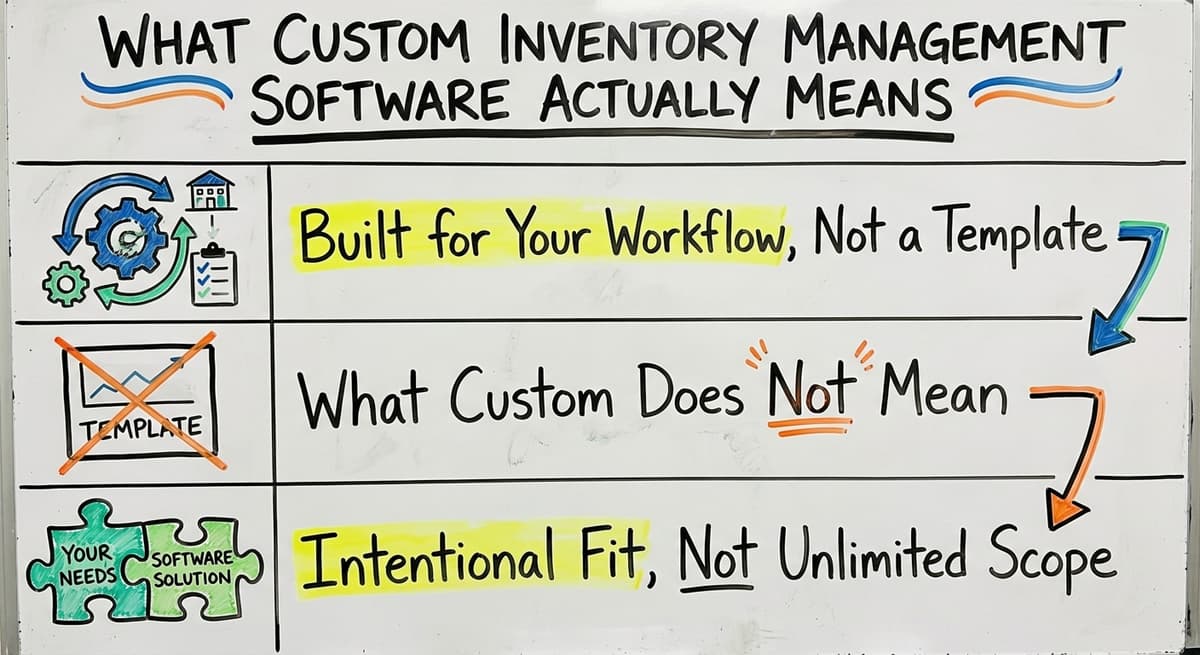
Custom inventory management software is software built specifically for how your operation runs. It is not a generic product you stretch to fit your process. It is a system that maps to your actual workflow from day one.
Built for Your Workflow, Not a Template
Off-the-shelf inventory systems target a hypothetical business. They assume a standard workflow, standard roles, and standard product types. If your operation does not match that template, you spend months building workarounds. Those workarounds recreate the original problem in a different form.
Custom software starts by learning how your business actually runs. Then it builds around that.
What Does Custom Not Mean?
Custom does not mean starting from scratch with no structure. It does not mean paying enterprise prices or waiting a year for something to launch.
A good custom build is scoped to replace only the parts that are causing pain. If your accounting software is already working well, it stays. If your vendor relationships are running smoothly, they are not touched.
Intentional Fit, Not Unlimited Scope
Custom means intentional fit. You and your builder agree on exactly what the software will do, who will use it, and what problem it solves.
The scope is defined before anything is built. That keeps cost and timeline predictable and keeps the project focused on what actually matters to your operation.
Would you rather have it built around your operation?
The first look is free. If you would rather not compare products, describe how your operation already works and we build the system around it.
No build cost. You see it running on your own process first, and the monthly subscription starts only once it is live.
Book a callSigns Your Current Inventory System Has Outgrown Itself
Most operations do not decide to change because they had a breakthrough moment. They decide because the pain finally outweighs the discomfort of changing. Here are the signs that moment is close.
The obligation behind all of this is not optional. IRS Publication 538 states: “To figure taxable income, you must value your inventory at the beginning and end of each tax year.” A stock figure nobody trusts makes that number a guess.
The arithmetic is worth doing before the software conversation. 3 people spending 6 hours a week between them chasing stock questions, at 22 dollars an hour, is 936 hours a year of paid time spent confirming numbers the system already knows. Over 3 years that is 2,808 hours.
The arithmetic is worth doing before the software conversation. A team of 3 spending 6 hours a week between them chasing stock questions, at $22 an hour, is $20,592 a year. That is the number the system has to beat, and it is the number nobody has written down.
Reviewed August 2026. Each figure comes from the assumptions stated beside it, so you can substitute your own and the arithmetic still holds.
Your Process Lives in People's Heads and Spreadsheets
If your team is maintaining multiple spreadsheets that do not talk to each other, that is a system problem.
If new hires take weeks to learn the process because it is stored in one person's memory, that is a risk. When that person leaves, the knowledge leaves with them.
In wholesale distribution and warehouse environments, this is one of the most common breaking points. The process works until it does not.
Orders Are Getting Picked from Wrong Counts
When receiving, picking, and shipping rely on printed sheets or verbal handoffs, stock counts drift. Orders get picked from outdated numbers. You end up with shorts that disappoint customers or overages that tie up cash.
A global standards organization for supply chain notes that "inaccurate product information leads to inefficiencies and waste throughout the supply chain," which is exactly what happens when your barcode and tracking standards are not connected to a live system.
Errors Increase When Volume Goes Up
A manual process that works fine at steady volume tends to fall apart during busy seasons. The steps that rely on people remembering, checking, and communicating are the first to break when everyone is moving fast.
If your error rate climbs every time volume climbs, the process is the problem, not the people.
Why Does Off-the-Shelf Inventory Software Often Fall Short?
Off-the-shelf inventory software is not bad. It is just built for a different kind of buyer. Understanding that gap helps you decide whether custom inventory management software is the right call for your operation.
The Mid-Sized Distributor Gap
Most packaged inventory platforms target either tiny retail operations or large enterprise accounts. If you are running a 10 to 50 person wholesale or distribution operation, you fall in between.
The small-business tools are too simple. The enterprise tools are too expensive and too complex. You pay for features you will never use and lack the ones you actually need.
Workarounds That Recreate the Problem
Forcing your operation into a generic workflow creates workarounds. You build a spreadsheet to handle the thing the software cannot do. Then you build another one to reconcile the first.
Within a year, you are back to the same fragmented system you started with, but now you are also paying a monthly license fee.
The Accounting Software Migration Problem
Many off-the-shelf platforms require you to replace your accounting software entirely. That creates two problems. First, migrating financial data is risky and time-consuming. Second, your team already knows that accounting system. Retraining costs are real, even when vendors minimize them.
A custom build avoids this by integrating with your accounting software rather than replacing it. The warehouse inventory software handles operations. Your accounting platform handles the books. Both do what they do best.
Is the comparison easier when one option is built for you?
Yes. Off-the-shelf means fitting your process to the software, and custom is the other way round. The first look costs nothing.
Book a call
How Is Custom Inventory Management Software Built?
The build process is more straightforward than most people expect. Here is how a well-run custom build works.
Discovery: Learning How Your Operation Actually Runs
Discovery is the first step. A good builder spends time understanding your current process before writing a single line of code. That means talking to the people who do the receiving, the picking, the shipping, and the reconciling. It means seeing the spreadsheets, the printed sheets, and the whiteboard notes.
This phase is not about imposing a template. It is about understanding the real workflow so the software can map to it.
Scoping and Building by Role
Once the workflow is mapped, the build is scoped around the roles that use it: receiver, picker, supervisor, owner. Each role sees what they need and nothing else. Common modules in a custom inventory management system include:
- Receiving: scan or log incoming goods, update counts automatically
- Stock location tracking: know exactly where product is in the warehouse
- Pick and pack workflow: staff see accurate counts before they pull product
- Reorder alerts: notifications or purchase order drafts when stock hits a threshold
- Reporting dashboard: what sold, what is slow, what is at risk of stocking out
Phased Delivery So You See Value Quickly
A good custom build does not ask you to wait six months for anything useful. Builds are delivered in phases. Phase one targets the highest-pain area.
You start using it, give feedback, and the builder improves it. Then phase two adds the next layer. This approach keeps cost predictable and gives your team time to adapt without being overwhelmed.
What Can Custom Inventory Management Software Replace?
Custom software for distributors is most valuable when it replaces specific manual tools that are causing daily friction. Here is what a well-scoped build removes from your operation.
Spreadsheets, Printed Sheets, and Old Databases
Replacing spreadsheet-based inventory tracking is a common reason operations reach out for a custom build. Shared spreadsheet files break when two people edit at the same time.
Old in-house databases built years ago by someone who no longer works there are fragile and unsupported. Printed pick sheets get lost, filled out wrong, or left on the floor.
Each of these replacements is a specific gain: fewer errors, less time spent reconciling, more accurate stock counts.
Manual Data Entry and Verbal Handoffs
Manual data entry from the warehouse floor into your accounting software is slow and error-prone. Verbal handoffs between shifts lead to missed tasks and duplicate work. Email chains used to communicate low-stock alerts get buried or ignored.
A custom warehouse software build replaces each of these with a structured workflow. The receiver scans product in. The system updates the count. Your bookkeeping software gets the data it needs without anyone retyping it.
The Hidden Cost of the Current System
The cost of your current manual system is not just the time spent. It is the orders that go wrong, the customers who do not reorder, and the hours your best people spend fixing mistakes instead of moving product.
Custom inventory tracking software removes those costs in a way that a spreadsheet never can.
What Does Custom Inventory Management Software Not Replace?
A good custom build is as clear about what it does not touch as it is about what it replaces. This matters because one of the biggest fears around any software project is disruption.
Your Accounting Software Stays as Your Accounting System
Accounting software integration is not about replacing your accounting system. The custom software handles the operational layer: receiving, picking, stock tracking, reorder alerts. Your accounting software stays as the system of record.
The custom system feeds it the data it needs, cleanly and without double entry. Your bookkeeper keeps working the same way. Your accountant sees the same reports. Nothing in the financial workflow changes unless you want it to.
Your Team's Knowledge and Your Vendor Relationships Stay Intact
Your staff's knowledge of the operation is preserved, not overridden. The software is built around how they already work, which means training time is short. Existing vendor relationships and ordering processes stay intact unless you specifically want to automate them.
A good custom build does not force a wholesale change to how your business operates. It removes the friction from the parts that are already causing problems.
What does it look like running on your own process?
The first thing you see is it running on your own process, at no build cost. The subscription starts once the software is live and doing the job, not before.
Book a call
Key Features to Expect in a Custom Inventory Management System
Not every feature is right for every operation. A good build includes only what you will actually use. That said, here are the features that most small business inventory software builds for distributors and warehouses include.
Visibility and Workflow Features
- Real-time stock visibility across one or multiple locations
- Receiving workflow: scan or log incoming goods, counts update automatically
- Pick and pack software: staff see accurate counts before pulling product
- Reorder triggers: alerts or automatic purchase order drafts at a set threshold
- Lot or serial number tracking for products that require it
Reporting, Roles, and Access
- Reporting dashboard: what sold, what is slow, what is close to stocking out
- User roles and permissions so each person sees only what they need
- Mobile or tablet access so the software works on the floor, not just at a desk
The Right Scope for Your Operation
Stock management software designed for a 15-person wholesale operation looks different from one designed for a 75-person distribution center. The features above are a starting point. Your builder should help you decide which ones matter for your specific operation and leave the rest out.
How Does Custom Inventory Software Work Alongside Your Accounting Software?
Accounting software integration for warehouse operations is among the most important parts of a custom build for small and mid-sized distributors. Here is how it works in practice.
The Integration Model
In this integration model, the custom software handles the operational workflow. The accounting platform handles the financial record. They share data at specific sync points:
| Sync Point | Custom Software Role | your accounting software Role |
|---|---|---|
| Purchase orders | Creates and tracks POs | Records vendor liability |
| Receiving | Updates stock counts | Posts inventory cost |
| Invoicing | Triggers invoice creation | Manages accounts receivable |
| Cost of goods | Tracks product movement | Posts COGS to P and L |
No Double Entry
A well-built integration eliminates duplicate data entry. When a receiver logs an incoming shipment in the warehouse software, that data flows to the accounting software automatically. No one types it twice. No one reconciles two systems at the end of the day.
Who This Approach Is Right For
The integrated accounting-plus-warehouse model works well for businesses with 5 to 100 staff who are not ready for a full ERP. It preserves the accounting system your team already knows while adding the operational layer your warehouse actually needs. It is also the approach used in wholesale distribution software solutions built for operations that have outgrown spreadsheets but are not large enough to justify an ERP implementation.
What Does a Custom Build Cost and How Long Does It Take?
Cost and timeline are the two questions every operations manager asks first about a custom build. Here is an honest answer.
What Affects Cost?
Custom build cost varies based on scope, not a fixed price. The factors that affect it most are:
- Number of users and locations
- Complexity of the accounting software integration
- Number of modules included in phase one
- Whether you need mobile or tablet access
- Whether lot or serial number tracking is required
A scoped custom build for a small distributor is a fraction of an ERP implementation. ERP projects routinely run into six figures before the first user logs in.
A well-scoped phase one build for a 10 to 30 person operation is a different category of investment entirely.
Timeline: Weeks, Not Years
A well-scoped phase one custom build runs several weeks to a few months, not a year-long project.
The phased delivery model means you start using the software before it is fully built out. You give feedback. The builder adjusts. The system improves as your operation uses it.
What is in a free first look?
A 30 minute call, your operation mapped, and a clear picture of what we would build. No obligation and nothing to install.
Book a callWhy Does Local Matter for Speed?
A local builder means faster iteration. When your builder can visit the warehouse, they understand the real workflow in a way that a remote team reviewing screenshots never will.
Custom operational software for small distributors built by a team that has seen your floor moves faster and fits better than one built entirely from a distance.

How Do You Choose the Right Custom Inventory Software Partner?
The builder matters as much as the build. Here is what to look for when choosing a partner for your custom inventory management software project.
What Should You Look For?
- They ask about your operation before talking about features
- They have built for distribution, warehousing, or wholesale specifically
- They will maintain and improve the software after launch, not hand it off
- They understand accounting software integration and will not require you to abandon it
- They can visit the warehouse, not just review a document you send them
What Should You Avoid?
Avoid partners who lead with a product demo before understanding your process. That is a sign they are selling a template, not building a fit.
Also avoid partners who cannot show you examples of similar builds or tell you how long those clients have been running the software.
Questions to Ask Before You Sign
- What does your discovery process look like before you start building?
- Have you built inventory software for a business like mine?
- Who maintains the software after launch?
- How do you handle accounting software integration?
- What does phase one include and what does it not include?
Replacing spreadsheets in warehouse operations and fulfillment center software are areas where experience matters. A partner who has solved these problems before will move faster and make fewer costly assumptions.
Frequently Asked Questions About Custom Inventory Management Software
Is custom inventory software only for large companies?
No. Custom inventory management software is well suited for operations with 5 to 100 staff that have outgrown manual tools. The build is scoped to match the size and complexity of your operation, so you are not paying for enterprise features you will never use.
Will We Have to Replace Your Accounting Software?
No. A good custom build integrates with your accounting software rather than replacing it. The custom software handles the operational workflow. That accounting platform stays as your system of record. Your bookkeeper and accountant keep working the same way they do now.
Is custom inventory software harder to use than off-the-shelf?
Custom inventory software is easier to use than off-the-shelf platforms, not harder. Because the software is built around how your staff already works, training time is shorter than with a generic platform.
Your team is not learning a new workflow. They are doing the same job with a better tool.
If your operation is running on spreadsheets, printed pick sheets, and processes that live in people's heads, a custom inventory management software build is worth a real conversation.
The Software Society builds operational software for growing businesses that have outgrown manual tools but are not ready for a full ERP.
We start by learning how your operation actually runs, then build something that fits it. Reach out to talk through what a scoped build could look like for your warehouse or distribution operation.
Frequently asked questions
Frequently asked questions
How can I build my own inventory management software?
You work with a custom software partner who starts by documenting your current workflow, then builds a system around it. The process includes a discovery phase, scoping session, phased build, and testing with your actual staff before launch.
You do not need to manage the technical side yourself. A good partner handles the build and maintains the software after launch. The key is finding a builder who asks about your operation before proposing a solution.
What are the top 5 inventory management software?
There is no single answer because the right platform depends on your operation size, industry, and existing tools. Commonly mentioned off-the-shelf options range from lightweight inventory apps to full mid-market platforms, each aimed at a different type of buyer.
Some target mid-sized operations, while others suit smaller businesses. None of them are custom built for your specific workflow, which is the core limitation for operations with unusual processes or accounting software dependencies.
Is the Inventory Software Really Free?
This inventory platform has a free plan, but it is limited to a small number of orders per month and a single warehouse. Most wholesale distributors or warehouse operations will outgrow the free tier quickly.
Paid plans start at a low monthly cost but add up as you add users, locations, and order volume. The free plan is worth testing for very small operations, but it is not a realistic long-term solution for a growing distributor.
What is the best software for inventory management?
The best inventory management software is the one that matches the way your operation actually runs. For small retail businesses, a simple point-of-sale or retail app may be enough.
For mid-sized distributors using accounting software, a custom build that integrates with it outperforms any off-the-shelf option because it follows your specific workflow rather than a generic template.
The question to ask is not which platform has the best features list, but which approach will actually be used by your team every day.
How long does it take to implement custom inventory management software?
A well-scoped phase one build takes several weeks to a few months. It is not a year-long project. The timeline depends on the number of modules, the complexity of the accounting software integration, and how quickly your team can participate in testing.
Phased delivery means you start using the software before it is fully built out, so you see value early rather than waiting for everything to be finished.
What manual processes can custom inventory software replace?
Custom inventory software commonly replaces shared spreadsheet files used to track stock levels, printed pick sheets, old in-house databases built by staff who no longer work there, email chains used to communicate low-stock alerts, manual data entry from the warehouse floor into accounting software, and verbal handoffs between shifts.
Each replacement reduces errors and saves time that your team currently spends fixing mistakes.
Do we need an IT department to run custom inventory software?
No. Custom inventory management software is built for warehouse and operations staff, not technical users. The software is designed around the roles that already exist in your operation: receiver, picker, supervisor, owner.
A good builder also provides ongoing support after launch so your team is not left to manage technical issues on their own.
What is the best custom inventory management software for a small business?
The best option is rarely a single product; it is a system scoped to the way your operation genuinely functions. For small operations, especially those between 10 and 50 people, off-the-shelf tools are too simple or too complex.
A custom build focused only on the parts of your process that cause pain, while keeping tools like your accounting software in place, tends to fit better than a generic platform.
How much does custom inventory management software cost?
Cost depends entirely on scope. A well-run custom build defines exactly what the software will do, who will use it, and what problem it solves before anything is built, which keeps cost and timeline predictable.
Because only the parts of your process causing pain are replaced, rather than everything, custom software does not have to carry enterprise pricing or an open-ended budget.
Should I build custom inventory software or buy an existing platform?
The answer depends on how closely a packaged platform matches your actual workflow. Off-the-shelf systems assume standard roles and processes, which forces workarounds that recreate the original problem.
If your operation does not fit that template, especially in the mid-sized range between small retail and large enterprise, building around your real process tends to hold up better over time.
What features should inventory management software include?
It should include receiving that updates counts automatically, stock location tracking so staff know where product sits in the warehouse, and a pick and pack workflow built on accurate counts.
Reorder alerts that flag or draft purchase orders at a set threshold, along with a reporting dashboard showing what sold, what is slow, and what risks stocking out, round out the core modules.
Should I build inventory software or buy an existing system?
The right choice depends on whether your workflow matches a generic template or not. Buying works when your process is simple and standard.
Building makes more sense when off-the-shelf tools force workarounds, require replacing systems that already work, or leave you paying for features you do not need while missing the ones you do.
Not sure this is the right shape for your operation?
The call is free. Describe how the work runs today. We map it on a call and show you what it would look like built around that, before you spend anything.
Book a callRelated guides
The rest of this guide, for the parts of the job this page does not cover.
Guides
- Warehouse Inventory Management Software
- Quickbooks Inventory Management Software
- Inventory and Warehouse Management Software
- Warehouse Stock Management Software
- Software for Warehouse Management System
- List of Warehouse Management Software
- Online Warehouse Management Software
- Software Warehouse Management
- Warehouse Inventory Tracking Software
- Warehouse Inventory Software Programs
- Inventory Software Warehouse
- Multi Location Inventory Management Software
- Manufacturing Inventory Management Software
- Cost of Inventory Management Software
- Inventory Management Software Freeware
- Best Inventory Management Software for Small Businesses
- Free Inventory Management Software for Small Business
- Inventory Management Software Barcode Scanner
- Inventory Management Software with Barcode
- Free Inventory Management Software with Barcode Scanner
- Hvac Inventory Management Software
- Inventory Management Software for Schools
- Inventory Management Software Costs