

Small Business Stock Management Software
Small business stock management software is the record of what stock you hold. It updates by scan or entry as goods move rather than by a count at the end of the month, and small business stock management software tells you when to reorder. For a team of 2 to 30 people it costs $50 to $300 a month packaged, or $8,000 to $25,000 once for a build around your own process. This guide, reviewed in September 2026, covers how the software works, when an off-the-shelf tool is enough, what a custom build looks like for a small operation, and how to get started without a long implementation.
Published 26 August 2026. Reviewed and updated 15 September 2026.
Book a callWhat Is Small Business Stock Management Software?
Stock management software is a tool that tracks your products from the moment they arrive to the moment they ship. It tells you what is on the shelf, what is on order, and what is running low. It is not an ERP system. A full ERP handles payroll, HR, finance, and more. Stock software does one job well: it keeps your inventory accurate.
Reviewed August 2026. Each figure comes from the assumptions stated beside it, so you can substitute your own and the arithmetic still holds.
Small business inventory systems target operations with lean teams. You do not need a dedicated IT department to run one. Most owners or warehouse leads can learn the basics in a day.
Would you rather have it built around your operation?
The first look is free. If you would rather not compare products, describe how your operation already works and we build the system around it.
No build cost. You see it running on your own process first, and the monthly subscription starts only once it is live.
Book a callWhy Do Spreadsheets Stop Working as You Grow?
Most small businesses start with Excel or a paper log, and 9 in 10 of the ones we talk to are still on it. That works fine at first.
The problems start when more than one person touches the same sheet.
One person updates stock in the morning. Another ships an order at noon and forgets to log it. By end of day, your numbers are wrong.
You do not know it yet. You place a purchase order based on bad data. Now you are overstocked on one item and out of another.
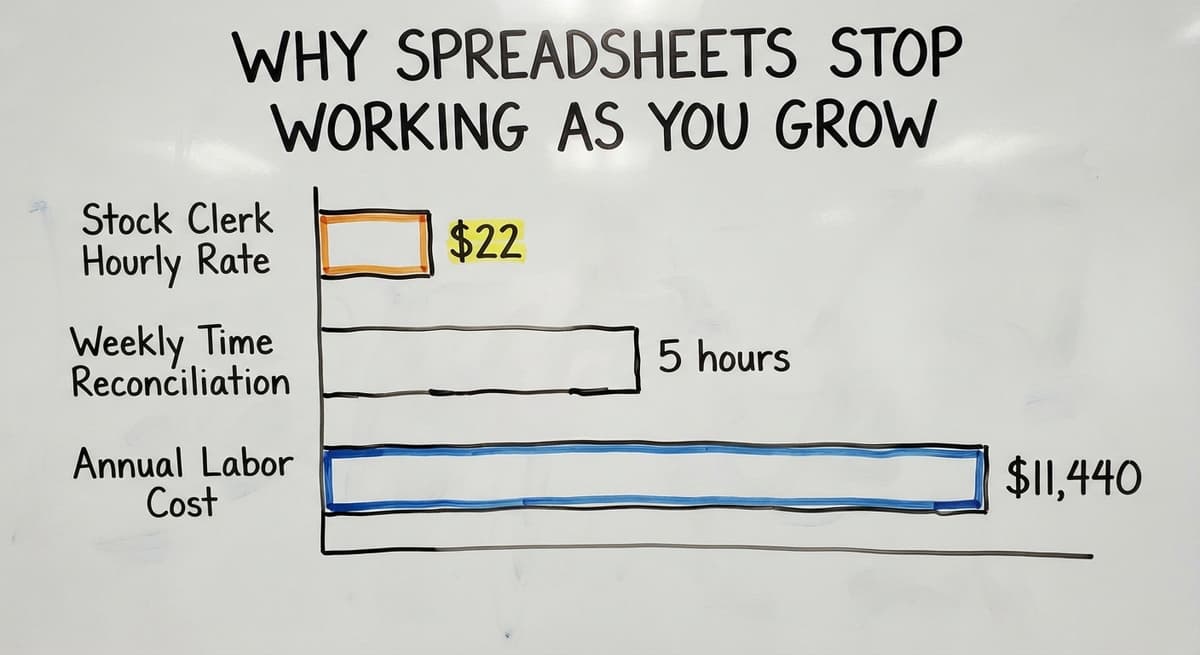
Manual inventory tracking also costs real money in staff time. The US Bureau of Labor Statistics reports that stock clerks and order fillers earn around $22 per hour.
If 2 people each spend 5 hours a week reconciling spreadsheets, that is $11,440 a year in labor alone, before you count the cost of the errors they miss.
There is also a legal reason to get this right. As the IRS states in Publication 538, "To figure taxable income, you must value your inventory at the beginning and end of each tax year." That is not optional.
A system that keeps clean records makes that process far less painful.
This is the point where most small businesses start looking for software.
Has Your Business Outgrown Manual Stock Tracking?
Yes, if any of these sound familiar, you have outgrown manual stock tracking. The signs are clear once you know what to look for.
- Stockouts that surprise you, even though the spreadsheet said you had stock
- Overstock on slow items because no one flagged the trend
- Staff spending hours counting shelves instead of doing other work
- Customer complaints about orders that shipped wrong or late
- Discrepancies between your the accounting software records and the actual shelf count
- Missed orders because a product was listed as available but was already spoken for
Any one of these is a signal. More than two means the cost of staying manual is already higher than the cost of switching.
How Does Stock Management Software Work?
The basic flow is simple. Stock arrives and gets logged, either by scanning a barcode or entering a receipt. The system updates your count.
When an order ships, the count drops. When stock falls below a set level, the system sends an alert.
Real-time inventory means everyone sees the same number at the same moment. There is no version confusion, no stale spreadsheet.
A warehouse lead in the back and a sales rep on the phone both see the live count.
Barcode scanning replaces manual entry. A staff member scans a box as it comes off the truck. The system does the rest. This cuts data entry errors and speeds up receiving.
Multi-location support lets you track stock across more than one site. If you run 2 warehouses or a warehouse and a retail floor, the software shows you what is where.
Core Features to Look for in Small Business Stock Management Software
Not every tool has every feature. Focus on the ones your operation actually needs.
- Real-time inventory counts updated as stock moves
- Low-stock alerts and reorder triggers so you act before you run out
- Purchase order tracking from the moment you place an order to the moment it arrives
- Reporting that shows turnover rates, slow movers, and top sellers
- Multi-location support if you run more than one site
- Barcode scanning to reduce manual entry errors
Skip features you will not use. More features mean more setup time and more training.
The comparison is easier when one option is built for you
Off-the-shelf means fitting your process to the software. We do it the other way round, and the first look costs nothing.
Book a callAccounting Integration: Keeping What Already Works
Most small businesses already use a standard accounting package for accounting. The good news is that you do not need to replace it.
Good stock software connects to the accounting software rather than competing with it.
accounting integration for warehouse operations means your stock software sends purchase orders, receipts, and cost-of-goods data straight into the accounting software.
Your bookkeeper sees accurate numbers without re-entering anything. You keep the accounting workflow you already know.
What flows between the two systems:
| Data Type | Direction |
|---|---|
| Purchase orders | Stock software to the accounting software |
| Received inventory and costs | Stock software to the accounting software |
| Sales and shipments | Stock software to the accounting software |
| Vendor and customer records | Synced both ways |
Ask any vendor you evaluate to show you exactly how this connection works. Request a live demo, not a slide deck.

What is the best free stock management software for small businesses?
There is no single best free option. The free tiers of the inventory apps and the basic plans of the point-of-sale systems work for very small operations with simple product lines and low order volumes. They tend to cap SKU counts, limit users, or restrict integrations.
If your operation has grown past a handful of products or needs accounting integration, free tools hit a wall quickly. The honest answer is that free software works best as a starting point, not a long-term system.
Off-the-Shelf Software vs Custom-Built Solutions
Packaged tools come ready to use. You sign up, follow the setup wizard, and start entering products.
The trade-off is that you adapt your process to fit the software, not the other way around.
Custom stock management software is built around how your operation already runs. If you have unique fulfillment rules, mixed product types, or a workflow that no packaged tool quite matches, custom is worth considering.
A common fear is that custom means expensive and slow. That is not always true. Replacing spreadsheet with custom operational software scopes down to cover only the painful parts.
You do not need to rebuild everything. A focused build that fixes your 3 biggest manual pain points can go live in weeks, not months.
When Is Off-the-Shelf Stock Software a Good Fit?
Packaged tools work well when your workflow is standard. If you sell a simple product line, fulfill orders the same way every time, and do not have unusual pricing or receiving rules, an off-the-shelf tool will likely cover you.
The popular packaged options each have strengths in different areas. None of them is the right fit for every business.
When Does a Business Need Custom Stock Management Software?
Custom software makes sense when your operation does not fit the standard mold. That is the short answer. The longer one involves a few specific situations.
- You have tried 1 or 2 packaged tools and hit the same walls each time
- Your fulfillment rules change by customer, product type, or season
- You run mixed product types that packaged tools struggle to categorize
- Your team has built workarounds in a spreadsheet that no off-the-shelf tool can replace
- You need the software to grow with you as you add locations or product lines
Custom inventory software for wholesale distributors is a good example. Distributors have customer-specific pricing, high SKU counts, and bulk receiving workflows that packaged retail tools were never designed to handle.

What Does a Custom Build Actually Look Like for a Small Operation?
Here is a realistic example. A small distributor runs 800 SKUs across 2 warehouses. They track stock in a spreadsheet. Three people update the same sheet. Errors are constant.
The build starts with a discovery process. The builder spends time learning the existing workflow before writing a line of code.
What does receiving look like? How are orders picked? Where do the errors actually happen?
From that, only the painful manual steps get replaced. The rest of the operation stays the same.
The result is a tool that feels familiar because it was built around what the team already does.
Implementation can be fast. A focused build like this goes live in 4 to 8 weeks. Staff training takes a day or two because the system mirrors their existing process.
What does it look like running on your own process?
The first thing you see is it running on your own process, at no build cost. The subscription starts once it is live and doing the job, not before.
Book a callInventory Accuracy and Why It Matters for Small Businesses
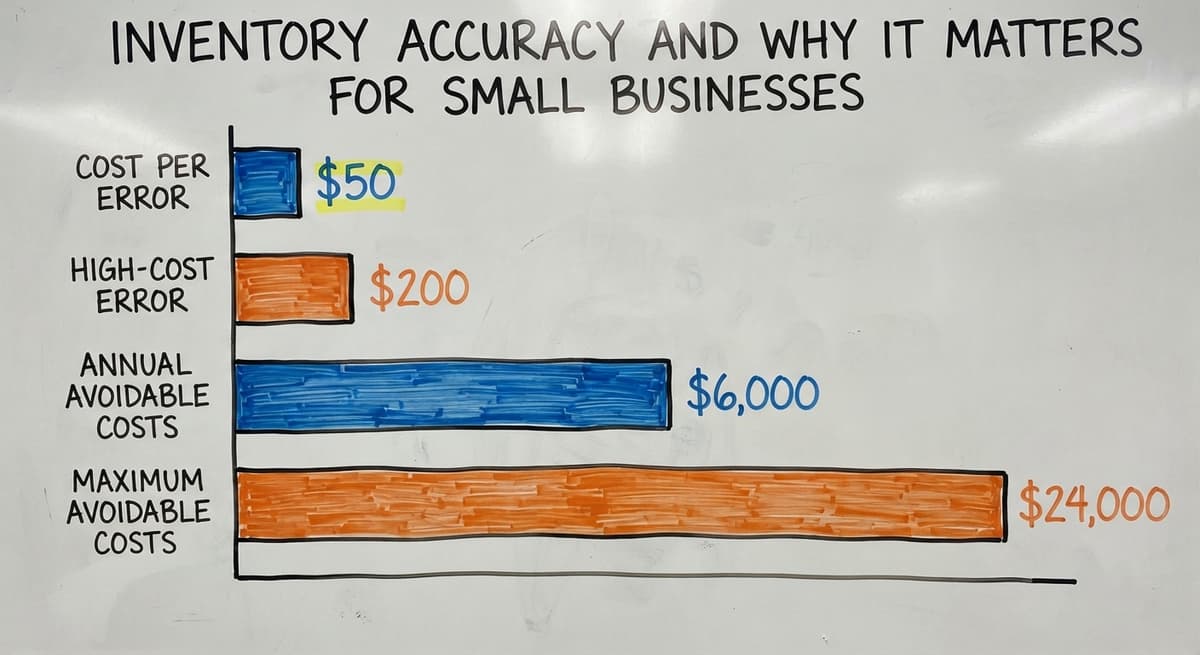
Inaccurate stock counts cost money in ways that are easy to underestimate. An order ships wrong. A customer complains.
You refund or reship. That single error can cost $50 to $200 when you add up the labor, shipping, and lost goodwill.
Multiply that by 10 errors a month and you are looking at $6,000 to $24,000 a year in avoidable costs.
Cycle counting is a way to keep accuracy high over time. Instead of counting all stock once a year, you count a portion each week.
The software tracks which areas are due for a count and flags discrepancies as they appear, not months later.
Automation reduces human error at the source. Barcode scanning at receiving means a box gets logged correctly the moment it arrives, not hours later from memory.

Reorder Points and Low-Stock Alerts Explained
A reorder point is the stock level that triggers an order. When a product drops to that level, the system alerts you or creates a draft purchase order automatically.
The software calculates this based on how fast a product sells and how long it takes to arrive from your supplier.
You set the threshold per SKU or per product category. A fast-moving item might trigger at 50 units. A slow mover might trigger at 10.
This prevents 2 problems at once. You do not run out of stock and lose a sale. You also do not overbuy and tie up cash in product that sits for months.
Reporting and Visibility Across Your Stock
Useful reports for a small business owner are the 5 that answer a question without a finance degree. The best small business inventory systems show:
- Turnover rate by product, so you know what sells and what sits
- Slow-moving stock that is tying up shelf space and cash
- Top sellers by revenue or units shipped
- Purchase order status so you know what is on the way
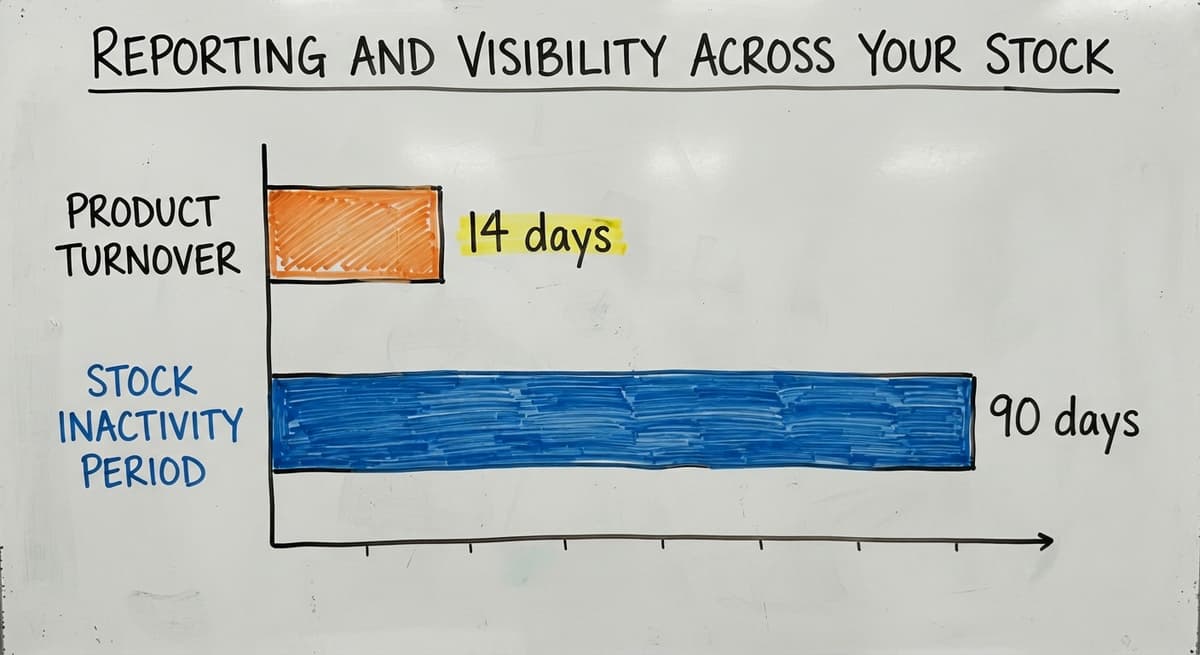
Visibility helps you make better buying decisions. If you can see that a product turns over every 14 days, you know how much to keep on hand.
If another product has not moved in 90 days, you stop reordering it.
Reports should be readable by a non-technical owner. If you need a consultant to explain a report, the software is not doing its job.

What mistakes do small businesses make when choosing stock software?
The most common mistake is buying more software than the business actually needs. That is the opening sentence answer, and it is worth expanding.
- Choosing a tool that does not connect to the accounting software, then discovering the gap after go-live
- Underestimating setup and training time, which delays the benefit by weeks or months
- Picking software based on price alone without checking whether it fits the actual workflow
- Skipping a demo with your own product types and using the vendor's generic demo instead
Map your current workflow before you look at any software. Know the specific problems you need to solve. That list will tell you which tools to rule out immediately.
How Do You Evaluate Stock Management Software for Your Business?
Start with your workflow, not a vendor's feature list. Write down how stock moves through your operation today, from receiving to shipping. Note where errors happen and where time gets wasted.
Then ask vendors these questions:
- How does your tool connect to the accounting software, and what data flows between them?
- Can you show me a demo using my product types, not a generic example?
- Who handles data migration from my current system?
- What does support look like after go-live?
- Can the software change as my business changes?
Ask who builds and who supports the software. A team that builds the tool and also supports it after launch is accountable in a way that a reseller is not.

What Should You Expect During Implementation?
A good implementation is 4 to 6 weeks for a small operation, and it starts with a conversation about your workflow, not a contract. The builder should understand how you operate before proposing a solution.
Realistic setup timelines:
- Off-the-shelf tool with standard workflow: 1 to 3 weeks
- Off-the-shelf tool with data migration and training: 3 to 6 weeks
- Custom build scoped to specific pain points: 4 to 8 weeks
- Full custom warehouse management software for small businesses: 8 to 16 weeks
A phased rollout keeps the business running during the switch. Start with receiving or one product category. Expand once the team is comfortable. Staff training is part of a good plan, not an afterthought.
What is in a free first look?
A 30 minute call, your operation mapped, and a clear picture of what we would build. No obligation and nothing to install.
Book a callStock Management Software for Wholesale Distributors
Wholesale distributors have needs that retail tools miss. High SKU counts, customer-specific pricing, and bulk receiving workflows are the norm, not the exception.
Fulfillment center software for growing operations needs to handle vendor management, purchase order tracking, and inbound receiving queues alongside outbound shipping.
A retail-focused tool may handle the outbound side well but fall short on the inbound and vendor side.
Stock management for distributors also needs to account for products that arrive in cases but ship as eaches, or products with lot numbers and expiration dates. These details matter at the SKU level, and not every tool handles them cleanly.

What Is the Real Cost of Not Having Stock Management Software?
Inaction has a price. That is the direct answer. Most business owners focus on the cost of new software and undercount the cost of staying manual.
Consider a warehouse with 3 staff members each spending 6 hours a week on manual stock reconciliation. At $22 per hour, that is $20,592 a year in labor before counting a single order error or stockout.
Add 10 order errors a month at an average cost of $100 each to fix, and the annual cost of staying manual climbs past $32,000.
The US Census Bureau's Monthly Wholesale Trade data shows that inventory-to-sales ratios are a key measure of how efficiently wholesale businesses manage stock.
Businesses that carry too much inventory relative to sales are tying up cash that could fund growth.
Software does not eliminate all errors. It reduces them. For most small operations, the reduction pays for the software within the first year.
How Do You Get Started Without a Long or Expensive Implementation?
Start with the biggest pain point, not a full overhaul. If receiving is where errors happen, fix receiving first. If low-stock surprises are the problem, start with reorder point alerts.
A good partner will map your current workflow before proposing anything. That process takes a single conversation. From there, building only what is needed keeps cost and time down.
The NIST Manufacturing Extension Partnership offers vendor-neutral guidance on supply chain process improvement that is worth reading before you talk to any software vendor. It helps you ask better questions.
The first step is a conversation, not a contract. If a vendor wants you to sign before they understand your workflow, that is a signal to keep looking.
Frequently Asked Questions
Frequently asked questions
Frequently asked questions
What is the best free stock management software for small businesses?
There is no single best free option. The free tiers of the inventory apps and the basic plans of the point-of-sale systems work for simple operations with low SKU counts. Both restrict integrations and user counts at the free level.
If you need accounting integration or manage more than a few hundred SKUs, free tools tend to hit limits quickly.
What is the best app for managing inventory for a small business?
The best app depends on your workflow. The general inventory apps work well for product-based businesses with standard fulfillment, and the accounting-led tools suit QuickBooks users who need warehouse features.
If none of those fit your operation, a custom-built tool scoped to your specific process is worth considering.
What is the best stock management software?
There is no single best tool. The right software fits your workflow, connects to your accounting system, and is supported by a team you can reach when something breaks.
A tool that works well for a retailer may be a poor fit for a wholesale distributor. Start with your workflow and match software to it, not the other way around.
What is the best inventory control system for a small business?
For most small businesses using the accounting software, the best system is one that connects cleanly to the accounting software, handles your specific product types, and does not require a full ERP implementation.
Off-the-shelf tools cover many standard cases. Custom inventory software makes sense when your workflow does not fit a standard mold.
Can I keep using the accounting software if I add stock management software?
Yes. Most stock management tools work alongside the accounting software, not replace it.
Purchase orders, received inventory, and shipping data flow from the stock system into the accounting software automatically. Your accounting workflow stays intact.
How long does it take to implement stock management software?
Off-the-shelf tools with standard setups can go live in 1 to 3 weeks. A custom build scoped to specific pain points takes 4 to 8 weeks.
The timeline depends on how complex your workflow is and how much data needs to be migrated from your current system.
What is the difference between stock management and inventory management software?
The terms are used interchangeably in most contexts. Some vendors use inventory management for broader tools that include demand forecasting and accounting features.
Stock management refers to the core functions: tracking what you have, where it is, and when to reorder. For practical purposes, treat them as the same category and focus on the features your operation needs.
Does stock management software work with the accounting software?
Most modern stock management tools offer accounting integration. The depth of that integration varies. Some sync only basic data.
Others push purchase orders, receipts, and cost-of-goods figures automatically. Ask any vendor to show you exactly what syncs and how often before you commit.
How much does small business inventory software cost?
Packaged tools run $50 to $300 a month, rising with users and locations, and the free tiers cap at 1 user and a few hundred items.
A build scoped to one operation runs $8,000 to $25,000 once with $100 to $400 a month for hosting and support. Scanners add $150 to $400 per station.
What is the easiest inventory software for a retail store?
The inventory built into the point-of-sale system, since every sale already reduces the count and staff learn nothing new. It gets hard at the second location or the first online channel, which is where a standalone stock system or a build takes over.
How do I migrate inventory from Excel to stock management software?
Export the item list with SKU, description, cost, and reorder point, remove the duplicates, and import it.
Then run one full count and enter it as the opening balance, so the system starts from the shelf rather than from the spreadsheet's drift. A 1,000-SKU stockroom takes a weekend.
How do I choose between the point-of-sale, e-commerce, and standalone inventory tools?
By where the sales happen. One store and no website: the point-of-sale inventory. Mostly online: the store platform's inventory.
Wholesale, a warehouse, or several channels: a standalone stock system or a build, because those tools hold one count per location and the others do not.
Not sure this is the right shape for your operation?
The call is free. Describe how the work runs today. We map it on a call and show you what it would look like built around that, before you spend anything.
Book a callRelated guides
The rest of this guide, for the parts of the job this page does not cover.
Guides
- Best Inventory Management Software for Small Businesses
- Inventory Tracking Software for Small Business
- Inventory Control Software for Small Business
- Inventory Sales Software Small Business
- Inventory Management Small Businesses
- Small Business Inventory Management System
- Small Business Inventory Management
- Free Inventory Management Software for Small Business
- Inventory Tracking Systems for Small Businesses
- Simple Inventory System for Small Business
- Inventory Control for Small Business
- Inventory System for Small Business
- Wms for Small Business
- Accounting and Inventory Software for Small Business
- Small Business Warehouse Management System
- Warehouse Management System for Small Business
- Warehouse Stock Management Software
- Cloud Stock Management Software
Common questions
- What is the Best Inventory Management Software for Small Business
- Why is Inventory Management Important for Small Businesses
- How to Manage Inventory for Small Business
- How to Organize Inventory for Small Business
- How to Keep Track of Inventory Small Business
- What is the Best Inventory Management System for Small Businesses?