


How To Manage Spare Parts Inventory
Learn how to manage spare parts inventory in 5 simple steps: count, sort, label, set reorder points, and track. Plus when to move past spreadsheets.
Book a callHow to Manage Spare Parts Inventory: The Short Answer
To manage spare parts inventory, know what parts you have, where they sit, and when to buy more. Spare parts often move slowly. A missing one can stop a machine or a job. The goal is the right part, in the right place, at the right time, without tying up too much cash. This guide was reviewed in October 2026.
We build it for your operation, and the first look is free
If you would rather not compare products, describe how your operation already works and we build the system around it.
No build cost. You see it running on your own process first, and the monthly subscription starts only once it is live.
Book a callWhy Spare Parts Inventory Is Harder to Manage Than Regular Stock
Spare parts are harder to manage because demand is uneven and the cost of a gap is high. You may sell 0 of a part for 6 months and then need 4 in a week. One missing part can stop a customer's machine.
Many parts also look alike. Suppliers use their own part numbers, so the same item may have 2 names. Old parts sit on shelves and tie up cash. Barcodes help with part IDs. As GS1 puts it, its standards give a way to identify items, and you can read more in the GS1 barcode standards overview.
Spare parts reward care because a small gap costs far more than the part itself.
Step 1: How Do You Count and List Every Part?
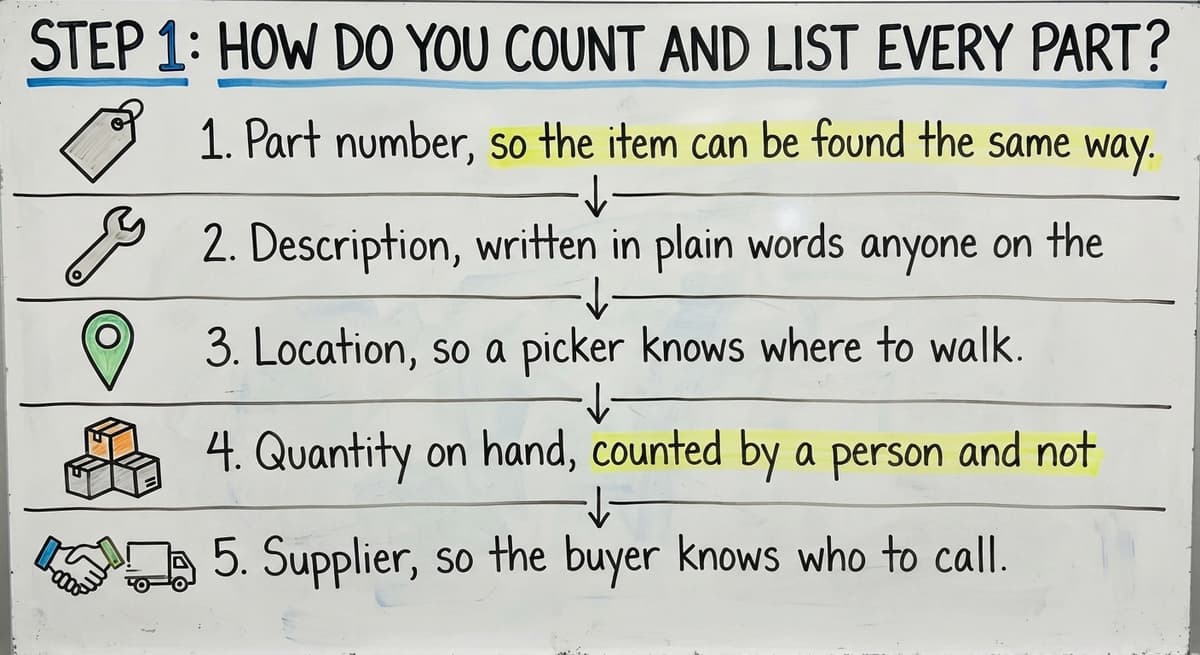
You count and list every part by doing one full physical count and writing each item into one master list. This gives you a clean start. Without it, every later step rests on guesses.
For each part, record these fields:
- Part number, so the item can be found the same way every time.
- Description, written in plain words anyone on the team can read.
- Location, so a picker knows where to walk.
- Quantity on hand, counted by a person and not guessed.
- Supplier, so the buyer knows who to call.
Next, remove duplicates. If a part has 2 names, pick one and fix the rest. Then retire the extra sheets. Many small distributors keep one sheet per person, and the sheets drift apart.
The IRS also expects a count. IRS Publication 538 says, "To figure taxable income, you must value your inventory at the beginning and end of each tax year." A clean list makes that job easy.
One master list is the base that every other step builds on.
Step 2: Sort Parts by How Much They Matter
Sort parts into 3 groups: critical, useful, and low-use. Critical parts are the ones where a gap causes a stop or a lost sale. These get the most attention.
A simple way to sort is ABC sorting. It ranks parts by value and by how often you use them.
- A parts are few in number but matter most. Count them often and keep a buffer.
- B parts sit in the middle. Check them on a steady schedule.
- C parts are many but low in value. Count them less often.
Ask one question of each part: "If this is gone tomorrow, what breaks?" A seal that stops a $40,000 machine is critical, even if it costs $3. A box of spare screws is not.
The NIST Manufacturing Extension Partnership offers supply chain guidance that supports this kind of risk-first thinking.
Your time is limited, so spend it where a miss hurts most.
The comparison is easier when one option is built for you
Off-the-shelf means fitting your process to the software. We do it the other way round, and the first look costs nothing.
Book a call
Step 3: Label Bins and Shelves Clearly
Label bins and shelves so every part has one home location. A picker should find a part without asking anyone. This is the heart of good warehouse inventory work.
Use simple bin locations. A code like A-03-2 can mean aisle A, shelf 3, level 2. Print the code on a label and stick it on the bin. Our guide on warehouse bin location setup covers this in more depth.
Follow these habits:
- Give each part exactly 1 home, so counts stay clean.
- Keep look-alike parts apart, so pickers do not grab the wrong one.
- Put the part number on the bin in large print.
- Add barcodes later, once the labels work.
Barcodes help, but clear labels are a good start.
A part with no clear home is a part you will lose.
Step 4: How Do You Set a Reorder Point and Safety Stock?
You set a reorder point by multiplying daily use by supplier lead time, then adding a buffer. Reorder point = (daily use x lead time) + safety stock. When stock falls to that number, you buy more.
Here is an example. Say you use 2 of a part each day. The supplier takes 10 days to ship. That is 20 parts during the wait. Add a buffer of 6 and your reorder point is 26.
Safety stock is the extra you keep for late shipments and surprise demand. It is your cushion.
- Set a bigger cushion for critical parts.
- Set a small one for low-use parts.
- Check the numbers every few months, since use and lead times change.
If a supplier starts shipping slower, your old numbers will fail. Update them before you run out.
A reorder point works only while the numbers behind it stay true.
Step 5: Track Every Part In and Out
Track every part by recording each receipt, pick, return, and fix at the moment it happens. Late updates cause most count errors. Inventory tracking only works if the record matches the shelf.

Tie each move to an order or a job. Then you can answer, "Where did that part go?" in seconds.
Use cycle counting to stay honest. Cycle counting means you count a few bins each week instead of all of them once a year. Our page on cycle counting for small warehouses shows how to plan it.
A simple weekly plan:
- Count all A parts every month.
- Count B parts every quarter.
- Count C parts once or twice a year.
- Look into every gap and note why it happened.
The FTC's mail, internet, or telephone order rule expects you to ship when you said you would. An accurate count helps you keep that promise.
Small, steady counts catch errors while they are still small.
See it running on your own process first
No build cost. The subscription starts once it is live and doing the job, not before.
Book a callHow to Deal With Slow-Moving and Obsolete Parts
Deal with slow parts by flagging anything with no use in a set span, such as 12 months. Dead stock is stock that no longer sells. It ties up cash and shelf space.
Once flagged, pick one path for each part:
- Return it to the supplier, if they take returns.
- Discount it to move it fast.
- Bundle it with a part that sells well.
- Scrap it and clear the space.
Then stop reordering. Many buyers keep buying a part out of habit. Mark the item so the system or the buyer sees it.
Track the dead stock value as one number. When an owner sees "$18,400 sitting idle," it gets noticed.
If you keep a part only for a few loyal customers, set a clear rule. Keep 1 or 2 and sell the rest.
What you do not track on paper will keep sitting on the shelf.
Which Numbers Should You Watch?
Watch a few numbers: stockout rate, fill rate, inventory turns, days of stock, and dead stock value. Pick 3 or 4 and review them on a set day. Too many numbers means none get read.

- Stockout rate is how often you run out of a part someone needs.
- Fill rate is the share of order lines you ship in full and on time.
- Inventory turns show how many times you sell and replace stock in a year.
- Days of stock on hand is how long your current stock lasts at today's use.
- Dead stock value is the dollar total of parts that no longer move.
The US Census Bureau tracks inventories and sales for wholesale firms in its Monthly Wholesale Trade data. That shows how widely firms watch stock against sales.
A number you review monthly beats ten you never open.
Why Spreadsheets Stop Working for Spare Parts Inventory
Spreadsheets stop working because they have many copies, typing errors, and no live view. Spare parts inventory management needs one source of truth, and a sheet cannot be that for long.
Many teams keep counts in a spreadsheet, orders in their accounting software, and notes in email. These drift apart. Then no one trusts any of them. Our page on moving off Excel and Access for inventory explains the shift.
Watch for these signs:
- You run out of parts that the sheet said you had.
- Parts get lost, or you buy a part you already own.
- A search for one part takes 10 minutes.
- Two people edit the same file and overwrite each other.
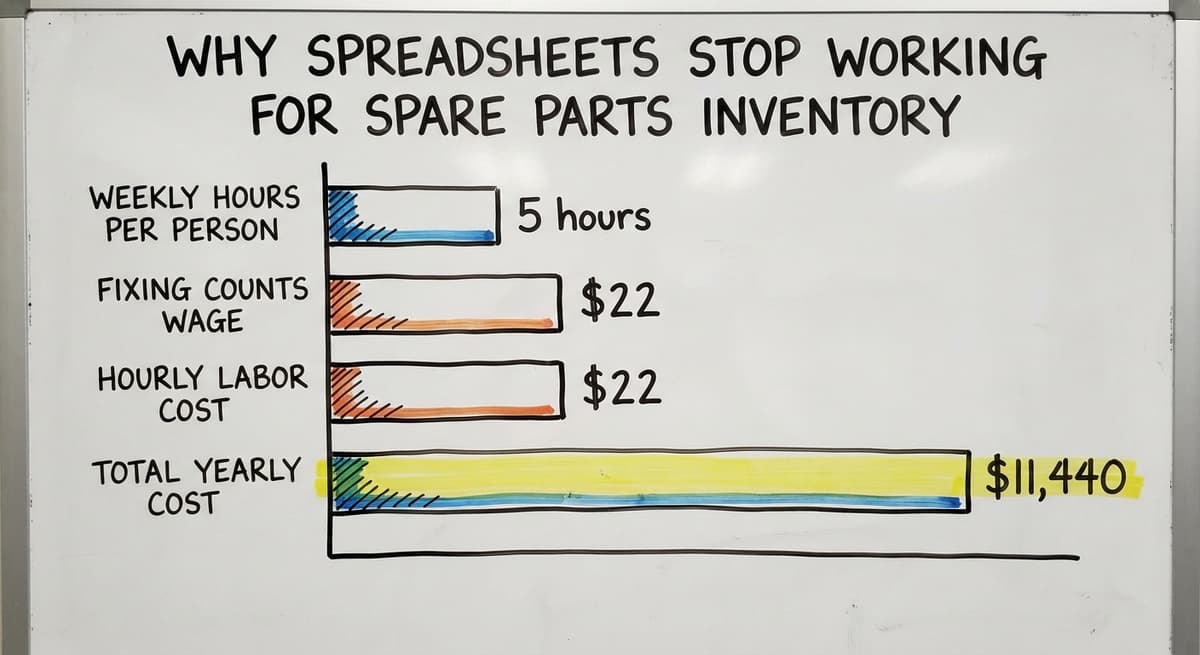
Check the cost. If 2 people spend 5 hours a week fixing counts at $22 an hour, that is 2 x 5 x $22 x 52, or $11,440 a year. The Bureau of Labor Statistics lists pay for staff in this kind of work.
Not every business needs a large ERP system, which is a big tool that runs the whole company.
When the sheet costs more than a fix, it is time to change.

A Simpler Path: Keep Your Accounting Software and Fix the Manual Parts
You can improve parts tracking without replacing your accounting software. Custom software can take over the manual parts, such as bin locations, reorder alerts, and part history. Your accounting software stays for accounting, where it works well.
This fits how many small distributors already run. Custom inventory software that works with your accounting software is built around how your team works today. So there is no forced move to a new system. Compare that with inventory management software for small warehouses, which often asks you to change your habits.
The Software Society is a Columbus, Ohio team that builds this kind of software. It works at small scale, and the work starts with a review of how your team handles parts now.
Fix only the parts of the process that are manual and keep the rest.
Frequently asked questions
How often should I count parts?
Count critical parts every month and the rest on a longer cycle. Use cycle counting so you check a few bins each week. This beats one big count each year.
How much safety stock is enough?
Enough to cover the usual delay in a late shipment. Use more for critical parts and less for low-use ones. Review the number every few months.
Do I need barcodes?
Not at first. Clear labels and one home per part come first. Add barcodes when scanning will save time or cut errors.
When is a spreadsheet no longer enough for spare parts?
A spreadsheet is no longer enough when you see frequent stockouts, lost parts, or long searches. Those signs mean the sheet no longer matches the shelf.
Start with a free first look
A 30 minute call, your operation mapped, and a clear picture of what we would build. No obligation and nothing to install.
Book a callRelated guides
The rest of this guide, for the parts of the job this page does not cover.
- How to Manage Inventory in Rocket League
- How to Manage Food Inventory
- How to Manage Inventory Fallout 76
- How to Manage Consignment Inventory
- How to Manage Inventory in Stardew Valley
- How to Manage Fba Inventory
- How to Improve Inventory Management
- How to Manage Inventory Diablo 4
- How to Manage Slow-moving Inventory
- How to Manage Hardware Inventory
- How to Manage Inventory Efficiently
- How to Manage Pharmacy Inventory
- How to Create an Inventory Tracking System?
- How to Keep Track of Ebay Inventory
- How to Keep Track of Inventory
- How to Resolve Inventory Discrepancies
- How to Record Inventory on Hand
- How to Manage Inventory in a Warehouse
- How to Manage Inventory in Retail Store
- How to Manage Inventory Between Etsy and Shopify
- How to Manage Inventory for Small Business
- What is the Most Important Part of Warehouse Organization
- What is E Inventory Management
- What is Roq in Inventory Management