


Erp System For Small Businesses
An ERP system, short for Enterprise Resource Planning, is software that connects your inventory, orders, purchasing, and accounting into one shared system. Small businesses do not always need a full ERP. Many are better served by a targeted fix that solves the actual bottleneck without replacing tools that already work.
Reviewed September 2026. Each figure comes from the assumptions stated beside it, so you can substitute your own and the arithmetic still holds.
Published 19 August 2026. Reviewed and updated 15 September 2026.
Book a callWhat Does an ERP System for Small Businesses Actually Do?
Think of ERP as a shared whiteboard every department reads from. When a sales order comes in, inventory drops. When stock falls low, a buy order goes out. When the order ships, accounting records the revenue. No one has to copy anything by hand.
Most small business ERP platforms cover these core areas:
- Inventory management tracks stock levels in real time so you stop selling what you do not have
- Order management routes and fulfills customer orders without email chains or printed pick sheets
- Purchasing and vendor management logs supplier lead times and automates reorder points
- Basic financial integration posts transactions to your books as they happen
- Reporting and dashboards give owners a live view of what the operation is doing
Not every small business needs every module. The value of ERP comes from the connections between modules, not from having all of them.
Would you rather have it built around your operation?
The first look is free. If you would rather not compare products, describe how your operation already works and we build the system around it.
No build cost. You see it running on your own process first, and the monthly subscription starts only once it is live.
Book a callWhy Do Small Businesses Start Looking at ERP?
The search for an ERP system rarely starts with a technology wish list. It starts with a breaking point. Orders fall through the gaps between a spreadsheet and an inbox.
A warehouse ships the wrong item because two people updated different files. A customer calls about a delivery that no one can locate.
Small distributors and warehouse operators feel this in specific ways: stock counts that do not match the accounting software, buy orders built by hand in a spreadsheet, and pick sheets printed each morning that are already wrong by noon.
The accounting side adds its own pressure. The IRS is direct on this point: "To figure taxable income, you must value your inventory at the beginning and end of each tax year," according to IRS Publication 538. That valuation has to come from somewhere accurate.
When inventory lives in a spreadsheet no one fully trusts, that somewhere is a problem.
The pain is real. The question is whether a full ERP is the right fix.
How Does a Small Business Usually Run Before ERP?
Before ERP, most small operations run on a stack of tools that each work fine alone. The accounting software handles the books. Spreadsheet tracks inventory. Email manages orders. Printed pick sheets go to the warehouse floor.
The gaps appear at the handoffs. A sales rep updates a spreadsheet. A warehouse worker pulls from a different one. No one knows which is current. A customer order sits in an inbox while two people wait for the other to act.
None of this means the team is doing a bad job. These tools were built for individual tasks. They were never built to talk to each other. The problem is the space between them, not the people filling it.
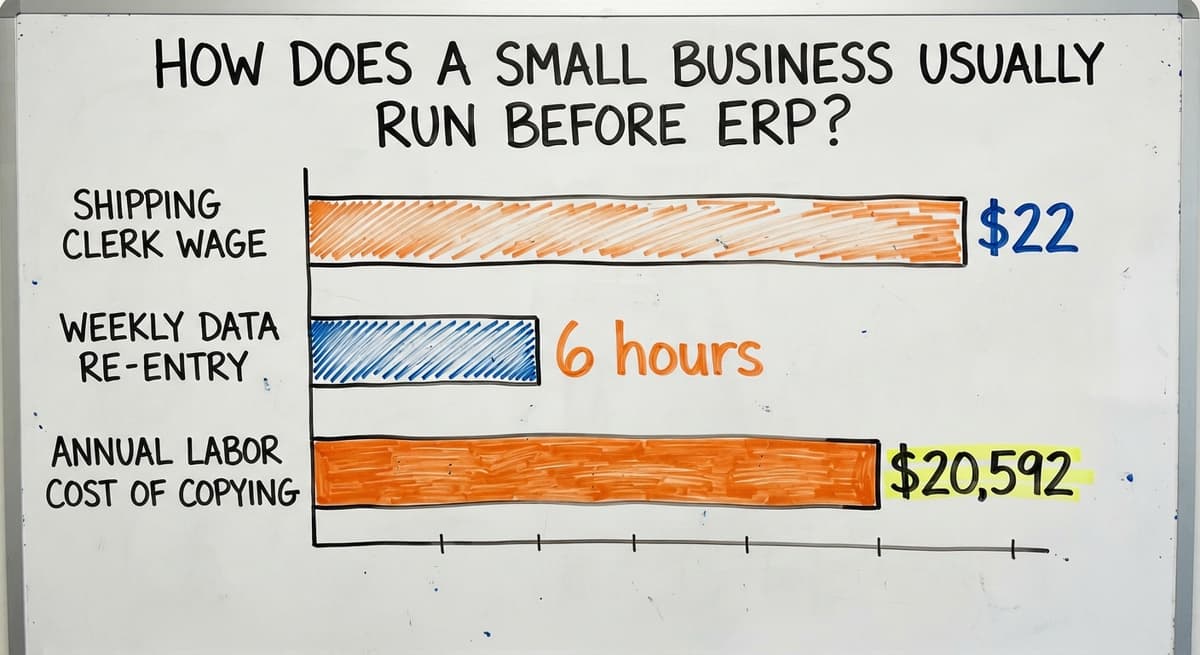
Manual data entry is the clearest cost. According to Bureau of Labor Statistics wage data, shipping and order clerks earn around $22 per hour.
If 3 people each spend 6 hours a week re-entering data that already exists somewhere else, that is $20,592 a year in labor doing nothing but copying. That number does not count the errors those copies introduce.
What Problems Is ERP Built to Solve?
ERP targets a short list of working failures, each with a real cost attached.
- Duplicate data entry wastes staff time and creates version conflicts that lead to wrong shipments
- Inventory errors cause overselling, stockouts, and the customer losses that follow both
- Slow order fulfillment lets competitors with faster systems take repeat business
- Poor visibility means owners make decisions on reports that are already days old
At small business scale, these are not abstract risks. A single bad inventory count can delay a week of orders. A missed reorder point can shut down a production line.
The NIST Manufacturing Extension Partnership notes that supply chain visibility is one of the highest-use improvements a small operation can make, and ERP is one path to it.
Is the comparison easier when one option is built for you?
Yes. Off-the-shelf means fitting your process to the software, and custom is the other way round. The first look costs nothing.
Book a call
Cloud ERP vs On-Premise: Which One Fits a Small Business
Cloud ERP runs in a browser. The vendor hosts the software and handles updates. You pay a monthly fee and log in from anywhere.
On-premise ERP runs on servers your business owns and keeps. You pay a larger upfront cost and handle your own IT.
For most small businesses, cloud is the right starting point. There is no server to buy, no IT staff to hire, and costs stay predictable.
On-premise still makes sense for businesses with strict data residency rules or very slow internet, but those cases are rare at small business scale.
How Much Does an ERP System Cost for a Small Business?
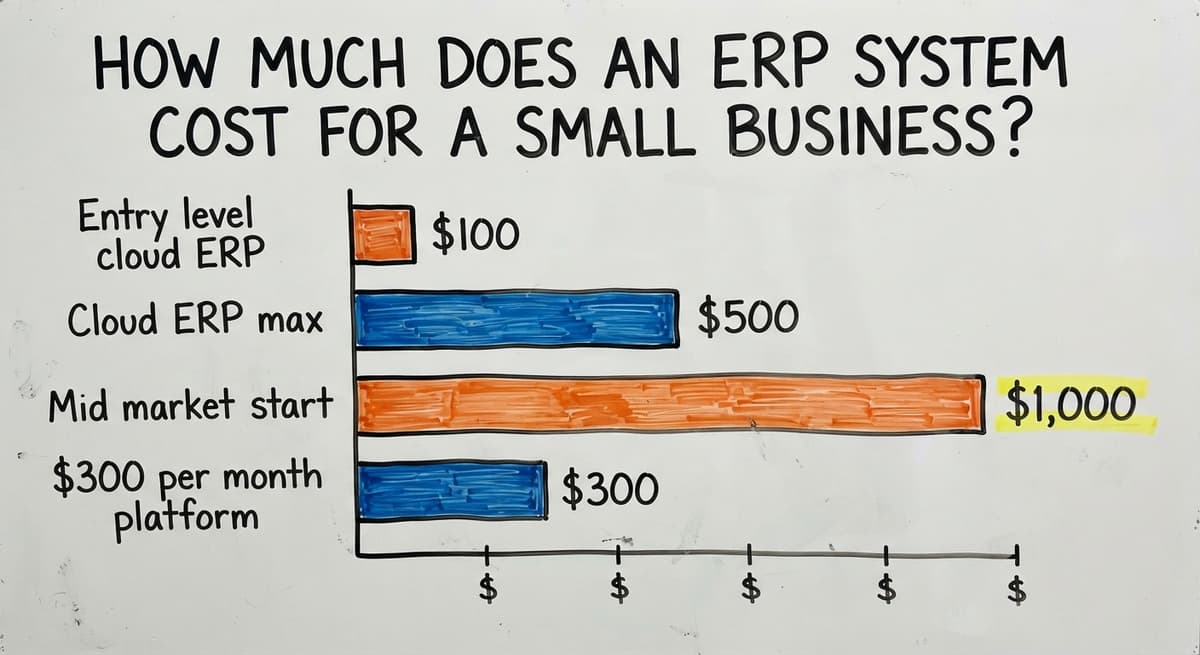
Entry-level cloud ERP runs $100 to $500 per month. Mid-market platforms start around $1,000 per month and climb from there. Those numbers are the subscription fee only.
The real cost includes:
- Rollout: mapping your processes, configuring the system, and migrating your data
- Training: getting staff comfortable enough to use it without reverting to the old way
- Customization: adjusting the software when it does not match how your operation works
- Ongoing support: who you call when something breaks after go-live
Rollout alone runs 2 to 3 times the first year's subscription cost. A $300 per month platform can easily become a $15,000 to $25,000 project once setup is included. Budget for the full picture before you sign.

What Are the Biggest Risks of ERP for Small Businesses?
The biggest risk is scope. Most failed ERP projects tried to change everything at once.
Small business ERP projects stall or collapse for a predictable set of reasons:
- Over-scoped projects that map every process before fixing any single one
- Forcing the business to match the software, rather than the other way around, so staff spend months learning workflows that do not match their actual jobs
- Staff resistance when familiar routines disappear overnight
- Running out of budget before the system goes live, which leaves the business mid-migration with neither the old system nor the new one working properly
A second risk is misfit. Many ERP platforms target manufacturing.
A wholesale distributor or fulfillment center buying one will spend months customizing it to handle buy orders, customer price tiers, and pick-and-pack workflows that a manufacturer never needs. That customization costs money and takes time, and it does not land where the vendor promised.
How Long Does ERP Implementation Take?
Most small business ERP rollouts take 3 to 12 months. The wide range reflects how much preparation the business brings to the project.
Data cleanup takes longer than anyone expects. Inventory records built over years in a spreadsheet rarely import cleanly. Process mapping, where the team documents how work actually flows before the system is configured, adds weeks. Staff training and parallel testing add more.
Three months is realistic for a focused rollout with a narrow scope. Twelve months is common for a full rollout across multiple departments. Projects that try to do everything at once land at the longer end or do not finish at all.

When Does Full ERP Fit, and When Does It Not?
Full ERP is the right tool for some businesses. If your operation runs across multiple legal entities, handles multiple currencies, involves complex manufacturing with bills of materials, or sits under regulatory compliance requirements, a full ERP earns its cost.
For a business with 5 to 100 staff, a single location or a few sites, and the accounting software already handling the books without major pain, full ERP is more than the job needs.
You end up paying for modules you never open and training staff on features that do not apply to your work.
The US Census Bureau's Monthly Wholesale Trade data shows that most wholesale firms operate at a scale where targeted working tools, not enterprise platforms, match the volume and complexity of the actual work.
The honest question is not "which ERP should I buy" but "what is actually breaking, and what is the smallest fix that solves it."
What does it look like running on your own process?
The first thing you see is it running on your own process, at no build cost. The subscription starts once it is live and doing the job, not before.
Book a callA Custom Operational System as an Alternative
A custom working system is software built around the way your business already works. Instead of reshaping your operation to match a vendor's assumptions, the software maps to your actual floor layout, your order routing logic, and your vendor relationships.
The accounting software stays in place for accounting. The custom system sits alongside it, pulling and pushing data without replacing it. This avoids a full accounting migration, which is one of the most expensive parts of any ERP project and one of the most disruptive to daily operations.
For a wholesale distributor or fulfillment center already running the accounting software well, this approach replaces only the manual parts that are causing pain: the spreadsheet-driven inventory count, the email-based order routing, the printed pick sheet that is wrong by the time it reaches the floor.
The accounting software Add-On Solutions for Distributors
The accounting software is good at accounting. It was not built for warehouse operations or order routing, and it does not pretend to be.
The accounting software add-on solutions for distributors connect to the books you already trust while adding the working layer the accounting software lacks.
Inventory moves in real time. Orders route automatically. Pick-and-pack workflows run from a screen on the warehouse floor, not a printed sheet from this morning.
The accounting migration you would face with a full ERP disappears entirely. Your chart of accounts, your vendors, your customers: all of it stays where it is.
What Should I Ask an ERP Vendor Before Signing a Contract?
The right questions protect you from the most common ways these projects go wrong. Ask every vendor on your list:
- How long does rollout take for a business my size, with my data volume?
- What does the total cost look like after setup, training, and customization?
- Can the system connect to the accounting software without replacing it?
- Who handles support after go-live, and what is the response time?
- Can you show me a current customer similar to my business in size and industry?
Watch for vague answers on cost and timeline. A vendor who cannot give you a range for a business your size has not done it at your size.
Pressure to migrate away from the accounting software before anyone has mapped your actual accounting needs is a warning sign. Demo environments that look nothing like a real warehouse floor tell you the product was built for a different buyer.

ERP for Wholesale Distributors and Fulfillment Centers
Wholesale distribution has needs that generic ERP platforms handle poorly: buy orders tied to vendor lead times, customer price tiers, and pick-and-pack workflows that vary by order type.
Most ERP systems were built for manufacturing first. Distributors buy them and spend months bending them into shape.
Warehouses need real-time inventory location, structured receiving workflows, and pick accuracy that holds under volume. ERP warehouse modules are an add-on, not a core feature.
A system built around your floor layout from the start will outperform a generic module bolted onto a manufacturing platform.
Warehouse management software for small teams built specifically for distribution and fulfillment reaches working accuracy faster and needs less customization than a manufacturing ERP adapted for warehouse use.
Not sure this is the right shape for your operation?
The call is free. Describe how the work runs today. We map it on a call and show you what it would look like built around that, before you spend anything.
Book a callWhat Does a Realistic 90-Day Implementation Look Like?
Ninety days gets you live on the first module, not finished across the whole operation. That is the right expectation.
A phased approach works like this:
- Weeks 1 to 3: Map how the operation actually works today. Document the order flow, the inventory process, and the handoffs where things break. No code is written yet.
- Weeks 4 to 8: Build the first module around those mapped processes. Run internal tests against real data, not demo data.
- Weeks 9 to 12: Go live on that first module. Staff use it in real operations while the team watches for friction and fixes it fast.
Starting with the biggest pain point means the business sees measurable value before the project expands. Staff learn a system that mirrors their existing habits, so training is shorter and resistance is lower.
How Do You Know If the New System Is Actually Working?
Pick 2 or 3 metrics before go-live and measure them on the same day each week. Good choices for most small operations:
- Order accuracy rate: what percentage of orders ship correctly the first time
- Time from order received to order shipped
- Hours per week spent on manual data entry
Compare each metric at 30 days and again at 90 days after go-live. A system that fits the operation shows clear movement within the first quarter.
If the numbers have not shifted by week 12, the rollout has a problem worth naming and fixing before it becomes a sunk cost.
Fulfillment center software built for small operations should reduce pick errors and cut receiving time in the first month. If it does not, the setup needs attention.
Common Mistakes and How to Avoid Them
The most expensive mistakes happen before any software is selected.
- Buying for the business you hope to be rather than the one you run today means paying for complexity you will not use for years, if ever
- Underestimating the time staff need to adapt leads to parallel systems running for months, which doubles the workload instead of cutting it
- Choosing the cheapest subscription without accounting for rollout cost produces sticker shock after the contract is signed
- Leaving out the people who do the daily work means the system is configured by someone who has never picked an order or received a shipment
The fix for all four is the same: start with the pain, not the software. List the 3 or 4 biggest working bottlenecks.
Ask whether each one needs a full ERP or a targeted fix. Then evaluate tools against that list, not against a feature checklist a vendor handed you.
Ready to Fix Your Operations? Start Here
Working management software works best when it is matched to the actual size and shape of the business using it. Full ERP fits some businesses well.
For many small distributors and warehouse operators, a custom working system that sits alongside the accounting software solves the real problem faster and for less money.
The Software Society builds around the operation rather than forcing a migration. The process starts with a conversation about where the business is losing time and accuracy today, not a demo of features you may never use.
If you can describe the bottleneck, we can scope a fix. Start with that conversation.
Frequently asked questions
What is replacing ERP?
Composable or modular software stacks are increasingly replacing monolithic ERP for small businesses. Instead of one large platform covering everything, businesses connect purpose-built tools: a warehouse management system, an order management layer, and the accounting software for accounting.
Each tool does one job well, and they share data through integrations. This approach costs less to implement, is easier to adjust, and avoids paying for modules the business never uses.
What is the cheapest ERP system for small businesses?
Entry-level cloud ERP subscriptions start around $100 to $150 per month for the open-source platforms, which also have free self-hosted versions. The subscription cost is rarely the full cost: rollout, data migration, and training add significantly to the total.
For many small businesses, a targeted working tool that connects to the accounting software costs less overall than even the cheapest full ERP once setup is included.
What are the top 3 ERP systems?
There is no single answer because the right ERP depends on industry, size, and budget. Three small-business platforms appear in most evaluations: one suits businesses growing toward mid-market, one is modular and lower cost, and one is strong for distribution and manufacturing.
Each needs meaningful rollout effort. A business under 50 staff with a working accounting setup should ask whether any of these is actually necessary before committing.
Can I keep the accounting software and still fix my working problems?
Yes. The accounting software handles accounting well and does not need to be replaced to fix warehouse or order management problems.
A custom working system or a the accounting software add-on can manage inventory, orders, and fulfillment in real time while posting results directly to the accounting software. This avoids a full accounting migration, which is one of the most expensive and disruptive parts of any ERP project.
How long does ERP rollout take for a small business?
Most small business ERP rollouts take 3 to 12 months. A focused project with a narrow scope and clean data can go live in 3 months. A full rollout across multiple departments takes 6 to 12 months.
Data cleanup, process mapping, and staff training account for most of the time. Projects that try to replace everything at once almost always land at the longer end of that range.
What is the difference between a full ERP and a custom working system?
A full ERP is a pre-built platform that covers many business functions. The business adapts its processes to match how the software works.
A custom working system is built around the way a specific business already operates. It replaces only the parts causing pain, leaves accounting tools like the accounting software in place, and needs less staff retraining because the workflows already look familiar.
Do small businesses really need a full ERP system?
Many do not. A business with fewer than 100 staff, a single location, and the accounting software already working well is over-served by full ERP. The real question is where the operation is losing time or accuracy.
If the answer is inventory tracking and order routing, a targeted fix for those two problems will cost less, go live faster, and disrupt fewer people than a full ERP rollout.
What is the best ERP system for a small business?
For most businesses under 50 staff, none: a working accounting package plus one operational tool built around the process that hurts costs less and goes live in weeks.
Where a full ERP is justified, by multi-entity accounting or manufacturing planning, the mid-market cloud suites are the usual shortlist and each needs a 6 to 12 month rollout.
How long does it take to implement an ERP system?
Six to 12 months for a small business on a mid-market suite, 12 to 24 for a larger one, with data migration and training taking longer than the software setup.
A targeted operational tool connected to the existing accounting package goes live in 4 to 8 weeks.
How much does ERP software cost for a small business?
Subscriptions run $100 to $150 a month per user at the entry level and $1,000 to $5,000 a month for a mid-market suite, plus $20,000 to $100,000 for implementation, migration, and training. The first-year total is 3 to 5 times the subscription.
Does a small business really need an ERP system?
Rarely under 50 staff. The ERP question comes from 1 broken process, receiving, order entry, or stock counts, and a tool built around that process fixes it for a tenth of the cost.
An ERP earns its place at multiple legal entities, multiple currencies, or manufacturing planning across sites.
What ERP system is best for small manufacturing businesses?
One with a bill of materials, production orders, and lot tracking as core features rather than add-ons, connected to the accounting package the business already runs. A small shop gets there faster with a manufacturing inventory system than with a full suite.
What is in a free first look?
A 30 minute call, your operation mapped, and a clear picture of what we would build. No obligation and nothing to install.
Book a callRelated guides
The rest of this guide, for the parts of the job this page does not cover.
Guides
- Small Business Warehouse Management System
- Inventory Tracking Systems for Small Businesses
- Simple Inventory System for Small Business
- Small Business Inventory Management System
- Inventory System for Small Business
- Warehouse Management System for Small Business
- Small Business Stock Management Software
- Inventory Tracking Software for Small Business
- Accounting and Inventory Software for Small Business
- Inventory Control Software for Small Business
- Inventory Management Small Businesses
- Best Inventory Management Software for Small Businesses
- Inventory Sales Software Small Business
- Free Inventory Management Software for Small Business
- Inventory Control for Small Business
- Small Business Inventory Management
- Wms for Small Business
- Ordering Management System
Common questions
- How to Organize Inventory for Small Business
- How to Keep Track of Inventory Small Business
- What is the Best Inventory Management Software for Small Business
- Why is Inventory Management Important for Small Businesses
- How to Manage Inventory for Small Business
- What is the Best Inventory Management System for Small Businesses?