

How To Manage Inventory In A Warehouse
Managing inventory in a warehouse is 5 steps: a clean physical count, a label on every location, receiving as a controlled step, a record of every pick, and cycle counts between full counts. This guide, reviewed in September 2026, covers those steps for small and mid-size operations already running on an accounting package, and the point where a spreadsheet stops being enough.
Published 17 August 2026. Reviewed and updated 15 September 2026.
Reviewed August 2026. Each figure comes from the assumptions stated beside it, so you can substitute your own and the arithmetic still holds.
Book a callWhy Does Warehouse Inventory Management Break Down?
Most small warehouses are on basic accounting software plus spreadsheets and printed pick sheets. That setup works fine at low volume. Add more SKUs, more staff, or a second location, and the cracks appear fast.
The most common failure points are not mysterious:
- 2 people counting the same shelf and recording different numbers
- Pick sheets printed in the morning that no longer match what is on the shelf by noon
- Stock that shows as available in the system but is physically gone
- Receiving done in a rush, with counts entered hours later or not at all
None of these require a software overhaul to fix. They require a process. This guide works through that process layer by layer. It keeps the tools that earn their place and only replaces what is genuinely broken.
Would you rather have it built around your operation?
The first look is free. If you would rather not compare products, describe how your operation already works and we build the system around it.
No build cost. You see it running on your own process first, and the monthly subscription starts only once it is live.
Book a callStart With a Physical Inventory Count
The first step to getting warehouse inventory under control is a clean baseline count. You cannot trust a system built on bad numbers. Before you change anything else, count what you actually have.
Do it in zones. Assign each person a specific aisle or section so no shelf gets counted twice. Write counts on paper first. Enter them into one place afterward. That two-step habit stops double-entry errors before they start.
A clean count almost always turns up surprises: stock that has drifted to the wrong bin, labels that no longer match the product, and shrinkage that was invisible inside a noisy spreadsheet.
The IRS is clear on why this matters beyond operations. As IRS Publication 538 states: "To figure taxable income, you must value your inventory at the beginning and end of each tax year." That is a legal requirement, not a preference. A clean count satisfies it.
OSHA notes that "the warehousing and storage industry includes establishments operating facilities for general merchandise, refrigerated goods, and other products" and sets specific safety standards for how people move through those spaces.
A physical count is also the right moment to check that aisles are clear and floor markings are visible.
How Do You Assign Zones for a Count?
Draw a simple floor plan, even by hand. Split it into sections small enough that one person can count a section in under 2 hours. Number each section. Assign names. No overlap.
When counts come back, one person enters them. Not each counter. One person. That single step removes a large share of entry errors before the data ever touches your system.
How Do You Set Up a Labeling System for a Warehouse?
Every bin, shelf, and SKU needs a readable label before any software can help you. Labeling is the foundation. Skip it and every other step gets harder.
Use a location code with 3 parts: aisle, rack, and shelf. A code like A-01-03 means aisle A, rack 1, shelf 3. Anyone on your team can find a product in under a minute using that system, including someone hired last week.
Add barcodes or QR codes to your labels. GS1 standards make barcodes scannable across systems, so a label printed today will scan correctly even if you change software later. Scanning at receiving and at picking cuts manual entry errors at both ends of the process.
A few rules that keep the system clean:
- Print labels, do not handwrite them
- Replace any label that is torn, faded, or peeling immediately
- Never let a product sit on a shelf without a location code attached
- Update the label the moment a product moves to a new bin
Set Up Receiving as a Controlled Step
Receiving is where most inventory errors are born. A shipment arrives, the dock is busy, and someone logs the count later from memory or from the packing slip without checking the actual boxes. That gap between what arrived and what was recorded is where ghost inventory enters your system.
The fix is simple: count and inspect every inbound shipment before it touches the shelf. Record quantity, condition, and bin location at the moment of receipt.
You do not need software to start. A shared receiving log, even a basic spreadsheet with columns for date, vendor, SKU, quantity received, and location, stops most of the damage. The rule is that nothing goes on a shelf until it is logged.
Is the comparison easier when one option is built for you?
Yes. Off-the-shelf means fitting your process to the software, and custom is the other way round. The first look costs nothing.
Book a callWhat Should You Record at Receiving?
There are 6 fields to record at receiving, and the table below is the list.
| Field | Why It Matters |
|---|---|
| Date and time | Ties the receipt to the purchase order |
| Vendor name | Lets you spot patterns in short shipments |
| SKU and description | Confirms the right product arrived |
| Quantity received | The number that updates your stock level |
| Condition | Flags damage before it reaches a customer |
| Bin location | Tells the next person exactly where to find it |
A 5-minute receiving check prevents hours of reconciliation later.

Track Every Pick and Shipment in Real Time
Stock levels only stay accurate if every outbound movement is recorded the moment it happens. Manual pick sheets entered at the end of the day create a lag. During that lag, the same unit can be promised to 2 customers.
Scanning a barcode at the moment of pick updates the count immediately. A digital pick list does the same thing. Either approach means your system reflects reality rather than yesterday's snapshot.
The US Federal Trade Commission requires businesses to ship orders when promised or notify customers of delays. Real-time inventory tracking is what makes that promise possible. You cannot commit to an order you cannot see.
Real-time pick tracking also removes the phone call to the floor. Your team can confirm availability from a screen instead of walking the aisle.
How Often Should You Count Warehouse Inventory?
Cycle counting, which means counting a small section of the warehouse on a regular schedule, beats one big annual count in almost every way. Annual counts shut down operations for days and still miss errors that built up across 12 months.
Count a section every day or every week instead. High-velocity SKUs, the ones that move in and out fastest, get counted more often. Slow movers get counted less often. Over a quarter, every location gets checked.
Small regular counts catch discrepancies early. Catching a 10-unit error in week 2 costs almost nothing to fix. Finding a 200-unit error at year-end can mean a write-off.
The Warehousing Education and Research Council tracks distribution center performance benchmarks and identifies inventory accuracy as one of the core measures separating top-performing operations from average ones. Cycle counting is the habit that moves the needle on that metric.

What Is a Reorder Point and How Do You Calculate It?
A reorder point is the stock level that triggers a purchase order or an alert before you run out. Without one, restocking depends on someone noticing a shelf looks low. That is not a system. That is luck.
The formula is straightforward:
Reorder point = (average daily usage x lead time in days) + safety stock
For example: if you sell 20 units a day and your supplier takes 5 days to deliver, your base reorder point is 100 units. Add a safety buffer of 30 units for late deliveries or demand spikes, and you reorder when stock hits 130.
Even a spreadsheet formula handles this. Build one column for daily usage, one for lead time, one for safety stock, and one that multiplies and adds them.
The result tells you exactly when to buy. Warehouse inventory management software can automate the alert, but the math works in a spreadsheet today.
Can You Keep Using Your Accounting Software and Still Improve Warehouse Accuracy?
Yes, and for most small operations that is exactly the right move. Popular accounting software is built for accounting, not for warehouse operations. Trying to run receiving, cycle counts, and real-time picking inside that accounting software creates workarounds that eventually break.
The practical answer is a warehouse layer that connects to your bookkeeping platform rather than replacing it. The floor team gets tools built for scanning, picking, and receiving.
The finance team keeps clean books without re-entering data. An integration between the two systems handles the sync automatically.
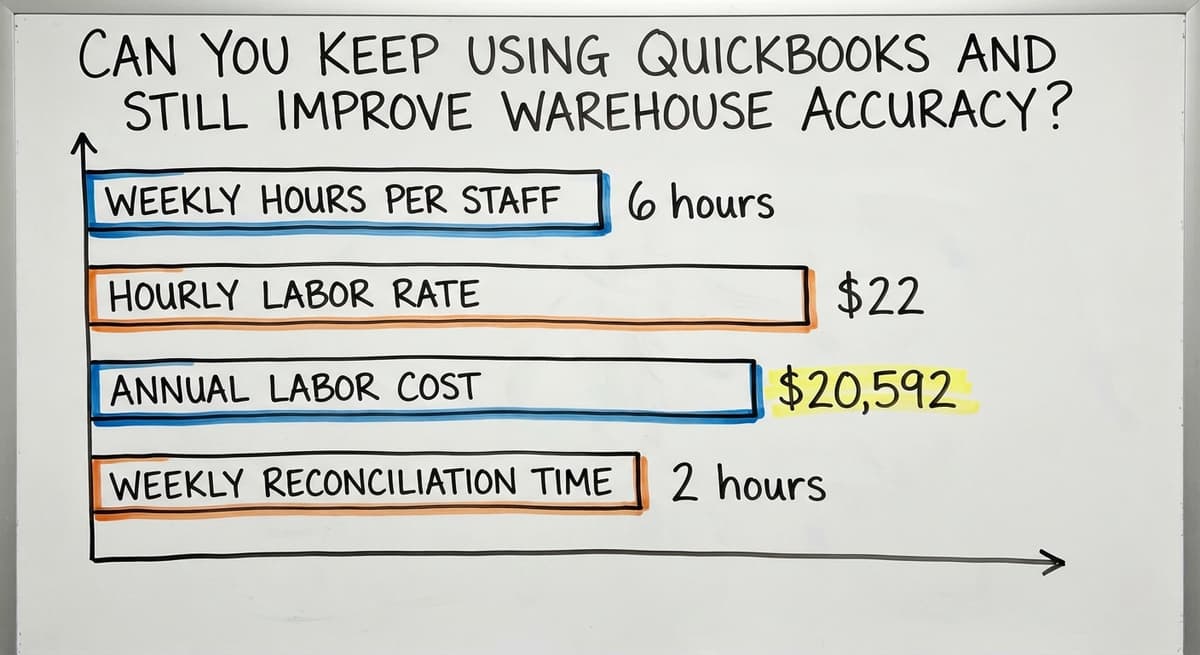
Consider the cost of the manual alternative. If 3 staff members spend 6 hours a week reconciling counts at $22 an hour, that is $20,592 a year in labor, before accounting for the orders that ship wrong or the customers who call to complain. A connected system pays for itself faster than most owners expect.
What does it look like running on your own process?
The first thing you see is it running on your own process, at no build cost. The subscription starts once it is live and doing the job, not before.
Book a callSigns Your Accounting Software Alone Is No Longer Enough
- Staff spend more than 2 hours a week reconciling inventory counts
- Orders ship with wrong items or quantities more than once a month
- You cannot answer a customer availability question without walking the floor
- Receiving and picking are logged in different places that never fully agree
None of these mean you need a full ERP with a year-long rollout. Warehouse inventory management software for small distributors is built to slot into an existing operation, not replace it wholesale.

Who Should Own Inventory Tasks in Your Warehouse?
Inventory accuracy is a team habit, not a software feature. Assign who owns receiving, who owns cycle counts, and who approves adjustments. Without clear ownership, corrections get skipped and errors compound.
Write the roles on one page. Not a long policy document. One page with names, tasks, and the frequency of each task. New staff can follow it on day one without a training session.
A simple ownership structure looks like this:
- Receiving lead: logs every inbound shipment before it hits the shelf
- Cycle count lead: counts the assigned zone each morning before picks begin
- Adjustment approver: reviews and signs off on any count correction above 5 units
When a discrepancy shows up, everyone knows who handles it. That clarity is worth more than any feature in a software demo.
Use Reports to Spot Problems Before They Cost You
Weekly reports on shrinkage, slow movers, and stockouts show patterns before they turn into crises. A SKU that is always over count points to a receiving error. A SKU that is always under count points to a picking or theft problem.
Slow-moving inventory ties up cash and floor space. The US Census Bureau's Monthly Wholesale Trade data tracks the national inventories-to-sales ratio for wholesale firms, and that ratio matters because carrying excess stock has a real cost measured in working capital.
Good reporting does not require expensive software. It requires consistent data entry upstream. If receiving, picking, and cycle counts are logged accurately, a basic spreadsheet report gives you what you need each week.
Look for these patterns in your weekly review:
- SKUs with repeated count discrepancies (process gap)
- Items with no movement in 60 days (cash tied up in slow stock)
- Stockouts on high-velocity SKUs (reorder point set too low)
- Adjustments approved without a reason logged (accountability gap)

A Simple Daily Routine That Keeps Inventory Accurate
No system is accurate without daily habits. The routine does not need to be long. It needs to be consistent.
Start of day:
- Confirm open orders and check reorder alerts
- Assign the cycle count zone for the morning
- Brief the receiving team on expected inbound shipments
During the day:
- Scan or log every receipt as soon as it arrives
- Record every pick as it leaves the shelf, not at end of shift
- Flag any count discrepancy immediately rather than waiting
End of day:
- Review adjustments made and confirm each has a reason logged
- Check that all inbound shipments are recorded and shelved
- Note any discrepancies for follow-up the next morning
A 10-minute end-of-day check prevents a full week of reconciliation work. The Bureau of Labor Statistics reports median hourly wages for warehouse stock clerks.
At those rates, even 3 hours of weekly reconciliation work across a small team adds up to a meaningful annual cost. The daily routine eliminates most of it.
What is in a free first look?
A 30 minute call, your operation mapped, and a clear picture of what we would build. No obligation and nothing to install.
Book a callWhen Is a Spreadsheet No Longer Enough?
Spreadsheets are fine in early-stage operations, up to about 200 SKUs. At some point, the signs that you have outgrown them become hard to ignore.
Look for these signals:
- Your team spends hours each week reconciling counts that never fully agree
- Orders ship wrong more than once or twice a month
- Customers call to ask about availability because your team cannot answer from a screen
- New staff take weeks to learn the spreadsheet logic rather than days to follow a system
The answer is not always a full ERP. Full ERP implementations take 12 to 18 months and require dedicated IT resources that small teams do not have.
Custom warehouse software built around your process can replace only the broken parts while leaving everything else in place.
Replacing spreadsheets in a distribution operation works best when the replacement is built around how your team already works, not around how a software vendor thinks warehouses should work.
The goal is a system your floor team will actually use, not one that requires a consultant every time something changes.
If your operation is ready to move beyond manual tools, custom warehouse software built around your process is worth a direct conversation. The Software Society builds connected systems that fit existing operations rather than demanding that operations change to fit the software.

Frequently Asked Questions
What are the 5 steps of inventory management?
The 5 core steps are: (1) count what you have with a physical inventory count, (2) label every location and SKU with a consistent system, (3) control what comes in through a documented receiving process, (4) record every outbound pick in real time, and (5) run regular cycle counts to keep the numbers honest between full counts.
Reorder points and reporting sit on top of those 5 steps once the foundation is solid.
What is the 80/20 rule in inventory?
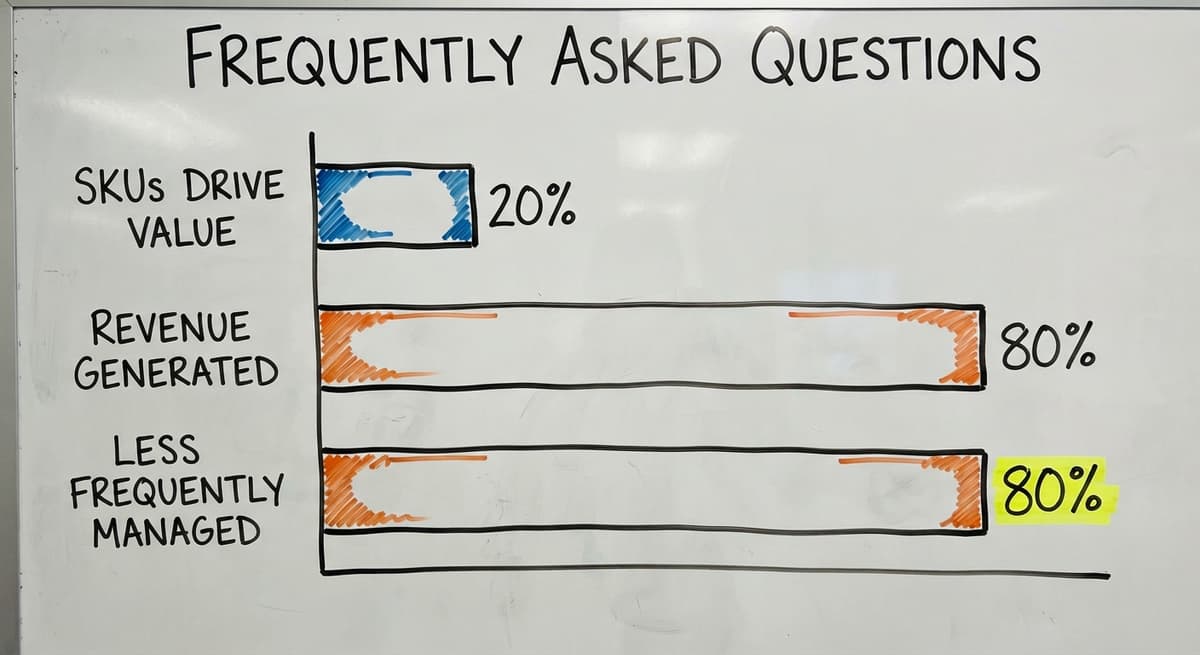
The 80/20 rule in inventory, sometimes called ABC analysis, holds that roughly 20% of your SKUs drive about 80% of your sales volume.
In practice, that means a small group of high-velocity items deserves more attention: tighter reorder points, more frequent cycle counts, and priority shelf locations.
The remaining 80% of SKUs can be managed with less frequent checks. No single number applies to every warehouse, but the pattern holds broadly enough to use as a starting point.
What is the 5S rule in warehousing?
The 5S rule is a workplace organization method with 5 steps: Sort (remove what does not belong), Set in order (give everything a fixed location), Shine (keep the space clean), Standardize (document the rules so everyone follows the same process), and Sustain (maintain the habits over time). It originated in Japanese manufacturing and is widely used in warehousing because a clean, organized floor is a prerequisite for accurate inventory tracking.
What are the 5 KPIs for a warehouse?
The 5 most commonly tracked warehouse KPIs are: (1) inventory accuracy, measured as the percentage of SKUs where the system count matches the physical count; (2) order fill rate, the share of orders shipped complete on the first attempt; (3) receiving accuracy, the percentage of inbound shipments logged correctly; (4) pick accuracy, the share of picks that match the order without error; and (5) inventory turnover, how many times stock cycles through in a given period.
The Warehousing Education and Research Council publishes benchmark ranges for each of these.
How do you manage inventory in a warehouse without expensive software?
The way to manage inventory in a warehouse without expensive software is 4 steps: start with a clean physical count, assign bin location codes to every shelf, log every receipt on a shared spreadsheet as soon as it arrives, record every pick before the shift ends, and run a small cycle count each morning.
A basic spreadsheet with reorder point formulas handles alerts. These steps fix the majority of accuracy problems before any software purchase is needed.
What are the most common causes of inventory errors in a warehouse?
The most common causes are: receiving logged from a packing slip rather than an actual count, picks recorded at end of shift instead of when the pick happens, no clear bin location system so stock ends up in the wrong place, and no defined owner for cycle counts so they get skipped. Each of these is a process failure, not a software failure.
When does a warehouse need software beyond spreadsheets?
The clearest signal is when your team spends more time maintaining the spreadsheet than doing warehouse work. Other signals: orders ship wrong regularly, staff cannot answer availability questions without walking the floor, and new hires take weeks to learn the spreadsheet logic.
At that point, warehouse inventory management software for small distributors or a custom warehouse system built around your existing process will recover more in labor and error costs than it adds in monthly fees.
Frequently asked questions
Frequently asked questions
What are the 5 steps of inventory management?
The 5 core steps are: (1) count what you have with a physical inventory count, (2) label every location and SKU with a consistent system, (3) control what comes in through a documented receiving process, (4) record every outbound pick in real time, and (5) run regular cycle counts to keep the numbers honest between full counts.
Reorder points and reporting sit on top of those 5 steps once the foundation is solid.
What is the 80/20 rule in inventory?
The 80/20 rule in inventory, sometimes called ABC analysis, holds that roughly 20% of your SKUs drive about 80% of your sales volume. That means a small group of high-velocity items deserves more attention: tighter reorder points, more frequent cycle counts plus priority shelf locations.
The remaining 80% of SKUs can be managed with less frequent checks.
What is the 5S rule in warehousing?
The 5S rule is a workplace organization method with 5 steps: Sort (remove what does not belong), Set in order (give everything a fixed location), Shine (keep the space clean), Standardize (document the rules so everyone follows the same process), and Sustain (maintain the habits over time). A clean, organized floor is a prerequisite for accurate inventory tracking.
What are the 5 KPIs for a warehouse?
The 5 most commonly tracked warehouse KPIs are: (1) inventory accuracy, the percentage of SKUs where system count matches physical count; (2) order fill rate, the share of orders shipped complete on the first attempt; (3) receiving accuracy, the percentage of inbound shipments logged correctly; (4) pick accuracy, the share of picks that match the order without error; and (5) inventory turnover, how many times stock cycles through in a given period.
How do you manage inventory in a warehouse without expensive software?
Begin with a full physical count, attach a bin location code to every shelf, log each receipt on a shared spreadsheet as soon as it arrives, log every pick before the shift ends, and run a short cycle count each morning.
A basic spreadsheet with reorder point formulas can handle the alerts. These steps resolve most accuracy problems before any software purchase is needed.
What are the most common causes of inventory errors in a warehouse?
Typical causes include receiving logged from a packing slip rather than an actual count, picks recorded at end of shift instead of when they happen, no clear bin location system so stock ends up in the wrong place, and no defined owner for cycle counts so they get skipped.
Each of these points to a process failure, not a software failure.
When does a warehouse need software beyond spreadsheets?
The clearest signal is when your team spends more time maintaining the spreadsheet than doing warehouse work. Other signals: orders ship wrong regularly, staff cannot answer availability questions without walking the floor, and new hires take weeks to learn the spreadsheet logic.
At that point, warehouse inventory management software for small distributors or a custom warehouse system will recover more in labor and error costs than it adds in fees.
How often should warehouse inventory be counted?
Warehouse inventory should be counted through regular cycle counts rather than one large annual count.
Count a section of the warehouse every day or every week, checking high-velocity items most often and slower movers less frequently, so that every location gets reviewed over the course of a quarter. This approach catches small discrepancies early, before they grow into costly write-offs.
What warehouse inventory KPIs should I track?
Inventory accuracy is the core metric to track, since it separates well-run operations from average ones. Alongside it, monitor receiving accuracy, pick accuracy, and how often recorded stock matches physical stock.
Tracking discrepancies uncovered during cycle counts, shrinkage rates, and how quickly errors are caught and corrected also helps show whether your process is actually working.
How do I choose the right warehouse management system?
Choose a system that fits how your operation already works rather than forcing your process to match the software. Start by fixing your physical count, labeling, receiving, and picking processes first, since most errors come from process gaps, not missing software.
Favor systems that support standard barcode or QR labeling so your labels keep working even if you later change tools.
What is the best inventory tracking method for a small warehouse?
For a small warehouse, a thorough physical count combined with a simple zone-based labeling system and a shared receiving log works well before adding software.
Label every bin with a location code, scan barcodes at receiving and picking where possible, and log each pick immediately. This keeps a spreadsheet or basic accounting tool accurate without requiring a full system overhaul.
How do I calculate reorder points and safety stock?
A reorder point is the stock level that triggers a new purchase order before you run out, rather than waiting until someone notices a shelf looks empty. It is based on how quickly an item sells and how long it takes to receive more stock.
Safety stock is extra inventory held above that level to absorb unexpected demand or supplier delays.
Not sure this is the right shape for your operation?
The call is free. Describe how the work runs today. We map it on a call and show you what it would look like built around that, before you spend anything.
Book a callRelated guides
The rest of this guide, for the parts of the job this page does not cover.
Guides
- Warehouse Inventory Management Software
- Warehouse Inventory Management Systems
- Inventory and Warehouse Management Software
- Warehouse Inventory Management System
Common questions
- How to Choose a Warehouse Management System
- How to Create a Warehouse Management System
- How to Build a Warehouse Management System
- How to Design a Warehouse Management System
- How to Set up a Warehouse Management System
- How Warehouse Management System Works
- How to Keep Track of Inventory in Warehouse
- Why is Warehousing and Inventory Management Important
- What is the Best Warehouse Inventory Management System?
- What is the Difference Between Warehousing and Inventory Management
- What is B Type of Inventory in Warehouse Management
- What is Warehousing and Inventory Management
- How to Manage Inventory for Small Business
- How to Manage Inventory Between Etsy and Shopify
- How to Manage Inventory in Retail Store
- How to Improve Inventory Management
- How to Manage Fba Inventory
- How to Manage Pharmacy Inventory
- How to Manage Hardware Inventory
- How to Manage Food Inventory