


How To Manage Inventory Between Etsy And Shopify
Reviewed and updated: July 2025
Reviewed September 2026. Figures are worked from the assumptions stated beside them, so you can substitute your own and the arithmetic still holds.
To manage inventory between Etsy and Shopify, you need a single source of truth that updates both platforms every time a sale happens. Without that, a sale on one channel will not reduce stock on the other. The result is overselling, canceled orders, and angry customers. Three options exist: manual tracking, a third-party sync app, or using Shopify as your inventory hub.
Book a callWhy Syncing Inventory Between Etsy and Shopify Is Harder Than It Looks
Etsy and Shopify each track stock on their own. Neither platform knows what is happening on the other by default. A sale on Etsy does not reduce your Shopify count. A sale on Shopify does not touch your Etsy listing. That gap is where overselling starts.
Manual updates can fill the gap at very low volumes, but they create lag. If 3 orders come in on a busy afternoon before you log in to adjust counts, you may already be oversold. The problem compounds as order volume grows. What takes 10 minutes a day at 5 orders a week takes an hour at 30, and the error rate climbs with it.
We build it for your operation, and the first look is free
If you would rather not compare products, describe how your operation already works and we build the system around it.
No build cost. You see it running on your own process first, and the monthly subscription starts only once it is live.
Book a callWhat Happens When Inventory Gets Out of Sync
Overselling is the most common result. A customer pays, you have nothing to ship, and you cancel the order. That damages trust and can hurt your seller ratings on Etsy. The US Federal Trade Commission's Mail, Internet, or Telephone Order Merchandise Rule needs sellers to ship within the time they stated or offer a refund. An accurate stock count is what keeps you on the right side of that rule.
Underselling: The Quieter Inventory Problem
If you set stock to zero on one channel to avoid overselling, you leave real sales behind. The classic failure: your last unit sells on Etsy and Shopify at the same moment. You ship to one customer and refund the other. As GS1 notes when describing the barcode standards that underpin scan-based inventory counts, consistent product spotting across channels is what makes a shared stock count possible in the first place. Without that foundation, any sync you build is fragile.
What Are the Main Ways to Manage Inventory Between Etsy and Shopify?
Three realistic options exist for multichannel inventory control between these two platforms. The right one depends on how many orders you process and how complex your product catalog is. Each option has a clear ceiling, and knowing where that ceiling sits saves you from rebuilding your system six months in.
Option 1: Manual Tracking With a Spreadsheet
Manual tracking works when order volume is very low, say under 10 orders a week across both channels. After every sale, you open your spreadsheet, find the SKU (stock keeping unit, the unique code for each product), and reduce the count by hand. Then you update the listing on whichever platform did not process the sale.
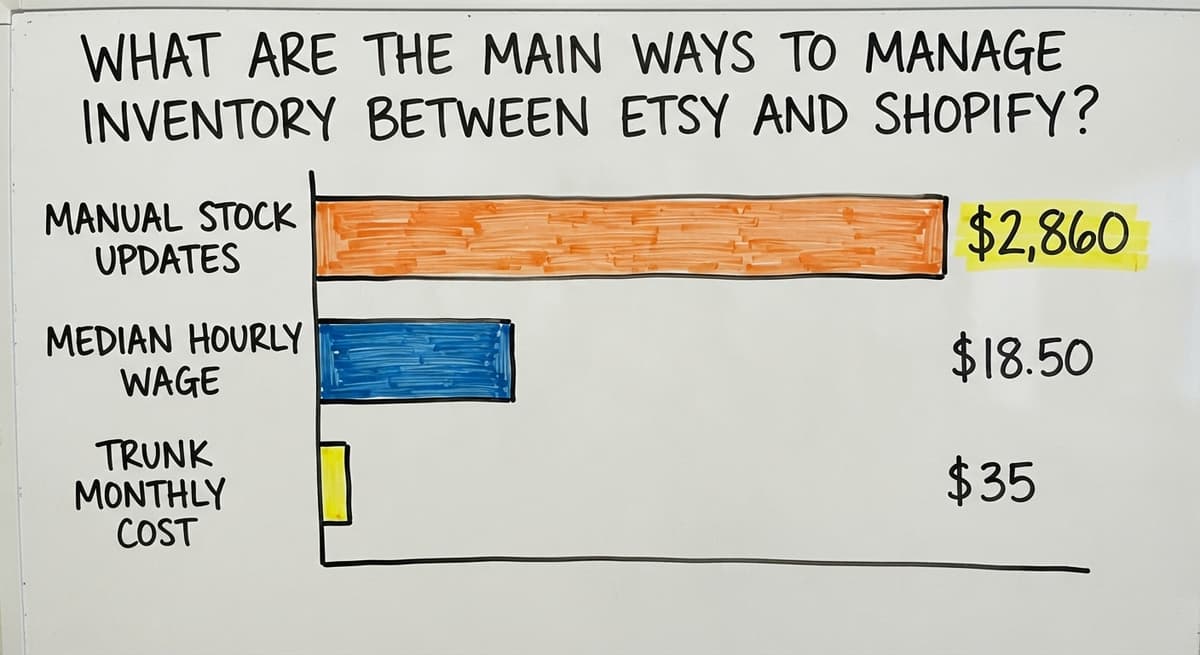
The risk is human error. One missed update and you are oversold. One typo and your counts drift. A single person spending 30 minutes a day on manual stock updates at the current median wage for stock clerks costs roughly $2,860 a year, based on Bureau of Labor Statistics data showing median hourly pay around $18.50 for that role. That cost grows before the error rate does. Treat this as a starting point only, not a long-term plan.
The comparison is easier when one option is built for you
Off-the-shelf means fitting your process to the software. We do it the other way round, and the first look costs nothing.
Book a callOption 2: Using a Third-Party Inventory Sync App
Apps like Trunk, Craftybase, and Multiorders connect Etsy and Shopify so that a sale on either platform triggers a real-time inventory update on the other. You set up the connection once, map your SKUs across both channels, and the app handles the math.
Most tools charge a monthly fee tied to order volume. Trunk starts around $35 a month for low-volume sellers. Craftybase is built for makers and tracks materials as well as finished goods. Multiorders suits sellers managing more than 2 channels at once.
A sync app is the right move for most growing sellers. It removes the manual step that causes most overselling errors, and the monthly cost is almost always lower than the labor it replaces. The main limit is complexity: bundles, kits, and custom orders often break standard sync logic, and that is when you need something more robust.
Option 3: Using Shopify as the Inventory Hub
Shopify can act as the master inventory source for your entire catalog. An integration app, such as the Etsy Marketplace Integration app available in the Shopify App Store, links your Etsy listings directly to Shopify stock levels. When a sale happens on Etsy, Shopify receives the order and reduces the shared count. Etsy reflects the new number automatically.
This setup needs more work upfront. You need consistent SKUs across both platforms, clean starting counts, and time to test before going live. The payoff is that Shopify becomes the single place you manage stock, pricing, and product data. Sellers with more than 50 active SKUs or plans to add more sales channels will find this approach far easier to scale than managing sync between equals.

How to Choose the Right Method for Your Business
Match the method to where your business actually is, not where you hope it will be in a year. Low-volume sellers, under 20 orders a week combined, can start with manual tracking and a clean spreadsheet. The moment errors start costing you more than a sync app would, make the switch.
Growing sellers with moderate SKU counts benefit most from a third-party sync app. The setup is fast and the ongoing work is minimal. Consider how fast your products move. A slow-moving catalog with 200 SKUs is easier to manage manually than a fast-moving one with 30.
Sellers running a warehouse, working with a fulfillment partner, or carrying more than 100 active SKUs need Shopify as their inventory hub, with integrations feeding every channel from one count. The number of SKUs you carry and the speed at which they move are the two variables that decide which method fits.
Setting Up Inventory Sync: Step-by-Step Overview
A clean setup prevents the errors that haunt sellers who rush the process. Follow these steps in order.
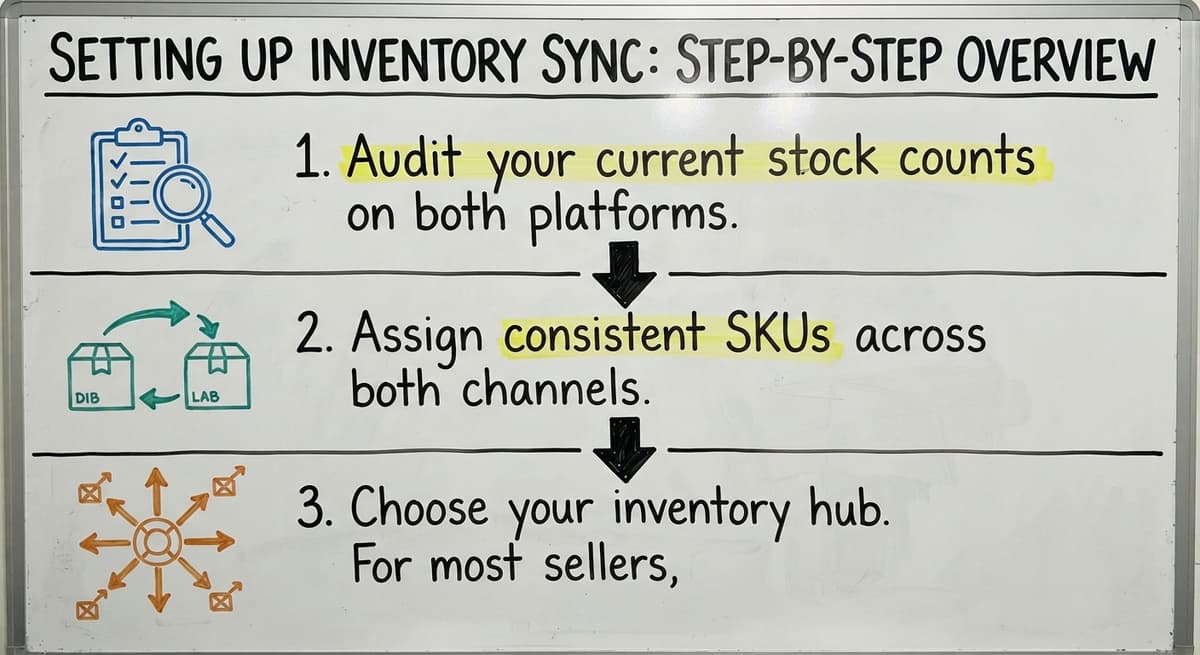
- Audit your current stock counts on both platforms. Pull a report from Etsy and Shopify on the same day. Find every mismatch and correct it before you connect anything. Dirty data going in means wrong counts coming out.
- Assign consistent SKUs across both channels. The same product needs the same SKU on Etsy and Shopify. This is how sync apps and hub integrations match records. Mismatched SKUs are the most common setup error.
- Choose your inventory hub. For most sellers, Shopify is the right choice. Set your confirmed stock counts there first.
See it running on your own process first
No build cost. The subscription starts once it is live and doing the job, not before.
Book a call
Setting Up Inventory Sync: Testing and Launch
Once your hub is configured, complete the launch carefully.
- Connect Etsy using an integration tool. Install your chosen app, authorize both accounts, and map your products. Start with a small batch, around 5 to 10 products, before enabling the full catalog.
- Run a test sale before going live. Place a test order on Etsy and confirm that Shopify stock drops by 1. Reverse the test and confirm the same in the other direction.
- Monitor daily for the first 3 weeks. Check counts each morning. Adjust sync settings if you see drift. Most issues appear in the first few days and are easy to fix early.
The IRS also needs that inventory be counted and valued at the start and end of each tax year. As IRS Publication 538 states: "To figure taxable income, you must value your inventory at the beginning and end of each tax year." Clean counts serve your taxes as well as your customers.
What Mistakes Do Sellers Make When Syncing Etsy and Shopify Inventory?
The most common mistake is starting the sync before fixing existing stock counts. If Etsy shows 4 units and Shopify shows 7 for the same product, the sync will pick one number and overwrite the other. You may not notice until you ship a product you do not have.

Other Sync Mistakes That Cause Real Problems
- Using different SKUs on each platform for the same product breaks the match that sync apps rely on. Rename them before you connect anything.
- Ignoring in-person sales that pull from the same stock. A market or pop-up sale that you forget to log will leave your online counts too high.
- Enabling the full sync before testing means a misconfigured mapping can wipe counts across your entire catalog at once.
- Launching sync right before a peak sales period leaves no time to catch errors. Run your test phase during a slow week.
Clean data is not a setup task you do once. It is the ongoing discipline that keeps multichannel selling from breaking down.
When a Simple Sync Tool Is No Longer Enough
Off-the-shelf sync apps handle the standard case well. They start to break when your operations get more complex. You have outgrown a basic sync app when:
- You ship from more than 1 location, because most sync tools track a single pool of stock and cannot split counts by warehouse or fulfillment center.
- You sell bundles or kits, where one order depletes multiple SKUs at once. Standard sync logic does not handle component-level deductions reliably.
- Custom orders change product specs at checkout, which creates variants the sync tool was not configured to handle.
Not sure this is the right shape for your operation
Describe how the work runs today. We map it on a call and show you what it would look like built around that, before you spend anything.
Book a call
When Accounting Integration Signals You Need More
- Your accounting software, such as QuickBooks, needs real-time stock values to keep your books accurate. Most sync apps do not write back to accounting systems.
The NIST Manufacturing Extension Partnership recommends treating inventory as a connected working process rather than a standalone count. When your business reaches that level of complexity, a connected working system, one that ties sales channels, stock, and accounting together, becomes necessary. That is a different category of tool than a sync app.
How Inventory Management Fits Into Broader Operations
Inventory sync is one piece of a larger picture. Stock levels connect to buy orders, receiving, and reorder points. When a SKU drops below its reorder threshold, someone needs to know. When a shipment arrives, counts need to go up. A sync app between Etsy and Shopify handles neither of those steps.

The Cost of Managing Stock Loosely
Many growing businesses run QuickBooks for accounting alongside spreadsheets for stock. That combination works until it does not. The US Census Bureau's Monthly Wholesale Trade data tracks the national inventories-to-sales ratio, a signal of how tightly businesses manage stock relative to demand. Businesses that manage stock loosely carry more of it than they need, which ties up cash.
A custom-built working system can connect your sales channels, stock counts, buy orders, and QuickBooks without replacing the tools your team already knows. That is a different investment than a sync app, but it solves a different problem: not just keeping counts aligned, but running the whole supply chain from one place. If your business is hitting that wall, the next step is a conversation about what a connected system would look like for your specific operations.
Quick Summary: Managing Inventory Between Etsy and Shopify
Three options exist. Manual spreadsheets work at very low volumes but break as orders grow. A third-party sync app like Trunk or Multiorders automates stock updates between both platforms and fits most growing sellers. Using Shopify as your inventory hub gives you the most control and scales furthest, but needs a clean setup.
The right choice depends on your order volume and SKU count. Clean data is the foundation of any method. A sync built on mismatched SKUs or wrong starting counts will fail regardless of the tool.
If you have outgrown off-the-shelf sync tools and need stock, orders, and accounting connected in one place, that is a sign your business needs a custom working system rather than another app. The Software Society builds connected systems for growing businesses ready to move beyond fragmented tools.
Frequently asked questions
Is it worth having both Etsy and Shopify?
For most product-based sellers, yes. Etsy gives you access to buyers who are already searching for handmade or unique goods. Shopify gives you a branded storefront you fully control. Running both expands your reach, but it adds the complexity of managing inventory across two channels. The added revenue usually justifies the setup work once you have a sync system in place.
Can you have a Shopify and Etsy store at the same time?
Yes. Nothing stops you from running both stores simultaneously. Etsy and Shopify are separate platforms with separate accounts. The challenge is keeping stock counts aligned across both. An integration app or using Shopify as your inventory hub handles that connection so you are not updating counts by hand after every sale.
What inventory management system is best for Shopify?
There is no single best answer. It depends on your order volume and complexity. Shopify's built-in inventory tools work well for sellers with a single location and straightforward products. For multichannel selling, Trunk and Multiorders are well-regarded sync apps. Sellers with warehouses, bundles, or accounting integration needs often need a more connected system built around their specific workflow.
Is it cheaper to sell on Etsy or Shopify?
Etsy charges listing fees ($0.20 per listing), transaction fees (6.5% per sale), and payment processing fees. There is no monthly fee on the standard plan. Shopify charges a monthly subscription starting at $39, plus payment processing fees, but no per-listing fee. At low sales volumes, Etsy is usually cheaper. As volume grows, Shopify's flat monthly fee often costs less per order than Etsy's percentage-based fees.
What apps can sync inventory between Etsy and Shopify automatically?
Trunk, Craftybase, and Multiorders are three commonly used options. Trunk is straightforward for sellers with simple catalogs. Craftybase suits makers who also track raw materials. Multiorders works well for sellers on more than 2 channels. The Etsy Marketplace Integration app in the Shopify App Store is another option if you want Shopify to act as the hub. Each has a different pricing model, so compare based on your monthly order volume.
What happens if I oversell because my inventory is out of sync?
You will need to cancel the order or source the product elsewhere. Canceling damages customer trust and can lower your seller rating on Etsy. The FTC's Mail, Internet, or Telephone Order Merchandise Rule also needs you to ship within the stated timeframe or offer a full refund. Repeated overselling can lead to account warnings. A reliable sync system is the practical fix.
Can Shopify act as the master inventory source for Etsy?
Yes. Using an integration app, you can connect your Etsy listings to Shopify stock levels. When a sale happens on either platform, Shopify receives the order and reduces the shared count. Etsy updates automatically. This setup needs consistent SKUs on both platforms and a clean starting count in Shopify, but it gives you one place to manage all stock going forward.
How do I set up inventory sync between Etsy and Shopify step by step?
Start by auditing stock counts on both platforms and fixing any mismatches. Assign the same SKU to the same product on both channels. Set your confirmed counts in Shopify, then connect Etsy using an integration app. Test with 5 to 10 products before enabling your full catalog. Place a test order and confirm the count drops on both sides. Monitor daily for the first 3 weeks and adjust any settings that cause drift.
Start with a free first look
A 30 minute call, your operation mapped, and a clear picture of what we would build. No obligation and nothing to install.
Book a callRelated guides
More on the same work.
Guides
Common questions
- How to Manage Inventory in Retail Store
- What is the Difference Between Aggregate and Item Inventory Management
- What is the Difference Between Warehousing and Inventory Management
- How to Manage Food Inventory
- How to Manage Consignment Inventory
- How to Manage Fba Inventory
- How to Improve Inventory Management
- How to Manage Hardware Inventory
- How to Manage Inventory Efficiently
- How to Manage Inventory in a Warehouse
- How to Manage Pharmacy Inventory
- How to Manage Inventory for Small Business
- How to Create a Warehouse Management System
- How to Set up a Warehouse Management System
- How to Design a Warehouse Management System
- How to Build a Warehouse Management System
- How Warehouse Management System Works
- How to Choose a Warehouse Management System
- How to Create an Inventory Tracking System?
- How to Keep Track of Ebay Inventory
- How to Keep Track of Inventory
- How to Resolve Inventory Discrepancies
Added since this page was reviewed
The newer guides in this cluster are here.
- How to Manage Spare Parts Inventory Answered on its own page.
Added since this page was reviewed
The newer guides in this cluster are here.
- How to Manage Slow-moving Inventory Answered on its own page.
Added since this page was reviewed
The newer guides in this cluster are here.
- How to Manage Inventory in Rocket League Answered on its own page.
Added since this page was reviewed
The newer guides in this cluster are here.
- How to Manage Inventory in Stardew Valley Answered on its own page.
Added since this page was reviewed
The newer guides in this cluster are here.
- How to Manage Inventory Fallout 76 Answered on its own page.
Added since this page was reviewed
The newer guides in this cluster are here.
- How to Manage Inventory Diablo 4 Answered on its own page.
Added since this page was reviewed
The newer guides in this cluster are here.
- How to Manage Inventory Apex Legends Answered on its own page.
Added since this page was reviewed
The newer guides in this cluster are here.
- Warehouse Inventory Management Software Answered on its own page.
- Warehouse Inventory Management Systems Answered on its own page.
- Quickbooks Inventory Management Software Answered on its own page.
- Inventory and Warehouse Management Software Answered on its own page.
- Custom Inventory Management Software Answered on its own page.
- Warehouse Inventory Management System Answered on its own page.
- Multi Location Inventory Management Software Answered on its own page.
- Why is Warehousing and Inventory Management Important Answered on its own page.
- Inventory Management for Multiple Locations Answered on its own page.
- What is the Best Warehouse Inventory Management System? Answered on its own page.
- Manufacturing Inventory Management Software Answered on its own page.
- Cost of Inventory Management Software Answered on its own page.
- Manufacturing Inventory Management Answered on its own page.
- Inventory Management Software Freeware Answered on its own page.
- What is B Type of Inventory in Warehouse Management Answered on its own page.
- What is Warehousing and Inventory Management Answered on its own page.
- What is Jit Inventory Management Answered on its own page.
- Inventory Management Small Businesses Answered on its own page.
Added since this page was reviewed
The newer guides in this cluster are here.
- How to Keep Track of Inventory on Etsy Answered on its own page.