


How To Resolve Inventory Discrepancies
Reviewed and updated: October 2026
To resolve an inventory discrepancy, stop outbound orders on the affected items, do a physical count, compare it to your system record, trace the error to its source, make a corrected adjustment entry, and then fix the process that caused the gap. Most discrepancies trace back to a data entry mistake, a receiving error, or a manual hand-off between disconnected tools.
Book a callWhat Is an Inventory Discrepancy
An inventory discrepancy is any gap between what your records say you have and what is actually on the shelf. Say your system shows 50 units in a bin. You count 43. That 7-unit gap is a discrepancy.
Small gaps feel harmless. They are not. A short count can trigger a backorder you did not expect. An over-count can lead to a buy you did not need. The IRS also needs accurate inventory records: as IRS Publication 538 states, "To figure taxable income, you must value your inventory at the beginning and end of each tax year." Bad counts mean bad financials, and bad financials mean tax risk.
We build it for your operation, and the first look is free
If you would rather not compare products, describe how your operation already works and we build the system around it.
No build cost. You see it running on your own process first, and the monthly subscription starts only once it is live.
Book a callCommon Causes of Inventory Discrepancies
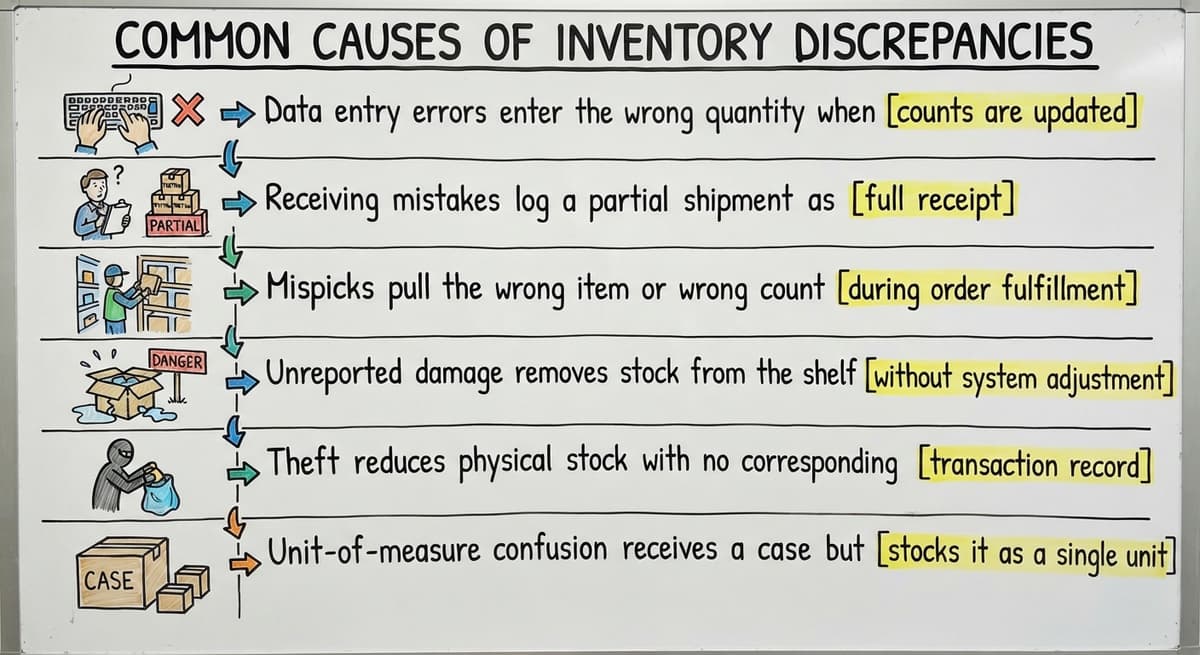
Most inventory discrepancies in a warehouse or distribution operation come from a short list of repeatable problems:
- Data entry errors enter the wrong quantity when receiving or shipping
- Receiving mistakes log a partial shipment as complete
- Mispicks pull the wrong item or wrong count without updating the record
- Unreported damage removes stock from the shelf without removing it from the system
- Theft reduces physical stock with no corresponding record
- Unit-of-measure confusion receives a case but records individual units, or the reverse
Manual processes make every one of these worse. Printed pick sheets, email updates between shifts, and spreadsheets each add a step where the count can drift before anyone notices. These problems are not unique to large operations. Small and mid-size distributors face them just as often, sometimes more so, because they have fewer checks built in.
None of these causes are permanent. They are fixable. As GS1 notes on its barcode standards page, standardized spotting and scanning reduce the manual steps where errors enter the system, which is the same principle that applies whether you run 500 SKUs or 50,000.
Step 1: What Should You Do First When You Find an Inventory Discrepancy?
Flag the affected SKUs or locations before you touch anything else. Placing a hold on outbound orders for those items is the single most important first move.
Acting on a bad number before you confirm the real count makes the discrepancy worse. A pick that goes out on a wrong count creates a second error on top of the first. Mark the location, notify whoever manages outbound, and treat the item as unavailable until the count is confirmed. Speed matters here, but accuracy matters more.
Step 2: Do a Physical Count of the Affected Items
A targeted physical count of just the problem items is faster than shutting down for a full inventory. This is the core idea behind cycle counting, which means counting a small portion of your stock on a rotating schedule rather than all at once.
For a discrepancy investigation, count only the affected SKU. A few practices improve accuracy:
- Count in pairs, or have a second person verify the first count independently
- Check every storage location for that SKU, including overflow racks and the returns area
- Record the physical count on paper or in your system before you look at what the record says
Looking at the system number first biases the count. Write down what you see, then compare.
The comparison is easier when one option is built for you
Off-the-shelf means fitting your process to the software. We do it the other way round, and the first look costs nothing.
Book a call
Step 3: Compare the Physical Count to Your Records
Pull the current on-hand quantity from your system of record. This is the number the system believes is in stock right now.
The math is simple. Physical count minus system count equals the inventory variance. A positive result means you have more stock than the system shows. A negative result means you have less.
Document the variance with 3 pieces of information: the number, the date, and the name of the person who did the count. This record matters later. If the discrepancy comes back, you need a baseline to compare against. A variance with no date attached is nearly impossible to trace.
Step 4: Trace the Discrepancy Back to Its Source
How do you find the source of an inventory discrepancy? You review the transaction history for that SKU and look for the moment the system count and the physical count split apart.
Pull every transaction tied to the item: receipts, picks, returns, adjustments, and transfers. Common clues in the audit trail include:
- A receipt logged at the wrong quantity, such as 120 units entered when 102 arrived
- A return processed on the shelf but never recorded in the system
- A pick that left the warehouse but never updated the on-hand quantity
- A transfer between locations recorded at the origin but not at the destination
Operations running on spreadsheets and email often lack a reliable audit trail. There is no transaction log to pull. You are left interviewing staff and checking paper records, which takes far longer and still may not produce a clear answer. The absence of a trail is itself a finding: it tells you the process has no way to catch errors before they compound.
Step 5: Make the Adjustment in Your System
What is an inventory adjustment and when should you use one? An inventory adjustment is a correction entry that brings the system count in line with the confirmed physical count. Use one after you have verified the physical count and traced the cause.

A few rules make adjustments useful rather than just cosmetic:
- Record the reason, not just the number. "Receiving error on PO-4471" is useful history. "Adjustment" alone tells the next person nothing.
- Set a dollar threshold above which a manager or owner must approve the entry. A 2-unit adjustment on a low-cost item is routine. A 20-unit adjustment on a high-value SKU needs a second set of eyes.
- If your accounting package handles inventory, make sure the adjustment flows through correctly so your financials stay accurate. The IRS requirement to value inventory at year-end means a string of unrecorded adjustments creates real tax exposure.
The adjustment fixes today's number. It does not fix tomorrow's.
Step 6: Fix the Process That Caused the Error
Adjusting the count closes the gap for now. The discrepancy will return if the underlying process stays the same.
Match the fix to the root cause you found in Step 4:
- Receiving error: Add a second check at the dock. The receiver counts, a second person confirms before the receipt is logged.
- Mispick: Review label clarity and bin placement. Add a scan-to-confirm step before the pick closes.
- Return not recorded: Create a required return entry step before the item goes back to the shelf.
- Unit-of-measure confusion: Standardize how each SKU is logged and post the unit clearly on the bin label.
Process tweaks like these handle most single-cause errors. Where they fall short is when the root cause is structural: manual hand-offs between paper, email, and spreadsheets that no single tweak can fully close. Blaming the team for that kind of error is counterproductive. The process created the gap, and the process needs to change.
See it running on your own process first
No build cost. The subscription starts once it is live and doing the job, not before.
Book a callHow Do Regular Cycle Counts Prevent Inventory Discrepancies?
Cycle counting prevents discrepancies by catching them while they are still small. Count a rotating slice of your inventory on a regular schedule, and errors surface weeks after they happen rather than at year-end when they are nearly impossible to trace.

Start with your highest-value or fastest-moving SKUs. A wrong count on a slow, low-cost item costs little. The same error on a high-demand product can trigger a backorder or an unnecessary buy order.
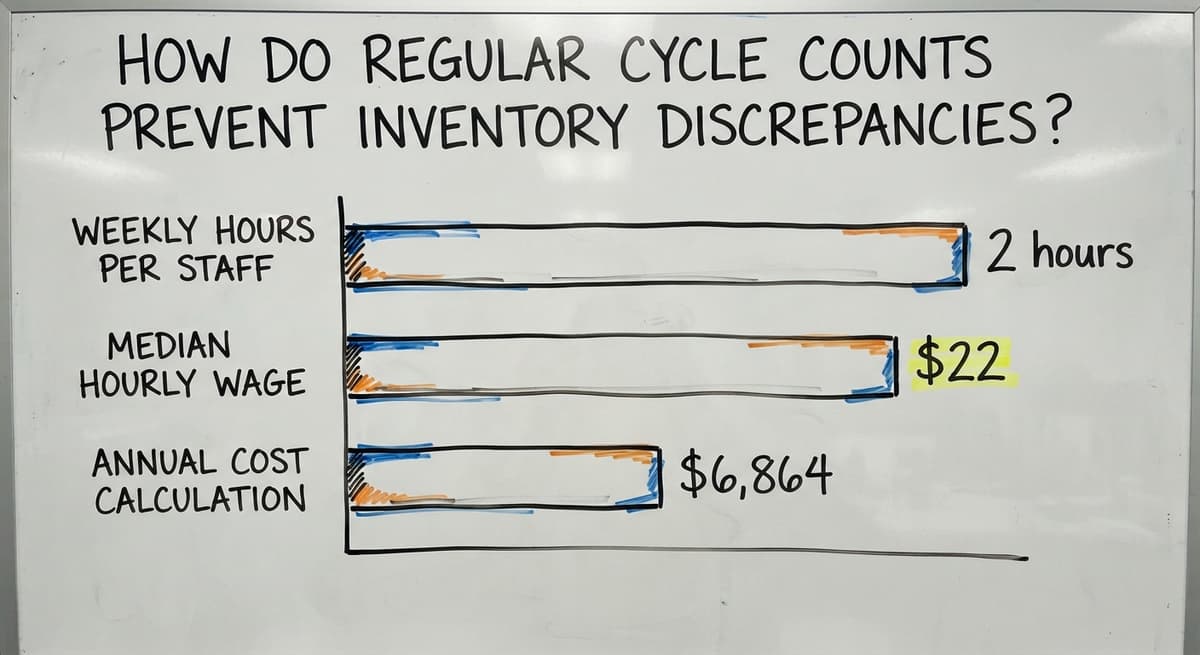
Consider the labor math. 3 staff members spending 2 hours each per week on manual cycle count paperwork at the median warehouse worker wage of roughly $22 per hour adds up to about $6,864 a year, just for the counting time, before any rework from errors those counts miss.
Cycle counting only works if the counts are recorded consistently. A paper-based process makes that hard. Sheets get lost, entries get skipped, and there is no way to confirm a count happened at all without chasing the person who did it. Consistent recording is the part most operations underinvest in.
When Manual Processes Are the Real Problem
If the same inventory discrepancies keep coming back after you have trained the team and tightened the steps, the root cause is usually the process, not the people.
The typical patchwork looks like this: an accounting package for financials, a spreadsheet for warehouse inventory, printed pick sheets on the floor, and email or text to pass updates between shifts. Each hand-off between those tools is a point where the count can drift. No single person can see the full picture at any moment.
This is not a people problem. A receiving clerk who logs a receipt in a spreadsheet and then emails the update to the warehouse manager has done exactly what the process asked. The error happens because re-entering data is how the two systems stay in sync, and re-entry always carries risk.
The US Census Bureau's Monthly Wholesale Trade data shows that wholesale inventories run in the hundreds of billions of dollars nationally. Even a small percentage of that tied up in miscounted or misplaced stock represents real money at the individual operation level. Replacing manual spreadsheet workflows in warehousing is not a luxury for large companies. It is a practical fix for anyone whose margin depends on accurate counts.
The NIST Manufacturing Extension Partnership offers vendor-neutral guidance on supply chain process and consistently points to connected data flow as the foundation of reliable inventory control. The principle is simple: fewer hand-offs mean fewer chances for error.
What a Connected Inventory Workflow Looks Like
A connected workflow means that receiving, picking, returns, and adjustments all update one shared record. No re-entry. No email to confirm the count moved. The system reflects reality as each transaction happens.

This removes the step where most errors enter: the moment someone copies a number from one place to another. When a receipt is scanned at the dock, the on-hand quantity updates at once. When a pick is confirmed, the count drops. When a return hits the shelf, the record reflects it.
Custom warehouse operations software can be built around how your operation already works. Staff do not have to change every habit. The tools change to fit the process rather than the other way around. Your accounting package stays in place for financials. The working layer handles inventory movements and feeds the accounting side automatically through an accounting software integration for wholesale distribution.
The FTC's guidance on order fulfillment makes clear that businesses must ship when they say they will. An accurate, real-time count is what makes that promise possible to keep.
Accurate inventory is not a feature of a good system. It is the output of a connected one.
Getting Outside Help to Resolve Persistent Discrepancies
Some operations have tightened their processes, retrained their teams, and still see the same discrepancies return. That pattern is a signal worth taking seriously.
A software partner who understands wholesale distribution and warehouse operations can map your current workflow and show you exactly where the count drifts. The goal is not a long, expensive rollout. It is a targeted fix built around what you already have, closing the specific gaps that keep producing errors.
Inventory management software for small distributors does not have to mean starting over. It means connecting what is already there so the hand-offs stop creating errors.
If recurring discrepancies are costing you time, margin, or customer trust, talking through your specific workflow is a useful first step. A clear picture of where the gaps are is worth more than a generic solution that does not fit how you actually operate.
Frequently asked questions
What are the common causes of inventory loss?
The most common causes of inventory loss in a warehouse or distribution operation are theft, unreported damage, mispicks that send the wrong item to a customer, receiving errors where a short shipment is logged as complete, and data entry mistakes during re-entry between systems. Manual processes, such as printed pick sheets and spreadsheet updates, multiply the risk because each hand-off is a point where the count can drift without anyone catching it.
What are four types of inventory?
The four standard types are raw materials (inputs not yet used in production), work-in-progress (items partially through a process), finished goods (ready to ship or sell), and maintenance, repair, and operations (MRO) supplies used to keep the operation running. Wholesale distributors and fulfillment centers mostly deal with finished goods and MRO, but the same counting and adjustment principles apply across all four types.
What is the 80/20 rule in inventory?
The 80/20 rule, also called the Pareto principle, holds that roughly 80 percent of your inventory value or sales volume comes from about 20 percent of your SKUs. In practice this means you should count, track, and audit your top 20 percent of items more frequently than the rest. Starting cycle counts with high-value or fast-moving SKUs applies this principle directly: errors on those items cost the most, so they deserve the most attention.
What are some effective ways to reduce inventory discrepancies?
The most effective steps are: run regular cycle counts on high-value and fast-moving SKUs; need a second person to verify each receiving count before it is logged; use scan-based confirmation at picking rather than paper pick sheets; record every adjustment with a reason code, not just a number; and connect your receiving, picking, and returns processes to a single shared record so re-entry is eliminated. Process fixes help, but the biggest gains come from removing the manual hand-offs where errors enter.
How do you find the source of an inventory discrepancy?
Pull the full transaction history for the affected SKU: receipts, picks, returns, transfers, and adjustments. Look for the transaction where the system count and the physical count first split apart. Common clues are a receipt logged at the wrong quantity, a return processed on the shelf but never recorded, or a pick that left the building without updating the on-hand quantity. Operations running on spreadsheets often lack a usable audit trail, which makes this step much harder and is itself a sign the process needs to change.
When should a business get outside help to fix recurring inventory problems?
If you have already tightened your process, retrained your team, and the same discrepancies keep returning, the root cause is likely structural rather than behavioral. That is the right time to bring in a partner who can map your actual workflow and identify where the count drifts. The goal is a targeted fix, not a full system replacement. A clear picture of the specific gaps is more valuable than a generic solution that does not fit how your operation works.
What is cycle counting and how does it help reduce discrepancies?
Cycle counting means counting a small portion of your inventory on a rotating schedule rather than stopping operations for a full annual count. By checking a slice of your stock regularly, you catch errors while they are still small and recent enough to trace. Start with your highest-value or fastest-moving items. The practice only works if counts are recorded consistently, which is difficult when the process relies on paper forms and manual entry.
Start with a free first look
A 30 minute call, your operation mapped, and a clear picture of what we would build. No obligation and nothing to install.
Book a callRelated guides
The rest of this guide, for the parts of the job this page does not cover.
Guides
Common questions
- How to Prevent Stock Discrepancies
- How to Keep Track of Inventory
- How to Record Inventory on Hand
- How to Improve Inventory Management
- How to Manage Fba Inventory
- How to Manage Pharmacy Inventory
- How to Manage Hardware Inventory
- How to Manage Food Inventory
- How to Manage Inventory Efficiently
- How to Manage Consignment Inventory
- How to Keep Track of Ebay Inventory
- How to Calculate Cycle Stock
- How to Maintain Stock Levels
- How to Manage Inventory in a Warehouse
- How to Create a Barcode System for Inventory
- How to Keep Track of Inventory in Warehouse
- How to Organize Inventory for Small Business
- How to Keep Track of Inventory Small Business
- How to Manage Inventory for Small Business
- How to Manage Inventory Between Etsy and Shopify
- How to Manage Inventory in Retail Store