

Manufacturing Inventory Software
Manufacturing inventory software tracks raw materials, work-in-progress, and finished goods through every stage of production. It differs from general inventory tools because it understands that items change form as they move through your shop floor. If you run on spreadsheets and the accounting software today, this page explains what the software does, what to look for, and how to add it without starting over.
Reviewed September 2026. Each figure comes from the assumptions stated beside it, so you can substitute your own and the arithmetic still holds.
Published 17 August 2026. Reviewed and updated 15 September 2026.
Book a callWhat Does Manufacturing Inventory Software Actually Do?
Most inventory tools count boxes. Manufacturing inventory software tracks what happens to those boxes before they become a product. Raw materials arrive, get pulled into production, become work in progress inventory, and eventually leave as finished goods. The software records every step.
That production-stage awareness is what separates it from a warehouse inventory management software tool or a simple stock ledger. A warehouse tool knows you have 400 bolts on shelf B3.
A manufacturing tool knows that 200 of those bolts are already committed to open production orders and only 200 are free to use.
The IRS makes inventory counting a legal requirement, not a choice. IRS Publication 538 states: "To figure taxable income, you must value your inventory at the beginning and end of each tax year." A system that tracks transformation, not just location, gives you a number you can actually defend.
Would you rather have it built around your operation?
The first look is free. If you would rather not compare products, describe how your operation already works and we build the system around it.
No build cost. You see it running on your own process first, and the monthly subscription starts only once it is live.
Book a callWhy Do Spreadsheets Stop Working for Small Manufacturers?
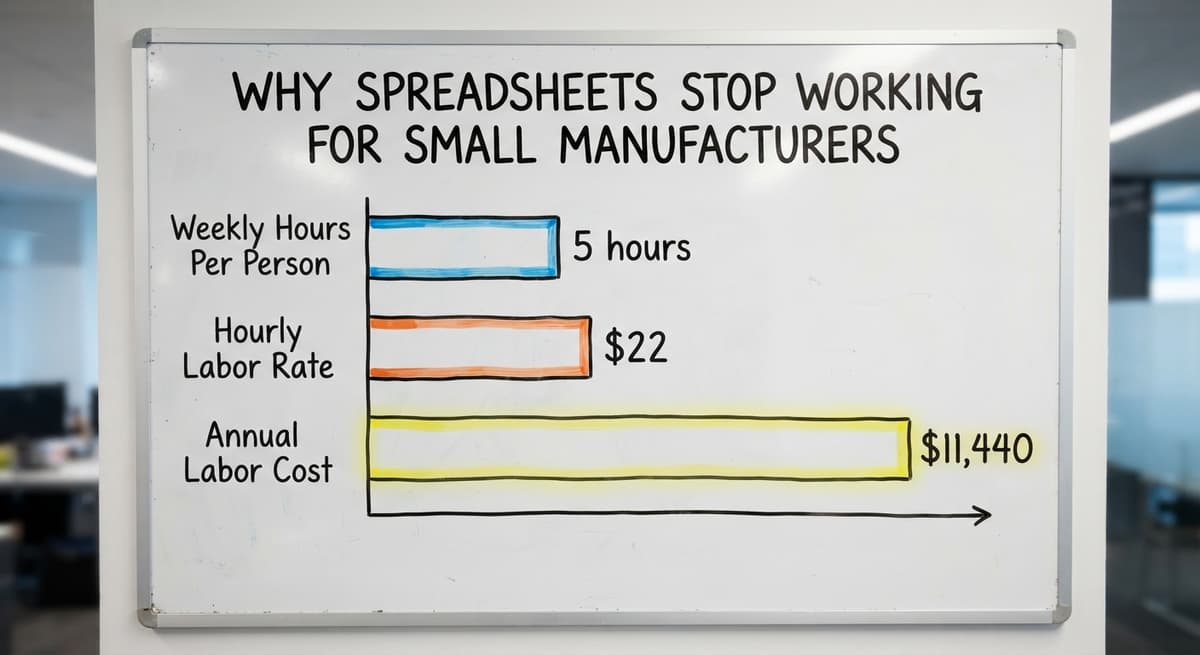
Spreadsheets feel free. They are not. Consider 2 people each spending 5 hours a week reconciling stock counts at $22 an hour. That is $11,440 a year in labor before you count a single stockout or missed order.
The deeper problem is that errors compound. One person updates a file. Another person opens an older copy. A third person emails a count that never gets merged. By Friday, no one knows which number is real.
Stockouts cost money in rush orders and lost production time. Overstock ties up cash and floor space. Neither is a personal failure. It is what happens when a system built for simple lists meets a process that involves transformation.
GS1, the global standards body behind product barcodes, notes that accurate item spotting is the foundation of any reliable count.
As GS1 explains on its barcode standards page, consistent spotting across every point in the supply chain is what makes a count trustworthy. Spreadsheets cannot enforce that consistency across multiple people.
The US Federal Trade Commission needs businesses to ship when they said they would. Accurate stock data is what makes that promise keepable.
The Signs You Have Outgrown Your Current System
You do not need a consultant to tell you the system is broken. The signs are visible on the floor:
- Stockouts surprise the team even when the spreadsheet showed stock available
- Staff spend hours each week reconciling counts that should already match
- Managers cannot answer basic stock questions without digging through files
- Production stops because a single component is missing that was supposed to be on hand
If 2 or more of those describe your week, the tool is the problem, not the process.
What Stages Does Manufacturing Inventory Software Track?
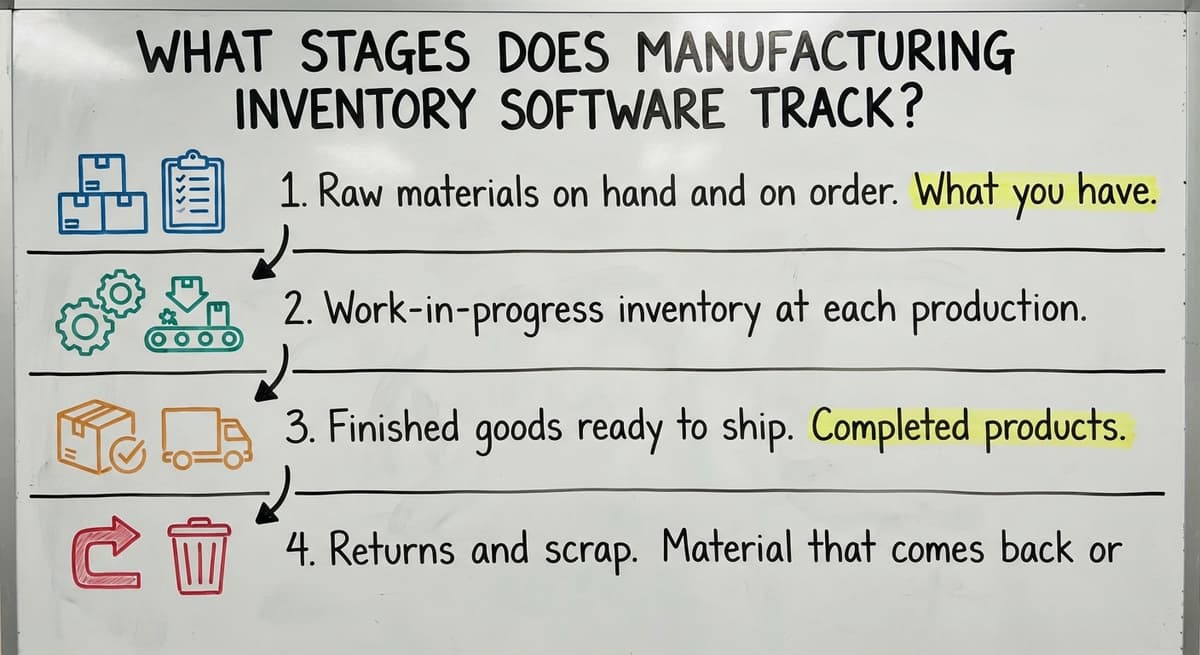
Manufacturing inventory software tracks 4 distinct stages, and missing any one of them leaves a gap in your count.
- Raw materials on hand and on order. What you have received and what is still coming from suppliers.
- Work-in-progress inventory at each production stage. Materials that have left the shelf but have not yet become a finished product.
- Finished goods ready to ship. Completed products waiting for a customer order.
- Returns and scrap. Material that comes back or gets rejected, which reduces usable stock without a new buy.
General inventory tools handle stage 1 and stage 3. They skip stages 2 and 4, which is where most of the surprises come from in a manufacturing operation.
Bill of Materials and Production Order Tracking
Two features separate manufacturing inventory software from everything else: the bill of materials and the production order.
How Does a Bill of Materials Work?
A bill of materials, or BOM, is a list of every component needed to make one unit of a finished product. Think of it as a recipe. One finished widget might need 3 steel brackets, 1 motor housing, and 12 screws.
When you enter a production run into the software, it reads the BOM and calculates exactly how much of each component you need.
If you only have enough screws for 80 units but you planned to build 100, the system flags that before production starts, not after the line stops.
That single check prevents the most common and most expensive surprise in small manufacturing: running out of one inexpensive part mid-run.
Is the comparison easier when one option is built for you?
Yes. Off-the-shelf means fitting your process to the software, and custom is the other way round. The first look costs nothing.
Book a callWhat Does a Production Order Do?
A production order is the software's record of a specific build job. It links the finished goods target to the raw materials it will consume, the quantity planned, and the current status.
Managers can see job status without walking the floor or calling anyone. That visibility shortens the loop between a delay happening and a manager knowing about it. Better information means better scheduling, and better scheduling means fewer late shipments.
NIST's Manufacturing Extension Partnership offers free, vendor-neutral guidance on production process improvement for small manufacturers at nist.gov/mep. Their supply chain resources at nist.gov/mep/supply-chain cover how production visibility connects to supplier coordination.

Real-Time Stock Counts and Reorder Alerts
Manual counting at the end of the day tells you what you had. Real-time counts tell you what you have right now.
The system updates stock levels as materials are issued to a job and as finished goods are logged complete. No one has to enter a count at the end of a shift. The number changes as the work happens.
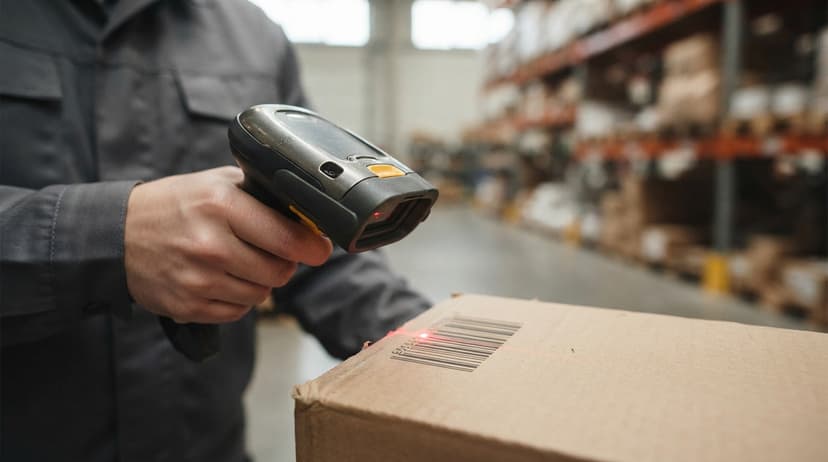
Barcode scanning, built on the spotting standards that GS1 defines, is an optional input method. Scan a bin when you pull from it. The system subtracts the quantity. Accuracy improves without adding a single labor hour.
How Do Reorder Points Work?
A reorder point is the stock level at which the system tells you to order more. Set it once per item, and the software watches the number for you.
The calculation uses 2 inputs: how fast you consume the item and how long your supplier takes to deliver.
If you use 50 units a week and your supplier takes 2 weeks, your reorder point is 100 units. When stock drops to 100, the system sends an alert or creates a buy suggestion automatically.
That replaces the mental load of remembering what to watch. Stock alerts do not need someone to remember to check.
Can Manufacturing Inventory Software Work Alongside the accounting software Instead of Replacing It?
Yes. Manufacturing inventory software sits next to the accounting software rather than replacing it. The inventory system handles stock counts, production orders, and BOMs. The accounting software handles the books.
The handoff is simple. When a buy order is received, the inventory system records the stock increase. When a job is complete, the cost of materials consumed passes to the accounting software as a journal entry or invoice line.
You do not re-enter data twice, and you do not have to abandon the accounting tool your team already knows.
accounting integration for operations like this is a standard feature in purpose-built manufacturing tools. Ask any vendor to show you the exact sync before you buy.
Small manufacturers who have built their accounting around the accounting software should not have to start over. The goal is to add production-stage awareness on top of what already works.

Custom Inventory Software Versus Off-the-Shelf Platforms
The off-the-shelf platforms you may have heard of are real products with real users. Each also comes with a fixed structure that your operation has to fit into.
Large platforms assume you will change your workflow to match the software. That works for businesses with the time and staff to retrain.
For an operation with 5 to 50 people, it means paying for features you do not use and fighting screens that do not match how your floor actually works.
Custom inventory software for small businesses is built the other way around. The developer maps your current process first, then builds screens and workflows that mirror what your team already does.
The result feels familiar on day one because it is built on your actual steps, not a generic template.
Custom operations software for small businesses is not a luxury. For manufacturers with specific workflows or mixed product lines, it is the faster path to accurate data because training time drops when the system matches the job.
| Factor | Off-the-Shelf | Custom-Built |
|---|---|---|
| Setup time | Fast install, long config | Longer build, faster adoption |
| Workflow fit | You adapt to the software | Software adapts to you |
| Feature bloat | Common | Rare |
| Cost structure | Subscription per seat | Fixed build, lower ongoing cost |
| BOM complexity support | Varies by product | Built to your spec |
How Does Manufacturing Inventory Software Reduce Waste and Overstock?
Accurate data cuts waste in 3 specific ways. First, overstock shrinks because reorder points are based on real consumption, not guesswork. Second, production history shows you how much material each job actually used, which tightens future estimates.
Third, scrap tracking reveals which processes consume more material than planned, so you can fix the process rather than just order more.
Overstock is not just a storage problem. Cash tied up in excess raw materials is cash that cannot pay wages or fund a new piece of equipment.
A manufacturer carrying $40,000 in excess stock at any given time is well lending that money to their shelves at zero interest.
Distribution inventory management tools track what moves in and out. Manufacturing software adds the layer of what gets consumed and what gets wasted, which is the data that actually changes behavior.
What does it look like running on your own process?
The first thing you see is it running on your own process, at no build cost. The subscription starts once it is live and doing the job, not before.
Book a call
What Should You Look for, and What Should You Ask Before You Buy?
What Should a Small Manufacturer Look for?
Not every system fits every shop. Before you talk to a vendor, know what your operation actually needs:
- BOM support matched to your product complexity. A shop making 3 products needs a different depth than one making 300.
- A simple interface that floor staff can learn in a day. If the receiving team cannot use it, the counts will be wrong.
- Clean connection to your accounting tool. Manual re-entry between systems creates the same errors you are trying to fix.
- A vendor who configures to your process. Any vendor who asks you to change your workflow before they understand it is selling a template, not a solution.
NIST MEP at nist.gov/mep offers free, vendor-neutral guidance to help small manufacturers evaluate options without a sales agenda.
What Questions Should I Ask a Vendor Before Buying Manufacturing Inventory Software?
Four questions cut through most sales conversations quickly:
- Can the system match our current workflow, or do we have to change it to fit the software?
- How does it connect to the accounting software, and what does the sync actually look like?
- Who handles setup and training, and is that included in the price?
- What does support look like after go-live, and who answers the phone?
If a vendor cannot answer question 1 with a specific example from your operation, move on.
Data You Already Have and How Long Implementation Takes
Most small manufacturers worry that starting a new system means starting from scratch. It does not.
Your existing spreadsheet stock lists become the opening inventory. Supplier lead times that your purchasing person already knows feed the reorder logic.
BOMs that exist on paper or in the owner's head can be entered in an afternoon. The data already exists. The system gives it a place to live.
A phased approach works best for operations under 100 staff:
- Map the current process before writing a line of code or configuring a screen
- Build or configure to match that process, not a generic template
- Train the team on screens that reflect what they already do
- Go live on one product line or one location before rolling out fully
Most small operations see accurate stock counts within the first month. Reorder alerts work as soon as reorder points are set.
Full trend reporting improves over several months as historical data builds. That timeline is fast compared to an ERP rollout, which routinely runs 12 to 18 months for a business of similar size.
Lot Tracking, Multi-Location Support, and Reporting
Three features matter for specific operations and can be skipped when they do not apply.
Lot tracking links a finished product back to the raw material batch used to make it. Food, chemical, and regulated manufacturers need this.
If a supplier recalls a batch, you can find every finished unit that used it in minutes rather than days. Expiry date tracking sits alongside lot tracking and stops out-of-date material from entering production.
Multi-location stock matters if you store materials at more than one site. The software tracks stock by location and records transfers between them so nothing disappears between buildings.
Reporting gives owners the numbers that drive decisions: stock value on hand at any moment, materials consumed per job, which products cost the most to produce based on actual material usage, and trend data showing whether inventory is growing or shrinking.
Wholesale inventory tracking at a national scale shows that inventory-to-sales ratios shift fast, according to US Census Bureau monthly wholesale trade data. A small manufacturer with good internal reporting can react before a ratio problem becomes a cash problem.
Next Steps for Small Manufacturers Ready to Improve Inventory Control
The core decision is simple: off-the-shelf or custom-built. Off-the-shelf is faster to start and right for operations whose workflow matches a standard template. Custom inventory software is right when your process is specific enough that a generic tool will fight you every day.
Before you call any vendor, write down your 3 biggest pain points in plain language. Not software requirements. Just the moments that cost you time or money this week. That list will tell you more about what you need than any feature comparison chart.
The Software Society builds custom operations software around the workflows small manufacturers already use. No forced process change. No enterprise price tag. If your inventory control is costing you more than it should, start with a conversation about what your operation actually looks like today.
Frequently asked questions
What is the best inventory management software for manufacturing?
There is no single best answer. The right fit depends on your product complexity, team size, and whether you need BOM support, lot tracking, or multi-location stock.
The off-the-shelf options work well for standard workflows. Custom-built systems work better when your process does not match a generic template. Evaluate on workflow fit first, then price.
What are the top 5 inventory management software?
For manufacturing specifically, 5 packaged tools are considered most often, and each has a different strength: one integrates tightly with the accounting software, one suits small batch manufacturers, one is simple to start, one targets sub-100-staff operations, and one handles multi-channel sales.
None is the right choice without matching it to your actual workflow first.
Is there a free inventory software?
Free tools exist, including one limited free tier and some open-source options. They rarely include bill of materials support or production order tracking, which are the features that make a tool useful for manufacturing rather than simple stock counting.
A free tool that cannot track work-in-progress inventory will not solve the problems most small manufacturers face.
Can I use spreadsheet for inventory management?
Spreadsheet works when one person manages a small, stable stock list. It breaks down when multiple people update separate files, when items change form during production, or when you need real-time counts.
The errors that result from merged files and outdated copies are the most common reason small manufacturers start looking for dedicated manufacturing inventory software.
How does manufacturing inventory software handle bills of materials?
The software stores a bill of materials for each finished product, listing every component and the quantity needed per unit.
When you enter a production run, the system reads the BOM and calculates total component requirements automatically. It then checks those requirements against current stock and flags any shortfalls before production starts.
How long does it take to implement manufacturing inventory software for a small operation?
Most small manufacturers see accurate stock counts within the first month. Reorder alerts work as soon as reorder points are configured. Full trend reporting builds over several months as historical data accumulates.
A phased rollout starting with one product line or one location shortens the time to useful data and reduces disruption to the floor.
Is custom manufacturing inventory software realistic for a business with fewer than 100 staff?
Yes. Custom-built systems are a better fit for operations under 100 staff than large off-the-shelf platforms, because the build focuses only on the features the operation actually uses.
Training time drops when the screens match what staff already do. The cost is higher upfront than a monthly subscription but avoids the ongoing cost of fighting a system that does not fit.
What data does a manufacturer need to get started with inventory software?
Three inputs cover most of the setup: a current stock list with quantities on hand, a list of supplier lead times for key materials, and the bill of materials for each finished product.
All three exist already in spreadsheets, paper records, or the owner's knowledge. Migration is mostly a matter of entering existing data into a new home rather than creating it from scratch.
How much does manufacturing inventory software cost?
Packaged tools with a bill of materials and production orders run $100 to $500 a month for a small shop, rising with users.
A build scoped to one operation runs $15,000 to $40,000 once with $200 to $600 a month for hosting and support. Scanners add $150 to $400 per station.
What is the difference between MRP and inventory management software?
Inventory software tracks what you have and where. MRP adds the planning: it turns a production schedule and a bill of materials into what to buy and when. A small manufacturer needs inventory with MRP on top, not a separate system for each.
What features should manufacturing inventory software include?
A bill of materials per product, production orders that consume components and book finished goods, lot or serial capture at receiving, reorder points on components, and a sync to the accounting package. Those 5 are the difference from retail inventory software.
What is the difference between MRP, ERP, and inventory software?
Inventory software tracks stock; MRP plans what to make and buy from it; ERP wraps both with accounting, sales, and HR in one suite over a 6 to 18 month rollout.
A shop under 50 staff needs inventory with MRP and keeps the accounting package it has.
What is in a free first look?
A 30 minute call, your operation mapped, and a clear picture of what we would build. No obligation and nothing to install.
Book a callRelated guides
The rest of this guide, for the parts of the job this page does not cover.
Guides
- Manufacturing Inventory Management Software
- Manufacturing Inventory Management
- Inventory Management System for Manufacturing
- Manufacturing Serial Number
- Warehouse Inventory Management Software
- Warehouse Inventory Tracking Software
- Best Inventory Software
- Quickbooks Inventory Management Software
- Inventory and Warehouse Management Software
- Custom Inventory Management Software
- Multi Location Inventory Management Software
- Warehouse Inventory Software Programs
- Cost of Inventory Management Software
- Inventory Software Warehouse
- Inventory Management Software Freeware
- Inventory Tracking Software for Small Business
- Accounting and Inventory Software for Small Business
- Inventory Control Software for Small Business
- Best Inventory Management Software for Small Businesses
- Inventory Sales Software Small Business
- Free Inventory Management Software for Small Business
- Inventory Management Software Barcode Scanner
- Inventory Management Software with Barcode