


How To Manage Inventory For Small Business
Managing inventory for a small business means counting what you have, coding it, and setting reorder points. Update the record after every transaction and the count stays right. You do not need expensive software to start; a spreadsheet works for the first 200 items and 1 person. This guide, reviewed in September 2026, covers the routines, the reorder point arithmetic, what errors cost, and when the spreadsheet has run out.
Published 7 July 2026. Reviewed and updated 15 September 2026.
Reviewed August 2026. Each figure comes from the assumptions stated beside it, so you can substitute your own and the arithmetic still holds.
Reviewed and updated 15 September 2026.
Book a callWhy Does Inventory Management Break Down in Small Businesses?
Most small businesses start with what works: a spreadsheet, a notebook, maybe a printed pick list. That setup gets the job done for a while. Then orders pick up, the team grows, and the cracks appear.
The common pain points are familiar:
- Overselling items you no longer have in stock
- Stockouts that delay shipments and upset customers
- Items that go missing between the shelf and the order
- Hours spent counting the same stock every week
The problem is not laziness. The tools simply stop keeping up. A warehouse running on the accounting package, spreadsheets, and printed pick sheets is not a broken operation. It is a normal small business that has grown past what those tools were built to handle together.
Would you rather have it built around your operation?
The first look is free. If you would rather not compare products, describe how your operation already works and we build the system around it.
No build cost. You see it running on your own process first, and the monthly subscription starts only once it is live.
Book a callWhy Are Accurate Stock Counts a Legal Requirement?
The US Federal Trade Commission requires that businesses ship orders within the timeframe they promise, or notify the customer and offer a refund. Accurate stock counts are what make that possible. When your records are wrong, you make promises you cannot keep.
What Does Good Inventory Management Actually Look Like?
Good inventory management means 3 things in plain terms: you know what you have, you know where it is, and you know what is coming in or going out.
That is it. You do not need a full ERP system. You do not need a warehouse management platform with a six-figure price tag.
As GS1 explains, barcode standards exist specifically so that any item can be identified and tracked consistently across any system. That is the foundation of scan-based inventory. But you do not need barcodes on day one.
Consistency beats complexity every time. A process you run every week with a spreadsheet will outperform a sophisticated system nobody updates. The goal is fewer surprises, not more reports.
Inventory Management Is a Legal Obligation, Not Just a Business Preference
The IRS makes this concrete. IRS Publication 538 states: "To figure taxable income, you must value your inventory at the beginning and end of each tax year." Inventory management is not optional. It is a legal obligation, not just a business preference.
How Do I Start Managing Inventory If I Have Never Done It Properly Before?
Start with a physical count. That is the only honest starting point, and everything else builds on it. For each item, record the name, a SKU or code, the quantity on hand, its location, and its condition.
Once you have that count, you need three numbers to tell you whether your inventory is healthy: how fast stock turns over, how many days of stock you have on hand, and where your reorder points sit.
Is the comparison easier when one option is built for you?
Yes. Off-the-shelf means fitting your process to the software, and custom is the other way round. The first look costs nothing.
Book a callWhat Inventory Numbers Should I Actually Be Tracking?
Three numbers tell you most of what you need to know about your small business inventory.
Inventory turnover measures how many times you sell through your stock in a given period. Divide your cost of goods sold by your average inventory value. A higher number means stock moves fast. A lower number means it sits.
Days on hand tells you how long your current stock will last at your current sales rate. Divide your current inventory by your average daily sales. If you have 300 units and sell 30 a day, you have 10 days of stock on hand.
Reorder point is the quantity at which you place a new order, calculated as average daily usage multiplied by lead time in days, plus a safety stock buffer. Together, these three numbers replace guesswork with a repeatable process you can run from a spreadsheet.
Step 1: Count What You Have Right Now
You cannot manage what you have not counted. Set aside time, pull everything off the shelves if needed, and record what is actually there.
For each item, write down:
- The item name or description
- A SKU or item code (create one if you do not have it yet)
- The quantity on hand
- The location in your storage area
- The condition, if it varies
A simple spreadsheet is fine for this first step. Accuracy matters more than format. One clean count done in a day is worth more than a perfect system that never gets finished.

Assign SKUs Before You Do Anything Else
A SKU (stock keeping unit) is just a short code you give each product so you can track it consistently. It can be anything: "BOOT-BLK-10" for a black boot in size 10.
The exact format does not matter. Using it every time does. The NIST Manufacturing Extension Partnership recommends that small manufacturers and distributors build process discipline before adding technology. A count is that discipline in its simplest form.
Step 2: Choose a Tracking Method That Fits Your Size
What Is the Difference Between Periodic and Perpetual Inventory Tracking?
Periodic inventory means you count stock on a set schedule, such as weekly or monthly, and update your records at that point. Between counts, you do not track every movement. It is simple and low-effort.
Perpetual inventory means every receipt, shipment, and return updates your records in real time. Your system always shows the current count, or close to it.
| Method | Best for | Main trade-off |
|---|---|---|
| Periodic | Low SKU count, slow-moving stock | Records lag between counts |
| Perpetual | High SKU count, fast-moving stock | Requires more discipline or software |
Match the method to your actual volume, not your ideal future state. A business with 40 SKUs and 20 orders a week does not need perpetual tracking. A distributor moving 500 SKUs a day does.
Start periodic if you are not sure. You can always tighten the process later as you grow.

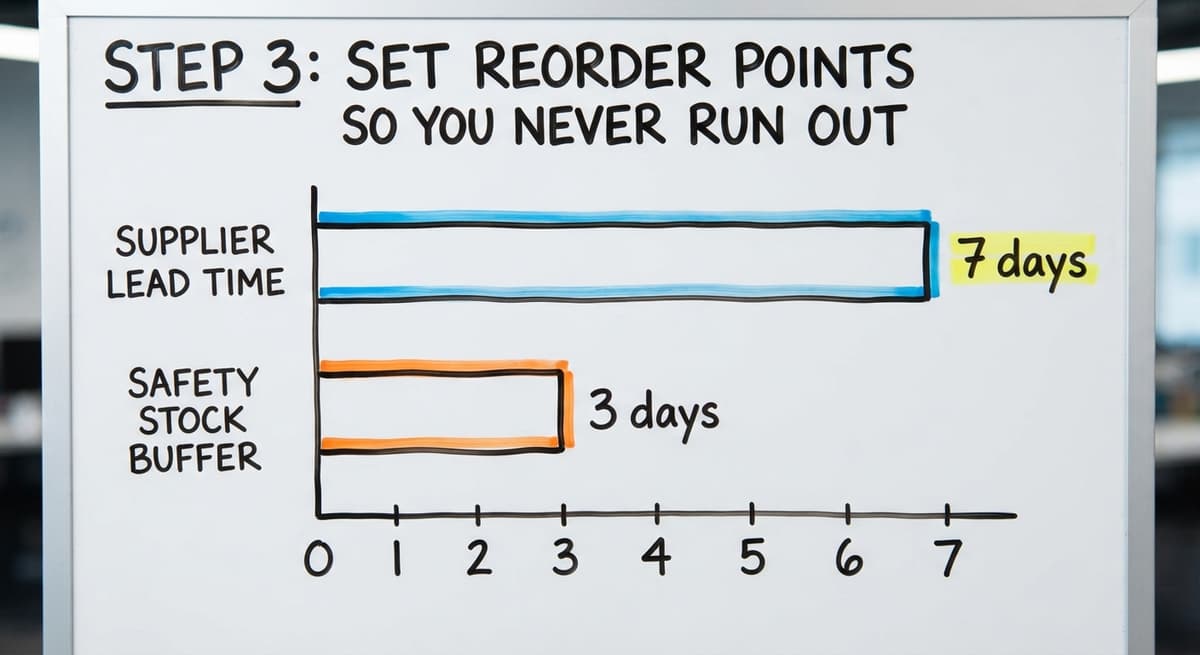
Step 3: Set Reorder Points So You Never Run Out
How Do I Know When to Reorder Stock?
A reorder point is the quantity at which you place a new order. Set it before you hit zero, not after.
The formula is straightforward:
Reorder point = (average daily usage x lead time in days) + safety stock
Here is a worked example. Say you sell 10 units a day of a product. Your supplier takes 7 days to deliver. You want 3 days of safety stock as a buffer.
(10 x 7) + (10 x 3) = 100 units
When your stock hits 100, you place the order. By the time it arrives, you still have a small buffer.
Even rough numbers work better than no numbers. If your daily usage varies, use a 30-day average. You can refine it over time. This one step eliminates most stockout emergencies for small businesses that currently order by gut feel.
How Do You Use Industry Data to Check Your Reorder Points?
The US Census Bureau's Monthly Wholesale Trade data tracks national inventories-to-sales ratios across wholesale sectors. When that ratio rises, businesses are holding more stock than they are selling.
When it falls, they are running lean. Watching your own ratio against that context helps you judge whether your reorder points are too tight or too loose.

Step 4: Organize Your Storage So Items Are Easy to Find
A well-organized warehouse cuts pick time and reduces mis-ships without any software at all. The layout of your storage space is part of your inventory system.
Four rules that work in any space:
- Label every shelf, bin, and zone with a code that matches your records. If the spreadsheet says "A3-B2", the shelf should say "A3-B2".
- Put fast-moving items closest to your packing or shipping area. Fewer steps per pick adds up fast across hundreds of orders.
- Group related items together. Picking an order should feel like a logical path, not a scavenger hunt.
- Keep a location field in your inventory records. "In stock" is not a location. "Shelf B, Bin 4" is.
Consistent location codes are the bridge between your physical space and your records. When they match, anyone on your team can find anything. When they drift apart, you lose time on every single pick.
What does it look like running on your own process?
The first thing you see is it running on your own process, at no build cost. The subscription starts once it is live and doing the job, not before.
Book a callStep 5: Keep Your Records Updated After Every Transaction
The biggest inventory mistake is counting once and never updating. A count is a snapshot. Records are the movie.
Every one of these events should trigger a record update:
- Stock received from a supplier
- Orders shipped to customers
- Items returned by customers
- Damaged or missing stock written off
- Transfers between locations
Decide who is responsible for each update. One person, or a clear handoff process. Stale records are worse than no records. They create false confidence. You think you have 47 units. You actually have 31. You sell 40. Now you have a problem.

What Do Inventory Errors Actually Cost You?
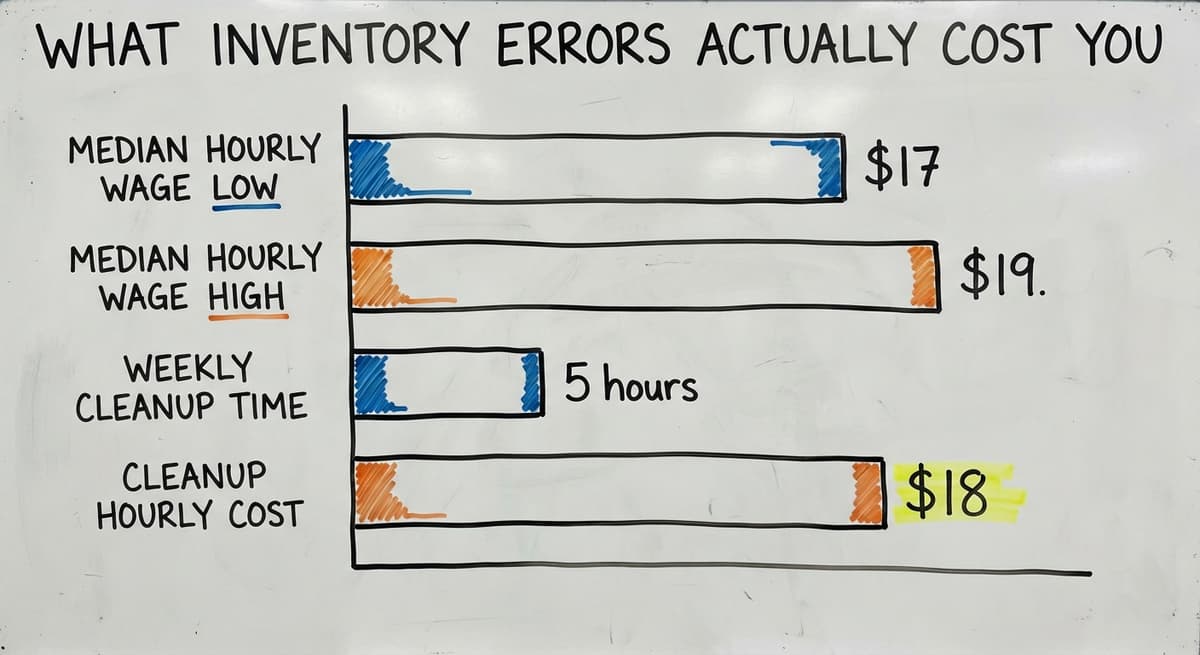
The Bureau of Labor Statistics reports that stock clerks and order fillers earn a median hourly wage around $17 to $19.
If 2 people spend 5 hours a week fixing inventory errors at $18 an hour, that is $9,360 a year spent on cleanup. Clean records prevent most of that.
How Does the Accounting Software Fit Into Small Business Inventory Management?
Can I Manage Inventory in the accounting software or Do I Need Separate Software?
The accounting software handles basic inventory tracking and ties it to your purchasing and sales. For many small businesses, that is enough to start.
The accounting software works well when:
- Your SKU count is manageable, roughly under 200 to 300 items
- Your workflow is simple: buy, stock, sell, ship
- You do not need to track items by lot or serial number
- One person or a small team manages the records

Where Does the Accounting Software Fall Short for Growing Warehouses?
Where the accounting software falls short:
- It does not track warehouse locations (which shelf, which bin)
- Barcode scanning is limited or requires add-ons
- Lot tracking and expiry dates are not built in for most plans
- Pick and pack workflows are not part of the core product
The answer is not to replace the accounting software. It handles your accounting, your payables, and your sales records.
The smarter move is to fill the gaps around it, whether through a connected tool or a purpose-built layer on top. accounting integration for warehouse operations is exactly what growing distributors look for when they hit these limits.
When Should a Small Business Stop Using Spreadsheets for Inventory?
Stop using spreadsheets when the errors cost more than the fix. That is the honest answer.
The signs are specific:
- Errors appear regularly, and you are not sure where they come from
- Updates lag because nobody has time to enter them
- Multiple versions of the same file exist, and nobody knows which is current
- Staff avoid updating the sheet because it is too slow or too confusing
When 3 of those 4 are true, the spreadsheet is no longer saving you time. It is costing you time and creating risk.

What Do You Do Instead of a Full Software Overhaul?
The next step is not always a full software overhaul. Look for tools that connect to what you already use rather than replacing everything. Replacing spreadsheet with purpose-built warehouse tools does not mean throwing out the accounting software or rebuilding your whole operation. It means plugging the specific gap that is causing the most pain.
Custom or purpose-built solutions can bridge that gap without a painful migration. The right tool fits your process. You do not reshape your operation to fit the software.
What is in a free first look?
A 30 minute call, your operation mapped, and a clear picture of what we would build. No obligation and nothing to install.
Book a callCommon Inventory Mistakes Small Businesses Make
What Are the Most Common Inventory Mistakes Small Businesses Make?
Most inventory problems come from the same short list of habits. Knowing them makes them easier to avoid.
Skipping cycle counts. A cycle count is a partial count of a subset of your stock on a regular schedule, rather than counting everything at once.
Doing a full physical count once a year and nothing in between means errors build up for months before anyone catches them.
Tracking in two places and letting them drift. the accounting software says one number. The spreadsheet says another. Nobody reconciles them. Both become unreliable.
Ordering by feel instead of by data. "We are probably running low" is not a reorder point. It is a guess. Guesses lead to both stockouts and overstock.
Waiting for a perfect system. A good-enough process you actually run beats a perfect system you never finish setting up. Start with what you have. Improve as you go.
Inventory Turnover
Inventory turnover measures how many times you sell through your stock in a given period. Divide your cost of goods sold by your average inventory value. A higher number means stock moves fast. A lower number means it sits.
Days on Hand
Days on hand tells you how long your current stock will last at your current sales rate. Divide your current inventory by your average daily sales. If you have 300 units and sell 30 a day, you have 10 days of stock on hand.
Shrinkage
Shrinkage is the gap between what your records say you have and what is actually on the shelf. It comes from theft, damage, counting errors, or paperwork mistakes. Track it by comparing your recorded count to your physical count at each cycle count.
You do not need a dashboard to track these. A monthly spreadsheet review of all 3 is enough to start seeing patterns and making better decisions.
When Should You Consider Custom Inventory Software?
Off-the-shelf tools target the average business. If your operation is average, they work fine. If your workflows are specific, you spend more time working around the software than using it.
Custom inventory software is built around how your operation already works. It keeps the accounting software in place and replaces only the manual parts that cause problems. No painful migration. No retraining your team on a system built for someone else.
For warehouses and distributors in the 5 to 100 staff range, a targeted custom build costs less than a full ERP and gets used because it fits.
Wholesale distribution operations software built to your exact process is a different thing from a generic platform you try to configure into shape.
How Do You Calculate Whether a Custom Build Pays for Itself?
The question to ask is not "which software is best?" It is "which parts of my current process are breaking, and what is the smallest fix that solves them?" That question leads to better outcomes than any feature comparison chart.
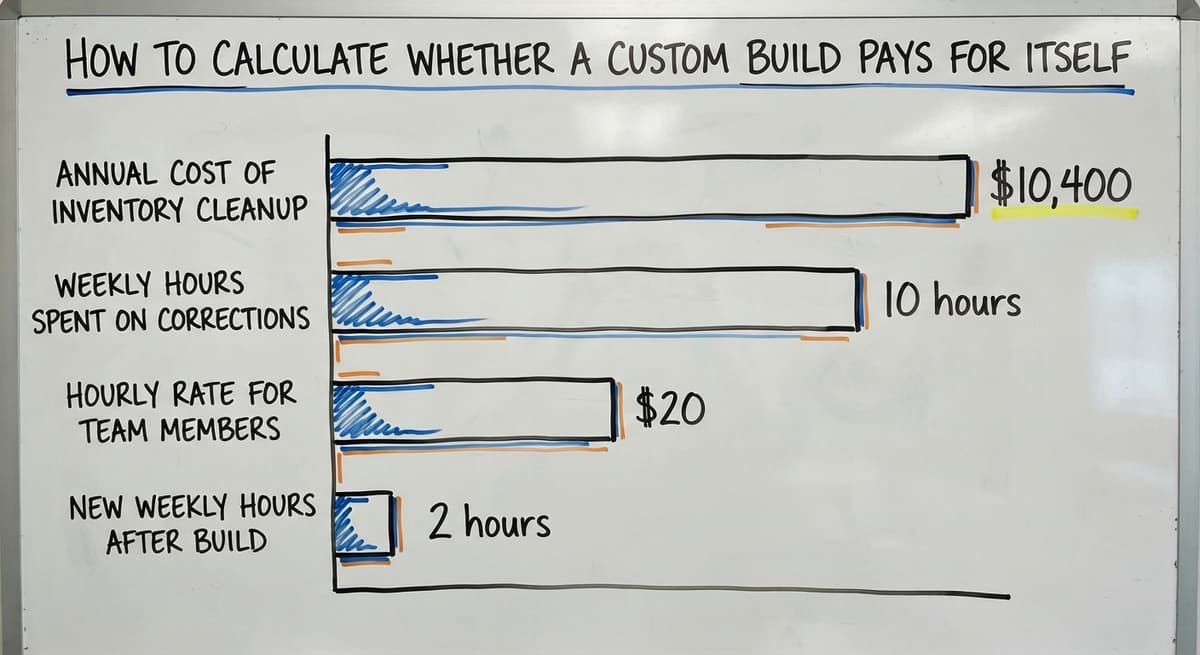
If your team is spending 10 hours a week on inventory corrections at an average of $20 an hour, that is $10,400 a year in cleanup work. A targeted build that cuts that to 2 hours pays for itself in the first year.
What Is the Best Inventory Management Method for a Small Business?
There is no single best method. The right approach depends on 3 factors: how many SKUs you carry, how fast stock moves, and how much time your team can spend on records.
A practical starting framework:
| Business size | SKU count | Recommended method |
|---|---|---|
| Very small, low volume | Under 50 SKUs | Periodic counts, spreadsheet |
| Small, moderate volume | 50 to 200 SKUs | Periodic with the accounting software tracking |
| Growing, high volume | 200 or more SKUs | Perpetual tracking, purpose-built tool |
The best method is the one your team will actually use every day. A simple system done consistently beats a complex one done occasionally.
Conclusion
Managing inventory for a small business does not require a big budget or a complex system. It requires a count, a method, a reorder point, and a habit of updating records.
Start with a physical count this week. Assign SKUs to every item. Set a reorder point for your top 10 products. Decide who updates the records and when. Those 4 steps will solve most of the pain you are dealing with right now.
As you grow, the gaps in your current tools will become clear. When they do, look for solutions that fit around what already works rather than replacing everything. The right next step is almost always smaller than you think.
If your operation has grown past what spreadsheets and the accounting software can handle together, and you want a system built around your actual workflow, that is exactly what custom workflow implementation is designed to solve. No ERP required.
Frequently asked questions
Frequently asked questions
What is the 80/20 rule in inventory?
The 80/20 rule in inventory means that roughly 80% of your sales come from 20% of your products. In practice, this tells you where to focus. Count your top 20% of products more often, keep tighter reorder points on them, and store them in the most accessible spots.
The remaining 80% of your SKUs need less attention because they drive less revenue. This is sometimes called ABC analysis, where A items are your top sellers, B items are mid-range, and C items are slow movers.
What is the best inventory management method for a small business?
There is no single best method. It depends on how many SKUs you carry and how fast stock moves. Businesses with fewer than 50 SKUs and slow-moving stock do well with periodic counts and a spreadsheet.
Businesses with more than 200 SKUs or fast-moving stock need perpetual tracking, ideally with a connected tool. The best method is the one your team will actually use every day. Start simple and add complexity only when the current method breaks down.
What are the 5 steps of inventory management?
The 5 core steps are: 1) Count what you have and assign item codes. 2) Choose a tracking method that fits your volume, either periodic or perpetual. 3) Set reorder points so you order before you run out. 4) Organize your storage so items are easy to find and pick. 5) Update your records after every transaction, including receipts, shipments, returns, and adjustments.
Each step builds on the last. Skipping any one of them is where most inventory problems start.
What is a good simple inventory system for a small business?
For most small businesses starting out, a spreadsheet with columns for SKU, description, location, quantity on hand, and reorder point is enough. Pair it with the accounting software for purchasing and sales records.
Once errors become frequent or updates start lagging, the next step is a purpose-built tool that connects to the accounting software rather than replacing it. The real products in this space each integrate with the accounting software and add warehouse location tracking and barcode scanning.
Can I manage inventory in the accounting software or do I need separate software?
The accounting software handles basic inventory tracking well for businesses with a manageable SKU count and simple workflows. It falls short when you need warehouse location tracking, lot or serial number tracking, barcode scanning, or pick and pack workflows.
The answer is usually not to replace the accounting software but to add a connected tool that fills those gaps while keeping your accounting in place.
When should a small business stop using spreadsheets for inventory?
Stop relying on spreadsheets when errors are frequent, updates lag behind reality, multiple versions of the file exist, or your team avoids updating it.
When 3 of those 4 are true, the spreadsheet is costing more time than it saves. The next step is a purpose-built tool that connects to your existing systems rather than a full software replacement.
Do I need an ERP to manage inventory properly?
No. Most small businesses do not need an ERP. A full ERP is built for large operations with complex, multi-department workflows.
For a small or mid-sized business, a combination of the accounting software plus a purpose-built inventory or warehouse tool covers the same ground at a fraction of the cost and with far less setup time. A targeted custom build costs less than an ERP license and gets used because it fits your actual process.
What inventory numbers should I actually be tracking?
Track 3 numbers to start: inventory turnover (how often you sell through your stock), days on hand (how long current stock will last at your current sales rate), and shrinkage (the gap between your recorded count and your actual count).
A monthly spreadsheet review of these 3 figures is enough to spot problems early and make better ordering decisions without needing a full reporting dashboard.
How often should a small business count inventory?
Count the fast movers weekly, everything else monthly, and the whole stockroom once a year for the accountant. Cycle counting 20 items a day keeps the record within 2 percent without ever closing for a count.
How can I reduce excess and slow-moving inventory?
Flag anything with no sale in 90 days, mark it down or bundle it before it reaches 180, and cut the reorder point on any item that has been marked down twice. Most excess is a reorder point that was set once and never revisited.
How do I calculate reorder points and safety stock?
Reorder point is average daily sales multiplied by lead time in days, plus safety stock. Safety stock is maximum daily sales multiplied by maximum lead time, minus the average of each.
A product selling 4 to 6 a day on a 10 to 14 day lead time carries 36 units of safety stock and reorders at 76.
Should a small business use FIFO or LIFO inventory accounting?
FIFO for almost every small business: it matches how stock physically moves, it is accepted everywhere, and it values remaining stock at recent cost. LIFO is a US-only tax choice that lowers profit when prices rise, and it is not permitted under international standards.
Not sure this is the right shape for your operation?
The call is free. Describe how the work runs today. We map it on a call and show you what it would look like built around that, before you spend anything.
Book a callRelated guides
The rest of this guide, for the parts of the job this page does not cover.
Guides
- Inventory Management Small Businesses
- Best Inventory Management Software for Small Businesses
- Small Business Inventory Management System
- Small Business Inventory Management
- Small Business Stock Management Software
- Inventory Tracking Software for Small Business
- Inventory Control Software for Small Business
- Inventory Tracking Systems for Small Businesses
- Simple Inventory System for Small Business
- Inventory Sales Software Small Business
- Inventory Control for Small Business
- Inventory System for Small Business
- Wms for Small Business
- Free Inventory Management Software for Small Business
- Small Business Warehouse Management System
- Warehouse Management System for Small Business
- Accounting and Inventory Software for Small Business
- Erp System for Small Businesses
Common questions
- How to Organize Inventory for Small Business
- How to Keep Track of Inventory Small Business
- What is the Best Inventory Management Software for Small Business
- Why is Inventory Management Important for Small Businesses
- What is the Best Inventory Management System for Small Businesses?
- How to Manage Inventory in a Warehouse