


How To Prevent Stock Discrepancies
To prevent stock discrepancies, standardize your receiving process, run cycle counts on a rotating schedule, assign clear ownership for each inventory task, and route all updates through one system. Those 4 steps stop most errors before they reach your records. The sections below explain how to put each one in place without shutting down operations.
Reviewed and updated: October 2026
Book a callWhat Is a Stock Discrepancy
A stock discrepancy is a mismatch between what your system says you have and what is physically on the shelf. Discrepancies show up in 3 ways: overages (the system shows less than you have), shortages (the system shows more than you have), and mislocated inventory (the units exist but are in the wrong bin). A single SKU off by 5 units looks small. Across 200 SKUs, that same rate produces 1,000 mismatched records, and each one is a potential lost sale or a bad reorder.
We build it for your operation, and the first look is free
If you would rather not compare products, describe how your operation already works and we build the system around it.
No build cost. You see it running on your own process first, and the monthly subscription starts only once it is live.
Book a callWhy Stock Discrepancies Happen
Most inventory discrepancies trace back to process gaps, not careless people. The most common root causes are manual data entry errors at receiving, missed receiving steps when the dock is busy, unrecorded returns that go straight back to the shelf, and mislabeled bins that send product to the wrong location.
Spreadsheets, printed pick sheets, and email confirmations are high-risk handoff points. Each one is a place where a record can be updated by one person and missed by another. When 2 people update the same row at different times, the later version quietly overwrites the earlier one.
The IRS makes the obligation clear: as stated in IRS Publication 538, "To figure taxable income, you must value your inventory at the beginning and end of each tax year." That requirement assumes your counts are accurate. Process gaps make that assumption hard to meet.
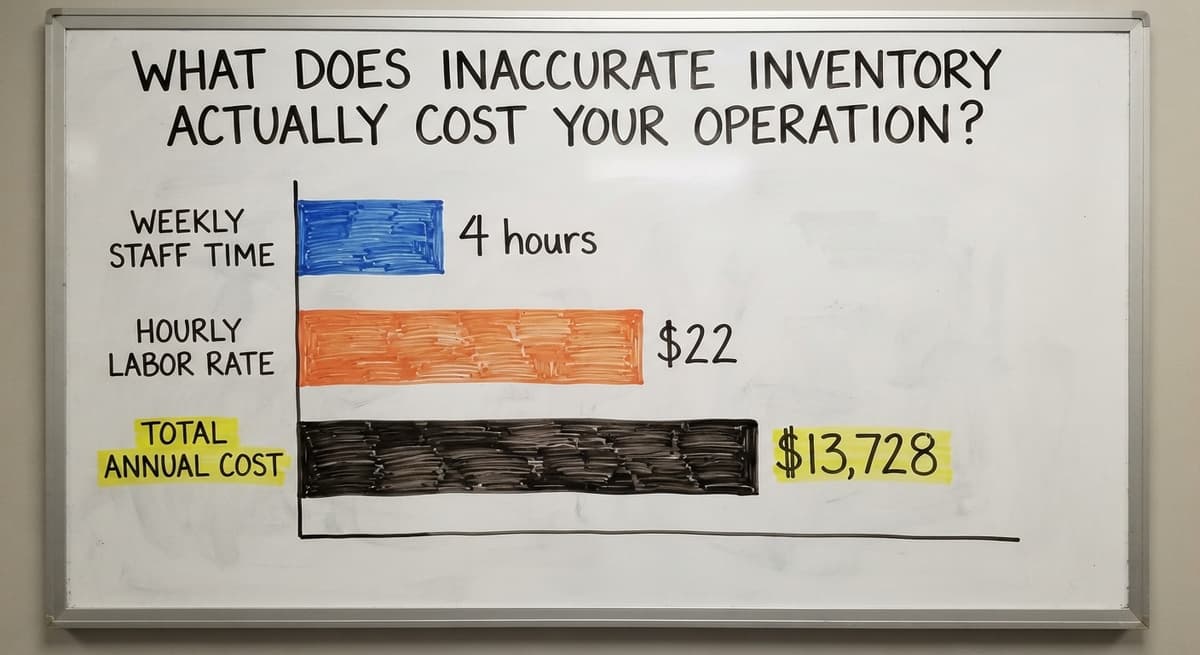
What Does Inaccurate Inventory Actually Cost Your Operation?
Inaccurate inventory costs you in ways you feel before you can measure them. Overselling a product you do not have triggers emergency reorders at full freight cost. Understating stock causes you to reorder items you already own. Customers who receive the wrong item or a backorder notice lose confidence quickly, and that trust is hard to rebuild.
Operations that run their accounting package alongside a separate spreadsheet are especially exposed. The 2 files drift apart every time someone updates one and forgets the other. Staff then spend hours each week reconciling records instead of moving product. 3 people spending 4 hours a week on manual matching at $22 an hour, a figure consistent with rates published by the US Bureau of Labor Statistics for stock clerks and order fillers, adds up to $13,728 a year in labor alone, before counting the cost of the errors those hours miss.
Start with a Clean Baseline Count
Preventing stock discrepancies starts with knowing your actual on-hand quantities right now. Every process improvement you add on top of a bad baseline will produce bad results. Run a full physical inventory count, or work through the warehouse zone by zone if a full shutdown is not practical.
Once you have a confirmed count, reconcile it back to your accounting system before you change anything else. Gaps between the count and the system record are the discrepancies you already own. Fixing those first gives you a clean starting point. That reconciled baseline is the foundation every other prevention step depends on.
The comparison is easier when one option is built for you
Off-the-shelf means fitting your process to the software. We do it the other way round, and the first look costs nothing.
Book a callUse Cycle Counts Instead of Annual Audits
How do you prevent inventory count errors without shutting down operations? Cycle counting is the answer. Cycle counting means counting a portion of your inventory on a rotating schedule rather than stopping everything for one big annual count.

The approach works like this: divide your SKUs into groups, then count one group each day or week. High-velocity items get counted more often because errors on fast-moving stock grow faster. Slower SKUs rotate in on a longer schedule.
Cycle counts spread the work across the year, so no single count is a major disruption. A team of 2 people spending 30 minutes a day on counts can cover a warehouse of several hundred SKUs without stopping shipments. Errors surface quickly, while they are still small, rather than piling up until the annual audit reveals a problem that is months old.
Which SKUs Should You Count First
Rank SKUs by velocity and by dollar value. Items that move every day and carry high unit costs are where errors hurt most. Count those weekly. Items that move once a month can rotate in every quarter. This is the practical version of the 80/20 rule applied to stock count accuracy: a small share of your SKUs drives most of your discrepancy risk.
Standardize Your Receiving Process
Receiving is one of the highest-risk moments for inventory discrepancies to enter the system. A shipment arrives, the dock is busy, someone sets boxes aside to count later, and later never comes. By the time the record gets updated, the count is wrong and no one knows it.
A written receiving checklist removes that gap. Every inbound shipment should follow the same steps:
- Pull the buy order and confirm the vendor and expected quantities before touching the boxes.
- Count every unit as it comes off the truck, not after it is on the shelf.
- Inspect condition and flag any damage before signing the delivery receipt.
- Record the actual received quantity in the system at once, at the dock.
- Move product to its assigned location only after the record is confirmed.
Recording must happen at the dock, not hours later at a desk. Delayed data entry is one of the top causes of phantom inventory, which is stock the system believes you have but that was never actually received or was received in a different quantity.

Assign Clear Ownership for Each Inventory Task
Discrepancies multiply when no single person is accountable for a step. If anyone can receive a shipment, anyone can skip the count. If anyone can process a return, returns go unrecorded.
Assign a named owner to each of these tasks: receiving, putaway, picking, and returns processing. One person per task does not mean one person does it alone every time. It means one person is responsible for making sure the step happens correctly and the record gets updated.
Accountability does not need more staff. It needs clearer role definitions. When a discrepancy appears, a clear owner can trace the step that broke down. That traceability is what turns a one-time fix into a lasting process improvement.
Eliminate Parallel Tracking Systems
When inventory lives in your accounting package and a spreadsheet and a whiteboard, those records will drift apart. That is not a prediction. It is a description of how parallel systems behave over time.
Every duplicate record is a place where a discrepancy can form. Someone updates the spreadsheet. Someone else updates the accounting package. Neither updates the whiteboard. Three days later, all 3 show different numbers and no one knows which is right.
The fix is to identify one system as the single source of truth and route every update through it. All receiving records, all picks, all returns flow into that one place. Other views of the data are read-only exports, never editable copies.
This is harder in practice than it sounds. Teams build habits around the tools they know. A spreadsheet feels faster in the moment. Changing that habit takes a clear decision about which system owns the record, communicated to everyone who touches inventory.
How Does Using Spreadsheets Alongside Accounting Software Create Discrepancies
Spreadsheets and accounting packages update independently. There is no automatic link between a cell someone edited this morning and the ledger record it was supposed to match. Every manual re-key is a chance for a typo, a missed row, or a version saved over the wrong file. The longer the two systems run in parallel, the wider the gap grows, and the harder it is to find where the split started.
See it running on your own process first
No build cost. The subscription starts once it is live and doing the job, not before.
Book a callCan Automation Prevent the Steps That Keep Getting Skipped?
Yes. Automating prevents skipped steps by removing the human decision of whether to update the record. When a shipment is confirmed, the system updates the count automatically. When stock drops below a set threshold, the system triggers a recount alert before the shortage causes a problem. No one has to remember to do it.

Manual steps get skipped when people are busy. That is exactly when accuracy matters most, because busy periods are when errors compound fastest. Targeted automating closes that gap without requiring a full enterprise system.
Automating does not have to mean a large platform replacement. Specific handoff points, receiving confirmation, pick completion, return logging, can each be automated with focused workflow tools that sit alongside existing systems. Start with the step that gets skipped most often. Fix that one first, measure the result, then move to the next. The goal is to make the right action the automatic action, not the effortful one.
Keep Your Accounting Software Connected, Not Competing
Most small distributors and warehouses are not replacing their accounting package, and they do not need to. Your accounting software handles the financial record well. The problem is not the accounting package itself. Discrepancies form in the gap between the accounting record and what is actually happening on the floor.
The answer is a bridge, not a replacement. Confirmed working data, actual received quantities, completed picks, processed returns, pushes into the accounting package automatically rather than being re-keyed by hand. Staff stop maintaining 2 records and start working from 1.
How to connect your accounting software to your warehouse operations is a practical question with a practical answer: build the connection at the point where working data becomes financial data, and make it one-way. The floor updates the system. The system updates the books. That flow preserves what already works while closing the gap that causes most discrepancies.

Review Discrepancy Reports on a Set Schedule
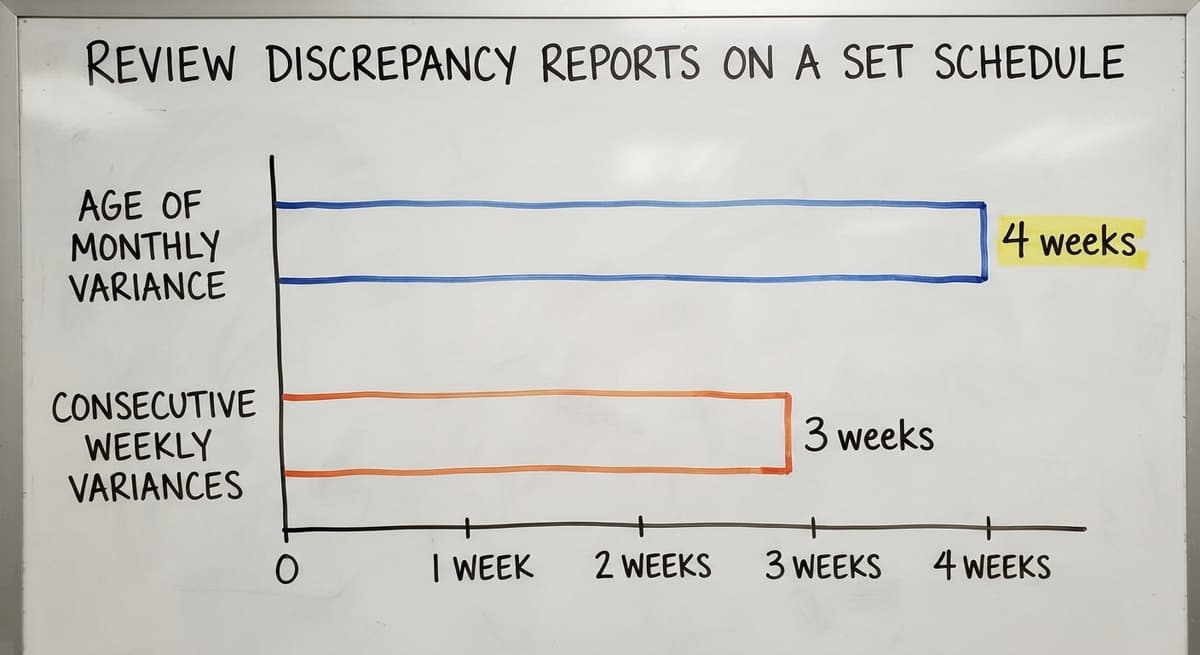
A variance report generated once a month finds problems that are already 4 weeks old. Generate a discrepancy or variance report at least weekly. A short review meeting, 20 to 30 minutes, with the people who touch inventory surfaces patterns before they become systemic.
Track which SKUs, which bin locations, and which process steps appear repeatedly in the data. A SKU that shows a variance 3 weeks in a row has a process problem, not a counting problem. A bin location that keeps producing errors may be mislabeled or in a spot where product gets mixed.
The goal of the review is to find the process gap, not to assign blame. A team that treats discrepancy data as diagnostic information fixes problems faster than one that treats it as a performance scorecard.
When Manual Fixes Stop Working
Checklists, cycle counts, and clear ownership fix most discrepancy problems for most operations. But growing businesses eventually outpace manual controls. The sign is specific: discrepancies keep reappearing in the same locations or the same SKU groups despite process improvements. The checklist is followed. The owner is accountable. The count still drifts.

At that point, the operation has fixed the easy problems. What remains is a structural gap between the volume of transactions and the capacity of manual systems to track them correctly. Signs your operation has outgrown spreadsheet-based inventory tracking include recurring variances in locations you have already addressed, staff spending more time reconciling than moving product, and a receiving process that cannot keep pace with inbound volume.
Custom warehouse software built around your workflow addresses that gap without forcing a new way of working. The system fits the operation rather than the operation bending to fit the system. If you are at that point and the same problems keep coming back, speaking with a local operations software team is the practical next step. A partner who starts by understanding your current process will build something that actually gets used.
Frequently asked questions
What is the 80/20 rule in inventory?
The 80/20 rule in inventory holds that roughly 80% of your stock discrepancies and stock value come from about 20% of your SKUs. A small group of high-velocity or high-value items drives most of your accuracy risk. Counting those items more frequently, and reviewing their process steps first, produces the largest improvement for the least effort.
What is the best way of resolving your stock take discrepancies?
The right approach depends on the size of the gap and how your records are kept. In general: recount the affected items physically, compare the result to the system record, trace the transaction history to find where the split occurred, and correct the record at the source. Adjusting the number without finding the cause means the same error will reappear.
What are the common causes of stock discrepancies?
The most common causes are manual data entry errors at receiving, product put away before it is recorded, unprocessed returns that go back to the shelf without a system update, mislabeled bin locations, and parallel tracking systems that update independently. Each one is a process gap that can be closed with a clearer procedure or a targeted automating.
How to prevent discrepancies?
Prevent discrepancies by running cycle counts on a rotating schedule, standardizing the receiving process with a written checklist, assigning named ownership for each inventory task, routing all updates through one system, and reviewing a variance report at least weekly. Those steps address the most common root causes before errors reach the financial record.
What does a standardized receiving process look like for a small warehouse team?
A standardized receiving process has 5 steps: confirm the buy order before unloading, count units as they come off the truck, inspect for damage, record the actual quantity in the system at once at the dock, and move product to its location only after the record is saved. Recording at the dock rather than later at a desk is the single most important rule.
How do you assign accountability for inventory accuracy without adding staff?
Assign a named owner to each task: receiving, putaway, picking, and returns. One owner does not mean one person does every instance of that task alone. It means one person is responsible for making sure the step is done correctly and the record is updated. Role clarity, not headcount, reduces after-the-fact matching.
When should a business move from manual inventory controls to software?
The signal is recurring discrepancies in locations or SKUs you have already addressed with process improvements. If the checklist is followed, ownership is clear, cycle counts are running, and the same variances keep appearing, the volume of transactions has outgrown what manual controls can handle. That is the point where inventory management software for small distributors becomes the practical next step.
How can accounting package users improve inventory accuracy without replacing the accounting package?
Build a one-way connection between the working floor and the accounting record. Confirmed working data flows into the accounting package automatically rather than being re-keyed by hand. Staff keep one record instead of two. The accounting package handles the financial side, a connected working layer handles the floor, and the gap where most discrepancies form closes.
Start with a free first look
A 30 minute call, your operation mapped, and a clear picture of what we would build. No obligation and nothing to install.
Book a callRelated guides
The rest of this guide, for the parts of the job this page does not cover.
Guides
- Cloud Stock Management Software
- Hospital Stock Management System
- Make to Stock Examples
- Types of Stock Control Systems
- Stock Software
- Low Stock Alert
- Procedure for Stock Control
- Warehouse Stock Management Software
- Warehouse Stock Software
- Warehouse Stock Management System
Common questions
- How to Resolve Inventory Discrepancies
- How to Calculate Cycle Stock
- How to Maintain Stock Levels
- What is Stock Taking in Inventory Management
- How to Keep Track of Inventory
- How to Record Inventory on Hand
- How to Improve Inventory Management
- How to Manage Fba Inventory
- How to Manage Pharmacy Inventory
- How to Manage Hardware Inventory
- How to Manage Food Inventory
- How to Manage Inventory Efficiently
- How to Manage Consignment Inventory
- How to Keep Track of Ebay Inventory