


How To Maintain Stock Levels
Reviewed and updated: October 2026
To maintain stock levels, set a minimum quantity for every SKU, automate reorder alerts, count inventory on a rotating schedule, and keep all stock data in one system. Operations that do these 4 things consistently avoid most stockouts and overstock problems without adding headcount.
Book a callWhy Maintaining Stock Levels Is Harder Than It Looks
Demand shifts faster than manual tracking can follow. A customer doubles an order. A supplier ships short. A team member forgets to log a return. Each event is small. Together, they push stock numbers out of sync before anyone notices.
Small and mid-size wholesale and distribution operations often run inventory across an accounting package, a spreadsheet, and a printed pick sheet. When those 3 sources disagree, no one knows which number is right. Operations managers usually find out about a stock problem only after a customer calls or a shipment comes up short. The fix is not a single tool or a one-time cleanup. It is a set of habits applied consistently, reviewed regularly, and supported by a system that keeps every number in one place.
We build it for your operation, and the first look is free
If you would rather not compare products, describe how your operation already works and we build the system around it.
No build cost. You see it running on your own process first, and the monthly subscription starts only once it is live.
Book a callSet a Minimum Stock Level for Every SKU
A minimum stock level, also called a reorder point, is the quantity that triggers a buy order before you run out. The formula is straightforward:
Reorder point = (average daily units sold x supplier lead time in days) + safety buffer
For example, if you sell 20 units a day and your supplier takes 5 days to deliver, your base reorder point is 100 units. Add a buffer of 20 units for uncertainty, and you reorder when stock hits 120. Any team member can run this math with a calculator. Write the formula on a card and post it near the receiving desk. The goal is a number anyone can check and update, not a formula locked inside someone's laptop. Simple systems get used; complex ones get ignored.
Why Accurate Inventory Numbers Are a Legal Requirement
The IRS makes clear why counting and valuing inventory is not optional: IRS Publication 538 states, "To figure taxable income, you must value your inventory at the beginning and end of each tax year." That legal obligation alone is reason enough to keep accurate numbers at all times. Review every minimum stock level at least once per quarter. Lead times change. Customers add or drop volume. A reorder point set in January may be wrong by April.
How Do You Calculate a Reorder Point Without a Spreadsheet Degree?
Any team member can run this math with a calculator. Write the formula on a card and post it near the receiving desk. The goal is a number anyone can check and update, not a formula locked inside someone's laptop. Simple systems get used; complex ones get ignored.
What Is the Difference Between Safety Stock and a Reorder Point?
Safety stock is extra inventory kept as a cushion against demand spikes or supplier delays. The reorder point includes that cushion. They are not 2 separate piles on separate shelves.
Here is a concrete example. A wholesale distributor sells 50 units of a fastener per day. The supplier lead time is 4 days. The base reorder point is 200 units. The team adds 40 units of safety stock to cover a possible delay. The reorder point becomes 240 units. When the bin hits 240, a buy order goes out. The 40-unit buffer is already built into that number.
Too much safety stock ties up cash that could fund other buys. Too little causes a stockout that costs a customer relationship. The right safety stock level is the smallest buffer that keeps service levels intact given your supplier's actual reliability.
Choose a Counting Method That Fits Your Operation
Inventory accuracy does not come from a single annual count. It comes from counting the right items at the right frequency throughout the year. 3 methods work well for small warehouse teams, and most operations use a mix.
- Cycle counting checks a rotating set of SKUs every day or week. The warehouse never shuts down, and errors surface quickly rather than once a year.
- ABC analysis ranks items by sales value and movement speed. "A" items are high-value and fast-moving; count them weekly. "B" items get counted monthly. "C" items, slow and low-value, need only a quarterly check.
- Full physical counts are still worth doing once or twice a year to catch discrepancies that cycle counts miss.
Match Counting Frequency to Risk
Not every SKU deserves the same attention. A fast-moving SKU that accounts for 30% of revenue needs more attention than a slow spare part ordered twice a year. Match counting frequency to risk. Cycle counting combined with ABC analysis gives a small team the coverage of a large one without the overtime.
What Counting Method Works Best for a Small Warehouse Team?
Cycle counting is the most practical starting point. Pick 10 to 15 SKUs each morning, count them before the first pick run, and log the result. Over a month, you will touch every item in the warehouse at least once. Discrepancies found early are cheap to fix. Discrepancies found at year-end are expensive.
The comparison is easier when one option is built for you
Off-the-shelf means fitting your process to the software. We do it the other way round, and the first look costs nothing.
Book a call
Keep One Source of Truth for Inventory Data
When stock numbers live in an accounting package, a separate spreadsheet, and a warehouse clipboard, they will eventually disagree. A single system that updates in real time gives every team member the same number at the same moment.
Disagreements between systems waste time. A buyer places a duplicate order because the spreadsheet shows low stock while the accounting package already has a buy order in transit. A picker pulls from an empty bin because the clipboard count was not entered. Each event is fixable, but the pattern erodes trust in every number the business runs on.
Why Your Accounting Package Is Not an Inventory System
Connecting existing tools often costs less than replacing them. An accounting package can stay in place for financials while a connected inventory layer handles stock control, reorder alerts, and location tracking. The accounting package was built for debits and credits, not for bin-level stock management. Giving it that job is the root cause of most data gaps in small distribution operations. For teams exploring inventory management software for wholesale distributors, the key question is not which system is biggest. It is which system connects cleanly to what you already use.
Use Reorder Alerts Instead of Memory
Relying on a buyer or warehouse manager to remember when to reorder is a single point of failure. People get busy, go on vacation, or simply miss a number buried in a spreadsheet row.
Automated reorder alerts trigger a alert or draft buy order the moment stock hits the reorder point. The alert can arrive by email, appear as a dashboard flag, or print as a daily report. The format matters less than the fact that it happens without anyone having to remember.

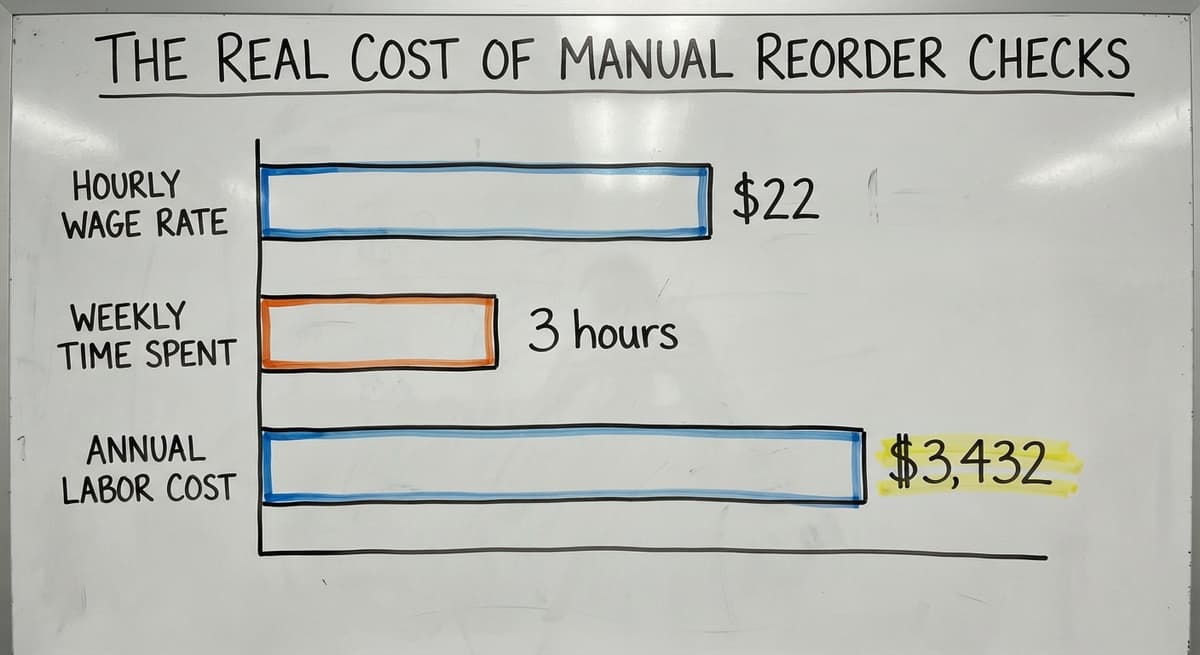
The Real Cost of Manual Reorder Checks
Consider the cost of the alternative. A warehouse coordinator earning $22 an hour, per Bureau of Labor Statistics wage data, spending 3 hours a week manually checking reorder levels across 200 SKUs costs about $3,432 a year in labor alone, before counting the stockouts that slip through anyway. Alerts remove that dependency without adding a complicated new step to the day.
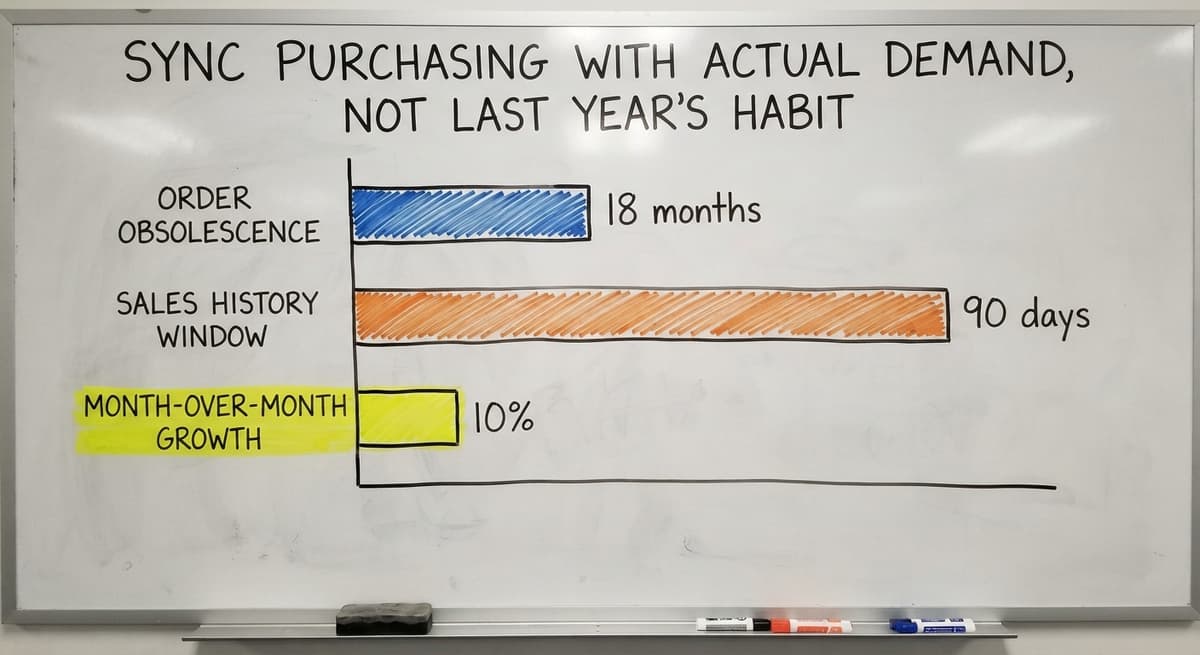
Sync Purchasing With Actual Demand, Not Last Year's Habit
Many small distributors reorder in the same quantities they always have. The order that made sense 18 months ago may now create overstock on one SKU and a stockout on another.
Pull at least 90 days of sales history before setting order quantities. Look for trends: a product climbing 10% month over month needs a larger order than the historical average suggests. A product that dropped off after a customer churned needs a smaller one.
See it running on your own process first
No build cost. The subscription starts once it is live and doing the job, not before.
Book a callDemand Forecasting Does Not Require a Data Science Team
Demand forecasting needs looking at recent sales before placing the next order rather than copying the last one. The US Census Bureau's Monthly Wholesale Trade data tracks national inventory-to-sales ratios for wholesale firms, and the pattern is consistent: operations that align purchasing to current demand carry less dead stock and fill more orders on time. Adjust order quantities when a customer adds volume, drops a product line, or when a seasonal pattern shifts. Demand-driven purchasing reduces both stockouts and the dead stock that clogs warehouse space and ties up cash.

Track Inventory Across Multiple Locations
Warehouses often split stock across bins, zones, or separate facilities. A system that shows total quantity on hand can hide the fact that a specific bin is empty while another holds excess.
Location-level tracking closes that gap. A simple bin field in your inventory system, noting that item A is in bin 3B and item B is in bin 7A, prevents mis-picks and cuts the time pickers spend searching. This does not need a full warehouse management system. Even a basic bin-level field in a connected inventory tool gives the team the visibility they need.
Why Location Tracking Pays Back Immediately
For operations running fulfillment center software built around your existing workflow, location tracking is one of the first features worth turning on. The NIST Manufacturing Extension Partnership notes that supply chain visibility at the location level is one of the lowest-cost improvements a small operation can make relative to its impact on fulfillment accuracy. Knowing where stock physically sits is as important as knowing how much of it exists. It pays back in faster pick times and fewer "where is it?" interruptions almost at once.
What Causes Shrinkage, and How Do You Reduce It?
Shrinkage is the gap between the inventory your records show and the inventory physically on the shelf. It includes theft, damage, miscounts, and items used internally without being logged. Even small, steady losses add up fast. A 1% shrinkage rate on $500,000 in annual inventory is $5,000 gone with no record of where it went.
The first step is measuring it. Compare physical counts to system counts at least monthly. Track the variance by SKU and by location so patterns become visible. A receiving area that consistently shows short counts is a different problem than a picking zone with consistent overages.

Practical Controls That Reduce Shrinkage
Practical controls include:
- Spot checks on high-value items between scheduled cycle counts
- Receiving audits that match every inbound shipment to its buy order before items are put away
- A clear write-off procedure so losses are recorded rather than quietly absorbed
Shrinkage you can see is shrinkage you can fix.
Standardize Receiving So Every Item Gets Recorded
Stock levels break down at the receiving dock more often than anywhere else. Items get put away before they are entered into the system. A shipment arrives short and no one flags it. A damaged case gets shelved instead of written off.
A simple receiving checklist stops most of these errors before they reach the inventory record. The checklist does not need to be digital. A printed form with 4 fields, buy order number, item count, condition, and the name of the person who received it, creates accountability and a paper trail.
Not sure this is the right shape for your operation
Describe how the work runs today. We map it on a call and show you what it would look like built around that, before you spend anything.
Book a callResolve Discrepancies Before the Dock Clears
Discrepancies between the buy order and the actual delivery should be resolved before the dock is cleared. Letting a short shipment sit unresolved means the inventory system overstates stock from the moment the truck pulls away. For teams looking at replacing Excel and Access databases with connected operations software, automating the receiving step, scan a barcode, quantity auto-populates, is often the single change that does the most to improve inventory accuracy. Good receiving discipline is one of the cheapest ways to close the gap between what the system says and what is actually on the shelf.
Review and Adjust Your Process Every Quarter
Maintaining stock levels is not a one-time setup. Demand changes. Suppliers change. Customers change. A reorder point that was accurate in January may cause a stockout by July if no one has updated it.
Quarterly reviews should cover 4 things:
- Reorder points: Do they still reflect current daily usage and lead times?
- Safety stock levels: Has supplier reliability improved or gotten worse?
- Slow-moving SKUs: Which items have not moved in 60 or 90 days and are tying up shelf space?
- Supplier lead times: Have any vendors gotten faster or slower since the last review?
Include the Warehouse Team in Every Review
Involve the warehouse team in these reviews. The people picking and receiving every day spot problems that reports do not surface. A bin that is always overfull or always empty is a signal worth hearing directly. Small adjustments made every quarter outperform a large overhaul done once and then left alone for 2 years.
When Manual Processes Stop Working, Software Fills the Gap
At some point, spreadsheets and memory cannot keep up. The volume grows. SKU counts climb. A second location opens. The manual system that worked at 300 orders a month breaks at 900.
Custom inventory software built around your actual workflow can automate reorder alerts, cycle counts, and receiving without forcing a full ERP migration. The accounting package stays in place for financials. A connected inventory layer handles the stock control logic that accounting software was never designed to manage.
Choose Software That Fits the Way You Already Work
For small-to-mid-size wholesale, distribution, and warehousing operations, the right software fits the way the operation actually runs. It does not ask the team to change every process to match a vendor's template. Integrating your accounting software with warehouse and distribution operations is one common starting point: the financial records stay where they are, and a purpose-built inventory system handles reorder alerts, location tracking, and cycle count scheduling alongside them. Custom warehouse management systems for small operations can be scoped and built around real workflows rather than theoretical ones. Does it give every person on the team the same accurate number, at the moment they need it, without adding a new manual step to get there? If yes, it is doing its job.
Frequently asked questions
What does it mean to maintain stock levels?
Maintaining stock levels means keeping enough of every item on hand to fill orders without holding so much that cash is tied up in unsold goods. It involves setting reorder points, counting inventory regularly, and adjusting purchasing to match real demand.
How do you stop stock levels from drifting out of sync?
Stock levels drift when receiving is not logged at once, when shrinkage goes unrecorded, or when data lives in more than one place. A single inventory system updated at the receiving dock, combined with regular cycle counts, keeps the numbers aligned.
How often should you update reorder points and safety stock?
Review reorder points and safety stock at least once per quarter. Update them sooner if a key customer changes their order pattern, a supplier's lead time shifts, or a product line is added or dropped.
What is ABC analysis in inventory management?
ABC analysis ranks every SKU by its sales value and movement speed. "A" items are high-value and fast-moving and need frequent counts. "B" items are mid-range and get counted monthly. "C" items are slow movers counted quarterly. The method focuses counting effort where errors are most costly.
When does manual inventory tracking stop being enough?
Manual tracking usually breaks down when SKU counts exceed what one person can monitor, when order volume grows past the point where spreadsheet errors are caught before they cause problems, or when a second location is added. At that point, connected software that automates alerts and syncs data across locations is the practical next step.
How do you track inventory across multiple warehouse locations without a full WMS?
Add a bin or zone field to your existing inventory records and require that every receiving entry and pick transaction includes it. Even a simple location field prevents the most common multi-location problem: total stock looks fine while one specific bin is empty.
Start with a free first look
A 30 minute call, your operation mapped, and a clear picture of what we would build. No obligation and nothing to install.
Book a callRelated guides
The rest of this guide, for the parts of the job this page does not cover.
Guides
- Cloud Stock Management Software
- Hospital Stock Management System
- Make to Stock Examples
- Types of Stock Control Systems
- Stock Software
- Low Stock Alert
- Procedure for Stock Control
- Warehouse Stock Management Software
- Warehouse Stock Software
- Warehouse Stock Management System
Common questions
- How to Calculate Cycle Stock
- How to Prevent Stock Discrepancies
- What is Stock Taking in Inventory Management
- How to Keep Track of Inventory
- How to Record Inventory on Hand
- How to Improve Inventory Management
- How to Manage Fba Inventory
- How to Manage Pharmacy Inventory
- How to Manage Hardware Inventory
- How to Manage Food Inventory
- How to Manage Inventory Efficiently
- How to Manage Consignment Inventory
- How to Keep Track of Ebay Inventory
- How to Resolve Inventory Discrepancies