


Types Of Stock Control Systems
The main types of stock control systems are periodic, perpetual, manual, barcode-based, RFID, just-in-time, min-max, ABC analysis, two-bin, cloud-based, on-premise, and custom-built. Each one fits a different operation size and workflow. This guide reviews all of them through one lens: what works for a small to mid-size wholesale distributor or warehouse running on QuickBooks and spreadsheets today.
Reviewed September 2026. Figures are worked from the assumptions stated beside them, so you can substitute your own and the arithmetic still holds.
Reviewed: June 2025
Book a callWhat Is a Stock Control System, and Why Does the Type Matter?
A stock control system is how your operation tracks what you have, where it sits, and when to reorder. It can be a paper log, a spreadsheet, or dedicated software. The system you choose shapes how fast you catch a stockout, how much time your team spends counting, and how clean your data is at tax time.
The wrong system creates real costs. As the IRS Publication 538 states, "To figure taxable income, you must value your inventory at the beginning and end of each tax year." That is a legal obligation, not a preference, and a weak system makes it harder and slower to meet. Choosing a system is a business decision, not just a technology one. Small and mid-size operations have different needs than large enterprises, and buying more system than you need wastes money just as surely as using too little.
We build it for your operation, and the first look is free
If you would rather not compare products, describe how your operation already works and we build the system around it.
No build cost. You see it running on your own process first, and the monthly subscription starts only once it is live.
Book a callPeriodic vs. Perpetual Stock Control Systems
Periodic and perpetual inventory are the 2 foundational categories of stock control, and every other system type sits on top of one of them. Periodic systems count stock at set intervals, weekly, monthly, or quarterly, and update records after each count. Perpetual systems update in real time with every transaction, whether a sale, a receipt, or a transfer. Periodic counting is simpler to set up and needs less technology, but it leaves gaps between counts where shrinkage or errors go undetected. Perpetual tracking is more accurate and supports faster decision-making, but it depends on consistent scanning or data entry at every touchpoint.
What is a periodic stock control system and how does it work?
A periodic stock control system counts and records inventory at set intervals, such as weekly or monthly, and reorder decisions happen after each count. Between counts, you are working from memory or the last snapshot. That is the core weakness: your team can run out of a fast-moving SKU on day 3 of a 30-day cycle and not know it until the next count.
Periodic review works for low-SKU operations, small retail settings, or any business where stock moves slowly enough that a weekly count stays accurate. The cost to start is low. No scanners, no software license, no training curve. For a 1-person or 2-person operation with fewer than 50 SKUs, it may be all you need.
Perpetual inventory: always-current stock levels
A perpetual inventory system updates stock levels in real time with every transaction. A sale posts, and the count drops by 1. A shipment arrives, and the count rises. Barcodes, scanners, or integrated software trigger each update automatically.
The benefit is clear: you always know where you stand. Reorder decisions happen faster because the data is current. The tradeoff is discipline. Every team member must scan or enter each transaction. One missed scan creates a gap that compounds over time. Perpetual inventory is the right baseline for any operation processing more than 20 to 30 orders a day across a broad SKU range.
Periodic vs. Perpetual: A Side-by-Side Look
Use this comparison to pick your baseline before choosing any other system feature.
| Factor | Periodic | Perpetual |
|---|---|---|
| Accuracy day-to-day | Low between counts | High if data entry is consistent |
| Startup cost | Low | Moderate to high |
| Staff effort | High at count time | Spread evenly across each transaction |
| Best fit | Low SKU, slow-moving stock | Multi-SKU, higher order volume |
Most growing distributors start periodic and switch to perpetual when stockouts start costing them orders.
Manual and Spreadsheet Stock Control Systems
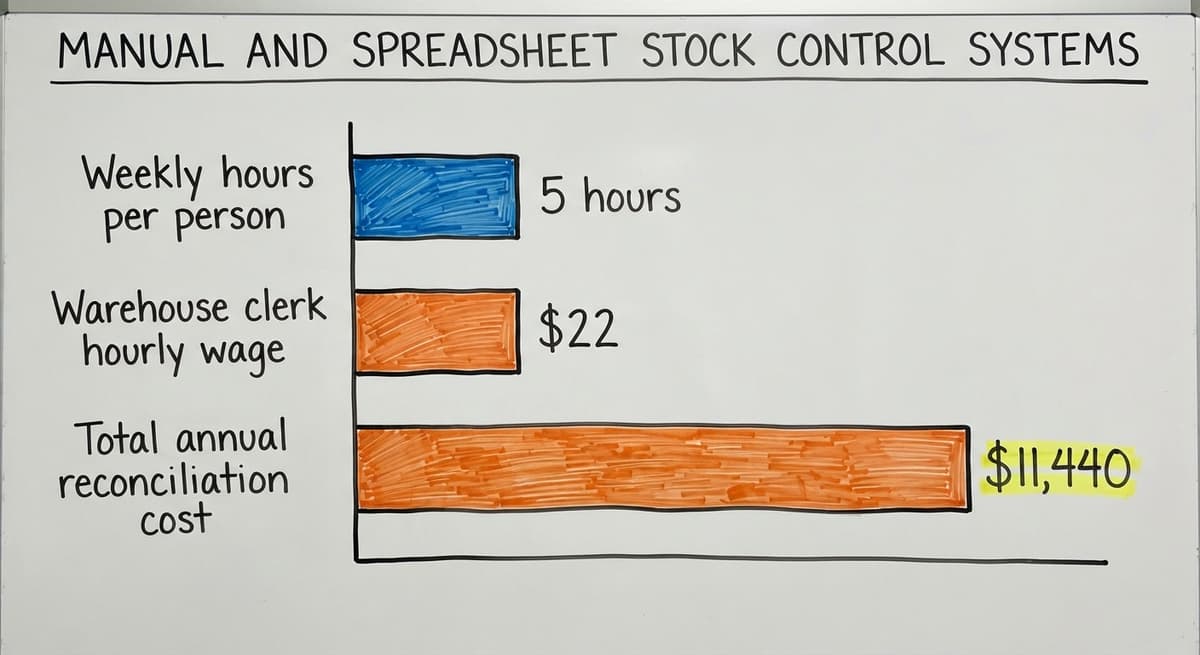
Manual systems use pen-and-paper logs, printed bin cards, and hand-counted stock sheets. They still work in very small operations or as a backup when software goes down. The hidden cost is staff time. If 2 people spend 5 hours each week reconciling paper counts at a median warehouse clerk wage of about $22 an hour (based on BLS occupational data), that is roughly $11,440 a year spent on a process that a basic software system could handle in minutes.
The comparison is easier when one option is built for you
Off-the-shelf means fitting your process to the software. We do it the other way round, and the first look costs nothing.
Book a callWhen Spreadsheets Stop Working for Stock Control
Spreadsheets, whether Excel or Google Sheets, are a step up from paper. You can build item lists, set reorder points, and track running totals. Many small distributors live here right now, and it works up to a point. The breaking point arrives when 2 or more people edit the same file, SKU counts pass 200, or you need real-time visibility across a warehouse. Version conflicts and formula errors become a daily problem, not a rare one. Spreadsheets are a starting point, not a destination.

Barcode and RFID Stock Control Systems
Barcodes and RFID tags both assign a unique identifier to each SKU or location, and the difference is how they read that identifier. A barcode needs a direct line of sight and a manual scan, making it the lower-cost option and the right choice for most small to mid-size distributors. RFID uses radio waves to read multiple tags simultaneously without line of sight, which speeds up receiving, cycle counts, and shipment check in high-volume environments. RFID hardware and tag costs are higher, so the investment makes sense when scan volume is large enough to justify it. For most operations under 500 SKUs, barcodes cover the need.
Barcode inventory systems: accurate, affordable, and proven
A barcode system prints a unique label for each SKU. Staff scan items at receiving and at shipping. Each scan feeds data into your software automatically, removing the manual entry step that causes most receiving errors. Accuracy improves. Receiving time drops. Your perpetual count stays reliable because the data comes from a scan, not a keyboard.
For most small to mid-size distributors, a barcode inventory system is the right first step into automated stock control. Hardware costs are low. Label printers and handheld scanners are widely available. Staff training takes hours, not weeks.
What is an RFID stock control system and when does it make sense?
An RFID system uses radio-frequency tags that a reader can detect without pointing a scanner at each item individually. You can read an entire pallet at once as it moves through a dock door. That speed advantage is real at high volume.
The upfront cost is higher than barcodes. Tags cost more than labels. Readers cost more than barcode scanners. RFID makes sense for high-volume warehouses, fast-moving apparel, or electronics where scanning individual items slows the line. For most operations under 100 staff, barcodes deliver 90% of the benefit at a fraction of the price. Start with barcodes and revisit RFID if volume demands it.
Just-in-Time, Min-Max, ABC Analysis, and Two-Bin Methods
Just-in-time, min-max, ABC analysis, and two-bin are inventory control methods you layer on top of whichever baseline system you choose, whether periodic or perpetual. Just-in-time minimizes on-hand stock by timing orders to arrive as close to the point of use as possible, reducing carrying costs but increasing the risk of stockouts if a supplier is late. Min-max sets a floor and a ceiling for each SKU: reorder when stock hits the minimum, and order enough to reach the maximum. ABC analysis ranks SKUs by revenue or movement so you apply tighter controls to your highest-value items and looser controls to low-value ones. The two-bin method keeps 2 physical containers of an item; when the first empties, the second activates and a reorder is placed, no software required.
Just-in-time inventory
Just-in-time (JIT) inventory means stock arrives only when it is needed for a specific order or production run. The goal is to cut holding costs and free up warehouse space. The risk is real: any supply chain disruption hits harder when you carry no buffer stock. JIT works best for operations with reliable suppliers, consistent lead times, and predictable demand. It is not a fit for businesses that face seasonal spikes or source from overseas suppliers with long shipping windows.
See it running on your own process first
No build cost. The subscription starts once it is live and doing the job, not before.
Book a callMin-max inventory control
Min-max sets a minimum stock level that triggers a reorder and a maximum level that caps the order size. When a SKU drops to the minimum, the system flags or places a reorder up to the maximum. Most inventory software supports min-max natively. This method is a strong fit for small and mid-size distributors because it is simple to set up, easy to explain to staff, and needs no complex forecasting. You set the numbers based on lead time and average daily usage, then let the system do the watching.
ABC analysis inventory control
ABC analysis groups your SKUs into 3 tiers. A items are high-value or high-velocity products that deserve tight oversight and frequent cycle counts. B items are mid-range. C items are low-value or slow-moving, and they need less attention.
ABC is not a standalone system. It is a method you apply inside whatever system you already use. For a small team managing 500 or more SKUs, it solves a real problem: you cannot count everything with equal care every week. ABC tells you where to focus. Counting your top 20 A items daily and your C items monthly is a practical way to keep accuracy high without burning staff hours on low-stakes SKUs.
Two-bin system
The two-bin method is physical and visual. You keep 2 containers of a given item. When the first bin empties, you start the second and place a reorder. When the reorder arrives, it refills bin one. No software required. No scanning. The trigger is visible to anyone on the floor.
Two-bin works best for consumables, maintenance supplies, and low-cost fast-moving parts where the cost of a stockout is high but the item value is low. It is a practical tool for any warehouse, even one running sophisticated software for its main SKUs.

Cloud-Based vs. On-Premise Stock Control Systems
What is a cloud-based stock control system and is it right for my operation?
A cloud-based system is software hosted online, accessible from any device with a browser or app. You pay a subscription, the vendor handles updates and servers, and your team can check stock from the warehouse floor, a delivery truck, or a home office. Most modern inventory management software ships as cloud-based by default, and most integrate with QuickBooks without a complex setup.
For operations with lean IT staff, cloud removes the burden of maintaining local servers. The tradeoff is internet dependency: if your connection goes down, so does your access. For most small distributors, that risk is manageable and the convenience outweighs it.
Cloud vs. On-Premise Stock Control: Which Should You Choose?
On-premise software installs on your own servers or computers. Some operations prefer it for data control or because they work in a facility with unreliable internet. The IT maintenance burden is higher, and new rollouts rarely choose on-premise today unless a specific compliance or connectivity reason demands it.
Custom and QuickBooks-Connected Stock Control Systems
Custom inventory software built around your operation
A custom-built stock control system is software designed around how your specific operation already works. No forced workflow changes. No unused features cluttering the screen. Your team does not learn a new way to work; the software learns yours.
For small to mid-size distributors not ready for a full ERP project, custom software for wholesale distributors can replace only the manual parts of your process while keeping QuickBooks in place for accounting. That means no data migration, no chart-of-accounts rebuild, and no retraining your bookkeeper. The scope is narrower, the timeline is shorter, and the result fits your actual workflow rather than a generic template.
How stock control systems work with QuickBooks
QuickBooks handles accounting well. Its inventory module works for simple product lists, but it strains under high order volume, multiple warehouse locations, or complex reorder logic. The answer for most distributors is not to replace QuickBooks but to connect a dedicated stock control system to it.
A proper QuickBooks integration for distributors syncs inventory transactions to QuickBooks automatically. Sales post to the right accounts. Buy orders update costs. Your bookkeeper still works in the tool they know. The goal is to add inventory accuracy without touching the accounting workflow your team already trusts. That integration is possible without an ERP project, and it preserves the familiarity that keeps errors low during the transition.
Not sure this is the right shape for your operation
Describe how the work runs today. We map it on a call and show you what it would look like built around that, before you spend anything.
Book a call
Signs You Have Outgrown Your Current Stock Control System
Most operations do not plan to switch systems. They switch because something breaks down often enough to force the decision. Watch for these signals:
- Stockouts or overstock surprises your team more than once a month, suggesting your count data is stale before you can act on it.
- Staff spend more than 3 hours a week reconciling spreadsheets or paper counts against what is actually on the shelf.
- Orders ship wrong or late because someone pulled from a location the system said was full but was not.
- Your SKU count or daily order volume has grown past what the current process can track without errors compounding.
Any one of these is a cost. All 4 together mean the system is the bottleneck, not the team.
How to Choose the Right Type of Stock Control System
Start with 3 questions before looking at any software: How many SKUs do you carry? How many orders do you ship per day? How many staff will touch the system?
Match the answers to system complexity:
- Fewer than 100 SKUs, under 20 orders a day, 1 to 5 staff: A spreadsheet or simple periodic system may still serve you. Add min-max rules and a two-bin method for your fastest movers.
- 100 to 500 SKUs, 20 to 100 orders a day, 5 to 25 staff: A cloud-based perpetual system with barcode scanning is the practical next step. Look for QuickBooks integration before anything else.
- Over 500 SKUs, more than 100 orders a day, or multiple locations: A custom or purpose-built warehouse stock control platform earns its cost. Evaluate whether your workflows need RFID speed or whether barcodes still cover it.

The Rule That Prevents Overbuying on Stock Control Software
Buy the simplest system that solves the actual problem. A system with 40 features you do not use is not an asset; it is a training burden.
What are the most common mistakes when switching stock control systems?
Most switching errors are predictable. Choosing based on a feature list rather than your actual workflow leads teams to buy systems that look impressive and fit poorly. Skipping staff training and expecting the team to figure it out slows adoption and creates data gaps in the first weeks. Migrating to a new system without first cleaning up your existing item list means bad data moves with you and corrupts the new system from day one. Picking an enterprise platform when a focused tool would solve the problem adds months to the project and cost that never pays back. The fix in every case is the same: define the problem first, then find the tool that solves it.
Frequently Asked Questions About Types of Stock Control Systems
What is the most common type of stock control system for small distributors? Most small distributors run a combination of periodic counting and spreadsheet tracking. The most common upgrade path is to a cloud-based perpetual system with barcode scanning, which adds real-time accuracy without requiring a full ERP.
Can I use a stock control system without replacing QuickBooks? Yes. Most dedicated inventory systems integrate with QuickBooks rather than replacing it. Inventory transactions sync automatically, and your accounting team keeps working in QuickBooks as usual.
What is the difference between periodic and perpetual inventory? Periodic inventory counts stock at set intervals and updates records after each count. Perpetual inventory updates in real time with every transaction. Perpetual is more accurate but needs consistent scanning or data entry.
Is a custom stock control system more expensive than off-the-shelf software? Not always. Off-the-shelf software carries ongoing subscription fees and often includes features you will never use. A custom system built to your exact workflow can cost less over 3 to 5 years, especially when it avoids a full ERP rollout.
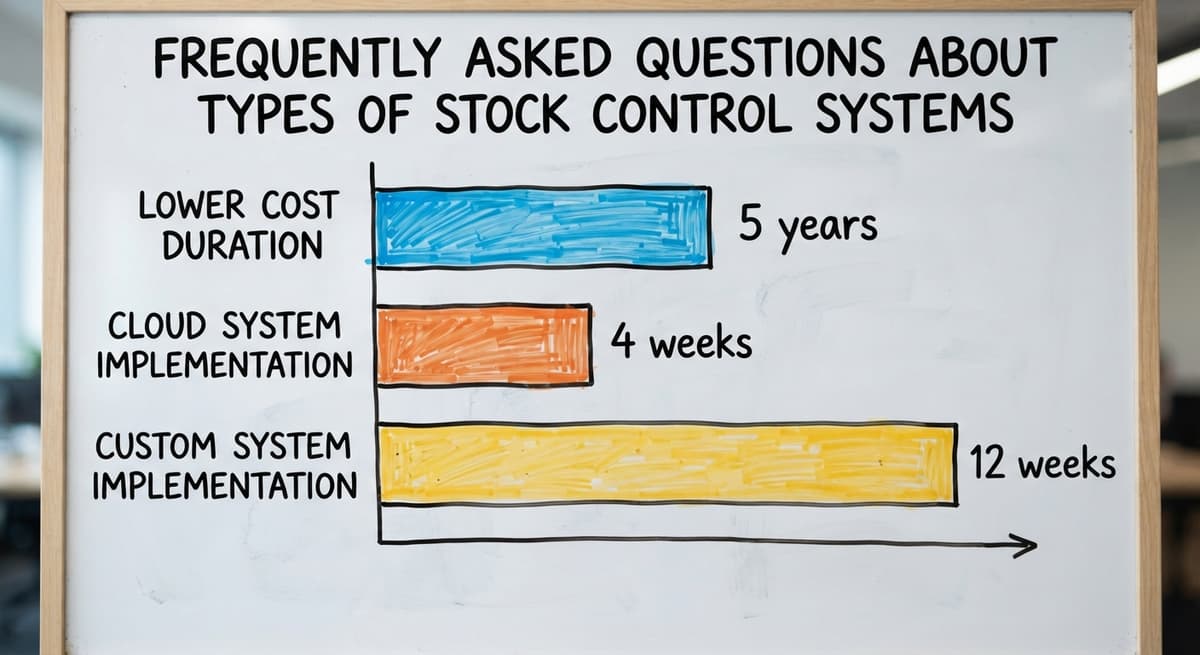
How long does it take to implement a new stock control system? A cloud-based barcode system for a small operation can go live in 2 to 4 weeks. A custom-built system usually runs 6 to 12 weeks depending on integration complexity and how clean your existing data is.
What is the two-bin method and what type of operation is it best for? The two-bin method keeps 2 physical containers of an item. When the first empties, the second becomes active and a reorder is placed. It needs no software and works best for consumables, maintenance parts, and low-cost fast-moving items.

Next Steps for Your Operation
The right stock control system is the one that fits your current volume, your team size, and the tools you already use. Periodic and perpetual are the two foundations. Barcode, min-max, ABC, and two-bin are methods you layer on top. Cloud-based and custom software are delivery options, not categories of their own.
If your operation is running on QuickBooks plus spreadsheets and the cracks are showing, the answer is not necessarily a larger system. It may be a focused one, built around how you already work. Talk to a team that builds around existing operations rather than replacing them, and start with a conversation about the actual problem before any software is selected.
Frequently asked questions
What is the most common type of stock control system for small distributors?
Most small distributors run a combination of periodic counting and spreadsheet tracking. The most common upgrade path is to a cloud-based perpetual system with barcode scanning, which adds real-time accuracy without requiring a full ERP rollout.
Can I use a stock control system without replacing QuickBooks?
Yes. Most dedicated inventory systems integrate with QuickBooks rather than replacing it. Inventory transactions sync automatically, and your accounting team keeps working in QuickBooks as usual. No chart-of-accounts rebuild is required.
What is the difference between periodic and perpetual inventory?
Periodic inventory counts stock at set intervals, such as weekly or monthly, and updates records after each count. Perpetual inventory updates in real time with every transaction. Perpetual is more accurate day-to-day but needs consistent scanning or data entry from every team member.
What is the two-bin method and what type of operation is it best for?
The two-bin method keeps 2 physical containers of an item. When the first empties, the second becomes active and a reorder is placed. It needs no software and works best for consumables, maintenance parts, and low-cost fast-moving items in any warehouse setting.
Is a custom stock control system more expensive than off-the-shelf software?
Not always. Off-the-shelf software carries ongoing subscription fees and often includes features you will never use. A custom system built to your exact workflow can cost less over 3 to 5 years, especially when it avoids a full ERP rollout and keeps QuickBooks in place.
How long does it take to implement a new stock control system?
A cloud-based barcode system for a small operation can go live in 2 to 4 weeks. A custom-built system usually runs 6 to 12 weeks, depending on integration complexity and how clean your existing item data is before migration.
How do cloud-based and on-premise stock control systems compare for small warehouses?
Cloud-based systems need no local servers, update automatically, and allow remote access from any device. On-premise systems give you full data control and work without internet, but need more IT maintenance. Most new rollouts choose cloud-based unless a specific compliance or connectivity reason demands otherwise.
Start with a free first look
A 30 minute call, your operation mapped, and a clear picture of what we would build. No obligation and nothing to install.
Book a callRelated guides
The rest of this guide, for the parts of the job this page does not cover.
Guides
- Hospital Stock Management System
- Warehouse Management System Types
- Cloud Stock Management Software
- Make to Stock Examples
- Warehouse Stock Management System
- Inventory Control Software for Small Business
- Inventory Control with Excel
- Inventory Control for Small Business
- Warehouse Stock Management Software
- Warehouse Stock Software
- Small Business Stock Management Software
- Inventory Management System for Manufacturing
- Top 10 Wms Systems
- Inventory Bin System
- Manual Inventory System
- Warehouse Inventory Management Systems
- Warehouse Inventory Systems
- Warehouse Management System Top 10
- Software for Warehouse Management System