


Low Stock Alert
A low stock alert is a notification that fires when an item's on-hand quantity drops to or below a set number, called a reorder point. It tells the right person to act before the item runs out. Alerts can arrive by email, text, or dashboard flag. The goal is simple: give your team enough time to place a buy order before a stockout happens.
Reviewed and updated: October 2026
Book a callWhat Is a Low Stock Alert and How Does It Work?
A low stock alert is a message your inventory system sends when stock falls to a level you have defined in advance. That level is called the inventory threshold or reorder point. The alert fires before the shelf is empty, not after.
Delivery format depends on your setup. Some systems send an email. Others flag the item on a dashboard or push a text to a phone. A few older systems print a report. What matters is that the alert reaches someone who can act on it.
The 4-Step Process Behind Every Alert
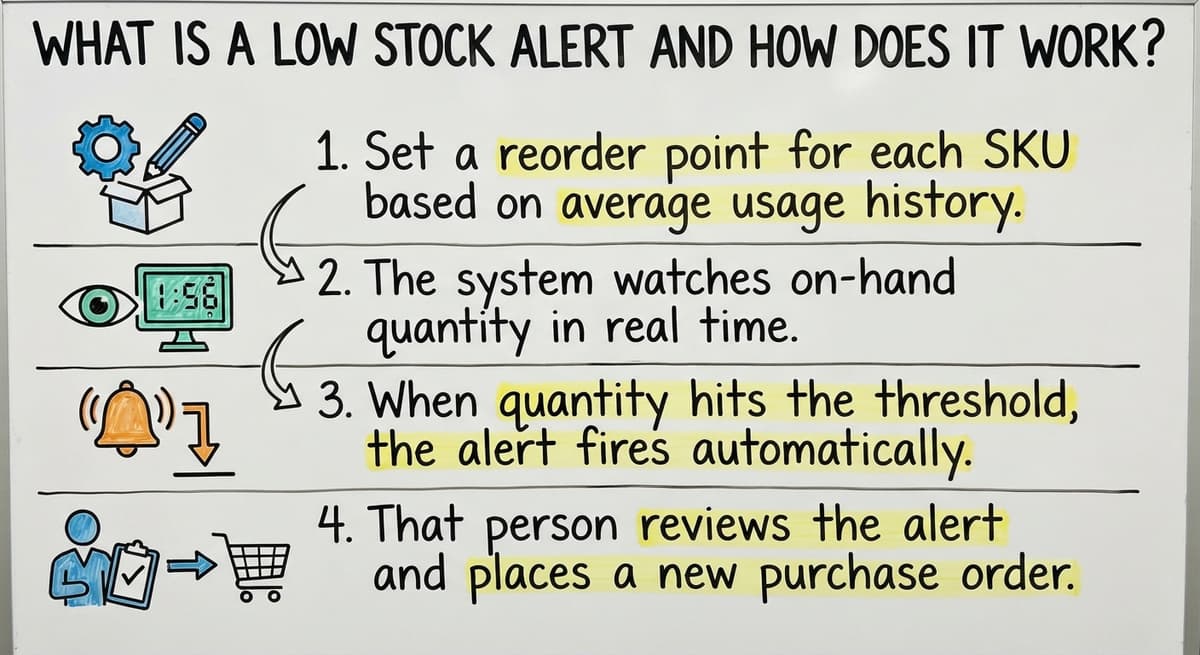
How does a low stock alert work step by step? The process follows 4 clear stages, and every reliable system runs through all of them.
- Set a reorder point for each SKU based on average daily usage and supplier lead time.
- The system watches on-hand quantity in real time or on a scheduled sync.
- When quantity hits the threshold, the alert fires to the person with authority to act.
- That person reviews the alert and places a buy order or moves stock from another location.
Skipping any step breaks the chain. A reorder point with no alert attached is just a number sitting in a spreadsheet.
We build it for your operation, and the first look is free
If you would rather not compare products, describe how your operation already works and we build the system around it.
No build cost. You see it running on your own process first, and the monthly subscription starts only once it is live.
Book a callWhy Stockouts Cost More Than the Lost Sale
Running out of stock in a wholesale distribution operation is not just a missed sale. The costs stack up fast.
- Lost revenue when a customer orders an item that is not available and goes elsewhere.
- Emergency freight when you scramble to restock at premium shipping rates.
- Canceled accounts when a customer decides your fill rate is too unreliable to keep.
- Staff hours spent on backorder calls and manual follow-up instead of higher-value work.
Stockouts Carry Tax and Labor Consequences Too
Inventory also carries a legal weight. The IRS states directly: "To figure taxable income, you must value your inventory at the beginning and end of each tax year." That obligation means your stock counts are not optional, and errors in them have tax consequences, not just working ones.
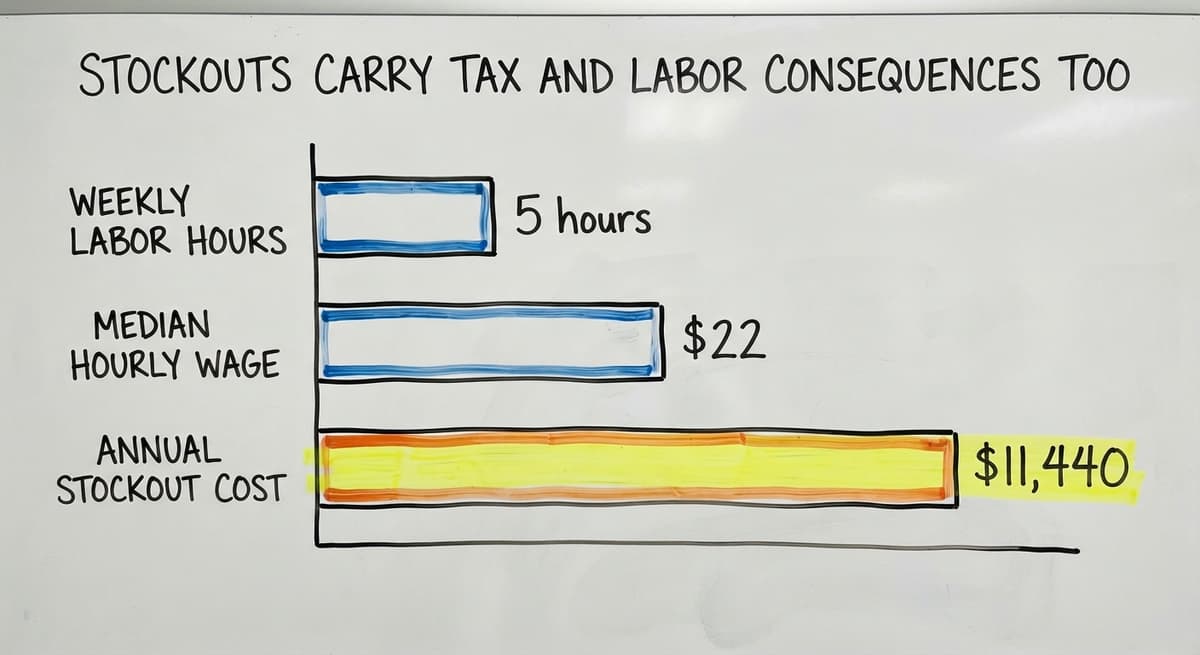
Consider 2 staff members each spending 5 hours a week managing backorder calls. At a median wage of $22 an hour, per BLS occupational data, that is $11,440 a year spent reacting to stockouts that a working alert system could have prevented.
An alert does not just save a sale. It saves the staff time, the freight cost, and the customer relationship.
The comparison is easier when one option is built for you
Off-the-shelf means fitting your process to the software. We do it the other way round, and the first look costs nothing.
Book a callReorder Point vs. Low Stock Alert: What Is the Difference?
Reorder points and low stock alerts are related but not the same thing.
- The reorder point is a number: the on-hand quantity level that means "order now."
- The low stock alert is the alert: the message that tells someone the reorder point has been reached.
Both are required. One without the other fails. Many operations set reorder points inside their accounting package but never connect a alert to them. The number exists. Nobody sees it. Nothing happens automatically.
Setting the reorder point is an inventory math problem. Wiring up the alert is a workflow problem. Solve both.

How to Set the Right Threshold for Each Item
One threshold does not work for every SKU. A fast-moving item needs a higher reorder point than a slow one, because it burns through stock faster between orders.
Factor in these 4 variables for each item:
- Supplier lead time. A vendor who ships in 2 days needs a smaller buffer than one with a 2-week lead time.
- Average daily or weekly usage. Multiply lead time by daily usage to find your minimum safe level.
- Minimum order quantities. If your supplier needs a case of 24, your reorder point has to account for that.
- Seasonality. An item that moves 3 times faster in Q4 needs a higher threshold from October through December.
How to Start When You Have No Sales History
If you have no sales history, start with enough stock to cover twice your average supplier lead time. Adjust after 60 to 90 days of real data.
The right threshold keeps you from ordering too early and wasting cash, or ordering too late and running dry.

Low Stock Alerts vs. Safety Stock: What Is the Difference?
Safety stock is a buffer quantity held above zero to absorb demand spikes or supplier delays. It is not normal working inventory. It is the floor you hope never to touch.
Your low stock alert should fire before you dip into safety stock, not after. Think of it this way:
- Safety stock is the floor.
- The alert threshold is the warning line above it.
- Normal stock sits above both.
If your alert fires only after you have already burned through the safety buffer, you have lost the time that buffer was designed to buy. Getting both numbers right keeps the safety stock acting as a true emergency reserve rather than a second reorder point.
Who Should Receive a Low Stock Alert
The right person is whoever has authority to place a buy order. In a small operation that may be the owner. In a larger one it is a purchasing manager or warehouse supervisor.
Sending alerts to everyone creates noise. When 10 people get the same alert and none of them own the decision, the alert gets treated as someone else's problem. Route it to the person who can act.
For fast-moving or critical SKUs, consider a backup recipient in case the primary is out. For slow movers, a daily digest works better than an instant ping. Match the urgency of the alert to the urgency of the item.
See it running on your own process first
No build cost. The subscription starts once it is live and doing the job, not before.
Book a call
Low Stock Alerts in Wholesale Distribution and Fulfillment
Wholesale Distributors
Distributors often carry hundreds or thousands of SKUs across multiple vendors. Manual checking of every line is not realistic. Alerts let a small purchasing team stay on top of a large catalog without opening every item record daily.
One important step: connect alert data to open buy orders. If stock is already on the way, the system should know that and suppress a duplicate alert. Without that link, buyers place redundant orders and overstock arrives.
The US Census Bureau's Monthly Wholesale Trade data tracks national inventory-to-sales ratios for wholesale firms. When that ratio rises, it often signals that buying decisions are running ahead of actual demand, which is exactly the kind of drift a well-tuned alert system helps prevent.
Fulfillment Centers
Fulfillment operations often hold inventory for multiple clients or product lines. A total warehouse quantity can look fine while 1 specific pick location is empty. Bin-level alerts flag when a pick slot is low even if overall stock is adequate. That detail keeps pickers from walking to an empty bin mid-order, which stalls the whole fulfillment line.
Why Spreadsheets and Email Chains Fail as Alert Systems
Can a spreadsheet send a low stock alert? No. A spreadsheet does not watch itself. Someone has to open it, scroll to the right column, and notice the number. That check happens on a schedule, not in real time.
Email threads about low stock get buried. They go to the wrong person. They sit unread while the item sells down to zero.
The gap between when stock gets low and when someone notices is exactly where stockouts happen. Manual processes make that gap wider, not smaller. The alert only works if it fires without anyone having to remember to look.

How Your Accounting Package Handles Low Stock Alerts
Your accounting software has a basic reorder point field per item. It can generate a low stock report. What it does not do is push a proactive alert automatically. Someone still has to run the report and remember to look, which is the same manual step the alert is supposed to replace.
For operations that have outgrown that manual step, a connected inventory layer can watch your accounting data and fire the alert automatically. This approach keeps your accounting package in place for what it does well and adds real-time alert logic on top. You do not replace the tool your team already knows. You extend it.
For more on this approach, see Your accounting software and inventory management: what to add and what to keep.
Not sure this is the right shape for your operation
Describe how the work runs today. We map it on a call and show you what it would look like built around that, before you spend anything.
Book a callConnecting Alerts to Purchase Orders and Avoiding Alert Fatigue
From Alert to Action
An alert with no clear next step gets dismissed. The best setups link the alert directly to a draft buy order or a replenishment workflow. The receiver clicks through, confirms the quantity, and the order moves. Fewer steps between alert and action means faster restocking.
For more on building that connection, see buy order workflow automating for small distributors.
Keeping Alerts Useful Over Time
Too many alerts train people to ignore them. Set thresholds carefully so each alert signals a genuine need. Review thresholds at least quarterly, or after any major shift in sales volume or supplier lead time.
Alert history also tells you something useful. Repeated alerts on the same item mean the reorder point is set too low or the order quantity is too small. Items that never trigger an alert may be overstocked and tying up cash. That pattern data is a simple diagnostic any operation can use without a dedicated analyst.

Signs Your Alert Process Is Broken and Steps to Fix It
Signs Something Is Wrong
A stockout alert setup that is not working will show clear warning signs:
- You find out you are out of stock when a customer calls, not before.
- Someone checks inventory counts manually every morning just to catch low items.
- Buy orders are placed in a panic rather than on a planned schedule.
- Staff spend time on backorder calls that could go toward higher-value work.
Steps to Improve Your Setup Today
Fix the process in this order:
- List every SKU and assign a reorder point based on lead time and average weekly sales.
- Identify who receives each alert and confirm that person has authority to place an order.
- Test the alert by manually adjusting a quantity and confirming the alert fires.
- Review thresholds every quarter or after any large demand change.
- If your current system cannot automate this, document the manual process clearly while you plan the upgrade.
The NIST Manufacturing Extension Partnership offers vendor-neutral guidance on supply chain process improvement for operations at this scale. It is a useful starting point for mapping your current workflow before you build on top of it.
For a deeper look at the full process, see how to set reorder points in a distribution operation and replacing manual inventory tracking with custom software.
How Custom Software Makes Low Stock Alerts Work for Your Operation
Off-the-shelf tools offer generic alert logic. That logic may not match how your operation actually buys and receives stock. A custom-built inventory layer can mirror your existing purchasing workflow, vendor lead times, and approval steps exactly.
The result keeps your accounting package in place for accounting while adding real-time alert logic on top. The rules can be adjusted quickly as your operation changes, without waiting for a vendor to release a new feature.
Built around how your team already works, a custom alert system removes the manual step that lets stockouts happen. For more on this approach, see inventory management software for wholesale distributors.
Frequently asked questions
How to get rid of low stock alert on Square?
In Square's item settings, open the item, go to the stock section, and remove or clear the low stock alert threshold. If you want to keep tracking stock without the alert, set the threshold to zero or turn off the alert toggle. Steps may vary slightly by account type.
Is there a free stock alert app?
Several inventory apps offer a free tier that includes basic low stock alerts. What decides between them is the number of SKUs you carry, whether you need multi-location support, and how the app connects to your accounting package. A spreadsheet with a manual review process costs nothing but needs someone to check it regularly.
What does low stock mean?
Low stock means on-hand quantity has fallen to or below a level you have decided needs action. That level is your reorder point. What counts as low is different for every item and every operation.
Can I set an alert for a stock price?
Stock price alerts tied to the market price of a publicly traded share are a different function from inventory alerts. Most brokerage platforms and financial apps offer price alerts as a separate feature. This article covers inventory stock alerts for physical goods.
How often should low stock alert thresholds be reviewed?
At least quarterly, or after any large change in sales volume or supplier lead time. Thresholds set once and never touched drift out of alignment with actual demand and stop firing at the right moment.
Can a low stock alert work with your accounting software?
Your accounting software has a basic reorder report, but proactive push alerts usually need a connected inventory layer on top. That layer watches your data and fires the alert without anyone having to run a report manually.
What is a good starting reorder point if I have no historical data?
Start with enough stock to cover twice your average supplier lead time, then adjust after 60 to 90 days of real sales data. That window gives you enough history to see whether the threshold is firing too early or too late.
Do I need a separate system just for low stock alerts?
Not necessarily. Alerts are often one feature of a broader inventory management system built around your existing tools. The goal is to extend what you already use, not replace it.
Start with a free first look
A 30 minute call, your operation mapped, and a clear picture of what we would build. No obligation and nothing to install.
Book a callRelated guides
The rest of this guide, for the parts of the job this page does not cover.
Guides
- Cloud Stock Management Software
- Hospital Stock Management System
- Make to Stock Examples
- Types of Stock Control Systems
- Procedure for Stock Control
- Warehouse Stock Management Software
- Warehouse Stock Software
- Warehouse Stock Management System
- Small Business Stock Management Software
- Classification of Inventory
- Excess Inventory
- Closed for Inventory
- Multi Location Inventory Management Software
- Ms Excel Inventory Template
- Inventory Management for Multiple Locations
- Costing Inventory
- Is Inventory a Long-term Asset
- Inventory Management System for Manufacturing
- Inventory Fixed Assets
- Pick Lists
- Inventory Management Pics