


Procedure For Stock Control
The correct procedure for stock control means tracking every unit that moves in or out of your warehouse, on a set schedule, every day. Assign SKUs, set reorder points, log each movement at the time it happens, run cycle counts, and reconcile your records weekly. That loop, repeated consistently, is what keeps your on-hand quantity accurate.
Reviewed and updated: October 2026
Book a callWhat Stock Control Actually Means for Your Operation
Stock control is the daily process of tracking, managing, and reconciling inventory quantities and locations. It is not a one-time physical count. It is a repeatable procedure that runs every day your warehouse is open.
This guide is written for wholesale distributors, fulfillment centers, and warehouses with 5 to 100 staff. Most of you run on a mix of an accounting package, spreadsheets, and printed pick sheets. That setup works until it doesn't. The steps below give you a formal stock control procedure you can adopt one section at a time, without shutting down to do it.
We build it for your operation, and the first look is free
If you would rather not compare products, describe how your operation already works and we build the system around it.
No build cost. You see it running on your own process first, and the monthly subscription starts only once it is live.
Book a callWhy a Written Procedure Beats Tribal Knowledge
Relying on one experienced employee who "knows where everything is" is a single point of failure. When that person is out sick, quits, or gets promoted, the knowledge walks out with them. Undocumented habits cause errors the moment volume grows or a new hire joins the floor.
A written stock control procedure creates a repeatable baseline. You can measure it, train to it, and improve it. The IRS makes the stakes plain: IRS Publication 538 states, "To figure taxable income, you must value your inventory at the beginning and end of each tax year." That valuation depends on accurate inventory records. A procedure protects those records year-round, not just at tax time.
Step 1: Define Your Stock Units and Categories
What is the first step in a stock control procedure?
The first step is assigning a unique SKU, a short item code, to every product you carry. Without a SKU, 2 staff members can log the same item under different names and your records split in two.
Once every item has a code, group products into logical categories: by supplier, product line, or storage zone. Then pick a unit of measure for each item, such as each, case, or pallet, and use it everywhere. This foundational work prevents double-counting and mismatched inventory records before they start. Every later step in the procedure depends on this one being done cleanly.
Steps 2 and 3: Set Stock Levels and Log Every Movement
Setting Minimum and Maximum Stock Levels
Your reorder point is the on-hand quantity that triggers a buy order. Calculate it with this formula:
Reorder point = (average daily usage x lead time in days) + safety stock
Safety stock is the buffer you hold against late deliveries or demand spikes. Your maximum stock level is the most you will hold given your storage space and available cash. These numbers come from real usage data, not guesswork. Review them every quarter because supplier lead times and sales patterns shift.
If an item sells 10 units a day and your supplier takes 5 days to deliver, your base reorder point is 50 units. Add 20 units of safety stock and you reorder at 70 units on hand.
Record Every Stock Movement at the Point It Happens
Delayed data entry is the single biggest cause of stock discrepancy. Log each movement the moment it occurs, not at the end of the shift.
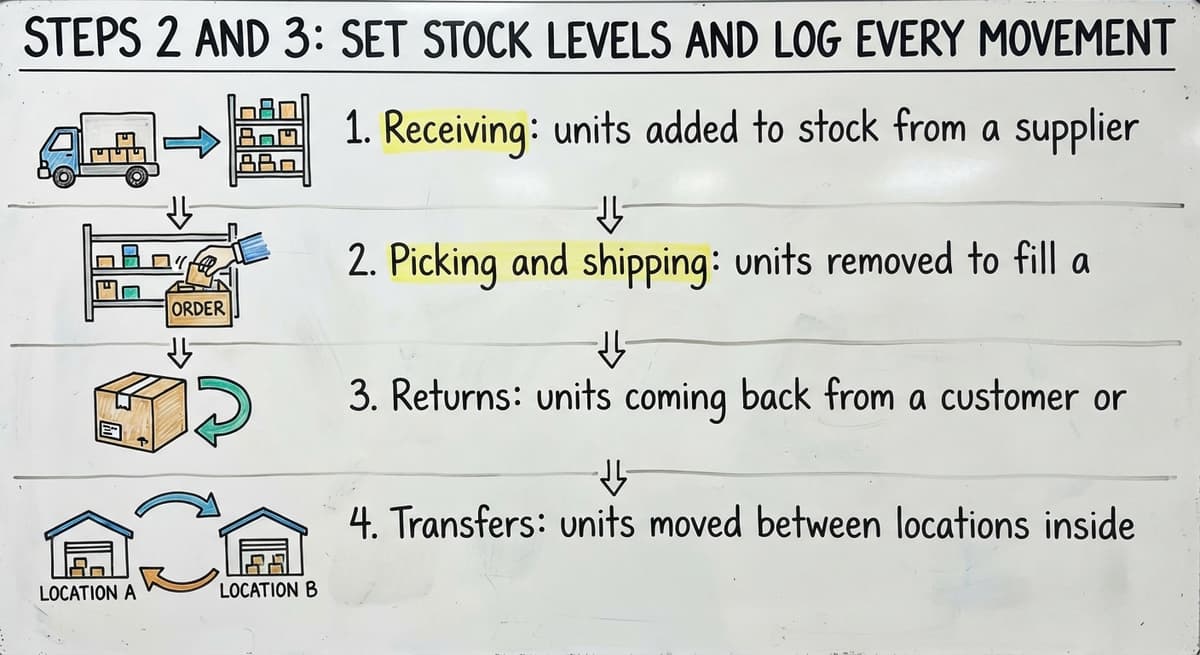
The 4 main movement types to capture are:
- Receiving: units added to stock from a supplier delivery
- Picking and shipping: units removed to fill a customer order
- Returns: units coming back from a customer or rejected at the dock
- Transfers: units moved between locations inside the warehouse
Each entry needs a date, quantity, item code, location, and the name of the person who made the move. Paper logs work, but they create a matching burden at the end of every week. This is where purpose-built custom inventory software starts to earn its keep.
The comparison is easier when one option is built for you
Off-the-shelf means fitting your process to the software. We do it the other way round, and the first look costs nothing.
Book a call
Step 4: Run Cycle Counts on a Set Schedule
Cycle counting means counting a rotating subset of SKUs each day or week instead of shutting the warehouse down for a full physical count. Compare the physical count to the system record and chase down any variance the same day you find it.
Rank high-value or fast-moving items. Use ABC analysis to set the right frequency:
| Category | Definition | Count frequency |
|---|---|---|
| A items | High value or high velocity | Weekly |
| B items | Moderate value and movement | Monthly |
| C items | Low value, slow-moving | Quarterly |
Any SKU with a history of stock discrepancy moves up one tier until the root cause is found. Put the count schedule on a shared calendar so it becomes routine. Cycle counts catch errors while they are small and make the annual physical count a confirmation rather than a crisis.
Step 5: Reconcile Stock Records with Your Accounting Package
Many small distributors use entry-level accounting software for purchasing and invoicing. The on-hand quantities in that system must match your physical count log. Run this matching weekly, not monthly.
The process is straightforward:
- Pull the current on-hand report from your accounting or inventory system.
- Compare it line by line to your most recent cycle count log.
- Flag every variance and trace it to a specific cause: a receiving error, an unrecorded pick, or a data entry mistake.
- Correct the record and note what process change prevents the same error next week.
When your accounting package's inventory features are stretched past what they were designed to do, a separate stock control layer makes this matching cleaner. Accounting software integration for warehouse operations works best when the warehouse data is clean before it reaches the accounting side.

What Should Happen at the Receiving Dock to Prevent Stock Errors?
Receiving is where most stock errors are born. A short count accepted without a note, or a damaged carton signed off as complete, causes problems that compound through every downstream step.
The receiving procedure is:
- Match the delivery to the buy order line by line before signing anything.
- Count every unit. Do not accept a supplier's count as your own.
- Note any discrepancy or damage on the delivery document and contact the supplier the same day.
- Move stock to its designated bin location before closing the receipt in the system.
Never close a receipt in the system until the stock is physically in its location. That single rule removes a large share of on-hand quantity errors that appear to have no cause.
Steps 7 and 8: Control Picks, Returns, and Damaged Goods
Pick and Pack Controls
Every pick must come from a pick list tied to a specific order. Freehand pulling, where a staff member grabs stock without a formal list, breaks the on-hand count at once. Pickers confirm the item code and quantity before removing anything from the shelf.
Backorders and substitutions must be documented in the system, not handled by a verbal agreement on the floor. This keeps the order fill rate accurate and prevents the same item from being promised to 2 customers.
Returns and Damaged Goods
Returned stock should never go straight back to the shelf. Inspect it first, then route it to one of 3 outcomes: restock, quarantine for supplier credit, or write off as damaged. Create a dedicated returns location in both the warehouse and the stock system.
Log the reason for every return. Patterns in return reasons reveal supplier quality issues or product problems before they become expensive. Write-offs for damaged or expired stock must be recorded so your on-hand count stays honest. An inflated on-hand figure is as damaging as a missing unit because it leads to orders you cannot fill.

Step 9: Assign Location Codes Across the Warehouse
A stock record showing 50 units on hand is useless if no one knows which aisle they are in. Assign a bin, shelf, or zone code to every storage location in the building. Record the location alongside the quantity for every single movement.
Location tracking cuts pick time, reduces errors, and makes cycle counts faster because the counter goes directly to the right spot rather than searching. Inventory management software for wholesale distributors usually handles this with barcode labels on each bin. Even a simple alphanumeric code on a printed label is far better than relying on staff memory.
See it running on your own process first
No build cost. The subscription starts once it is live and doing the job, not before.
Book a callStep 10: Review Stock Reports Before Each Week Starts
Reports are only useful if someone reads them and acts on them. Set a weekly review rhythm. The operations manager should see these numbers before Monday's first shift:
- Current on-hand by SKU: confirms the baseline for the week ahead
- Items below reorder point: triggers buy orders before a stockout happens
- Slow-moving and dead stock: flags inventory that is tying up cash and space
- Cycle count variance summary: shows where accuracy is slipping and why
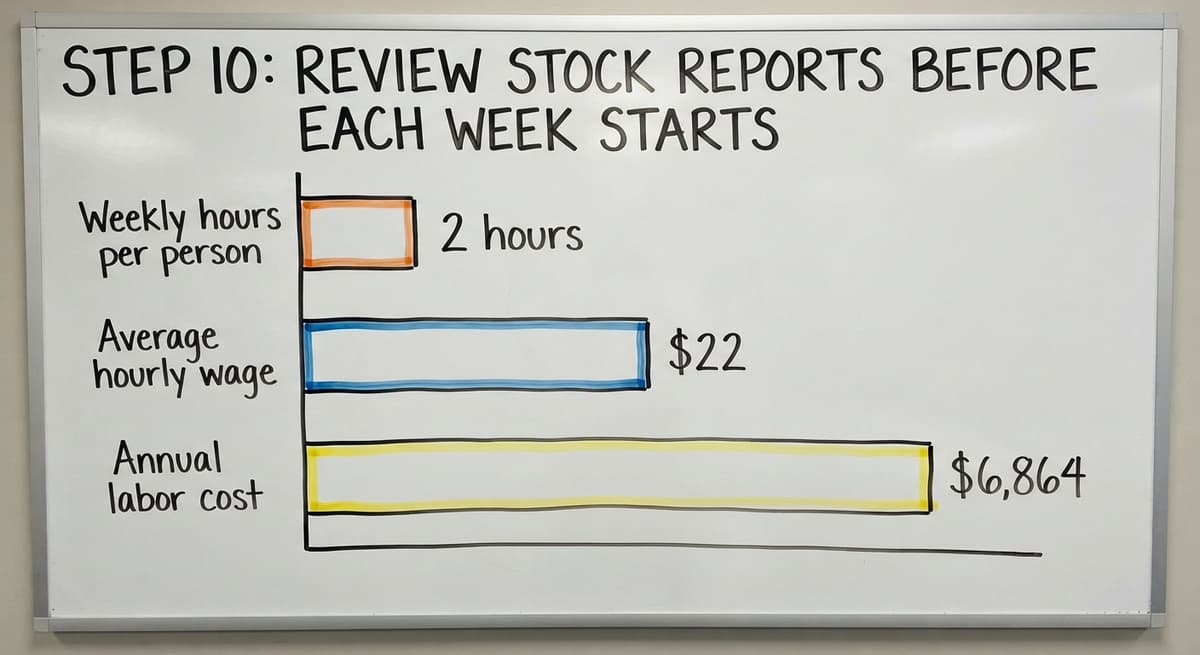
Manual spreadsheet reports take time to build and are easy to get wrong. Consider 3 people each spending 2 hours a week building and checking reports at an average wage of $22 an hour, based on BLS wage data for stock clerks and order fillers. That is $6,864 a year in labor, before counting the cost of the errors those reports still miss.
Common Mistakes That Break a Stock Control Procedure
Even a well-designed procedure fails when the team cuts corners under pressure. The most damaging habits are:

- Skipping the receiving check when the dock is busy: one uncounted short shipment ripples through every downstream record
- Allowing informal picks outside the pick list process: on-hand counts become fiction within days
- Updating the system hours after the physical movement: the gap between reality and record is where discrepancies live
- Treating the annual physical count as a substitute for cycle counts: by the time the annual count finds an error, months of bad data have already affected orders and purchasing decisions
- Using too many disconnected tools: when no single record is trusted, staff work around the system rather than with it
Each mistake is fixable. The first step is writing down the correct procedure so that the right way is also the obvious way.
When Do Spreadsheets and Basic Accounting Software Stop Being Enough?
The current setup is breaking when you see frequent stockouts despite having stock on hand, orders shipping with the wrong items, and staff spending hours each week reconciling spreadsheets that still don't agree. Those are not signs of a bad team. They are signs that the tools have hit their ceiling.
An accounting package handles purchasing and invoicing well. It was not designed to run a warehouse floor. The gap gets filled with spreadsheets, printed sheets, and email threads, and each one becomes a data silo that nobody fully trusts. How to replace manual spreadsheets with custom operations software is a question more distributors are asking once they see the matching hours add up.
Custom warehouse management systems for small distributors are built around the operation's existing workflow rather than forcing staff to learn a new one. They keep the accounting package in place for what it does well and replace only the manual parts. The same team that builds the software understands the warehouse process, not just the code. That matters because a system that doesn't match the floor gets abandoned inside 90 days.
Fulfillment center software built around existing workflows closes the gap between what the accounting package records and what actually happens on the shelf, without a rip-and-replace ERP project.

Key Metrics That Show Your Stock Control Is Working
Track these 5 numbers to know whether the procedure is holding:
- Inventory accuracy rate: the percentage of SKUs where the physical count matches the system record. Target 95% or higher.
- Stockout rate: how often an item is ordered but unavailable to ship.
- Order fill rate: the percentage of orders shipped complete and on time.
- Shrinkage rate: the value of stock lost to damage, theft, or error as a percentage of total inventory value.
- Cycle count variance: the average gap between counted and recorded quantities across all SKUs counted that week.
Review these metrics in the same weekly session as your stock reports. A metric that no one reviews changes nothing.
Next Steps: Tighten Your Stock Control Procedure
The 10 steps above cover the full loop: define SKUs, set stock levels, log every movement, count on a schedule, reconcile weekly, control the dock, manage picks and returns, use location codes, and review reports. Start by mapping your current process against those steps and finding the first gap.
You do not need a large ERP or a long rollout to fix it. A conversation with a custom software team that understands small distribution operations is a low-risk starting point. Describe how your operation runs today and where it breaks down. That conversation costs nothing and usually surfaces the 1 or 2 changes that would make the biggest difference fast.
Frequently asked questions
What is the correct procedure for stock control in a small warehouse?
Assign a unique SKU to every item, set reorder points based on usage and lead time, log every stock movement the moment it happens, run cycle counts on a schedule, and reconcile your records weekly. Those steps, repeated consistently, keep your on-hand quantity accurate.
How do you set minimum and maximum stock levels?
Calculate your reorder point using this formula: average daily usage multiplied by supplier lead time in days, plus a safety stock buffer. Your maximum level is set by available storage space and cash flow. Review both numbers quarterly as usage patterns and lead times change.
What is cycle counting and how often should it be done?
Cycle counting means counting a rotating subset of SKUs each day or week rather than shutting down for a full physical count. High-value or fast-moving items should be counted weekly, mid-range items monthly, and slow movers quarterly. Any SKU with a history of discrepancy moves to a higher frequency until the cause is found.
How do you reconcile physical inventory with accounting package records?
Pull the current on-hand report from your system, compare it line by line to your most recent cycle count log, flag every variance, and trace each one to a specific cause such as a receiving error or unrecorded pick. Correct the record and identify the process change that prevents the same error next week.
What should happen at the receiving dock to prevent stock errors?
Match every delivery to the buy order line by line before signing. Count every unit yourself rather than accepting the supplier's count. Note any discrepancy or damage on the delivery document and contact the supplier the same day. Do not close the receipt in the system until the stock is in its designated bin location.
How do you handle returns and damaged goods in a stock control system?
Never return stock directly to the shelf. Inspect each item first and route it to one of 3 outcomes: restock, quarantine for supplier credit, or write off as damaged. Log the reason for every return and record all write-offs so your on-hand count stays accurate.
What are the most common mistakes that break a stock control procedure?
Skipping the receiving check when the dock is busy, allowing informal picks outside the pick list process, updating the system hours after the physical movement, relying on the annual physical count instead of regular cycle counts, and using too many disconnected tools so no single record is trusted.
What metrics show whether a stock control procedure is working?
Track inventory accuracy rate (target 95% or higher), stockout rate, order fill rate, shrinkage rate, and cycle count variance. Review all 5 in the same weekly session as your stock reports. A metric that no one reviews and acts on changes nothing.
Start with a free first look
A 30 minute call, your operation mapped, and a clear picture of what we would build. No obligation and nothing to install.
Book a callRelated guides
The rest of this guide, for the parts of the job this page does not cover.
Guides
- Types of Stock Control Systems
- Types of Inventory Control
- Cloud Stock Management Software
- Hospital Stock Management System
- Make to Stock Examples
- Low Stock Alert
- Inventory Control Software for Small Business
- Inventory Control with Excel
- Inventory Control for Small Business
- Warehouse Stock Management Software
- Warehouse Stock Software
- Warehouse Stock Management System
- Small Business Stock Management Software
- Classification of Inventory
- Excess Inventory
- Closed for Inventory
- Multi Location Inventory Management Software
- Ms Excel Inventory Template
- Inventory Management for Multiple Locations
- Costing Inventory
- Is Inventory a Long-term Asset