

Inventory Management Software Barcode Scanner
Inventory management software with a barcode scanner lets a worker scan an item and have the software record what happened, instantly, with no typing. The scanner reads the barcode. The software updates the count. That is the whole idea. If your team is still writing numbers on clipboards or updating a spreadsheet after the shift, this guide explains a better path.
Published 12 August 2026. Reviewed and updated 15 September 2026.
Reviewed September 2026. Each figure comes from the assumptions stated beside it, so you can substitute your own and the arithmetic still holds.
Book a callWhat Is Inventory Management Software with a Barcode Scanner?
A barcode scanner reads the lines or dots printed on a label. The software receives that code and knows which item was just scanned. It then records what happened: a unit received, picked, moved, or counted. No one types anything.
Contrast that with the old way. A worker writes a bin number on a clipboard. Later, someone types it into a spreadsheet.
By the time that number is in the system, it may already be wrong. Inventory management software with a barcode scanner removes that gap entirely. The scan is the record.
The IRS makes the stakes clear. IRS Publication 538 states: "To figure taxable income, you must value your inventory at the beginning and end of each tax year." Accurate counts are not optional. A scanning system makes them easier to get right.
Would you rather have it built around your operation?
The first look is free. If you would rather not compare products, describe how your operation already works and we build the system around it.
No build cost. You see it running on your own process first, and the monthly subscription starts only once it is live.
Book a callHow Does a Barcode Scanner Talk to Inventory Software?
Think of a grocery checkout lane. The cashier scans a can of soup. The register knows the price and records the sale. Barcode inventory management works the same way, just inside your warehouse.
The scanner reads the barcode and sends the item ID to the software over a wire, Bluetooth, or Wi-Fi.
The software matches that ID to a product record and updates the count in real time. Most modern barcode scanning inventory software accepts standard barcode input. You do not need proprietary hardware.
The standards behind every scan matter. As GS1 explains, barcode standards define "the language of business" so any compliant scanner can read any compliant label, regardless of brand. That interoperability keeps your hardware costs down and your options open.
What Types of Barcodes Are Used in Warehouse Inventory Management?
The right barcode type depends on how much data you need on the label. 1D barcodes such as UPC and Code 128 store a product ID. They work well for standard product tracking where the software holds all the detail. 2D barcodes such as QR codes and Data Matrix store more data on the label itself, including lot numbers, expiry dates, or serial numbers.
Use 1D for simple stock items. Use 2D when a single label needs to carry more than just a product number.
What Does the Software Do After Every Scan?
Each scan triggers a chain of automatic actions. No one has to remember to do any of them.
- Quantity updates instantly so the stock level is always current.
- The system logs which worker scanned the item and timestamps the event, creating a full audit trail.
- Low-stock alerts fire when a product falls below its reorder point.
- If your operation runs the accounting software, a well-built system writes the inventory value and cost-of-goods data back to the accounting software automatically, keeping both systems in sync without double entry.
Why Does Eliminating Manual Entry Have a Real Dollar Value?
The US Bureau of Labor Statistics reports that warehouse clerks earn a median wage that makes every hour of manual data entry a real cost.
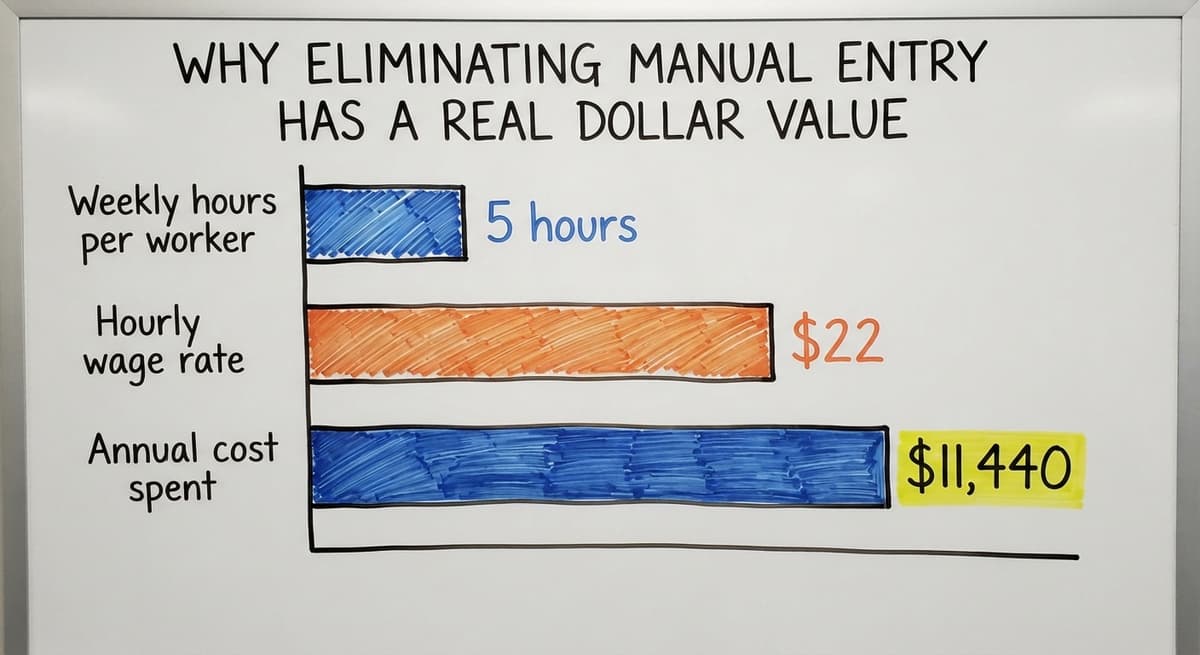
If 2 workers spend 5 hours a week on manual entry at $22 an hour, that is $11,440 a year spent on work a scan would do in seconds.
Receiving, Picking, and Cycle Counting with a Barcode Scanner
Three workflows drive most of the value in a barcode inventory management system, and each one replaces a paper-heavy process with a scan-driven one. At receiving, a worker scans each item against the buy order at the dock, catching discrepancies before stock is put away.
At picking, scanning confirms the right item and quantity before anything leaves the pick zone, eliminating mis-picks. Cycle counting replaces the annual physical inventory shutdown by spreading small, scan-based counts across the year, so stock levels stay accurate without halting operations.
Receiving Inventory
When a shipment arrives, the worker opens the buy order on the scanning device. Each item gets scanned as it comes off the truck.
The software matches each scan to the PO and adds the unit to stock. If a line is short or the wrong item arrives, the system flags it before anything hits the shelf.
That matters because errors found at the dock can be disputed with the supplier the same day.
Errors found a week later, when the paper receiving log has been filed and the truck is long gone, are absorbed as a loss. Barcode receiving closes that window.
Is the comparison easier when one option is built for you?
Yes. Off-the-shelf means fitting your process to the software, and custom is the other way round. The first look costs nothing.
Book a callPicking and Packing Orders
The software generates a pick list. The worker scans each item as they pull it. If the scan does not match the expected item or quantity, the device alerts them in real time. Nothing ships until every line is confirmed.
Pick-and-pack barcode scanning removes the most common cause of mis-ships: a picker grabbing the wrong SKU because two products look similar on the shelf.
The scan either confirms the right item or stops the worker before the box is sealed. Customers receive the right order, and your team stops fielding return calls.
Cycle Counting
Cycle counting means counting a portion of inventory on a rolling schedule rather than shutting the warehouse down for a full annual count.
A worker walks an aisle, scans each item, and the software compares the scan result to the expected quantity. Discrepancies are flagged at once. Accuracy reports are generated without any spreadsheet work.
Operations that switch to cycle counting with barcode scanners cut their annual shutdown time significantly, because most discrepancies are caught and corrected throughout the year.
The NIST Manufacturing Extension Partnership recommends cycle counting as a supply chain best practice precisely because it keeps data current without a disruptive full stop.
How Barcode Scanning Reduces Inventory Errors
Human keying errors cause most inventory discrepancies. When a worker writes a bin number and someone else types it later, there are two chances for a mistake. A scan has zero transcription steps. The machine reads the label directly.
Consider a simple example. A worker scans a bin label. The software records bin A-14.
The alternative: the worker writes "A-14" on a clipboard, someone reads it as "A-44", and types the wrong bin. That one error can hide 40 units from your available stock and cause a stock-out that triggers a lost sale.

How Inventory Accuracy Affects Distributor Performance
Fewer errors mean fewer lost sales, fewer customer complaints, and less shrinkage. The US Census Bureau tracks wholesale inventories and the inventories-to-sales ratio, and the data shows that inventory accuracy directly affects how quickly a distributor can operate.
A scanning system is the most direct way to improve that accuracy at the item level.
Does Barcode Scanning Give Me Real-Time Inventory Across All My Locations?
Yes. Every scan updates the central software instantly, so every person looking at the system sees the same stock number at the same moment. That matters most for businesses with multiple warehouse zones or more than one site.
The old alternative: a manager calls the warehouse, waits for someone to walk the aisle and count, and gets a number that is already stale by the time it is spoken. Real-time inventory tracking through barcode scanning ends that cycle.
A manager can check stock from a phone or desktop without leaving their desk. Workers in one zone see what is available in another without making a call. Accurate, shared visibility is what lets a small team operate like a larger one.
What does it look like running on your own process?
The first thing you see is it running on your own process, at no build cost. The subscription starts once it is live and doing the job, not before.
Book a callConnecting Barcode Inventory Software to the accounting software
Many small distributors and wholesalers already run a standard accounting package for accounting. The question is not whether to replace it. The question is whether the inventory system can talk to it.
A well-built the accounting software inventory integration writes inventory value and cost-of-goods data back to the accounting software automatically after each transaction.
Stock received updates the asset account. Stock shipped updates cost of goods sold. No one has to open the accounting software and type those numbers by hand.

Why Keeping Both Systems in Sync Matters
Double entry is where errors multiply. A warehouse team updates the inventory system. An office team updates the accounting software. The two records drift apart. Month-end matching becomes a project.
A connected system keeps both in sync from the moment of the scan, so the books reflect what is actually on the shelf. The FTC's Mail and Internet Order Merchandise Rule needs sellers to ship when promised, and that obligation depends on knowing what stock is actually available.
Hardware, Labels, and Getting Started
Getting started with a warehouse barcode scanner system does not need a large capital investment. The basic hardware list is short.
- A handheld, ring, or mobile barcode scanner. Many operations start with a Bluetooth handheld under $200.
- A thermal label printer to produce barcode labels for items, bins, shelves, and pallets.
- Durable labels suited to the environment. Cold storage, outdoor, and high-traffic areas need materials that hold up longer.
Smartphones can also scan barcodes if the software supports it, which lowers the entry cost for operations that want to test the workflow before buying dedicated hardware.
A dedicated scanner is faster and more durable for high-volume use, but a phone is a reasonable starting point.
Why Labels Are the Foundation of the Whole System
Every item, bin, and shelf needs a scannable label for the system to work. The software generates the barcode. The thermal printer produces the label. The worker applies it.
A good system lets you reprint labels easily when they wear out or an item is relabeled. Without complete, accurate labels, even the best scanning software cannot deliver reliable data.
Mobile Scanning Versus Fixed Scanners
A mobile barcode scanner warehouse setup means a worker carries a handheld or ruggedized device and scans anywhere on the floor. A fixed scanner is mounted at a conveyor, dock door, or workstation and reads items as they pass.
Most small-to-mid-size operations use mobile scanning because it is flexible and costs less to deploy. Fixed scanners make sense at high-volume choke points like a busy receiving dock where every incoming pallet passes the same spot.

How Long Does It Take to Set Up Barcode Inventory Software?
For most small warehouses, setup takes days to a few weeks, not months. Labeling existing inventory is the longest step.
A warehouse with several thousand SKUs may need one to two weeks to get every item and bin labeled. Software setup and staff training take a few days.
That timeline is far shorter than a traditional ERP rollout, which can run six months or more and disrupt operations the whole way through.
A system built around your existing workflow is faster to adopt because your team does not have to learn a new way of working.
How Staff Training Works in Practice
Training is straightforward. Scanning mirrors what workers already do at a grocery store or when they receive a package. A basic session covers the scanner, the workflow screens, and a practice transaction.
A well-designed system shows clear prompts so workers do not need to memorize steps. When the process lives in the software rather than in one person's head, turnover becomes far less disruptive.
Not sure this is the right shape for your operation?
The call is free. Describe how the work runs today. We map it on a call and show you what it would look like built around that, before you spend anything.
Book a callWhat to Look for in Inventory Management Software with Barcode Support
Not every system is built for a 10-to-100-person warehouse. These are the criteria that matter for inventory management for small warehouse operations.
- Real-time updates so every scan is reflected at once across the system.
- accounting integration that writes back automatically, not through a manual export.
- Mobile scanning support so workers are not tethered to a fixed workstation.
- Built-in label printing so you are not managing a separate label tool.
- Receiving and pick-and-pack workflows that match how your operation actually works.
- Reporting that shows pick accuracy, receiving errors, and count discrepancies without custom development.
- No per-scan fees, no proprietary hardware requirements, and a vendor who answers the phone.
Avoid systems that need a long-term contract before you can test whether the software fits your operation. A vendor confident in their product will let you see it work before you commit.
Off-the-Shelf Versus Custom Inventory Software: Which Fits a Small Distributor?
Off-the-shelf barcode scanning inventory software is built for a generic warehouse. It covers the common cases well. If your operation runs a standard receive-store-pick-ship workflow with no unusual product types or location structures, an off-the-shelf tool may fit with minimal adjustment.
Custom working software for wholesale and distribution follows how your operation already works. Adoption is faster because workers are not asked to change their process to match the software. The output is more useful because the reports reflect your actual data structure.
Custom does not always cost more over three years. Off-the-shelf tools carry unused features you pay for, workarounds your team builds around gaps, and staff time lost to a poor fit.
A system that matches your workflow from day one avoids those hidden costs. The right choice depends on how standard your process is and how much friction you can absorb during rollout.
Is a Barcode Inventory System Worth the Investment?
Most operations see measurable improvement within the first month of consistent scanning. Tracking a few numbers before and after makes the case clear.
Useful metrics to capture now, before any change:
- Pick accuracy rate (correct orders shipped divided by total orders)
- Time to complete a physical or cycle count
- Receiving errors per month
- Hours spent on manual data entry each week
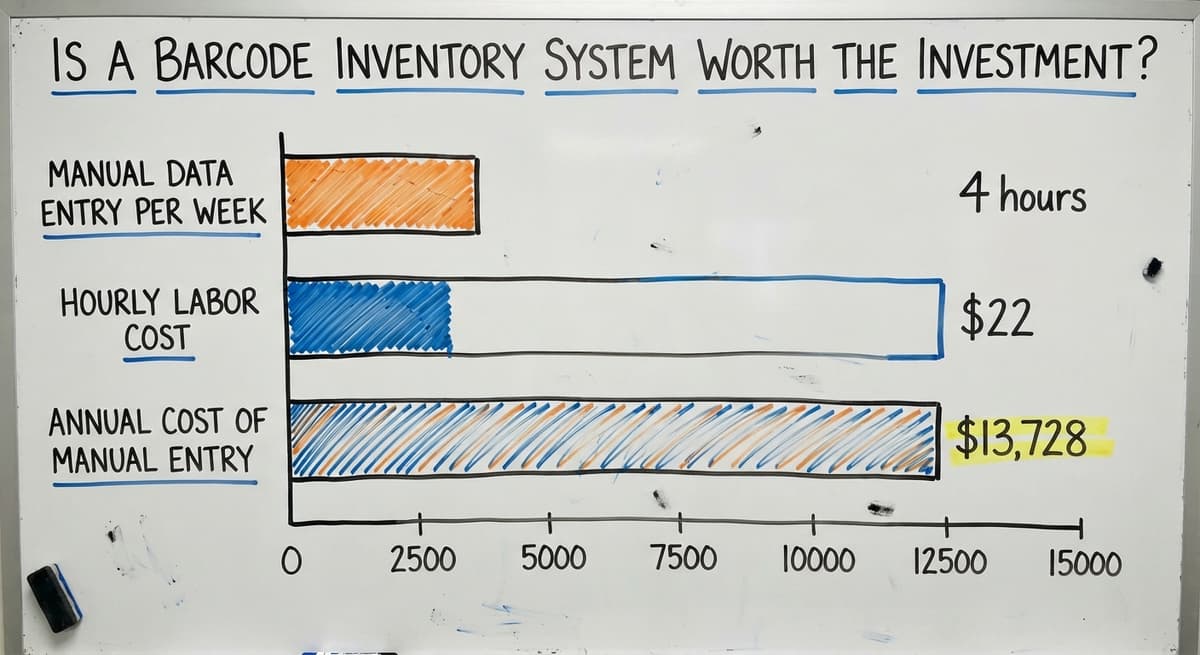
If 3 workers each spend 4 hours a week on manual data entry at $22 an hour, that is $13,728 a year on work that scanning removes.
Set that against the cost of the software and hardware, and the return is visible within the first quarter. The math is not complicated. The harder part is measuring where you start so you can see where you end up.
Common Problems Barcode Inventory Software Solves
Barcode inventory software is a quick diagnostic tool for common warehouse pain points. If your operation runs into any of these, barcode scanning is likely part of the fix.
- Phantom inventory (the system says you have stock but the shelf is empty) is caused by counts that never get recorded. Every scan creates a record.
- Mis-picks happen when workers grab by sight. Scanning confirms the right item before it leaves the pick zone.
- Receiving errors go undetected when paper logs are the only check. Scanning matches each item to the PO at the dock.
- Slow physical counts drain staff time and shut down operations. Cycle counting with scanners spreads that work across the year.
- Stock-outs from bad data cause lost sales. Real-time tracking keeps reorder points accurate.
Scanning solves data accuracy problems. It does not fix demand forecasting or supplier reliability. Be clear-eyed about what the tool does, and it will deliver on that promise.
Next Steps for Adding Barcode Scanning to Your Inventory System
The path forward is straightforward. Start by identifying which workflow causes the most pain, receiving errors, mis-picks, or slow counts. Pick that workflow first. Get the labels on, train the team on one process, and measure the result before expanding.
You do not need to replace the accounting software, buy expensive hardware, or endure a months-long rollout. A system built around your existing operation can be running in weeks.
If you want to talk through what that looks like for your specific warehouse, the team at The Software Society builds these systems for small and mid-size distributors.
There is no pressure and no obligation. Just a direct conversation about what your operation needs and whether we are the right fit to build it.
Frequently asked questions
What is the best barcode scanner for inventory tracking?
There is no single best scanner for every operation. The right choice depends on your volume, environment, and budget. For most small warehouses, a Bluetooth handheld scanner in the $100 to $200 range works well.
Ruggedized devices like those from a major scanner maker or a major scanner maker hold up better in demanding environments. If your volume is low and your software supports it, a smartphone camera can scan barcodes at no extra hardware cost. Match the scanner to the workload rather than buying on brand alone.
How to manage inventory with a barcode?
Print a barcode label for every item, bin, and shelf in your warehouse. When stock moves, a worker scans the item and the location. The software records the transaction and updates the count instantly. For receiving, scan each item against the buy order.
For picking, scan each item against the order pick list. For counting, scan each item in a zone and let the software compare the result to the expected quantity. The scan replaces the clipboard, the spreadsheet entry, and the manual count sheet.
What is the best software for scanning barcodes?
The best barcode scanning inventory software for your operation is the one that matches your workflow, connects to your accounting system, and does not need expensive proprietary hardware.
For small distributors already on the accounting software, look for a system with a direct accounting integration, mobile scanning support, and built-in receiving and pick workflows. Off-the-shelf options cover common cases. A custom-built system is worth considering if your process has enough specific requirements that a generic tool would need large workarounds.
Is there a free software for QR code inventory management?
Several tools offer free tiers at entry level. Free plans cap the number of users, items, or transactions you can manage each month. They can work for a very small operation testing the concept.
For a warehouse with regular receiving, picking, and counting activity, a paid plan is necessary to get real-time sync, accounting integration, and adequate transaction limits. Treat a free tier as a trial, not a long-term solution for a growing operation.
Can I use my phone as a barcode scanner for inventory?
Yes, if the inventory software supports it. Most modern barcode scanning inventory software includes a mobile app that uses the phone camera as a scanner. A smartphone is a reasonable starting point for low-volume operations.
A dedicated handheld scanner is faster, reads barcodes in poor light more reliably, and holds up better in a warehouse environment. For high-volume receiving or picking, a dedicated scanner pays for itself quickly in time saved.
Do I need to replace the accounting software to use barcode inventory software?
No. A well-integrated barcode inventory management system keeps the accounting software for accounting and adds scanning on top. The inventory system handles receiving, picking, and counting. It then writes the resulting inventory values and cost-of-goods data back to the accounting software automatically.
Your accounting team keeps working in the accounting software. Your warehouse team works in the scanning system. The two stay in sync without anyone doing double entry.
What happens if a barcode label is damaged or missing?
The worker can search for the item by name or SKU in the software and complete the transaction manually. The system can then reprint the label so the item is scannable going forward.
A good barcode inventory management system makes reprinting straightforward, because labels do wear out, especially in cold storage or high-traffic areas. Keeping a label printer accessible on the floor reduces the time a damaged label takes to fix.
How much does barcode inventory management software cost?
Packaged tools run $50 to $300 a month for a small team; the scanner hardware is $80 to $400 per station on top. A custom build scoped to one operation runs $8,000 to $25,000 once, then a smaller monthly fee.
What is the best free inventory software with barcode scanning?
The free tiers of the entry-level inventory apps, scanning with the phone camera. They cap items and users, so they suit a single stockroom. Once a second person or location needs access, the paid tier or a build is the next step.
Which barcode scanner works best with inventory software?
Any USB or Bluetooth 2D imager, because the software sees it as a keyboard. Pick on range, drop rating, and connection rather than brand; the software decides what a scan means.
How do I set up barcodes for my existing inventory?
Export the product list, give each SKU a Code 128 label, and label every bin with its address. Then do one full count by scanning product and bin together, which loads the system and corrects the old records in one pass.
What is in a free first look?
A 30 minute call, your operation mapped, and a clear picture of what we would build. No obligation and nothing to install.
Book a callRelated guides
More on the same work.
Guides
- Free Inventory Management Software with Barcode Scanner
- Inventory Management Software with Barcode
- Scanner Inventory Software
- Barcode Scanner Inventory System
- Inventory Software Barcode
- Barcode Scanner App Ios
- Imager Barcode Scanner
- 2d Wireless Barcode Scanner
- 2d Imaging Barcode Scanners
- 2d Imager Barcode Scanner
- 2d Usb Barcode Scanner
- Barcode Scanner Description
- 2d Image Barcode Scanner
- Quickbooks Inventory Scanner
- Rfid Inventory Software
- Barcode System for Inventory Free
- Inventory Tracking Barcode
- Upc Scanner Gun