

Inventory Management Software With Barcode
Inventory management software with barcode scanning lets your team scan a label and update your stock count in real time, no typing required. It works alongside tools you already use, including the accounting software. Setup is faster than an ERP, and most teams are comfortable within a week. This guide explains how it works, what it solves, and whether your operation is ready for it.
Published 24 August 2026. Reviewed and updated 15 September 2026.
Reviewed September 2026. Each figure comes from the assumptions stated beside it, so you can substitute your own and the arithmetic still holds.
Book a callWhat Is Inventory Management Software with Barcode, and How Does It Work?
Barcode inventory management software connects a scanner to your item records. When a worker scans a label, the software finds the matching item and updates its count at once. Nothing gets typed. Nothing gets lost in a spreadsheet that someone forgot to save.
Manual tracking means someone reads a label, types a number, and hopes they got it right. That chain breaks constantly. Barcode scanning removes the manual entry step entirely. The scanner reads the label.
The software does the rest. For an operations manager running a real warehouse, that difference shows up in receiving times, pick accuracy, and the number of customer complaints about wrong orders.
The IRS is direct about why counts matter at all. IRS Publication 538 states: "To figure taxable income, you must value your inventory at the beginning and end of each tax year." Accurate counts are not optional. They are a legal requirement, and a barcode system makes meeting that requirement far less painful.
Would you rather have it built around your operation?
The first look is free. If you would rather not compare products, describe how your operation already works and we build the system around it.
No build cost. You see it running on your own process first, and the monthly subscription starts only once it is live.
Book a callHow Does Barcode Scanning Work Inside Inventory Software?
The basic flow has 3 steps: scan the barcode, software looks up the item, quantity updates. That is the whole loop.
Barcodes come in 2 main formats. 1D codes, like UPC and Code 128, hold a short string of numbers. 2D codes, like QR and Data Matrix, hold more data in a smaller space.
As GS1 explains on its barcode standards page, these codes are "the foundation of global trade" because they give every product a unique, machine-readable identity. Your software reads either format.
The scanner itself can be a handheld gun, a mobile phone running the software app, or a fixed reader mounted at a dock door. Each option works. The right choice depends on your volume and environment, which is covered later in this guide.
How Does Barcode Scanning Reduce Inventory Errors?
Barcode scanning reduces inventory errors because it removes the human keying step where most mistakes happen. A person typing a 12-digit item number into a spreadsheet will make an error. A scanner reading that same number does not.
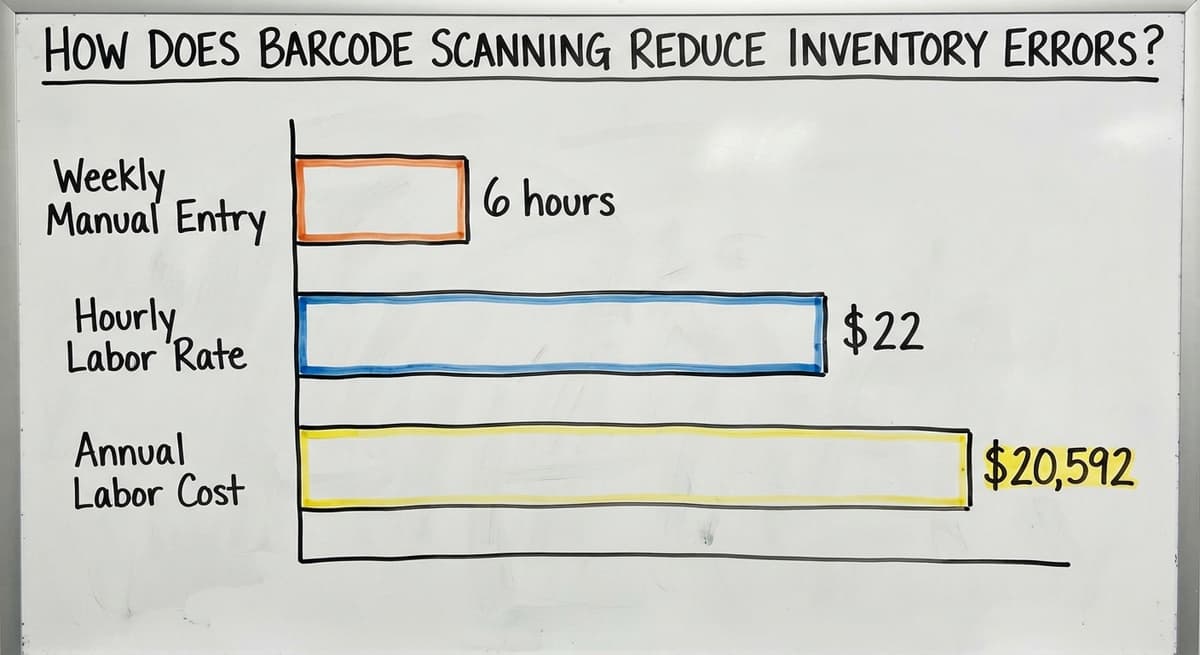
Consider a receiving team of 3 people, each spending 6 hours a week on manual data entry at $22 an hour (a figure consistent with the US Bureau of Labor Statistics wage data for stock clerks and order fillers). That is $20,592 a year in labor, before you count the cost of the errors those 3 people make.
Wrong counts cause real damage. A stock-out means a customer order you cannot fill. Overstock ties up cash in product sitting on a shelf.
A wrong shipment generates a return, a replacement, and a frustrated customer. Spreadsheets make all 3 outcomes more likely because the data is only as good as the last person who typed it.
Common Problems Barcode Inventory Software Solves
If your operation runs on an accounting package plus spreadsheets plus paper, these problems will sound familiar.
- Lost stock happens because no one recorded where it was put. Bin location scanning fixes this by recording the location at the time of put-away.
- Wrong counts happen because someone typed the wrong number. Scan-to-confirm replaces the keystroke entirely.
- Slow receiving happens because workers count by hand and then type each line. Scanning a PO receipt takes a fraction of that time.
- Missed picks happen when a paper pick sheet is misread or skipped. Guided pick lists on a scanner screen remove the guesswork.
- Unreliable stock levels happen when the spreadsheet is updated once a day, or not at all. Every scan updates the central record at once.
Each problem maps directly to a feature. The software is not adding complexity. It is replacing the manual steps that were already breaking.
Is the comparison easier when one option is built for you?
Yes. Off-the-shelf means fitting your process to the software, and custom is the other way round. The first look costs nothing.
Book a call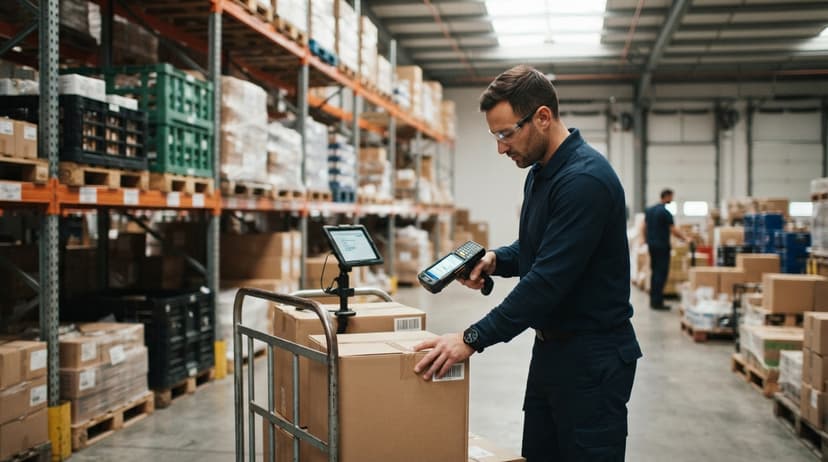
Receiving and Picking with a Barcode Scanner
Receiving Inventory with a Barcode Scanner
When a delivery arrives, the buy order is already in the system. A worker scans each item as it comes off the truck.
The software matches each scan to the open PO line. If the count is short, or if a wrong item arrives, the system flags it at once.
That matters for wholesale distributors receiving truckloads. A discrepancy found at the dock takes 5 minutes to resolve.
The same discrepancy found 3 days later, after stock has been put away and orders have been picked against it, can take hours and may result in a customer short-ship.
Catching problems at the point of receiving is the fastest and cheapest place to catch them.
Picking and Packing Orders with Barcode Verification
On the outbound side, a picker scans each item before placing it in the box. The software confirms the item matches the order. If it does not match, the scanner alerts the worker before the wrong item ships.
Guided pick lists on the scanner screen replace paper pick sheets. The worker follows the screen rather than interpreting a printed list. Speed goes up. Wrong-item shipments drop.
The US Federal Trade Commission's Mail and Internet Order Merchandise Rule holds businesses to shipping what they promised, when they promised it. Accurate picking is the working foundation of that obligation.
Real-Time Stock Levels and Cycle Counting
Real-Time Inventory Tracking Across Locations
Every scan updates the central count at once. A manager watching a dashboard sees the current number, not last night's number. Multiple warehouse locations or bin locations stay accurate without a nightly reconcile.
The contrast with an end-of-day spreadsheet update is large. By the time someone enters yesterday's receipts and picks into a spreadsheet, that data is already stale. Orders placed this morning are working from yesterday's picture. Real-time inventory tracking closes that gap entirely.
Cycle Counting with Barcode Scanners
Cycle counting means counting a section of inventory on a rolling schedule rather than shutting down for an annual physical count.
A worker scans every item in one aisle or one product category. The software compares the scan results to the expected count and flags any gap.
This approach is faster and far less disruptive than a full shutdown. Discrepancies are caught and corrected in small batches rather than discovered all at once during a year-end count that takes days.
The NIST Manufacturing Extension Partnership recommends cycle counting as a core inventory control practice for exactly this reason. A barcode scanner turns cycle counting from a burden into a routine.

The accounting software Inventory Management and Barcode Software
Most small distributors already use the accounting software for financials. They do not want to replace it, and they should not have to.
Barcode inventory software can sync item counts, buy orders, and invoices directly with the accounting software. When a PO is received in the barcode system, the financial record in the accounting software updates.
When an invoice goes out, the stock level adjusts. The 2 systems stay in step without anyone re-entering data.
This approach keeps the accounting software doing what it does well: accounting. The barcode system handles what the accounting software was never designed for: real-time warehouse transactions.
You do not need a full ERP switch. You need the right layer added on top of what already works.
The US Census Bureau tracks inventory-to-sales ratios for wholesale firms through its Monthly Wholesale Trade report. Operations carrying too much stock relative to sales are doing so because their counts are unreliable, leading to safety-stock padding.
Accurate counts, fed by barcode scanning and reflected in the accounting software, give managers the confidence to carry leaner stock.
What does it look like running on your own process?
The first thing you see is it running on your own process, at no build cost. The subscription starts once it is live and doing the job, not before.
Book a callWhat Hardware Do I Need to Run Barcode Inventory Software?
The hardware you need depends on your environment, but the options fit most budgets. Here is how to think through the choice.
Mobile Phones Versus Dedicated Handheld Scanners
A smartphone running the software app can scan barcodes. This works well for a small operation or for staff who move between the office and the floor. The cost is near zero if the phones are already in hand.
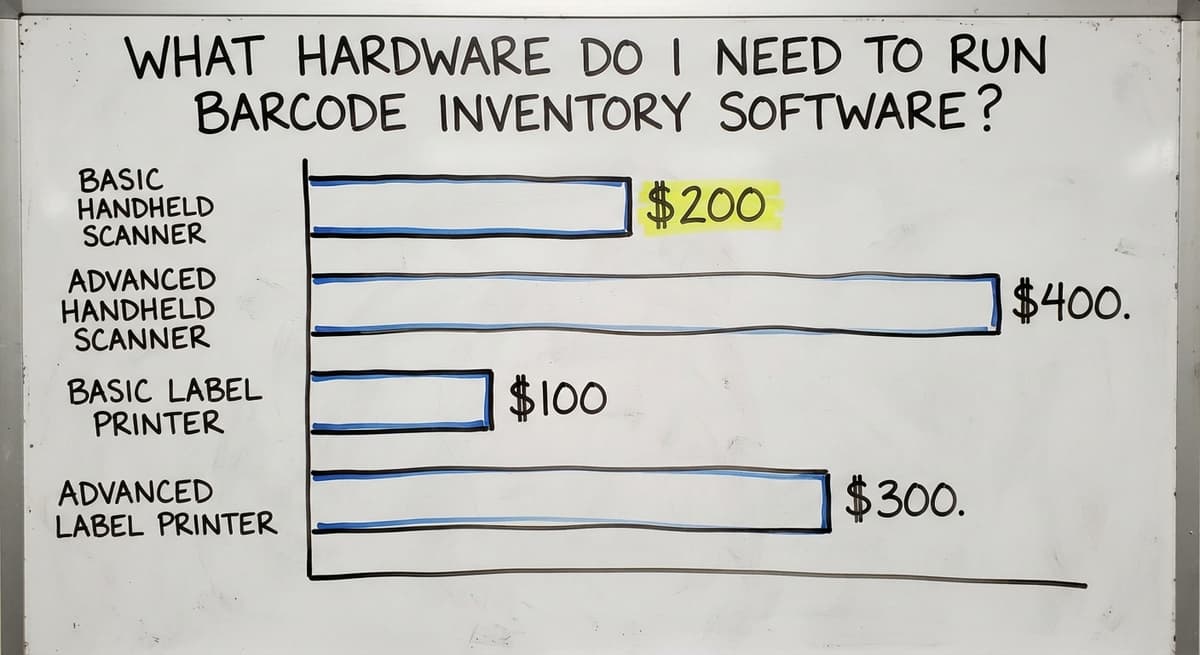
A dedicated handheld barcode scanner is more rugged and faster in a busy warehouse. Scan rates are higher, batteries last longer, and the device survives drops that would break a phone. Entry-level handheld scanners start around $200 to $400. Industrial-grade units run higher.
For a team of 5 to 15 people in a light-volume operation, phones may be enough. For a dock receiving 20 or more shipments a day, dedicated scanners pay for themselves quickly in speed alone.
Label Printing and Barcode Generation
Not every item arrives with a barcode. Suppliers, especially overseas manufacturers, ship unlabeled goods. The software should generate a barcode for any item that lacks one, then print a label on demand.
Thermal printers are the standard choice for label printing. They use heat rather than ink, so there are no cartridges to replace and labels do not smear. A thermal label printer costs $100 to $300 for a basic model.
Print on demand means a worker prints a label as items arrive. Batch printing means running a full sheet before a receiving session starts. Both approaches work. The right one depends on how your receiving process flows.

What to Look for in Barcode Inventory Management Software?
The right barcode inventory software fits your current workflow without requiring a full process overhaul. Rank these features.
- Scanner compatibility: USB, Bluetooth, and mobile scanning should all be supported so you are not locked into one hardware vendor
- Label printing built in or integrated: generating and printing barcodes for unlabeled items should happen inside the same system
- The accounting software sync: the software should push and pull data from the accounting software without manual export and import steps
- Ease of setup for a team of 5 to 100: setup should not need an IT department or a months-long rollout project
- Audit trail: every scan should create a timestamped record showing who did what, when, and where
- Role-based screens: a supervisor dashboard looks different from a worker scan screen, and both should be simple enough to use without training documents
The audit trail point deserves emphasis. Every scan creates a record: who scanned, what item, when, and at which location. That record resolves disputes with customers and suppliers. It replaces the notebook on the dock that no one can read a week later.
Custom Barcode Inventory Software Versus Off-the-Shelf
Off-the-shelf software is built for a generic operation. It forces your team to change how they work to fit the software's assumptions. That creates friction, workarounds, and eventual abandonment.
Custom barcode inventory software is built around how your operation already works. Your receiving process, your pick workflow, your accounting setup, your label format. None of that changes. The software fits into the existing structure rather than replacing it.
The cost comparison is not simply buy price versus build cost. Off-the-shelf software that does not fit your workflow has a hidden cost: the hours spent working around it, the errors it does not prevent because it was not designed for your process, and the eventual cost of switching again.
Operations with unique workflows or existing accounting setups tend to get better long-term value from a custom build.
Not sure this is the right shape for your operation?
The call is free. Describe how the work runs today. We map it on a call and show you what it would look like built around that, before you spend anything.
Book a call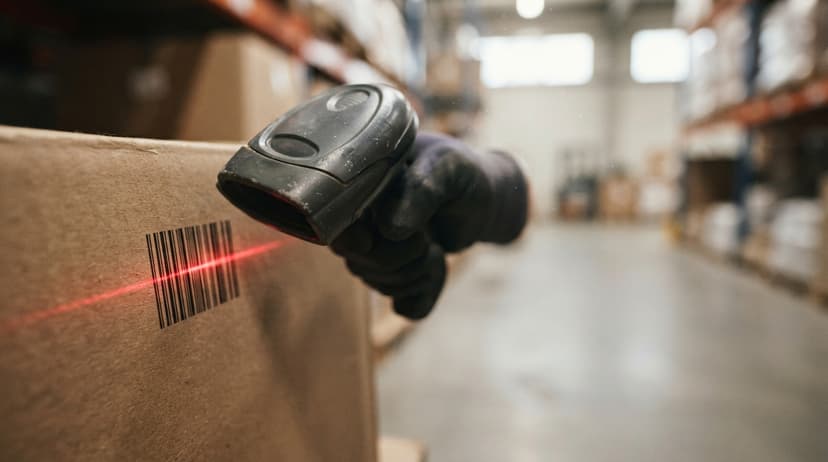
Signs Your Operation Is Ready and What Setup Looks Like
Signs Your Operation Is Ready for Barcode Inventory Software
You do not need to be running a large warehouse to benefit from a barcode system. These are the clearest signals that the timing is right.
- You count physical inventory more than once a month because the numbers keep drifting
- Wrong shipments are a regular customer complaint, not a rare exception
- Receiving takes too long because every line gets typed in manually
- Your team is growing and the paper system cannot keep pace with the volume
Any one of these is enough to justify a closer look. All 4 together mean the cost of waiting is higher than the cost of switching.
What Does the Setup Process Look Like?
A focused rollout follows 4 phases.
- Item catalog: import existing items from the accounting software or build the catalog from a spreadsheet
- Label assignment and printing: assign barcodes to any items that lack them and print labels before go-live
- Scanner setup: connect hardware via USB, Bluetooth, or mobile app and test each scan workflow
- Go-live by workflow: start with receiving, then add picking, then cycle counting. Roll out one workflow at a time rather than switching everything at once
Most small operations complete this in days, not months. The process is in the software, so new staff learn it by following the screen rather than asking a colleague.
How Do We Build Barcode Inventory Software for Operations Like Yours?
The Software Society is based in Columbus, Ohio. We work directly with the operations team, not through a project manager who has never seen a warehouse floor.
We start by mapping how your operation currently works: what the accounting software handles, what falls into spreadsheets, and what lives on paper or in someone's memory.
The build covers the gap between those, and nothing more. The accounting software stays in place. We replace only the manual steps that are causing the errors.
The same team that builds the system handles support and ongoing changes. There is no handoff to a separate support desk.
If your process changes, the software changes with it. That continuity is what separates a system that gets used from one that gets abandoned six months after go-live.
Next Steps to Get Barcode Inventory Software Running in Your Warehouse
Start with a conversation about how your operation currently works. Bring the honest version: the spreadsheets, the paper, the workarounds. That is exactly what we need to see.
From there, we map the gaps and propose a focused build that solves the specific problems without overbuilding. No feature you will never use. No months of disruption before you see results.
Schedule a review call and we will tell you plainly what a barcode inventory system would look like for your operation, and whether it makes sense to build one.
Frequently asked questions
What is the best app for barcode inventory management?
There is no single best app. The right choice depends on whether you need the accounting software sync, how many users you have, and whether your workflow is standard or specific to your operation.
Off-the-shelf options work for straightforward setups. Operations with unique receiving or picking workflows, or existing accounting setups, get better results from a custom build that fits how they already work rather than forcing a process change.
How to manage inventory with a barcode?
Assign a barcode to every item in your catalog. Print labels for any items that do not already have one. Connect a scanner to your inventory software.
From that point, every receiving, picking, and counting action is completed by scanning rather than typing. The software updates the count in real time. Most teams are comfortable with the scan workflow within a day of training.
How much does a barcode inventory system cost?
Hardware costs range from near zero if you use existing smartphones, to $200 to $400 per handheld scanner for a basic unit, and higher for industrial-grade devices. A thermal label printer adds $100 to $300.
Software costs vary: off-the-shelf subscriptions run $50 to $300 per month depending on user count and features. A custom build has a higher upfront cost but no ongoing subscription, and it is sized to your actual needs rather than a generic feature set.
Which barcode scanner is best for inventory management?
For a light-volume or office-adjacent operation, a smartphone running the inventory app is enough and costs nothing extra. For a warehouse or dock environment with high daily scan volume, a dedicated handheld scanner is faster, more durable, and worth the investment.
Brands like a major scanner maker and a major scanner maker make reliable warehouse-grade units. The best scanner is the one that matches your scan volume, your environment, and your budget.
Can barcode inventory software work alongside the accounting software without replacing it?
Yes. Barcode inventory software can sync item counts, buy orders, and invoices with the accounting software in real time. The accounting software continues to handle accounting.
The barcode system handles warehouse transactions. You do not need to replace the accounting software or switch to a full ERP to get accurate, real-time inventory counts.
Can the software generate barcodes for items that do not already have them?
Yes. If a supplier ships unlabeled goods, the software can generate a barcode for each item and print a label on a thermal printer. This is standard for distributors who receive product from manufacturers who do not apply retail labels. The label is created once and scanned from that point forward.
How long does it take to implement barcode inventory software in a small warehouse?
A focused rollout for a small operation takes days rather than months. The 4 phases are item catalog setup, label printing, scanner connection, and go-live by workflow.
Rolling out one workflow at a time, starting with receiving, reduces disruption and lets the team build confidence before the next phase begins.
What barcode scanner and label printer should I buy?
A cordless 2D imager per active station ($150 to $400) and a desktop thermal label printer ($150 to $500). Both connect over USB and need no drivers for basic use. Buy rugged only for a dock or a cold room.
What is the best free inventory management software with barcode scanning?
The free tiers of the entry-level inventory apps, scanning with a phone camera. They cap items and users, which makes them a stockroom tool. A second user or a second location is where the paid tier or a custom build starts.
How do I set up barcode tracking for my inventory?
Label every product with a Code 128 SKU label and every bin with its address, load both lists into the software, and run one full count scanning product and bin together. From then on each receipt, move, and pick is a scan.
How much does this type of software cost for a small business?
Packaged tools run $50 to $300 a month; a custom build scoped to one operation runs $8,000 to $25,000 once with a smaller monthly fee. Hardware adds $80 to $400 per scanning station.
What is in a free first look?
A 30 minute call, your operation mapped, and a clear picture of what we would build. No obligation and nothing to install.
Book a callRelated guides
More on the same work.
Guides
- Inventory Management Software Barcode Scanner
- Free Inventory Management Software with Barcode Scanner
- Inventory Software Barcode
- Rfid Inventory Software
- Scanner Inventory Software
- Barcode Scanner Inventory System
- Barcode System for Inventory Free
- Inventory Tracking Barcode
- Barcode Abbreviation
- Barcode Scan Machine
- Tracking Number Barcode
- Barcode Reader Machine
- Barcode Scanner App Ios
- 2d Barcode Readers
- Barcode Producer
- Barcode Systems for Warehouse
- Barcode Reader Description
- Barcodes and Labels
- Alphanumeric Barcode