


Barcode Scanner Inventory System
If your team counts stock by hand, tracks it in a spreadsheet, and finds errors at month-end, a barcode scanner inventory system solves exactly that problem. It does not replace your accounting software. It does not need an IT department. It replaces the manual steps that cause most inventory errors, and it does it without shutting down your operation.
Published 10 July 2026. Reviewed and updated 15 September 2026.
Reviewed September 2026. Each figure comes from the assumptions stated beside it, so you can substitute your own and the arithmetic still holds.
The guide addresses the owner or operations manager of a small wholesale distributor or fulfillment center running 5 to 100 staff. If that is you, every section below maps to something you already deal with every day.
Book a callWhat Does a Barcode Scanner Inventory System Do, and How Does It Work?
A barcode scanner inventory system has 4 parts: barcode labels on your products, a scanner or mobile device to read them, inventory management software to record the transaction, and a data connection that keeps your records current.
When a worker scans a label, the software matches the code to a SKU (a unique item number), logs the transaction, and updates the stock count. No typing. No paper. No separate data-entry step later.
As GS1 explains, barcodes are "the global language of business," and the standards behind them mean any compliant scanner can read any compliant label. That matters because it keeps your hardware options open.
Would you rather have it built around your operation?
The first look is free. If you would rather not compare products, describe how your operation already works and we build the system around it.
No build cost. You see it running on your own process first, and the monthly subscription starts only once it is live.
Book a callWhat Label Types Do Barcode Scanners Read?
Scanners read 2 main label types. A 1D barcode, like the Code 128 format common in warehouses, holds a short string of numbers and letters.
A 2D code, like a QR or Data Matrix code, holds more data in a smaller space. For most inventory tracking needs, 1D barcodes work well and cost less to print. Thermal-printed labels last longer in warehouse conditions than standard paper ones.
The scan itself takes under a second. Speed and accuracy come together at that moment: the right item is confirmed, and the record is written without a human transcribing anything.
How Do Warehouses Use Barcode Scanners Day to Day?
A barcode scanner inventory system earns its keep across 4 daily workflows. Each one removes a step where errors used to enter the system.
Receiving is where the payoff starts. When a truck arrives, the worker scans each item at the dock door. The software matches the scanned quantities against the buy order automatically.
If the count is short or a wrong item arrived, the system flags it right then, not at month-end when the paperwork has been filed and the vendor is harder to reach.
Picking and packing is where mis-picks happen. Directed picking means the software tells the picker which shelf to go to and which item to pull.
The scan confirms the right product before it goes in the box. Pickers do not need to read long SKU strings or memorize locations. The scan does the confirming.
How Barcode Scanners Support Shipping and Cycle Counting
Shipping closes the loop. A scan at the packing station closes the order and reduces the stock count. The US Federal Trade Commission needs businesses to ship when they said they would, and an accurate count is what makes that promise keepable.
Cycle counting replaces the annual physical count. Instead of shutting down for a full day, workers scan one section of shelves on a rolling schedule.
Weekly or even daily counts become practical because each one takes minutes, not hours. Accuracy improves because errors are caught and corrected before they compound.
The Real Cost of Picking Errors
A mis-pick costs more than the return label. There is the re-pick labor, the outbound shipping on the replacement, and the customer who now doubts whether to order again.
Scan-to-confirm at the pick and pack stage catches the wrong item before the box closes. Some systems need a successful scan before a shipping label will even print, which removes the possibility of skipping the check under time pressure.
Is the comparison easier when one option is built for you?
Yes. Off-the-shelf means fitting your process to the software, and custom is the other way round. The first look costs nothing.
Book a call
How a Barcode Scanner Inventory System Connects to the accounting software
Many small distributors already use a standard accounting package for accounting, and the right barcode scanner inventory system writes inventory transactions back to the accounting software rather than replacing it. This is not a full ERP migration.
Your chart of accounts stays. Your vendor records stay. Your team keeps working in the same accounting tool.
The specific pain this fixes: stock tracked in a spreadsheet, emailed between staff, always one version behind. The barcode system becomes the single source of truth for inventory while the accounting software handles the financials.
The goal is to replace only the manual parts, not to rebuild what already works. A the accounting software inventory integration built for small operations can be configured to match your current receiving and shipping workflow without months of setup.
Why Accurate Inventory Records Are a Legal Obligation
The IRS is direct on why inventory records matter at all. IRS Publication 538 states: "To figure taxable income, you must value your inventory at the beginning and end of each tax year." That is a legal obligation, not a preference. A barcode system makes meeting it easier and more defensible.

Do I Need a Full ERP, or Will a Barcode System Be Enough?
A barcode scanner inventory system is enough for most small distributors. An ERP (enterprise resource planning system) is large, expensive, and takes months or years to implement. It touches every part of a business, from HR to finance to production.
Most operations with fewer than 100 staff do not need that scope.
A focused barcode scanner inventory system solves the inventory problem without the overhead. It is a targeted fix, not a rip-and-replace project. Some businesses will eventually outgrow it and move toward a full ERP.
Most will not need to for years. If the core problem is stock discrepancies, wrong shipments, and time lost to manual counts, a barcode system addresses all 3 without asking you to rebuild everything else.
What Does a Barcode Scanner Inventory System Cost for a Small Operation?
Costs fall into 4 categories, and the ranges vary widely based on what you already own.
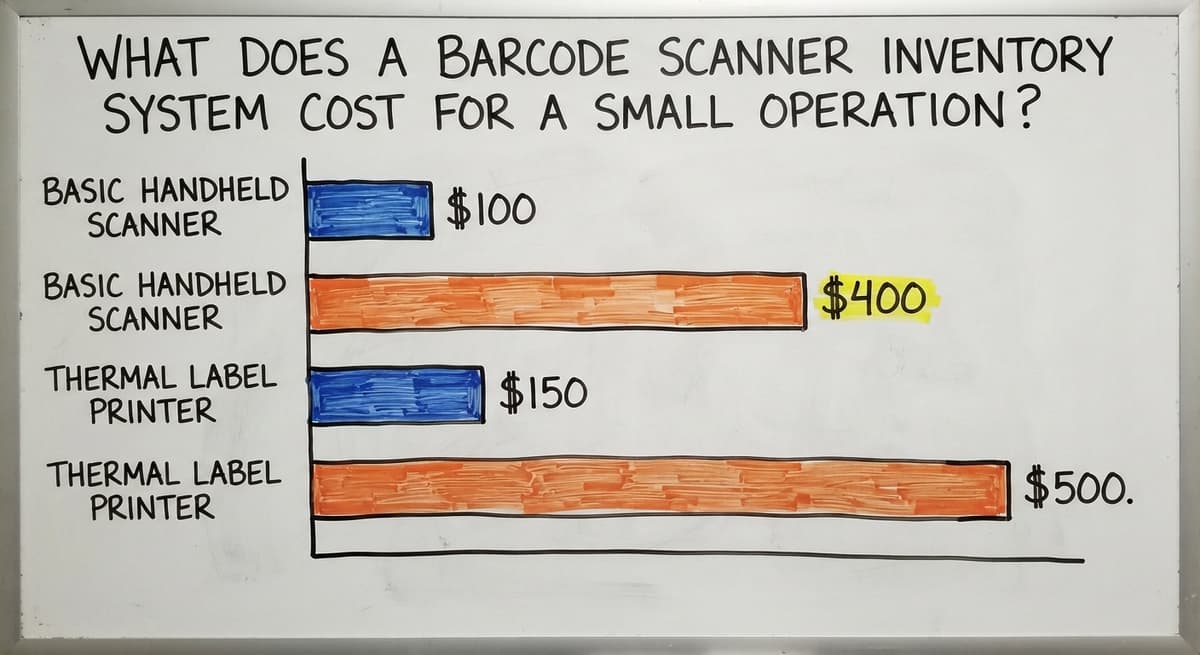
- Hardware: A basic handheld barcode scanner runs $100 to $400 per unit. Rugged mobile computers that run apps and show more information on screen cost more. Smartphones with a scanning app are the lowest upfront option but are not built for high-volume environments where drops are common.
- Labels and printers: A thermal label printer costs $150 to $500. Label stock is an ongoing supply cost.
- Software: Custom-built systems for small operations cost far less than enterprise platforms. Expect a setup fee and an ongoing subscription or maintenance cost.
- Rollout: A phased rollout that labels existing inventory, configures the software to match current workflows, and trains staff can be completed without months of downtime.
What does it look like running on your own process?
The first thing you see is it running on your own process, at no build cost. The subscription starts once it is live and doing the job, not before.
Book a call
What Manual Inventory Management Actually Costs
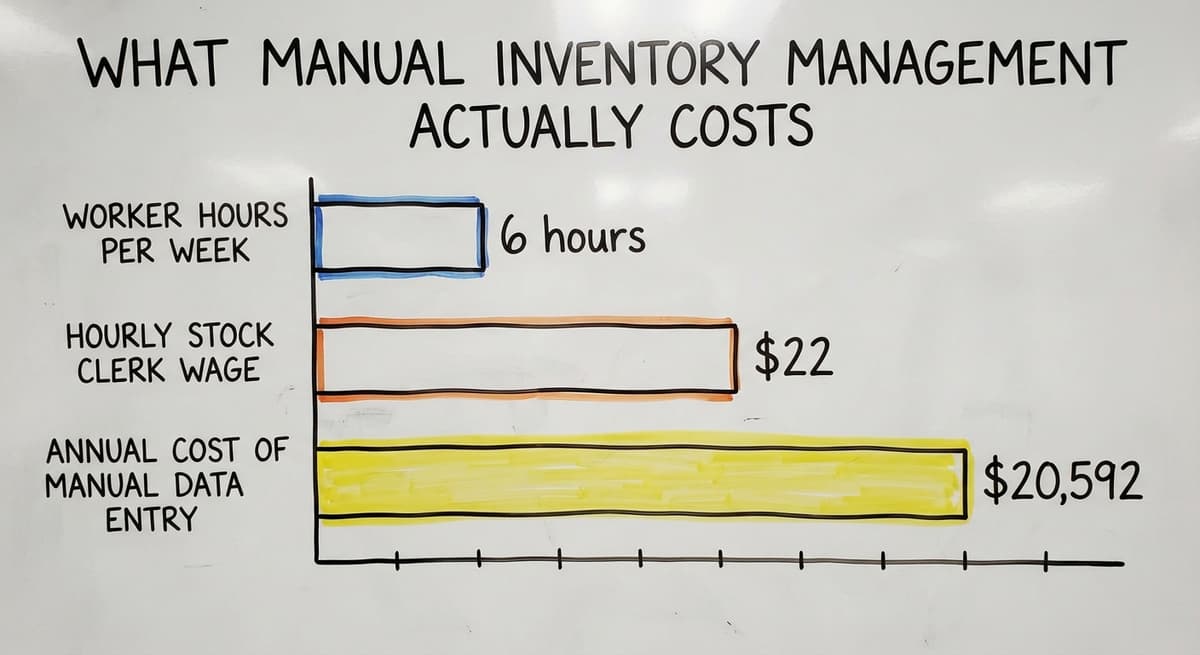
To size the cost of doing nothing: 3 workers spending 6 hours a week each on manual data entry, at the median stock clerk wage of around $22 an hour, adds up to roughly $20,592 a year in labor alone, before counting the cost of errors those hours still produce.
Choosing the Right Scanner Hardware
The right hardware depends on scan volume, environment, and budget. Dedicated handheld scanners are durable, fast, and single-purpose. They hold up on a loading dock. Rugged mobile computers run apps and display more context on screen, which helps in complex pick workflows.
Smartphones with scan apps work for light-duty use and low budgets, but they are not built for a shift of constant scanning or a concrete floor drop.
Bluetooth scanners pair well with small operations where a worker moves through a limited area. For any environment with forklifts, moisture, or heavy daily use, a purpose-built scanner is worth the extra cost per unit.
Real-Time Inventory Visibility and Reporting
Real-time inventory means stock counts update the moment a scan happens, not at the end of the day when someone exports a spreadsheet.
Purchasing decisions are based on live data. Low-stock alerts trigger reorder points automatically. Stockouts and overstock both shrink because the signal is current.
Every scan also creates a timestamped record: who scanned, which item, which location, what quantity. That audit trail resolves disputes with vendors or customers without guesswork. Reports on slow-moving stock, turnover rates, and receiving accuracy become easy to pull because the data is already there.
The NIST Manufacturing Extension Partnership notes that supply chain visibility is a core driver of process reliability for small and mid-size manufacturers, and the same principle applies to distributors.
Is Your Operation Ready, and Where Do You Start?
Readiness is about pain, not company size. Three questions point the way:
- Are you counting stock manually and finding errors after the fact?
- Are mis-picks a regular source of customer complaints or returns?
- Do you lose hours each week reconciling spreadsheets that do not match?
Any warehouse processing more than 20 orders a day can benefit. The system scales from small to mid-size without needing an IT department. Before choosing a system, ask the vendor these questions:
- Does it connect to the accounting software without a full migration?
- Can it be configured to match our current receiving and shipping workflow?
- What happens when we scan something that is not in the system yet?
- Who supports the system if something breaks, and how fast do they respond?

How to Go Live With a Barcode Scanner Inventory System
The path forward is practical: identify the biggest inventory pain, map the current workflow, choose hardware that fits the environment, build or buy software that connects to the accounting software, label existing stock, train staff, and go live in phases.
Most warehouse staff are comfortable with a scanner within 1 shift. The software should show clear prompts so no one needs to memorize steps.
If you want to talk through your specific situation before committing to anything, that conversation costs nothing and takes less time than your next manual count.
Frequently asked questions
What is a barcode scanner inventory system and how does it work?
A barcode scanner inventory system reads a label on a product, matches the code to a SKU in your software, and updates your stock count automatically. It replaces manual counting, paper logs, and spreadsheet entry with a scan that takes under a second and needs no typing.
How does a barcode scanner inventory system connect to the accounting software?
A well-built system writes inventory transactions back to the accounting software rather than replacing it. Your chart of accounts, vendor records, and accounting workflows stay intact. The barcode system handles inventory tracking while the accounting software handles financials.
What hardware do I need to run a barcode scanner inventory system?
You need barcode labels on your products, a scanner or mobile device to read them, inventory software, and a data connection.
Dedicated handheld scanners cost $100 to $400 each and are the most common choice for warehouse use. Smartphones with scan apps work for light-duty operations.
How does scanning reduce picking errors and wrong shipments?
Scan-to-confirm at the pick stage checks the item before it goes in the box. Some systems will not print a shipping label until a successful scan is recorded. This catches the wrong item before it leaves the building, which cuts return costs and customer complaints.
Can a small warehouse with fewer than 100 staff use a barcode system?
Yes. A barcode scanner inventory system is built for exactly this size of operation. It does not need an IT department, and it scales from a handful of staff to around 100 without a platform change.
Any warehouse processing more than 20 orders a day will see a clear benefit.
What is the difference between a barcode inventory system and a full ERP?
An ERP covers every part of a business and takes months or years to implement at large cost. A barcode scanner inventory system is a focused tool that solves the inventory problem. Most small distributors do not need an ERP and will not for years.
How long does it take to implement a barcode scanner inventory system?
A phased rollout for a small operation covers labeling existing stock, configuring the software, and training staff. Most warehouse workers are comfortable with a scanner within one shift. A phased go-live reduces disruption and does not need days of downtime.
What does a barcode scanner inventory system cost for a small operation?
Costs break into hardware ($100 to $400 per scanner), a thermal label printer ($150 to $500), software (setup plus ongoing subscription), and rollout.
Custom-built systems for small operations cost far less than enterprise platforms. The ongoing cost of manual errors and labor is higher than the system cost.
How do I create and print inventory barcode labels?
Assign each product and bin a code, generate Code 128 labels from the inventory software or a free generator, and print on a thermal label printer. Print the code as text under the bars, and test one label with the scanner before printing the batch.
What barcode scanner works with a spreadsheet?
Any USB scanner. It acts as a keyboard and types the code into the selected cell, then sends Enter to move down a row. It works, and it is also the reason spreadsheet inventory drifts: nothing checks that the cell was the right one.
What barcode scanner works best for warehouse inventory?
A cordless 2D imager for a small floor, or a rugged mobile computer where staff walk aisles all day. Both read 1D and 2D codes and worn labels. The software that turns the scan into a stock movement matters more than the model.
How do I set up barcodes for products and storage locations?
Give every location an address code (zone-aisle-shelf-bin) and every product a SKU, label both, and load the two lists into the inventory system. From then on, a put-away is 2 scans, product then bin, and the system records the pairing.
What is in a free first look?
A 30 minute call, your operation mapped, and a clear picture of what we would build. No obligation and nothing to install.
Book a callRelated guides
The rest of this guide, for the parts of the job this page does not cover.
Guides
- Inventory Management Software Barcode Scanner
- Free Inventory Management Software with Barcode Scanner
- Barcode System for Inventory Free
- 2d Image Barcode Scanner
- Imager Barcode Scanner
- 2d Usb Barcode Scanner
- Barcode Scanner App Ios
- Barcode Scanner Description
- 2d Wireless Barcode Scanner
- 2d Imaging Barcode Scanners
- 2d Imager Barcode Scanner
- Warehouse Scanner System
- Barcode Systems for Warehouse
- System Id Barcode Solutions
- Scanner Inventory Software
- Quickbooks Inventory Scanner
- Inventory Management Software with Barcode
- Inventory Tracking Barcode
- Inventory Software Barcode