


2d Wireless Barcode Scanner
A 2D wireless barcode scanner reads barcodes without a cable and decodes formats like QR codes and Data Matrix codes, not just the old striped labels. It sends scan data to your computer or tablet over Bluetooth or a USB dongle. Most plug straight into any software that accepts typed text. Reviewed and updated 15 September 2026.
Published 17 July 2026. Reviewed and updated 15 September 2026.
Book a callWhat Is a 2D Wireless Barcode Scanner?
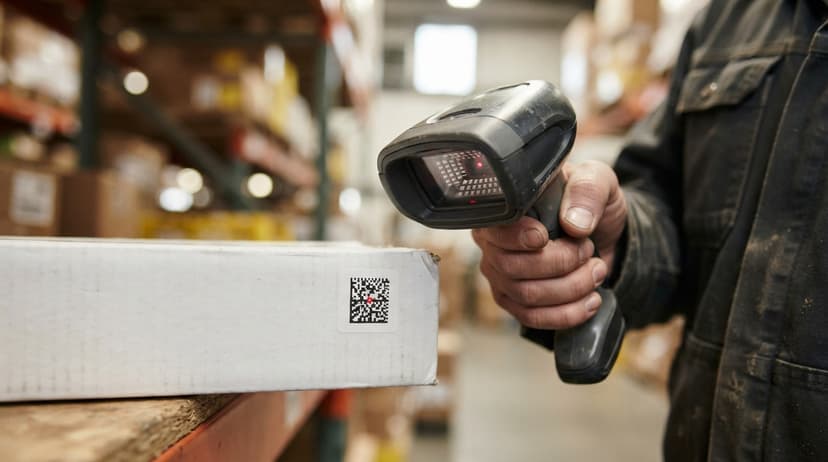
A 2D wireless barcode scanner is a handheld device that reads a barcode and sends the data to your computer without a cable. The "2D" part means it reads codes that carry data in two directions, across and down, not just left to right like a traditional striped barcode.
Think of it as a camera that decodes a label and types the result for you. Workers can move freely across a warehouse floor because there is no cord tethering them to a workstation.
Would you rather have it built around your operation?
The first look is free. If you would rather not compare products, describe how your operation already works and we build the system around it.
Reviewed September 2026. Each figure comes from the assumptions stated beside it, so you can substitute your own and the arithmetic still holds.
No build cost. You see it running on your own process first, and the monthly subscription starts only once it is live.
Book a callHow Does a 2D Scanner Differ from a 1D Scanner?
A 1D barcode scanner reads the familiar striped label. It only pulls data from horizontal lines. A 2D barcode stores data in a grid pattern, which lets it hold far more information in a much smaller space.
GS1, the global standards body that governs barcode formats, states that its standards cover "the foundation of our global language of business" across retail, healthcare, and logistics.
You can review those standards at gs1.org/standards/barcodes. Most modern shipping labels, product packaging, and compliance labels now use 2D formats.
A warehouse that receives goods from multiple suppliers, or ships via carriers that print QR codes and Data Matrix labels, needs a 2D scanner. A 1D scanner will miss those codes entirely.
The practical rule: if any label on your floor is not a plain striped barcode, a 1D scanner will not read it.
What Barcode Formats Does a 2D Scanner Read?
A 2D wireless barcode scanner reads every major barcode format automatically, including the ones your suppliers and carriers are most likely to use today.
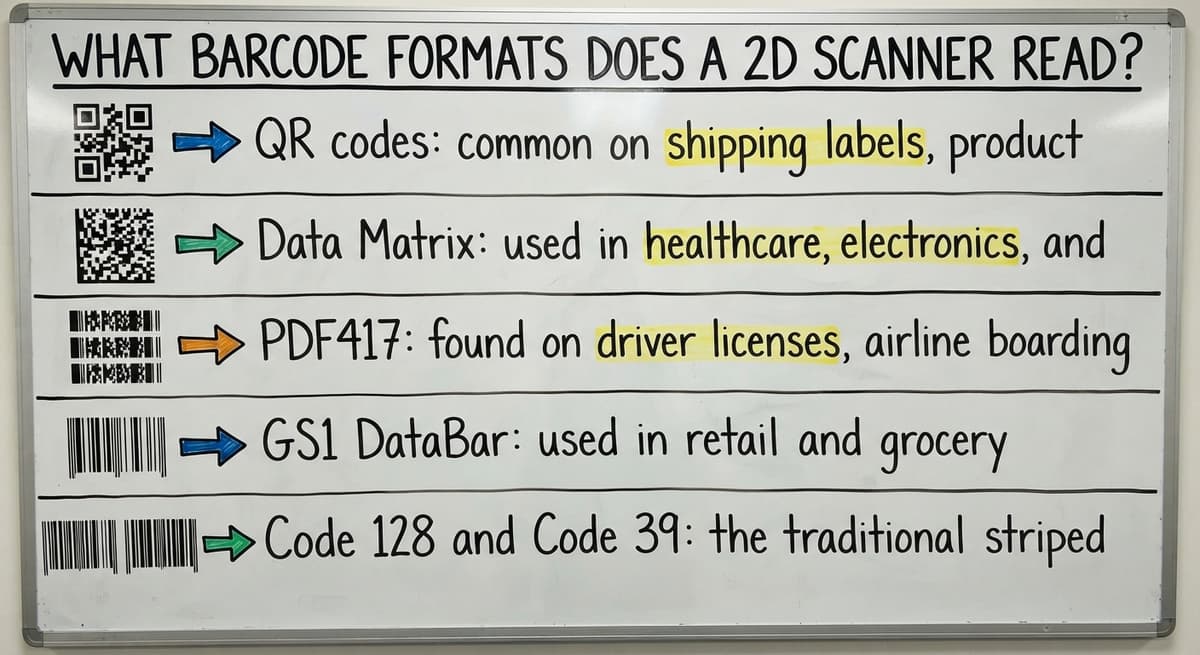
The formats you will see most often are:
- QR codes: common on shipping labels, product packaging, and returns processing
- Data Matrix: used in healthcare, electronics, and small parts where label space is tight
- PDF417: found on driver licenses, airline boarding passes, and freight documents
- GS1 DataBar: used in retail and grocery distribution for variable-weight items
- Code 128 and Code 39: the traditional striped formats still common in wholesale and manufacturing
Do 2D Scanners Need Configuration to Switch Formats?
Most 2D wireless scanners decode all of these without any setup change. The scanner detects the format and decodes it in a single pass.
Are there wireless 2D barcode scanners? Yes. Most major scanner brands, including a major scanner maker, a major scanner maker, and a major scanner maker, sell cordless 2D models that connect via Bluetooth or a USB dongle. They are widely available and work with standard computers, tablets, and point-of-sale systems.
Wireless Connection Types: Bluetooth vs USB Dongle
Two wireless methods dominate the market. Choosing the right one depends on your floor size and IT setup.
Bluetooth pairs the scanner directly to a computer, tablet, or mobile device. No extra hardware is needed on the host side.
Bluetooth range is usually 30 to 100 feet in open space, though metal shelving and concrete walls cut that figure noticeably. It suits mid-size warehouse floors and works well when workers pair to a tablet they carry with them.
When Should You Use a USB Dongle Instead of Bluetooth?
USB dongle (2.4 GHz) plugs into a USB port and creates its own wireless link. The scanner connects to the dongle, not to the computer's Bluetooth radio.
Range is usually 30 to 50 feet, but the signal is more consistent in environments crowded with other wireless devices. Setup takes about 60 seconds: plug in the dongle and scan a pairing barcode.
For large facilities over 10,000 square feet, a Wi-Fi connected handheld terminal is a better fit than either option.
Match the scanner's rated range to your actual floor layout before you buy.
Is the comparison easier when one option is built for you?
Yes. Off-the-shelf means fitting your process to the software, and custom is the other way round. The first look costs nothing.
Book a call
Key Specs to Check Before You Buy a 2D Wireless Barcode Scanner
The scanner brand matters less than whether the hardware fits the job. Check these specs before ordering.
- Scan engine: An imager (camera-based) reads 2D codes. A laser does not. Confirm the listing says "imager" or "area imager".
- Battery life: Look for at least 8 hours of continuous use. A scanner that dies at 2 p.m. costs you a shift.
- Drop rating: Most warehouse scanners are rated for 5-foot drops onto concrete. Cold storage or outdoor docks need a higher rating.
- IP rating: IP54 handles dust and light splashes. IP65 or higher is worth the extra cost in wet or dusty environments.
Specs That Affect Daily Performance
- First-pass read rate: A good imager scanner reads a clean label on the first try, every time. A low read rate on damaged labels signals a wider decode tolerance is needed.
- Weight: Workers scan hundreds of times a day. A scanner over 7 ounces causes fatigue by afternoon.
Budget for a charging cradle and at least 1 spare battery per scanner. The scanner itself is rarely the biggest cost.
What is the best 2D barcode scanner? There is no single best model. The right scanner depends on your environment, budget, and barcode formats. For mid-range warehouse use, the an entry-level wired USB scanneris a reliable choice. For light-duty or office use, the a rugged handheld 1602g costs less and performs well. Budget-focused buyers start with the a major scanner maker QuickScan QBT2430. Choose based on your workflow requirements, not brand preference.
How Does a 2D Wireless Barcode Scanner Connect to Your Inventory System?
By default, a wireless barcode scanner acts like a keyboard. It sends the decoded string of characters to whatever field is active on your screen. This is called HID mode (Human Interface Device), and it works with any software that accepts typed text, including the accounting package, spreadsheets, and browser-based systems.
Most off-the-shelf scanners ship in HID mode. You do not need an IT team to get started.

Connecting a Scanner Through an API or SDK
For more advanced setups, scanners can connect through an API or SDK. This routes scan data directly into your inventory software without the cursor needing to be in the right field.
The system receives the scan, matches it to a record, and triggers an action automatically.
Custom inventory software takes shape to receive scan data and act on it in real time, which removes the manual step of clicking into the correct field before each scan.
The scanner is the input device. The software is what decides what happens next.
What Happens When the Scanner Reads a Code
The process runs in about half a second. The scanner's imager captures an image of the label.
The onboard processor decodes that image into a string of characters, for example a SKU number or a serial number. That string travels over Bluetooth or the dongle connection to the host device.
The inventory system receives the string and looks it up in its database. A match triggers an action: stock count updates, a pick is logged, or a discrepancy is flagged.
If no match is found, the system shows an error. Workers see the result on screen at once rather than discovering a problem hours later.
Using a 2D Wireless Scanner for Receiving, Picking, and Cycle Counts
Receiving
As goods come off the truck, a worker scans each item or pallet. The system matches each scan to an open buy order automatically.
Any quantity or SKU mismatch appears on screen right then, not after the truck has left. This removes the manual key-entry step that causes most receiving errors.
For wholesale distributors and fulfillment centers, this matters most. A receiving error caught at the dock takes 2 minutes to fix. The same error found 3 days later during a customer complaint takes far longer.
How Does a 2D Wireless Scanner Help with Pick and Pack?
A wireless barcode scanner speeds up pick and pack by letting workers confirm each item at the bin rather than checking a paper list. The worker scans the bin location, then scans the item.
The system confirms the correct pick and updates the pick list in real time. A wrong item triggers an alert before it reaches the packing table.
Wireless freedom is the key difference here. Workers move through the warehouse without returning to a terminal between picks. The system tracks progress continuously, and order management or fulfillment workflows update as each scan comes in.
Cycle Counts
Cycle counting means counting a zone or product group on a rolling schedule rather than shutting down for a full physical inventory.
A worker scans items in a zone and the system compares each scan to its records on the fly. Discrepancies are logged at once.
The IRS is direct on why this matters: "To figure taxable income, you must value your inventory at the beginning and end of each tax year," as stated in IRS Publication 538.
Accurate counts are a legal requirement, not just a best practice. A barcode inventory management system connected to a 2D wireless scanner makes that count faster and more reliable than any paper-based method.
What does it look like running on your own process?
The first thing you see is it running on your own process, at no build cost. The subscription starts once it is live and doing the job, not before.
Book a callPairing a 2D Wireless Scanner with the accounting software
The accounting software accepts scanned data as keyboard input. In practice, a worker clicks into an item field and scans a barcode.
The accounting software treats it as typed text and fills the field. For simple operations, this works from day one with no extra software.
For a team of 3 doing 20 to 30 orders a day, scan-to-field entry in the accounting software may be enough.

Where the accounting software Scan-to-Field Entry Breaks Down
The limits appear quickly. The accounting software has no concept of bin locations. It does not generate pick lists or guide workers through a put-away sequence. It cannot show a floor worker what task to do next.
Stock levels update only when someone enters a transaction, not when a scan happens on the floor.
For a team handling 100 or more orders, the gap between what the scanner captures and what the accounting software can act on becomes a daily bottleneck.
Custom middleware or a purpose-built inventory layer can bridge that gap and feed accurate on-hand quantities back to the accounting software automatically.
The scanner is not the problem. The software behind it is where the accounting software inventory reaches its ceiling.
Can a phone read a 2D barcode? Yes. Most smartphones can read QR codes and some Data Matrix codes using the built-in camera app. For warehouse use, phones are not a reliable substitute for a dedicated scanner. They are slower, less accurate on damaged labels, and not built for all-day use in a warehouse environment.
When the accounting software Is Not Enough for Barcode-Based Inventory
Some clear signs that a basic scan-to-field setup has run out of room:
- Workers print pick lists and check them off by hand because the system gives them no guided task
- Receiving errors only surface after a customer complains, not at the dock
- Stock counts in the accounting software do not match what is on the shelf, and no one knows why
- The same item lives in 3 bin locations and the system tracks none of them
- A worker at one end of the warehouse has no way to know what another worker just picked
These are not scanner problems. A faster or more expensive scanner will not fix any of them.
The Real Cost of Manual Inventory Workarounds
They are signs that the operation needs a smarter system behind the scanner, one built to manage multi-step warehouse workflows rather than account for transactions after the fact.
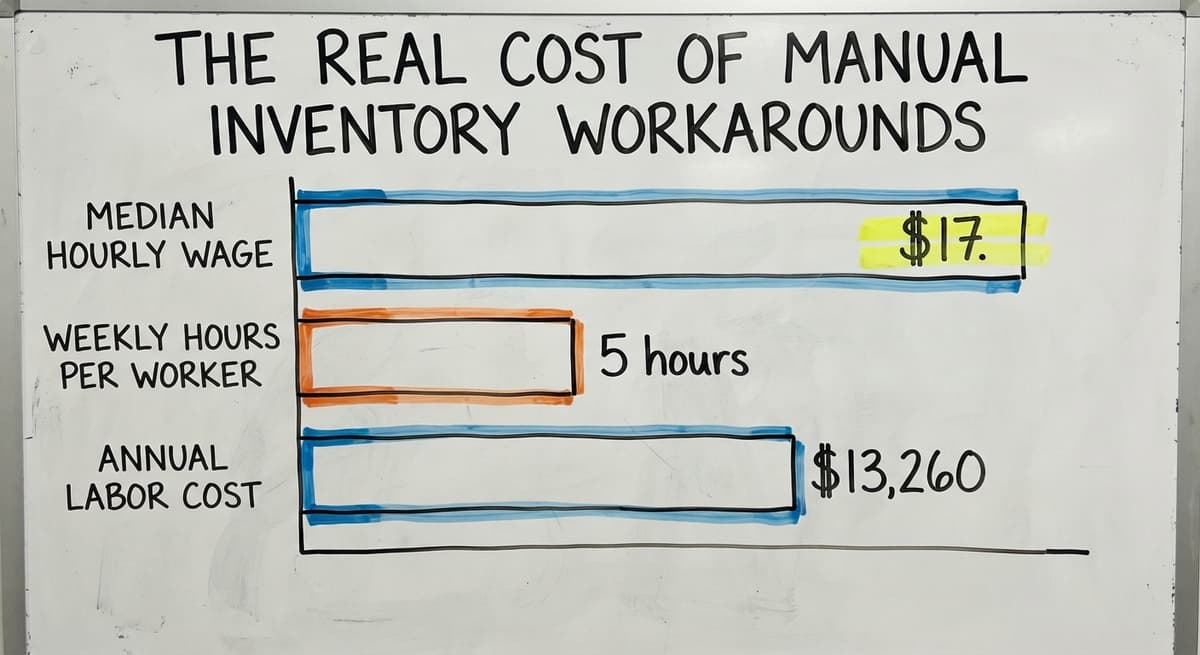
Consider the cost of manual workarounds. The US Bureau of Labor Statistics reports that stock clerks and order fillers earn a median hourly wage around $17.
Three workers spending 5 hours a week each on manual matching adds up to roughly $13,260 a year in labor that a proper system would remove.
What a Barcode Inventory Management System Does That the accounting software Cannot
A barcode inventory management system is purpose-built for warehouse workflows. It tracks bin locations, lot numbers, and serial numbers in real time. It manages the full sequence: receive, put-away, pick, pack, and ship, as distinct steps with guided tasks on screen.
Floor staff see their next task on a screen rather than a paper list. Each scan updates the system at once. When a pick is confirmed, the order management layer knows. When a receipt is completed, purchasing knows.
How a Barcode Inventory System Feeds Accurate Data Back to the accounting software
The accounting software receives accurate on-hand quantities automatically, so the books reflect what is actually on the shelf.
The NIST Manufacturing Extension Partnership notes that connected supply chain processes reduce errors and improve throughput for small and mid-size operations. A barcode inventory management system is how that connection happens at the floor level.
The scanner is the input. The inventory system is the brain. Both have to be the right fit.
Not sure this is the right shape for your operation?
The call is free. Describe how the work runs today. We map it on a call and show you what it would look like built around that, before you spend anything.
Book a callHow Do I Choose the Right 2D Wireless Scanner for My Warehouse?
Start with your actual workflow, not a spec sheet. The right scanner for a cold-storage pick operation is not the same as the right scanner for a light-duty receiving desk.
Work through these steps:
- List the barcode formats your suppliers and carriers use. If you see QR codes or Data Matrix labels, you need a 2D imager.
- Measure your warehouse floor. If your longest aisle is over 60 feet, check the scanner's rated range in cluttered environments, not open air.
- Decide between Bluetooth and a USB dongle based on whether your host devices have Bluetooth enabled and how much wireless interference your floor has.
- Check the drop and IP rating against your environment. Cold storage, wet docks, and outdoor areas each need a higher rating.
- Budget for the full kit: scanner, charging cradle, spare battery, and any mounting hardware.
Which Scanner Models Fit Common Warehouse Use Cases?
Model selection should follow workflow requirements. The an entry-level wired USB scannersuits mid-range warehouse use. The a rugged handheld 1602g fits lighter duty.
The a major scanner maker QuickScan QBT2430 is a reasonable starting point for budget-conscious buyers. None of these is the right answer until you have answered the questions above.
How to use a 2D barcode scanner? Power on the scanner and pair it to your device via Bluetooth or plug in the USB dongle. Click into the field in your software where you want the data to appear. Point the scanner at the barcode and press the trigger. The decoded data fills the field as if you had typed it. For guided workflows, use inventory software that routes the scan to the right action automatically.
Common Problems with Wireless Barcode Scanners and How to Fix Them
Most scanner problems have simple fixes. Here are the ones that come up most often.
- Scanner will not pair: Confirm Bluetooth is enabled on the host device and the scanner is in pairing mode. Most scanners enter pairing mode by holding the trigger for 5 seconds or scanning a setup barcode from the manual.
- Scanner drops the connection mid-shift: Other wireless devices on the same frequency are the usual cause. Move the USB dongle closer to the work area, or switch to a different Bluetooth channel using the scanner's setup barcodes.
- Scanner reads but nothing appears in the software: The cursor is not in an active text field. Click into the correct field before scanning.
Fixing Battery and Read Rate Problems
- Battery drains faster than expected: Check that the charging cradle contacts are clean and making full contact. Also confirm the scanner's sleep mode is set to activate after 1 to 2 minutes of inactivity.
- Poor read rate on damaged or wrinkled labels: Switch to a scanner with a wider decode tolerance, or improve label quality at the source. A scanner with an aggressive decode algorithm handles low-contrast and partially torn labels better.
Most scanner problems are setup or environment issues, not hardware failures.
Training Your Team and Getting the Most from Your Scanner
Most workers learn basic scanning in under an hour. The scanner itself is not the hard part. Focus training on the workflow steps: what to scan, in what order, and what the screen should show after each scan.
Post a simple scan sequence guide at each workstation. Run a test day with real inventory before going fully live. Catch edge cases, like damaged labels or missing barcodes, before they slow down a live shift.
What Determines Scanner Outcomes More Than the Device Itself
The scanner is a tool. Label quality, barcode format consistency, and software integration work out the outcome far more than the scanner brand does.
Review scan error logs monthly to catch label quality problems early. A well-designed inventory system reduces training time because it guides workers through each step rather than relying on memory.
As your operation grows, the same scanner hardware can do more if the software scales with it. The investment that compounds is the system, not the device.
Frequently asked questions
Are there wireless 2D barcode scanners?
Yes. Most major scanner brands, including a major scanner maker, a major scanner maker, and a major scanner maker, sell cordless 2D models. They connect via Bluetooth or a USB dongle and work with standard computers, tablets, and point-of-sale systems.
Wireless 2D scanners are widely available at a range of price points.
What is the best 2D barcode scanner?
There is no single best model. The right scanner depends on your environment, budget, and the barcode formats you need to read. For mid-range warehouse use, the an entry-level wired USB scanneris a reliable choice.
For light-duty use, the a rugged handheld 1602g costs less and performs well. Budget-focused buyers start with the a major scanner maker QuickScan QBT2430. Choose based on workflow requirements, not brand name.
Can a phone read a 2D barcode?
Yes. Most smartphones read QR codes and some Data Matrix codes using the built-in camera.
For warehouse use, phones are not a reliable substitute for a dedicated scanner. They are slower, less accurate on damaged labels, and not designed for all-day scanning in a warehouse environment.
How to use a 2D barcode scanner?
Power on the scanner and pair it to your device via Bluetooth, or plug the USB dongle into a USB port. Click into the field in your software where you want the data to appear.
Point the scanner at the barcode and press the trigger. The decoded data fills the field as if typed. For guided workflows, use inventory software that routes each scan to the correct action automatically.
Can a 2D wireless barcode scanner work with the accounting software?
Yes, for basic operations. The scanner sends data as keyboard input and the accounting software accepts it in any text field. The limits appear quickly: the accounting software has no bin locations, no guided pick lists, and no real-time floor visibility.
For operations handling more than 50 to 100 orders a day, a dedicated inventory layer connected to the accounting software is necessary.
What is the difference between a Bluetooth barcode scanner and a USB dongle scanner?
A Bluetooth scanner pairs directly to a computer, tablet, or mobile device using the device's built-in Bluetooth radio. A USB dongle scanner plugs a small receiver into a USB port and creates its own wireless link.
Bluetooth offers longer range, 30 to 100 feet. Dongle connections are simpler to set up and hold a more consistent signal in environments with heavy wireless traffic.
How do I know when my warehouse has outgrown basic barcode scanning into the accounting software?
Clear signs include workers printing pick lists and checking them off by hand, receiving errors that only surface after a customer complaint, and stock counts in the accounting software that do not match what is on the shelf. These are not scanner problems. They signal that the operation needs a purpose-built inventory system behind the scanner, not a different scanner.
What is the best 2D wireless barcode scanner for retail?
A cordless 2D imager with a charging cradle at the counter and a range of 30 feet or more. It reads printed labels and phone screens, lasts a shift on one charge, and costs $150 to $400.
How long does a wireless barcode scanner battery last?
A full shift on most models: 12 to 16 hours or roughly 5,000 scans per charge. Keep one spare unit per 5 scanners so a dead battery never stops a station.
Should I choose Bluetooth or 2.4 GHz for a barcode scanner?
Bluetooth to pair directly with a phone, tablet, or laptop. A 2.4 GHz dongle for a fixed PC where you want plug-and-scan with no pairing and a longer range. Both act as a keyboard once connected.
Can a wireless 2D scanner read QR codes from phone screens?
Yes. Reading from a screen is one of the reasons to choose a 2D imager over a laser, which the glass and backlight defeat. Turn the phone's brightness up for the cleanest read.
What is in a free first look?
A 30 minute call, your operation mapped, and a clear picture of what we would build. No obligation and nothing to install.
Book a callRelated guides
More on the same work.
Guides
- 2d Imaging Barcode Scanners
- 2d Imager Barcode Scanner
- 2d Usb Barcode Scanner
- 2d Image Barcode Scanner
- 2d Barcode Readers
- Barcode Scanner App Ios
- Barcode Scanner Inventory System
- Imager Barcode Scanner
- Inventory Management Software Barcode Scanner
- Free Inventory Management Software with Barcode Scanner
- Barcode Scanner Description
- Upc Scanner Gun
- Quickbooks Inventory Scanner
- Scanner Manuals
- Aml Scanners
- Warehouse Scanner System
- Scanner Inventory Software
- Barcode Abbreviation
- Barcode Scan Machine