

Upc Scanner Gun
A UPC scanner gun is a handheld that reads a product barcode in under a second. It sends the item number to your computer or inventory system, replaces hand-keyed entry, and cuts the error rate from about 1 in 300 keystrokes to about 1 in a million scans. This guide, reviewed in September 2026, covers how a UPC scanner gun works, wired against wireless, and what to buy.
Reviewed August 2026. Each figure comes from the assumptions stated beside it, so you can substitute your own and the arithmetic still holds.
Published 26 August 2026. Reviewed and updated 15 September 2026.
Book a callWhat Is a UPC Scanner Gun?
A UPC scanner gun is a handheld device that reads the black-and-white barcode printed on most products. Point it at a barcode, pull the trigger, and the item number appears in your software. That is the whole job.
You may hear it called a barcode scanner, barcode reader, or handheld barcode scanner. All four names refer to the same tool.
The UPC barcode it reads is the standard 12-digit code that appears on nearly every retail and wholesale product sold in North America.
The scanner does not think. It captures a number and passes it on. The software on the other end does the work.
Would you rather have it built around your operation?
The first look is free. If you would rather not compare products, describe how your operation already works and we build the system around it.
No build cost. You see it running on your own process first, and the monthly subscription starts only once it is live.
Book a callHow Does a UPC Scanner Gun Read a Barcode?
Inside the gun is either a laser or an imaging sensor. The laser sweeps across the barcode. The sensor reads the pattern of bars and spaces. That pattern encodes a 12-digit UPC number.
A decoder chip inside the gun converts the pattern into digits in milliseconds. The number then travels to your computer the same way a keyboard does.
Accurate inventory records are not just good practice. As the IRS states in IRS Publication 538, "To figure taxable income, you must value your inventory at the beginning and end of each tax year." A scanner helps your team capture the data that makes that valuation possible.
Is a Wired or Wireless UPC Scanner Gun Better for My Warehouse?
The right choice depends on where your team works. A worker at a fixed receiving desk rarely needs to move, so a wired USB scanner works well and costs less. A worker walking the floor needs a wireless barcode scanner.
Wired USB Scanners
- Cost less, under $75
- Never need charging
- Plug into any PC or tablet with a USB port
- Work in USB HID mode, so they act like a keyboard and work with almost any software
Wireless Scanners
- Connect via Bluetooth or Wi-Fi
- Let workers move freely across the warehouse floor
- Need daily or shift charging
- Some models store scans offline and sync later. These are called batch scanners and they suit cold storage or areas with weak Wi-Fi signal
For most small warehouses, a Bluetooth wireless barcode scanner paired with a tablet or nearby PC covers the majority of use cases without a large investment.
1D vs 2D Barcode Scanners
A 1D scanner reads standard UPC barcodes only. That covers the vast majority of wholesale and distribution products. A 2D imager reads UPC codes and also reads QR codes and Data Matrix codes.
If every product your team handles has a standard UPC barcode, a 1D scanner is enough.
Buy a 2D imager if there is any chance your suppliers or customers will use QR codes in the future. The price difference is small, and the flexibility is worth it.
Common Uses in a Warehouse or Distribution Center
A UPC scanner gun earns its cost across four core warehouse tasks:
- Receiving: Scan items as they arrive from suppliers to confirm the purchase order matches what was delivered.
- Putaway: Scan the bin location and then the product to confirm the item lands in the right slot.
- Order picking: Scan each item before it goes into a shipment box to verify the correct product and quantity.
- Cycle counting: Scan items on the shelf to verify stock levels without shutting down the whole operation.
Each of these tasks currently costs your team time and introduces risk when done on paper.
Is the comparison easier when one option is built for you?
Yes. Off-the-shelf means fitting your process to the software, and custom is the other way round. The first look costs nothing.
Book a callHow Does a UPC Scanner Gun Connect to an Inventory System?
The scanner is the sender: it passes the UPC number to software running on a PC, tablet, or server. The software looks up that number in a product database and records the action.
In USB HID mode, the scanner acts like a keyboard. Any software that accepts typed input can receive scan data. That includes spreadsheets, web browsers, and basic point-of-sale tools.
Dedicated inventory management software offers tighter integration. When a scan arrives, the system updates stock counts, logs the location, and can trigger a reorder alert automatically. That is where the real value sits, not in the scanner itself.

Using a UPC Scanner Gun with the accounting software
Many small distributors already run the accounting software. The accounting software has limited native barcode scanning support on its own.
You can scan into a field, but the software does not automatically update stock levels or log warehouse movements the way a real inventory system does.
A middleware layer or a custom system built around your workflow can bridge the scanner to the accounting software records. Your team keeps using a standard accounting package for accounting. The inventory layer handles scan data and feeds the numbers the accounting software needs.
The accounting software does not need to be replaced to get scanning working. For more on this, see how the accounting software inventory integration can fit into a broader system without disrupting your books.
Why Does Manual Data Entry Cause Inventory Errors?
Humans make roughly 1 error per 300 keystrokes. A UPC scanner gun drops that error rate to near zero for data capture.
Here is a simple example. A receiving clerk types the wrong item number on a receiving sheet.
Your system now shows stock for an item you do not have, and no stock for the item you do. That phantom discrepancy causes a wrong shipment, a customer complaint, and a wasted hour of count time to track down the source.
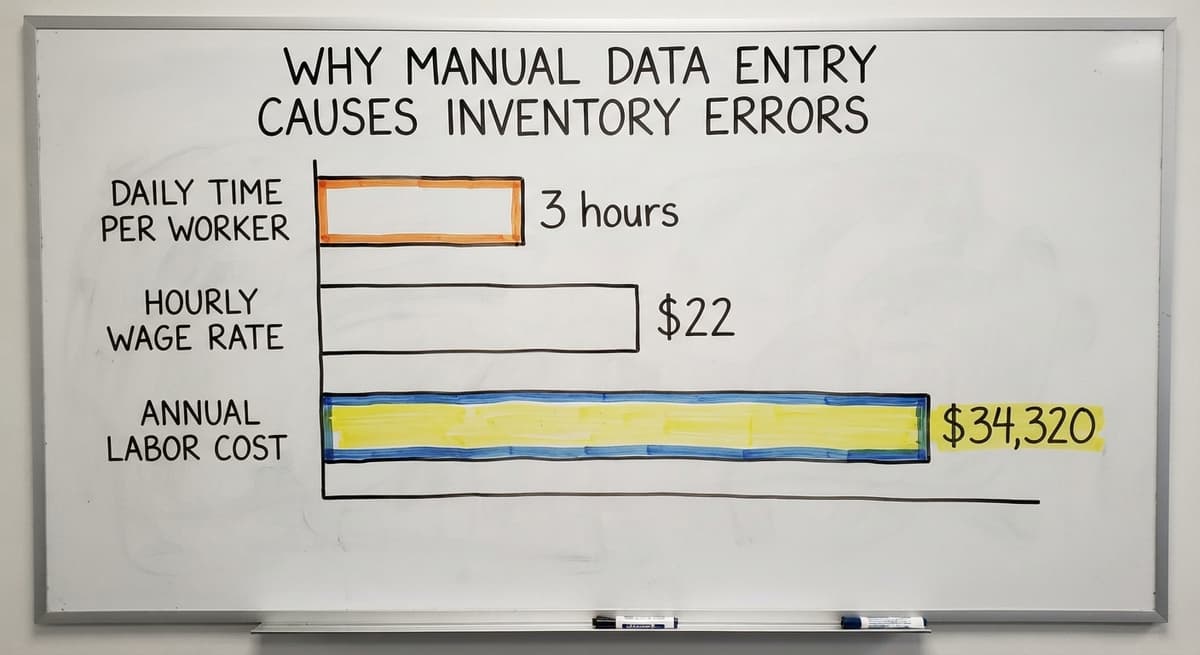
Consider the cost of manual receiving in a small operation. 2 workers spending 3 hours each per day on paper-based receiving at $22 an hour (close to the median wage for stock clerks tracked by the US Bureau of Labor Statistics) adds up to $34,320 a year. Errors on top of that cost more still.
How Much Faster Is Barcode Scanning Than Manual Entry?
A scan takes under 1 second. Manual entry of a 12-digit item number takes 5 to 10 seconds, plus the time to find the right field and check the number. Over a 200-line receiving order, that difference is 30 or more minutes per session.
Faster receiving means product is available to pick sooner. Faster picking means more orders ship per shift. Both outcomes improve customer satisfaction without adding headcount.

What to Look for When Buying a UPC Scanner Gun
The first rule is to match the scanner to the job. Ask your team where they will use it and what they will scan.
| Factor | What to Check |
|---|---|
| Drop resistance | Look for an IP or MIL-STD rating. Warehouse floors are hard |
| Scan range | Counter depth needs 4 to 6 inches. Tall shelving may need 24 inches or more |
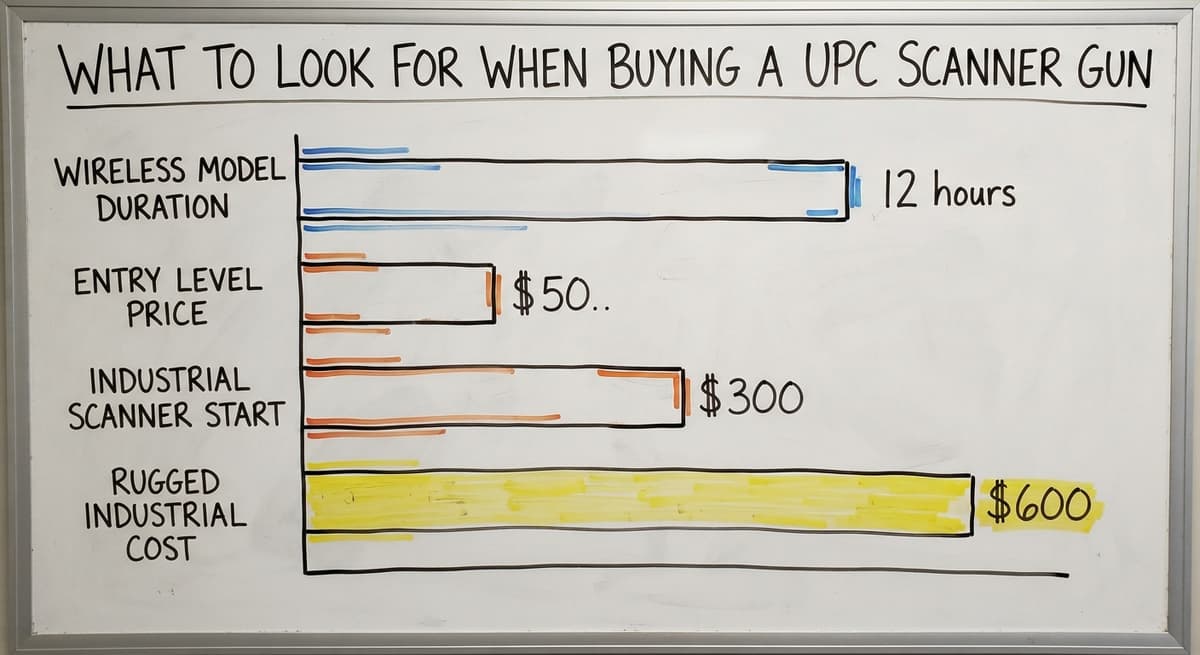
| Battery life | Match to shift length. Most wireless models run 8 to 12 hours |
| Compatibility | Confirm it works with your OS and inventory software |
| Price | Entry-level models start around $50. Rugged industrial scanners run $300 to $600 |
Do not buy the cheapest scanner if your team drops things. Do not buy the most rugged model for a desk job.
What does it look like running on your own process?
The first thing you see is it running on your own process, at no build cost. The subscription starts once it is live and doing the job, not before.
Book a callRugged vs Standard UPC Scanner Guns
A standard consumer-grade scanner is fine at a receiving desk. Drop it on a concrete floor once and it may not survive.
A rugged barcode scanner is built for drops, dust, and temperature swings. The casing is thicker. The internals are sealed.
IP ratings tell you how well a scanner resists dust and water. IP54 means dust-protected and splash-resistant. IP65 means fully dust-tight and resistant to a water jet.
For any operation running more than a few dozen scans a day, a rugged model pays for itself quickly in avoided replacements.
Setting Up Barcodes for Products That Do Not Have UPC Codes
Some supplier products, custom items, or bulk goods arrive with no printed UPC code, and 1 label printer solves it. That does not mean you cannot scan them.
Print your own barcode labels using a label printer. The barcode can encode your internal SKU, a lot number, or a bin location. Apply the label when the product arrives. From that point on, your team scans it like any other item.
This is a one-time setup task. Once the label is on the product, the scan workflow is identical to any UPC-labeled item.

Scanning Bin Locations as Well as Products
Barcodes are not just for products. Place them on shelves and bin locations too.
A scan-to-confirm workflow works like this:
- Worker scans the bin location barcode on the shelf
- Worker scans the product barcode
- System confirms the match and records the quantity
This prevents putaway errors where a product lands in the wrong slot. It also speeds up cycle counts by zone.
Your team scans a row of bins in sequence rather than reading shelf labels and typing locations by hand. For more on this, see cycle counting best practices.
Mobile Computers vs Dedicated UPC Scanner Guns
A mobile computer combines a scanner, screen, and keyboard in one device. Workers see instructions on screen and confirm actions without walking to a PC. They cost more, often $600 to $1,200 per unit.
A simple scanner gun paired with a nearby tablet or PC is cheaper and often enough for small warehouses. The tablet shows the workflow. The scanner captures the data. The two together cost far less than a mobile computer.
Match the device to the complexity of the task. A picker confirming a single item per scan does not need a mobile computer. A receiver managing lot numbers, expiry dates, and multiple locations might.
What is in a free first look?
A 30 minute call, your operation mapped, and a clear picture of what we would build. No obligation and nothing to install.
Book a callIs a UPC Scanner Gun Enough on Its Own?
A scanner is hardware only. It captures a number and passes it on. Without software to receive that number and do something with it, the scan goes nowhere useful.
Scanning into a spreadsheet is a step up from typing, but someone still has to clean the data, check for duplicates, and update stock counts by hand. The scanner captures data. A real inventory system acts on it.
This is the gap most small warehouses hit. They buy a scanner, plug it in, and find that the hard part was never the hardware.
The hard part is the system behind it. See how a Barcode Inventory Management System overview can clarify what that system needs to do.
Connecting Your Scanner to a Barcode Inventory Management System
A barcode inventory management system is the receiver of the scan data, and it acts on it immediately. It updates stock counts, logs every movement, and triggers reorder alerts when stock falls below a set level.
A custom-built system can match the exact workflow your team already uses. Receiving and putaway workflows that mirror your paper process are easier for your team to adopt. The goal is replacing manual steps, not replacing the accounting software or forcing a full ERP migration.
The NIST Manufacturing Extension Partnership recommends aligning inventory systems to actual supply chain workflows rather than forcing operations to fit software defaults. A system built around your process is faster to adopt and less likely to be abandoned.
How Small Warehouses Get Started with Barcode Scanning
Start with one process. Receiving is the best first step. Every item that enters your warehouse passes through receiving, so fixing that process first improves everything downstream.
Entry-level hardware is inexpensive. The risk of starting is low. Map your current paper or spreadsheet process before you buy anything. A system that mirrors real work is adopted faster than one that asks your team to change how they think.
A phased rollout avoids the disruption of a big-bang ERP implementation. Add putaway next, then picking, then cycle counting. Each phase builds on the last. For more detail, see Custom warehouse management software and how it supports a phased approach.
Questions to Ask Before Choosing a UPC Scanner Gun
Before you buy hardware or software, there are 6 scanner questions to work through with your team:
- What software will receive the scan data?
- Will workers be at a fixed desk or moving around the floor?
- Does the environment involve drops, moisture, or temperature swings?
- Do any products use 2D codes like QR or Data Matrix in addition to UPC?
- How many scanners are needed across shifts?
The answers shape every hardware and software decision that follows.

Next Steps for Warehouse Teams Ready to Scan
A UPC scanner gun gives your team faster receiving, fewer errors, and real-time stock visibility. The hardware cost is low. The payoff starts on day one.
Audit your current receiving and picking process first. Write down every step your team takes on paper or in a spreadsheet. That map becomes the blueprint for a system that fits the way you already work.
The biggest barrier is not the scanner. It is connecting the scanner to a system that does something useful with every scan.
A custom inventory system built around your existing workflows removes that barrier without forcing you to replace the accounting software or retrain your team from scratch.
If your team is ready to move past spreadsheets, talk through your specific operation with us. We build systems around the work you already do.
Frequently asked questions
Frequently asked questions
What is a UPC scanner gun and how does it work?
A UPC scanner gun is a handheld device that reads the barcode on a product and sends the item number to your computer or inventory system in under a second.
A laser or imaging sensor reads the pattern of bars and spaces on the barcode. A decoder chip converts that pattern into a 12-digit number. The number then travels to your software the same way a keyboard entry does.
What is the difference between a wired and wireless UPC scanner gun?
Wired USB scanners plug into a PC or tablet, cost less, and never need charging. Wireless barcode scanners connect via Bluetooth or Wi-Fi and let workers move freely around the warehouse floor.
Wireless models need daily charging. Some wireless scanners store scans offline and sync later, which suits areas with weak Wi-Fi.
Can a UPC scanner gun work with the accounting software?
Yes, but the accounting software has limited native barcode scanning support on its own. A middleware layer or custom inventory system can bridge the scanner to the accounting software records.
Your team keeps using a standard accounting package for accounting while the inventory layer handles scan data and feeds the numbers the accounting software needs. You do not need to replace the accounting software to get scanning working.
What if my products do not have UPC barcodes?
Print your own barcode labels using a label printer. The barcode can encode your internal SKU, a lot number, or a bin location. Apply the label when the product arrives.
From that point on, your team scans it the same way they scan any UPC-labeled item. This is a one-time setup task that pays off quickly in scan accuracy.
How much does a UPC scanner gun cost?
Entry-level barcode scanners start around $50 and work well at a fixed receiving desk. Mid-range wireless models run $100 to $250. Rugged industrial scanners built for warehouse floors cost $300 to $600.
The right price point depends on how often the scanner is used, whether it needs to be wireless, and how rough the environment is.
What is the difference between a rugged and standard barcode scanner?
A standard scanner works fine at a desk but may not survive a drop on a concrete floor. A rugged barcode scanner has a thicker casing, sealed internals, and an IP rating that tells you how well it resists dust and water.
For any operation running more than a few dozen scans a day, a rugged model pays for itself quickly in avoided replacements.
What is the difference between a 1D and 2D barcode scanner?
A 1D scanner reads standard UPC barcodes only. A 2D imager reads UPC codes and also reads QR codes and Data Matrix codes.
Most wholesale and distribution products use standard UPC barcodes, so a 1D scanner covers the majority of use cases. Buy a 2D imager if there is any chance your suppliers or customers will use QR codes in the future.
When do I need more than just a scanner gun?
When the scan data has nowhere useful to go. A scanner captures a number and passes it on. Without software to receive that number and act on it, the scan does not update stock counts, log movements, or trigger reorder alerts.
If your team is scanning into a spreadsheet and still cleaning data by hand, you need a barcode inventory management system behind the scanner.
What is the best UPC scanner gun for a small business?
A wired 2D imager on a stand for a counter, or a cordless 2D imager for a stockroom. Either runs $80 to $300 and reads printed labels and phone screens.
Buy rugged only if the gun will live on a dock or in a cold room.
How do I connect a wireless barcode scanner to a computer?
Pair it over Bluetooth the way you would a wireless keyboard, or plug in the USB base station it ships with. Once paired it types each scan into the active field, so no driver is needed for basic use.
Can a barcode scanner gun scan QR codes?
A 2D imager gun can; a laser gun cannot. If your labels or your suppliers' labels include QR or Data Matrix codes, buy the 2D model, which also reads every 1D format.
Do UPC scanner guns need special software?
No. The gun acts as a keyboard and types into whatever is open. What turns a scan into a stock movement is inventory software, and that is where the value is: a gun typing into a spreadsheet is faster typing, not inventory control.
Not sure this is the right shape for your operation?
The call is free. Describe how the work runs today. We map it on a call and show you what it would look like built around that, before you spend anything.
Book a callRelated guides
The rest of this guide, for the parts of the job this page does not cover.
Guides
- Barcode Scanner App Ios
- Barcode Scanner Inventory System
- Imager Barcode Scanner
- Inventory Management Software Barcode Scanner
- Quickbooks Inventory Scanner
- Scanner Manuals
- 2d Wireless Barcode Scanner
- 2d Imaging Barcode Scanners
- Aml Scanners
- 2d Imager Barcode Scanner
- Warehouse Scanner System
- 2d Usb Barcode Scanner
- Free Inventory Management Software with Barcode Scanner
- Scanner Inventory Software
- Barcode Scanner Description
- 2d Image Barcode Scanner
- Barcode Abbreviation
- Barcode Scan Machine