


Barcode System For Inventory Free
A free barcode system for inventory lets you scan items and update stock counts without typing anything by hand. Most free tools cover basic scanning, item lookup, and stock counts. They work well for a single location with under 200 SKUs and one user. This page was reviewed in July 2025.
Published 29 July 2026. Reviewed and updated 15 September 2026.
Book a callWhat Does a Free Barcode System for Inventory Actually Do?
A barcode inventory system links a physical label to a record in software. When a staff member scans a barcode, the software adds or subtracts one unit from the count for that item. No typing. No clipboard. No end-of-day spreadsheet entry.
Reviewed September 2026. Each figure comes from the assumptions stated beside it, so you can substitute your own and the arithmetic still holds.
The contrast with manual tracking is direct. A person writing counts by hand can transpose digits, skip a row, or lose the sheet. A scan takes under a second and writes to the same record every time.
The scan removes the step where errors enter. That is the whole point of warehouse barcode scanning, and it applies whether the software costs nothing or several hundred dollars a month.
Would you rather have it built around your operation?
The first look is free. If you would rather not compare products, describe how your operation already works and we build the system around it.
No build cost. You see it running on your own process first, and the monthly subscription starts only once it is live.
Book a callWhy Do Small Warehouses Look for a Free Option First?
Budget pressure is real. Many small distributors are already paying for accounting software, a website, maybe a shipping tool. Adding another subscription feels hard to justify before you know whether barcodes will actually change how the floor runs.
Starting free is a reasonable way to test the concept. As GS1, the global body that sets barcode standards, explains at gs1.org/standards/barcodes, the standards behind any scan-based count are open and widely supported.
The technology is not exotic. A free tool can prove the workflow before you spend anything on a paid tier.
What Does a Free Barcode Inventory System Actually Include?
Free barcode inventory software covers the basics: scanning a barcode, pulling up an item record, and adjusting a stock count. Most free tiers are browser-based or run as a mobile app. Common features include:
- Basic item lookup by barcode or SKU
- Manual stock adjustments after a scan
- A simple product list with quantities on hand
- Export to CSV so you can pull data into a spreadsheet
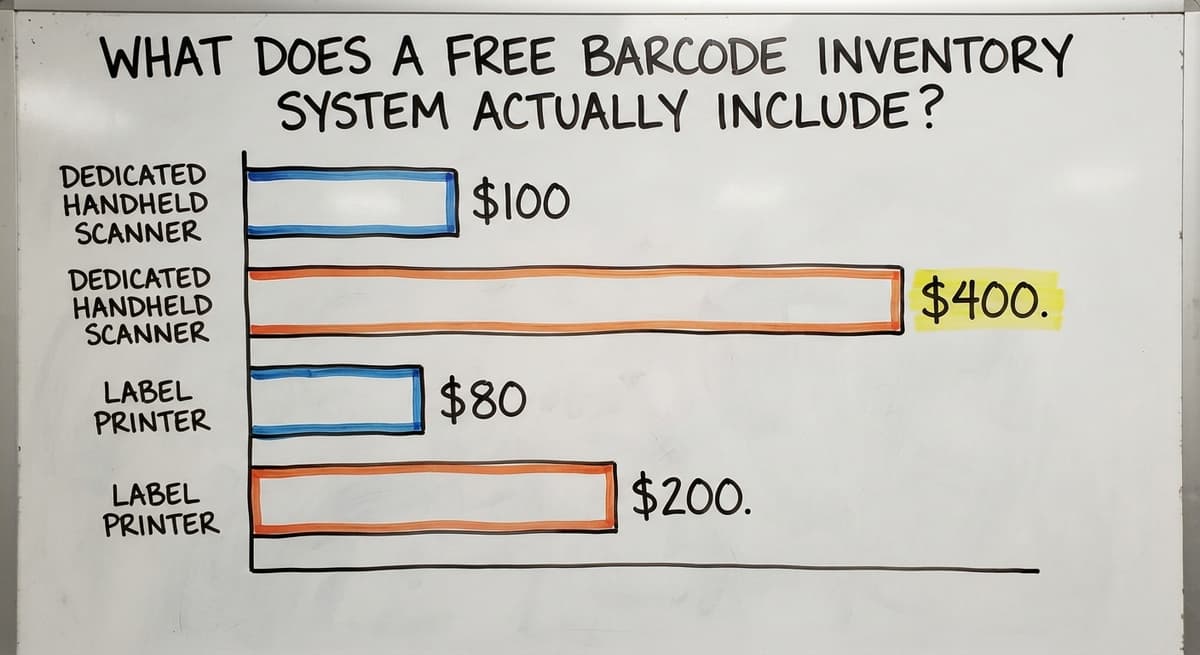
Free tools rarely include buy order receiving, automated reorder alerts, or multi-user access. Hardware is a separate cost regardless of what the software charges. A dedicated handheld barcode scanner runs $100 to $400.
A label printer adds another $80 to $200. A smartphone camera can substitute for a scanner at low volume, but it is slower and the battery drains fast on a busy floor.
Hardware, Labels, and Getting the Floor Ready
Free software does not mean a free setup. The physical side of inventory tracking has real costs.
For labels, most free barcode inventory software includes a basic label generator. Print on 1" x 2" or 2" x 3" labels for shelf bins, and larger labels for pallet locations.
Place labels at eye level on the front face of each bin so a scanner can reach them without moving product.
Why Does a Dedicated Scanner Pay for Itself?
A smartphone works at low volume. A purpose-built handheld barcode scanner is faster, more rugged, and holds a charge through a full shift.
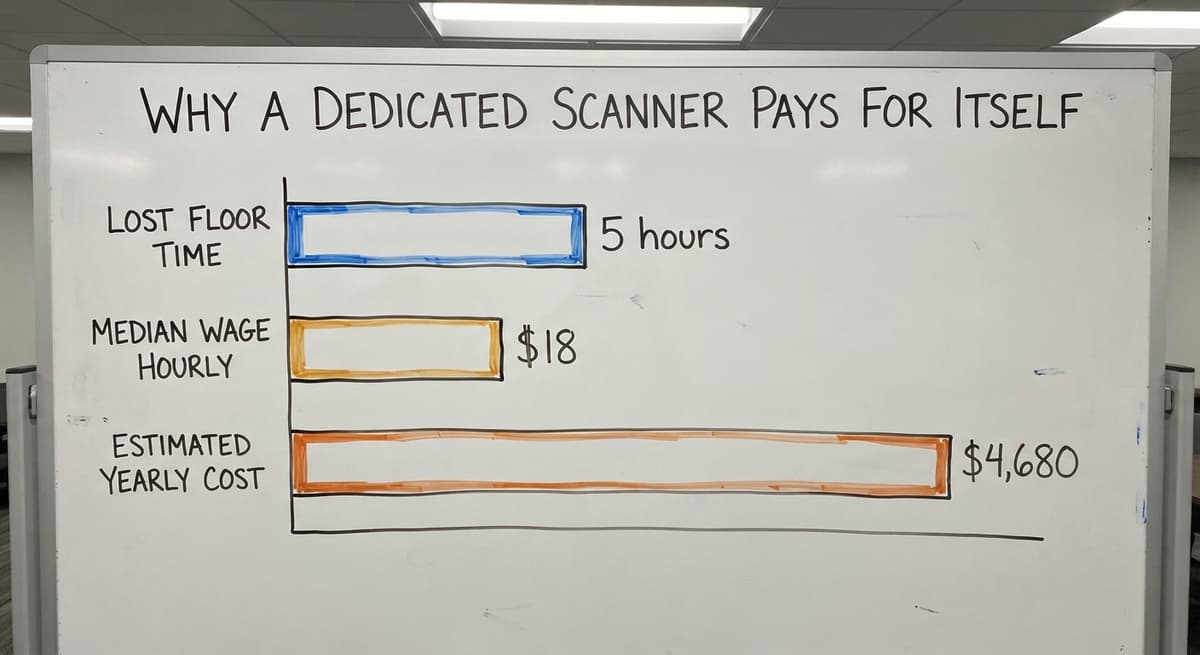
3 staff each spending 20 extra minutes a day on slow phone scanning adds up to 5 hours of lost floor time per week. At the US Bureau of Labor Statistics median wage for stock clerks of around $18 an hour (bls.gov), that is roughly $4,680 a year. A dedicated scanner pays for itself in weeks.
Common Limits of Free Barcode Inventory Systems
Free tiers are built to convert users to paid plans. That means deliberate caps. Knowing where those caps sit helps you pick the right starting point.
Typical limits on free plans:
- User seats: Usually 1 or 2. A second staff member scanning at the same time causes conflicts or gets locked out.
- SKU caps: Many free tools stop at 100 to 500 items. Growth past that cap means migrating your data.
- No multi-location support: A second warehouse, or even bin-level tracking within one warehouse, is almost always a paid feature.
- No the accounting software sync: Free tools export a CSV file. You import it manually. That lag creates mismatches between your books and your floor count.
- Thin reporting: You get a quantity-on-hand list. Velocity, reorder history, and receiving logs need an upgrade.
Is the comparison easier when one option is built for you?
Yes. Off-the-shelf means fitting your process to the software, and custom is the other way round. The first look costs nothing.
Book a call
Why a Weak Inventory System Creates a Tax Compliance Gap
The IRS is worth noting here. Publication 538 states: "To figure taxable income, you must value your inventory at the beginning and end of each tax year." (irs.gov/publications/p538) A system that cannot produce a reliable count at year-end is not just inconvenient. It creates a compliance gap.
When Is Free Enough, and When Have You Outgrown It?
A free barcode system for inventory is enough when the operation runs from one location, one person handles all scanning, and the SKU count stays under 200.
Starting free to learn the workflow is smart. You build habits around scanning before you spend money on features you may not need yet.
The Signs That a Free Tool Has Stopped Working
The signs that a free tool has stopped working are specific:
- 2 or more staff scan at the same time and the system shows conflicts or wrong counts
- Stock counts in the free tool do not match what the accounting software shows
- You are exporting to spreadsheet to build reports the tool cannot produce
- Receiving, picking, and shipping each need their own workflow and the tool treats them the same
- A second warehouse or a second bin location is impossible to track separately
When more than 2 of those are true at once, the free tool is costing more in staff time than a paid system would cost in subscription fees.
Can a Free Barcode System Connect to the accounting software?
Rarely, and not automatically. Most free barcode inventory software produces a CSV export. You download it, open the accounting software, and import it by hand. That process takes time and introduces errors every time a row is misread or a column does not map cleanly.
A real the accounting software inventory integration works the other way: a scan on the floor writes to inventory, and the accounting software sees the updated count without anyone touching a spreadsheet. That kind of sync is almost always a paid feature, and often needs middleware or a custom connection.
Why Inventory Lag Makes Overselling Easy
For small distributors running their books in the accounting software, this is the most common breaking point. The US Federal Trade Commission needs businesses to ship when they say they will (ftc.gov).
An accurate count is what makes that promise possible. A manual export that lags by a day or two makes overselling easy and refunds likely.
What does it look like running on your own process?
The first thing you see is it running on your own process, at no build cost. The subscription starts once it is live and doing the job, not before.
Book a callTypes of Barcodes Used in Warehouse Inventory
Most warehouses work with 3 barcode formats, and most free software reads all of them.
- UPC (Universal Product Code): The standard for retail products. If you receive goods from a supplier, they likely already carry a UPC.
- Code 128: Common on shipping labels and receiving documents. It encodes letters and numbers and is readable at longer distances.
- QR codes: Useful for internal labels, bin locations, and any place where you want to encode a URL or longer text string.
Most free barcode inventory software supports UPC and Code 128 out of the box. Niche formats like Data Matrix or GS1-128 may need a paid tier or a scanner with broader firmware.
Check format support before you print 500 labels in a format your scanner cannot read.

How to Run a Cycle Count With a Barcode Scanner
A cycle count means counting a portion of inventory on a regular schedule rather than shutting down for a full physical count once a year.
You count zone A this week, zone B next week, and so on. By the time you finish the last zone, zone A is due again.
The Basic Steps for Running a Cycle Count
The basic steps:
- Pick the zone or product group to count today
- Scan each item in that zone and let the software record what it sees
- Compare the scanned count to the system count
- Adjust any discrepancies and note the reason
Frequent small counts catch errors before they compound. A single annual count finds the gap after a year of drift. A weekly cycle count finds it after a week.
Free tools may not support scheduled cycle counts or automated variance reports, but you can run the process manually using a CSV export and a spreadsheet comparison.
Free vs. Paid Barcode Inventory Systems: Which One Fits Your Operation?
The right choice depends on 4 factors, not on which tool has the best landing page.
| Factor | Free tier fits | Paid or custom fits |
|---|---|---|
| Users scanning at once | 1 | 2 or more |
| SKU count | Under 200 | 200 and growing |
| The accounting software sync needed | No | Yes |
| Multi-location tracking | No | Yes |
| Reporting needs | Basic quantity list | Velocity, receiving, picks |
If 3 or more rows in the paid column match your operation, a free tool will slow you down within months.
Why Starting at the Wrong Tier Costs More Than the Subscription
The cost of migrating data later, retraining staff on a new tool, and correcting the errors that built up in the meantime is real. Starting with the right tier is cheaper than starting over.
NIST's Manufacturing Extension Partnership notes that supply chain process gaps are most costly when they are discovered late (nist.gov/mep/supply-chain). A tool that fits the operation from day one prevents that discovery.
What Custom Barcode Inventory Software Means for a Small Distributor
Custom does not mean slow or expensive. It means the software is built around how your floor already works, not the other way around.
Off-the-shelf tools assume a generic warehouse. Your operation has specific receiving steps, specific bin locations, and specific rules for how orders get picked.
A custom system maps to those rules. Staff do not have to learn a new process. They learn where to tap on a screen that already matches what they do.
Not sure this is the right shape for your operation?
The call is free. Describe how the work runs today. We map it on a call and show you what it would look like built around that, before you spend anything.
Book a callHow a Custom Build Handles Accounting Integration Differently
Rollout for a focused scope takes weeks, not months. A partner who can walk your floor, watch a receiving shift, and ask the right questions will build something that fits the first time. That is different from buying a SaaS license and spending 3 months figuring out workarounds.
Custom warehouse management software also means the integration with the accounting software is built to your chart of accounts, not to a generic mapping that breaks on your item classes.
How Long Does Setup Take, and What Mistakes to Avoid
A free tool can be running the same day. Create an account, load your SKUs, print a test label, scan it. Basic setup takes an afternoon for a small SKU list.
A custom build for a small distributor with a defined scope takes 3 to 6 weeks from first conversation to go-live. That includes mapping the workflow, building the integration, testing on real inventory, and training the team.
The Setup Mistakes That Cost the Most Time
The mistakes that cost the most time:
- Labeling products but not locations. A scan that says "item received" but not "received into bin 4B" leaves picking errors in place.
- Picking software before reviewing the process. Software does not fix a broken workflow. It runs the workflow faster, including the broken parts.
- Starting with a free tool that cannot scale and having to migrate. If you already know your SKU count will pass 500 in 12 months, start at the right tier now.
- Assuming staff will resist scanning. Most warehouse staff adopt scanning quickly. The harder training is the workflow steps around the scan, not the scan itself. Start with one process, like receiving, before rolling out to picks and shipments.
Questions to Ask Before Choosing Any Barcode Inventory System
Before you sign up for anything, answer these 4 questions about your own operation.
- How many people need to scan at the same time? One user is a free-tier operation. Two or more need a paid seat structure.
- Does the system need to write to the accounting software automatically? If yes, rule out any tool that only exports CSV.
- Do you track inventory across more than one location or bin? Multi-location inventory tracking is almost always a paid or custom feature.
- What reports do you need, and can the tool produce them without exporting? If you need velocity by SKU, reorder history, or receiving logs, check that those exist in the tier you are considering before you load your data.
A software partner worth talking to will ask these same questions before recommending anything.
Ready to Move Past Free Tools?
If 2 or more of the signs above match your operation, a free barcode system for inventory is holding you back rather than helping. The next step is a short conversation, not a big commitment.
The Software Society builds custom inventory workflows for small distributors who are outgrowing manual processes and off-the-shelf tools. We look at how your floor actually runs, then build a system that fits it.
No pressure to replace the accounting software. No six-month rollout. Start with a conversation about what is breaking now. That is enough to know whether a custom path makes sense for your operation.
Frequently asked questions
How to create barcodes for inventory for free?
Several free tools let you generate barcodes from a SKU or product name. Barcode generators like Barcode Monkey or the label tools built into free inventory apps will produce a UPC, Code 128, or QR code you can print on standard label stock.
Enter your item identifier, choose a format your scanner supports, and print. Most free barcode inventory software includes a basic label generator so you can do this without a separate tool.
How much does a barcode inventory system cost?
Free tiers exist and cover basic scanning and stock counts for one user. Paid plans for small warehouses run $30 to $150 a month depending on user seats and features.
Hardware adds $100 to $600 for a scanner and label printer. A custom system built around a specific operation costs more upfront but removes the recurring subscription and the workarounds that paid tiers still need.
What is the best free software for inventory management?
There is no single best answer. The right free tool depends on your SKU count, how many users need access, and whether you need the accounting software sync.
Several inventory apps with a free tier are common starting points. Each has different caps on items and users. Check those limits against your current operation before loading your data, because migrating later costs time.
What type of barcode is best for inventory tracking?
Code 128 is the most practical choice for warehouse inventory. It encodes both letters and numbers, reads reliably at longer distances, and is supported by nearly every scanner and free software tool.
UPC codes work well if your products already carry them from a supplier. QR codes are useful for bin locations and internal labels where you want to encode more information in a small space.
Can I use my smartphone as a barcode scanner for inventory?
Yes, and it works well at low volume. Most free barcode inventory apps use the phone camera to scan. The drawbacks are speed, battery drain during a full shift, and the risk of dropping a personal device on a warehouse floor.
A dedicated handheld barcode scanner is faster and more rugged. Use a smartphone to test the workflow, then invest in a scanner once scanning becomes a daily habit.
Does a free barcode inventory system work with the accounting software?
Almost never automatically. Free tiers export a CSV file that you import into the accounting software by hand. That lag creates count mismatches and needs someone to manage the transfer.
A real the accounting software inventory integration writes directly to your books when a scan happens on the floor. That level of sync is almost always a paid or custom feature.
What is cycle counting and why does it matter?
Cycle counting means counting a portion of your inventory on a regular schedule rather than doing one full count each year. You scan one zone or product group at a time, compare the result to the system count, and fix any gaps.
Frequent small counts catch errors before they grow. A full annual count finds a year's worth of drift all at once, which is harder to correct and more likely to affect your tax filing.
What is the best free barcode inventory app for Android?
Several free tiers run on Android with the phone camera as the scanner, and they are fine up to a few hundred items and one user.
Check the cap on items and users before committing; the paid step arrives at the second user or the second location.
Can I use a spreadsheet as a barcode inventory system?
Yes, for a while. A USB scanner types the code into the selected cell and a lookup formula fills in the description. It fails when two people edit at once or a scan lands in the wrong row, and nothing in a spreadsheet catches either.
How do I create barcode labels for free?
A free online generator or a free barcode font produces Code 128 labels from any number you choose. Print on a laser printer for shelf labels; a $150 thermal printer pays for itself once you pass a few hundred labels a month.
Can I scan inventory barcodes with my phone camera?
Yes. A scanning app reads 1D and 2D codes and posts to the inventory record. It is slower than a dedicated scanner and struggles with worn labels and glare, so it suits a stockroom better than a dock.
What is in a free first look?
A 30 minute call, your operation mapped, and a clear picture of what we would build. No obligation and nothing to install.
Book a callRelated guides
The rest of this guide, for the parts of the job this page does not cover.
Guides
- Free Inventory Management Software with Barcode Scanner
- Barcode Scanner Inventory System
- Barcode Systems for Warehouse
- System Id Barcode Solutions
- Inventory Management Software with Barcode
- Inventory Tracking Barcode
- Inventory Software Barcode
- Inventory Management Software Barcode Scanner
- Free Inventory Management Software for Small Business
- Barcode Words
- 2d Image Barcode Scanner
- Barcode Reader Description
- Alphanumeric Barcode
- Mrp Barcode
- Online Barcode
- Make Barcode
- Barcode for Id Card
- Quickbooks Barcode Reader