

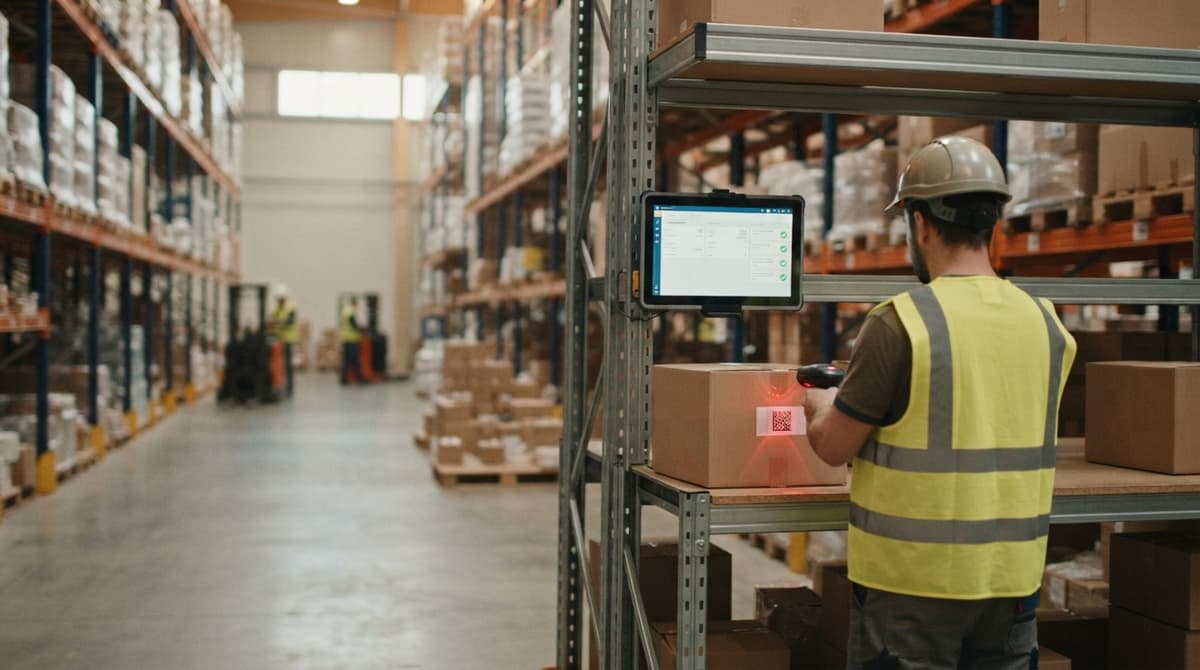
2d Imager Barcode Scanner
A 2D imager barcode scanner takes a photo of a barcode and decodes it instantly. Unlike a laser scanner, it reads QR codes, Data Matrix codes, and standard barcodes from a single device. If your team scans labels at a receiving dock, a pick station, or during a cycle count, a 2D imager handles all of them without switching tools.
Reviewed September 2026. Each figure comes from the assumptions stated beside it, so you can substitute your own and the arithmetic still holds.
Published 9 July 2026. Reviewed and updated 15 September 2026.
Book a callWhat Is a 2D Imager Barcode Scanner?
A 2D imager barcode scanner is a handheld or fixed device that captures a full image of a barcode label and reads the data encoded in it.
A 1D laser scanner sweeps a single line across a label and can only read traditional striped barcodes. A 2D imager takes a picture, so it reads both flat barcodes and square codes like QR codes or Data Matrix in one pass.
For a warehouse manager, the difference is simple. One device handles every label your suppliers send, whether that label came from a small vendor using a printed QR code or a large retailer using a GS1-standard barcode.
How Does a 2D Imager Actually Work?
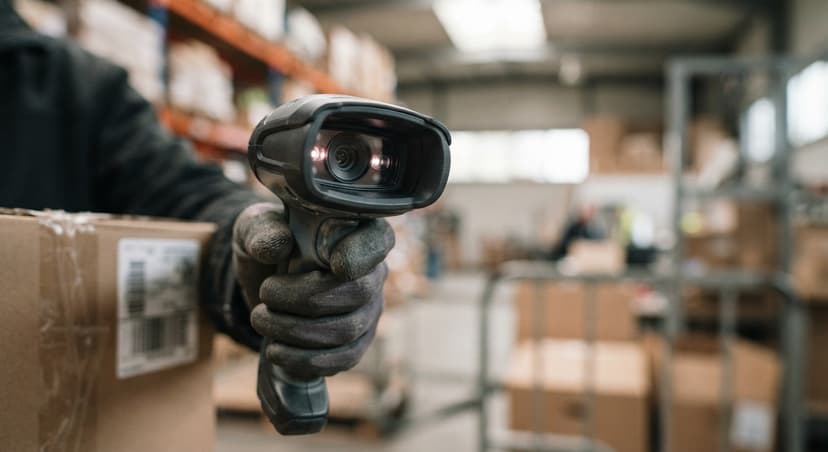
The scanner uses a small camera and an LED illuminator. It floods the label with light, captures an image in milliseconds, and decodes the pattern.
Because it reads a full image rather than a single sweep, it handles damaged, dirty, or low-contrast labels without a re-scan.
As GS1 explains on its barcode standards page, barcodes encode data in patterns that machines read, and different symbologies carry different amounts of information.
A 2D imager reads all of those symbologies from one trigger pull. On a busy dock, that means fewer failed scans and less time holding a box at an odd angle trying to get a read.
Would you rather have it built around your operation?
The first look is free. If you would rather not compare products, describe how your operation already works and we build the system around it.
No build cost. You see it running on your own process first, and the monthly subscription starts only once it is live.
Book a call1D Laser Scanner vs 2D Imager: Which One Does Your Operation Need?
The honest answer is that most warehouses benefit from a 2D imager, even if they currently only use 1D barcodes. Here is why the comparison matters.
| Feature | 1D Laser Scanner | 2D Area Imager |
|---|---|---|
| Reads standard barcodes | Yes | Yes |
| Reads QR codes and Data Matrix | No | Yes |
| Handles damaged labels | Poor | Good |
| Hardware cost | Lower | Slightly higher |
| Future-proof for new label formats | No | Yes |
A 1D scanner costs a little less upfront. But if even one supplier switches to a QR code label, your team is stuck.
A 2D imager barcode scanner costs slightly more and handles every format you will encounter. For operations with 5 to 100 staff where a mis-scan means a mis-ship, that flexibility pays for itself quickly.
Barcode Formats a 2D Imager Can Read
A 2D imager reads a wide range of formats from a single device. That matters in a mixed-supplier environment where labels vary by vendor.
- QR Code: Stores up to several hundred characters. Common on consumer products and supplier packing slips.
- Data Matrix: A compact square code used on small inner cartons and pharmaceutical labels where space is tight.
- PDF417: A stacked barcode used on shipping labels and ID documents. Carries a large amount of data in a narrow strip.
- Code 128: The standard 1D barcode on most warehouse cartons. Fast to scan and widely supported.
- UPC-A and UPC-E: The retail barcode on consumer goods. Required for any product sold through a major retailer.
GS1 Compliance and the 2D Imager
Distributors selling to large retail customers should note that GS1 barcode standards govern which symbology is required at each point in the supply chain. A 2D imager handles all of them, so GS1 compliance does not need a second scanner.
Why Do Warehouses Choose a 2D Imager Over Other Scanner Types?
Speed and accuracy are the two reasons operations managers switch. At a receiving dock, a worker scanning 200 inbound cartons per shift cannot afford to re-scan the same label 3 times.
A 2D imager reads on the first trigger pull, even at an angle, even on a label that got wet in transit.
The Cost of Scan Errors in a Warehouse Operation
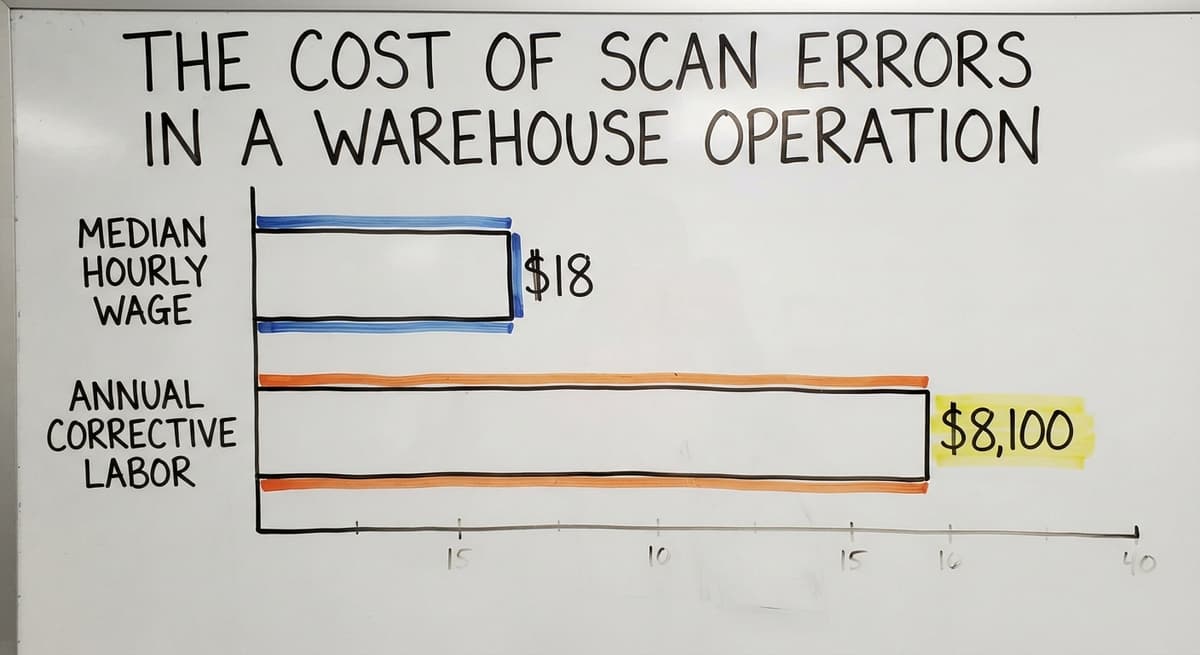
Fewer scan errors mean fewer mis-ships. A mis-ship costs the labour to fix it, the freight to reship, and sometimes the customer relationship. Consider a team of 3 people spending just 30 minutes a day correcting scan errors.
At the US Bureau of Labor Statistics median wage for stock clerks of around $18 per hour (BLS OES data), that is roughly $8,100 a year in corrective labour alone, before freight costs.
A 2D imager also reads the small labels on inner cartons and individual units. That matters for operations picking at the unit level rather than the case level.
Is the comparison easier when one option is built for you?
Yes. Off-the-shelf means fitting your process to the software, and custom is the other way round. The first look costs nothing.
Book a call
Handheld vs Fixed-Mount 2D Imagers, and Corded vs Wireless
Choosing the Right Form Factor
Handheld 2D imager barcode scanners suit most small and mid-size operations. Workers carry them to the label rather than moving the product to a fixed point. Receiving, cycle counts, and returns processing all work well with a handheld unit.
Fixed-mount or presentation scanners sit above a conveyor or at a checkout-style station. They scan automatically as items pass. These make sense for high-volume fulfilment lines where speed is the only variable that matters.
For an operation just getting started with barcode scanning, start with handheld units. They are flexible, cheaper, and feed data into the same inventory system a fixed-mount scanner would use.
Corded vs Wireless Options
Corded scanners plug into a workstation via USB and act like a keyboard. They are simpler, cheaper, and never run out of battery. For a fixed receiving desk or a pack station, corded is the right call.
A wireless barcode scanner, using Bluetooth or Wi-Fi, lets staff move freely across a large floor. Battery life is the practical limit.
Most warehouse-grade wireless units run a full 8-hour shift on a single charge. If your team works double shifts, a spare battery or a charging cradle at each station solves that.
Rugged vs Standard Grade: Matching Durability to the Environment
IP ratings and drop ratings tell you how tough a scanner actually is. IP65, for example, means the unit is dust-tight and can handle a water spray. A drop rating of 1.5 metres means it survives a fall from waist height onto concrete.
Rugged barcode scanners are worth the extra cost in 3 specific environments:
- Cold storage, where condensation forms on the device when it moves between temperature zones
- Outdoor docks, where rain, dust, and temperature swings are constant
- High-use environments where a scanner is passed between multiple workers per shift
Standard-grade scanners are fine for a light-duty office receiving area or a retail-style environment where drops are rare and conditions are stable. Match the durability rating to what actually happens on your floor, not to what sounds impressive on a spec sheet.
How Does a 2D Imager Connect to Your Inventory System?
Most 2D imager barcode scanners connect via USB and act exactly like a keyboard to whatever software is open on the screen.
The scanner reads the barcode, sends the number, and the cursor moves to the next field. No drivers, no setup beyond plugging it in.
Deeper integration uses one of 3 methods:
- USB HID (Human Interface Device): The plug-and-play keyboard method. Works with any software that accepts typed input.
- Serial (RS-232): An older connection used by some legacy warehouse systems. Still common in food and beverage distribution.
- SDK (Software Development Kit): The scanner manufacturer provides code that a developer uses to build a direct link between the scanner and the inventory database.

Matching Scanner Connection to Your Existing Process
The NIST Manufacturing Extension Partnership recommends aligning technology choices to existing process flows rather than forcing a process change around new hardware. That principle applies here. If your inventory software already accepts keyboard input, a USB HID scanner works on day one.
Deeper features like real-time stock updates, low-stock alerts, and automatic PO matching need software that is built to act on the scan, not just receive it.
Connecting a 2D Imager to the accounting software, and Where the Gap Appears
Many small distributors run the accounting software as their financial backbone. The accounting software can accept scanned input through its keyboard-wedge method, meaning the scanner types the barcode number into a field just as a person would. That works for basic data entry.
The gap appears in what the accounting software does next. The accounting software has limited native barcode support. It does not automatically match a scanned barcode to a SKU, update a stock count, or flag a discrepancy against a buy order.
A worker still has to navigate to the right screen, confirm the right item, and save the record manually.
What does it look like running on your own process?
The first thing you see is it running on your own process, at no build cost. The subscription starts once it is live and doing the job, not before.
Book a callWhy Is Inventory Accuracy a Legal Obligation, Not Just an Operational Goal?
The IRS is clear that inventory records are not optional. IRS Publication 538 states: "To figure taxable income, you must value your inventory at the beginning and end of each tax year." A scanner that feeds data into a system that cannot act on it automatically does not solve that obligation. It just moves the manual step one place to the right.
This is the gap a barcode inventory management system fills. Middleware or a custom inventory layer sits between the scanner and the accounting software. It applies the business logic, updates the stock count, and then posts the financial result to the accounting software.
The scanner captures the fact. The software decides what that fact means.

Building a Barcode Inventory Management System That Works
A working system has 4 components. Each one matters, and none of them works alone.
- Scanner: Captures the label data at the point of activity.
- Labels: Printed on a thermal label printer, attached to every SKU and every storage location in the warehouse.
- Inventory database: Holds the current stock count, location, and history for every item. Updates the moment a scan comes in.
- Reporting layer: Turns the database into decisions: what to reorder, where stock is sitting, which SKUs are moving.
Why Small Operations Do Not Need an Enterprise ERP
When the software is set up correctly, every scan triggers a real-time stock update. A worker scans a carton at the dock.
The system adds the quantity to the right SKU, records the location, and closes the line on the buy order. No spreadsheet, no manual entry.
Small operations do not need an enterprise ERP to get this right. A custom warehouse management system built around how the operation already works does the job without forcing a new process on the team.
The goal is to fit the system to the workflow, not the other way around.
Label Strategy That Supports Reliable Scanning
A 2D imager is forgiving with label quality, but good labels still matter. A smudged or undersized label slows the team down even if the scanner can eventually decode it.
- Use a thermal label printer for all warehouse labels. Thermal print does not fade or smear the way inkjet does.
- Size labels to the smallest surface they will go on. A 1-inch by 1-inch Data Matrix code works on an inner carton where a full UPC label would not fit.
- Place labels consistently, same corner of every carton, so workers do not hunt for the scan point.
- Tie label codes to SKU and location codes inside the inventory system so every scan maps to a specific record.
Common Use Cases: Receiving, Putaway, Pick and Pack, and Cycle Count
A 2D imager barcode scanner earns its place across the full warehouse workflow, not just at one station.
- Receiving: Scan inbound cartons against the open buy order. The system confirms the quantity, flags short shipments, and updates stock levels before the pallet leaves the dock.
- Putaway: Scan the carton and then scan the location label on the shelf. The system records where that stock lives so anyone can find it later.
- Pick and pack: Scan to confirm the right item and the right quantity before the box is sealed. This is the last check before a shipment leaves the building.
- Cycle count: Scan to audit a section of the warehouse without shutting down operations. Staff count one zone at a time while the rest of the floor keeps moving.
How Scan-and-Track Discipline Reduces Capital Tied Up in Stock
The US Census Bureau tracks the national inventories-to-sales ratio for wholesale firms (Monthly Wholesale Trade), and that ratio reflects how much capital is sitting in stock at any moment.
Tighter scan-and-track inventory discipline directly reduces the amount of capital tied up in overstock and lost product.
Not sure this is the right shape for your operation?
The call is free. Describe how the work runs today. We map it on a call and show you what it would look like built around that, before you spend anything.
Book a callWhat Should I Look for When Buying a 2D Imager?
The right scanner is the one that works with your software, survives your environment, and connects to your workstations without a workaround. Start with those 3 filters before looking at brand or price.
- Scan engine: Look for an area imager, not a linear imager. An area imager reads 2D codes. A linear imager does not, even if it is marketed as a 2D scanner.
- Connection type: Match USB, Bluetooth, or Wi-Fi to how your workstations are set up.
- Durability rating: Check the IP and drop rating against your actual environment, not the best-case scenario.
- Software compatibility: Confirm with your inventory software vendor before buying. A scanner that works in HID mode connects to almost anything. A scanner that needs a proprietary driver may not.
Which Brands to Consider and How to Choose Between Them
Recognised brands include a major scanner maker, a major scanner maker, a major scanner maker, and a major scanner maker. Brand matters less than compatibility with the software stack you already run.
Mid-range models from any of these manufacturers handle most warehouse tasks well. Avoid recommending a specific model here because product lines change; check current models against your confirmed requirements.

Total Cost and How to Start Without Disrupting the Operation
What a Full Setup Costs
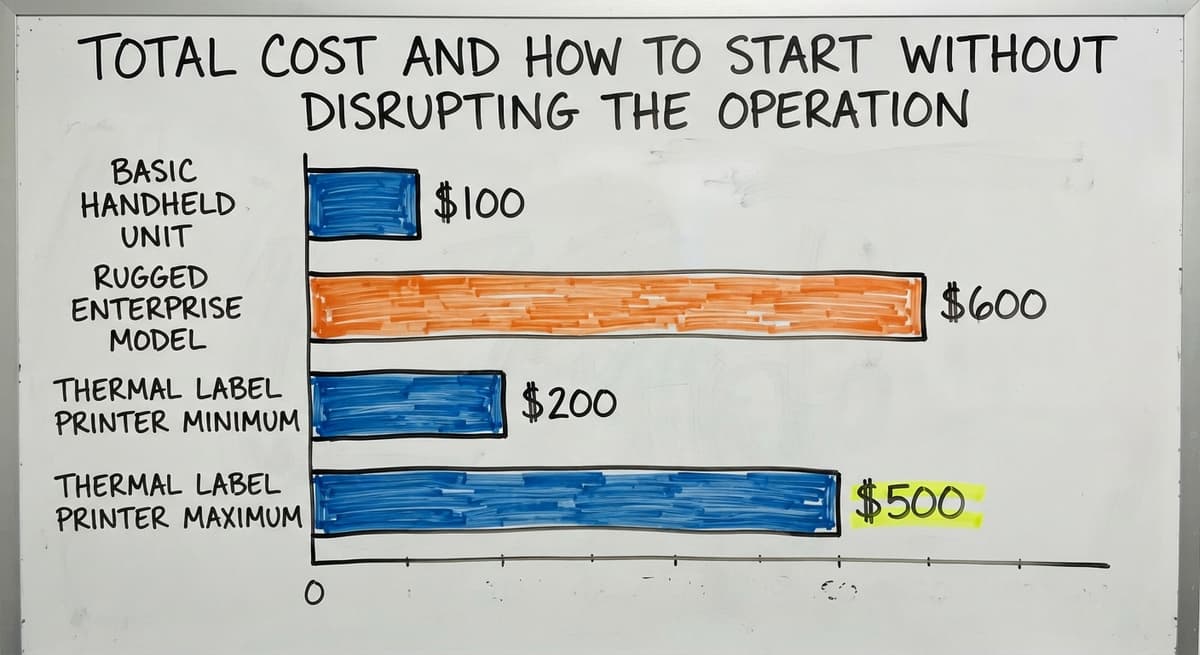
Scanner hardware runs from around $100 for a basic handheld unit to $600 or more for a rugged enterprise model.
Add a thermal label printer ($200 to $500), label stock, and a charging cradle if you are going wireless. Hardware alone is rarely the largest line item.
Software integration is the bigger investment, and it is also where the return on investment comes from. A scanner that feeds a well-built inventory system prevents mis-ships, reduces the time spent on manual counts, and gives managers accurate stock data without a phone call to the floor.
Frame the cost in terms of errors prevented and hours saved per week, not in terms of hardware price.
Start Small, Then Expand
Begin with 1 workflow, such as receiving, before rolling out warehouse-wide. Pilot with 1 or 2 scanners to prove the process. If receiving runs cleanly for 30 days, the team trusts the system and the rollout to pick and pack is straightforward.
A phased approach keeps the business running during the change. Staff learn one new habit at a time. The inventory system proves itself on a contained workflow before it carries the whole operation.
Next Steps for Warehouse and Distribution Teams
The decision path is short. Choose the scanner type that fits your environment and your label formats. Pair it with software that actually acts on the scan data rather than just receiving it. Start with one workflow and expand once the team trusts the process.
The scanner is a tool. The system is what creates the outcome.
Closing the Gap Between the accounting software and Real Inventory Control
If your operation is still running on an accounting package and spreadsheets, the gap between scanning hardware and real inventory control is the problem worth solving first.
A custom inventory system built around your workflow closes that gap without forcing an enterprise ERP on a team that does not need one.
If you want to talk through your current setup before buying any hardware, that conversation costs nothing.
The Software Society works with warehouse and distribution teams to map out what a connected inventory system would look like for their specific operation, and to build it in a way that fits how the team already works.
Frequently asked questions
How do I scan a 2D barcode?
Point the scanner at the barcode and press the trigger. The device takes a photo of the label and decodes it in milliseconds.
Most 2D imagers work at a range of 2 to 30 centimetres and read at an angle, so you do not need to hold the scanner perfectly level. If your scanner connects via USB HID, the decoded number appears wherever your cursor is sitting in the open software.
What is the best 2D barcode scanner?
There is no single best model because the right scanner depends on your environment, your software, and how your team works. A major scanner maker, a major scanner maker, a major scanner maker, and a major scanner maker all make reliable warehouse-grade units.
For most small distribution operations, a mid-range handheld area imager from any of these brands handles the job. Confirm software compatibility first, then match the durability rating to your actual work environment before comparing models.
How much does a 2D scanner cost?
A standard handheld 2D imager runs from around $100 to $250. Rugged models rated for cold storage or heavy drop environments cost $400 to $600 or more.
Add a thermal label printer ($200 to $500) and a charging cradle if you need wireless. Software integration is the larger cost and the one that delivers the measurable return, because the scanner alone does not manage inventory logic.
Can a phone read a 2D barcode?
Yes. Most modern smartphones read QR codes and Data Matrix codes through the built-in camera app. For warehouse use, a phone works in a pinch but has real limits: no trigger button, slower decode on damaged labels, no rugged rating, and no clean connection to inventory software.
A dedicated 2D imager is faster, more reliable, and built to survive a shift on a warehouse floor.
Can a 2D imager barcode scanner connect to the accounting software?
A 2D imager connects to the accounting software through the keyboard-wedge method, typing the scanned barcode into whichever field is active on screen.
The accounting software itself has limited native barcode logic, so the scanner delivers the number but the accounting software does not automatically update stock counts or match the scan to a buy order. A middleware layer or custom inventory system between the scanner and the accounting software handles that business logic.
What software do I need alongside a 2D imager to manage inventory properly?
You need an inventory database that acts on each scan in real time: updating stock counts, recording locations, and closing buy order lines automatically. The accounting software alone does not do this.
Options range from add-on inventory apps that sync with the accounting software to a fully custom warehouse management system built around your specific workflow. The right choice depends on how many SKUs you carry, how many locations you manage, and how your team currently works.
How rugged does a barcode scanner need to be for a warehouse environment?
For a standard indoor warehouse with a concrete floor, look for a drop rating of at least 1.5 metres and an IP52 or better rating.
For cold storage, outdoor docks, or environments where the scanner changes hands between multiple workers per shift, step up to IP65 and a 1.8-metre drop rating. Standard-grade scanners without those ratings are fine for a light-duty receiving desk or a retail-style environment where drops are rare.
How do I start using barcode scanning without disrupting my current operation?
Start with one workflow, receiving, and run it with 1 or 2 scanners for 30 days before expanding. Keep the existing process running alongside the new one until the team trusts the scan data.
Once receiving is stable, add putaway, then pick and pack, then cycle counts. A phased rollout means staff learn one habit at a time and the business keeps moving throughout the change.
What is the difference between a 2D imager and a laser barcode scanner?
A laser sweeps a beam and reads 1D codes only, in line with the beam.
A 2D imager photographs the code and decodes it, so it reads 1D and 2D formats from any angle, on damaged labels and on phone screens, with no moving mirror to break.
Can a 2D imager scan QR codes from a phone screen?
Yes. Reading off a screen is one of the main reasons to choose an imager over a laser, which the glass and backlight defeat. Brightness up and the phone held flat gives the cleanest read.
Which 2D barcode scanner works best for warehouses?
A cordless 2D imager with a drop rating of at least 5 feet and a range matched to your shelving, or a rugged mobile computer where staff scan all shift. The software that records the scan matters more than the model.
What is the best 2D imager barcode scanner for retail?
A wired 2D imager on a stand at the counter: it reads printed labels and phone screens, needs no charging, and costs $80 to $200. Add a cordless unit only where staff scan away from the counter.
What is in a free first look?
A 30 minute call, your operation mapped, and a clear picture of what we would build. No obligation and nothing to install.
Book a callRelated guides
The rest of this guide, for the parts of the job this page does not cover.
Guides
- Imager Barcode Scanner
- 2d Image Barcode Scanner
- 2d Usb Barcode Scanner
- 2d Wireless Barcode Scanner
- 2d Imaging Barcode Scanners
- 2d Barcode Readers
- Inventory Management Software Barcode Scanner
- Free Inventory Management Software with Barcode Scanner
- Barcode Scanner App Ios
- Barcode Scanner Description
- Barcode Scanner Inventory System
- Upc Scanner Gun
- Scanner Inventory Software
- Quickbooks Inventory Scanner
- Scanner Manuals
- Aml Scanners
- Warehouse Scanner System
- Barcode Words