


Warehouse Scanner System
Learn how a warehouse scanner system works, what it costs, and how it connects to the accounting software. Plain answers for small distributors still running on clipboards.
Published 11 August 2026. Reviewed and updated 15 September 2026.
Book a callWhat Is a Warehouse Scanner System and How Does It Work?
Reviewed and updated 15 September 2026
A warehouse scanner system pairs a handheld scanner with software that tracks every item as it moves through your building. A worker scans a barcode.
The software records what was scanned, where, and when. That record replaces a clipboard entry, a spreadsheet row, or a mental note that gets forgotten by lunch.
Would you rather have it built around your operation?
The first look is free. If you would rather not compare products, describe how your operation already works and we build the system around it.
No build cost. You see it running on your own process first, and the monthly subscription starts only once it is live.
Book a callWhat Problem Does a Warehouse Scanner System Solve?
This is not a full ERP system. It does not run your payroll or generate invoices. It fills the gap between what happens on the warehouse floor and what your accounting software knows about it. If you run the accounting software and your physical stock never quite matches what the accounting software shows, a warehouse scanner system is the layer that fixes that gap.
As OSHA notes, "The warehousing and storage industry includes establishments operating facilities for general merchandise, refrigerated goods, and other products." Those facilities share one common problem: moving goods without a reliable record of where they went.
What Hardware and Software Make Up a Warehouse Scanner System?
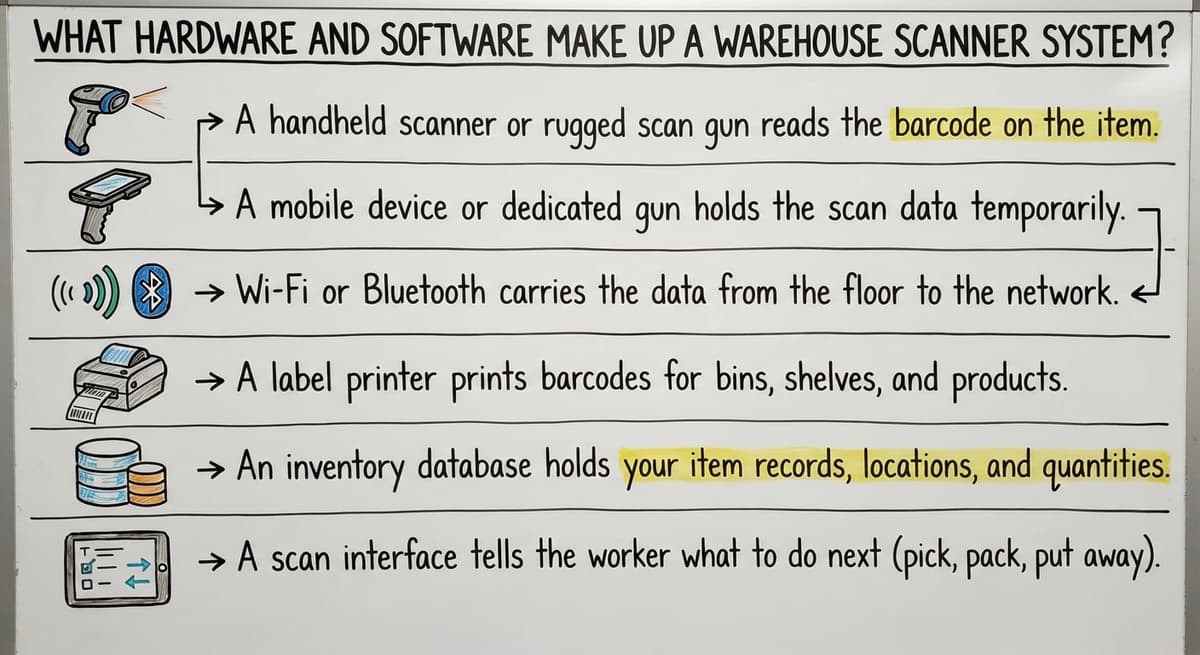
The core parts are simpler than most vendors make them sound. On the hardware side, you need a scanner and a way to send data to a central system.
Core hardware:
- A handheld scanner or rugged scan gun reads the barcode and sends the data
- A mobile device or dedicated gun holds the scan interface the worker sees
- Wi-Fi or Bluetooth carries the data from the floor to the software
- A label printer prints barcodes for bins, shelves, and cartons that do not already have them
Core software:
- An inventory database holds your item records, quantities, and bin locations
- A scan interface tells the worker what to do next and confirms each scan
- Reporting tools let managers pull counts, movement history, and error logs
The parts connect like this: a worker scans a barcode, the gun sends the read to the software over Wi-Fi, the software checks it against the item record, and it either confirms or flags an error. The whole loop takes about 2 seconds.
Which Scanner Type Fits Which Warehouse Task?
Scanner types vary by task. 1D laser scanners read standard barcodes on most cartons. 2D imagers read QR codes and denser barcodes used on smaller items. Rugged scan guns survive drops on concrete.
Wearable ring scanners leave both hands free for pick-and-pack work. GS1 barcode standards ensure a barcode printed by your supplier scans correctly on your floor without any setup on your end.
Is the comparison easier when one option is built for you?
Yes. Off-the-shelf means fitting your process to the software, and custom is the other way round. The first look costs nothing.
Book a call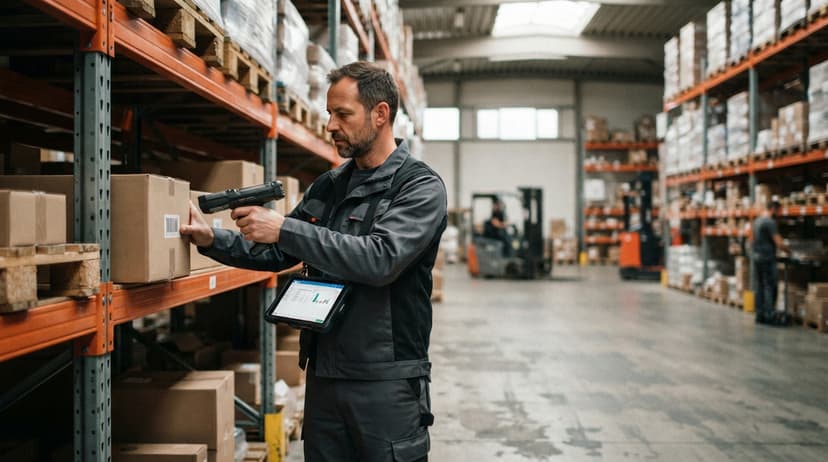
What Tasks Does a Warehouse Scanner System Handle?
A scanner system covers the 4 core movements that happen in every warehouse. Each one replaces a step where manual entry causes errors.
Receiving: Your team scans items as they come off the truck. The software checks the scan against the open buy order and flags any quantity or item mismatch before the goods move deeper into the building. This is a receiving scan, and it is the first point where errors get caught rather than discovered weeks later.
Put-away: After receiving, a worker scans the bin or shelf location where an item is stored. The software records the exact bin location. When someone needs that item later, the system knows where it is.
How Do Scan to Pick and Shipping Scans Reduce Errors?
Scan to pick: The system tells the picker which bin to go to and what to pull. The picker scans the item to confirm it is the right one.
A wrong item triggers an alert before it reaches the packing table. This is scan to pick, and it is the single biggest driver of fewer mispicks and fewer customer returns.
Shipping: Before a carton leaves the dock, a final scan matches it to the sales order. The software creates a timestamp and a record that the right items left in the right quantities. That record protects you in a dispute.
Receiving and Put-Away in Detail
The receiving scan step runs like this:
- Supplier delivers goods and hands over a packing slip
- Worker scans each item barcode as it comes off the pallet
- Software matches the scan to the open buy order line by line
- Any quantity short or wrong item shows on the screen at once
- Worker scans the destination bin to record put-away location
This removes the clipboard and the re-entry step where someone types the packing slip into a spreadsheet later. That re-entry step is where most receiving errors are born.
Pick, Pack, and Ship
Scan-to-pick works the same way in reverse. The system generates a pick list. The picker goes to the bin, scans the item, and the software confirms it before the picker moves on.
Pack confirmation happens at the packing table: the worker scans each item going into the box. A final shipping scan closes the order.
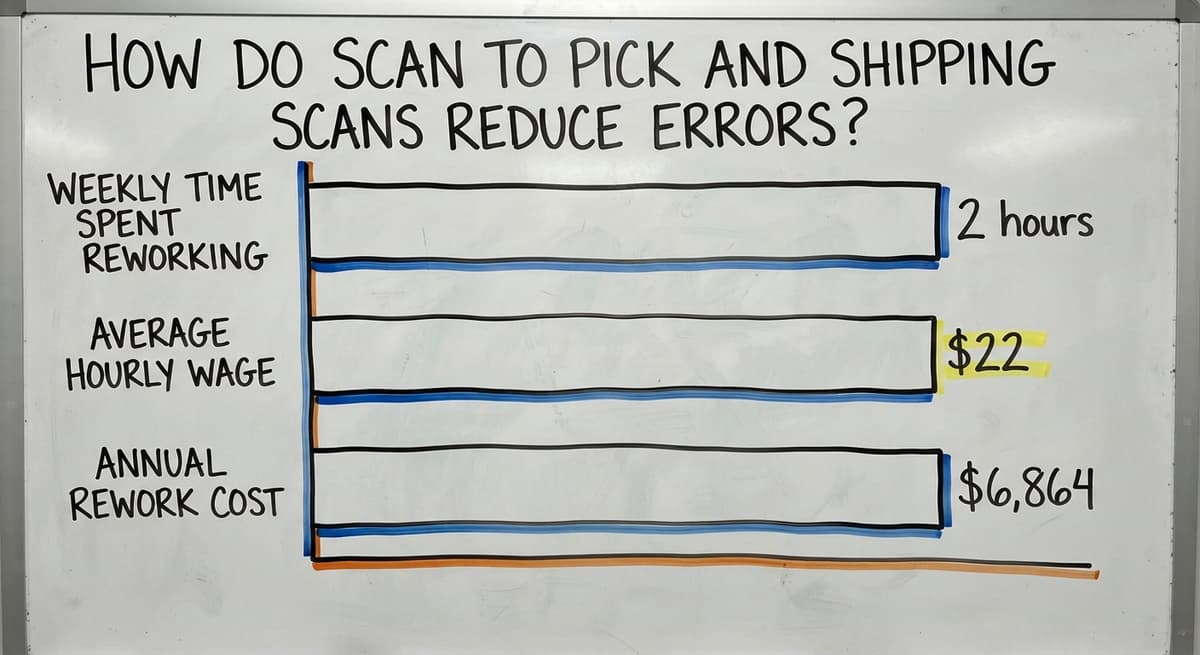
Consider 3 workers each spending 2 hours a week correcting mispicks at an average wage of $22 an hour, per BLS data for this role. That is $6,864 a year in rework time, before counting the cost of return shipping or a lost customer.

How Does a Scanner System Connect to the accounting software?
The accounting software stays in place. The scanner system does not replace it. The accounting software handles invoicing, payroll, and financials. The scanner system handles what happens on the floor and pushes updates to the accounting software item records automatically.
The sync works like this: a worker scans a receipt on the floor, the scanner software updates the item quantity, and that update writes to the matching the accounting software item record.
No one types a number twice. Your the accounting software inventory reflects what is actually in the building because the floor data flows to it in real time.
What does it look like running on your own process?
The first thing you see is it running on your own process, at no build cost. The subscription starts once it is live and doing the job, not before.
Book a callHow Does Real-Time Scan Data Support Tax Inventory Valuation?
This also removes the manual inventory adjustment. Instead of a manager logging into the accounting software at the end of the week to correct counts, the counts correct themselves with each scan.
The IRS needs that businesses "value your inventory at the beginning and end of each tax year." Accurate, timestamped scan records make that valuation faster and defensible.
For more on connecting scanner data to your books, see the accounting software inventory integration page.

How Accurate Is Barcode Scanning, and What Does Setup Actually Take?
Barcode scanning has a far lower error rate than manual keying. The accuracy depends on 2 things: clean item master data and consistent label placement.
If your item records have duplicate SKUs or missing descriptions, the scanner will confirm the wrong thing perfectly. Clean data comes first.
What good label placement looks like:
- Shelf and bin labels go at the same height on every rack so workers scan without bending
- Carton labels face outward, not toward the wall
- Small item labels sit on the flat face of the product, not wrapped around a curve
- Consistent placement means fewer rescans and faster picks
A label printer is part of the system setup. You print bin labels once when you set up the warehouse layout, then reprint only when a location changes.
How Long Does It Take to Set Up a Warehouse Scanner System?
A focused setup for a small to mid-size warehouse takes 2 to 6 weeks, not months. The phases are:
- Item master cleanup: fix duplicate SKUs, add missing descriptions, assign bin locations
- Label printing: print and place bin labels and item labels
- Hardware setup: connect scanners to Wi-Fi, install the scan interface
- Staff training: most workers learn the scan-confirm loop in a single shift
This is not an ERP rollout. There is no months-long discovery phase or a consultant who needs to learn your business before anything gets built.
The NIST Manufacturing Extension Partnership recommends starting with the process before buying the tool. A workflow review before you order hardware saves time and avoids buying gear that does not fit your floor.
Off-the-Shelf Versus Custom Warehouse Software
Off-the-shelf systems ask your operation to adapt to the software. That works well when your workflows match what the software expects.
Many small distributors find that their workflows do not match, and they end up paying for features they will never use while missing the ones they need.
Custom warehouse software is built around the workflows you already run. Custom does not always mean slow or expensive. A focused build for a 10-to-50-person distributor is a different scope than an enterprise platform.
The Warehousing Education and Research Council tracks distribution center performance benchmarks that show how much variance there is across operations of similar size. That variance is exactly why a single off-the-shelf product rarely fits every shop.
Not sure this is the right shape for your operation?
The call is free. Describe how the work runs today. We map it on a call and show you what it would look like built around that, before you spend anything.
Book a call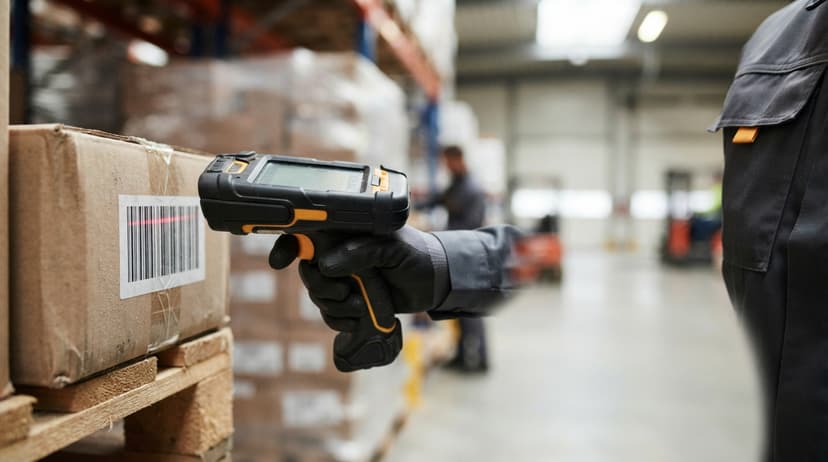
When Does Custom Warehouse Software Deploy Faster Than Off-the-Shelf?
For operations with unique receiving flows, multi-step put-away rules, or non-standard picking logic, custom warehouse software deploys faster than a heavily configured off-the-shelf product because there is no setup layer to fight.
Is Your Warehouse Ready for a Scanner System?
Your operation is likely ready if more than one of these is true:
- Inventory counts take more than a day and still come out wrong
- Mispicks happen more than once a week
- Staff spend time looking for items because there is no bin location record
- The accounting software inventory numbers do not match what is on the shelf
- Someone re-types packing slips into a spreadsheet after every delivery
If you recognize 3 or more of those, the cost of staying on paper is already higher than the cost of a scanner system.
How Does Cycle Counting Work with a Scanner System?
Cycle counting means counting a portion of your inventory on a rolling schedule rather than shutting the warehouse down once a year for a full physical count. A scanner system makes cycle counts fast enough to run them without disrupting daily operations.
A worker scans each item in a section, the software compares the scan count to the record, and any gap shows at once. The record updates in real time.
Over a quarter, every item gets counted without a single all-hands shutdown. For more on building a counting schedule, see the cycle counting guide.
The US Census Bureau's wholesale trade data shows that inventory-to-sales ratios shift faster than most small distributors expect. Regular cycle counts let you catch shrinkage and errors before they compound into a year-end surprise.
Next Steps
You now know what a warehouse scanner system does, what it costs in time and labor to run without one, and how it connects to the accounting setup you already have.
The decision is not whether to scan. The decision is whether to start with off-the-shelf software or a system built around your actual floor.
Start with a workflow review before you buy any hardware. Map receiving, put-away, picking, and shipping as they actually run today, not as they are supposed to run. That map tells you what the scanner system needs to do and prevents you from buying gear that does not fit.
If you want a second set of eyes on that workflow before you commit to anything, reach out. A conversation about your specific setup costs nothing and often surfaces one or two problems that change which direction makes sense.
Frequently asked questions
What scanners do warehouse workers use?
Most warehouse workers use one of three types: a rugged handheld gun such as a major scanner maker TC series or a major scanner maker Dolphin for heavy daily use, a mobile device in a protective case for lighter operations, or a wearable ring scanner for hands-free picking.
The right choice depends on drop frequency, scan volume, and whether workers need both hands free.
What are warehouse scanners called?
They go by several names depending on context: barcode scanner, handheld scanner, scan gun, mobile computer, or data collector. In a warehouse software context, the device is called a mobile data terminal or MDT.
All of these refer to the same basic tool: a device that reads a barcode and sends the data to a central system.
What are the four types of scanners?
The four types most relevant to warehouse work are: 1D laser scanners for standard linear barcodes, 2D imagers for QR codes and high-density barcodes, rugged handheld guns built for concrete floors and cold storage, and wearable ring scanners worn on the finger for hands-free picking.
Some vendors also count fixed-mount scanners as a fifth type, used at conveyor checkpoints.
What are the 7 main types of scanners?
A broader list includes: 1D laser scanners, 2D imagers, rugged handheld guns, wearable ring scanners, fixed-mount scanners, sled scanners that attach to a smartphone, and RFID readers that do not need line of sight.
Not all seven apply to every warehouse. Small to mid-size distributors need only one or two types.
Do I need Wi-Fi throughout the entire warehouse?
Yes, for real-time scanning you need Wi-Fi coverage across every area where scanning happens. Gaps in coverage cause the scan to fail or queue locally until the device reconnects, which creates delays and out-of-order records.
A basic site survey before setup identifies dead zones. Most warehouses under 50,000 square feet can achieve full coverage with 3 to 6 access points.
Can I start with one scanner and add more later?
Yes. Most scanner systems are designed to scale by adding devices without changing the software or the database. Starting with one scanner on the receiving dock is a common first step.
Once the receiving workflow is running cleanly, you add scanners for put-away and picking. This approach also keeps the initial cost low while you verify the system fits your operation.
Can the scanner system work with my current barcodes?
In most cases, yes. If your suppliers already print GS1-standard barcodes on their cartons, your scanner reads them without any changes. If items arrive without barcodes, a label printer generates them from your item master.
The only situation that needs extra work is when the same item arrives from multiple suppliers with different barcodes, which needs a cross-reference record in the software.
How does a warehouse scanner system replace paper logs and spreadsheets?
Every scan creates a timestamped record automatically. Receiving, put-away, picking, and shipping each generate a data row without anyone typing anything. Managers pull reports from that data instead of compiling a spreadsheet at the end of the week.
Staff do not need to learn new data entry habits because there is no data entry step left for them to do.
What is the best warehouse scanner system for a small business?
A cordless 2D imager per active worker, thermal labels on every bin and product, and inventory software that treats each scan as a stock movement. The software decides accuracy; the scanners are the cheapest part.
How much does a warehouse barcode system cost?
Hardware for a 5-person floor runs $1,000 to $2,500: scanners at $150 to $400 each, a label printer at $150 to $500, and labels. Software is $50 to $300 a month packaged, or $8,000 to $25,000 once for a build scoped to your process.
How do I implement a warehouse scanning system?
Label bins first, then products, load both lists into the software, and run one full count scanning product and bin together. Start scanning at receiving, add picking a week later, and cycle counts after that. A small floor is live in 4 to 6 weeks.
How do I set up warehouse location barcode labels?
Give every location a code that reads zone, aisle, bay, shelf, and bin, print it as Code 128 with the code in text beneath, and mount it at eye level on the front edge of the shelf. Print a spare set; labels on the floor level wear first.
What is in a free first look?
A 30 minute call, your operation mapped, and a clear picture of what we would build. No obligation and nothing to install.
Book a callRelated guides
The rest of this guide, for the parts of the job this page does not cover.
Guides
- Barcode Scanner Inventory System
- Barcode Systems for Warehouse
- Warehouse Scanning System
- 2d Image Barcode Scanner
- Upc Scanner Gun
- Scanner Inventory Software
- Quickbooks Inventory Scanner
- Scanner Manuals
- Aml Scanners
- Inventory Management Software Barcode Scanner
- Imager Barcode Scanner
- Free Inventory Management Software with Barcode Scanner
- 2d Usb Barcode Scanner
- Barcode Scanner App Ios
- Barcode Scanner Description
- 2d Wireless Barcode Scanner
- 2d Imaging Barcode Scanners
- 2d Imager Barcode Scanner
- 3pl Warehouse Management System