


Barcode Systems For Warehouse
A barcode system for a warehouse lets your team scan items instead of writing them down. Each scan records what moved, where it went, and how many are left. The system updates your inventory in real time. You keep using QuickBooks or whatever you already have. The barcode layer sits on top and fills the gaps that paper and memory cannot.
Reviewed September 2026. Each figure comes from the assumptions stated beside it, so you can substitute your own and the arithmetic still holds.
Published 21 August 2026. Reviewed and updated 15 September 2026.
Book a callWhat Does a Barcode System for a Warehouse Actually Do?
A warehouse barcode system links a physical label to a digital record. When a worker scans a label, the system logs the event: item received, item moved, item picked, item shipped. That log updates your inventory count without anyone typing a number.
The basic loop is simple. Print a label. Stick it on a product or a shelf. Scan it when something happens. The software records what happened and where. Your count stays current without a clipboard.
For an operations manager running on QuickBooks and printed sheets today, the change is smaller than it sounds. You are not replacing your system. You are adding a step that removes the part where errors sneak in.
Would you rather have it built around your operation?
The first look is free. If you would rather not compare products, describe how your operation already works and we build the system around it.
No build cost. You see it running on your own process first, and the monthly subscription starts only once it is live.
Book a callThe Core Parts of a Warehouse Barcode System
Four components make up any barcode inventory system, and each one can be swapped or scaled on its own.
- Barcode labels go on products, pallets, shelves, and bins. They hold the data the scanner reads.
- Scanners read the label and send the data somewhere. They range from a phone-sized handheld to a fixed mount above a conveyor.
- Software receives the scan, matches it to a record, and updates your inventory. This is where QuickBooks integration happens.
- A data connection moves the scan from the scanner to the software. That can be Wi-Fi, a cable, or a batch upload at the end of a shift.
Why Does the Label-and-Scan Model Work Across All Goods?
As OSHA notes, "The warehousing and storage industry includes establishments operating facilities for general merchandise, refrigerated goods, and other products." The range of goods handled is wide, and the label-and-scan model works across all of them. You do not need to rebuild everything to add one component.
What Types of Barcodes Work Best in a Warehouse?
The answer depends on how much data you need to store on the label itself. A 1D barcode, like a UPC or Code 128, holds a short string of numbers. That string points to a record in your software.
A 2D barcode, like a QR code or Data Matrix, holds more data directly on the label, including lot numbers, expiry dates, or serial numbers.
For most small warehouse barcode scanning setups, 1D barcodes are enough. Your software does the heavy lifting. Use 2D barcodes when you need to scan an item with no network connection and still read full product details, or when you ship to customers who need them.
GS1 sets the global standards that let a barcode printed at your dock scan cleanly at a customer's receiving door.
Barcode Scanners and Software: Matching the Tool to the Job
Choosing the Right Scanner
Scanner type should follow workflow, not the other way around.
- Handheld scanners are the most common starting point. One worker, one scanner, one hand free. Most small warehouses begin here.
- Mobile computers combine a scanner with a small screen. Workers can see instructions, confirm picks, and log notes without walking to a terminal.
- Fixed-mount scanners sit above a conveyor or dock door and read every label that passes. Useful once volume is high enough to justify the cost.
- Wearable scanners strap to a finger or wrist. Workers keep both hands free during pick and pack, which cuts cycle time on high-volume lines.
A warehouse with 10 to 20 staff starts with 2 or 3 handheld units and adds mobile computers as picking volume grows. The scanner does not need to match the brand of your software. Confirm compatibility before you buy.
How Does the Scan Reach Your Inventory Records?
When a worker scans a label, the scanner sends a data string to your software over Wi-Fi or a direct connection. The software matches that string to a product record and logs the event. Your inventory count changes.
Real-time updates happen the moment the scan completes. Batch updates collect scans through a shift and upload them together. Real-time suits receiving and shipping, where an error caught at once costs nothing. Batch works for cycle counting, where a short delay is acceptable.
The connection to QuickBooks barcode integration works the same way. The barcode layer sends a transaction record to QuickBooks. QuickBooks handles the accounting side.
Neither system replaces the other. A small distributor running QuickBooks Desktop or Online can add a barcode layer without migrating to a new platform.
Receiving, Putaway, and Location Tracking
Receiving Inventory with a Barcode System
Barcode receiving at the dock door removes the manual count sheet from the process. Here is what a receiving workflow looks like in practice.
- A buy order is loaded in the software before the truck arrives.
- The receiver scans each item or pallet as it comes off the truck.
- The software checks the scan against the open PO and flags any discrepancy.
- The received quantity updates automatically. No one types a number.
- If a count is wrong or an item is missing, the system flags it at the point of entry, not two days later.
Errors caught at receiving cost almost nothing to fix. Errors caught after putaway cost time, space, and credibility with customers.
Putaway and Warehouse Location Barcodes
Location barcodes are labels on shelves, aisles, and bins. Each location has a unique code. When a worker puts an item away, they scan the item and then scan the location. The software records where that item lives.
This matters most during picking. If your software knows that Item A is in Aisle 3, Bin 12, it can route pickers directly there. Without location data, pickers rely on memory or printed maps. Both fail when a product moves.
For a small to mid-size warehouse, location labeling takes a day or two to set up. The time savings during daily picking start the same week.
Is the comparison easier when one option is built for you?
Yes. Off-the-shelf means fitting your process to the software, and custom is the other way round. The first look costs nothing.
Book a callOrder Picking and Shipping Verification
Scan-to-Pick and Picking Accuracy
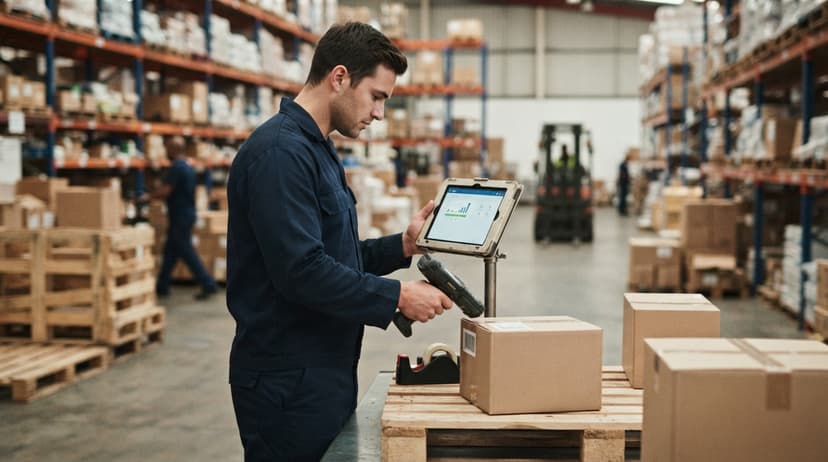
Scan-to-pick means the picker scans the item before placing it in the tote or box. If the wrong item is scanned, the software alerts them at once. The error is caught before the box is sealed, not after it arrives at a customer's dock.
Paper pick lists need a worker to read a number, find the item, and check a box. Three steps, three chances to make a mistake.
Scanning replaces two of those steps with a single confirmed action. Picking speed improves because workers spend less time double-checking themselves.
Pick-to-light systems add a light on the bin to guide the picker. These suit high-volume operations. For most warehouses under 50 staff, scan-to-pick alone delivers a clear accuracy improvement.
Does Scanning Before Shipment Actually Catch Packing Mistakes?
Yes, and it is one of the highest-value steps in the whole system. A final scan at the packing station checks every item in the box against the order. If something is missing or wrong, the system stops the process before the label prints.
Shipping labels can be generated from the same scan event. The system confirms the order, prints the label, and marks the order as shipped in one step.
Fewer wrong shipments means fewer return freight costs, fewer customer complaints, and fewer replacement orders that eat margin. For a warehouse shipping 30 to 100 orders a day, catching even 2 errors a week adds up across a year.
Cycle Counting with Barcodes Instead of Annual Shutdowns
Cycle counting means counting a portion of your inventory on a regular schedule rather than shutting the warehouse down once a year to count everything. With barcode scanning, a worker can count one aisle in 20 minutes. That makes daily or weekly counts practical.
The business benefit is early detection. Shrinkage, miscounts, and receiving errors show up within days rather than at year-end.
The IRS is direct on why this matters: IRS Publication 538 states, "To figure taxable income, you must value your inventory at the beginning and end of each tax year." Accurate counts are not optional. Cycle counting with barcodes makes meeting that requirement easier and less disruptive than a full annual shutdown.
How Cycle Counting Performance Compares to Annual Counts
The Warehousing Education and Research Council tracks distribution center performance benchmarks. Inventory accuracy is one of the core measures. Operations that cycle count regularly consistently outperform those that rely on annual counts.
How Barcode Scanning Reduces Human Error
The most common manual errors in a warehouse are picking the wrong item, recording the wrong count, and putting stock in the wrong location. All three share a root cause: the process relies on a person reading something, remembering it, and writing it down correctly.
Scanning replaces that chain. The worker scans. The software confirms. If the scan does not match the expected item, the system says so before the worker moves on.
A realistic example: a picker pulls Item 4821 instead of Item 4812 because the numbers look similar on a printed sheet.
With scan-to-pick, the software flags the mismatch the moment the wrong item is scanned. The picker puts it back and grabs the right one. Without scanning, that error ships to a customer.
The fix is not better workers. It is a system that does not depend on perfect reading and perfect memory.
What Picking Errors Actually Cost in Labor
According to the US Bureau of Labor Statistics, warehouse workers earn a median wage in the range that makes manual rework expensive.
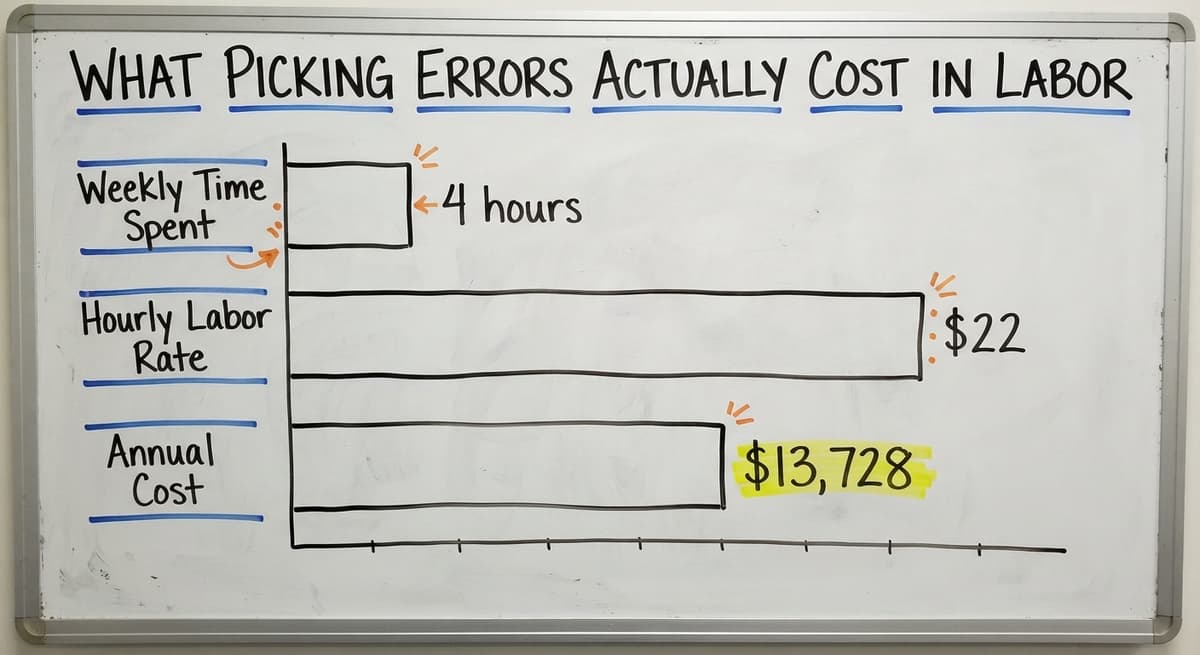
Three workers spending 4 hours a week correcting picking and receiving errors, at $22 an hour, costs about $13,728 a year in labor alone, before you count the customer impact.
Barcode Systems and QuickBooks: What Works Together
QuickBooks handles accounting well. It tracks what you owe, what you are owed, and what you spent. It is not built to track where a specific pallet is in your warehouse or to flag a picking error in real time.
A barcode layer fills those gaps without touching your QuickBooks setup. Scans generate transaction records. Those records feed into QuickBooks as inventory adjustments, buy receipts, or sales. QuickBooks stays as your financial record. The barcode system handles the physical side.
For more on connecting these two systems, the [QuickBooks integration for distributors](QuickBooks integration for distributors) page covers the specific data flows and which QuickBooks versions support direct connections.
What does it look like running on your own process?
The first thing you see is it running on your own process, at no build cost. The subscription starts once it is live and doing the job, not before.
Book a callWhen QuickBooks Alone Is Not Enough
The signs are recognizable. Inventory counts are always off by the time someone checks. Pickers pull the wrong item more than once a week.
Staff keep a separate Excel sheet because QuickBooks does not reflect what is actually on the shelf. A physical count takes two days and still does not match.
These are not signs of failure. They are signs of growth. QuickBooks was built for accounting, not for warehouse floor operations.
Adding a barcode inventory system is the next logical step, not a replacement. You keep QuickBooks for the books. You add scanning for the floor.

Replacing Spreadsheets and Paper Logs with Barcode Scanning
If your team tracks inventory in Excel or on printed sheets, the transition to barcode scanning is a direct swap, not a rebuild. Every column on your spreadsheet maps to a field in the barcode software.
- The sheet tracked item number. The scan records item number.
- The sheet tracked quantity received. The scan records quantity received.
- The sheet tracked location. The scan records location.
The difference is that the scan is faster, timestamped, and tied to a specific worker. The spreadsheet depends on someone filling it in correctly and on time.
How to Transition from Spreadsheets Without Disrupting Operations
The transition can be gradual. Start by scanning receiving. Keep the spreadsheet running in parallel for 2 weeks. Once the scan data proves accurate, drop the sheet.
Then move to putaway. Then picking. One workflow at a time is less disruptive than switching everything on a single day.
For a broader look at managing inventory data across systems, the [Barcode Inventory Management System](Barcode Inventory Management System) pillar covers how the data layers connect.
Can a Small Warehouse Afford to Start with a Barcode System?
Yes, and the starting setup is smaller than most people expect. A minimal barcode system for warehouse use includes printed labels, 1 or 2 handheld scanners, and basic software that connects to what you already run.
You do not need a server room or a dedicated IT person.
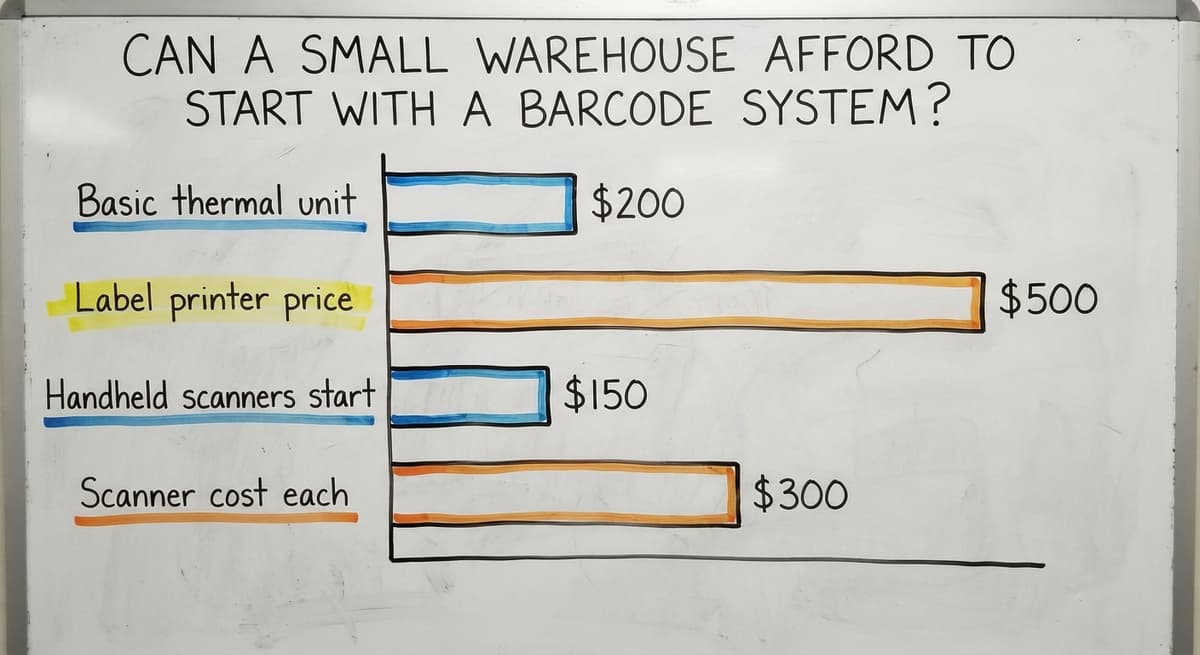
A realistic starting budget for a 10-person warehouse covers labels, a label printer, 2 scanners, and a software subscription. The label printer runs between $200 and $500 for a basic thermal unit.
Handheld scanners start around $150 to $300 each. Software varies widely, from $50 a month for off-the-shelf tools to a one-time build for custom warehouse software for small operations.

How a Small Warehouse Scales a Barcode System Over Time
The path from that starting point to a fuller system is incremental. Add a scanner when a second worker needs one.
Add location barcodes when picking errors become the main problem. Add a shipping check step when order volume grows. Nothing about the first step locks you into a specific second step.
Custom vs Off-the-Shelf Warehouse Barcode Software
Off-the-shelf warehouse inventory management software covers the common workflows. Receiving, putaway, picking, shipping. It works well when your operation runs close to a standard model.
The trade-off is that off-the-shelf tools are built around their own logic.
If your receiving process has a step that does not fit the software's default flow, you change your process, not the software. That is a reasonable trade for some operations and a real problem for others.
When Custom Warehouse Software Is Worth the Upfront Cost
Custom warehouse software is built around how your operation actually runs. The receiving screen matches your dock workflow. The picking logic follows your bin layout. Staff learn it faster because it mirrors what they already do.
The [Warehouse inventory management software overview](Warehouse inventory management software overview) page compares specific platforms and the workflows each handles well. The short version: off-the-shelf is faster to start and lower cost upfront. Custom fits better and costs less in retraining and workarounds over time.
Not sure this is the right shape for your operation?
The call is free. Describe how the work runs today. We map it on a call and show you what it would look like built around that, before you spend anything.
Book a call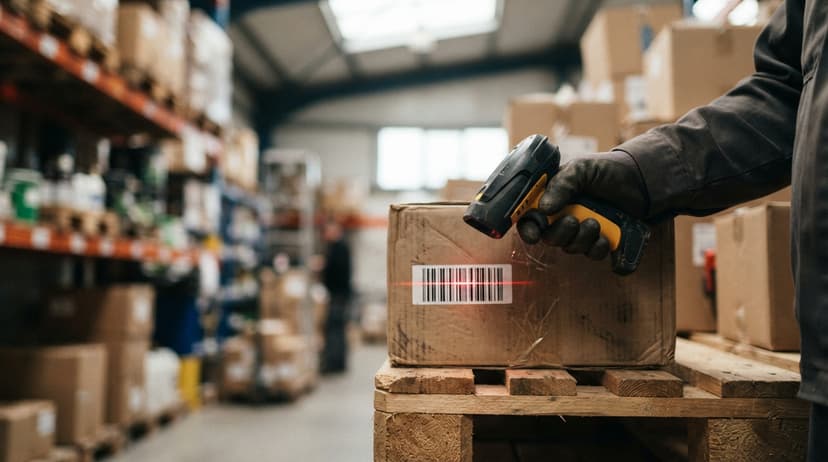
What Implementation Actually Looks Like, and How Long Training Takes
A Realistic Timeline for a Small Distributor
A good rollout does not shut the warehouse down. For a distributor with 10 to 30 staff, a phased rollout looks like this.
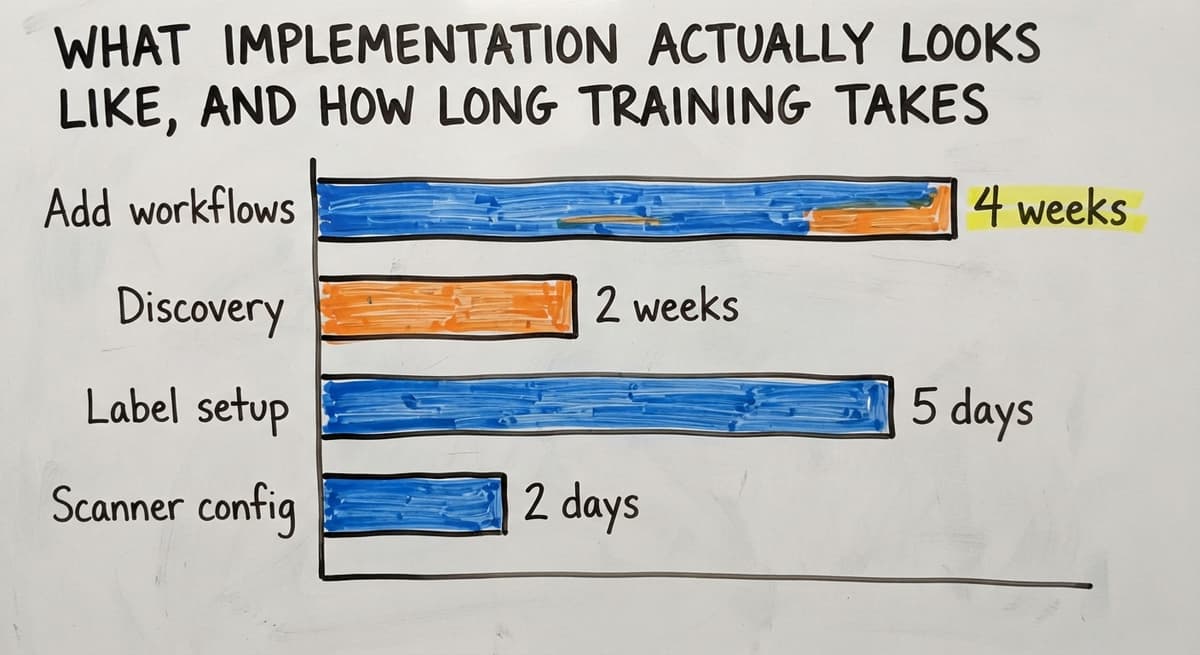
- Discovery (1 to 2 weeks): Map the current workflows. Identify which steps cause the most errors. Decide which workflow to tackle first.
- Label setup (3 to 5 days): Print and apply product labels and location labels. This is physical work, not software work.
- Scanner config (1 to 2 days): Connect scanners to the software. Test reads on every label type in use.
- Staff training (half a day to 1 day): Walk staff through the scan steps for the first workflow. Let them practice on real items before go-live.
- Go-live on first workflow (day 1): Run the new workflow live. Keep the old process available as a backup for the first week.
- Add workflows (rolling, 2 to 4 weeks apart): Once receiving is stable, add putaway. Once putaway is stable, add picking.
How Long a Full Barcode Implementation Takes
The whole process from start to a fully running system takes 6 to 10 weeks for a small distributor. No warehouse shutdown required.
Training Your Team
Scanner training for warehouse staff is measured in hours, not days. The scan step itself takes about 10 minutes to learn. The rest of the training covers what the screen shows and what to do when the system flags an error.
Good software reduces the training burden by design. If a worker has to memorize a menu structure, the software is not well built. The screen should show what to do next. New staff should be able to follow the prompts without a manual.
Common Mistakes When Setting Up a Warehouse Barcode System
Several errors slow rollouts down or cause teams to abandon the system after a few weeks.
- Labeling products but not locations means the system knows what you have but not where it is. Picking stays slow and error-prone.
- Buying scanners before confirming software compatibility leaves you with hardware that does not talk to your system. Check the integration list before ordering.
- Going live without staff training creates resistance. Workers who do not understand the scan step revert to paper within a week.
- Trying to implement every workflow at once overwhelms staff and makes it impossible to isolate what is causing problems. Start with receiving. Get it right. Then move forward.
A phased approach is not slower. It is more durable.
What to Look for in a Vendor, and How to Measure ROI
Choosing a Warehouse Barcode System Vendor
The right vendor asks about your current workflow before proposing a solution. If the first conversation is about their product rather than your operation, that is a warning sign.
Practical criteria for evaluation:
- QuickBooks compatibility: Can the system feed data to your existing QuickBooks setup without a full migration?
- Support availability: Is support reachable during your operating hours, or only by ticket?
- Ability to customize: Can the software be adjusted to match your workflow, or do you adjust your workflow to match the software?
- Rollout approach: Does the vendor have a phased rollout process, or do they hand you a manual and walk away?
Why Most Small Warehouses Do Not Need a Full ERP
Be cautious of vendors who frame a full ERP migration as the only path forward. For most warehouses under 50 staff, an ERP is more system than the operation needs.
A barcode layer on top of QuickBooks solves the problem at a fraction of the cost and disruption.
How Do You Know If a Barcode System Is Paying Off?
Measure 4 numbers before go-live and again 90 days after. The difference is your return.
- Picking accuracy rate: How many orders ship without an error? Track wrong-item and wrong-quantity incidents per 100 orders.
- Time per order: How long from pick start to label print? Even a 3-minute reduction across 40 orders a day is 2 hours of labor saved daily.
- Shrinkage rate: What percentage of inventory disappears between counts? Barcode tracking makes the source of shrinkage visible.
- Hours spent on counts: How many staff-hours go into inventory counts each month? Cycle counting with barcodes cuts this by more than half.
For a 20-person warehouse, 2 hours of daily labor saved at $22 an hour is $11,440 a year. That covers the cost of most barcode system rollouts in the first year.
The [Inventory cycle counting guide](Inventory cycle counting guide) has a simple tracking template you can use before rollout to set a baseline.
Why Inventory Accuracy Is a Margin Problem, Not Just an Operations Problem
The US Census Bureau wholesale trade data shows that inventory-to-sales ratios for wholesale firms have tightened over recent years. Carrying excess stock or losing inventory to shrinkage is a margin problem, not just an operations problem. Accurate tracking directly affects the bottom line.
Frequently Asked Questions About Barcode Systems for Warehouses
How to implement a barcode system in a warehouse? Start with one workflow, not the whole operation. Map your receiving process first. Print labels for your products. Set up location labels on your shelves. Configure 1 or 2 scanners. Train staff on the receiving scan steps in a single session.
Run the new process alongside your current one for a week, then drop the old method. Move to putaway next, then picking, then shipping. Six to ten weeks covers a full rollout for most small distributors without shutting anything down.
What is the best barcode scanner for a warehouse? There is no single best answer. The right scanner depends on your workflow. For a small warehouse doing mixed picking, a mid-range handheld like the Zebra DS2208 or Honeywell Voyager covers most needs at a reasonable cost.
For workers who need both hands free, a wearable ring scanner from Zebra or Honeywell works well. For high-volume fixed points like a dock door, a fixed-mount scanner is more practical. Confirm software compatibility before buying any hardware.
What is the best barcode scanner for warehouse inventory? For inventory counting specifically, a mobile computer with a built-in scanner, such as the Zebra TC52 or Honeywell CT40, gives workers a screen to confirm counts and flag discrepancies on the spot.
Handheld scanners paired with a tablet work for smaller budgets. The key feature is the ability to batch-scan and upload counts to your inventory software, whether that is QuickBooks, a warehouse management system, or a custom platform.
How much does a barcode inventory system cost? A minimal setup for a small warehouse, covering a label printer, 2 handheld scanners, and a basic software subscription, runs between $1,500 and $4,000 upfront, plus $50 to $200 a month for software.
Custom-built software for a specific workflow costs more upfront but removes the ongoing subscription and the cost of fitting your operation to someone else's logic. Mid-market systems with full warehouse management features run $5,000 to $20,000 for rollout. The right number depends on volume, SKU count, and how much your current errors are costing you.
Do I need Wi-Fi throughout the warehouse for barcode scanning to work? Not always. Real-time scanning needs a Wi-Fi signal at the point of scan. Batch scanning collects data locally on the scanner and uploads when the device connects.
For most small warehouses, a basic Wi-Fi setup covering the main floor is enough. Dead zones in a corner of the building are not a reason to delay. Batch mode covers those areas.
How long does it take to label all my products and locations? For a warehouse with 500 to 2,000 SKUs and a straightforward bin layout, labeling products and locations takes 2 to 5 days with 2 to 3 staff.
New items get labeled at receiving from day one, so the ongoing work is minimal after the initial setup.
What happens if a scanner breaks or a label is damaged? A broken scanner is replaced, the same day if you keep a spare. Most operations with 3 or more scanners keep one in reserve.
A damaged label is reprinted and restuck. The software record does not depend on the physical label being perfect. As long as the item number is in the system, a new label can be printed in under a minute.

Next Steps: Building a Barcode System Around How You Already Work
The core decision is straightforward. You do not need to replace QuickBooks, throw out your spreadsheets on day one, or buy an ERP. You need a barcode layer that sits on top of what you have and fixes the parts that are breaking.
Start with the workflow that causes the most errors. Add scanning there. Measure the difference. Then move to the next workflow.
If you want to talk through your specific setup, including what you are running now and where the gaps are, that conversation costs nothing and does not come with a hard sell.
The goal is to find out whether a barcode system fits your operation, not to convince you it does.
Frequently asked questions
How to implement a barcode system in a warehouse?
Start with one workflow, not the whole operation. Map your receiving process first. Print labels for your products and location labels for your shelves. Configure 1 or 2 scanners and train staff in a single session.
Run the new process alongside your current one for a week, then drop the old method. Move to putaway next, then picking, then shipping. Most small distributors complete a full rollout in 6 to 10 weeks without shutting the warehouse down.
What is the best barcode scanner for a warehouse?
There is no single best answer. The right scanner depends on your workflow. For a small warehouse doing mixed picking, a mid-range handheld like the Zebra DS2208 or Honeywell Voyager covers most needs at a reasonable cost.
For workers who need both hands free, a wearable ring scanner works well. For high-volume fixed points like a dock door, a fixed-mount scanner is more practical. Always confirm software compatibility before buying hardware.
What is the best barcode scanner for warehouse inventory?
For inventory counting specifically, a mobile computer with a built-in scanner, such as the Zebra TC52 or Honeywell CT40, gives workers a screen to confirm counts and flag discrepancies on the spot.
Handheld scanners paired with a tablet work for smaller budgets. The key feature is the ability to batch-scan and upload counts to your inventory software, whether that is QuickBooks, a warehouse management system, or a custom platform.
How much does a barcode inventory system cost?
A minimal setup for a small warehouse, covering a label printer, 2 handheld scanners, and a basic software subscription, runs between $1,500 and $4,000 upfront, plus $50 to $200 a month for software.
Custom-built software costs more upfront but removes the ongoing subscription fee and the cost of fitting your workflow to someone else's logic. The right number depends on your order volume, SKU count, and what your current errors are costing you each month.
Can a barcode system work with my existing QuickBooks setup?
Yes. A barcode layer sends transaction records to QuickBooks as inventory adjustments, buy receipts, or sales entries. QuickBooks handles the accounting side. The barcode system handles the physical floor side.
You do not need to migrate to a new platform. Both QuickBooks Desktop and QuickBooks Online support connections to barcode inventory systems, either through direct integration or a middleware layer.
Is a barcode system worth it for a warehouse with fewer than 20 staff?
Yes, more so than for larger operations. A small team has less margin for picking errors and fewer people available to fix mistakes after the fact. A minimal barcode setup, labels, 2 scanners, and basic software, can pay for itself within the first year through reduced picking errors alone.
Two errors caught per day at 250 working days is 500 fewer wrong shipments annually. That number is real for a warehouse shipping 30 to 60 orders a day.
Which barcode format should be used for pallets and bins?
Code 128 for bins and internal pallets: compact, alphanumeric, and readable by every scanner. Pallets that leave the building for retail customers carry a GS1-128 label with an SSCC, the format carriers and retailers expect.
How do I integrate barcode scanning with my WMS or ERP?
A USB or Bluetooth scanner types the code into the system's active field, so basic integration is plugging it in.
Real integration means the WMS knows the scan's context: a receiving screen treats it as an inbound count, a pick screen as a confirmation. That is configured in the software, not the scanner.
What information should be printed on warehouse labels?
The barcode, the same code in human-readable text beneath it, and one line of plain description. Bin labels add the zone-aisle-shelf address; product labels add the SKU and, where it matters, lot and expiry.
What is the difference between a barcode system and RFID?
A barcode needs line of sight and one scan per item; RFID reads tags by radio, many at once, without seeing them.
Barcodes cost cents per label and RFID tags 10 to 50 cents plus readers at $1,000 and up, which is why most warehouses under 100 staff start with barcodes.
What is in a free first look?
A 30 minute call, your operation mapped, and a clear picture of what we would build. No obligation and nothing to install.
Book a callRelated guides
The rest of this guide, for the parts of the job this page does not cover.
Guides
- Barcode System for Inventory Free
- System Id Barcode Solutions
- Barcode Scanner Inventory System
- Warehouse Scanner System
- Warehouse Scanning System
- 3pl Warehouse Management System
- Warehouse Inventory Systems
- Examples of Warehouse Management System
Common questions
- How to Create a Barcode System for Inventory
- What is a Warehouse Management System Example
- How to Create a Warehouse Management System
- How to Set up a Warehouse Management System
- What is the Point of Warehouse Management System
- What is Asn in Warehouse Management System
- What is a Warehouse Management System Pdf
- What is a Warehouse Management System Used For
- Meaning of Warehouse Management System
- What Are the Benefits of Warehouse Management System
- How to Design a Warehouse Management System
- What is the Purpose of a Warehouse Management System
- How to Build a Warehouse Management System
- Warehouse Execution System vs Warehouse Management System
- Why Warehouse Management System
- Warehouse Management System vs Warehouse Control System