


Aml Scanners
AML stands for Applied Mobile Labs, a manufacturer of rugged barcode scanning hardware built for warehouse and distribution work. AML scanners are not general-purpose phones or tablets. They are purpose-built handheld scanners designed to read barcodes across a full shift without breaking, losing charge, or dropping a Wi-Fi connection at the wrong moment.
Published 13 August 2026. Reviewed and updated 15 September 2026.
Reviewed September 2026. Each figure comes from the assumptions stated beside it, so you can substitute your own and the arithmetic still holds.
This article is written from the operator's side. It covers what AML scanners actually do, how they connect to inventory software, what they cost, and when a different tool makes more sense.
Book a callWhat Do AML Scanners Do, and How Do They Differ from Other Barcode Scanners?
A standard USB desktop scanner sits on a receiving desk and reads whatever passes in front of it. A consumer smartphone can run a scanning app, but the glass cracks at picking height and the battery drains by early afternoon.
AML scanners sit between those two options: more mobile than a desktop unit, more durable than a phone.
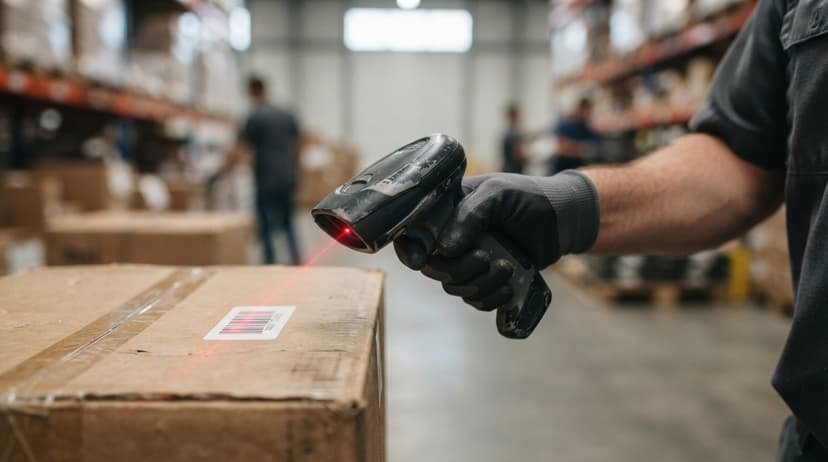
The rugged construction is the practical difference. AML devices carry drop ratings measured in repeated falls onto concrete, plus IP dust and moisture ratings that matter near loading docks and refrigerated areas.
Consumer smartphones are not rated for that environment. A broken scanner stops a pick run. Reliability is an working concern, not a spec-sheet detail.
AML also makes wearable ring scanners for hands-free picking, which frees both hands during order fulfilment.
Most AML models read both 1D and 2D barcodes without swapping hardware:
- 1D formats (Code 39, Code 128, UPC, EAN) cover the most common labels in wholesale and distribution
- 2D formats (QR codes, Data Matrix) carry more data and appear on smaller items
Existing barcode labels on your products do not need to change when you add AML scanners.
Would you rather have it built around your operation?
The first look is free. If you would rather not compare products, describe how your operation already works and we build the system around it.
No build cost. You see it running on your own process first, and the monthly subscription starts only once it is live.
Book a callBatch Scanner or Wireless Barcode Scanner: Which One Do You Need?
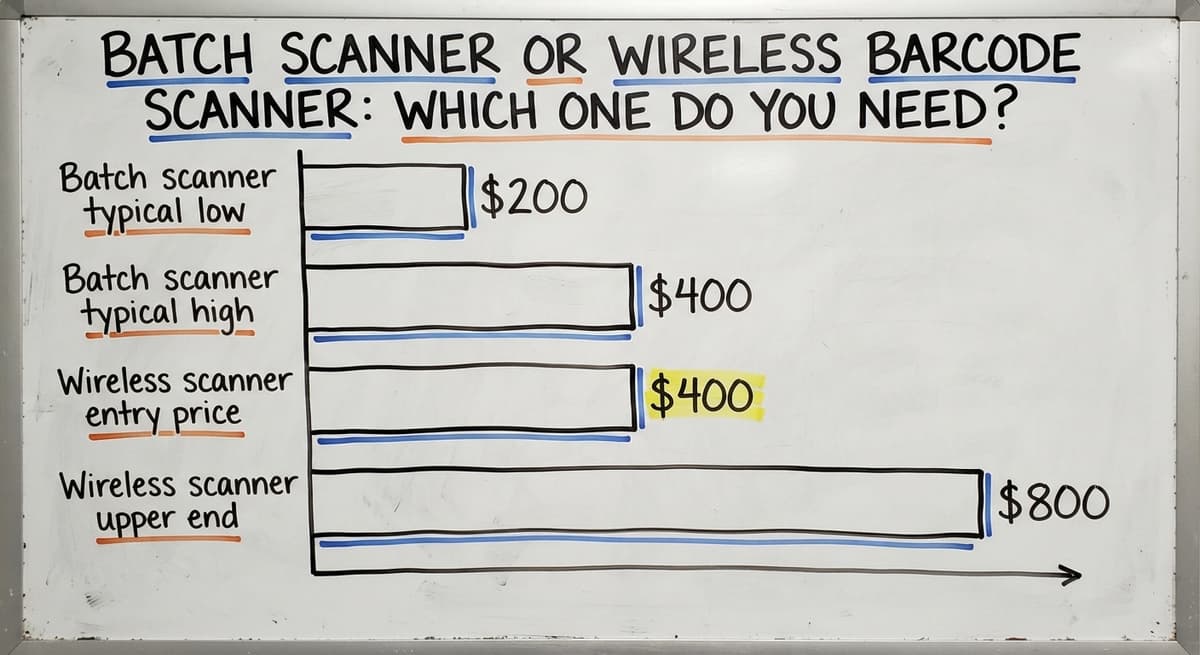
The right answer depends on how quickly your inventory system needs to know what moved. Batch scanners store scan data locally and sync when docked. Wireless barcode scanners send data over Wi-Fi the moment the trigger is pressed.
Batch models cost less, usually $200 to $400 per unit, and work in areas with no Wi-Fi signal.
A team can scan a full receiving session, then dock the device and push the data to the host PC. The gap between physical movement and system records is measured in hours, not seconds.
Wireless models run $400 to $800 or more and update inventory counts in real time. That matters when multiple people are picking from the same stock simultaneously and you need the system to reflect what is actually left on the shelf.
Before ordering wireless units, check the warehouse floor for dead zones. Large metal buildings absorb Wi-Fi signal. Access point placement matters, and a 2.4 GHz or 5 GHz network needs coverage across every aisle where staff will scan.
Batch scanners need only a USB dock or Bluetooth pairing, so they work with no Wi-Fi infrastructure at all.
The CML Series from AML is a compact, lightweight batch scanner suited to smaller operations or locations with limited connectivity. The MRL Series is a heavier, longer-range wireless model built for larger floor areas where real-time updates justify the added cost.
IRS Publication 538 states: "To figure taxable income, you must value your inventory at the beginning and end of each tax year." (IRS Publication 538) That legal requirement is the reason cycle counts matter.
A scanner that captures counts at the source removes the manual re-entry step that introduces errors before the numbers ever reach your books.

How Do AML Scanners Connect to Inventory Management Software?
The scanner is the input device. The inventory management software does the work of updating records. AML scanners do not manage inventory on their own.
Connection depends on the model type:
- Batch scanners sync via USB dock or Bluetooth to a PC running inventory software
- Wireless models connect over the warehouse Wi-Fi network to a server or cloud application
- AML provides an SDK and file-based data transfer options so custom software can receive scan data without a complex build
Many small distributors run QuickBooks for financials but QuickBooks has no native scanner interface. The practical path is a middleware layer or custom application that accepts scan data and posts updates to QuickBooks.
Staff scan an item. The middleware records the count. QuickBooks stays current without anyone typing an item number by hand. That approach keeps QuickBooks as the financial record without replacing it or starting a long ERP project.
The same logic applies across the warehouse workflow:
- Receiving: scan items as they arrive to confirm buy order quantities
- Putaway: scan the bin or shelf location to record where stock landed
- Picking: scan each item during order fulfilment to verify picking accuracy
- Shipping: scan outbound cartons to confirm what left the building
- Cycle counting: walk the floor and scan to reconcile physical stock against system records
Scanning at each step replaces a written note or a keyboard entry. Fewer keystrokes means fewer transcription errors. According to the NIST Manufacturing Extension Partnership, reducing manual data entry at handoff points is one of the highest-use process changes a small distributor can make.

Can AML Scanners Replace the Paper and Excel Trail?
Yes, and that is the point. The common pain in small distribution looks like this: staff write counts on paper during a cycle count, someone re-enters those numbers into Excel, then another person updates QuickBooks. Three steps, three chances for a digit to change.
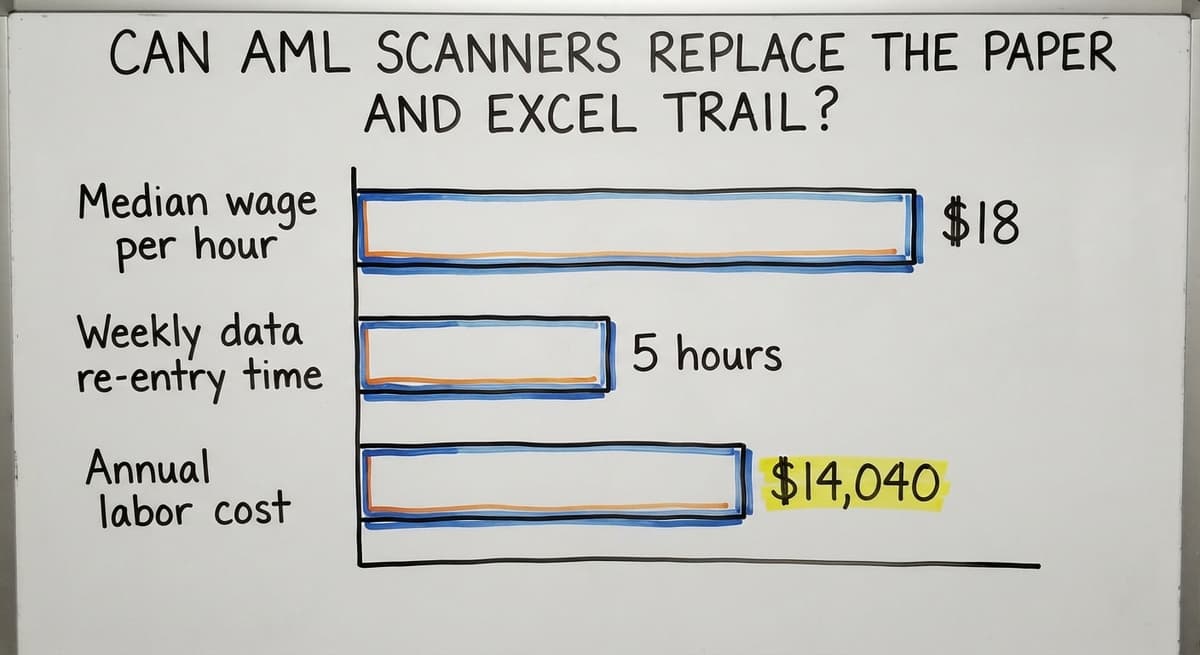
AML scanners capture the count at the source. The data moves directly into software. The Bureau of Labor Statistics reports that stock clerks and order fillers earn a median wage around $18 per hour.
Three people spending 5 hours a week re-entering data costs roughly $14,040 a year in labour alone, before accounting for the errors those entries produce. The scanner does not remove those roles. It redirects that time toward work that needs judgment.
The goal is not new technology for its own sake. It is removing a manual step that causes mistakes.
Is the comparison easier when one option is built for you?
Yes. Off-the-shelf means fitting your process to the software, and custom is the other way round. The first look costs nothing.
Book a call
How Many Scanners Does a Small Operation Need, and How Hard Is Training?
A rough starting rule: one scanner per active station, plus one spare. A 10-person team running receiving, picking, and shipping at the same time may need 4 to 6 units.
Batch scanners can be shared across shifts if sync happens at shift change. Start with fewer units and add as the team finds the bottlenecks rather than buying for a peak that may not arrive.
Training is faster than most managers expect. AML scanners are designed around a single action: point, press, done. Most warehouse staff learn the physical device in under an hour.
The larger training need is the software side: what appears on screen after the scan and what the operator does next. Keep training focused on the 3 or 4 tasks each role actually performs rather than every feature the device supports.
What Are the Most Common Problems with AML Scanners and How Do You Fix Them?
Most scanner problems have a short fix list. Here are the ones that come up most often:
- Scanner will not read a label: the label is damaged, too small, or low contrast. Reprint it.
- Batch scanner not syncing: check the USB connection or Bluetooth pairing. Confirm the host software is running on the PC before docking.
- Wireless scanner dropping connection: check Wi-Fi signal strength at that spot on the floor. A dead zone needs an added access point, not a scanner replacement.
- Battery draining faster than it used to: scanner batteries wear out after roughly 18 to 24 months of daily use. Replacement batteries are inexpensive and the fix takes seconds.
None of these need a service call. They need a checklist.
When AML Scanners Make Sense and When They Do Not
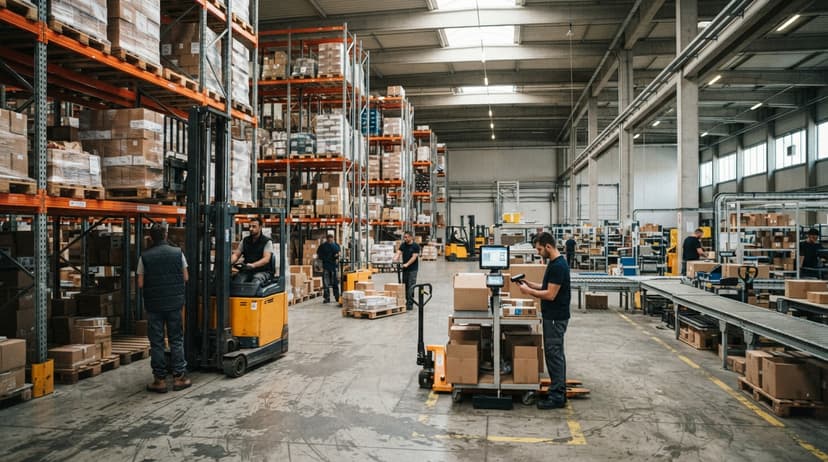
AML scanners are the right tool when a team does high-volume, repetitive scanning across a dedicated warehouse floor and consumer phones have proven fragile or distracting in that setting.
The rugged build pays for itself when the alternative is replacing cracked phone screens every few months.
They are not always the right answer. A USB desktop scanner works fine at a receiving desk where the operator stays in one place.
A Bluetooth sled that clips onto a smartphone may suit a very small team already using phone-based apps. Zebra and Honeywell both make competing rugged scanners at similar price points and are worth comparing if AML availability is limited in your area.
For operations scanning fewer than 50 items a day, a desktop USB scanner at under $100 is probably enough. The rugged handheld scanner earns its cost when the volume and the environment demand it.
Fitting AML Scanners into a Custom Software Build
Off-the-shelf inventory software is built around a generic warehouse workflow. Custom software is built around yours.
For Columbus-area distributors running QuickBooks alongside a mix of manual processes, a custom layer between the scanner and QuickBooks is the practical path: the scanner feeds data into an application designed for that specific operation, and that application posts clean records to QuickBooks.
The software defines what happens after the scan: update a count, flag a discrepancy, confirm a shipment. A custom build avoids forcing the warehouse workflow to match a template that was designed for someone else's operation.
If the software side is unclear, map the 3 or 4 manual steps in your current process where a scan would replace a written note.
Then talk to a developer who builds for warehouse operations before buying hardware. The scanner is only as useful as the system behind it.
Frequently asked questions
What are the barcode scanners called?
Barcode scanners go by several names depending on form and function: handheld scanners, barcode readers, portable scanners, or rugged scanners.
In warehouse settings, the most common types are handheld scanners, wearable ring scanners, and fixed-mount scanners. AML scanners are a specific brand of rugged handheld and wearable barcode scanners made by Applied Mobile Labs.
How much does a barcode inventory system cost?
The hardware alone ranges from under $100 for a USB desktop scanner to $400 to $800 per unit for a rugged wireless barcode scanner like those in the AML MRL Series.
Add software, a charging dock, and spare batteries and the per-station cost rises. A small operation running 4 wireless units with docks might spend $3,000 to $5,000 on hardware before software. The better frame is cost per hour of manual data entry eliminated.
What are the top 5 barcode scanners?
There is no single answer because the right scanner depends on the job. For rugged warehouse use, AML, Zebra, and Honeywell are the most commonly evaluated brands. Zebra's TC-series and Honeywell's Dolphin line compete directly with AML at similar price points.
For light-duty receiving desks, Zebra's DS2208 and the Honeywell Voyager are reliable USB options. Choose based on drop rating, battery life, and whether you need batch or wireless connectivity, not brand alone.
What is a good portable scanner for inventory?
For a small warehouse doing receiving and cycle counts, the AML CML Series is a practical batch scanner in the $200 to $400 range. If real-time inventory updates matter, the AML MRL Series or a comparable Zebra wireless model is worth the added cost.
For very small operations, a Bluetooth sled paired with a smartphone works if the team already uses a phone-based inventory app. Match the scanner to the volume and environment before deciding.
What is the difference between a batch AML scanner and a wireless AML scanner?
A batch scanner stores scan data on the device and transfers it to a PC when docked. A wireless barcode scanner sends data over Wi-Fi the moment you scan.
Batch models cost less and work without Wi-Fi coverage. Wireless models keep inventory counts current in real time, which matters when multiple people pick from the same stock at the same time.
Can AML scanners work with QuickBooks?
Yes, but not directly. QuickBooks has no native scanner interface. AML scanners feed data into a middleware application or custom layer that then posts updates to QuickBooks. This keeps QuickBooks as the financial record without requiring staff to type item numbers by hand, and it does not need replacing QuickBooks or implementing an ERP system.
How rugged are AML scanners compared to a smartphone?
AML scanners carry drop ratings for repeated falls onto concrete from picking height, plus IP ratings for dust and moisture. Consumer smartphones are not rated for warehouse conditions.
A phone screen that cracks on a concrete floor costs as much to repair as a replacement battery for a rugged scanner. Over a 3-year period, the rugged device costs less in repairs and downtime.
What infrastructure do I need before buying wireless AML scanners?
A stable 2.4 GHz or 5 GHz Wi-Fi network with coverage across every aisle where staff will scan. Large metal buildings create dead zones that drop connections mid-scan.
Walk the floor with a Wi-Fi analyzer before ordering wireless units. If coverage is patchy, either add access points first or start with batch scanners that need only a USB dock.
What is in a free first look?
A 30 minute call, your operation mapped, and a clear picture of what we would build. No obligation and nothing to install.
Book a callRelated guides
The rest of this guide, for the parts of the job this page does not cover.
Guides
- 2d Image Barcode Scanner
- Upc Scanner Gun
- Scanner Inventory Software
- Quickbooks Inventory Scanner
- Scanner Manuals
- Inventory Management Software Barcode Scanner
- Warehouse Scanner System
- Imager Barcode Scanner
- Free Inventory Management Software with Barcode Scanner
- 2d Usb Barcode Scanner
- Barcode Scanner App Ios
- Barcode Scanner Description
- 2d Wireless Barcode Scanner
- 2d Imaging Barcode Scanners
- Barcode Scanner Inventory System
- 2d Imager Barcode Scanner
- Barcode Words
- Barcode Reader Description