


Barcode Scanner Description
Updated June 2025 for small distributors and fulfillment centers running 5 to 100 staff.
Reviewed September 2026. Figures are worked from the assumptions stated beside them, so you can substitute your own and the arithmetic still holds.
A barcode scanner reads the printed lines on a product label and sends that data straight into your software. It replaces manual typing at receiving, picking, and shipping. If your team is still writing things down or keying item numbers by hand, a scanner is the fastest single fix available.
Book a callWhat a Barcode Scanner Is and What It Does
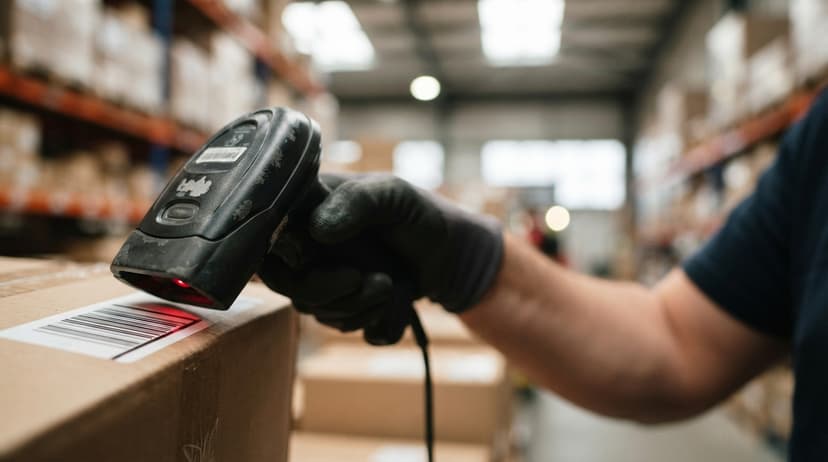
A barcode scanner is a handheld or fixed device that reads a printed barcode and turns it into data your computer can use. Point it at a label, pull the trigger, and the item number appears in your software in under a second. No typing. No clipboard. No transcription step where errors sneak in.
For a warehouse owner or ops manager, the practical result is simple: your team stops entering data by hand and starts confirming it with a scan. That shift alone removes the biggest source of receiving errors, short picks, and mis-ships in most small operations.
We build it for your operation, and the first look is free
If you would rather not compare products, describe how your operation already works and we build the system around it.
No build cost. You see it running on your own process first, and the monthly subscription starts only once it is live.
Book a callHow a Barcode Scanner Works
Every scanner has a light source, a sensor, and a decoder chip. The light source, either a laser beam or an LED array, shines onto the barcode. The sensor reads the pattern of dark bars and light spaces that reflect back. The decoder chip converts that pattern into a number or text string. That string travels to your software in milliseconds.
The patterns themselves follow published rules. As GS1 explains, barcode symbologies define exactly how digits map to bar widths so any compliant scanner can read any compliant label, regardless of brand. That standard is why a scanner you buy today reads a label printed five years ago without any setup.
What Are the Parts Inside a Barcode Scanner?
Five components do the work inside every scanner. Each one affects how fast and how reliably your team can scan on a busy shift.
- Light source shines on the label so the sensor has contrast to read
- Lens focuses the reflected light onto the sensor
- Image sensor or photodetector captures the bar and space pattern
- Decoder chip converts that pattern into a character string
- Output interface sends the string to your software via USB, Bluetooth, or Wi-Fi
Cheaper scanners cut corners on the decoder chip and the lens. That shows up as missed reads and rescans, which slow your team down at the worst moments.
1D vs. 2D Barcodes: What Your Scanner Needs to Read
Not all barcodes carry the same amount of data, and not all scanners read every type.
1D barcodes are the familiar stripes on retail products. UPC, Code 128, and EAN are the most common formats. A standard inventory barcode scanner built for 1D reads these fast and costs less up front.
2D barcodes pack more data into a square pattern. QR codes and Data Matrix codes are 2D. They can store a full URL, a serial number, and a lot number in a single label. A 2D imager reads both 1D and 2D codes, which makes it the more flexible choice for a warehouse that handles products from multiple suppliers.
The barcode type on your products should drive which scanner you buy, not the other way around. If your suppliers ship with Data Matrix labels and you buy a 1D-only scanner, your team cannot scan those items at receiving.
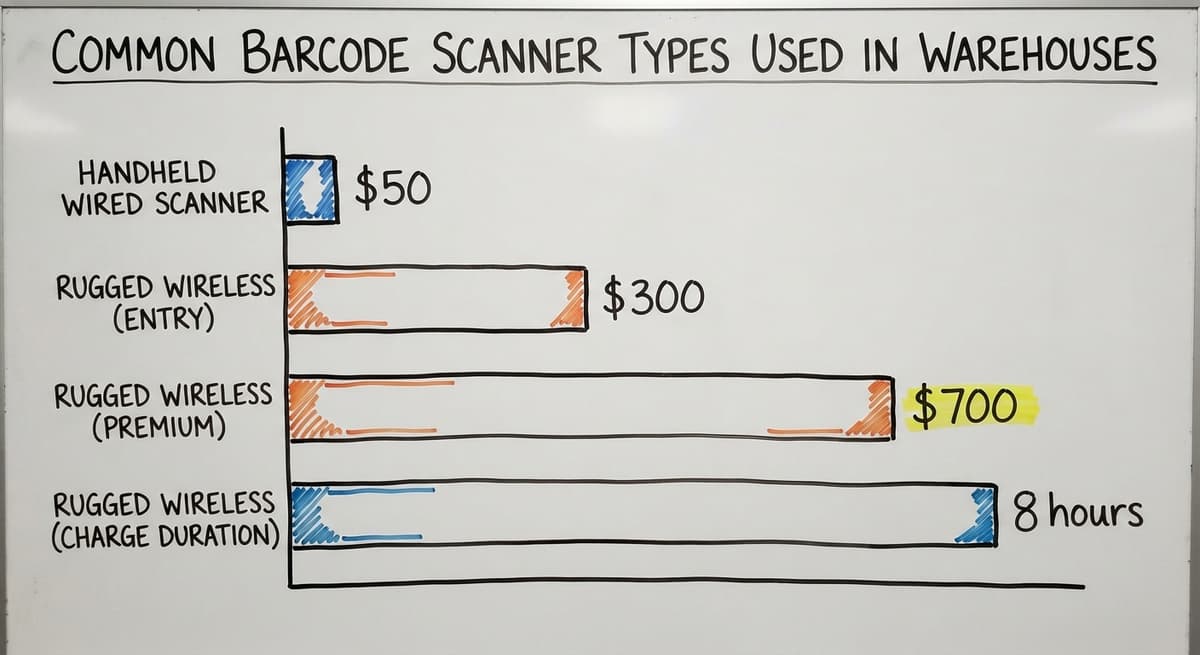
Common Barcode Scanner Types Used in Warehouses
The right scanner type depends on how your team moves and where they scan. These are the 5 types you will actually see in a warehouse.
- Handheld wired scanners plug into a workstation via USB, cost as little as $50, and never need charging. They work well at a receiving desk or a pack station where the operator stays put.
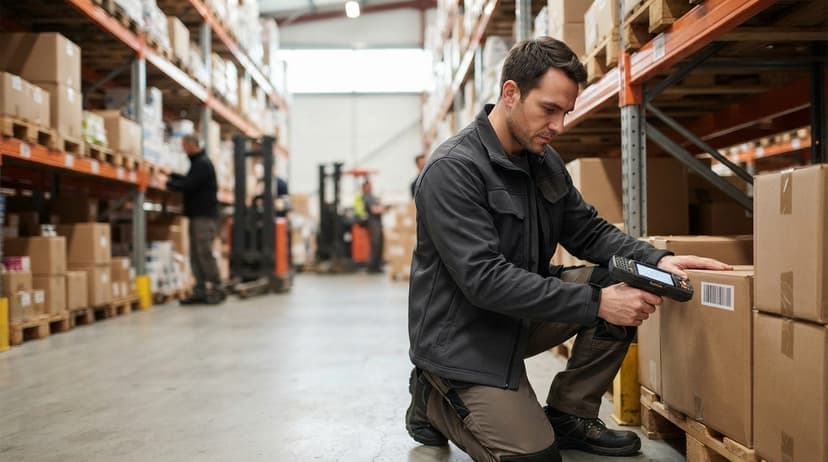
- Wireless handheld scanners connect via Bluetooth or Wi-Fi and give your team freedom to move across the floor. Rugged wireless models run $300 to $700.
- Mobile computer scanners combine a screen, a keyboard, and a scanner in one rugged device. Your picker sees the task and confirms the scan without walking back to a terminal.
- Fixed-mount scanners bolt to a conveyor or dock door and scan items as they pass, with no operator needed.
- Wearable ring scanners sit on a finger so both hands stay free during pick-and-pack operations.
The comparison is easier when one option is built for you
Off-the-shelf means fitting your process to the software. We do it the other way round, and the first look costs nothing.
Book a callWired vs. Wireless: Which One Fits Your Floor?
Wired scanners are simpler. They plug in, they work, and you never manage a battery. For a small receiving desk or a single pack station, a wired unit is the right call.
Wireless scanners add mobility. Bluetooth covers roughly 30 feet reliably. Wi-Fi covers your whole building and keeps the scanner connected to live software as your team walks the aisles. The trade-off is battery life. On a 10-hour shift, a scanner that holds 8 hours of charge becomes a problem by mid-afternoon. Buy spares or plan a charging rotation before go-live.
How a Barcode Scanner Connects to Inventory Software
Most scanners present themselves to your computer as a keyboard. When your team scans a label, the item number types itself into whatever field is open on the screen. No driver, no custom setup, no IT project.
That basic connection works for simple tasks. Custom barcode scanning software goes further. Each scan can trigger a specific action: mark a buy order line as received, decrement a pick ticket, or log a shipment. The scanner sends the same string either way. The software decides what to do with it.
QuickBooks has limited scanning support built in. It can accept a scanned item number into a line field, but it does not manage bin locations, lot numbers, or scan-driven workflows. That gap is why most warehouses add a dedicated barcode inventory management system that sits alongside QuickBooks and syncs financial data across. The inventory layer handles every scan event. QuickBooks handles the books.
What Barcode Scanners Replace on the Warehouse Floor
Every manual step a scanner replaces was a place where errors entered your data. Here is what goes away.
- Handwritten receiving logs cause stock to sit unrecorded until someone keys the sheet, sometimes hours later
- Paper pick tickets get lost, smudged, or filled in wrong, and your team ships the wrong item
- Manual count sheets on clipboards during cycle counts produce numbers that are already stale by the time they reach a spreadsheet
- Typed item numbers suffer transposition errors, where a team member flips 2 digits and creates a phantom SKU
- Email or phone confirmations of shipment details add a lag that your customer already noticed before you did
The IRS adds another reason to get this right. IRS Publication 538 states: "To figure taxable income, you must value your inventory at the beginning and end of each tax year." Inaccurate records are not just an ops problem. They are a compliance problem.

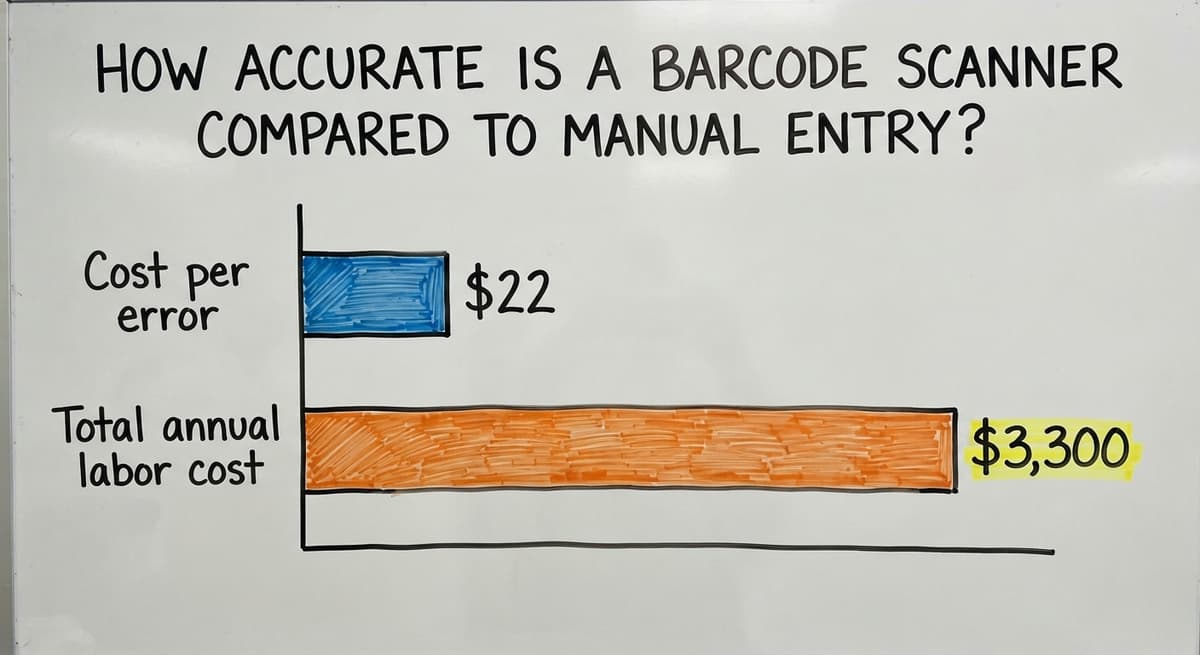
How Accurate Is a Barcode Scanner Compared to Manual Entry?
Scanning is far more accurate than typing, and the gap is large enough to matter on a small operation. Manual keying produces roughly 1 error per 300 keystrokes. Barcode scanning drops that rate to about 1 error per 36 trillion scans.
Put that in dollar terms. Say your team keys 500 item numbers a day across receiving and picking. At 1 error per 300 keystrokes, you generate roughly 1 to 2 bad records every shift. Each mis-ship costs time to fix, a replacement shipment to send, and goodwill with the customer. If your team earns $22 an hour and spends 30 minutes correcting each error, 300 errors a year costs over $3,300 in labor alone, before freight or customer credits. Scanning removes almost all of that.
Speed and Real-Time Inventory Visibility
A scan takes under a second. Typing an item number takes 5 to 10 seconds, plus the time to find the right field and confirm the entry. Across 500 transactions a day, that difference adds up to more than an hour of recovered labor per shift.
Faster receiving means items are in the system and available to pick the same day they arrive, not the next morning after someone keys the paperwork. Faster picking means more orders leave the dock before the carrier cutoff.
Real-time inventory tracking is what makes the speed gain stick. Each scan updates your stock count the moment it happens. Your manager can see what is on hand, where it sits, and what has moved, without walking the floor. That live view prevents overselling a product you no longer have and stops a stock-out from becoming a back-order crisis.
Batch-update spreadsheets, where someone exports and imports a file at the end of the day, are always behind. By the time the numbers land, your sales team has already promised inventory that is gone.
See it running on your own process first
No build cost. The subscription starts once it is live and doing the job, not before.
Book a call
What to Look for When Choosing a Warehouse Barcode Scanner
Buying the wrong scanner is a common and avoidable mistake. Match the device to your environment before you buy.
- Scan range matters at distance. A scanner at a receiving desk needs 6 to 12 inches of range. A scanner reading a label on a top shelf needs 3 to 10 feet.
- IP rating tells you how the device handles dust and moisture. A warehouse scanner should carry at least IP54. Cold storage or wet dock areas need IP65 or higher.
- Drop rating matters on a busy floor. Rugged barcode scanners are rated for drops from waist or shoulder height, usually 4 to 6 feet onto concrete. Consumer-grade devices are not.
- Barcode types supported must match your labels. Confirm 2D support if any of your suppliers use QR or Data Matrix.
- Connectivity should match your workflow. USB for fixed stations, Bluetooth for short-range mobility, Wi-Fi for full-floor coverage.
Barcode Scanning vs. RFID
RFID (radio-frequency spotting) uses a radio signal to read a tag without pointing at it. You can scan a full pallet through a dock door in one pass. Barcode scanners need line of sight: you aim, you scan, one item at a time.
The cost difference is real. Barcode labels cost fractions of a cent to print. RFID tags run $0.10 to $1.00 each or more, depending on type. GS1 keeps the EPC/RFID standards that govern how those tags are encoded and read.
For most small to mid-size distributors, barcodes offer the better cost-to-value ratio. RFID earns its cost when volume is high enough, or when automating demands hands-free reading at speed. If you are not yet running barcodes reliably, RFID is a later conversation.
Can I Keep QuickBooks and Still Add Barcode Scanning?
Yes, and most small distributors do exactly that. QuickBooks handles your financials well. It does not handle bin locations, scan-driven receiving, or lot tracking. Custom inventory software fills that gap without replacing QuickBooks.
The inventory layer captures every scan event: receiving, put-away, picking, and shipping. It keeps a live count of every SKU in every location. At defined intervals, it pushes the data QuickBooks needs, such as COGS and inventory value, across to your accounting file. Your bookkeeper keeps working in QuickBooks. Your warehouse team works in the scanning system. Neither team has to change tools.
This approach avoids a full ERP migration. For a 5-to-50-person operation, a focused QuickBooks add-on built around your actual workflow can go live in days, not months. The NIST Manufacturing Extension Partnership recommends aligning software to existing operations rather than forcing operations to fit a new system, and that principle holds here.
Common Mistakes When Rolling Out Barcode Scanners
Most failed scanner rollouts share the same short list of causes.
- Buying scanners before the software is ready. Hardware sitting in a box while software is still being configured is wasted money and lost momentum.
- Using poor-quality barcode labels. A label printed on an inkjet at low resolution will fail to scan reliably within weeks. Thermal transfer labels last years in warehouse conditions.
- Skipping staff training before go-live. Your team needs to know what each scan triggers, not just how to pull the trigger.
- Failing to define scan events in the software. A scan that does nothing useful teaches your team to ignore the scanner.
- Skipping a pilot on one product line. Test on a single SKU family, fix the gaps, then expand. A full rollout with unresolved problems multiplies those problems across everything.
Good barcode labels are the foundation. Each SKU, bin location, and pallet needs its own label, printed at the right resolution, placed where the scanner can reach it. Labels that face inward or sit in shadow cause rescans, and rescans slow your team down as much as manual entry did.
Getting Started with Barcode Scanning in Your Warehouse
Start with an honest look at where your current process breaks down most often. Receiving errors, short picks, and inaccurate cycle counts are the most common answers.
- Audit the 3 or 4 steps that produce the most errors or the most delay
- Confirm your inventory software supports scanning before you buy any hardware
- Choose a scanner type that fits your physical space and how your team moves
- Label one product line completely and run a pilot through the full workflow
- Expand to the rest of your SKUs once the pilot runs clean
A focused rollout on a single workflow, such as receiving, can go live in days. Working with a software partner who configures the system around your existing operations is faster than trying to adapt a generic platform to your floor. The goal is a system your team actually uses, not one that sits unused because it does not match how the work gets done.
Frequently asked questions
Can a smartphone replace a dedicated barcode scanner in a warehouse?
For low-volume tasks, a smartphone camera can read barcodes using a free app. For warehouse use, a dedicated scanner is faster, more durable, and built to survive drops and dust. Most smartphones are not rated for a full shift on a warehouse floor, and their scan speed is noticeably slower under real picking conditions.
Do barcode scanners work with QuickBooks?
QuickBooks accepts a scanned item number into an open line field, but it does not support bin locations, scan-driven receiving workflows, or lot tracking. Most warehouses add a dedicated inventory layer that handles every scan event and syncs key data back to QuickBooks, keeping accounting intact without limiting what the warehouse can do.
How much does a barcode scanner cost?
Entry-level wired handheld scanners start around $50 and work well at a fixed desk. Rugged wireless models built for full-shift warehouse use run $300 to $700. Mobile computer scanners with a built-in screen and keyboard sit at the higher end of that range or above.
How long does it take to implement barcode scanning in a small warehouse?
A focused rollout on one workflow, such as receiving or picking, can go live in days when the software is already configured and labels are ready. A full warehouse rollout covering receiving, put-away, picking, and shipping usually takes a few weeks when done in stages with proper staff training at each step.
Start with a free first look
A 30 minute call, your operation mapped, and a clear picture of what we would build. No obligation and nothing to install.
Book a callRelated guides
More on the same work.
Guides
- Barcode Reader Description
- Barcode Scanner App Ios
- Barcode Scanner Inventory System
- Imager Barcode Scanner
- Inventory Management Software Barcode Scanner
- 2d Wireless Barcode Scanner
- 2d Imaging Barcode Scanners
- 2d Imager Barcode Scanner
- 2d Usb Barcode Scanner
- Free Inventory Management Software with Barcode Scanner
- 2d Image Barcode Scanner
- Upc Scanner Gun
- Quickbooks Inventory Scanner
- Scanner Manuals
- Aml Scanners
- Warehouse Scanner System
- Scanner Inventory Software
- Barcode Abbreviation
- Barcode Scan Machine