


2d Usb Barcode Scanner
A 2D USB barcode scanner is one of the cheapest ways to cut manual data entry errors at the receiving desk. Most operations running mixed supplier labels are still using a 1D laser scanner that cannot read QR codes or Data Matrix labels. That gap costs time every shift. This article covers what to look for, what to avoid, and how to make sure the scanner you buy actually works with the software behind it.
Published 26 July 2026. Reviewed and updated 15 September 2026.
Reviewed September 2026. Each figure comes from the assumptions stated beside it, so you can substitute your own and the arithmetic still holds.
Book a callWhat Is a 2D USB Barcode Scanner and How Does It Differ from a 1D Scanner?
A 2D USB barcode scanner is a handheld reader that plugs into a computer and reads barcodes in two directions, not just left to right. That second dimension lets it capture far more data from a single label.
USB means no pairing, no batteries, no wireless dropout. You plug it in and it works.
A 1D scanner reads one row of bars. A 2D scanner reads a grid of dots or squares, which is how a QR code or Data Matrix label stores data.
As GS1 explains in its barcode standards library, "2D symbols can encode significantly more data than 1D barcodes", which is why suppliers use them for shipping labels that carry item, lot, and expiry data in one print.
For a warehouse manager: a 1D scanner reads a product number. A 2D scanner reads the product number, the lot, the expiry date, and the supplier ID in one pass.
What Barcode Formats Can a 2D USB Scanner Read?
A 2D USB scanner reads QR Code, Data Matrix, PDF417, and Aztec codes, plus every standard 1D format your operation already uses. The formats you will see most in wholesale and distribution are Data Matrix on GS1 shipping labels and PDF417 on freight documents.
QR codes appear on returns and some retail supplier labels. Most 2D imagers also read UPC, Code 128, and Code 39 without any extra setup. One scanner handles all of them.
Would you rather have it built around your operation?
The first look is free. If you would rather not compare products, describe how your operation already works and we build the system around it.
No build cost. You see it running on your own process first, and the monthly subscription starts only once it is live.
Book a callWhy Does the USB Connection Still Matter for Fixed Scan Stations?
At a receiving dock, pack station, or checkout counter, a plug and play scanner on a USB cable is the right tool.
The scanner appears to your computer as a keyboard. Any software that accepts typed input accepts scanner input. No drivers, no pairing screens, no signal dropout when a forklift rolls past.
Bluetooth and Wi-Fi scanners suit workers moving through aisles. But for fixed stations, wireless adds failure points with no benefit.
A dropped Bluetooth connection at the receiving desk means a worker types the label by hand, which is exactly the error you bought the scanner to prevent.
A practical split: USB at the dock and desk, wireless on the floor.
How Does a 2D Imager Work?
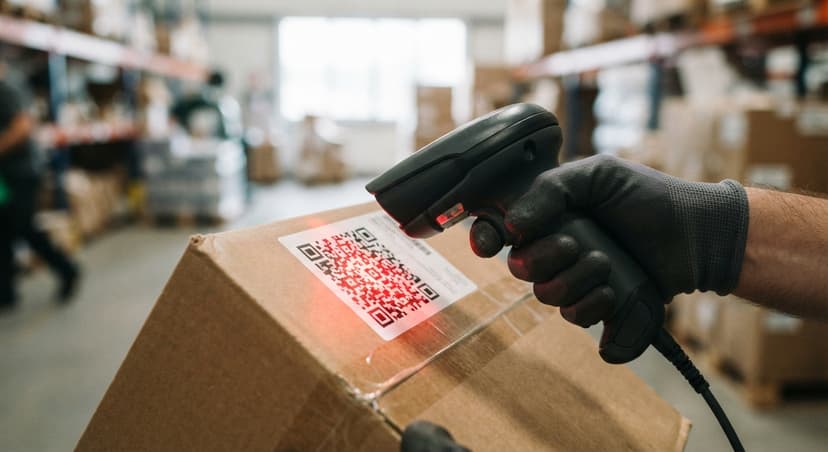
A 2D imager takes a photograph of the barcode and decodes the pattern in software.
A laser scanner bounces a beam off the bars and reads the reflection. That matters because an imager can read a damaged, dirty, or low-contrast label that would stop a laser cold.
On a receiving dock, labels get wet, creased, and smudged. An image-based barcode reader handles those conditions. A laser scanner does not. That difference alone justifies the small price gap between the two types.
What Data Does a 2D Barcode Carry Compared to a 1D Barcode?
A 1D barcode holds one field: a product identifier. A 2D code can carry item number, lot number, expiry date, quantity, and supplier ID in a single scan. That means one pass fills 5 fields in your inventory system instead of 1.
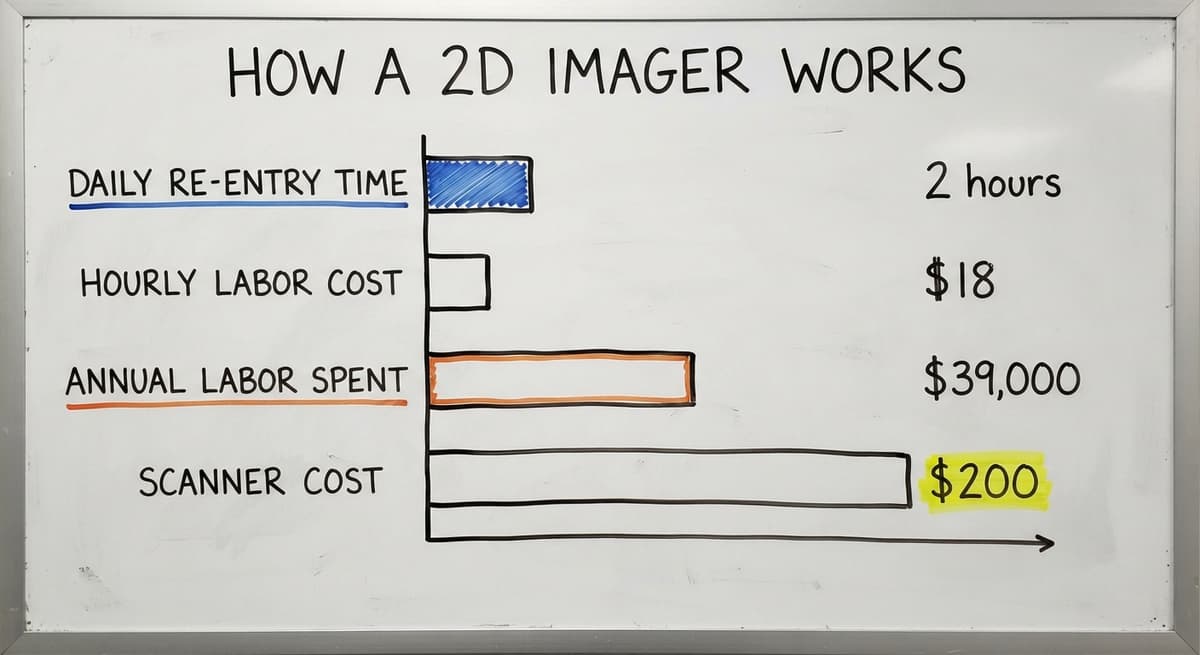
If 3 workers spend 2 hours a day re-entering data that a scanner could capture automatically, and the Bureau of Labor Statistics puts median pay for stock clerks at around $18 per hour, that is roughly $39,000 a year in labor spent on a problem a $200 scanner and the right software can solve.
For operations running on the accounting software or a custom inventory system, this is where the scanner pays for itself fast.
Is the comparison easier when one option is built for you?
Yes. Off-the-shelf means fitting your process to the software, and custom is the other way round. The first look costs nothing.
Book a call
Connecting a 2D USB Barcode Scanner to Your Inventory Software
Because USB scanners emulate a keyboard, they work with any field that accepts typed input. Open a field in your barcode inventory management system, scan the label, and the data lands where your cursor sits. No special drivers in most cases.
The limitation is that basic keyboard emulation drops all scanned data into one field.
A custom inventory system can route each scanned value, item number, lot, expiry, to the correct database field automatically. That removes the step where a worker copies data from one field to another, which is where most entry errors happen.
The accounting software accepts scanner input the same way it accepts keyboard input. A custom layer on top can split the scanned string and push each value to the right record.

What to Check Before You Buy a 2D USB Barcode Scanner
What specs should I look at before buying a 2D USB barcode scanner? Start with the scan engine: you need an imager, not a laser, for any 2D format.
Beyond that, check these before ordering:
- Scan engine type: imager for 2D codes; laser cannot read them
- Decode list: confirm it reads every label format your suppliers currently ship
- Depth of field: how far or close the label needs to be for a clean read
- Scan rate: reads per second matters at high-volume pack stations
- Cable length: long enough to reach the computer from your scan position
- IP and drop rating: covered in the next section
Test against real labels from your actual suppliers before buying more than 1 unit. A scanner that passes a spec sheet but fails on your labels is the wrong scanner.
Durability, Cost, and Choosing the Right Grade
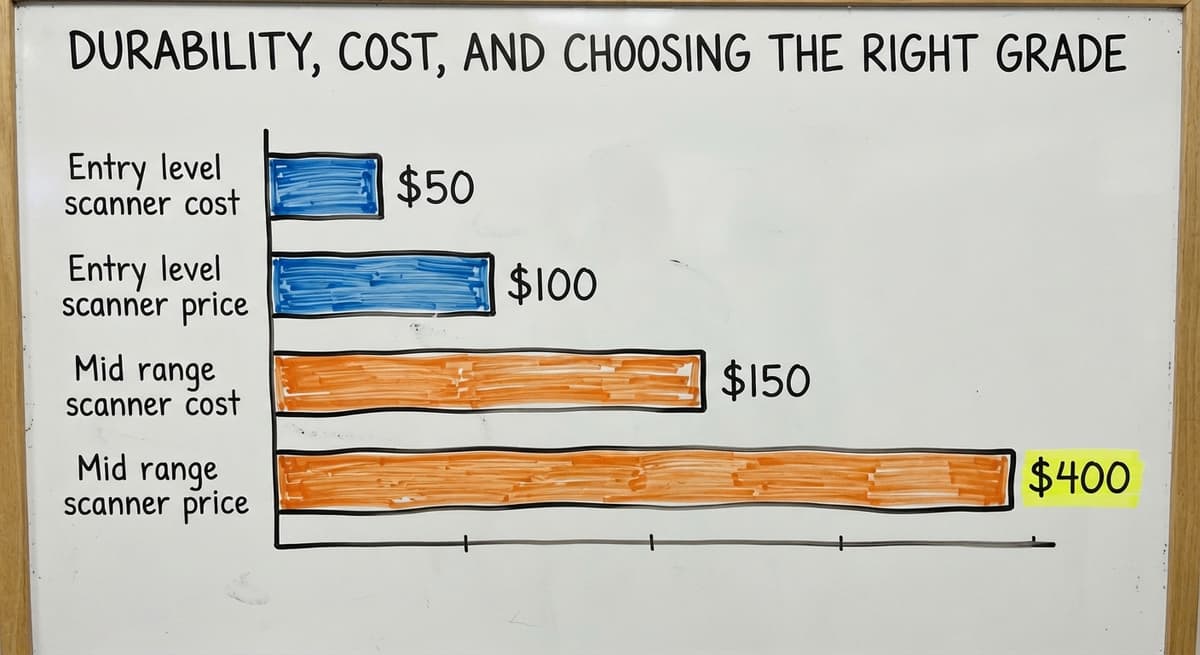
IP ratings measure dust and liquid resistance. A scanner rated IP52 handles light splashes. IP65 handles a direct water spray. Drop ratings tell you how many falls from what height the unit survives. Office-grade scanners cost less but crack quickly on a concrete floor.
For most small to mid-size distribution operations, a mid-range industrial barcode scanner in the $150 to $400 range is the right fit.
Entry-level 2D USB scanners start around $50 to $100 but target retail counters, not warehouse floors. Ruggedized units above $500 suit high-volume or outdoor environments.
The rule of thumb: match the grade to the floor, not to the budget. A $75 scanner that breaks in 3 months costs more than a $250 one that runs for 4 years.
Recognized brands include a major scanner maker, a major scanner maker, a major scanner maker, and a major scanner maker. Brand matters less than matching specs to your actual use case and label formats.
What does it look like running on your own process?
The first thing you see is it running on your own process, at no build cost. The subscription starts once it is live and doing the job, not before.
Book a call
Where 2D USB Scanners Fit in a Warehouse Operation
A warehouse barcode scanner on USB earns its keep at every fixed station in the building. Here is where each use case reduces a specific error:
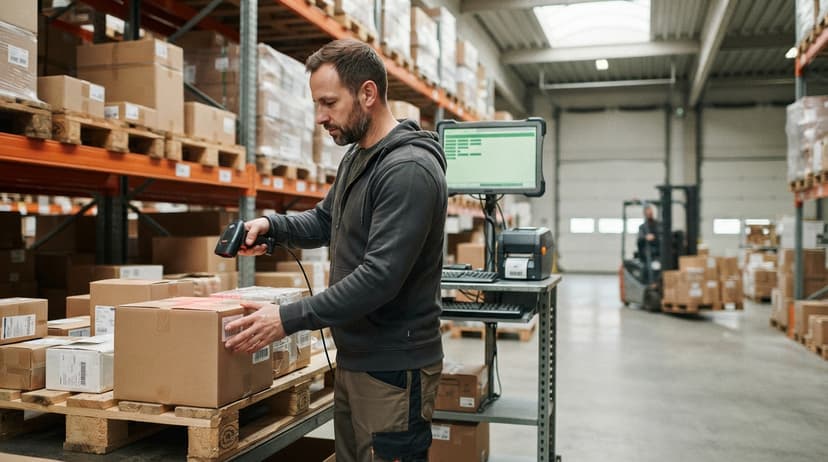
- Receiving dock: scan GS1 supplier labels and shipping labels to capture item, lot, and quantity without manual entry
- Put-away and picking: confirm item and location in one scan, cutting mis-picks before they reach the customer
- Pack and ship: verify order contents before sealing the box, catching short-ships at the station rather than after delivery
- Returns: read any label format a customer sends back, including QR codes and Data Matrix codes your 1D scanner would miss
Each of these touches the same root problem: a worker typing data by hand is a worker making errors.
The IRS puts it plainly in Publication 538: "To figure taxable income, you must value your inventory at the beginning and end of each tax year." Accurate counts are not optional, and manual entry is the fastest way to corrupt them.
Common Mistakes and How to Test Before You Commit
How do I test a 2D USB barcode scanner before committing to a buy? Request a demo unit or use a 30-day return window, then run it against every label type in your current operation.
The mistakes most operations make before that test:
- Buying a 1D laser scanner when suppliers ship QR or Data Matrix labels, then discovering it on the first delivery
- Plugging into a USB hub that drops power and causes missed scans at the worst moment
- Skipping software setup so scans land in the wrong field and workers correct them by hand
- Ordering in bulk before testing a single unit against real labels at real working distances
During the test, scan from the angles and distances your workers actually use. Check where the output lands in your current software.
If data splits across the wrong fields, that is a software setup problem, not a scanner problem, and it is fixable before you commit.
Signs Your Operation Needs a 2D Scanner Upgrade and What Comes Next
Your operation is ready for a 2D barcode scanner upgrade when any of these are true:
- Supplier labels arrive with QR or Data Matrix codes your current scanner cannot read
- Workers hand-type data that a scan could capture in under a second
- Inventory errors trace back to the receiving desk, not to the warehouse floor
- Your current scanner regularly fails on creased or low-contrast labels
Once you have the right scanner, the hardware question is closed. The scanner is the input device. The system that receives the data does the actual work. Map out which workflows still rely on manual entry and target those first.
A software partner can connect scanner output to your inventory records cleanly, routing each scanned field to the right place without a full ERP migration. That connection is where the error rate drops and the labor savings show up on the schedule.
Frequently Asked Questions
How do I scan a 2D barcode? Point the scanner at the barcode, press the trigger, and hold it steady for a half-second. The scanner takes a photo of the code and decodes it.
Most USB scanners beep and flash when the read is successful. No special technique is needed beyond keeping the label in the scan window.
What is the best 2D barcode scanner? There is no single best model. The right scanner depends on your label formats, scan volume, and floor conditions.
A major scanner maker, a major scanner maker, and a major scanner maker all make reliable mid-range units. Match the spec sheet to your actual use case rather than picking by brand or price alone.
Can a phone read a 2D barcode? Yes. Most smartphones can read QR codes with the built-in camera app. Data Matrix and PDF417 codes may need a dedicated scanning app.
Phones work for occasional reads but are not practical for high-volume receiving or picking because they are slow, drop-prone, and not integrated with inventory software.
Is 2D barcode the same as QR code? No. QR code is one type of 2D barcode. Data Matrix, PDF417, and Aztec are also 2D formats.
All of them store data in a two-dimensional pattern rather than a single row of bars. QR code is the most recognized, but Data Matrix is more common on industrial and pharmaceutical labels.
Can a 2D USB scanner read 1D barcodes? Yes. Almost all 2D imagers read 1D codes including UPC, Code 128, and Code 39. You do not need a separate scanner for legacy labels.
Do I need special software to use a USB barcode scanner? No. Most USB scanners appear to your computer as a keyboard.
Any software that accepts typed input accepts scanner input. Custom software can route scanned data to specific fields automatically, which is worth setting up if you scan high volumes.
Frequently asked questions
How do I scan a 2D barcode?
Point the scanner at the barcode, press the trigger, and hold it steady for a half-second. The scanner takes a photo of the code and decodes it.
Most USB scanners beep and flash when the read is successful. No special technique is needed beyond keeping the label in the scan window.
What is the best 2D barcode scanner?
There is no single best model. The right scanner depends on your label formats, scan volume, and floor conditions.
A major scanner maker, a major scanner maker, and a major scanner maker all make reliable mid-range units. Match the spec sheet to your actual use case rather than picking by brand or price alone.
Can a phone read a 2D barcode?
Yes. Most smartphones can read QR codes with the built-in camera app. Data Matrix and PDF417 codes may need a dedicated scanning app.
Phones work for occasional reads but are not practical for high-volume receiving or picking because they are slow, drop-prone, and not integrated with inventory software.
Is 2D barcode the same as QR code?
No. QR code is one type of 2D barcode. Data Matrix, PDF417, and Aztec are also 2D formats.
All of them store data in a two-dimensional pattern rather than a single row of bars. QR code is the most recognized, but Data Matrix is more common on industrial and pharmaceutical labels.
Can a 2D USB scanner read 1D barcodes?
Yes. Almost all 2D imagers read 1D codes including UPC, Code 128, and Code 39. You do not need a separate scanner for legacy labels.
Do I need special software to use a USB barcode scanner?
No. Most USB scanners appear to your computer as a keyboard. Any software that accepts typed input accepts scanner input. Custom software can route scanned data to specific fields automatically, which is worth setting up if you scan high volumes.
What is the difference between a 1D and 2D barcode scanner?
A 1D scanner reads a single line across the bars, so it handles UPC and Code 128 only. A 2D scanner takes an image and decodes it in both directions, so it reads QR, Data Matrix, and PDF417 as well as every 1D format.
How do I install a USB barcode scanner on Windows?
Plug it in. In its default USB HID mode the scanner shows up as a keyboard and needs no driver; a scan types into whatever field has the cursor.
If it does not type, scan the USB HID barcode in the manual to reset the mode.
Will a USB 2D barcode scanner work with a spreadsheet?
Yes. It types the code into the selected cell and sends Enter, moving down a row per scan. It works, and it is also the reason spreadsheet inventory drifts: nothing checks that the cell was the right one.
How do I configure a USB barcode scanner?
By scanning the programming barcodes in the manual: one sets the interface, one adds or removes the Enter suffix, one enables a symbology. Keep the manual PDF on the shared drive, since those barcodes are the only way to change settings on most models.
What is in a free first look?
A 30 minute call, your operation mapped, and a clear picture of what we would build. No obligation and nothing to install.
Book a callRelated guides
More on the same work.
Guides
- 2d Wireless Barcode Scanner
- 2d Imaging Barcode Scanners
- 2d Imager Barcode Scanner
- 2d Image Barcode Scanner
- 2d Barcode Readers
- Barcode Scanner App Ios
- Barcode Scanner Inventory System
- Imager Barcode Scanner
- Inventory Management Software Barcode Scanner
- Free Inventory Management Software with Barcode Scanner
- Barcode Scanner Description
- Upc Scanner Gun
- Quickbooks Inventory Scanner
- Scanner Manuals
- Aml Scanners
- Warehouse Scanner System
- Scanner Inventory Software
- Barcode Abbreviation
- Barcode Scan Machine