

Scanner Inventory Software
Scanner inventory software updates your stock count the moment a worker scans a barcode. No typing. No clipboard. No spreadsheet entry later. The system finds the item, adjusts the quantity, and moves on. If your team is counting by hand and entering numbers later, this page explains a better path.
Reviewed September 2026. Each figure comes from the assumptions stated beside it, so you can substitute your own and the arithmetic still holds.
Published 22 August 2026. Reviewed and updated 15 September 2026.
Book a callWhat Does Scanner Inventory Software Do?
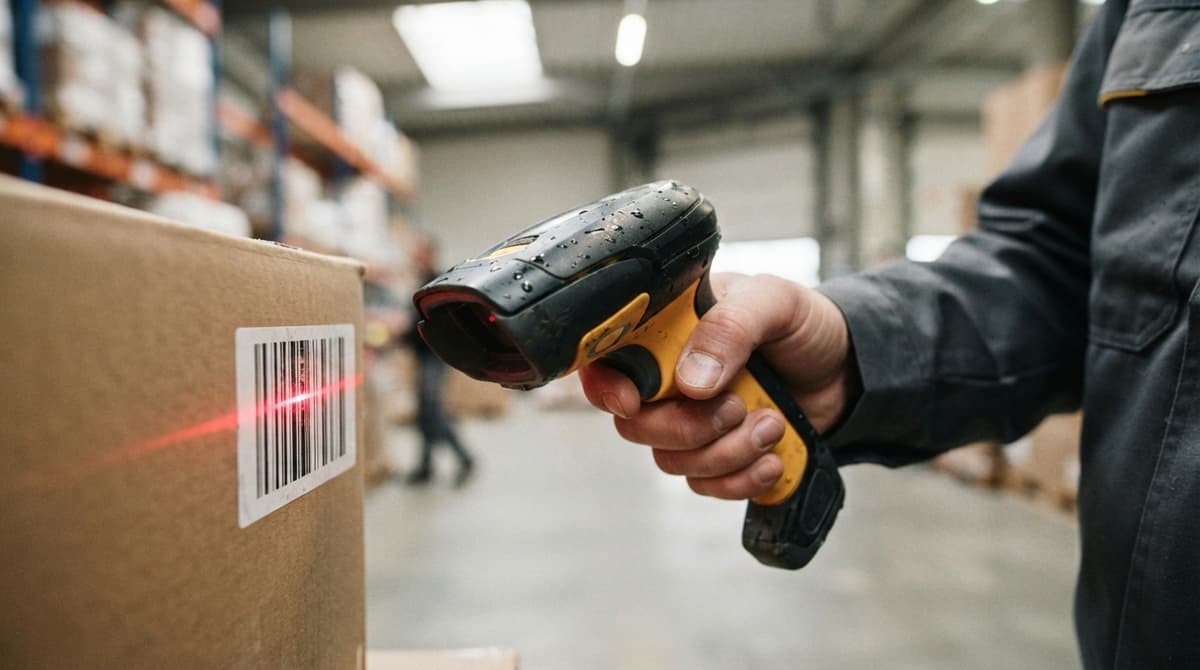
Scanner inventory software is a system that links a barcode scanner to your stock records. A worker points a scanner at a label.
The system reads the code, finds the matching item, and updates the quantity on hand. That is the whole loop, and it closes in under a second.
Compare that to writing a count on a clipboard, carrying the sheet back to a desk, and typing the numbers into a spreadsheet.
Every hand-off in that chain is a chance for a mistake. Scanner software removes every hand-off between the scan and the record. Small warehouses and wholesale distributors feel the difference almost at once.
Would you rather have it built around your operation?
The first look is free. If you would rather not compare products, describe how your operation already works and we build the system around it.
No build cost. You see it running on your own process first, and the monthly subscription starts only once it is live.
Book a callHow Does a Barcode Scanner Connect to an Inventory System?
The connection is simpler than it sounds. A scan triggers a lookup. The system finds the item by its barcode number, then writes a new quantity to the record. Nothing else needs to happen.
Scanners come in 3 main forms: wired scanners plugged into a workstation, wireless scanners that talk to a local network, and mobile handheld computers that run the full software on the device.
As GS1, the global body that sets barcode standards, explains, "barcodes enable products to be identified correctly and quickly throughout the supply chain". That accuracy depends on a consistent label standard and a system ready to receive the scan. No manual typing is needed after the scan lands.
Why Are Clipboards and Spreadsheets a Problem?
Clipboards and spreadsheets cause stock errors because data moves through too many hands before it reaches the system. A picker writes a count.
Someone reads the handwriting. A number gets transposed. The sheet gets lost. By the time the data lands in the spreadsheet, it is already hours old.
Warehouse managers know this pattern well. A customer calls to check stock. The spreadsheet says 40 units. The shelf has 12. The difference lives somewhere in a stack of count sheets no one has entered yet.
The IRS needs that businesses "value your inventory at the beginning and end of each tax year." That obligation is hard to meet cleanly when the numbers in your spreadsheet do not match the shelf.
Scanner software closes the gap between the physical count and the digital record in real time.
Who Uses Scanner Inventory Software?
Barcode inventory management is not only for large operations. The businesses that benefit most are small: wholesale distributors, fulfilment centres, and warehouses running 5 to 80 staff.
users of a standard accounting package are a common fit. Many small distributors already run a standard accounting package for invoicing and accounting. They do not need a new accounting system. They need a scanning layer that handles stock counts and locations while the accounting software keeps doing what it does.
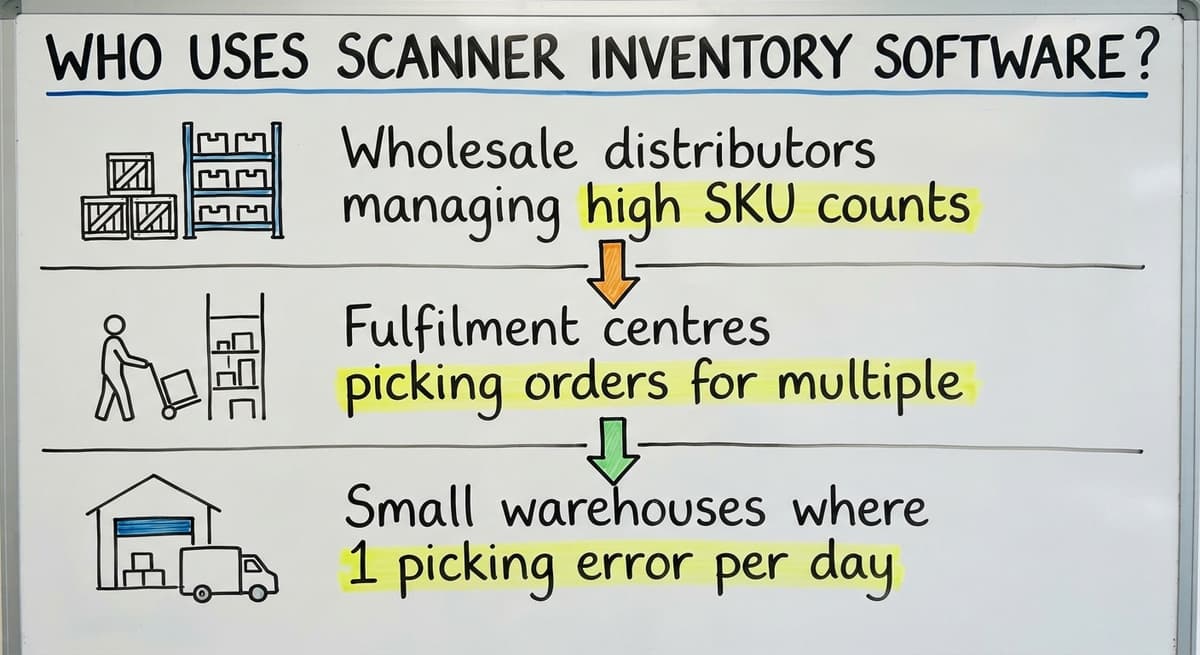
- Wholesale distributors managing high SKU counts and frequent receiving
- Fulfilment centres picking orders for multiple clients
- Small warehouses where 1 picking error per day adds up fast
This is not enterprise software. It is practical tooling for teams that have outgrown paper.
Core Features to Look For in Scanner Inventory Software
Buying scanner inventory software without a checklist leads to paying for features no one uses while missing the ones everyone needs.
Must-haves include real-time stock updates on every scan, location tracking so the system knows not just what is in stock but where it sits, accounting integration to remove double entry, and a receiving workflow that logs a shipment from the moment it arrives. Skip anything on this list and the gaps will show up quickly.
Real-Time Stock Updates
Every scan should change the quantity on hand at once. Real-time inventory tracking matters because pickers, sales staff, and buyers all rely on the same number.
A picker who sees 20 units available should be able to trust that number right now, not as of last night's batch update.
Delayed updates cause the same errors as paper, just with more steps in between.
If the system batches changes every hour, a picker can pull stock that a colleague already committed to another order. Real-time data makes that conflict visible before it becomes a wrong shipment.
Is the comparison easier when one option is built for you?
Yes. Off-the-shelf means fitting your process to the software, and custom is the other way round. The first look costs nothing.
Book a callReceiving and Put-Away Scanning
When a delivery arrives, a worker scans each item and the system matches the scan to the open buy order. Quantities received are checked against quantities ordered.
Discrepancies are caught at the dock, not three days later when a customer asks where the rest of their order is.
Put-away scanning goes one step further. After receiving, the worker scans the item again at the shelf location. The system records where the stock landed. That step feeds directly into location tracking, which pickers use to find items without searching.
Pick, Pack, and Ship Scanning
A picker scans each item before it goes into a box. The system checks the scan against the order.
If the wrong item is scanned, the scanner alerts the picker before the box is sealed. Pick and pack scanning reduces wrong shipments by catching errors at the source rather than after the customer calls.
Once all items on an order are confirmed, the system can mark the order as shipped and update stock automatically.
The FTC's Mail and Telephone Order Rule needs sellers to ship within the time promised. Accurate stock and confirmed picks make that obligation easier to meet.
What Is Cycle Count Scanning and Why Does It Matter?
Cycle count scanning means counting a small section of the warehouse on a regular schedule instead of shutting down for one big annual count.
A worker scans every item in aisle 3 on Monday, aisle 4 on Tuesday, and so on through the week. Results feed directly into the system without a separate data-entry step.
This approach keeps the count current without stopping operations. Staff count while the warehouse runs. The annual physical count shrinks from a multi-day shutdown to a final check on any areas flagged during the year.
Location and Bin Tracking
Items can be assigned to specific aisles, shelves, or bins. A location label carries its own barcode. A picker scans the location label and the item label in sequence. The system confirms both are correct before the pick is logged.
This matters most in warehouses with hundreds of SKUs. A picker who knows the system will direct them to bin B-14-3 spends less time searching and less time making substitution errors. Location tracking turns the warehouse floor into a map the software can read.
Can Scanner Inventory Software Work with the accounting software?
Yes, and for most small distributors this is the right setup. The accounting software handles invoices, payments, and the books. The scanner system handles stock counts, locations, and warehouse movements.
The two systems share data at defined points, when a buy order is received or a sales order is shipped.
Nothing in the accounting software needs to change. The scanner software sits alongside it rather than replacing it. This matters because the people who know the accounting software keep using it.
The warehouse team uses the scanner system. Each tool does what it was built for.
A The accounting software inventory integration built for your specific workflow means stock on hand in the scanner system matches what the accounting software reports.
Sales staff can quote correctly. Buyers can reorder at the right time. The accounting stays clean without anyone manually reconciling two sets of numbers.
What does it look like running on your own process?
The first thing you see is it running on your own process, at no build cost. The subscription starts once it is live and doing the job, not before.
Book a call
Off-the-Shelf Software versus Custom Scanner Software
Packaged inventory scanning systems work well when a business runs a standard process. The software ships with a set of screens and workflows. The team adapts to fit them.
The problem is that most warehouses have at least one process that does not match the standard model.
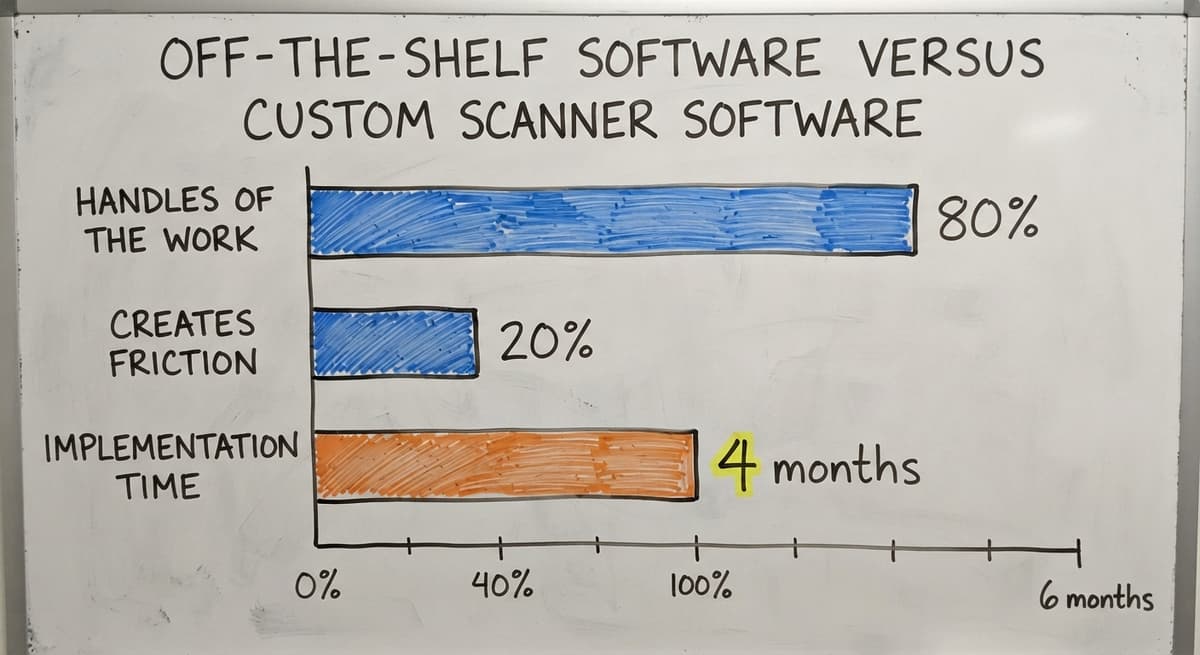
A distributor who runs mixed-case picking, or a fulfilment centre with client-specific labelling rules, finds that the packaged tool handles 80% of the work and creates friction for the other 20%.
Custom warehouse software is built around the process that already exists. Screens show only what that team needs. The workflow follows the physical steps workers already take.
Reports answer the questions the owner actually asks. Custom software does not ask the team to change how they work. It learns how they work and reflects it back.
Signs That Off-the-Shelf Is Not Working
Packaged warehouse systems show these patterns within weeks of going live when the fit is wrong:
- Workers print screens and write on them anyway because the screen does not match the task
- Staff keep a shadow spreadsheet for the cases the software cannot handle
- The system has 40 features and the team uses 6, but the 6 they need are missing
- Rollout took 4 months and the team still works around the tool daily
When workarounds become the process, the software has failed regardless of what it cost.
What Does Custom Inventory Software Look Like in Practice?
A custom build starts with the current workflow, not a feature list. A developer maps the physical steps: how items arrive, where they go, how picks are assigned, and how orders leave. The software is then built to follow that path.
For a wholesale distributor, that might mean a receiving screen that shows the supplier's delivery note format. For a fulfilment centre, it might mean a packing screen that shows the client's logo and labelling rules.
The measure of a good custom build is that a new hire can follow the screen without reading a manual.
What Hardware Do I Need to Run Scanner Inventory Software?
Most modern inventory scanning systems work with affordable, widely available hardware. Expensive proprietary devices are rarely required. The 3 most common options are:
- Handheld barcode scanners wired or wireless, reading 1D barcodes (the standard striped kind) and 2D codes like QR codes
- Mobile handheld computers running the full scanner software on a ruggedised device, useful in cold storage or rough environments
- Smartphones with a scanning app, which work well for low-volume operations or staff who move between tasks
Most warehouses already use 1D barcodes on products. Location labels are printed in-house. The hardware budget for a small warehouse is a few hundred dollars per scanner, not thousands.

Implementation: What to Expect
A focused rollout runs 2 to 6 weeks for most small warehouses. The steps are straightforward:
- Map the current workflow, including every place stock moves
- Label items and locations that do not already have barcodes
- Configure the software to match the mapped process
- Train staff on the new screens
- Run a parallel period where both the old process and the new system run together
- Cut over fully once the team is confident
Labelling is the longest step. A warehouse with 500 SKUs and 200 bin locations can take a full week to label properly. That work is not wasted. It is the foundation the scanning system runs on.
A local partner who works on-site during setup catches problems that remote support misses. A short, focused rollout beats a long expensive one because the team stays engaged and the business stays running.
Staff Training and Common Mistakes
Scanning is faster to learn than typing into a spreadsheet. A typical training session runs 2 to 3 hours.
The trainer walks through each screen: scan this item, confirm the quantity, scan the location, done. Workers who can read a screen can learn the process in a morning.
Good software reduces training time further because screens are self-explanatory. A picker who sees "Scan item, then scan bin" does not need a manual. When a new hire joins, the scanner workflow teaches the process rather than relying on a colleague to explain it.
Not sure this is the right shape for your operation?
The call is free. Describe how the work runs today. We map it on a call and show you what it would look like built around that, before you spend anything.
Book a call
Common Mistakes When Choosing Scanner Inventory Software
The most common mistakes when choosing scanner inventory software:
- Buying a system with features the team will never use, which adds cost and complexity
- Choosing software that cannot connect to the accounting software, forcing double entry
- Labelling products but ignoring locations, so the system knows what is in stock but not where
- Picking a vendor who has never seen a warehouse like yours and cannot advise on the physical setup
How Do I Know If My Operation Is Ready?
Perfect conditions are not required before starting. The signals that a warehouse is ready are practical:
- Items have consistent labels, or the team is willing to apply them
- Locations are defined, even loosely, by aisle or shelf
- Staff follow a repeatable process most of the time, even if it is not documented
If none of those are true yet, labelling and process cleanup happen during rollout. Many businesses use the rollout as the trigger to tidy up the warehouse layout they have been meaning to fix.
The NIST Manufacturing Extension Partnership recommends starting with the process as it exists, then improving it, rather than waiting for ideal conditions. Small operations can start with 1 scanning station and 1 process, then expand.
Measuring Results and Industry-Specific Needs
After going live, compare the first full month to the month before on 4 metrics:
- Picking accuracy rate: the share of orders shipped with no error
- Receiving time per shipment: how long from truck arrival to stock in the system
- Shrinkage: stock that disappears between counts
- Cycle count time: hours spent counting per week
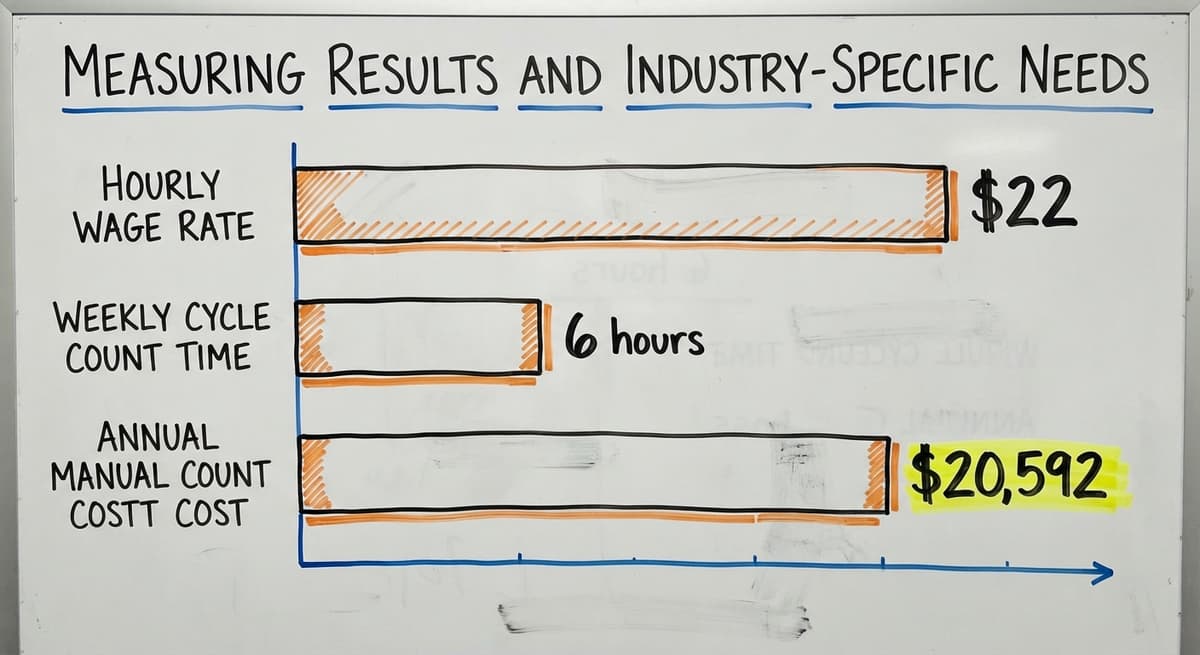
For a team of 3 warehouse staff earning $22 an hour and spending 6 hours a week on manual counts, that is $20,592 a year in count labour alone. Faster cycle counts free those hours for picking and shipping.
The US Bureau of Labor Statistics reports median wages for stock clerks and order fillers, which grounds any cost-of-manual-process calculation in real payroll numbers rather than guesses.
Scanner Inventory Software for Wholesale Distributors and Fulfilment Centres
Wholesale distributors face a specific version of this problem. High SKU counts, frequent receiving, and multi-line customer orders mean that 1 pick error per day across a 250-day year is 250 wrong shipments.
Real-time stock levels help sales staff quote correctly. Scan data ties directly to the accounting software invoicing, so the stock record and the invoice match without matching.
Fulfilment centres have an extra need: client reporting. Scanning each item before it ships creates an automatic audit trail. When a client disputes a shipment, the scan log shows exactly what left the building and when.
A system that handles multiple clients in one database keeps that audit trail clean without separate logins or spreadsheets per client.
The US Census Bureau's Monthly Wholesale Trade data shows that inventories-to-sales ratios shift month to month across the wholesale sector. Operations that know their exact stock position can respond to those shifts. Operations running on stale spreadsheet data cannot.
Next Steps for Getting Scanner Inventory Software
The path forward is short. Document the current workflow in plain language: how items arrive, where they go, how orders are picked, and how they leave. Note where errors happen and where time is lost. That document is the brief for any software conversation.
Evaluate options against that brief, not against a vendor's feature list. Pilot with 1 process, receiving or picking, before rolling out across the warehouse. A pilot that runs for 2 weeks gives real data on whether the software fits.
The Software Society builds custom warehouse and inventory scanning systems for small and mid-size distributors. We work on-site, map your process first, and build software that fits the operation you have today.
If your team is still counting on clipboards, a 30-minute conversation is the right next step.
Frequently asked questions
Is there a free inventory scanner app available?
Yes, several inventory apps offer a free tier, a free trial, or a free plan for very small operations. Free plans cap the number of SKUs, users, or monthly transactions.
For a warehouse with more than 100 SKUs or more than 2 users, a paid plan is almost always needed. The free version is useful for testing whether scanning fits your process before committing to a budget.
What are the top 5 inventory management software?
There is no single right answer because the best fit depends on business size, industry, and whether accounting integration matters. The commonly evaluated options split into accounting-led tools, small-warehouse apps, broader ERP suites, simple visual trackers, and e-commerce fulfilment platforms.
Each has strengths in different areas. The deciding factors are the accounting software compatibility, scanner hardware support, and whether the workflow matches yours without heavy customisation.
How do you digitize your inventory?
Start by listing every SKU you stock with a consistent name and unit of measure. Assign or verify a barcode for each item. Label storage locations with their own barcodes. Choose software that can receive a scan and update a quantity.
Then do a baseline count using the scanner so the system starts with accurate numbers. Most small warehouses complete this in 1 to 3 weeks depending on SKU count and how tidy the current records are.
What is the best inventory scanner system for a small business?
The best system for a small business is the one that matches how the team already works, connects to the accounting tool already in use (usually the accounting software), and does not need expensive proprietary hardware.
For operations under 50 staff, the small-warehouse apps are the usual shortlist. For businesses with a non-standard workflow, a custom-built system pays for itself faster than a packaged tool that needs constant workarounds.
Can scanner inventory software work with the accounting software?
Yes. Most mid-tier scanner inventory systems offer a direct accounting integration. The scanner system handles stock counts, locations, and warehouse movements. The accounting software handles invoices and payments.
Data passes between them at receiving and shipping events so both systems stay in sync. You do not need to replace the accounting software to add a scanning layer.
How long does it take to implement scanner inventory software?
Most small warehouses go live in 2 to 6 weeks. The longest step is labelling items and locations that do not already have barcodes.
Software setup and staff training take a few days each. Running a short parallel period, where both the old process and the new system run together, adds confidence before the full cutover.
What is the difference between off-the-shelf and custom scanner software?
Off-the-shelf software ships with a fixed set of screens and workflows. The team adapts to fit the software. Custom scanner software is built around the process the team already uses.
Off-the-shelf is faster to start but creates workarounds for non-standard processes. Custom software costs more upfront but removes the friction that packaged tools leave behind when the workflow does not match the standard model.
What hardware do I need for a barcode inventory management system?
Most systems work with standard handheld barcode scanners, mobile handheld computers, or smartphones with a scanning app. Wired scanners suit fixed receiving stations.
Wireless or mobile devices suit pickers who move through the warehouse. Expensive proprietary hardware is rarely required. A basic handheld scanner costs $100 to $300 and reads both 1D and 2D barcodes.
Can I use my phone as an inventory scanner?
Yes. The camera reads 1D and 2D codes through the inventory app, and for a stockroom or a cycle count it is enough. It is slower than a dedicated scanner, struggles with worn labels, and ties up a phone that staff also use for calls.
What barcode scanner works best with inventory software?
A cordless 2D imager, $150 to $400, connected by Bluetooth or a USB base. The software sees it as a keyboard, so any model works; pick on range, drop rating, and battery life for a full shift.
How much does scanner inventory software cost?
Packaged tools run $50 to $300 a month for a small team. A custom system scoped to one operation runs $8,000 to $25,000 once with a smaller monthly fee for hosting and support. Hardware adds $150 to $400 per scanning station.
What is the difference between barcode and QR-code inventory tracking?
A barcode holds a short item number that the software looks up; a QR code can hold the lot, expiry, and serial as well. Both need a 2D imager to read, so the choice is about how much data travels on the label, not the hardware.
What is in a free first look?
A 30 minute call, your operation mapped, and a clear picture of what we would build. No obligation and nothing to install.
Book a callRelated guides
More on the same work.
Guides
- Inventory Management Software Barcode Scanner
- Free Inventory Management Software with Barcode Scanner
- Barcode Scanner Inventory System
- Quickbooks Inventory Scanner
- Inventory Management Software with Barcode
- Rfid Inventory Software
- Inventory Software Barcode
- Barcode Scanner App Ios
- Imager Barcode Scanner
- Upc Scanner Gun
- Scanner Manuals
- 2d Wireless Barcode Scanner
- 2d Imaging Barcode Scanners
- Aml Scanners
- 2d Imager Barcode Scanner
- Warehouse Scanner System
- 2d Usb Barcode Scanner
- Barcode Scanner Description
- 2d Image Barcode Scanner