

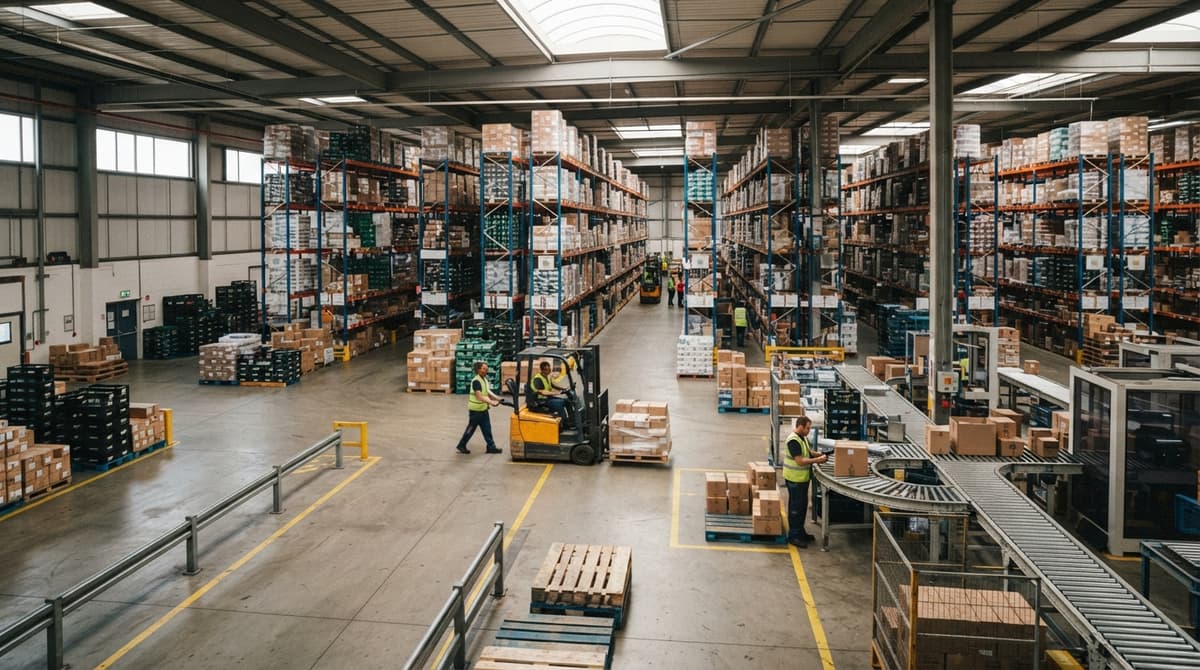
What Does A Barcode Look Like
A barcode is a row of black bars and white spaces printed side by side. The bars vary in width. Below them sit a row of digits a person can read. The whole label is small enough to fit on a box, a shelf tag, or a shipping carton. A scanner reads the pattern of light and dark and turns it into a number your inventory system can use.
Reviewed September 2026. Each figure comes from the assumptions stated beside it, so you can substitute your own and the arithmetic still holds.
Published 30 August 2026. Reviewed and updated 15 September 2026.
Book a callWhat Does a Barcode Look Like at Its Most Basic?
A barcode is a pattern of black bars and white spaces printed in a row. The bars and spaces vary in width, and that width is what encodes the data. Below the bars you almost always see a row of numbers printed in plain text so a person can read them without a scanner.
The whole thing is compact enough to fit on a small label, a cardboard box, or a shelf tag in a distribution center. Most people have seen one on a grocery item without thinking much about it. For warehouse operators, understanding what each part does is the first step to getting labels right.
Would you rather have it built around your operation?
The first look is free. If you would rather not compare products, describe how your operation already works and we build the system around it.
No build cost. You see it running on your own process first, and the monthly subscription starts only once it is live.
Book a callThe Three Main Parts of Every Barcode
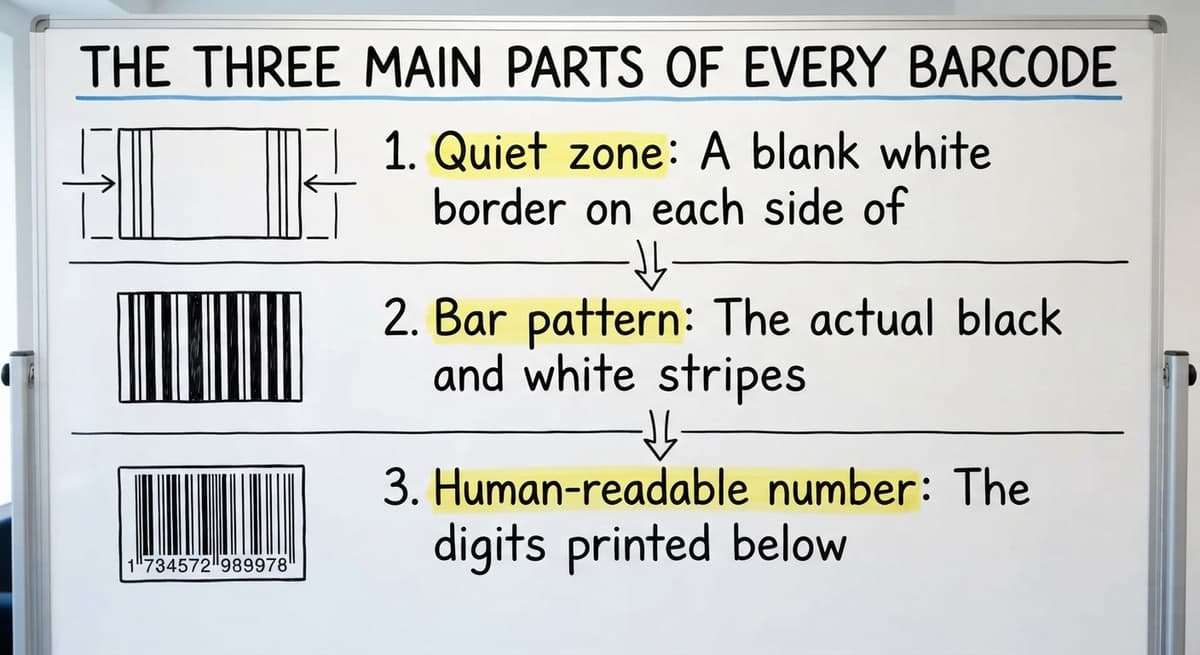
Every barcode, regardless of type, has 3 core parts that work together.
- Quiet zone: A blank white border on each side of the bars. It tells the scanner where the code starts and stops. Without it, the scanner may misread the first or last bar.
- Bar pattern: The actual black and white stripes that hold the data. Bar width and spacing carry the encoded number.
- Human-readable number: The digits printed below the bars so a worker can type the number by hand if the scanner fails.
As GS1 explains in its barcode standards records, "The quiet zone is a critical component of a barcode symbol" because a scanner needs clear margins to find the edges of the code.
Getting all 3 parts right on every inventory barcode label is what separates a reliable scan from a daily frustration.
What Do the Colors in a Barcode Mean?
Why are barcodes black and white? The answer is physics. Black bars absorb the scanner's laser or light beam. White spaces reflect that light back to the sensor. The scanner reads the on-off pattern of reflected light and converts it to data.
Color barcodes exist, and some packaging uses them. In a warehouse or distribution center, black on white gives the most reliable scan. Colored inks can reflect or absorb light in ways the scanner does not expect, which raises the error rate.
Faded labels, colored backgrounds, and low-contrast printing all reduce how cleanly the sensor picks up the signal. Black on white is not a style choice; it is a reliability choice.
1D Barcodes: The Classic Striped Look
A 1D barcode, meaning one-dimensional, stores data in a single row of vertical stripes running left to right. The data runs in one direction only, which is why the format is called one-dimensional.
The UPC barcode on a grocery product is the most familiar example. Code 128 and Code 39 are two other common formats used on shipping labels and industrial parts. They all look like a small fence of vertical lines with numbers printed underneath.
Common 1D Barcode Formats by Warehouse Use
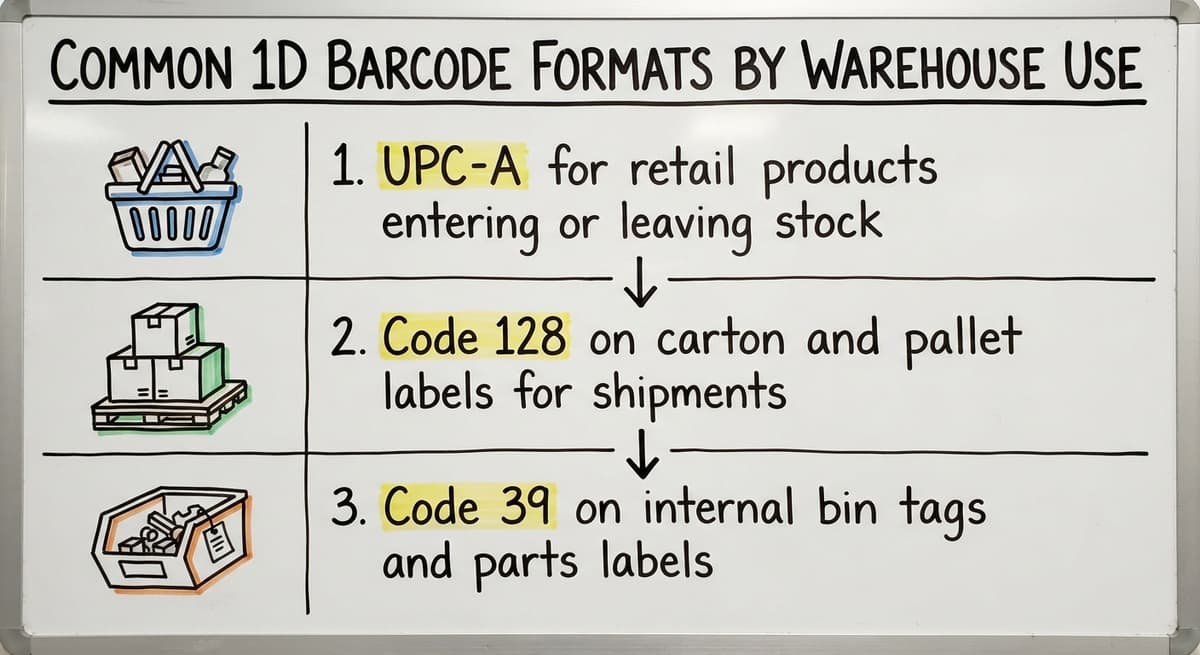
Common uses in a warehouse setting:
- UPC-A for retail products entering or leaving stock
- Code 128 on carton and pallet labels for shipments
- Code 39 on internal bin tags and parts labels
1D barcodes are best for simple item numbers, SKUs, and bin locations where the data is short and the scanner is close to the label. A barcode inventory system built around 1D codes is fast to implement and easy to print with standard label hardware.
Is the comparison easier when one option is built for you?
Yes. Off-the-shelf means fitting your process to the software, and custom is the other way round. The first look costs nothing.
Book a call2D Barcodes: The Square Pixel Pattern
A 2D barcode, meaning two-dimensional, stores data in both rows and columns at once. That second dimension is what lets it hold far more data than a stripe barcode of the same physical size.
QR codes are the most recognizable type: a square grid of small black and white squares with three bold corner markers. Data Matrix codes look similar but are smaller and appear on tiny parts in manufacturing and medical supply chains.
A smartphone camera can read most 2D codes without a dedicated scanner, which makes them useful for batch information, URLs, or multi-field records.
How Do 2D Barcodes Differ From 1D Formats?
Key differences from 1D formats:
- A QR code can hold hundreds of characters; a UPC holds 12 digits
- 2D codes can encode a URL, a lot number, and an expiry date in one label
- Damage to part of a 2D code is less likely to cause a failed scan because the format includes built-in error correction
When a label needs to carry more than a simple item number, a 2D barcode is the right shape for the job.
How Big Is a Barcode?
Barcode size depends on the type, the scanner, and how far away the scan will happen. A standard UPC barcode is about 1.5 inches wide and 1 inch tall at its nominal size.
Warehouse shelf labels are printed larger so a handheld scanner can read them from several feet away. Tiny Data Matrix codes can be less than a quarter inch square, which is why they appear on circuit boards and medical devices.

What Sets the Right Barcode Size in Practice?
There is no single fixed minimum size. The right size is set by 2 practical factors:
- The resolution of the printer producing the label
- The read range of the scanner that will capture it
A label printed at low resolution will have ragged bar edges that cause scan failures even at a size that looks fine to the eye.
Warehouse label printing best practices recommend testing printed labels at the actual scan distance before rolling out a new label design across a full facility.
What Does a Barcode Number Tell You?
The digits printed below a barcode are not random. Each position carries a specific meaning tied to a numbering standard.
For a UPC-A code, the 12 digits break down like this:
- Digits 1 through 6: the company prefix assigned by GS1
- Digits 7 through 11: the item number the company assigns
- Digit 12: the check digit, calculated from the other 11 numbers
The check digit is the key quality control tool built into the barcode number itself. The scanner recalculates it on every read.
If the result does not match digit 12, the scan is rejected as an error. That one number catches most misreads before they reach your inventory records.
What does it look like running on your own process?
The first thing you see is it running on your own process, at no build cost. The subscription starts once it is live and doing the job, not before.
Book a call
How Internal Warehouse Barcodes Work
Internal warehouse barcodes can follow any numbering scheme the business chooses. The barcode itself does not store a product name or description.
The number is a key that points to a record in a database. The database holds the description, price, and stock count. Change the database record and every scan of that barcode reflects the new data instantly.
Common Barcode Types Used in a Warehouse
Warehouse and distribution operations run into several barcode formats regularly. Each format suits a different job.
| Format | Structure | Typical Use |
|---|---|---|
| UPC-A | 12 digits, 1D stripes | Retail products, receiving |
| Code 128 | Variable length, 1D stripes | Shipping labels, carton IDs |
| Code 39 | Variable length, 1D stripes | Industrial parts, older systems |
| GS1-128 | Code 128 with GS1 data fields | Supply chain, pallet labels |
| QR Code | Square grid, 2D | URLs, batch data, multi-field records |
| Data Matrix | Square grid, 2D | Small parts, tight label space |
GS1-128 is worth a closer look for distributors. It is a Code 128 variant that follows GS1 global supply chain standards, which means trading partners and logistics providers can read the label without a custom decoder.
For a distributor shipping to large retailers, GS1-128 on carton and pallet labels is a compliance requirement, not a preference.
What Does a Damaged or Unreadable Barcode Look Like?
A damaged barcode is obvious once you know what to look for. Smeared ink makes bars bleed into the white spaces, so the scanner cannot tell one bar from the next.
Torn or wrinkled labels distort the spacing between bars, which changes the data the scanner reads. A missing quiet zone removes the margin the scanner needs to find the start of the code.
Faded print is the most common problem in warehouse environments. Heat, moisture, and abrasion all reduce contrast over time. When the difference between black and white drops below what the sensor can detect, the scan fails.
The 4 Most Common Causes of a Failed Scan
- Smeared or bleed ink from a low-quality printer or wrong label stock
- Physical damage such as tears, wrinkles, or punctures
- Missing or narrow quiet zone from a label cut too close to the bars
- Faded print from thermal labels exposed to heat or UV light
Every failed scan becomes a manual entry, and manual entries are where inventory counts go wrong. A worker who types a number by hand introduces errors that no check digit can catch.
How a Scanner Reads What It Sees
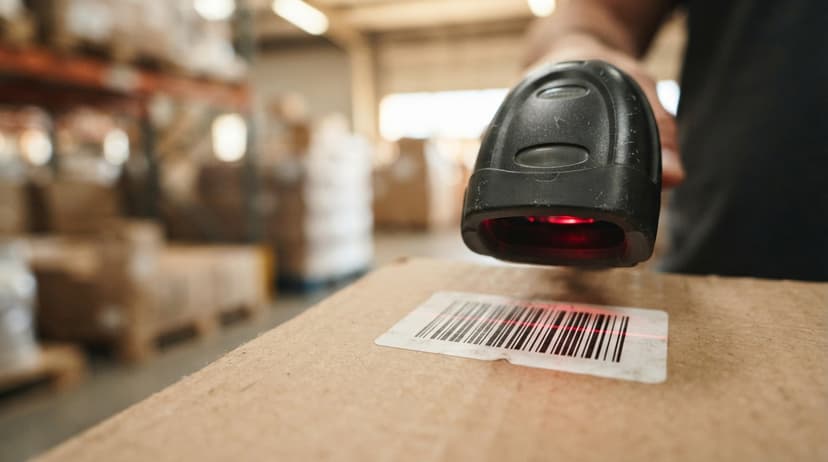
A barcode scanner shines a light or laser beam across the label. A sensor inside the scanner measures how much light bounces back at each point along the beam's path.
Dark bars absorb the light. White spaces reflect it. The sensor records a rapid sequence of high and low signals as the beam crosses the label. That signal pattern maps to a string of binary data, which the scanner's decoder converts to a number.
Not sure this is the right shape for your operation?
The call is free. Describe how the work runs today. We map it on a call and show you what it would look like built around that, before you spend anything.
Book a callFrom Decoded Number to Inventory Record
The number travels to your inventory software, which looks up the matching record and returns the item name, quantity, and location. The whole process takes less than a second on a clean label.
Print quality is the single variable that work out whether the scanner gets a clean signal or a failed read. A barcode that looks fine to the human eye can still fail if the bars are slightly too narrow or the ink density is uneven. How barcode scanning works in a warehouse depends on this same signal chain at every receiving dock, pick face, and shipping station.

Why Barcode Appearance Matters for Inventory Accuracy
A barcode that looks correct to the eye can still fail if the print resolution is low or the label stock is wrong.
Consistent label size, contrast, and placement reduce scan errors across a facility. Errors in scanning lead to wrong counts, misplaced stock, and orders shipped with the wrong items.
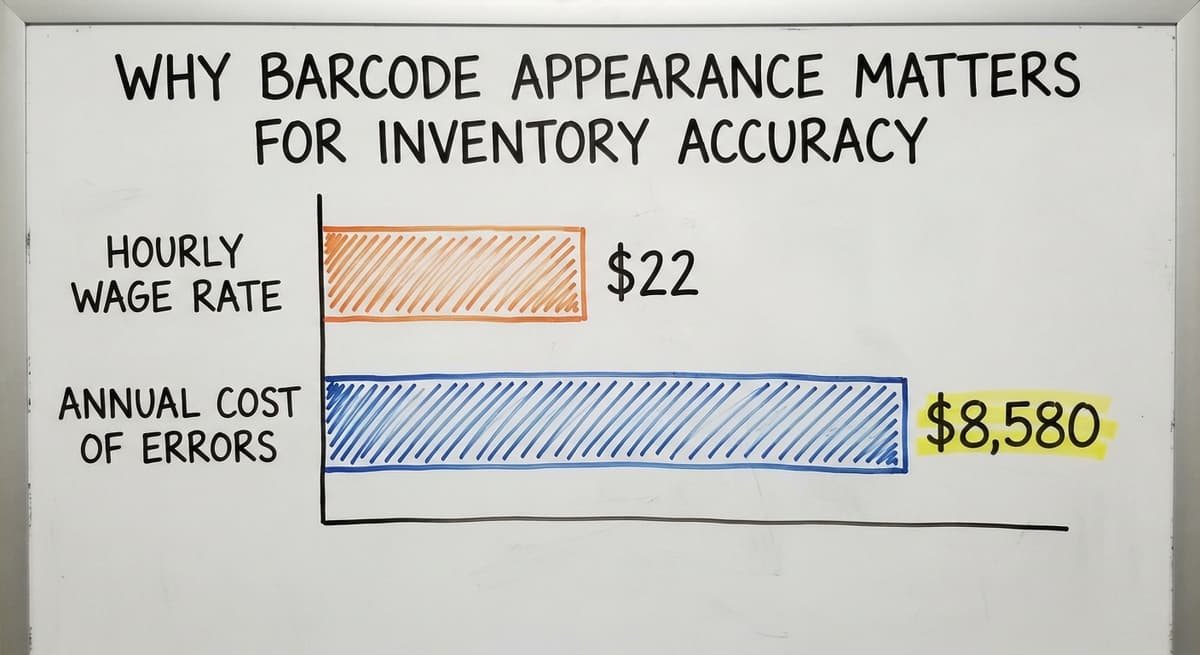
Consider the cost in plain numbers. A team of 3 workers each spending 20 minutes a day on manual data entry to correct scan failures, at a median wage of $22 an hour per the US Bureau of Labor Statistics, adds up to $8,580 a year in labor alone. That figure does not count the downstream cost of a mispicked order or a stock discrepancy found at the end of a quarter.
Scan Errors and Year-End Inventory Reconciliation
Operations running on the accounting software with spreadsheet backups feel scan errors most sharply. There is no automatic correction layer. A wrong scan writes a wrong number, and that number sits in the record until someone finds it by hand.
Getting barcode labels right is the first step before any inventory system can work reliably, and it costs far less than fixing the errors that bad labels produce.
The IRS adds another reason to care. As IRS Publication 538 states, "To figure taxable income, you must value your inventory at the beginning and end of each tax year." Inventory records built on failed or corrected scans are harder to defend and slower to reconcile at year end.
Connecting Barcodes to Your Inventory System
A barcode is only a key. The value lives in the software database it points to. When a scanner reads an inventory barcode, the system pulls up the item, location, or order linked to that number and acts on it in real time.
For distributors and warehouse operators, the right software ties each scan directly to receiving, picking, and shipping records. A scan at the dock updates stock on hand.
A scan at the pick face confirms the right item left the shelf. A scan at the shipping station closes the order. No paper, no retyping, no lag.
Matching Barcode Workflow to a Specific Facility
A barcode inventory management system overview will show that most platforms work this way in principle, but the rollout details vary widely.
A custom workflow built around how a team already moves through the building removes manual data entry without forcing a full ERP migration or retraining staff on a system that does not match their process.
Custom inventory software for distributors can match the barcode type, label format, and scan workflow to the specific goods and movements in a single facility. That specificity is what turns a barcode from a printed sticker into a reliable source of truth for every item in the building.
What the manual process costs, in numbers
The arithmetic is worth doing before the software conversation. 3 people spending 6 hours a week between them chasing the same questions, at 22 dollars an hour, is 936 hours a year of paid time spent confirming what a system would already know. Over 3 years that is 2,808 hours.
Frequently asked questions
What does a barcode look like in simple terms?
A barcode is a row of black bars and white spaces printed side by side. The bars vary in width to encode a number. Below the bars you see that number printed in plain digits so a person can read it without a scanner.
What are the 3 main parts of a barcode?
Every barcode has a quiet zone (the blank white border on each side), a bar pattern (the black and white stripes that hold the data), and a human-readable number printed below the bars.
All 3 parts must be intact for a scanner to read the code correctly.
What is the difference between a 1D and a 2D barcode?
A 1D barcode stores data in a single row of vertical stripes and holds a short number, 12 to 20 characters.
A 2D barcode stores data in both rows and columns, which lets it hold hundreds of characters including URLs, lot numbers, and expiry dates in the same physical space.
What do the numbers under a barcode mean?
The digits under a barcode are not random. On a UPC-A code, the first 6 digits identify the company, the next 5 identify the specific item, and the last digit is a check digit the scanner uses to confirm the read was accurate.
The barcode number itself is just a key; the product description lives in a database linked to that number.
How big is a standard barcode?
A standard UPC barcode is about 1.5 inches wide and 1 inch tall. Warehouse shelf labels are printed larger so a handheld scanner can read them from a distance.
Data Matrix codes used on small parts can be less than a quarter inch square. The right size depends on the scanner's read range and the printer's resolution.
Why does barcode print quality affect inventory accuracy?
A scanner reads the contrast between black bars and white spaces. Low print quality reduces that contrast, which causes failed scans.
Every failed scan becomes a manual entry, and manual entries introduce errors that no check digit can catch. Poor label quality is one of the most common causes of inventory count discrepancies in warehouse operations.
What types of barcodes are most common in warehouses?
The most common warehouse barcode formats are UPC-A for retail products, Code 128 on shipping and carton labels, Code 39 on industrial parts, GS1-128 for supply chain compliance, and QR codes where a label needs to carry batch data or a URL.
The right format depends on how much data the label needs to carry and what scanner hardware is in use.
Can a smartphone read a warehouse barcode?
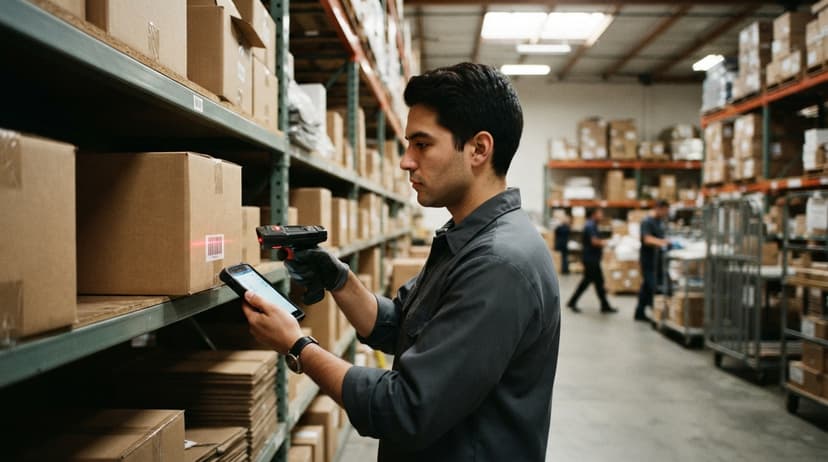
A smartphone camera can read most 2D barcodes such as QR codes and Data Matrix codes without any extra hardware.
Reading 1D barcodes like Code 128 or UPC-A needs a scanning app, and accuracy is lower than a dedicated barcode scanner in bright or variable warehouse lighting. For high-volume receiving and picking, a dedicated handheld scanner is more reliable.
Can I create my own barcode?
Yes. For internal use, any free generator or a barcode font can produce a Code 128 label from a number you choose. Only products sold through retailers need a UPC with a registered GS1 prefix.
How does a barcode scanner read a barcode?
The scanner shines light across the code, measures the reflection from the light and dark bars, and turns the pattern of widths into digits. The digits go to software, which looks up the record behind them.
Where is the barcode located on a product?
On retail packaging it sits on the back or bottom, printed flat on a light background. On cartons it sits on the side that faces out on a pallet, and on warehouse bins it goes on the front edge at eye level.
Can I scan a barcode with my phone?
Yes. A phone camera reads 1D and 2D codes through a scanning app, and it is enough for a small stockroom. For all-day picking a dedicated scanner is faster and reads damaged labels a camera misses.
What is in a free first look?
A 30 minute call, your operation mapped, and a clear picture of what we would build. No obligation and nothing to install.
Book a callRelated guides
More on the same work.
Guides
- Barcode Abbreviation
- Barcode Scan Machine
- Tracking Number Barcode
- Barcode Reader Machine
- Barcode Scanner App Ios
- 2d Barcode Readers
- Barcode Producer
- Barcode Systems for Warehouse
- Barcode Reader Description
- Barcodes and Labels
- Alphanumeric Barcode
- Barcode Scanner Inventory System
- Lpn Barcodes
- Imager Barcode Scanner
- Barcode System for Inventory Free
- Inventory Management Software Barcode Scanner
- Make Barcode