

How Do I Create My Own Barcodes
You can create your own barcodes today, for free, without registering with any global body. Pick a barcode type, assign a number to each item, run that list through a free generator, and print the labels. For internal warehouse use, that is the whole process. Retail barcodes sold through major chains need GS1 registration. Most warehouse and distribution operations do not.
Reviewed September 2026. Each figure comes from the assumptions stated beside it, so you can substitute your own and the arithmetic still holds.
Published 28 August 2026. Reviewed and updated 15 September 2026.
Book a callHow Do You Create Your Own Barcodes with the Right Type and the Right Data?
Creating a barcode means generating a scannable image tied to a number you assign. Your system stores the product details. The barcode just holds the key that looks them up. For internal use, you control the whole system, so no outside registration is needed.
The two formats that cover most warehouse needs are Code 128, which encodes letters and numbers compactly and scans reliably at distance, and QR, which holds more data and works with a phone camera when a dedicated scanner is not available. Choose based on what your scanner supports and how much information each label needs to carry.
Which barcode type fits your operation?
The type you pick work out what scanners can read it and how much data it holds. Here is a plain comparison of the 4 most common options:
| Type | Best for | Supports |
|---|---|---|
| Code 128 | Warehouses and distribution | Letters and numbers |
| Code 39 | Industrial and older systems | Letters and numbers |
| QR code | Linking to digital records | Large data blocks |
| GS1-128 / UPC | Retail chains only | GS1 identifiers |
Code 128 is the right choice for most warehouse and distribution operations. It is compact, widely read by every modern scanner, and handles SKUs, serial numbers, and location codes without issue.
QR codes work well when you need to link a label to a web record or a digital form. As GS1 notes on its barcode standards page, "barcodes are the foundation of global supply chain visibility," but that global layer only matters when you trade outside your own walls.
Would you rather have it built around your operation?
The first look is free. If you would rather not compare products, describe how your operation already works and we build the system around it.
No build cost. You see it running on your own process first, and the monthly subscription starts only once it is live.
Book a callWhat data should the barcode encode?
What data should the barcode encode? Encode the shortest string that maps back to a record in your system, nothing more. A SKU, an item number, a location code, or a serial number all work.
The barcode does not need to hold the product name, price, or description. Your inventory system does that job. Keep codes short, consistent, and unique from day one. Changing your numbering scheme after labels are printed is a painful fix.
Free and Low-Cost Tools to Generate Barcodes
Several free tools handle bulk barcode generation without any software to install. The most reliable options used by small distributors are:
- Barcode.tec-it.com generates Code 128, QR, and dozens of other types, with a bulk upload option
- Free-barcode-generator.net lets you paste a list and download a sheet of images
- a shared spreadsheet and spreadsheet plugins such as the Barcode Generator add-in create barcodes directly from a column of SKUs
- Zint is a free desktop app for teams that want offline generation and more format control
- Bartender or NiceLabel are paid tools worth the cost only when label design is complex or volume is very high
Is the comparison easier when one option is built for you?
Yes. Off-the-shelf means fitting your process to the software, and custom is the other way round. The first look costs nothing.
Book a call
Bulk Generation Cuts Labor to Under 20 Minutes
For most small to mid-size distributors, a free online tool or a spreadsheet plugin covers everything needed to start.
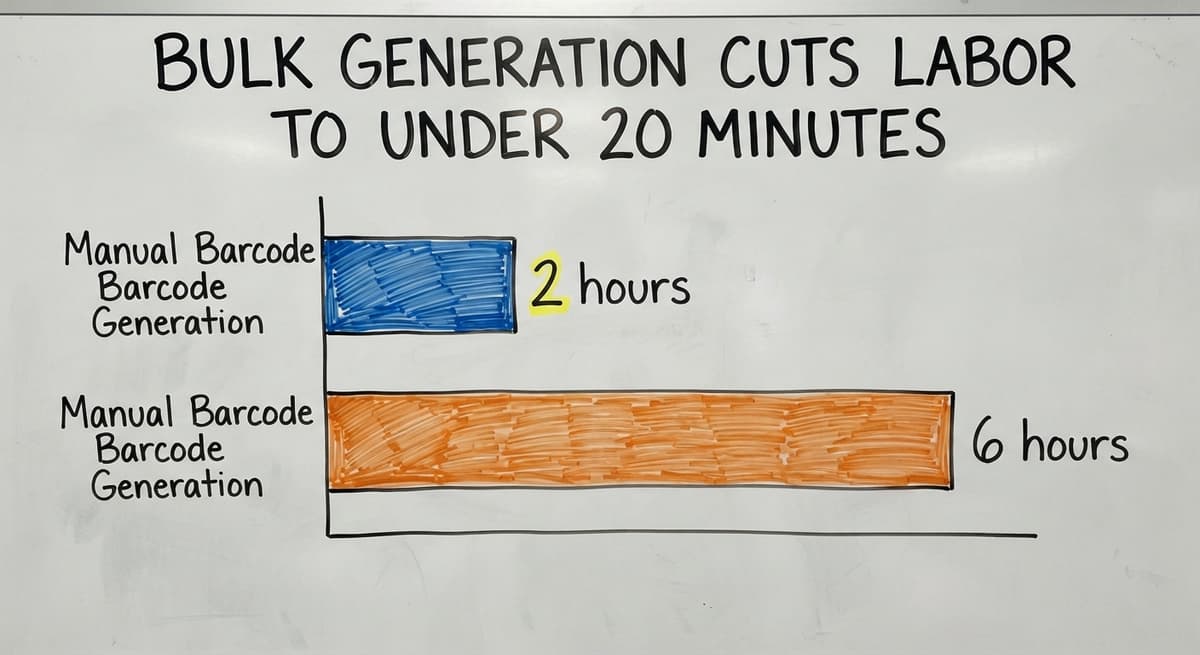
Export your item list, paste it in, download the images or a print-ready PDF, and match each image back to its record before printing. 3 staff members spending 2 hours each generating barcodes one at a time costs roughly 6 hours of labor per batch. Bulk generation cuts that to under 20 minutes.

Printing and Scanning: What You Actually Need
Printing barcode labels
Thermal label printers from a major scanner maker, Dymo, or Brother produce the clearest barcode labels and do not smudge under warehouse conditions. A standard laser printer works for low-volume or short-term labels, but the print quality drops fast on small labels.
Common sizes are 2x1 inch for small items and 4x2 or 4x6 for shelves and pallets. Avery label templates match most free generators directly.
Print a test sheet and scan every label before running a full batch. A barcode that looks fine on screen can fail to scan if the bars are too narrow or the contrast is low.
Code 128 needs at least 1 inch of width to scan reliably at arm's length.
What scanner do I need to read the barcodes I create?
What scanner do I need? A basic USB handheld scanner plugs into any computer and works like a keyboard: scan a label and the number appears in whatever field is active. No drivers, no setup.
Bluetooth scanners give staff freedom to move around a warehouse floor without a cable. Mobile apps such as Scandit or the built-in camera on most Android and iOS phones scan Code 128 and QR codes without any extra hardware.
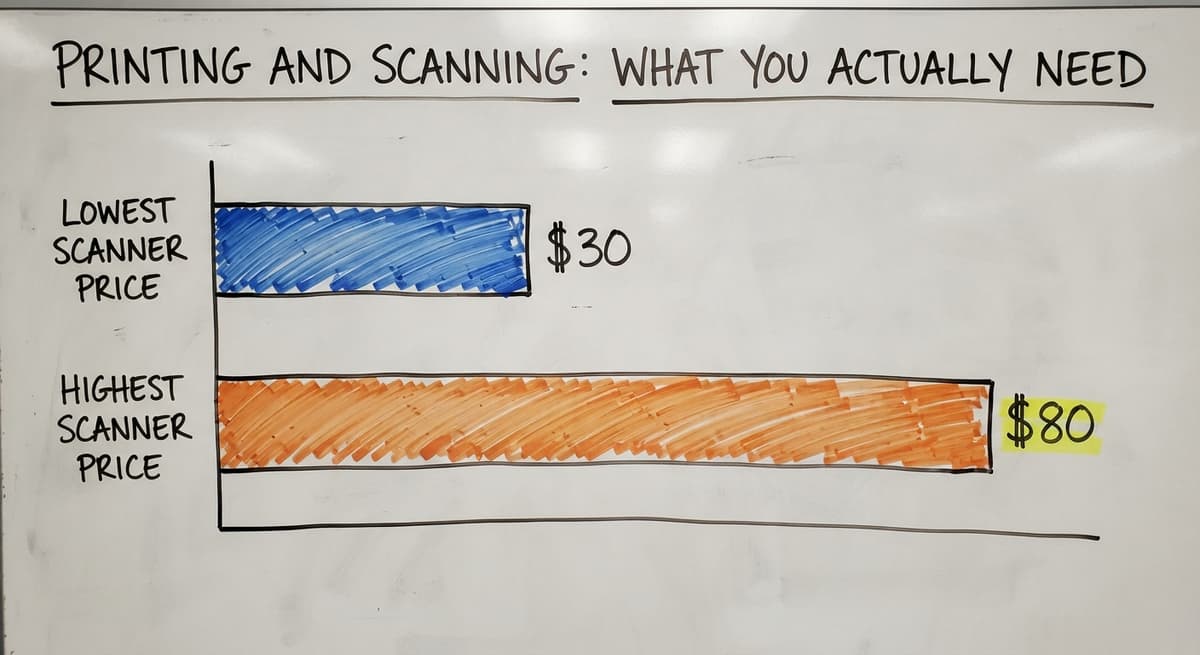
Entry-level USB scanners start at $30 to $80 and handle Code 128 and QR without issue. Confirm the scanner supports your chosen barcode type before buying, though almost every scanner sold today covers both.

Connecting Barcodes to Your Inventory System
A barcode alone does nothing. The scan produces a number. Something has to receive that number and update a record. That connection is where most operations either gain or lose the benefit of scanning. The path most small distributors follow runs in 3 stages:
- Start with a spreadsheet. Map each barcode number to an item in a spreadsheet. Scan into the active cell. Simple, but it has no real-time view and no movement history.
- Add a dedicated inventory tracking system. Tools built for this job update counts on scan, log who scanned and when, and flag discrepancies.
- Connect to the accounting software. A the accounting software barcode integration, built through an add-on or a custom connection, lets scans update the same records your accountant uses. No double entry, no end-of-month matching sprint.

Why Are Accurate Counts a Tax Requirement, Not Just a Best Practice?
The IRS is direct on why inventory counts matter: Publication 538 states, "To figure taxable income, you must value your inventory at the beginning and end of each tax year." The stage that fits your operation depends on order volume, team size, and how many locations you manage.
A spreadsheet works at low volume, but a dedicated system is what makes that legal requirement reliably achievable.
What does it look like running on your own process?
The first thing you see is it running on your own process, at no build cost. The subscription starts once it is live and doing the job, not before.
Book a call
When Is a Simple Barcode Setup Not Enough?
When counts are still wrong after scanning, the setup has a gap that spreadsheets cannot fix.
Other clear signs include staff skipping the scanner because the process feels slower than writing it down, data living in 3 or more separate files, and orders growing faster than the pick process can keep up. Scanning into spreadsheet does not give you real-time inventory or a movement log.
What Does a Proper Barcode Inventory System Add?
A second warehouse location needs a system that tracks where an item is, not just that it exists somewhere. Growing order volume needs barcodes tied to a pick-and-pack workflow, not a lookup sheet. A barcode inventory management system built around your SKUs, locations, and workflows updates inventory on every scan and feeds reports without manual entry. The accounting software stays in place for accounting.
The warehouse system handles the floor. No migration to a large ERP is needed. The right system fits the size and shape of your operation and can be adjusted as that shape changes. A local rollout partner can build it that way from the start, rather than selling you a platform and leaving the setup to you.
Common Mistakes and a Quick-Start Checklist
Most first-time barcode setups fail at one of the same points. Avoid these before you print a single label:
- Printing Code 128 labels narrower than 1 inch, which causes scan failures at normal distances
- Using inconsistent SKU formats that break lookups when a new item type arrives
- Skipping a test scan in the actual warehouse environment before rolling out across all stock
- Creating duplicate codes by assigning numbers without a central list
- Building the label system before deciding how scans will update inventory records
Build the data structure before you print anything. Once labels are on shelves, changing the numbering scheme means reprinting everything.
Quick-Start Checklist
When you are ready to start, work through these steps in order:
- Pick Code 128 for warehouse use or QR if labels need to link to digital records
- Define what each barcode encodes: SKU, item number, or location code
- Export your item list from the accounting software or your current system
- Run the list through a bulk barcode generator and download a print-ready file
- Print a test sheet and scan every label before approving the full run
- Connect the scanner to whichever system will receive and store the scan data
- Train staff on the process before going live, and review counts after the first 2 weeks
If you reach step 6 and find no clear system to receive the scans, that is the moment to talk to someone who builds custom barcode inventory systems rather than buying a platform and adapting your process to fit it.
Frequently asked questions
Can I create a barcode by myself?
Yes. You can generate a barcode yourself using a free online tool or a spreadsheet plugin.
Enter the number or SKU you want to encode, choose a barcode type such as Code 128, and download the image. No registration or specialist software is required for barcodes used inside your own operation.
Can I generate barcodes for free?
Yes. Tools such as Barcode.tec-it.com and Free-barcode-generator.net generate Code 128 and QR barcodes at no cost. a shared spreadsheet and spreadsheet also have free add-ins that create barcodes in bulk from a column of item numbers.
Free tools cover most small to mid-size warehouse needs without any limitations that matter in practice.
How much does it cost to create a barcode?
Generating barcode images costs nothing if you use a free online tool or spreadsheet plugin. The real costs are hardware: a thermal label printer runs $80 to $300, a USB barcode scanner starts at $30 to $80, and label stock is a few cents per label.
If you need GS1-registered barcodes for retail, GS1 membership fees start at around $250 per year depending on your company size.
Is there a free app to generate barcodes?
Yes. Barcode.tec-it.com works in any browser on a phone or desktop at no charge.
For scanning rather than generating, the built-in camera app on most Android and iOS phones reads Code 128 and QR codes without any extra app. Scandit offers a free tier for low-volume mobile scanning.
Do I need to register with GS1 to create my own barcodes for internal use?
No. GS1 registration is only required when your barcodes need to be read by trading partners or retail point-of-sale systems. For internal warehouse use, you assign your own numbers and your own system reads them. There is no legal or technical requirement to involve GS1.
How do I connect my barcodes to the accounting software?
The accounting software does not have a built-in barcode scanner interface for warehouse use.
The most common approaches are a third-party add-on that sits between your scanner and the accounting software, or a custom integration that maps scan data to the accounting software inventory records. Either way, the scan updates the item count in the accounting software without manual entry.
What is the minimum label size for a Code 128 barcode?
Code 128 barcodes need at least 1 inch of width to scan reliably at arm's length with a standard handheld scanner. A 2x1 inch label is a safe minimum for small items.
Larger labels on shelves and pallets, such as 4x2 or 4x6 inches, give more margin and scan faster in a busy warehouse.
What is the difference between a barcode and a QR code?
A barcode holds a short number in one row of bars and points to a record; a QR code holds up to 4,296 characters in a grid and can carry the record itself. Both read with a 2D imager.
What barcode type should I use for inventory?
Code 128. It holds letters and numbers, every scanner reads it, and it prints narrow enough for a bin label. Use UPC or EAN only on products sold through retail, where GS1 issues the number.
Can I make a barcode for free?
Yes. A free generator turns any SKU into a Code 128 image, and a free barcode font does the same inside a spreadsheet.
The cost is the label printer and the time to keep the labels and the records in step, which is the job the inventory system does for you.
How do I print barcodes on label paper?
On a thermal label printer, from the inventory software or label software, one label per SKU or bin. Print at 100 percent scale, test one label with a scanner at arm's length, then print the roll.
What is in a free first look?
A 30 minute call, your operation mapped, and a clear picture of what we would build. No obligation and nothing to install.
Book a callRelated guides
More on the same work.
Guides
- Create a Barcode
- Barcode Abbreviation
- Barcode Scan Machine
- Tracking Number Barcode
- Barcode Reader Machine
- Barcode Scanner App Ios
- 2d Barcode Readers
- Barcode Producer
- Barcode Systems for Warehouse
- Barcode Reader Description
- Barcodes and Labels
- Alphanumeric Barcode
- Barcode Scanner Inventory System
Common questions
- How to Make Your Own Barcode
- How Do Barcodes Work
- How to Create a Barcode System for Inventory
- How to Create a Barcode
- What Do Barcode Scanners Scan
- How to Use a Barcode Scanner
- How to Read a Barcode Number
- How to Barcode Scanners Work
- How Barcode Scanning Works
- How Are Barcodes Read
- What Does a Barcode Look Like