


System Id Barcode Solutions
A system ID barcode solution gives every item, bin, or pallet in your warehouse a unique scannable label tied to your software. When a worker scans that label, the system updates the record instantly. No paper. No manual entry. This page explains how it works, what hardware you need, and how to get started without disrupting what already works.
Reviewed September 2026. Each figure comes from the assumptions stated beside it, so you can substitute your own and the arithmetic still holds.
Published 26 July 2026. Reviewed and updated 15 September 2026.
Book a callWhat Do System ID Barcode Solutions Actually Do?
A system ID barcode solution connects a physical label to a software record. Each label carries a unique ID number.
When a scanner reads that ID, the software looks it up and returns the item name, quantity, location, lot number, and any other fields you track.
The data lives in the software, not on the label. The label is just the key. This is simpler than it sounds: think of it like a library card number that pulls up a full borrower record when the librarian scans it.
Generic barcode printing just makes labels. A connected barcode ID system makes those labels mean something inside your operation.
Would you rather have it built around your operation?
The first look is free. If you would rather not compare products, describe how your operation already works and we build the system around it.
No build cost. You see it running on your own process first, and the monthly subscription starts only once it is live.
Book a callHow Does a Warehouse Barcode System Work, Step by Step?
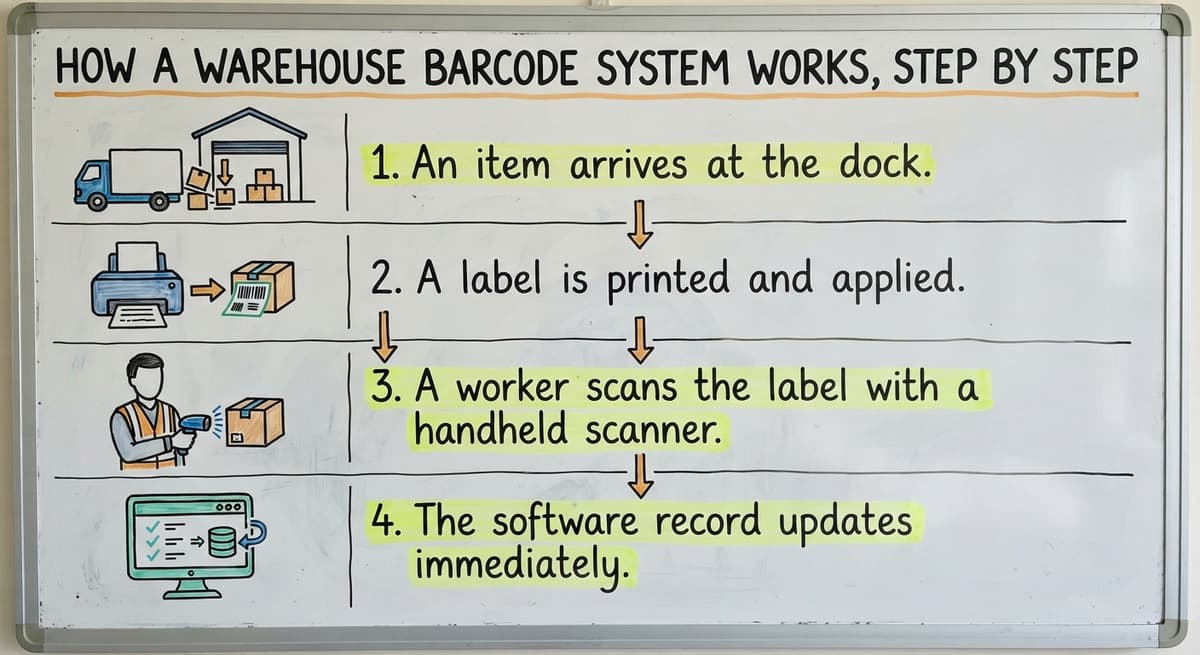
The basic flow has 4 steps.
- An item arrives at the dock.
- A label is printed and applied.
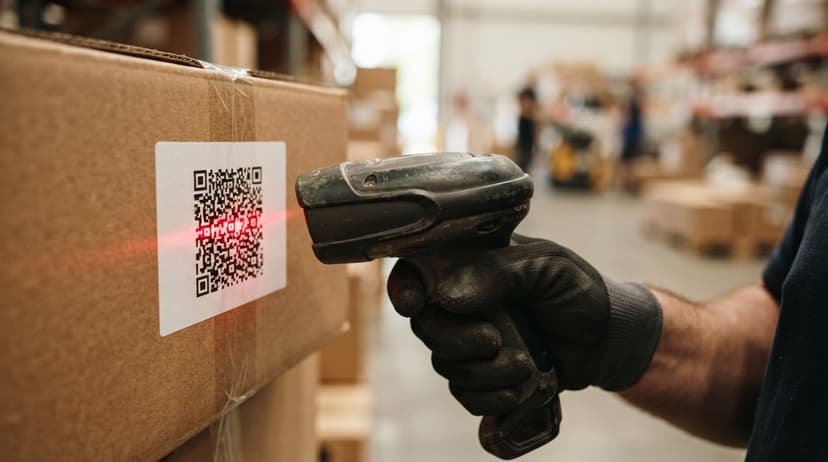
- A worker scans the label with a handheld scanner or mobile device.
- The software record updates at once.
Scanners, mobile devices, and fixed readers all feed data into the same system. As GS1 explains at gs1.org/standards/barcodes, barcode standards define how that ID number is structured so any compliant scanner can read it reliably.
The link between the label and the software record is what makes the system useful. Without that link, you just have stickers. With it, every scan is a live transaction that keeps your counts accurate.
What Barcode Type Should You Use?
1D barcodes such as Code 128 and UPC are narrow strips of lines. They hold a short ID string and scan fast. Most warehouse scanners read them without any setup.
2D codes such as QR and Data Matrix pack more data into a small square. They work when label space is tight or when you need to encode a lot number directly on the label.
For most wholesale distributors, Code 128 is the practical starting point. Move to 2D only when a specific need pushes you there.
What Hardware and Software Do You Need to Run a Barcode System?
A working barcode inventory management system has 4 parts, and each one connects to the others.
- A thermal label printer produces the labels. Desktop models suit low volume. Industrial printers handle high volume without jamming.
- A barcode scanner warehouse workers carry reads the labels. Wi-Fi connected scanners send data to the software in real time.
- Label stock is the physical roll of labels. Choose the right material for your environment: direct thermal labels work indoors; thermal transfer labels resist heat, chemicals, and outdoor conditions.
- Inventory tracking software is the brain. The hardware is only as useful as the database behind it.
Many operations start with 1 printer and 2 scanners. That is enough to cover receiving and picking in a small warehouse. Components can be added as the operation grows.
How Much Does Barcode System Hardware Cost?
A thermal label printer runs from a few hundred dollars for a desktop model to over a thousand for an industrial unit. Handheld scanners vary similarly. The software is the larger long-term investment, and it is where most of the value comes from.
Is the comparison easier when one option is built for you?
Yes. Off-the-shelf means fitting your process to the software, and custom is the other way round. The first look costs nothing.
Book a call
How Do Barcodes Replace Paper Logs and Spreadsheets?
If your team writes item counts on a clipboard and then types them into a spreadsheet, that process has at least 2 chances to go wrong: once when someone misreads a number and once when someone mistypes it.
A scan-to-receive workflow removes both steps. The worker scans the incoming item. The system matches it to the open buy order and logs the quantity. Discrepancies show up on screen right then, not 3 days later when the spreadsheet finally gets updated.
Why Accurate Inventory Counts Matter for Tax Purposes
The IRS is direct on why accurate counts matter: "To figure taxable income, you must value your inventory at the beginning and end of each tax year," as stated in IRS Publication 538. A barcode system makes that valuation far easier to defend.
Staff need almost no training to scan a label. Filling in a spreadsheet correctly, on the other hand, takes practice and attention that busy workers cannot spare.
Can a Barcode System Work with QuickBooks?
Yes, and it does not replace QuickBooks. Many small distributors run accounting in QuickBooks and want to keep it there. A barcode system sits alongside QuickBooks and feeds it clean data instead of manual entries.
The goal is to remove the manual data entry step, not to rip out tools that already work. Receiving counts, picked quantities, and inventory adjustments flow from the barcode system into QuickBooks automatically.
Your accountant sees the same numbers. The books stay accurate without anyone retyping figures at the end of the day.
For more on connecting inventory tools to your accounting workflow, see the QuickBooks integration for wholesale distributors page.

Receiving, Picking, and Counting with Barcodes
Receiving, picking, and cycle counting are the 3 workflows where barcode systems pay for themselves fastest. In receiving, a worker scans each incoming item and the system matches it to the open buy order, logging the quantity at once. In picking, scanning confirms the right item leaves the right location, cutting mis-picks before they reach the customer. In cycle counting, staff scan a section of the warehouse on a rolling schedule rather than shutting down for a full physical count.
Each workflow reduces manual entry, surfaces errors in real time, and builds an audit trail that paper logs cannot provide. A well-built system grows with the operation. Adding new locations, products, or users should not need starting over. Custom barcode software can be updated as needs change, and the Warehouse inventory tracking software page covers how that growth path looks. You are not locked into a rigid structure.
How Does Scan-to-Receive Work in a Small Warehouse?
Scan-to-receive means the worker scans each incoming item and the system checks it against the buy order automatically. If the quantity or item does not match, the screen flags it at once. No one discovers the error a week later during a manual recount.
In a warehouse with 2 or 3 receiving staff, this alone can cut receiving time significantly and nearly remove short-ship disputes with suppliers.
Pick and Pack Barcode Workflow
During order fulfillment, the picker scans the bin location first, then scans the item pulled. The system confirms the right product came from the right spot.
If the scan does not match the order, the scanner alerts the worker before the wrong item goes into a box.
This pick and pack barcode process reduces mis-picks and the customer complaints that follow. It works with a basic handheld scanner and no special equipment.
Cycle Count Barcode Process
A cycle count barcode approach means counting one section of the warehouse on a rolling schedule rather than shutting everything down for an annual physical count.
Workers scan items in a zone, the system compares the count to the record, and any gap shows up instantly.
Cycle counting spreads the work across the year. It also catches shrinkage and data errors while they are still small.
What does it look like running on your own process?
The first thing you see is it running on your own process, at no build cost. The subscription starts once it is live and doing the job, not before.
Book a callLocation Tracking, Bin Labels, and Lot Tracking
Bin Location Barcode Labels
Shelves, bins, and aisles each get their own barcode label. When a worker scans a bin location before scanning an item, the system records exactly where that item lives. Finding a product stops being a guessing game.
Bin labels are inexpensive to print and easy to replace if they get damaged. A single afternoon of labeling can map an entire small warehouse.
Lot and Serial Number Tracking
Lot tracking barcode systems encode a lot number directly on the item label.
When the item is scanned at any point, the lot number travels with the record automatically. This matters most in food distribution, medical supply, and electronics, where a recall or warranty claim needs knowing exactly which batch went where.
Serial number tracking works the same way but at the individual unit level. Both are handled by the same scan-to-receive workflow already described.
For supply chain traceability guidance, the NIST Manufacturing Extension Partnership offers vendor-neutral resources on building traceable processes in small and mid-size operations.

Custom Barcode Software Versus Off-the-Shelf Systems
Off-the-shelf barcode inventory management apps are built around a generic warehouse. They assume a workflow. If your operation does not match that assumption, you either change how you work or live with workarounds.
Custom barcode software follows your actual process. Your receiving steps, your bin naming convention, your QuickBooks chart of accounts. Nothing needs to change just to satisfy the software.
Small distributors are wary of long ERP rollouts that cost more than expected and deliver less than promised. Custom software built for a 10 to 50 person operation does not have to look like that.
The scope is tighter, the timeline is shorter, and the result fits the business rather than the other way around.
For a broader look at what this approach can cover, see the Custom warehouse software page and the Barcode Inventory Management System overview page.
Getting Started, Common Mistakes, and Knowing It Is Working
How to Start Without Disrupting Your Operation
Start with 1 workflow, not the whole warehouse. Receiving is the best first step because every item passes through it. Once scan-to-receive is running cleanly, add picking. Then add cycle counting.
A phased approach means staff learn one new habit at a time. It also means the business keeps running while the system goes in.
You do not need a large IT team. You need a clear starting point and a partner who builds around what you already have.
What Does Staying Manual Actually Cost?
The US Census Bureau's Monthly Wholesale Trade data shows that wholesale inventories are large relative to sales across the industry. Even a small reduction in receiving errors or mis-picks has a real dollar value.
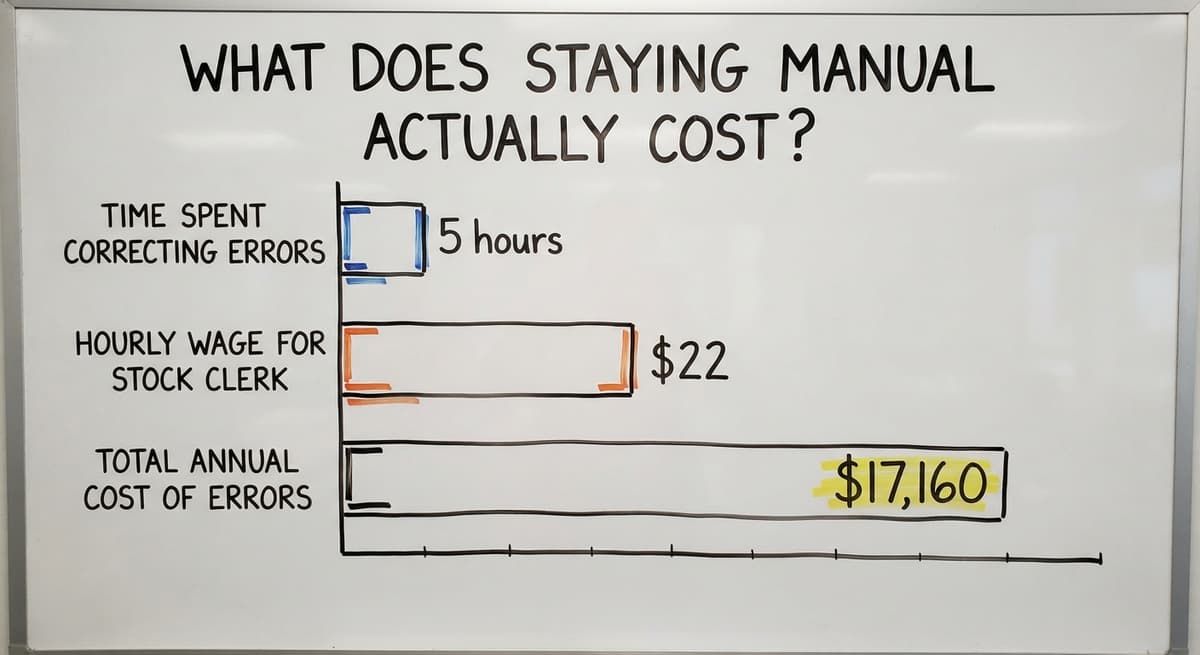
Consider: 3 people spending 5 hours a week correcting inventory errors at $22 an hour (near the median for stock clerks per the Bureau of Labor Statistics) adds up to $17,160 a year. That is the cost of staying manual.
Not sure this is the right shape for your operation?
The call is free. Describe how the work runs today. We map it on a call and show you what it would look like built around that, before you spend anything.
Book a callCommon Mistakes When Setting Up a Barcode ID System
The following mistakes are easy to avoid with a little planning.
- Labeling items before the software is configured means the labels carry IDs that the system does not recognize yet. Set up the database first.
- Choosing the wrong label material leads to labels that peel, fade, or smear in cold storage or high-humidity areas. Match the stock to the environment.
- Skipping staff training is the most common mistake. A 30-minute walkthrough before go-live prevents most early errors.
- Trying to barcode everything at once creates chaos. Start narrow and expand.
How Do You Know If the Barcode System Is Working?
Three simple metrics tell the story without any complex reporting.
- Pick accuracy rate: count mis-picks per 100 orders before and after. Improvement should show within the first few weeks.
- Time to receive a shipment: clock it from truck arrival to system update. A scan-to-receive workflow cuts this noticeably.
- Inventory count time: compare how long a zone count takes by hand versus by scanner.
If none of these improve in the first month, something in the setup needs attention. The goal is fewer errors and less manual work, and both should be visible quickly.
Can I Start Small and Scale Up Later?
A well-built system grows with the operation. Adding new locations, products, or users should not need starting over.
Custom barcode software can be updated as needs change, and the Warehouse inventory tracking software page covers how that growth path looks. You are not locked into a rigid structure.
Frequently Asked Questions About System ID Barcode Solutions
What is an ID barcode? An ID barcode is a scannable label that carries a unique number. When a scanner reads it, the connected software looks up that number and returns the full record tied to it, such as an item name, quantity, or location.
How much does a barcode inventory system cost? There is no single answer. A basic setup with 1 printer and 2 scanners can start in the low thousands.
Software adds to that, and custom-built systems cost more upfront but fit your process without forcing you to change how you work. The right budget depends on your volume, your current pain, and whether you want off-the-shelf or custom.
What are barcode systems? Barcode systems are combinations of label printers, scanners, and software that track physical items by scanning unique labels. In a warehouse, they replace manual counts, paper logs, and spreadsheet entries with real-time digital records.
Where is the barcode on your ID? On a government-issued ID such as a driver's license, the barcode is on the back. It encodes personal data so a scanner can read it quickly.
Warehouse item labels work the same way: the barcode is printed on the label face and encodes the item's unique ID number.
Is barcode technology being replaced by RFID? RFID can read many tags at once without line of sight, which makes it faster for bulk counts. But RFID tags cost more per unit and the readers are more expensive.
For most small wholesale distributors, barcodes remain the practical and cost-effective choice. The GS1 EPC/RFID standard governs how RFID tags are structured, and both technologies can coexist in the same operation.
What happens if a scanner breaks or a label is damaged? A broken scanner is replaced or swapped out. Most operations keep a spare.
A damaged label can be reprinted and re-applied without losing any data, because the data lives in the software, not on the label itself.
Next Steps for Your Warehouse Operation
System ID barcode solutions replace the manual steps that cause most inventory errors: wrong picks, missed receipts, and counts done by hand. The technology is not complicated, and it does not need replacing QuickBooks or hiring an IT team.
The Software Society builds barcode systems around the way your operation already runs. We are based in Columbus, Ohio, and we work with small wholesale distributors who want a practical fit, not a forced migration.
If you want to talk through your specific setup, reach out. No pressure, no pitch deck. Just a conversation about where the manual work is costing you the most.
Frequently asked questions
What is an ID barcode?
An ID barcode is a scannable label that carries a unique number.
When a scanner reads it, the connected software looks up that number and returns the full record tied to it, such as an item name, quantity, or location. The data lives in the software, not on the label.
How much does a barcode inventory system cost?
There is no single answer. A basic setup with 1 printer and 2 scanners can start in the low thousands.
Software adds to that, and custom-built systems cost more upfront but fit your process without forcing you to change how you work. The right budget depends on your volume, your current pain, and whether you want off-the-shelf or custom software.
What are barcode systems?
Barcode systems are combinations of label printers, scanners, and software that track physical items by scanning unique labels. In a warehouse, they replace manual counts, paper logs, and spreadsheet entries with real-time digital records that update the moment a scan happens.
Where is the barcode on your ID?
On a government-issued ID such as a driver's license, the barcode is on the back. It encodes personal data so a scanner can read it quickly.
Warehouse item labels work the same way: the barcode is printed on the label face and encodes the item's unique ID number.
Is barcode technology being replaced by RFID?
RFID can read many tags at once without line of sight, which makes it faster for bulk counts. But RFID tags cost more per unit and the readers are more expensive.
For most small wholesale distributors, barcodes remain the practical and cost-effective choice. Both technologies can coexist in the same operation.
What happens if a scanner breaks or a barcode label gets damaged?
A broken scanner is replaced or swapped out, and most operations keep a spare on hand. A damaged label can be reprinted and re-applied without losing any data, because the data lives in the software, not on the label itself.
Can a barcode system connect to or work alongside QuickBooks?
Yes. A barcode system sits alongside QuickBooks and feeds it clean data instead of manual entries. The goal is to remove the manual data entry step, not replace the accounting tools already in place. Your books stay accurate without anyone retyping figures.
Does System ID provide custom barcode software integration?
System ID sells and configures hardware and packaged software. Integration work that follows one warehouse's own workflow, such as a receiving screen tied to your accounting package, is a custom build, and that is what a software partner rather than a reseller delivers.
How does a barcode solutions reseller compare with buying scanners direct?
A reseller bundles hardware, labels, and setup advice in one order and handles returns and repairs. Buying direct is cheaper per unit but leaves configuration to you. For a first system, the bundle saves more time than it costs.
How much do barcode scanners and printers cost through a reseller?
Handheld 2D scanners run $150 to $400, rugged mobile computers $800 to $2,000, and desktop label printers $150 to $500. Reseller pricing sits close to list; the value is in the configuration and support, not a discount.
What is in a free first look?
A 30 minute call, your operation mapped, and a clear picture of what we would build. No obligation and nothing to install.
Book a callRelated guides
The rest of this guide, for the parts of the job this page does not cover.
Guides
- Barcode for Id Card
- Barcode Systems for Warehouse
- Barcode System for Inventory Free
- Barcode Scanner Inventory System
- Barcode Words
- 2d Image Barcode Scanner
- Barcode Reader Description
- Alphanumeric Barcode
- Inventory Management Software with Barcode
- Mrp Barcode
- Online Barcode
- Make Barcode
- Inventory Tracking Barcode
- Quickbooks Barcode Reader
- Inventory Software Barcode
- Inventory Management Software Barcode Scanner