


Quickbooks Barcode Reader
A QuickBooks barcode reader is a scanner that reads a product barcode and pushes that data into QuickBooks, updating inventory quantities, item receipts, or sales orders without manual typing. It does not replace QuickBooks. It removes the data-entry step between the warehouse floor and your books. Most small distributors can add scanning without changing how QuickBooks is set up.
Reviewed September 2026. Each figure comes from the assumptions stated beside it, so you can substitute your own and the arithmetic still holds.
Published 16 August 2026. Reviewed and updated 15 September 2026.
Book a callWhat Does a QuickBooks Barcode Reader Actually Do?
A barcode reader captures the number encoded in a barcode's lines or squares and sends it to a connected system.
In a QuickBooks context, that system is your item list, your buy orders, or your inventory counts. The scanner reads the code. The software matches it to an item record. QuickBooks gets updated.
The scanner itself is a data-entry tool. It does not think. The logic that decides what to do with the scan lives in QuickBooks or in a layer of software sitting between the scanner and QuickBooks. That distinction matters when you are choosing a setup.
This is a practical tool, not a complex system. A small warehouse team can be up and scanning in a day.
Would you rather have it built around your operation?
The first look is free. If you would rather not compare products, describe how your operation already works and we build the system around it.
No build cost. You see it running on your own process first, and the monthly subscription starts only once it is live.
Book a callWhy Do Warehouse Teams Start Looking for Barcode Scanning?
Most teams reach a breaking point. Someone types the wrong SKU. A count sheet gets lost.
A shipment goes out with 12 units when the order said 10. These are not careless mistakes. They are what happens when people enter data by hand under time pressure.
The IRS is direct about why inventory accuracy matters beyond operations: "To figure taxable income, you must value your inventory at the beginning and end of each tax year," as stated in IRS Publication 538.
A wrong count is not just an ops problem. It is a tax problem.
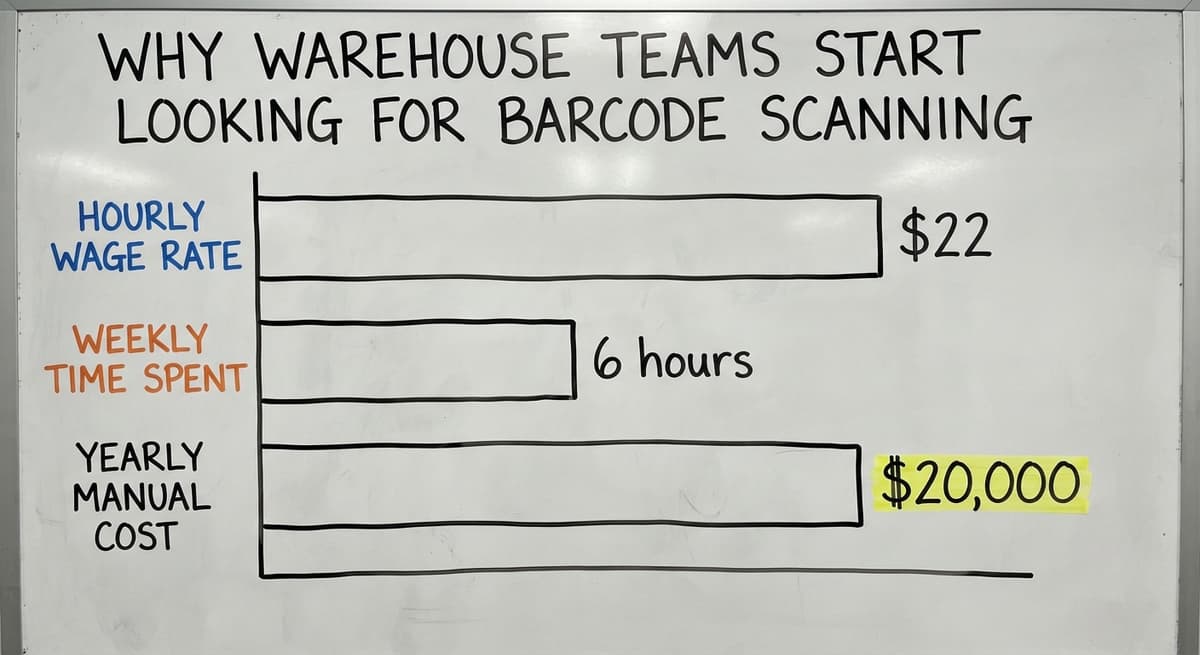
For a 10 to 50 person distributor, the cost adds up fast. 3 people spending 6 hours a week on manual data entry at $22 an hour costs over $20,000 a year. That figure uses the median wage for stock and order clerks reported by the US Bureau of Labor Statistics.
Scanning does not remove those roles. It redirects them toward work that needs a human.
The Intuit developer records notes that QuickBooks item records expose fields including quantity on hand, unit cost, and SKU, as described at developer.intuit.com. Those are exactly the fields a barcode scan can update automatically.
How Does a Barcode Reader Connect to QuickBooks?
A barcode reader connects to QuickBooks through one of 2 paths: direct integration or a middleware layer.
Direct integration means the scanning app talks to QuickBooks through its SDK (for Desktop) or its API (for Online). The scan triggers a transaction in QuickBooks with no manual step in between.
Middleware is a separate app that sits between the scanner and QuickBooks. The scanner talks to the middleware. The middleware talks to QuickBooks. This adds flexibility but also adds cost and one more system to keep.
QuickBooks Desktop vs QuickBooks Online for Barcode Scanning
Desktop and Online behave differently for barcode scanning, and knowing which you use shapes every hardware and software decision.
QuickBooks Desktop has a more mature third-party scanner ecosystem. The Desktop SDK has been available longer, so more tools have been built around it.
If your team runs Enterprise or Pro on a local server, you have more scanner options and more established integrations to choose from.
QuickBooks Online has a growing app marketplace. Native barcode support is limited, but the QBO API is well-documented and several newer apps connect cleanly. If your team is cloud-based, look at the QuickBooks App Store first before buying hardware.
The right answer depends on which version you run today, not which one sounds more modern.
Is the comparison easier when one option is built for you?
Yes. Off-the-shelf means fitting your process to the software, and custom is the other way round. The first look costs nothing.
Book a callTypes of Barcode Readers That Work with QuickBooks
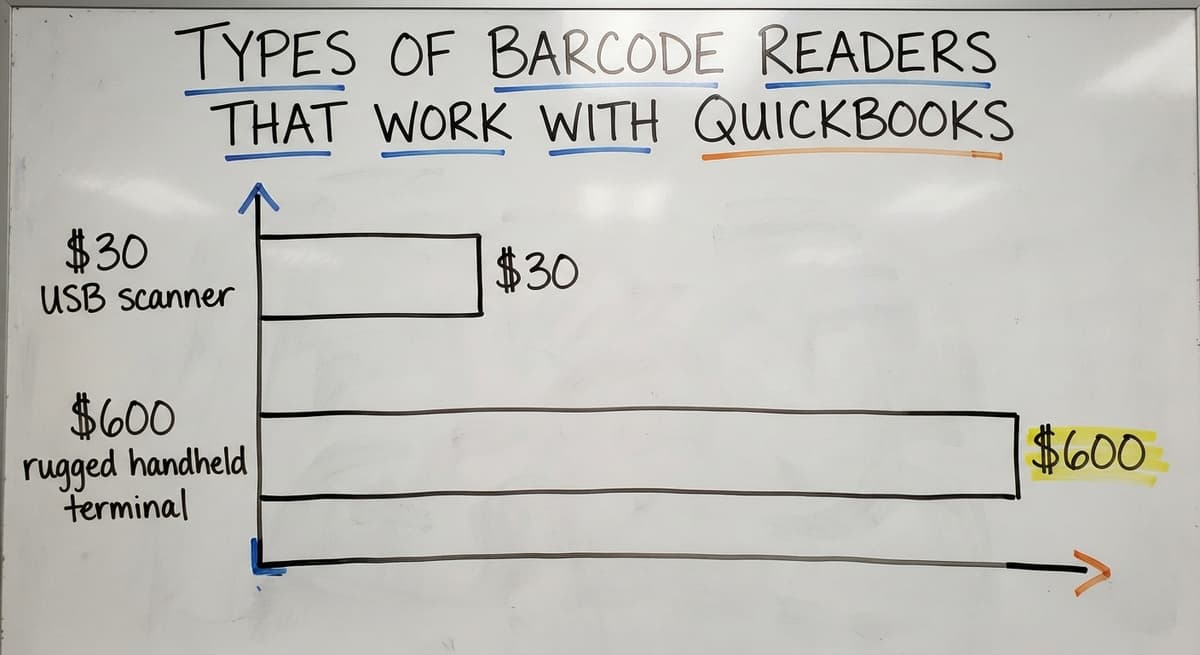
Hardware choices range from a $30 USB scanner to a $600 rugged handheld terminal. The right choice depends on your environment, not your budget alone.
Here are the main categories:
- USB handheld scanners plug into a computer or tablet and act like a keyboard. They are simple, cheap, and work well at a fixed receiving desk.
- Bluetooth handheld scanners pair wirelessly to a device. Workers can move around without a cable, which suits a small pick floor.
- Mobile device cameras can read barcodes through an app. Most modern smartphones handle standard 1D codes well. This is the lowest-cost entry point.
- Rugged handheld terminals are purpose-built for warehouse floors. They handle drops, dust, and temperature swings that would break a consumer device.
1D barcodes (like Code 128 or UPC) are lines. They store a product number. 2D barcodes (like QR codes or Data Matrix) store more data, including lot numbers or expiry dates. GS1 keeps the global standards for both formats.
What Can a Barcode Scanner Update in QuickBooks?
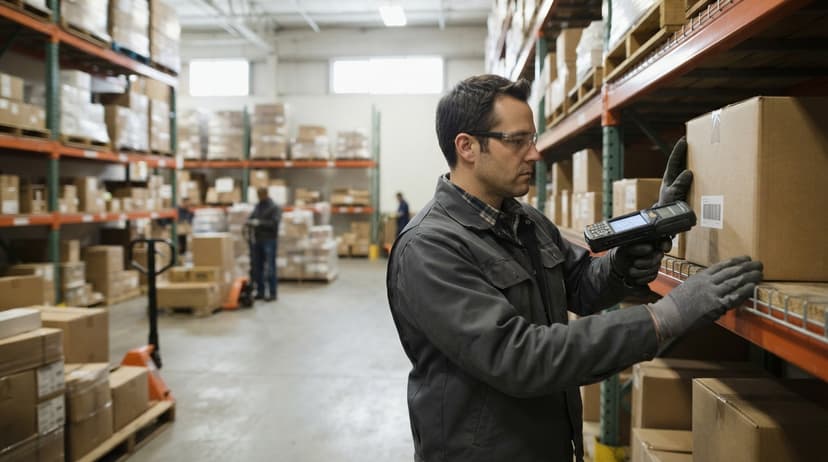
A barcode scanner, paired with the right software, can touch several key areas of your QuickBooks data.
Tasks a scanner can handle:
- Receiving inventory against a buy order and updating quantity on hand
- Creating item receipts when goods arrive at the dock
- Confirming picks against a sales order during fulfillment
- Recording inventory adjustments during a cycle count
What scanning cannot do on its own:
- It cannot create new item records in QuickBooks. The item must already exist with a barcode value assigned.
- It cannot resolve duplicate SKUs or missing barcodes. Clean data is a prerequisite.
- It cannot generate a scannable pick list from QuickBooks alone without an add-on.
Those limits are where most small teams hit a wall. The gap between what scanning can do and what the business needs is exactly where custom or add-on tools earn their place.
Setting Up Barcodes on Your QuickBooks Inventory Items
Before any scanner can work, each item in QuickBooks needs a barcode value tied to its record. This step is skipped, and it causes most early failures.
Here is the sequence:
- Open each inventory item in QuickBooks and locate the barcode or custom field where the code will live.
- Enter the barcode value, whether that is a UPC from the manufacturer or a code you assign yourself.
- Confirm the value matches the physical label on the product.
- Print labels for any items that do not already carry a scannable barcode. A basic label printer handles this.
- Test each label with your scanner before going live.
Clean item data is the foundation. A scanner that reads a code perfectly but finds no match in QuickBooks is useless. Do the data work first.

Popular Apps That Add Barcode Scanning to QuickBooks
Several middleware tools sit between a scanner and QuickBooks, handling the logic that QuickBooks does not manage natively.
The well-known add-ons each connect to QuickBooks and adds scanning workflows, reporting, and in some cases multi-location tracking. None of these are endorsed here. Each has trade-offs.
Middleware costs anywhere from a low monthly subscription to a large upfront license fee, depending on features and user count. The larger add-ons target growing distributors and carries a higher price point. SOS Inventory is lighter and suits smaller teams. Scanventory focuses on simplicity.
The honest trade-off: more features mean more setup, more training, and more things to break.
A 5-person team receiving 20 lines a day does not need the same tool as a 50-person distributor managing 3 locations. Buying more software than the operation needs creates its own friction.
Receiving, Picking, and Cycle Counting with a QuickBooks Barcode Reader
How Does Barcode Scanning Work for Receiving Inventory?
Barcode scanning for receiving works like this: a worker scans each item as it comes off the truck, the system matches the scan to an open buy order, and QuickBooks updates the quantity on hand automatically. No clipboard. No retyping.
Without scanning, receiving errors cluster around 2 moments: when the count is written down and when it is typed into QuickBooks. Both steps disappear with a scanner.
For a small warehouse team, this alone can recover an hour or more per receiving session.
Scan-to-Pick and Fulfillment
Scan-to-pick means a worker scans the item they pull from the shelf to confirm it matches the order before it goes into the box. This one step cuts wrong shipments sharply.
QuickBooks alone does not generate a scannable pick list. A worker would need to read a printed order and pick from memory or habit. An add-on or custom tool generates the list, guides the scan, and flags mismatches before the box is sealed.
This gap is where QuickBooks add-ons for wholesale distributors deliver clear value.
What does it look like running on your own process?
The first thing you see is it running on your own process, at no build cost. The subscription starts once it is live and doing the job, not before.
Book a callCycle Counting
Cycle counting means counting a portion of inventory on a regular schedule rather than shutting down for a full physical count once a year. A team might count one section of shelving every week.
A scanner speeds this up. A worker scans each item in the section. The system compares the scan count to what QuickBooks shows.
Differences become adjustment transactions. The NIST Manufacturing Extension Partnership recommends frequent cycle counts as a way to catch shrinkage and data drift before they compound.

Common Problems When Adding Barcode Scanning to QuickBooks
Barcode scanning does not fix bad data. It exposes it faster.
Real problems teams run into:
- Duplicate item numbers cause scan matches to land on the wrong record. Clean the item list before go-live.
- Missing barcodes on items mean the scanner finds nothing. Every item needs a value assigned before scanning begins.
- Wi-Fi dead zones on the warehouse floor break wireless scanners mid-count. Map coverage before choosing hardware.
- Staff adoption is the quietest problem. Workers who built habits around clipboards and spreadsheets need a reason to trust the new process. A short, supervised go-live on one workflow builds that trust faster than a full rollout.
QuickBooks item data needs a cleanup pass before scanning works well. Budget time for that step. It is not glamorous, but it decides whether the project succeeds.
When Do Off-the-Shelf Apps Stop Being Enough?
Generic apps cover the common cases. They fall short when the operation has specific needs the app was not built for.
Signs that a standard app is creating more work than it saves:
- The team keeps workarounds inside the app to handle how the business actually receives or ships.
- Multi-location inventory needs manual transfers the app does not support cleanly.
- Lot tracking or expiry dates need fields the app does not expose.
- The app's workflow does not match the physical layout of the warehouse.
At that point, the business is bending its operation to fit the software. That is the wrong direction.
This is where custom warehouse software built around QuickBooks becomes the practical option. Not a full ERP migration. Not a replacement for QuickBooks.
A purpose-built layer that handles the specific workflows the operation actually runs, while QuickBooks keeps doing what it does well: accounting, reporting, and financial records.
What Does a Custom QuickBooks Barcode System Look Like in Practice?
A small distributor running 20 to 40 staff is a good example. The team receives product 5 days a week, picks and ships daily, and counts inventory in sections throughout the month.
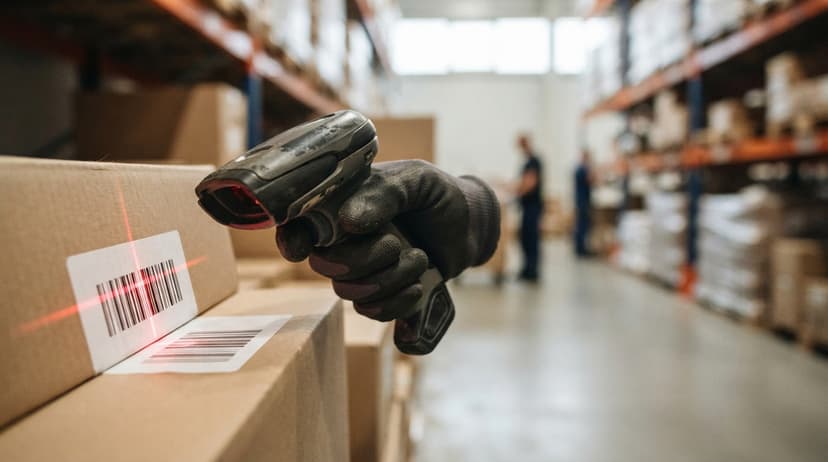
In a custom setup, a worker at the receiving dock scans each item with a rugged handheld terminal.
The screen shows the open buy order, the expected quantity, and the item description. The worker scans until the count matches. Any discrepancy flags at once. QuickBooks receives an item receipt automatically.
On the pick floor, the same device shows the order, guides the worker to the right bin, and confirms each scan. A mismatch stops the pick before the wrong item ships.
During cycle counts, the worker scans a section. The device compares to QuickBooks on hand. Adjustments post without a separate data-entry session.
QuickBooks stays in place. Only the manual, error-prone steps get replaced. The accounting team sees clean numbers. The warehouse team stops typing.
Not sure this is the right shape for your operation?
The call is free. Describe how the work runs today. We map it on a call and show you what it would look like built around that, before you spend anything.
Book a callHardware and Software Costs to Expect
Costs vary widely. Here are the ranges without specific figures that date quickly.
| Item | Relative Cost |
|---|---|
| Basic USB scanner | Low, under $100 in most cases |
| Bluetooth handheld scanner | Low to mid range |
| Rugged handheld terminal | Mid to high, several hundred dollars per unit |
| Off-the-shelf scanning app | Low monthly fee to mid-range annual license |
| Custom-built scanning layer | Higher upfront, lower ongoing per-user cost |
The number that matters most is not the hardware cost. It is the cost of the errors and labor the system replaces.
A team spending 15 hours a week on manual entry at $22 an hour spends over $17,000 a year on that task alone. Hardware pays for itself quickly when measured against that figure.

How to Know If You Are Ready and How to Get Started
Readiness Signals
Before buying a scanner, check these conditions:
- Your QuickBooks item list is clean, with no duplicates and no items missing a name or unit of measure.
- Products in the warehouse carry labels the scanner can read.
- Your receiving process follows a consistent sequence most of the time.
Messy data in QuickBooks will cause problems even with good hardware. A data cleanup pass before rollout is not optional. It is the project.
Steps to Get Started
A phased rollout reduces risk for small teams. Start with one workflow and prove it before expanding.
- Audit your QuickBooks item list and fix duplicates, blanks, and mismatches.
- Assign a barcode value to every item that will be scanned.
- Choose hardware based on your environment: USB for a fixed desk, rugged terminal for a busy floor.
- Choose a software path: off-the-shelf app, or custom build if your workflows are specific.
- Train staff on one workflow, receiving for example, before adding picking or cycle counts.
- Go live on that single workflow and measure accuracy and time before expanding.
Starting small is not a compromise. It is how teams build confidence in a new process without disrupting everything at once.
Frequently Asked Questions About QuickBooks Barcode Readers
Does QuickBooks have a built-in barcode scanner? QuickBooks has limited native barcode support. Desktop versions allow a barcode field on item records and basic scan-to-receive in some editions.
QuickBooks Online has minimal built-in scanning. Most teams need an add-on app or a custom integration to get a full scanning workflow.
What barcode format does QuickBooks use? QuickBooks works with standard 1D formats like Code 128 and UPC. These are the most common formats on retail and wholesale products.
If you are printing your own labels, Code 128 is a reliable choice. GS1 keeps the full standards reference for barcode symbologies.
Can I use my phone as a barcode reader for QuickBooks? Yes, with the right app.
Several QuickBooks-connected apps use the phone camera to scan barcodes. This works well for low-volume tasks. For a busy receiving dock or pick floor, a dedicated scanner is faster and more reliable.
Which barcode scanners are compatible with QuickBooks Desktop? Most USB and Bluetooth handheld scanners that act as keyboard input devices work with QuickBooks Desktop out of the box.
The scanner sends the barcode number as keystrokes, and QuickBooks treats it like typed input. For more advanced workflows, a packaged add-on or a custom integration uses the QuickBooks Desktop SDK directly.
Is QuickBooks Desktop going away in 2026? Intuit has announced end-of-life dates for older Desktop versions and has pushed users toward QuickBooks Online.
As of mid-2025, QuickBooks Desktop Enterprise continues to be sold and supported. Check Intuit's official announcements for the current support timeline before making a hardware or software investment tied to Desktop.
How do I get a barcode reader? For basic use, any USB handheld scanner from a business hardware retailer works.
For warehouse use, look at rugged handheld terminals from the major scanner makers. Buy hardware after choosing your software, not before. The software work out which scanner types and connection methods will work.
Do I need the internet for barcode scanning to work with QuickBooks? It depends on your setup. QuickBooks Online needs an internet connection for any sync.
QuickBooks Desktop can run scanning workflows on a local network without internet access. Some middleware apps store scans locally and sync when a connection is available, which handles Wi-Fi gaps on the floor.
Ready to Stop Typing and Start Scanning?
A barcode inventory management system built around QuickBooks does not need replacing what works. It replaces the parts that do not: the manual counts, the retyped SKUs, the clipboard that gets wet at the dock.
If your team is outgrowing manual processes and your QuickBooks data is mostly clean, the next step is straightforward. Audit your item list, assign barcodes, and pick one workflow to prove the concept.
If your operation has specific needs that off-the-shelf apps do not cover cleanly, a custom build around QuickBooks is worth a conversation.
The Software Society builds exactly this kind of connected workflow layer for growing distributors who want to keep QuickBooks and stop working around it.
Frequently asked questions
Which barcode scanners are compatible with QuickBooks Desktop?
Most USB and Bluetooth handheld scanners that act as keyboard input devices work with QuickBooks Desktop out of the box. The scanner sends the barcode number as keystrokes, and QuickBooks treats it like typed input.
For more advanced workflows, a packaged add-on or a custom integration uses the QuickBooks Desktop SDK directly. Choose your software path first, then confirm hardware compatibility before buying.
Is QuickBooks Desktop going away in 2026?
Intuit has announced end-of-life dates for older Desktop versions and has pushed users toward QuickBooks Online. As of mid-2025, QuickBooks Desktop Enterprise continues to be sold and supported.
Check Intuit's official announcements for the current support timeline before making a hardware or software investment tied to Desktop.
How do I get a barcode reader?
For basic use, any USB handheld scanner from a business hardware retailer works with QuickBooks. For warehouse use, look at rugged handheld terminals from the major scanner makers.
Buy hardware after choosing your software, not before. The software work out which scanner types and connection methods will actually work with your QuickBooks setup.
Does QuickBooks have a built-in barcode scanner?
QuickBooks has limited native barcode support. Desktop versions allow a barcode field on item records and basic scan-to-receive in some editions. QuickBooks Online has minimal built-in scanning.
Most teams need an add-on app or a custom integration to get a full scanning workflow for receiving, picking, and cycle counting.
What barcode format does QuickBooks use?
QuickBooks works with standard 1D formats like Code 128 and UPC, which are the most common formats on retail and wholesale products.
If you are printing your own labels, Code 128 is a reliable choice. GS1 keeps the full standards reference for barcode symbologies at gs1.org.
Can I use my phone as a barcode reader for QuickBooks?
Yes, with the right app. Several QuickBooks-connected apps use the phone camera to scan barcodes. This works well for low-volume tasks like spot checks or cycle counts.
For a busy receiving dock or pick floor, a dedicated scanner is faster and more reliable than a phone camera.
Do I need the internet for barcode scanning to work with QuickBooks?
The answer depends on your setup. QuickBooks Online needs an internet connection for any sync. QuickBooks Desktop can run scanning workflows on a local network without internet access.
Some middleware apps store scans locally and sync when a connection is available, which handles Wi-Fi gaps on a warehouse floor.
Can I use a barcode scanner with QuickBooks Online?
Yes, as a keyboard: a USB scanner types the item code into any QuickBooks Online field. Scanning that updates stock by bin or confirms a pick needs an add-on or a custom layer that writes through the QuickBooks Online API.
How do I print barcode labels in QuickBooks?
QuickBooks Desktop Enterprise with Advanced Inventory prints item barcode labels from the Inventory Center. QuickBooks Online has no label printing, so labels come from label software or the inventory layer that sits beside it.
How do I import existing barcodes into QuickBooks?
Export your item list, add a column with the barcode value for each item, and import it back through the item import in Desktop or the products import in Online. Keep the barcode as text so leading zeros survive.
What barcode scanner works best with QuickBooks Desktop?
Any USB 2D imager. Desktop Enterprise treats the scan as typed input in its barcode fields; Pro and Premier need an add-on to do anything with it. Pick on range and durability, not brand.
What is in a free first look?
A 30 minute call, your operation mapped, and a clear picture of what we would build. No obligation and nothing to install.
Book a callRelated guides
The rest of this guide, for the parts of the job this page does not cover.
Guides
- Barcode Reader Description
- 2d Barcode Readers
- Barcode Reader Machine
- Quickbooks Inventory Scanner
- Quickbooks Inventory Management Software
- Barcode Words
- 2d Image Barcode Scanner
- Alphanumeric Barcode
- Inventory Management Software with Barcode
- Mrp Barcode
- Online Barcode
- Barcode Systems for Warehouse
- Make Barcode
- Inventory Tracking Barcode
- Barcode for Id Card
- Inventory Software Barcode
- Inventory Management Software Barcode Scanner