


Small Business Warehouse Management System
A small business warehouse management system is software that tracks inventory, guides staff through picking and packing, and keeps your stock counts accurate in real time. It works alongside your accounting software rather than replacing it. Most small operations can be up and running in weeks, not months. Reviewed and updated 15 September 2026.
Published 6 August 2026. Reviewed and updated 15 September 2026.
Book a callWhat Does a Small Business Warehouse Management System Actually Do?
A warehouse management system, or WMS, is software that runs the day-to-day work of a warehouse. It tells staff where stock lives, guides them through each job, and keeps a record of every move. Think of it as a traffic controller for your inventory.
Walking is the hidden cost. A picker covering 40 feet to a fast mover 60 times a shift walks 2,400 feet a day, and across 250 days that is 600,000 feet a year per picker.
Moving 20 fast movers nearer the pack bench removes most of it.
Walking is the hidden cost. A picker covering 40 feet to a fast mover 60 times a shift walks 2,400 feet a day, and across 250 days that is 600,000 feet a year per picker.
Moving 20 fast movers nearer the pack bench removes most of it.
Reviewed August 2026. Each figure comes from the assumptions stated beside it, so you can substitute your own and the arithmetic still holds.
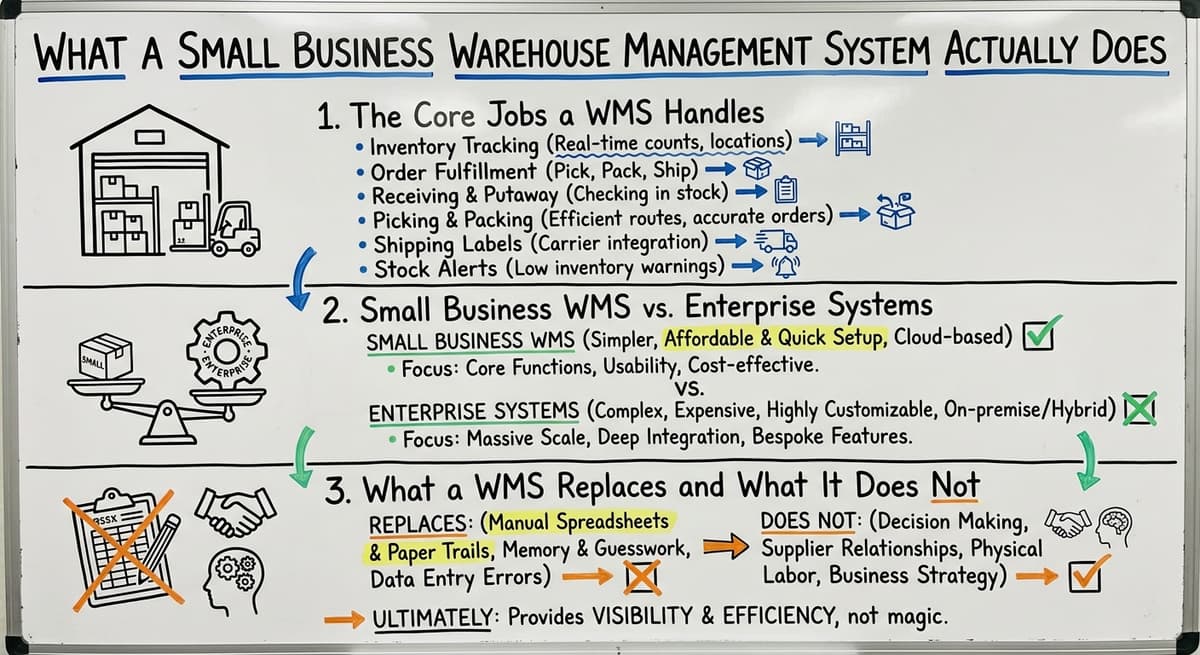
The Core Jobs a WMS Handles
A small business WMS handles 6 main jobs:
- Receiving: Logging stock as it arrives
- Putaway: Telling staff where to store it
- Picking: Guiding staff to the right item for each order
- Packing: Confirming the right items go in the right box
- Shipping: Handing off to carriers with the right paperwork
- Inventory tracking: Keeping a live count of what is where
These are the same jobs your team does now. The WMS just makes each one faster and less likely to go wrong.
Small Business WMS vs. Enterprise Systems
A large enterprise WMS is built for operations with hundreds of staff, multiple sites, and complex rules. It takes months to set up and costs accordingly.
A small business WMS does the same core jobs at a scale that fits a team of 10 to 40 people. It is simpler, faster to learn, and priced for a smaller operation.
What Does a WMS Replace and What Does It Not Replace?
A WMS does not need to replace everything you use. For a distributor running inventory on accounting software and spreadsheets, the WMS fills the gaps where manual work is breaking down.
Your accounting software stays in place for bookkeeping. The WMS handles what that software was never built to do: live inventory location, pick and pack workflows, and accurate stock counts on the floor.
Would you rather have it built around your operation?
The first look is free. If you would rather not compare products, describe how your operation already works and we build the system around it.
No build cost. You see it running on your own process first, and the monthly subscription starts only once it is live.
Book a callSigns Your Small Business Needs a Warehouse Management System
Signs that your small business has outgrown a manual process are common. They are not signs that your team is failing. They are signs that your operation has grown past what a manual process can handle.
Errors, Mismatches, and Lost Orders
Picking errors cost time and money to fix. A wrong item shipped means a return, a repack, and an unhappy customer.
If your accounting software's inventory counts do not match what is physically on the shelf, you are making decisions based on wrong numbers. Orders get lost when the process lives in someone's inbox or head rather than in a system.
As the IRS notes in Publication 538, "To figure taxable income, you must value your inventory at the beginning and end of each tax year." If your counts are wrong, your tax filings may be too.
Time Lost to Manual Work
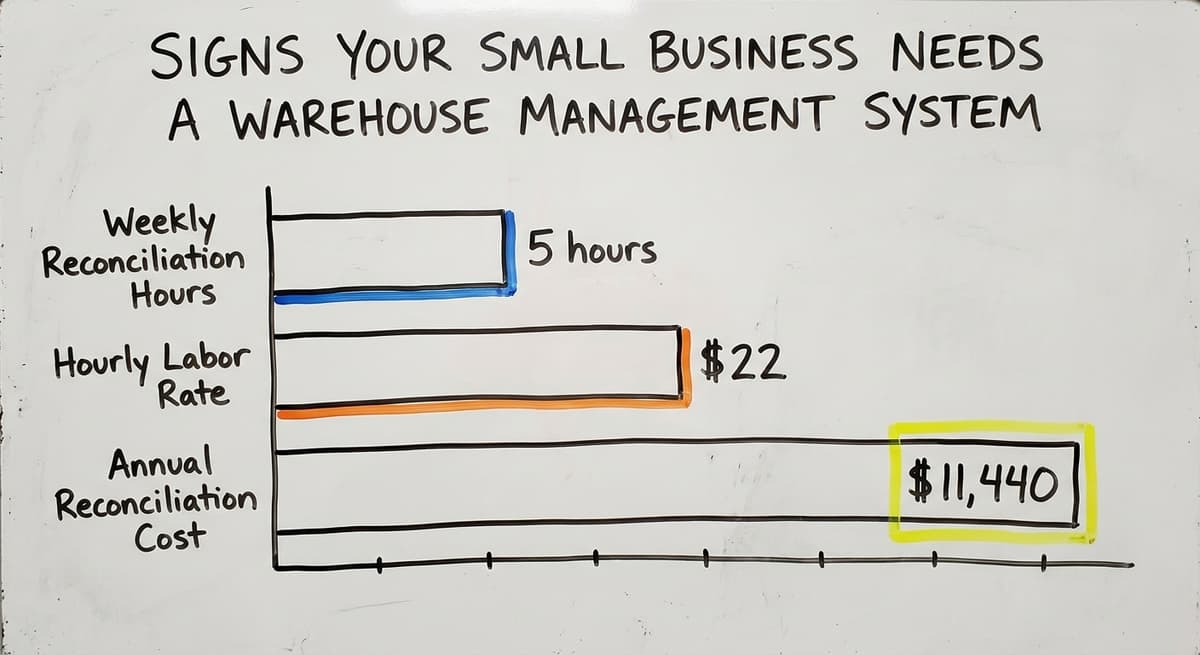
Staff spending hours reconciling inventory in a spreadsheet program is not a small problem.
Consider 2 people spending 5 hours a week each on manual reconciliation at $22 an hour. That is $11,440 a year in labor, just to maintain a spreadsheet that is still wrong half the time.
The US Bureau of Labor Statistics puts median pay for stock clerks and order fillers in that range. That math is real for most small operations.
Training and Scaling Problems
New hires take too long to train when the process lives in someone's head. If your best picker leaves, so does the knowledge.
OSHA states directly that "The warehousing and storage industry includes establishments operating facilities for general merchandise, refrigerated goods, and other products" and sets clear expectations for safe, organized operations.
A WMS gives every staff member the same step-by-step guidance, which shortens training and reduces risk. If you are growing but the manual process is not keeping up, a small business warehouse management system is the right next step.
What Should You Look for in a Small Business Warehouse Management System?
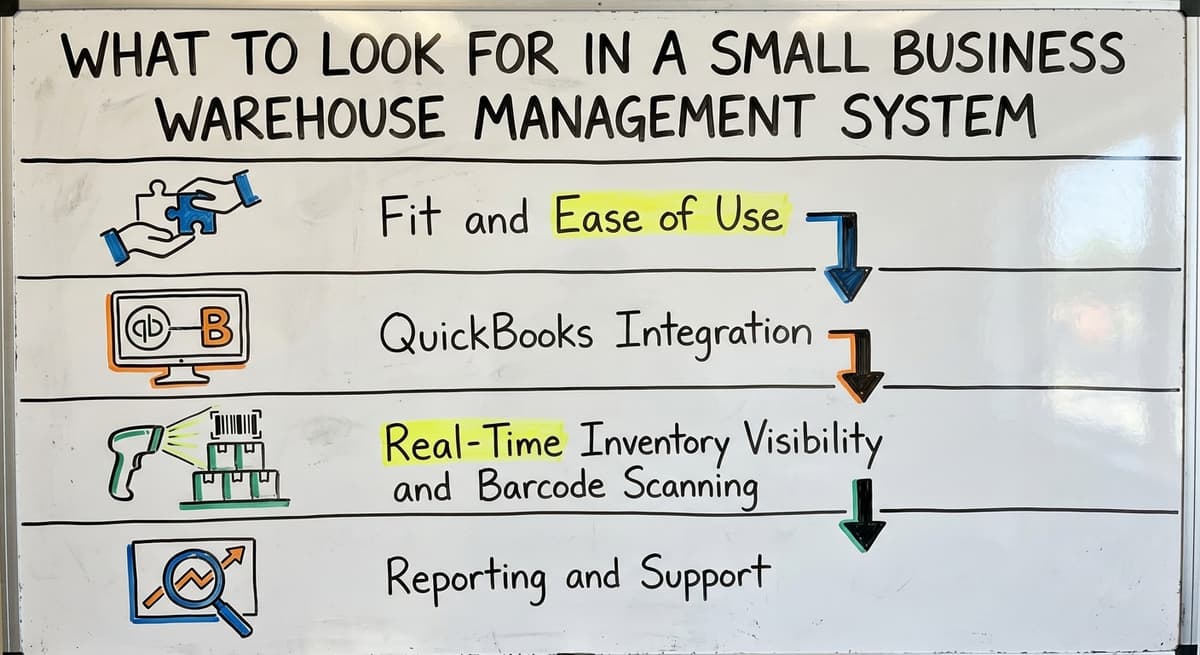
Not all WMS products target small operations. Here is what actually matters when you are choosing one.
Is the comparison easier when one option is built for you?
Yes. Off-the-shelf means fitting your process to the software, and custom is the other way round. The first look costs nothing.
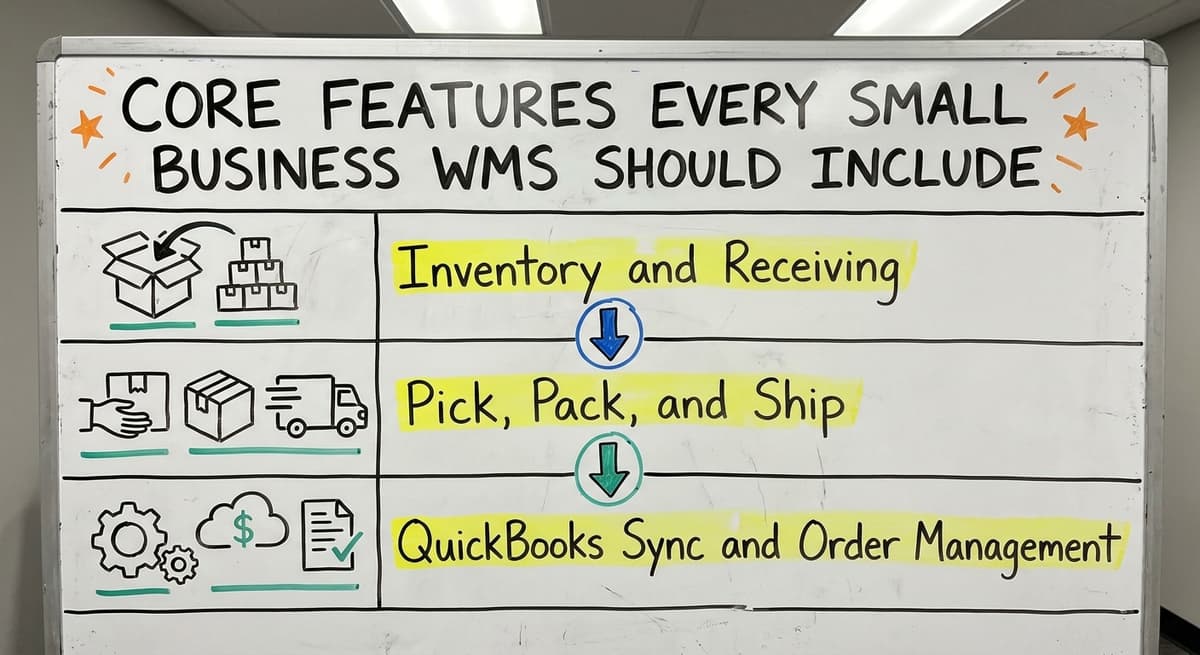
Book a callCore Features Every Small Business WMS Should Include
When you evaluate warehouse operations software, check for these specific features. A system missing more than 1 or 2 of these will leave gaps.
Inventory and Receiving
- Inventory tracking by location, SKU, and quantity in real time
- Receiving workflows that log incoming stock accurately and quickly
- Low stock alerts so reordering happens before a stockout
- Audit trail showing what happened, when, and who did it
These features replace the spreadsheet and the clipboard. They give you a live picture of your stock without a manual count.
Pick, Pack, and Ship
Pick and pack software inside a small business warehouse management system guides staff to the right item, in the right quantity, for the right order. Step-by-step prompts reduce errors.
Shipping integration hands off to your carriers with the right label and paperwork already generated. Order management ties each shipment to a customer record so you can see fulfillment status at a glance.
Your Accounting Software Sync and Order Management
Accounting sync is the feature that keeps your financial data accurate without double entry. When stock moves in the warehouse, the accounting system sees it.
When an invoice is raised in the accounting system, the WMS knows the order is confirmed. This two-way connection is what makes a WMS genuinely useful for a small distributor rather than just another piece of software to maintain.
Custom Built vs. Off-the-Shelf: Which Is Right for a Small Business
The question of custom-built versus off-the-shelf warehouse management software is one most small operators do not ask until they are already frustrated with a packaged system.
The Problem With Off-the-Shelf
Off-the-shelf systems target a generic operation. Most packaged WMS tools target enterprise scale and priced that way. Small businesses end up paying for features they will never use.
Worse, they spend months adapting their workflow to match the software rather than the other way around. A team of 15 people does not need the same system as a 500-person distribution center.
What Does Custom Actually Mean?
A custom small business warehouse management system is shaped around your actual workflow, your team, and your products. Custom does not mean slow or expensive when the scope is focused.
A focused custom build that replaces only the manual parts that are breaking down can be faster and cheaper than a packaged enterprise system.
The NIST Manufacturing Extension Partnership offers vendor-neutral guidance on matching supply chain tools to actual process needs, and the consistent finding is that fit matters more than features.
When Can Off-the-Shelf Work?
Off-the-shelf software can work for very simple operations with standard products, standard workflows, and no unusual customer requirements. If your operation is genuinely generic, a packaged tool may be fine.
Be honest with yourself about this. If you have custom pricing rules, unusual product types, or specific fulfillment requirements, a packaged tool will fight you at every turn.
The Risk of a Long ERP Implementation
Forcing a small team through a year-long ERP implementation is a real risk. Staff get frustrated. The business slows down. The system goes live with half the features working.
For operations with unique workflows or customer requirements, custom software for small distributors and fulfillment centers wins on fit and long-term cost. Start focused. Expand when the core is working.
What does it look like running on your own process?
The first thing you see is it running on your own process, at no build cost. The subscription starts once it is live and doing the job, not before.
Book a call
How Does a Small Business Warehouse Management System Work With Your Accounting Software?
Most small distributors and warehouses rely on accounting software they already trust and do not want to give it up. The good news is that they do not have to.
Your Accounting Software Stays Where It Is Useful
A well-built small business warehouse management system connects to your accounting software rather than replacing it. The accounting software handles invoicing, accounts payable, and financial reporting.
The WMS handles inventory location, pick and pack, and receiving. Each tool does what it was built to do. Neither one duplicates the other.
What Data Flows and Why Does It Matter?
Inventory movements flow from the WMS to your accounting software so stock values stay current. Purchase orders can flow from your accounting software to the WMS so the receiving team knows what is coming.
Invoices can trigger fulfillment steps in the WMS. This data flow in both directions is what eliminates the manual re-entry step that wastes hours every week and introduces errors. your accounting software integration for wholesale distributors is one of the most common setups The Software Society builds.
A Common Setup for Small Distributors
A connected setup linking a WMS to accounting software is standard for small wholesale distributors and fulfillment centers. The WMS sits between the warehouse floor and the accounting system. Staff on the floor use the WMS.
The finance team uses the accounting software. Both see accurate data without anyone bridging the gap by hand. Inventory tracking software for small business works best when it is built around the tools already in use.

What Does Implementation Look Like for a Small Business?
A realistic implementation for a focused small business WMS takes weeks, not months. Here is what that process looks like.
Discovery and Mapping
Implementation of a small business warehouse management system starts by mapping how your operation currently works: 2 to 3 days on the floor, not a questionnaire. Not by selling you a generic product.
A good implementation partner asks where the errors happen, where time is lost, and what your team finds most frustrating. That mapping becomes the blueprint for the system. Staff training is short because the system is built around what your team already does.
Data Migration and Go-Live
Data migration from spreadsheets or accounting software is part of the process, not an afterthought. Your current stock counts, SKU list, and location data move into the new system before go-live. This is handled for you, not handed off to your team to figure out.
Going live on a focused system is far less disruptive than switching to a full ERP. The Warehousing Education and Research Council tracks standard benchmarks for distribution center performance, and a clean data migration is one of the most reliable predictors of a smooth go-live.
Ongoing Support and Expansion
Ongoing support for a small business warehouse management system should come from the team that built it. If something breaks or a new need comes up, you call people who know your setup. Avoid over-scoping at the start.
Begin with the biggest pain points and expand from there. Local or dedicated support is a real advantage. How custom operational software is built matters as much as what it does.
What is in a free first look?
A 30 minute call, your operation mapped, and a clear picture of what we would build. No obligation and nothing to install.
Book a call
Common Mistakes Small Businesses Make When Choosing a WMS
Common mistakes small businesses make when choosing a WMS are easy to make and expensive to fix.
Choosing on Features Rather Than Fit
Buying a system based on a feature list rather than fit for your actual workflow is the most common mistake. A system with 200 features you do not need is worse than a system with 20 that match your operation exactly.
Not involving warehouse staff in the selection is equally costly. The people using the system daily know exactly what is broken. Their input is not optional.
Underestimating Cost and Disruption
Underestimating the cost of migrating away from existing accounting software is a trap. Many small operators assume they can switch accounting systems as part of a WMS project. That adds months and real cost.
Choosing a vendor who has never worked with an operation your size adds risk. An enterprise vendor selling down to a small business is not the same as a partner who works with small operations every day.
Skipping Discovery and Going Cheap
Skipping the discovery phase and jumping straight to a demo or contract is how businesses end up with the wrong system. Assuming the cheapest option is fine until the errors and lost time add up is a version of the same mistake.
A WMS that costs less upfront but creates 3 hours of extra work per day is not cheap.
Paying for an enterprise system with a year-long setup when a focused custom build would have been faster and cheaper is the other end of the same problem.

Frequently Asked Questions About Small Business Warehouse Management Systems
What is the most popular WMS system?
There is no single answer. Among enterprise systems, the large enterprise suites are widely used. For small and mid-sized businesses, several well known inventory and fulfillment platforms come up often. Popularity does not mean fit.
The right system for your operation depends on your size, your workflows, and whether you need accounting software integration. A popular enterprise system is the wrong choice for a team of 10 to 40.
How much does a WMS cost?
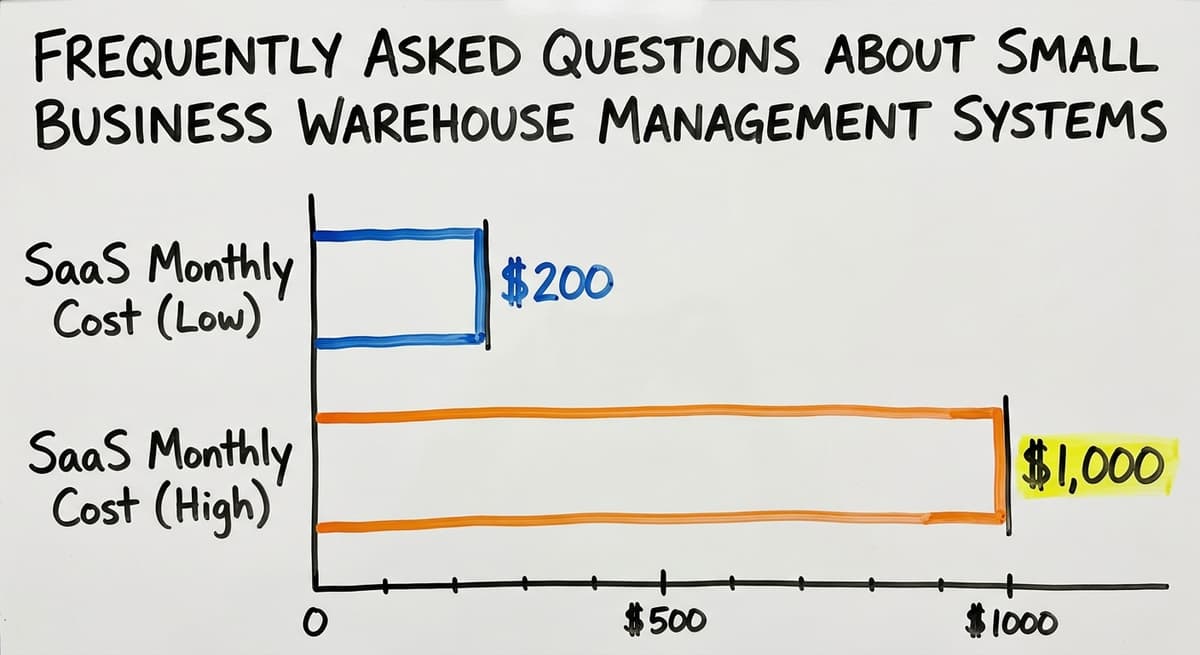
WMS costs vary widely. Off-the-shelf SaaS products for small businesses run from $200 to $1,000 per month depending on users and features. Enterprise systems can cost tens of thousands per year plus implementation fees.
A focused custom build for a small operation can fall in a similar range to mid-tier SaaS but fits your workflow exactly and does not charge for features you do not use. The real cost comparison includes implementation time, training, and ongoing support.
Can a WMS work with your accounting software?
Yes. A well-built small business warehouse management system connects to accounting software rather than replacing it. Inventory movements, purchase orders, and invoices sync between the two systems automatically. This eliminates manual re-entry and keeps both systems accurate.
The accounting software handles accounting. The WMS handles warehouse operations. Neither one needs to do the other's job.
What are the four types of WMS?
The 4 common types of WMS are: standalone WMS (software focused only on warehouse operations), ERP-integrated WMS (a module inside a larger system like the large enterprise resource planning suites), cloud-based SaaS WMS (subscription software hosted online), and custom-built WMS (software built around a specific operation).
For small businesses, standalone or custom-built systems are the best fit. ERP-integrated systems carry the cost and complexity of the full ERP.
What is the best software for warehouse management?
There is no single best option. For small operations running on accounting software, the best warehouse management system is one that integrates with your accounting software, fits your team size, and matches your actual workflow.
Off-the-shelf inventory tools work for straightforward operations. Custom warehouse software works better when your workflow, products, or customer requirements are specific. The honest answer is: the best system is the one your team will actually use.
Do I need to replace my current software to use a WMS?
A WMS works alongside your existing tools, not replace them. Your accounting software stays in place for accounting.
The WMS adds inventory location tracking, pick and pack workflows, and barcode scanning on the floor. The two systems connect so data flows between them without manual re-entry.
What happens to my data during the transition?
A good implementation partner handles data migration as part of the project. Your current stock counts, SKU list, supplier records, and location data move into the new system before go-live.
You do not start from scratch. The migration is planned, tested, and confirmed before your team switches over.
If your team is spending hours on spreadsheets, shipping wrong items, or making decisions based on inventory counts that do not match the shelf, a small business warehouse management system is not a luxury. It is the next step.
We build focused warehouse and inventory systems for small distributors and fulfillment centers, connected to your accounting software and shaped around the way your operation already works. If you want to see what that looks like for your business, start with a conversation.
Frequently asked questions
Frequently asked questions
What is the most popular WMS system?
There is no single most popular system across all business sizes. Among enterprise buyers, the large enterprise suites are widely used. For small and mid-sized businesses, several well known inventory and fulfillment platforms come up often.
Popularity does not equal fit. The right small business warehouse management system depends on your team size, workflow, and whether accounting software integration matters to you.
How much does a WMS cost?
Off-the-shelf SaaS warehouse management systems for small businesses run from $200 to $1,000 per month. Enterprise systems can cost tens of thousands per year before implementation.
A focused custom build for a small operation can land in a similar range to mid-tier SaaS but fits your workflow exactly and does not charge for features you will never use. Always factor in implementation time, training, and ongoing support when comparing costs.
Can a WMS work with your accounting software?
Yes. A well-built small business warehouse management system connects to accounting software rather than replacing it. Inventory movements, purchase orders, and invoices sync between the two systems automatically. The accounting software handles accounting. The WMS handles warehouse operations. No manual re-entry required.
What are the four types of WMS?
The 4 common types are: standalone WMS (focused only on warehouse operations), ERP-integrated WMS (a module inside a larger system like the large enterprise resource planning suites), cloud-based SaaS WMS (subscription software hosted online), and custom-built WMS (software built around a specific operation).
For small businesses, standalone or custom-built systems are the best fit.
What is the best software for warehouse management?
There is no single best option. For small operations on accounting software, the best warehouse management system is one that integrates with your accounting software, fits your team size, and matches your actual workflow.
Off-the-shelf inventory tools work for straightforward operations. Custom warehouse software works better when your workflow or products are specific. The best system is the one your team will actually use.
Do I need to replace my current software to use a WMS?
No. A WMS works alongside your existing tools. Your accounting software stays in place for accounting. The WMS adds inventory location tracking, pick and pack workflows, and barcode scanning on the floor. The two systems connect so data flows between them without manual re-entry.
What size business needs a warehouse management system?
Any warehouse operation where manual processes are causing errors, delays, or wasted time can benefit from a WMS. For most small businesses, that threshold arrives somewhere between 5 and 40 staff.
If your team is spending hours reconciling spreadsheets, shipping wrong items, or struggling to train new hires, the size of your operation is less important than the cost of the problems you are already experiencing.
What happens to my data during the transition?
A good implementation partner handles data migration as part of the project. Your current stock counts, SKU list, supplier records, and location data move into the new system before go-live.
You do not start from scratch. The migration is planned, tested, and confirmed before your team switches over.
Do I need a WMS or just inventory management software?
The answer depends on how much of your process breaks down beyond counting stock. Basic inventory management software just tracks quantities. A warehouse management system goes further, guiding staff through receiving, putaway, picking, packing, and shipping while keeping counts accurate in real time.
If errors, mismatched counts, or lost orders are recurring problems, a full warehouse management system addresses the workflow, not just the numbers, and works alongside your existing accounting software rather than replacing it.
How much does a small business WMS cost?
Cost varies by whether you choose a packaged system or one built around your existing process. Off-the-shelf enterprise systems tend to include features a small team never uses, so you pay for capacity you do not need.
A system scaled and priced for a team of ten to forty people, or a focused custom build addressing only the manual steps that are breaking down, is more affordable than adopting a large enterprise-grade platform.
How long does it take to implement a warehouse management system?
Most small operations can be up and running in weeks rather than months. This is very different from enterprise systems, which serve hundreds of staff across multiple sites and can take months to configure because of their complexity.
A system sized for a smaller team, especially one built around a process that already exists rather than forcing that process to adapt to generic software, is quicker to train staff on and get live.
What is the best warehouse management system for a small business?
The best option is one sized for a team of roughly ten to forty people rather than an enterprise operation with hundreds of staff and multiple sites. It should cover the core jobs of receiving, putaway, picking, packing, shipping, and live inventory tracking, sync with your existing accounting software, and be simple and fast to learn.
A system shaped around your actual workflow fits better than a generic packaged product.
Not sure this is the right shape for your operation?
The call is free. Describe how the work runs today. We map it on a call and show you what it would look like built around that, before you spend anything.
Book a callRelated guides
The rest of this guide, for the parts of the job this page does not cover.
Guides
- Warehouse Management System for Small Business
- Small Business Inventory Management System
- Warehouse Inventory Management Systems
- Warehouse Management System Top 10
- Software for Warehouse Management System
- Warehouse Management System Types
- Warehouse Inventory Management System
- Warehouse Management System Examples
- Warehouse Management System Implementation
- Cloud Warehouse Management System
- Warehouse Stock Management System
Common questions
- What Are the Benefits of Warehouse Management System
- What is the Point of Warehouse Management System
- How to Choose a Warehouse Management System
- What is Asn in Warehouse Management System
- How to Create a Warehouse Management System
- What is a Warehouse Management System
- Which Warehouse Management System Would a Jeweler Most Likely Use
- How to Build a Warehouse Management System
- What is a Warehouse Management System Used For
- Warehouse Management System vs Warehouse Control System
- Meaning of Warehouse Management System
- Definition of Warehouse Management System
- Warehouse Management System Comparison