


Small Business Inventory Management System
A small business inventory management system is software that tracks what stock you have, where it sits, and when to reorder. It replaces the spreadsheets and paper lists that most small operations start with. This article covers what the system does, what features you actually need, how it connects to the accounting software, and how to avoid the most common mistakes. Reviewed and updated 15 September 2026.
Published 24 July 2026. Reviewed and updated 15 September 2026.
Book a callWhat Is a Small Business Inventory Management System?
A small business inventory management system tracks your stock in real time. It tells you what you have, where it is, and when you are running low. That is the core job.
Reviewed August 2026. Each figure comes from the assumptions stated beside it, so you can substitute your own and the arithmetic still holds.
It is not a full ERP system. An ERP handles accounting, HR, payroll, manufacturing, and more in one giant platform.
Most small operations do not need that. A focused inventory system does one job well and connects to the tools you already use.
The system can be off-the-shelf software you subscribe to, or it takes shape to match how your operation already runs. Both are valid options. The right choice depends on how standard your workflow is.
Would you rather have it built around your operation?
The first look is free. If you would rather not compare products, describe how your operation already works and we build the system around it.
No build cost. You see it running on your own process first, and the monthly subscription starts only once it is live.
Book a callWhy Do Spreadsheets and Paper Stop Working?
Most small businesses start with a spreadsheet, and it is fine to about 200 items.
A sheet for stock counts, a printed pick list, an email chain with the supplier. That setup works fine when you have a handful of products and one person keeping track.
The problems start when the business grows. Someone updates the wrong row. Two people edit the same file at once.
A reorder gets missed because the sheet was not checked. Stock goes out the door that was already sold to someone else.
For a warehouse with 5 to 50 staff, these errors add up fast.
As GS1 notes at gs1.org/standards/barcodes, barcode standards exist precisely because manual data entry introduces errors that compound across every step of the supply chain. The spreadsheet did not fail you. It just reached its limit.
The Real Cost of Manual Counting
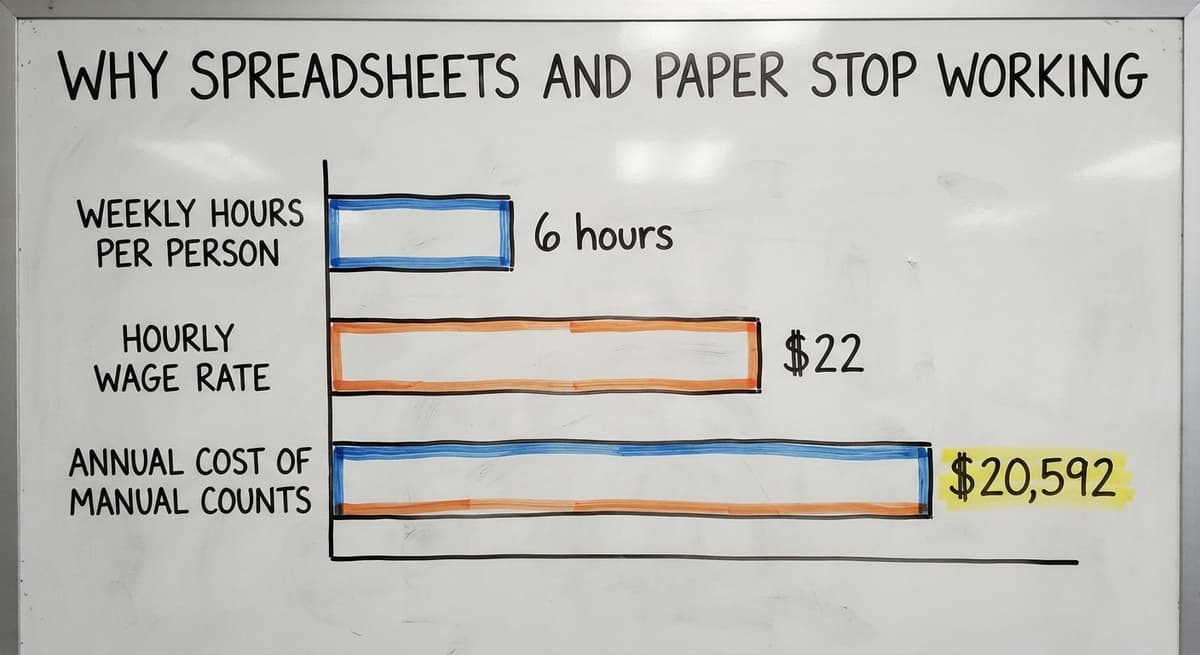
Consider a team of 3 people who each spend 6 hours a week on manual stock counts and reconciliation.
At the current median wage for stock clerks of around $22 per hour, according to the US Bureau of Labor Statistics, that is roughly $20,592 a year spent on a task a system could handle automatically. That figure does not include the cost of errors those counts still produce.
Do You Need a Better System?
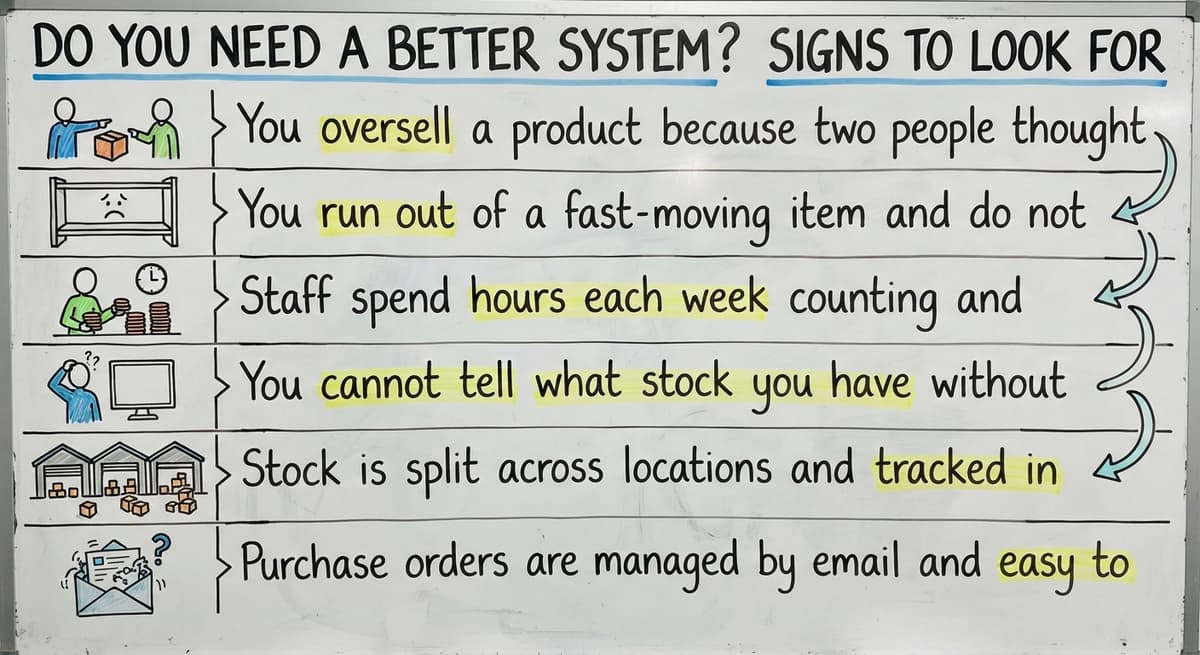
You need a better system when the manual process is costing you more than the fix would. That is the honest answer. Here are the signs that point to it.
For any small business:
- You oversell a product because two people thought stock was available
- You run out of a fast-moving item and do not notice until a customer complains
- Staff spend hours each week counting and reconciling rather than shipping
- You cannot tell what stock you have without walking the floor
Specific to wholesale and distribution:
- Stock is split across locations and tracked in separate sheets
- Purchase orders are managed by email and easy to lose track of
- You cannot see what has been ordered versus what has arrived
- Pick lists are printed and then updated by hand when something changes
None of these are failures. They are just signals that the operation has grown past the tools.
Core Features Every Small Business Inventory System Should Have
Not every feature on a vendor's list matters to a small operation. These are the ones that do.
- Real-time stock levels across every location, updated as items move
- Purchase order tracking so you know what is ordered, what has arrived, and what is still outstanding
- Pick, pack, and ship workflow that guides staff through each step without guessing
- Low-stock alerts and reorder triggers that fire before you run out
- Reporting on movement, turnover, and shrinkage so you can make buying decisions with real data
If a system does not do all 5 of these things well, keep looking.
Features That Matter More at Small Scale
Enterprise software is built for enterprise teams. Small operations need something different.
- Ease of use for staff who are not tech-savvy
- Fast setup, measured in weeks, not months
- Pricing that does not assume you are shipping 10,000 orders a day
- Flexibility to match how your team already works
- Support from people who have worked with small operations before
A system that takes 6 months to configure is not a small business solution. It is an enterprise tool sold to the wrong buyer.
Is the comparison easier when one option is built for you?
Yes. Off-the-shelf means fitting your process to the software, and custom is the other way round. The first look costs nothing.
Book a callCan It Work Alongside the accounting software Instead of Replacing It?
Yes. A good inventory system connects to the accounting software rather than replacing it. That is the right answer for most small businesses.
The accounting software handles accounting, invoicing, and payroll well. What it does not do well is track stock across locations, manage pick and pack workflows, or trigger reorders automatically. Those gaps are where a dedicated inventory system earns its place.
The connection works like this: when stock moves in your inventory system, that event updates the matching record in the accounting software.
You do not re-enter the data. Your books stay accurate without extra work. This is what accounting integration for wholesale operations looks like in practice.
What Stays in the Accounting Software?
You keep your chart of accounts, your invoicing, your supplier payments, and your tax records in the accounting software.
The IRS is clear on the obligation: as stated in IRS Publication 538, "To figure taxable income, you must value your inventory at the beginning and end of each tax year." Your inventory system feeds accurate numbers into the accounting software so that valuation is right without manual effort.
Custom Built vs Off-the-Shelf Software
The choice between custom built and off-the-shelf software is the question most buyers skip, and it matters.
| Factor | Off-the-Shelf | Custom Built |
|---|---|---|
| Time to start | Days to weeks | Weeks to months |
| Fits your workflow | Partially | Fully |
| Upfront cost | Lower | Higher |
| Long-term fit | Compromise | Built around you |
| Vendor flexibility | Limited | High |
Off-the-shelf software is built around a generic workflow. If your operation runs close to that workflow, it works well.
If your process is different, you spend time working around the software instead of using it.
Custom inventory software is built around how your operation actually runs. There is less compromise. The cost is higher upfront, but the fit is better and the workarounds are fewer.
Custom makes sense when your workflow is genuinely different, when you run mixed systems, or when off-the-shelf tools have already failed you.
What Does Custom Actually Mean for a Small Operation?
Custom is a 4 to 8 week project for a small operation, not a two-year one. It does not mean rebuilding everything from scratch.
A realistic scope for a small operation looks like this: replace the parts that are breaking, keep what works. That might mean a custom receiving screen that matches your supplier's delivery process, a barcode scan at pick that removes manual entry, and an auto-update to the accounting software when an order ships. Nothing more complicated than that.
The system fits the team. The team does not change to fit the system. That is the point of custom operational software for wholesale and distribution.

Does Barcode Scanning Work in a Small Warehouse?
Barcode scanning works well in small warehouses and is one of the fastest ways to cut errors.
When a staff member scans a barcode at receiving, the system records the item, the quantity, and the location without any typing. That removes the most common source of stock count errors.
Modern barcode inventory systems run on affordable Android or iOS devices. Staff carry a phone or a handheld scanner on the floor. They do not need a desktop or a fixed terminal. The data updates in real time.
For a small team, the speed gain is real. A scan takes 2 seconds. Manual entry takes 20.
Across 100 receiving lines a day, that is more than 27 minutes saved, with fewer mistakes. GS1 maintains the global standards behind every barcode used in commerce, explained at gs1.org/standards/barcodes.
Multi-Location and Multi-Warehouse Tracking
Stock spread across 2 or more locations is a common pain point for small distributors.
One sheet for the warehouse, another for the showroom, a third for the satellite location. Reconciling those sheets is slow and error-prone.
A warehouse inventory system gives you one view of all stock across every location.
You can see what is at each site, move stock between them, and know the total on hand without calling anyone.
This matters most when a customer order could be filled from more than one location.
Without a single system, you risk promising stock that is already committed somewhere else. With one, you can see the full picture before you confirm.

Purchase Orders and Supplier Management
A good inventory system does not wait for you to notice you are low. It watches stock levels and triggers a purchase order when a product hits its reorder point, the minimum quantity you set before the system flags a replenishment.
The purchase order tracking function shows you what has been ordered, what has arrived, and what is still outstanding. That replaces the email thread with your supplier.
When a delivery arrives, the receiving workflow matches it against the open PO and updates stock automatically.
The US Census Bureau's Monthly Wholesale Trade data tracks the inventories-to-sales ratio for wholesale firms across the country.
When that ratio climbs, it means businesses are holding more stock than they are moving. Better purchase order tracking helps keep that ratio tight.
What does it look like running on your own process?
The first thing you see is it running on your own process, at no build cost. The subscription starts once it is live and doing the job, not before.
Book a callPick, Pack, and Fulfillment Workflow
A fulfilment workflow automation system guides each order from received to picked to packed to shipped. Staff do not decide what to do next. The system tells them.
When an order comes in, the system generates a pick list. The list shows the item, the location, and the quantity.
Staff scan each item as they pick it. The system confirms the pick and flags any discrepancy. Once packed, the shipment is recorded and the stock level drops automatically.
This matters for wholesale distributors shipping to customers on tight timelines. The FTC's Mail, Internet, or Telephone Order Merchandise Rule requires businesses to ship when they say they will or notify the customer.
Accurate stock counts and a clear fulfilment workflow are what make that possible.

Inventory Reporting and Stock Visibility
Reporting turns your stock data into decisions. The standard reports you need are:
- Stock on hand by location and by product
- Movement history showing what sold, when, and how fast
- Slow movers so you can stop reordering what is not selling
- Shrinkage tracking the gap between expected and actual stock
With a spreadsheet, you get a snapshot. With a real-time inventory tracking system, you get a live view you can act on.
Buying decisions improve when they are based on actual movement data rather than a count from last month.
How Long Does Implementation Take for a Small Business?
For a small operation, a focused system goes live in weeks, not months. That is the honest answer, and it is different from what enterprise software vendors will tell you.
A phased approach works well. Start with the biggest pain point, receiving or stock counts, and get that working first.
Add pick and pack next. Connect to the accounting software last. Each phase is short. The team keeps operating throughout.
The NIST Manufacturing Extension Partnership recommends phased supply chain improvements for small manufacturers and distributors precisely because a full cutover is high-risk for lean teams. Small steps with clear outcomes work better than a big-bang launch.

What Should I Expect During Setup?
Setup is a sequence of 5 steps. Knowing what comes first removes most of the anxiety around it.
- Data import: your product list, supplier records, and opening stock counts move into the new system
- Workflow mapping: the partner walks through how your operation runs and configures the system to match
- Staff training: warehouse staff learn receiving and pick; managers learn reporting and reorder settings
- Go-live: the system runs live alongside a short parallel period to catch anything unexpected
There will be a short learning curve. That is normal. A good partner does the heavy lifting on configuration so your team is not left to figure it out alone.
Custom systems built around your existing process reduce disruption because the screens look familiar from day one.
Training Your Team
Small teams need fast, practical training. A half-day session focused on the tasks each role actually does is more useful than a classroom course covering every feature.
Warehouse staff learn to receive, scan, and pick. Managers learn to run reports and set reorder points. The simpler the system, the shorter the curve.
Ongoing support after go-live matters too. The first few weeks are where questions come up, and your partner should be reachable when they do.
Common Mistakes When Choosing a System
Five mistakes cost small businesses time and money when choosing an inventory system.
- Buying more than you need. A system built for 500-person operations will overwhelm a team of 10.
- Choosing software that forces a process change. If the system cannot match how you work, your team will work around it.
- Underestimating migration cost. Moving away from the accounting software entirely is expensive and usually unnecessary.
- Picking a vendor with no small-business experience. A vendor who only knows enterprise deployments will not understand your constraints.
- Skipping a review of current operations. If you do not map what you do now, you cannot build something better.
Replacing spreadsheet and small desktop databases with custom software is a common trigger for these mistakes. The fix is to map the current process first, then build to match it.
What is in a free first look?
A 30 minute call, your operation mapped, and a clear picture of what we would build. No obligation and nothing to install.
Book a call
Questions to Ask Before You Buy
There are 6 questions to bring to every vendor conversation.
- Does it connect to the accounting software or replace it?
- How long does setup take for a team our size?
- Can it be configured to match how we already work?
- What does support look like after go-live?
- Has the vendor worked with wholesale distributors or fulfilment operations before?
The answers tell you quickly whether the vendor understands small operations or is trying to fit you into an enterprise mold.
How Much Does a Small Business Inventory System Cost?
Cost varies by type. Off-the-shelf SaaS tools run from a few hundred to a few thousand dollars a month depending on features and order volume.
Custom builds cost more upfront but have no monthly seat fees that climb as your team grows.
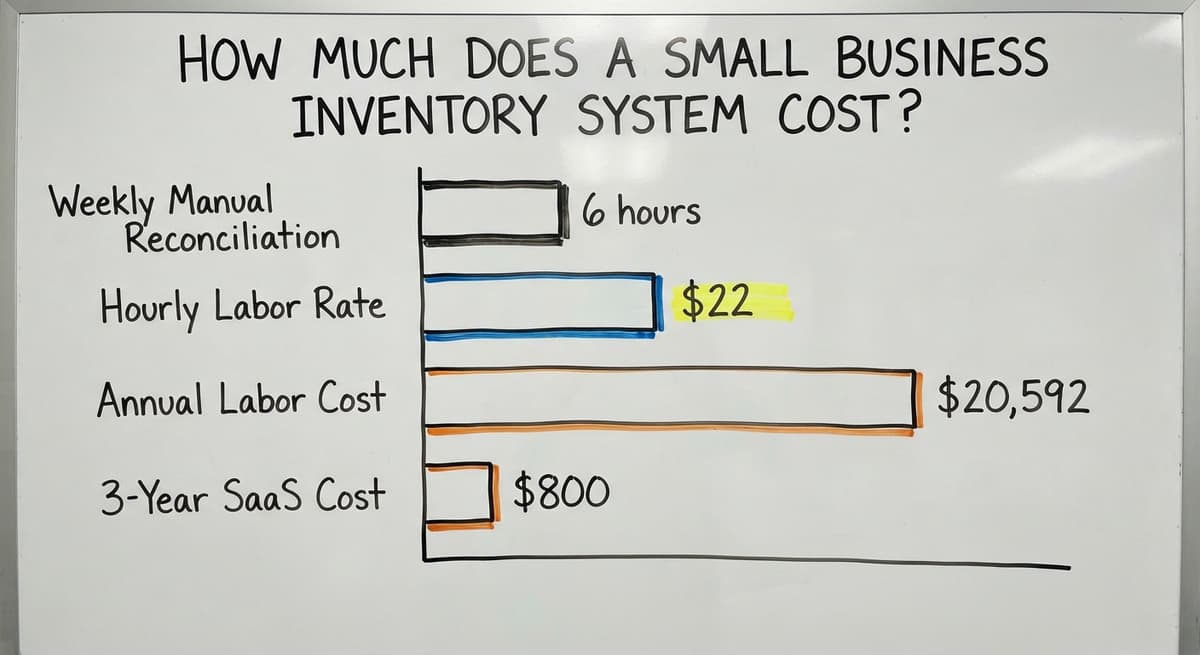
The more useful comparison is cost against the alternative. If 3 staff members spend 6 hours a week on manual reconciliation at $22 an hour, that is $20,592 a year in labor alone, before counting the cost of a stockout or an oversell.
A system that removes most of that work pays for itself faster than most owners expect.
Custom inventory software is not always the most expensive option over a 3-year horizon.
A SaaS tool at $800 a month is $28,800 over 3 years, with no customization and no ownership of the system.

The ROI of Getting Inventory Right
Better inventory management produces 4 outcomes you can measure.
- Fewer stockouts mean fewer lost sales and fewer customers who go elsewhere
- Less overstock means less cash sitting in slow-moving product on a shelf
- Staff time recovered from manual counting goes back into work that moves orders
- Fewer shipping errors mean fewer returns and fewer customer complaints
These are not abstract benefits. Each one shows up in your margin or your cash position. The stock visibility that a real-time system provides is what makes those improvements possible.
Why Does a Local Partner Make a Difference?
A local partner sees your operation firsthand. That is different from buying a software subscription and reading the help docs.
When something needs to change, a local partner can respond quickly. When your business adds a product line or a new location, the system can grow with you. That ongoing relationship is what separates an implementation partner from a vendor.
For businesses in the Columbus, Ohio area and surrounding region, working with a partner who can walk your floor, understand your workflow, and build around it is a real advantage.
Custom warehouse management software for small distributors built by someone who has seen your kind of operation runs better than software built for a generic customer.
The Software Society works this way. The system follows your operation, not the other way around.
When Should You Start Looking for a System?
The right time to start is before the pain becomes a crisis. That is easier said than done, but the trigger points are recognizable.
Look at a new system when you add a product line, when order volume climbs past what one person can track, or when you hire your first warehouse staff member.
Getting a system in place before peak season is far better than scrambling during it.
The goal is a system that is working and familiar before growth puts pressure on it. Starting early means the team is confident in the system when it matters most.
Next Steps for Small Business Owners
A small business inventory management system does not have to be complicated or expensive.
The right system tracks your stock in real time, connects to the accounting software, and fits how your team already works.
Start by mapping your current process. Write down where stock enters, where it moves, and where errors happen most. That map is the foundation of any system you build or buy.
If you want to talk through what a right-sized system looks like for your operation, The Software Society is a practical starting point.
No pressure, no enterprise pitch. Just a conversation about what you are running and what would make it work better.
Frequently asked questions
Frequently asked questions
What is a small business inventory management system and how does it work?
A small business inventory management system is software that tracks your stock in real time. It records what you have, where it is, and when you need to reorder.
When stock moves, the system updates automatically. It connects to tools like the accounting software so your accounting stays accurate without manual data entry.
Can a small business inventory system work with the accounting software instead of replacing it?
Yes. A good inventory system connects to the accounting software rather than replacing it. The accounting software keeps handling your accounting and invoicing.
The inventory system handles stock tracking, purchase orders, and pick and pack. When stock moves, the system updates the accounting software automatically so your books stay accurate.
How long does it take to set up a small business inventory system?
For a small operation, a focused system can go live in weeks. A phased approach works best: start with the biggest pain point, get it working, then add more.
Your team keeps operating throughout. There is a short learning curve, but a good partner handles the configuration so your staff can focus on their work.
What is the difference between a custom inventory system and off-the-shelf software?
Off-the-shelf software is built around a generic workflow. It is faster to start but requires you to adapt your process to match the software.
A custom system is built around how your operation already runs. It costs more upfront but fits better and produces fewer workarounds over time.
What features does a small business inventory management system actually need?
The core features are real-time stock levels, purchase order tracking, pick and pack workflow support, low-stock alerts with reorder triggers, and reporting on stock movement and shrinkage.
Everything else is optional depending on your operation. Ease of use and fast setup matter more at small scale than a long feature list.
How much does a small business inventory system cost?
Off-the-shelf SaaS tools run from a few hundred to a few thousand dollars a month. Custom builds cost more upfront but have no climbing monthly fees.
The more useful comparison is cost against the labor and errors the system replaces. Three staff members spending 6 hours a week on manual counts at $22 an hour costs over $20,000 a year before counting stockout losses.
What mistakes should I avoid when choosing an inventory system?
The most common mistakes are buying more software than you need, choosing a system that forces you to change your process, underestimating the cost of moving away from the accounting software, and picking a vendor with no experience at small scale.
Map your current process before you buy anything. That map tells you what the system actually needs to do.
Does barcode scanning work for small warehouse operations?
Yes. Barcode scanning works well in small warehouses and cuts errors fast. Staff scan items at receiving and pick using an affordable Android or iOS device.
The system records the item, quantity, and location without typing. A scan takes about 2 seconds versus 20 for manual entry, which adds up quickly across a full day of receiving.
What is the best free inventory management software for a small business?
A hosted free tier for one user and a few hundred items, scanning with a phone camera.
The caps on users, locations, and orders are the product, so plan on the paid tier or a build at the second user or the first accounting sync.
Should I use the accounting software's inventory or dedicated inventory software?
The accounting software's inventory for one location, under 500 items, and no bins. Dedicated software from the first bin location, scanner, or second site, because the accounting package has none of those and never will.
The dedicated system posts stock values back, so the books stay where they are.
What features should I look for in barcode inventory software?
A scan that does 4 things, not 1: receive, move, pick, and count. Plus labels printed from the item record, a location per shelf, a reorder point per item, and a sync to the accounting package.
Anything that only looks an item up on scan is a catalogue, not an inventory system.
How do I move my inventory from a spreadsheet to inventory software?
Export the item list with SKU, description, cost, and reorder point, remove the duplicates, and import it.
Then run one full count and enter it as the opening balance, so the system starts from the shelf rather than from the spreadsheet's drift.
Not sure this is the right shape for your operation?
The call is free. Describe how the work runs today. We map it on a call and show you what it would look like built around that, before you spend anything.
Book a callRelated guides
The rest of this guide, for the parts of the job this page does not cover.
Guides
- Inventory Tracking Systems for Small Businesses
- Simple Inventory System for Small Business
- Inventory System for Small Business
- Inventory Management Small Businesses
- Best Inventory Management Software for Small Businesses
- Small Business Inventory Management
- Small Business Stock Management Software
- Inventory Tracking Software for Small Business
- Inventory Control Software for Small Business
- Inventory Sales Software Small Business
- Inventory Control for Small Business
- Small Business Warehouse Management System
- Warehouse Management System for Small Business
- Wms for Small Business
- Free Inventory Management Software for Small Business
- Erp System for Small Businesses
- Accounting and Inventory Software for Small Business
- Warehouse Inventory Management Systems
Common questions
- What is the Best Inventory Management Software for Small Business
- Why is Inventory Management Important for Small Businesses
- How to Manage Inventory for Small Business
- What is the Best Inventory Management System for Small Businesses?
- How to Organize Inventory for Small Business
- How to Keep Track of Inventory Small Business