

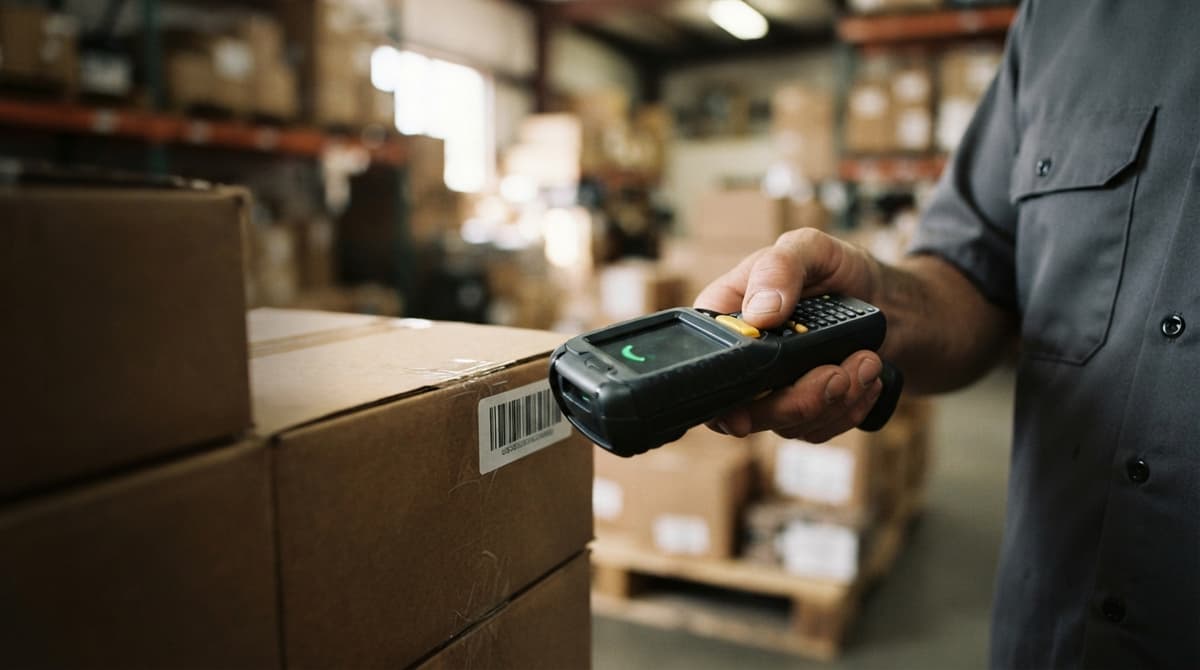
Warehouse Management System For Small Business
A warehouse management system for small business is software that tracks where inventory is, routes orders to the right picker, and confirms shipments before they leave the dock. If your team runs on spreadsheets and printed pick lists today, this guide explains what changes, what stays the same, and how to choose the right system without replacing everything that already works.
Published 24 July 2026. Reviewed and updated 15 September 2026.
Reviewed September 2026. Each figure comes from the assumptions stated beside it, so you can substitute your own and the arithmetic still holds.
Reviewed and updated 15 September 2026. It addresses owners and operations managers running warehouses with 5 to 100 staff.
Book a callWhat Is a Warehouse Management System for Small Business?
A warehouse management system, or WMS, is software that tracks inventory, orders, and movement inside a warehouse. It is not an accounting package and it is not an ERP. Its core job is simple: know where things are and know what needs to happen next.
As OSHA notes, "The warehousing and storage industry includes establishments operating facilities for general merchandise, refrigerated goods, and other products", and in every one of those facilities, people are moving goods across a floor where errors cost money and time.
We build it for your operation, and the first look is free
The first look is free. If you would rather not compare products, tell us how your floor runs today and we build the system around that.
No build cost. You see it running on your own process first, and the monthly subscription starts only once it is live.
See it on your processHow a Small Business Warehouse Runs Without One
Affordable WMS options with mobile barcode scanning exist for a warehouse this size, but most small operations are not using any of them yet.
The typical setup is an accounting package for orders, a spreadsheet for stock counts, printed pick lists handed to staff each morning, and email threads to sort out what went wrong. That works at low volume.
As order counts climb past 50 or 100 a day, the gaps between those tools start producing errors that cost real money.
The IRS requires that businesses "value your inventory at the beginning and end of each tax year" to figure taxable income. Most small warehouses do that count manually. A WMS makes it continuous rather than annual.
Signs You Have Outgrown Your Current System
The signals are obvious before the owner admits them. Orders get picked wrong or ship late. Staff spend hours each week reconciling stock counts that never quite match.
A customer calls to ask where their order is, and no one can answer without asking someone else.
The accounting system shows a quantity that does not match what is on the shelf. Each of these is a symptom of the same problem: the business has grown past what manual tools can track reliably.
What Does a Warehouse Management System Do?
A WMS handles the physical side of the operation from the moment goods arrive to the moment they leave. The core functions are receiving, putaway, picking, packing, shipping, and returns.
A live view of stock runs underneath all of them, so no count has to halt the floor. The sections below cover each function and what it changes when the team is small.
Receiving, Putaway, and Inventory Location Management
When a delivery arrives, the WMS is the first to know: it shows staff the purchase order it matches. Scanning confirms quantities against the open PO at once and flags any gap before the product moves.
The system then assigns a bin, shelf, or zone based on rules the operation sets, such as fast movers near the dock or cold items in a specific aisle.
Bin-level and zone-level tracking means the system knows where every SKU sits at all times. For an operation with limited floor space, that precision reduces the time staff spend searching.
GS1 barcode standards ensure that a label printed by a supplier scans correctly at your dock without manual re-entry. Accurate putaway is the foundation every other function depends on.
Pick Lists, Order Fulfillment, and Packing
The WMS pulls incoming orders and builds pick lists that route staff through the warehouse on the shortest path, so walking time and missed items both drop; 2 fewer aisles per order is typical.
Staff confirm each pick with a scanner or mobile device rather than a pen. When the order is complete, the system verifies contents before the box closes.
Shipping labels generate directly from the order record. Carrier data flows back in, so the system tracks outbound shipments without a separate spreadsheet.
Does a WMS handle packing verification before a shipment leaves?
Yes. A WMS confirms a scan of every item in an order before the label prints. That step alone removes the most common cause of customer complaints: a box that left the warehouse missing a line item.
Returns, Reporting, and Inventory Visibility
Returned goods scan back into the system and land in the correct location automatically. Damaged or unsellable items get flagged rather than silently restocked. Inventory counts update continuously.
Reporting gives owners and managers a live picture: stock levels by location, order status, fulfillment rate, and slow-moving SKUs.
The Warehousing Education and Research Council publishes standard benchmarks for distribution center performance, and the reports a good WMS produces map directly to those measures. Managers should not need to ask staff for a status update. A daily dashboard replaces the morning walk-around.
The comparison is easier when one option is built for you
Off-the-shelf asks the floor to bend to the software. We work the other way round, and the first look costs nothing.
Book a callHow a Warehouse Management System Connects to Your Accounting Software
Most small businesses already keep their books in one package and have no reason to replace it.
A WMS sits alongside that package and syncs the data that crosses between them: buy orders, receipts, sales order confirmations, inventory adjustments, and cost of goods. The ledger remains the book of record for money.
The WMS handles the physical record. What flows between the two systems: buy orders cross from the accounts side into the WMS so receiving staff can scan against them; fulfillment confirmations flow back to close the sales order; inventory adjustments sync so valuation reflects actual stock; cost of goods data stays accurate without a separate matching step.
What Stays in Your Accounting Software When You Add a WMS?
Accounts payable, accounts receivable, payroll, and banking are untouched: they stay entirely in your accounting software. The WMS replaces only the manual warehouse steps, not the whole business system.
Ask any vendor early how their product connects to the ledger you already run, because integration is what keeps stock records and financial records in agreement without extra keying.


Types of Warehouse Management Systems for Small Business
The answer depends on how standard your workflows are, not on how many staff you have. There are 3 main categories to understand before comparing vendors.
| Type | Best fit | Typical cost model | Main risk |
|---|---|---|---|
| Cloud WMS subscription | Standard pick-pack-ship workflows | Monthly fee per user or order | Workarounds for non-standard steps |
| ERP with warehouse module | Enterprise scale, complex finance | High upfront, long rollout | Oversized for 5 to 100 staff |
| Custom-built WMS | Unique rules, products, or customer requirements | Upfront build, no per-order fee | Higher initial investment |
Table: Three WMS categories compared by fit, cost, and risk at this scale.
Which WMS Category Fits a Small Operation?
A subscription platform is fast to set up and works well when the operation follows a standard receive-store-pick-ship pattern. An ERP with a warehouse module is built for hundreds of staff and millions of orders.
Most teams at the 5 to 100 staff scale get overwhelmed by unused features and setup complexity before they see any benefit.
Custom warehouse software mirrors the workflow a specific team already runs, which means no forced process migration and lower long-term friction, at the cost of a higher upfront design effort.
How to Choose and What to Watch For
The decision is one question: does this system match how we already pick and ship, or do we have to change to fit it? Other questions worth asking before signing anything:
- How does it connect to your accounting package, and what does that cost?
- What happens when we need a change six months from now?
- Who supports it, and how fast do they respond?
Red flags appear when a vendor needs a process change to fit their software, quotes a 12-month rollout for a 20-person operation, or cannot give a clear answer on accounting integration.
Enterprise pricing repackaged for small businesses is another sign the product was not built for this scale. A vendor who cannot describe how your current process fits their system is selling the wrong product for your operation.
Key Features a Small Business WMS Needs
The goal is to solve the current problem, not to buy a future-proof platform full of features no one will use. Below are the must-haves for a warehouse management system for small business, and what each one actually changes.
- Barcode scanning at receive and pick removes the manual confirmation step that produces most mis-picks.
- Location tracking ties every SKU to a shelf address so staff stop searching and start scanning.
- A live sync to the books removes the double-entry that turns one transaction into two data entry tasks.
- Order routing matters once daily order counts reach double digits and a paper pick list stops keeping up.
See it running on your own process first
No build cost. You owe nothing while we design and test. Billing begins when the floor uses it.
Map my operationReal-Time Inventory Visibility and Barcode Scanning
Real-time inventory visibility means every location, quantity, and status is visible at any moment. Staff confirm every move with a scanner or mobile phone, from the dock through to the outbound door. That habit is what keeps the picture accurate between counts.
The hardware does not need to be expensive or proprietary. Affordable scanners that read standard barcodes work on most modern WMS platforms.
Accurate counts feed back to the books automatically, so the financial record reflects what is actually on the shelf rather than what was there at the last cycle count.
Order Management, Pick Routing, and Receiving
Orders flow in and the system sequences the work, batching 5 to 10 into a single run on high-volume days so staff cover less ground per line picked.
Discrepancies at receiving surface at the dock, before product is put away, rather than weeks later during a matching. The spreadsheet step disappears entirely.
Do I need lot and serial number tracking in a small warehouse?
Not every small business needs it, but the system should support it. Food, medical, and regulated products need tracking which lot shipped to which customer for recall or compliance purposes.
If the operation handles any of those product types, lot tracking is a requirement, not an option.
User Roles, Access Control, and Reporting Dashboards
Warehouse staff see their tasks, and managers see the full picture: 3 roles are enough for most small teams. Limiting who can adjust inventory or override a pick reduces errors and creates an audit trail for every action.
Daily dashboards show order status, stock levels, and fulfillment rate at a glance. Reports should be simple and actionable. A data dump no one reads is not a feature.

What Does Implementation Look Like for a Small Business?
A phased rollout for a warehouse of this size can start showing results in weeks, not months. The fear of a long, expensive, disruptive rollout is real, and it comes from stories about enterprise ERP projects.
A WMS built at this scale does not work that way. Phase 1: Map the current operation. Document how orders move through the warehouse today.
Identify the manual steps that cause the most errors or delays. This step prevents building the wrong system.
Phase 2: Build or configure the core system. Set up locations, SKUs, and order flows. Connect the ledger and test the data sync. Train a small group of staff before the full rollout.
How to Go Live Without Disrupting Operations
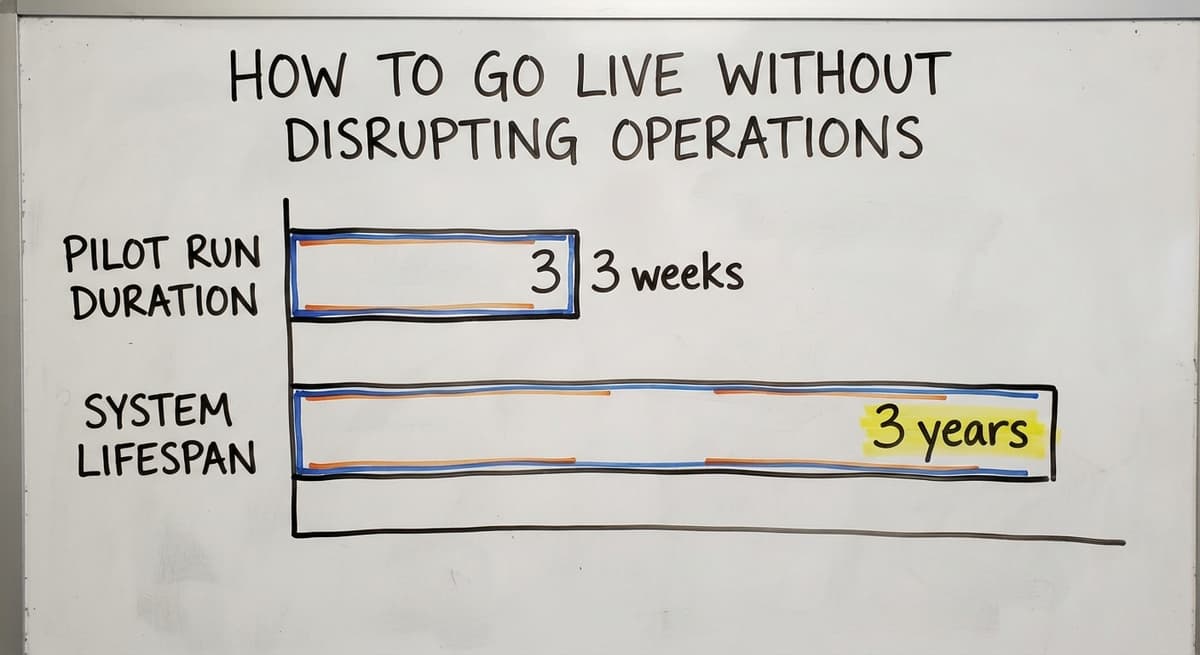
Run 1 product line or order type through the new system first. Catch problems before they affect the whole warehouse, and adjust based on real feedback from the staff doing the work.
A pilot that runs for 2 to 3 weeks costs far less than a full-warehouse rollout that goes wrong. Phase 4: Full rollout and ongoing improvement. Expand to all product lines and order types.
Add features as the team gets comfortable. The system should grow with the business rather than need a replacement in 3 years.
Timeline depends on the complexity of SKUs, locations, and integrations, so ask any vendor to justify the one they quote. The NIST Manufacturing Extension Partnership offers vendor-neutral guidance on supply chain process improvement that is worth reviewing before any vendor conversation.
How Much Does a Warehouse Management System Cost for a Small Business?
Pricing has 4 components, and the monthly fee is rarely the whole story:
- Software. The subscription or the build, priced by users, orders, or SKUs.
- Rollout. Mapping the process, loading locations and SKUs, and testing the sync.
- Hardware. Scanners, label printers, and the devices staff carry on the floor.
- Ongoing support. Tiers that only cover basic questions are where hidden cost sits.
A subscription platform charges by users, orders, or SKUs. Hidden costs appear in integration fees, customization charges, and add-ons priced per seat.
The US Bureau of Labor Statistics reports that warehouse staff earn a median wage in the range that makes manual error correction expensive fast.
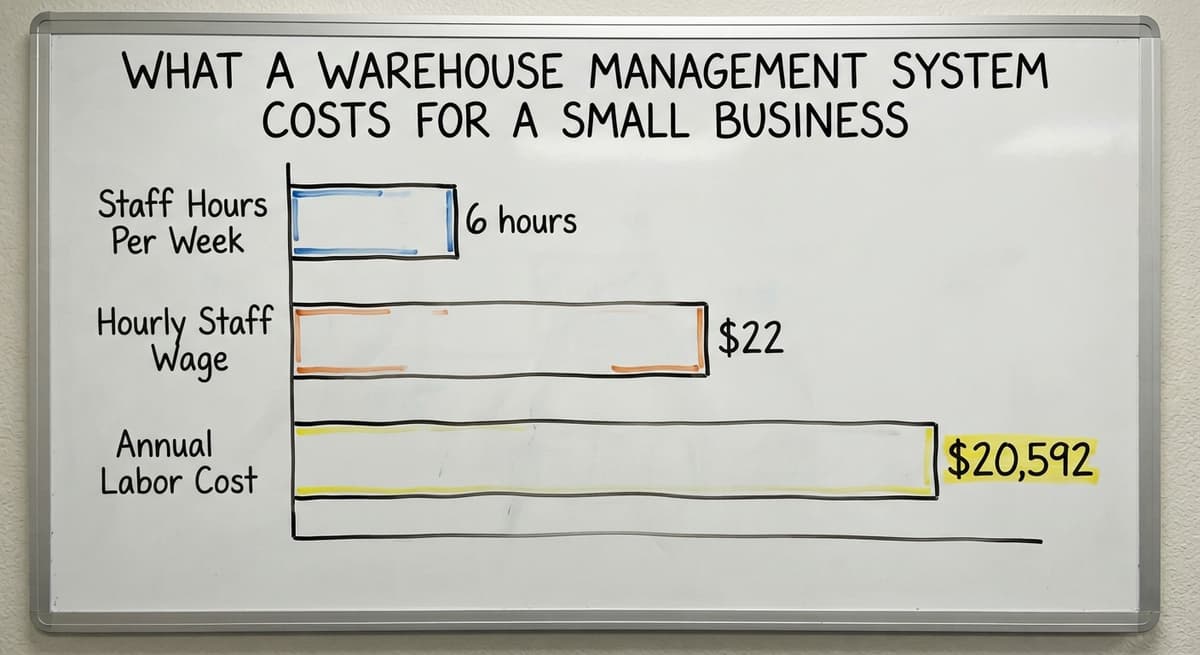
Consider: 3 staff spending 6 hours a week reconciling inventory at $22 an hour is $20,592 a year in labor alone, before counting mis-picks and late shipments.
Not sure this is the right shape for your operation?
The call is free. Describe how the work runs today. We map it on a call and show you what it would look like built around that, before you spend anything.
Book a call
How to Compare WMS Cost Over Three Years
Custom warehouse software carries a higher upfront investment, $8,000 to $40,000 in our scoping, and no per-user or per-order fees that grow with volume; a cloud seat at $150 a month for 8 users is $43,200 over 3 years before order-volume tiers. It fits the operation exactly, which reduces training time and the ongoing expense of workarounds.
Cloud subscription pricing instead scales with order volume and seat count, while a custom build is priced by scope and stops there.
The number that matters is total spend over 3 years, including the labor the system replaces, not the invoice arriving each month. A system that hands staff back a full day every week pays for itself quickly at any wage rate.
Common Mistakes Small Businesses Make When Choosing a WMS
The most expensive mistake is buying more system than the operation needs. Enterprise WMS platforms carry features designed for multi-site networks and order volumes no small floor will reach. A small team gets lost in setup before the system ever helps anyone.
The second mistake is ignoring how the system fits the team. A system staff will not use is worse than no system. Warehouse staff should be part of the evaluation. Simple interfaces and clear task flows cut training time and reduce resistance on day one.
The third mistake is skipping the accounting integration question. If the WMS does not sync with the books, someone enters data twice. Double entry creates the same errors the system exists to fix.
Confirm the integration before signing anything. The price of a bad WMS choice is not just the software fee. It is the time spent changing processes, retraining staff, and living with workarounds.
How Do You Know You Are Ready for a Warehouse Management System?
Readiness is not about size. It is about consistency. An operation with stable SKUs, defined shelf locations, and regular order volume is ready.
One that changes its product mix every month or has no defined pick process is not ready yet: the system would rest on a moving target.
Signs of readiness: orders come in through a predictable channel, staff follow a repeatable pick process even if it is manual, and every SKU has an assigned location even if that location lives only in someone's head.

Signs You Are Not Ready and What to Do First
Signs of not being ready: no defined process, constantly changing products, or no agreement on where things belong. The work before rollout is to define the process, assign locations, and stabilize the SKU list.
The US Census Bureau's wholesale trade data shows that inventory-to-sales ratios are a standard measure of working efficiency, and a WMS is what makes that ratio trackable continuously rather than at quarter-end.
A Warehouse Management System Built Around How You Already Work
The right answer depends on whether your workflows are standard. Packaged software fits a business whose rules match the template it ships with.
Custom working software for small warehouses suits teams with products, compliance duties, or customer requirements that break that template. The Software Society builds warehouse management systems around how the operation already works, not the other way around.

Working With a Local WMS Partner in Columbus, Ohio
For operations in and around Columbus, Ohio, that means a local partner who can respond quickly when something needs to change, not a support ticket queue. The best system is the one your team will actually use, built around the process that already produces results.
If the current setup is breaking under volume and the answer from every vendor so far has been "change your process to fit our software," there is a different path. Reach out to discuss what a system built around your operation would look like.
Frequently asked questions
How much does a WMS cost?
Cloud subscriptions for small operations run from a few hundred to a few thousand dollars a month based on users and order volume.
Custom builds carry a larger initial cost with no ongoing per-order fees. Weigh the 3 year total, labor savings included, rather than the first invoice.
What is the best Warehouse management software?
There is no single answer. The best fit depends on order volume, workflow complexity, and how well the software links to the tools already in use.
A standard pick-pack-ship operation may do well with a cloud subscription. Teams with unusual rules or regulated products are better served by software built to their own workflow.
What's the difference between WMS and ERP?
A WMS manages physical warehouse operations: where inventory is, how orders are picked, and what ships. An ERP is a broader business platform covering finance, HR, procurement, and operations in one system.
Most small warehouses do not need an ERP. They need a WMS that links to the accounting package they already use.
What are the four types of WMS?
The main categories are: standalone cloud WMS, ERP with a warehouse module, custom-built WMS, and on-premise WMS installed on local servers.
For most small businesses, the relevant choice is between a cloud subscription and a custom build. On-premise systems and full ERP platforms target larger operations.
What is the best free warehouse management system for a small business?
Free tools exist, mostly spreadsheet templates or basic inventory apps. They work at very low volume. As order counts grow, manual workarounds multiply and correcting them costs more than a paid system would.
No free option handles barcode scanning, a live link to the ledger, and pick routing reliably at scale.
Do I need a WMS or just inventory management software?
Inventory management software tracks quantities. A WMS tracks quantities and directs the physical work: where to put things, how to pick them, and how to verify shipments.
If the operation has staff moving goods through defined locations, a WMS is the right tool. When one person tracks stock in a single room, inventory management software may be enough.
How can I set up barcode scanning in a small warehouse?
Start with a WMS that supports standard barcode formats and works with affordable handheld scanners or mobile phones. Assign a barcode to every SKU and every shelf location.
Staff scan the location and the item on every move. The system confirms the match or flags an error. Setup time at this size is a matter of days, not weeks.
What barcode scanner works best with small-business warehouse software?
Any scanner that reads standard GS1 barcodes and connects via Bluetooth or USB works with most modern WMS platforms.
The choice depends on the environment: a cold storage operation needs a ruggedized device; a standard warehouse can use a consumer-grade scanner or a mobile phone with a scanning app.
How much does warehouse management software cost?
The monthly fee is only part of the cost. Add rollout, hardware, integration fees, and the ongoing cost of any workarounds the software needs.
A system that removes 10 hours of manual work a week frees over $11,000 of labor a year at a $22 wage, before error costs.
How do I implement a warehouse management system?
Map the current process first. Then configure or build the system around those steps. Connect the books and test the sync.
Run a pilot on one product line before expanding. A phased approach for a small warehouse shows results within the first few weeks of the pilot.
What is in a free first look?
A 30 minute call, your operation mapped, and a clear picture of what we would build. No obligation and nothing to install.
Get the first lookRelated guides
The rest of this guide, for the parts of the job this page does not cover.
Guides
- Small Business Warehouse Management System
- Small Business Inventory Management System
- Warehouse Inventory Management Systems
- Warehouse Management System Top 10
- Software for Warehouse Management System
- Warehouse Management System Types
- Warehouse Inventory Management System
- Warehouse Management System Examples
- Warehouse Management System Implementation
- Cloud Warehouse Management System
- Warehouse Stock Management System
Common questions
- What Are the Benefits of Warehouse Management System
- What is the Point of Warehouse Management System
- How to Choose a Warehouse Management System
- What is Asn in Warehouse Management System
- How to Create a Warehouse Management System
- What is a Warehouse Management System
- Which Warehouse Management System Would a Jeweler Most Likely Use
- How to Build a Warehouse Management System
- What is a Warehouse Management System Used For
- Warehouse Management System vs Warehouse Control System
- Meaning of Warehouse Management System
- Definition of Warehouse Management System
- Warehouse Management System Comparison