

How To Organize Inventory For Small Business
Start by counting everything you have, giving each product a unique code, labeling your storage, and setting reorder points. Those 4 steps fix most inventory problems for small businesses. You do not need expensive software to begin. A spreadsheet works until your volume or team size outgrows it. This guide walks you through the full process in the order that actually works.
Reviewed September 2026. Each figure comes from the assumptions stated beside it, so you can substitute your own and the arithmetic still holds.
Published 17 August 2026. Reviewed and updated 15 September 2026.
Book a callWhy Does Inventory Organization Matter for Small Businesses?
Disorganized inventory costs money in ways that are easy to miss. You sell something that is not actually in stock.
You order more of something you already have too much of. Staff spend hours searching for items or fixing count errors. Each of those problems eats margin directly.
Small businesses feel these problems faster than large ones. A big retailer can absorb a bad quarter of overstock. A wholesale distributor with tight margins cannot.
The IRS adds another reason to care: IRS Publication 538 states plainly, "To figure taxable income, you must value your inventory at the beginning and end of each tax year." That is not optional.
The good news is that getting organized does not require a big software rollout. It requires a clear sequence and the discipline to follow it.
Would you rather have it built around your operation?
The first look is free. If you would rather not compare products, describe how your operation already works and we build the system around it.
No build cost. You see it running on your own process first, and the monthly subscription starts only once it is live.
Book a callStart by Counting Everything You Have
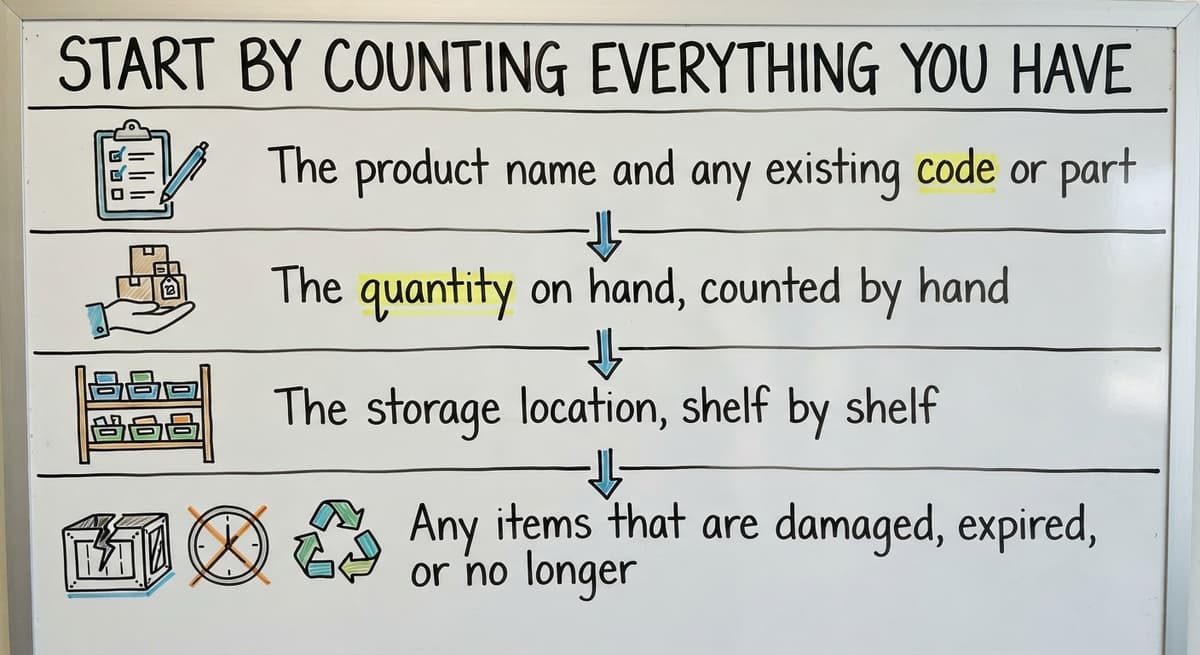
A full physical count is the only honest starting point. Any system you build on top of bad data will produce bad results. Before you set up anything new, walk the warehouse and write down what is actually there.
For each item, record:
- The product name and any existing code or part number
- The quantity on hand, counted by hand
- The storage location, shelf by shelf
- Any items that are damaged, expired, or no longer sold
A simple spreadsheet handles this first count well. You are not building a permanent system yet. You are getting a clean picture of what you own. Pull damaged or obsolete stock aside. It should not live in your active inventory records.
Name Every Item Before You Touch Any Technology
GS1, the global body that sets barcode standards, recommends that every item in a count be uniquely identified before scanning begins, which means your naming has to come before your technology. A SKU, or stock keeping unit, is a short code you assign to each product so your records and your shelves use the same language.
Write one down for every item during your physical count, and you will never confuse two similar products again. Once the count is done and every item has a name, you have a baseline. Every step that follows builds on that number.
What Is a SKU and How Do I Create One?
A SKU, or stock keeping unit, is a short code you assign to each product so your records and your shelves use the same language. Write one down for every item during your physical count, and you will never confuse two similar products again.
Build a SKU Format That Anyone Can Read
A good SKU format uses a few short segments separated by dashes. Each segment carries meaning. Here is a simple example for a wholesale distributor:
CAT-SUPPLIER-SIZE-COLOR
So a medium blue shirt from supplier ACM in the apparel category becomes: APP-ACM-M-BLU
Keep each segment to 2 to 4 characters. Avoid spaces and special characters. Consistent naming prevents duplicate entries, which are one of the most common causes of phantom stock.
Barcodes can come later. Start with a naming convention your whole team can follow without a scanner. Once SKUs are stable, adding barcodes is straightforward because the code already exists.
Why Do Consistent Codes Matter More Than Fancy Tools?
One person calling a product "Blue Shirt M" and another calling it "Shirt-Blue-Medium" creates 2 separate line items in a spreadsheet. You now have split stock records for the same item. Multiply that across hundreds of products and your count becomes unreliable fast.
Write your SKU format down. Put it somewhere every team member can see it. Make it the rule from day one.
Is the comparison easier when one option is built for you?
Yes. Off-the-shelf means fitting your process to the software, and custom is the other way round. The first look costs nothing.
Book a callChoose a Storage System That Matches Your Space
Physical layout is part of your inventory system. A shelf that no one can find is the same as a shelf that does not exist.
Label every shelf, bin, and aisle with a code that matches your tracking records. If your spreadsheet says an item is in location B3-S2, that label should be on the shelf in plain sight.
Anyone new to the warehouse should be able to find any item in under 2 minutes.
Group products in a way that reflects how you actually work:
- Fast-moving items go closest to the packing or shipping area to cut walking time
- Products from the same supplier can share a zone to make receiving faster
- Hazardous or fragile items need their own clearly marked section
Keep Physical Layout and Records in Agreement
The rule is simple: the physical layout and the tracking record must agree at all times. When they drift apart, picking errors follow. Walk the warehouse weekly in the early weeks and check that labels match records.
Implement FIFO by arranging shelves so older stock is always picked first, and mark dates where needed. A layout that made sense when you had 100 SKUs may need adjustment at 300. Revisit the arrangement whenever a zone becomes congested or pick times start to climb.

Pick the Right Tracking Method for Your Size
The right tool is the one that matches your current volume, not the one you might need in 3 years. Three options cover most small businesses.
| Method | Best for | Main limit |
|---|---|---|
| Spreadsheet | 1 user, under 200 SKUs | Breaks with multiple editors or high order volume |
| The accounting software inventory | Small teams already using a standard accounting package for accounting | Limited receiving and picking workflows |
| Dedicated inventory software | Higher volume, multiple users, complex locations | Higher cost and setup time |
Spreadsheets work at very small scale. They break when 2 people edit the same file at once, or when you need to track items across more than one location. Version conflicts create count errors that are hard to trace.
When Do the Accounting Software and Dedicated Software Each Make Sense?
The accounting software inventory features suit many small businesses that already use the accounting software for their books. You get basic stock tracking without a second system.
The accounting software inventory limitations show up when you need detailed receiving workflows, bin-level locations, or real-time picking lists. Dedicated inventory software solves those gaps but adds cost and a learning curve. Match the tool to where you are now.
What does it look like running on your own process?
The first thing you see is it running on your own process, at no build cost. The subscription starts once it is live and doing the job, not before.
Book a call
How Do I Know When to Reorder Stock?
Set a reorder point for every product, and your tracking system will tell you when to buy before you run out. A reorder point is the quantity at which you place a new order.
The Simple Reorder Formula
The math is straightforward:
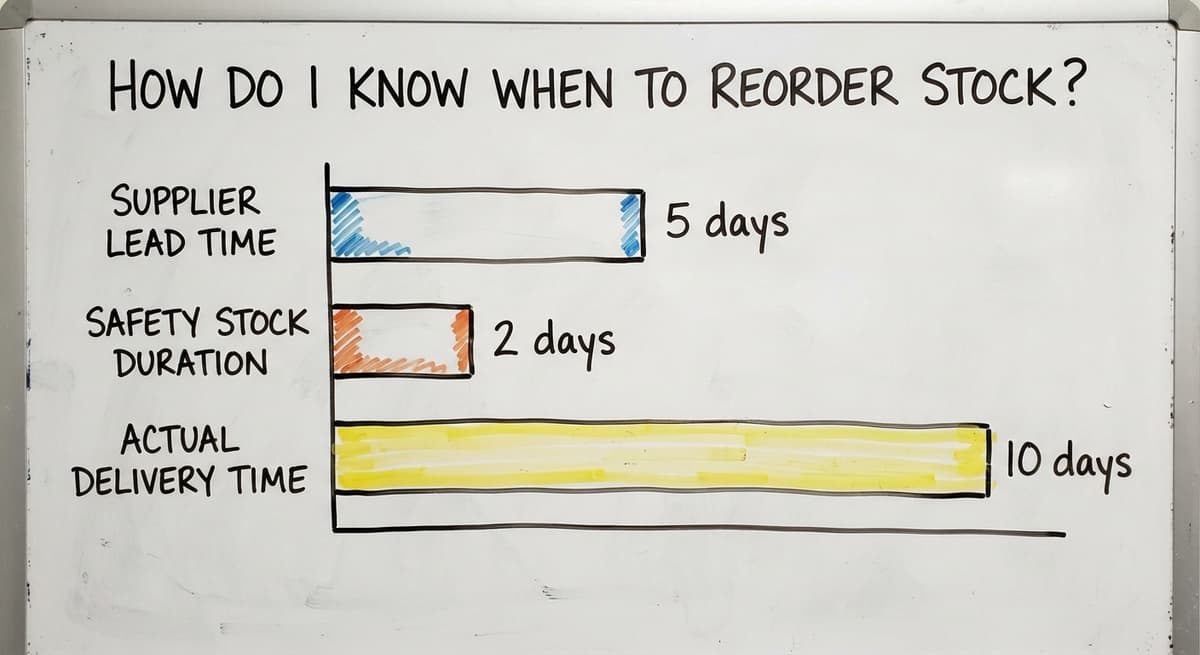
Reorder point = (average daily sales) x (supplier lead time in days) + safety stock
For example: you sell 10 units a day of a product. Your supplier takes 5 days to deliver. You want 2 days of safety stock for unexpected demand.
Reorder point = (10 x 5) + (10 x 2) = 70 units
When stock drops to 70, you order. You will not run out before the next delivery arrives.
Write reorder points into your tracking system as alerts. Review them every season, and any time a supplier changes their lead time. A reorder point based on a 5-day lead time is wrong if that supplier now takes 10 days.
Use the FIFO Method to Reduce Waste
FIFO stands for First In, First Out. Older stock ships before newer stock, which prevents items from sitting until they expire or go out of date.
FIFO matters most for perishables, dated goods, and anything with a shelf life. It also applies to non-perishable products.
An item that sits at the back of a shelf for 2 years may be discontinued, damaged by age, or simply forgotten. Moving older stock first keeps inventory fresh and reduces write-offs.
Physical storage has to support FIFO by design. Load new stock from the back of the shelf. Pick from the front. If your racking does not allow that, mark older stock with a date sticker and train staff to pick the earliest date first.
FIFO is also an IRS-recognized inventory valuation method. If you use it in your warehouse, your accountant needs to know so your books match your physical practice.

Conduct Regular Cycle Counts Instead of One Big Annual Count
A cycle count checks a portion of your inventory on a set schedule rather than everything at once. It catches errors early, before small discrepancies grow into large ones.
A practical schedule for most small warehouses:
- Count your top 20% of SKUs by value or volume every week
- Count mid-range items monthly
- Count slow-moving or low-value items quarterly
That way, your highest-risk stock gets checked most often. Document every count result, including the date, who counted, and any variance found.
Investigate variances immediately. A count that shows 50 units when the record says 60 has a reason. Find it before the next count.
Cycle counts keep accuracy a daily habit rather than an annual scramble. They also surface process problems, such as items being put away in the wrong location, before those problems multiply.
How Do I Get My Team to Follow the Inventory System Consistently?
Train every person who touches inventory, and write the procedures down so training does not live only in someone's head. A system that depends on one person's memory is one resignation away from breaking.
Write Procedures in Plain Language
For each key process, a one-page checklist beats a long policy document. Cover:
- How to receive a delivery: count items, check against the purchase order, record in the system, put away in the correct location
- How to pick an order: pull from the correct bin, record the pick, flag any shortage immediately
- How to handle a return: inspect, record the reason, decide whether the item goes back to stock or to a write-off pile
One person entering a receipt differently from another creates phantom stock, which is inventory that appears in the records but does not exist on the shelf. Short checklists make the right steps obvious and leave less room for variation.
Post checklists at the receiving dock and at packing stations. Review them when a new person joins. Update them when a process changes.

Connect Inventory to Your Sales and Purchasing Records
Inventory records that do not talk to sales orders create overselling. You commit stock to a customer that has already been sold to someone else.
The FTC's Mail, Internet, or Telephone Order Merchandise Rule requires sellers to ship within the time they promise or notify the customer. Accurate stock records are what make that possible.
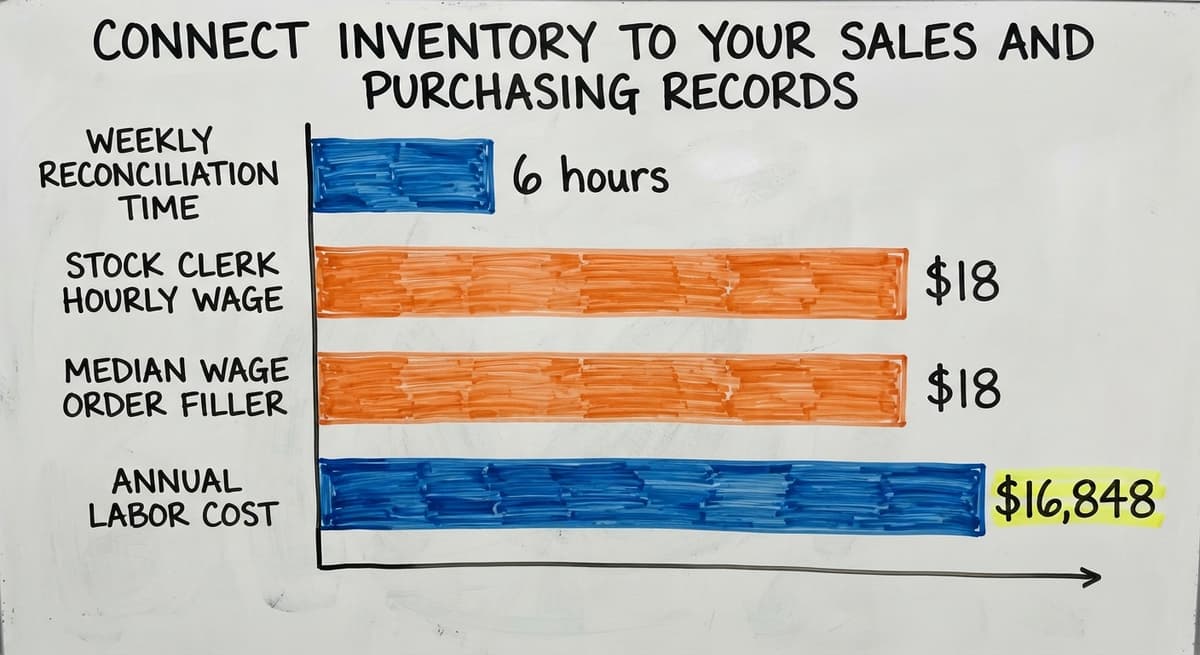
When purchase orders, sales orders, and stock counts live in separate spreadsheets or inboxes, someone has to reconcile them by hand. Consider 3 people each spending 6 hours a week on manual reconciliation.
BLS data puts the median wage for stock clerks and order fillers at around $18 an hour. That is 3 x 6 x 52 x $18 = $16,848 a year in labor just to keep three separate records from drifting apart.
Not sure this is the right shape for your operation?
The call is free. Describe how the work runs today. We map it on a call and show you what it would look like built around that, before you spend anything.
Book a callWhat Does a Connected System Actually Remove?
Connecting these workflows is where most small businesses recover the most time. When a sales order automatically reduces available stock, and a purchase order automatically updates expected receipts, the reconciliation step disappears. This is where custom operational software for distributors replaces the manual layer.
A connected system does not just save time. It removes the category of error that manual reconciliation was trying to catch.

When Is a Spreadsheet No Longer Good Enough for Inventory Tracking?
Replacing spreadsheet with a real inventory system becomes necessary when the cost of errors exceeds the cost of the tool. Watch for these signs:
- Stockouts happen regularly even though your records say you have stock
- Count discrepancies appear every cycle and take hours to trace
- More than 1 person edits the same spreadsheet, and conflicts overwrite each other
- Staff spend more time fixing the records than doing the actual work
- Sales orders and purchase orders live in different files with no automatic link
You do not need a full ERP to fix this. A purpose-built system that connects to the accounting software and matches your actual workflow can solve it without a 6-month rollout.
The goal is to replace only the parts that are broken, not rebuild everything from scratch.
How Do You Choose the Right Replacement Tool?
Inventory management software for small business ranges from lightweight tools at a few hundred dollars a year to full platforms. The right choice depends on your SKU count, your team size, and whether your sales and purchasing records need to connect in real time.
The NIST Manufacturing Extension Partnership advises small manufacturers and distributors to match their supply chain tools to their actual complexity, not to the complexity they expect to reach someday. That is practical advice. Buy for now and upgrade when the business demands it.

Quick-Start Checklist for Organizing Small Business Inventory
Use this as a one-page action plan. Each step builds on the one before it.
- Complete a physical count. Count every item by hand. Write down the product name, quantity, and location. Pull damaged or obsolete stock aside.
- Assign SKUs to every product. Build a consistent naming format and apply it to every item in your count.
- Label all storage locations. Every shelf, bin, and aisle gets a code that matches your tracking records.
- Choose a tracking method. Spreadsheet for very small operations, the accounting software inventory for teams already on the accounting software, dedicated software when volume or users exceed what a spreadsheet can handle.
- Set reorder points. Calculate average daily sales multiplied by lead time, add safety stock, and write the number into your system. A reorder point is the quantity at which you place a new order, set low enough that stock arrives before you run out.
- Implement FIFO. Arrange shelves so older stock is always picked first. Mark dates where needed.
- Schedule cycle counts. Count your fastest-moving or highest-value items weekly. Document every result and investigate every variance.
- Train staff with written checklists. Cover receiving, picking, and returns. Post checklists where the work happens. Write the procedures down so training does not live only in someone's head. A system that depends on one person's memory is one resignation away from breaking.
- Connect inventory to sales and purchasing. Stop reconciling by hand. Link the records so a sale reduces stock automatically and a purchase order updates expected receipts.
When Do You Add Tools, and When Do You Call for Help?
The right system depends on your operation's size and complexity. A 3-person team with 150 SKUs needs a different setup than a 20-person warehouse with 2,000 SKUs. Start with the steps above and add tools only when a specific gap makes itself clear.
If your records and your physical shelves are regularly out of sync, and manual fixes are eating staff hours, that is the signal to look at a connected system. The Software Society builds custom workflow systems that replace the manual reconciliation layer without forcing you to abandon the tools you already use.
Frequently asked questions
Where do I start when my inventory is completely disorganized?
Start with a full physical count before touching any software or system. Walk the warehouse, count every item by hand, and write down the product name, quantity, and location.
Pull damaged or obsolete stock aside. A clean count gives you a baseline that every other step builds on. A spreadsheet is fine for this first pass.
What is the simplest way to track inventory for a small business?
A spreadsheet with columns for SKU, product name, quantity on hand, location, and reorder point covers the basics for most small operations.
Update it every time stock moves in or out. It breaks down when multiple people edit it at once or when order volume grows, but it is the right starting point for a business with under 200 SKUs and one or two users.
Can I manage inventory in the accounting software or do I need separate software?
The accounting software inventory works well for small teams that already use a standard accounting package for accounting. It tracks quantities and ties stock to sales and purchase orders inside one system. It runs short when you need bin-level locations, detailed receiving workflows, or real-time picking lists.
If those gaps are costing you time or causing errors, a dedicated inventory tool is worth considering.
How often should I count my inventory?
Use cycle counts rather than one big annual count. Check your fastest-moving or highest-value items every week. Count mid-range items monthly and slow-moving items quarterly.
Document every count and investigate any variance right away. This approach catches errors early and keeps accuracy a regular habit rather than a once-a-year scramble.
What is FIFO and do I need to use it?
FIFO stands for First In, First Out. It means older stock ships before newer stock. It is most important for perishables and dated goods, but it applies to any product that can become obsolete or damaged over time.
Arrange shelves so staff always pick from the front and restock from the back. FIFO is also an IRS-recognized valuation method, so your accountant should know if you use it.
How do I stop running out of stock or overstocking?
Set a reorder point for every product using this formula: average daily sales multiplied by supplier lead time in days, plus a small safety stock buffer. When stock hits that number, place a new order.
Review reorder points every season and whenever a supplier changes their delivery time. Writing these numbers into your tracking system so they trigger alerts removes the guesswork.
When is a spreadsheet no longer good enough for inventory tracking?
A spreadsheet is no longer enough when stockouts happen regularly despite records showing stock on hand, when more than one person edits the file and conflicts overwrite each other, or when staff spend several hours a week reconciling inventory against sales and purchasing records.
At that point, the cost of errors and labor exceeds the cost of a proper system.
How do I get my team to follow the inventory system consistently?
Write down the key steps for receiving, picking, and returns as short checklists, not long policy documents. Post them where the work happens. Train every new team member on the same steps.
Review the checklists when a process changes. One person doing a step differently from another creates phantom stock, which is inventory that appears in the records but is not actually on the shelf.
How often should a small business count inventory?
Count the fast movers weekly, everything else monthly, and the whole stockroom once a year for the accountant. Cycle counting 20 items a day keeps the record within 2 percent without ever closing for a count.
How do I create SKU numbers for my products?
Use 6 to 12 characters with a fixed structure: a 2-letter category, a 3-digit product number, and a variant code for size or colour. Never reuse a code, never encode the supplier, and print the SKU under every barcode.
What is the best way to set reorder points?
Average daily sales multiplied by supplier lead time in days, plus safety stock.
A product selling 4 a day on a 10-day lead time with 3 days of safety stock reorders at 52 units. Review the numbers each quarter, because both sales and lead times drift.
How can I reduce excess or slow-moving inventory?
Flag anything with no sale in 90 days, mark it down or bundle it before it reaches 180, and cut the reorder point on any item that has been marked down twice. Most excess is a reorder point that was set once and never revisited.
What is in a free first look?
A 30 minute call, your operation mapped, and a clear picture of what we would build. No obligation and nothing to install.
Book a callRelated guides
The rest of this guide, for the parts of the job this page does not cover.
Guides
- Inventory Tracking Software for Small Business
- Inventory Control Software for Small Business
- Inventory Management Small Businesses
- Inventory Tracking Systems for Small Businesses
- Simple Inventory System for Small Business
- Best Inventory Management Software for Small Businesses
- Inventory Sales Software Small Business
- Small Business Inventory Management System
- Inventory Control for Small Business
- Inventory System for Small Business
- Small Business Inventory Management
- Small Business Stock Management Software
- Wms for Small Business
- Accounting and Inventory Software for Small Business
- Free Inventory Management Software for Small Business
- Small Business Warehouse Management System
- Erp System for Small Businesses
- Warehouse Management System for Small Business
Common questions
- How to Keep Track of Inventory Small Business
- How to Manage Inventory for Small Business
- What is the Best Inventory Management Software for Small Business
- Why is Inventory Management Important for Small Businesses
- What is the Best Inventory Management System for Small Businesses?
- How to Keep Track of Inventory