


Inventory System For Small Business
An inventory system for small business is a record of what stock you hold, where it sits, and when to reorder, updated by a scan or an entry as goods move. For a team of 2 to 30 people it costs $50 to $300 a month packaged or $8,000 to $25,000 once for a build, and pays back in the first year at about 500 orders a month.
Published 10 August 2026. Reviewed and updated 15 September 2026.
Reviewed August 2026. Each figure comes from the assumptions stated beside it, so you can substitute your own and the arithmetic still holds.
Reviewed and updated 15 September 2026.
Book a callWhat Does an Inventory System for Small Business Actually Do?
An inventory system tracks your stock from the moment it arrives to the moment it leaves. It tells you what is on hand, what is on order, and what is running low. That is its core job.
Small business inventory management does not need to look like an enterprise ERP. Those systems target companies with hundreds of users and complex supply chains.
A small operation needs something leaner: accurate counts, clear alerts, and a record that connects to the tools you already use.
Set realistic expectations. A good system will not run your warehouse for you. It will give your team the right information at the right time so they can do their jobs without guessing.
Would you rather have it built around your operation?
The first look is free. If you would rather not compare products, describe how your operation already works and we build the system around it.
No build cost. You see it running on your own process first, and the monthly subscription starts only once it is live.
Book a callWhy Do Spreadsheets and Paper Stop Working?
Most small businesses start with a spreadsheet. It works fine at first. Then the product list grows. Two people edit the file at the same time.
A row gets deleted. A count from last Tuesday is still sitting there as if it is current.
The breaking point arrives quietly. A customer orders something you think you have. You do not. Or you find a pallet of stock that nobody recorded.
GS1, the global body behind barcode standards, notes that barcodes and scanning systems exist precisely because manual data entry creates errors at scale. "The barcode is the most widely used automatic identification technology in the world," GS1 states, and the reason is simple: humans miscopy numbers.
Paper sheets get lost. Spreadsheets drift from reality. The signal that it is time to move on is when your team spends more time fixing the tracking system than using it.
What Does Inventory Mismanagement Actually Cost a Small Business?
Inventory errors cost you in 3 ways: tied-up cash, lost sales, and wasted staff time. Those costs compound quickly.
Overstock locks cash in product that sits on a shelf. Stockouts push customers to a competitor.
The US Federal Trade Commission requires businesses to ship orders when promised, which means an inaccurate count is not just an operational problem. It can become a compliance one.
The IRS adds another layer. Publication 538 states: "To figure taxable income, you must value your inventory at the beginning and end of each tax year." That means your count is a legal obligation, not a preference.
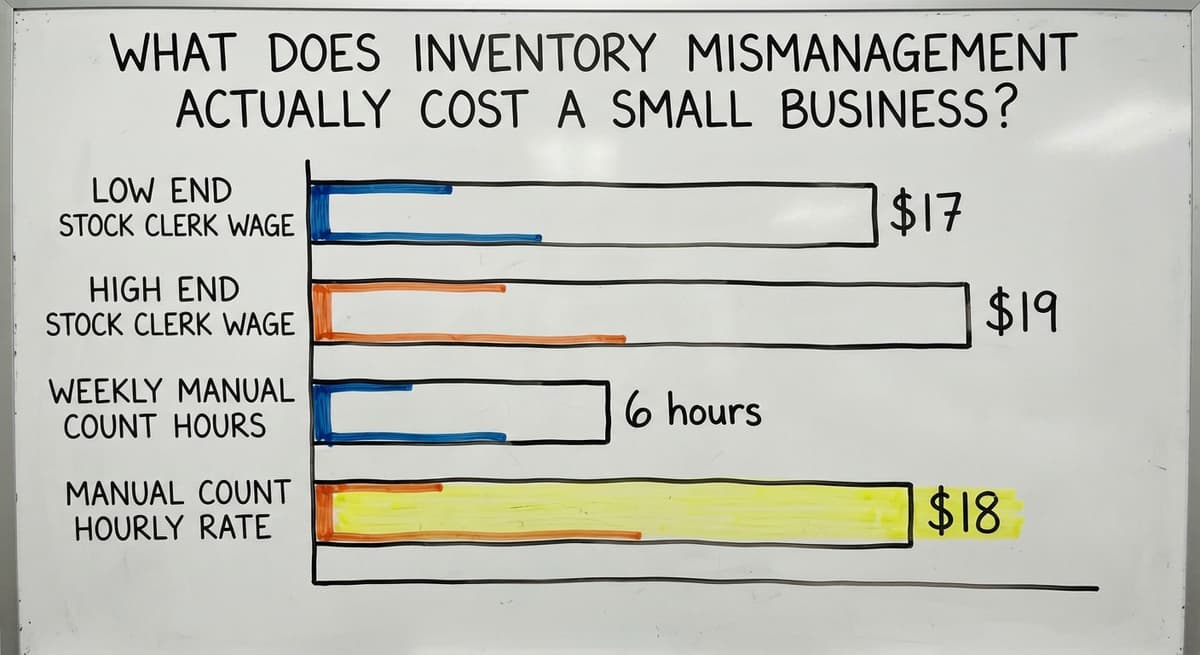
Consider the staff cost alone. The Bureau of Labor Statistics reports that stock clerks and order fillers earn a median wage around $17 to $19 per hour.
If 3 people spend 6 hours a week on manual counts at $18 per hour, that is $16,848 a year spent on a task a system could handle in minutes.
Errors in stock counts also ripple into the accounting software and billing. A wrong count produces a wrong invoice. A wrong invoice creates a conversation nobody wants to have.
Types of Inventory Systems Available to Small Businesses
Not every operation needs the same solution. Here is a plain breakdown:
| Type | Best for | Weakness |
|---|---|---|
| Paper and manual | Tiny operations, few SKUs | Does not scale, easy to lose |
| Spreadsheet | Early-stage businesses | Breaks with volume or multiple users |
| Off-the-shelf software | Standard retail or e-commerce flows | May not match your workflow |
| Custom-built system | Unique processes, existing tool stack | Takes longer to build |
The right choice depends on how many products you carry, how many people touch inventory, and how closely your process matches what off-the-shelf tools assume.
Off-the-Shelf Software vs Custom-Built
Off-the-shelf inventory software gets you started fast. You sign up, load your products, and begin tracking. That speed is real. The trade-off is that the software was built for a generic workflow, not yours.
Custom inventory software is built around how you already operate. Your receiving process, your pick logic, your naming conventions. Nothing needs to change to fit the tool.
Migration risk is real with off-the-shelf tools. Moving your product list, historical data, and team habits into a new system takes time.
If the system does not match your workflow, your team will work around it, which defeats the purpose.
For businesses with a non-standard process, or those that need to connect with existing tools like the accounting software or an order system, custom operational software for small business delivers better long-term fit than a subscription product that almost works.
Short-term convenience matters. So does not having to rebuild everything in 18 months because the tool stopped fitting.
Key Features to Look for in a Small Business Inventory System
The features that matter are the 6 your team will use every day; extras add cost and confusion.
- Real-time stock visibility: Know what is on hand right now, not as of last night's sync
- Low-stock alerts and reorder triggers: The system tells you when to order, not your gut
- Barcode or SKU tracking: Every product has a unique identifier so counts are clean
- Reporting and history: See what sold, what sat, and what came in over any period
- User access controls: A warehouse picker does not need the same view as the owner
These 5 features cover the core job. Anything beyond them should solve a specific problem you already have.
Is the comparison easier when one option is built for you?
Yes. Off-the-shelf means fitting your process to the software, and custom is the other way round. The first look costs nothing.
Book a callAccounting Integration Is Not Optional
Most small businesses already run a standard accounting package for accounting. A good inventory system works alongside the accounting software, not instead of it.
The goal is zero double entry. When a shipment arrives and gets logged in your inventory system, that update should flow into the accounting software automatically.
When an order ships, the cost of goods updates without anyone typing it twice.
accounting integration for wholesale distributors matters even more because purchase orders, supplier invoices, and customer billing all need to stay in sync.
A gap between your inventory count and your books creates reconciliation work every month.
Some off-the-shelf tools offer a the accounting software sync that works for simple setups.
If your process is more complex, a custom connection built specifically for your workflow will be more reliable and require less manual correction.
How Does Inventory Connect to Your Warehouse or Fulfilment Floor?
Every physical movement in your warehouse is a record in the system, or the count is wrong.
Receiving, put-away, picking, and shipping all touch inventory counts. If any of those steps happens without a system update, your numbers drift.
The system should reflect physical reality in real time. That means staff can look at a screen and trust what they see, rather than walking over to ask a colleague.
Warehouse management for small business starts here: replacing verbal hand-offs and memory with a shared, live record. Fewer errors happen when the information is visible to everyone who needs it.
Do Small Warehouses Need Barcode Scanning?
Barcode scanning reduces count errors for any operation with more than a few dozen SKUs, regardless of size. The hardware is affordable.
A basic USB or Bluetooth scanner costs under $100. A mobile device with a scanning app costs nothing extra if your team already carries phones.
GS1 sets the global standards for barcodes that make scanning work across suppliers, carriers, and systems. If your products already carry a barcode, you can start scanning today.
Scanning is worth adding when:
- Your team makes regular count errors
- You receive shipments with many line items
- You pick orders from multiple locations
Scanning is not yet needed when you carry fewer than 30 products and one person manages all stock movement. Start simple and add scanning when the errors justify it.

Managing Multiple Locations or Storage Areas
Even a single warehouse has zones. Shelf A, Bin 3, the overflow rack near the dock.
Without location tracking, your system knows you have 40 units of a product. It does not know where they are.
Location tracking speeds up picking because staff go directly to the right spot instead of searching. It also makes receiving faster because put-away has a defined destination.
As your operation grows from one storage area to multiple sites, the system scales with you. The NIST Manufacturing Extension Partnership recommends clear location and labelling logic as a foundation for any supply chain process.
Start with zones in one building. Add a second site later without rebuilding the system from scratch.
Reorder Points and Low-Stock Alerts
A reorder point is the stock level at which you need to place a new order. It accounts for how long your supplier takes to deliver and how fast you sell. When stock drops to that number, the system alerts you.
Automated alerts replace the sticky note and the gut-feel reorder method. They also prevent the scenario where someone notices you are out of a product only after a customer asks for it.
Setting a reorder point takes 3 inputs:
- Average daily sales for that product
- Supplier lead time in days
- A small buffer for unexpected demand
Multiply daily sales by lead time, add your buffer, and that is your reorder point. A system does this calculation for every product and watches the numbers so you do not have to.
What does it look like running on your own process?
The first thing you see is it running on your own process, at no build cost. The subscription starts once it is live and doing the job, not before.
Book a callInventory Reporting That Actually Helps You Decide
Good inventory reporting is 4 reports that answer purchasing questions before they become problems.
The reports that matter most:
- Stock on hand vs stock on order: What you have and what is coming
- Slow-moving and dead stock: Products that tie up cash without selling
- Turnover rate by product or category: How fast each item moves
The US Census Bureau tracks the inventories-to-sales ratio for wholesale firms nationally, which gives context for whether your stock levels are in line with your sales pace. Your own reports give you the same view at your scale.
A system with weak reporting forces you to export data and build your own analysis. That is extra work every time you need to make a buying decision. Strong built-in reports cut that work to a few clicks.

How Do Small Teams Use an Inventory System Day to Day?
A typical day for a warehouse worker using a good system is 5 steps:
- A shipment arrives. The worker scans each item. The system updates counts automatically.
- An order comes in. The system generates a pick list with locations.
- The worker picks the items, scans them out, and marks the order complete.
- The system updates stock levels and flags any product that has dropped below its reorder point.
The system reduces verbal check-ins and paper trails. The owner does not need to ask how much stock is left. The answer is on a screen.
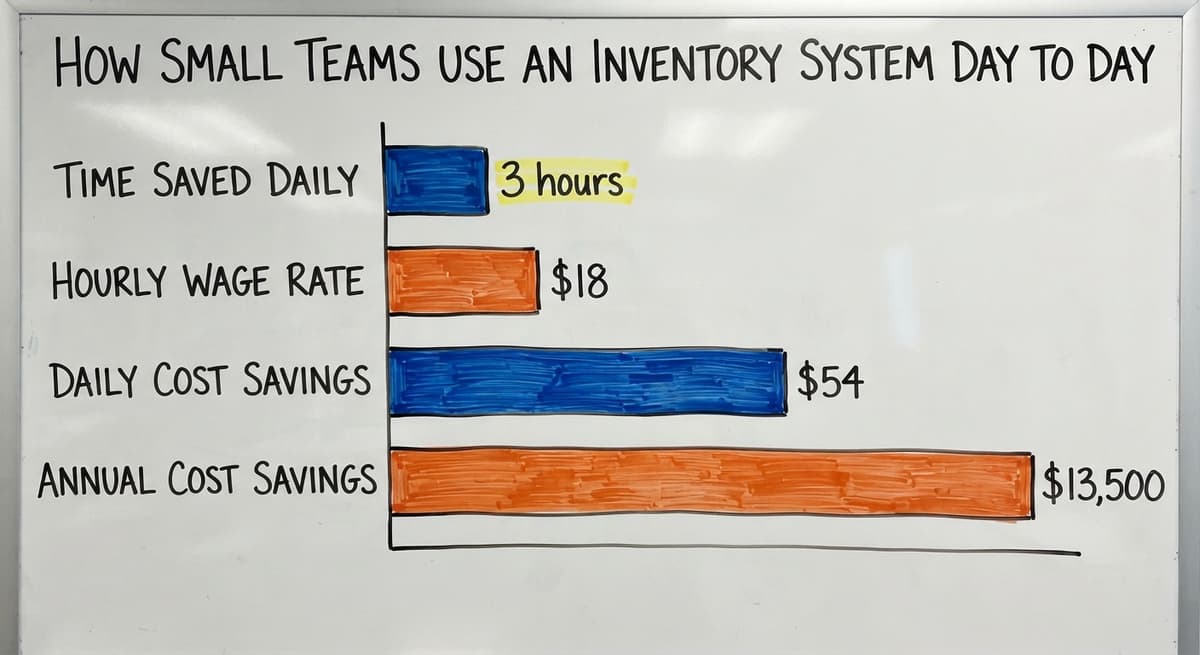
Time saved per shift adds up. If scanning and system updates replace 45 minutes of manual logging per worker per day, a team of 4 saves 3 hours of paid time daily.
At $18 per hour, that is $54 a day or roughly $13,500 a year.
Getting Your Team to Actually Use the System
Adoption is the hardest part of any new system. A tool that nobody uses does not solve anything.
A system built around existing habits gets used. If your team already receives stock in a certain order, the system should match that flow, not demand a new one.
Keep the interface role-specific. A picker needs a pick list and a scan prompt. They do not need purchasing reports or supplier contacts. Show each person only what they need.
Train on the job, not in a classroom. Walk through the first 5 receiving sessions together. Answer questions as they come up. People learn faster when the task is real.
An order management system for small business that fits existing habits will be used from day one. One that requires a workflow change will be abandoned by week two.
How Long Does It Take to Set Up an Inventory System for a Small Business?
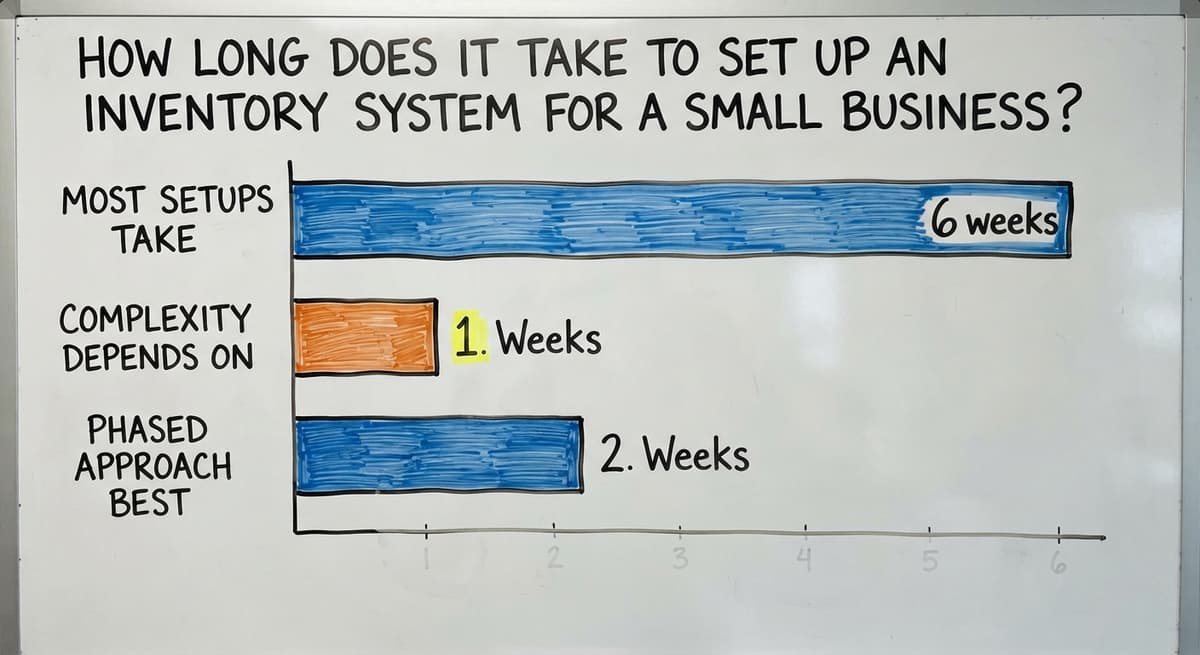
Most small business inventory setups take 2 to 6 weeks from first product load to daily use. The range depends on how complex your product list is and how many integrations you need.
A phased approach works best:
- Weeks 1 and 2: Load products, set starting counts, test with one user
- Weeks 3 and 4: Train the full team, run the new system alongside the old one
- Week 5 onward: Cut over fully, review and adjust after the first month
What slows implementation down is incomplete product data. If your SKUs, descriptions, and units of measure are inconsistent, clean that up before you start. It is faster to fix a spreadsheet than to fix a live system.
A custom build takes longer than an off-the-shelf setup, but it arrives ready for your workflow. Off-the-shelf tools go live faster and then require weeks of workarounds.

What Should You Avoid When Choosing an Inventory System?
The wrong system costs more than no system. Here is what to watch for:
- Systems that require you to change your whole operation: If the tool demands a new receiving process, a new naming system, and new staff roles, the tool is wrong for you
- Features you will never use: Every unused feature adds complexity and training time
- Hidden costs: Ask about migration fees, annual price increases, and per-user charges before you sign anything
- Overbuying for today: A system built for 500 SKUs and 20 users is not better for a 50-SKU operation. It is just harder to use
Replacing spreadsheet with a custom business system is the right move when off-the-shelf tools keep adding features you do not need while missing the one thing you do.
When Does a Custom Inventory System Make More Sense?
Off-the-shelf software fits a lot of businesses, and it does not fit all of them.
A custom inventory system makes sense when:
- Your workflow does not match standard software categories
- You need the system to connect with the accounting software, your order platform, or your carrier
- Off-the-shelf options require too many workarounds to function correctly
- You want the system to grow with your operation without a platform change
The real question is whether you are bending your operation to fit the software or the software fits your operation. The second option is always cheaper in the long run.
What is in a free first look?
A 30 minute call, your operation mapped, and a clear picture of what we would build. No obligation and nothing to install.
Book a callInventory System for Wholesale Distributors
Wholesale has needs that standard inventory tools miss. Bulk units, case packs, and customer-specific pricing all require logic that retail-focused software does not carry.
A wholesale inventory system needs to handle:
- Purchase orders and supplier lead times
- Multiple units of measure (each, case, pallet)
- Customer-specific pricing tiers
- Inbound and outbound volume at the same time
The Census Bureau's Monthly Wholesale Trade data shows that inventory-to-sales ratios in wholesale shift with demand. A system that gives you real-time visibility helps you respond to those shifts without over-ordering or running short.
accounting integration for wholesale distributors keeps your supplier invoices, customer billing, and stock counts in sync without manual reconciliation.

Inventory System for Fulfilment Centres
Fulfilment centres move fast. Accuracy is the main metric because an error at the pick stage becomes a wrong shipment, a return, and a damaged customer relationship.
Pick lists, packing slips, and shipping labels should all tie directly to inventory. When an item is picked, the system deducts it.
When a shipment goes out, the order closes. Nothing waits for someone to update a spreadsheet.
If you store inventory for multiple clients, the system needs to keep each client's stock separate while giving you a single view of the whole facility. That is a layer of complexity that most off-the-shelf tools handle poorly.
Fulfilment inventory management is where the cost of errors is highest and where a well-built system pays back fastest.
How Do You Know If Your Current System Is Good Enough?
There are 6 questions to ask yourself:
- Do your stock counts match your physical stock more than 95% of the time?
- Can any team member check stock levels without asking someone else?
- Does a new shipment get recorded the same day it arrives?
- Are your the accounting software numbers and your inventory numbers always in sync?
If you answered no to any of these, your current system is holding you back. Good enough stops being good enough the moment errors start costing you sales or staff time.
A simple self-audit: pick 10 random products. Count them physically. Compare to your system. If more than 1 is wrong, the gap is worth fixing.
How Do You Set Up an Inventory System for Your Small Business?
Start with a clean count of what you have, then choose a system that matches your operation. Skipping the count first is the most common setup mistake.
- Count and categorise what you have. Every product needs a name, a SKU, a unit of measure, and a current quantity.
- Choose your system type. Use the table earlier in this guide to match your scale and workflow.
- Load your product list and starting counts. This is the migration step. Clean data in means clean data out.
- Train your team on daily use. Focus on the tasks they do every day: receiving, picking, and shipping.
- Review and adjust after the first month. Check your counts against physical stock. Fix any gaps in the process before they become habits.
The NIST Manufacturing Extension Partnership recommends a phased approach to supply chain process changes rather than a full cutover. Start with core tracking and add features once the basics are solid.

Common Questions About Inventory Systems for Small Business
How much does an inventory system cost? Off-the-shelf tools range from $30 to $300 per month depending on features and users.
A custom-built system has a higher upfront cost but no recurring licence fee. The right comparison is total cost over 3 years, including staff time saved.
Can I keep using the accounting software? Yes. A good inventory system works alongside the accounting software. It handles stock tracking while the accounting software handles accounting. The two sync so you do not enter data twice.
Do I need a barcode scanner? Not on day one. Start with manual entry if your volume is low.
Add scanning when count errors become frequent or your product list grows past 50 to 100 SKUs.
What if my team is not tech-savvy? Keep the interface simple. A well-designed system shows each user only what they need. Most warehouse teams pick up a scan-and-confirm workflow in a single shift.
How long before I see results? Most operations see fewer count errors within the first 2 weeks.
The bigger gains in staff time and purchasing accuracy show up after the first full month of consistent use.

Next Steps for Getting the Right Inventory System
The path from manual chaos to a working system is not complicated. It starts with an honest look at where your current process breaks down.
Write down the 3 problems that cost you the most time or money right now. Wrong counts, missed reorders, the accounting software gaps. Those 3 problems are your requirements list.
From there, the choice between off-the-shelf and custom becomes clearer. If a standard tool solves all 3, use it. If it solves 2 and creates a workaround for the third, look harder.
The Software Society works with small warehouses, wholesale distributors, and fulfilment operations that already run on the accounting software and need a system built around how they actually work. The team is Columbus-based and works at small business scale, not enterprise scale.
If you want to talk through your current setup and what a practical inventory system would look like for your operation, start there.
No pitch, no demo deck. Just a clear look at what you have and what would actually help.
Frequently asked questions
Frequently asked questions
Which inventory system is best for small business?
There is no single best answer because the right system depends on your workflow, product count, and existing tools. The off-the-shelf options work well for standard retail or e-commerce flows. A custom-built system fits better when your process is non-standard or you need tight accounting integration.
The criteria that actually decide it: how closely the tool matches your receiving and picking process, whether it connects to the accounting software without manual steps, and whether the total cost over 3 years is lower than the staff time you currently waste on manual tracking.
Is there a free inventory software?
Yes. Two or three of the point-of-sale and inventory apps offer free versions with limited features. Free tools work for very small operations with fewer than 100 SKUs and a single user. They tend to cap the number of orders or products, lack accounting integration, and offer limited reporting.
If your operation has grown past those limits, the cost of a paid tool is less than the cost of the errors a free tool cannot prevent.
How to keep track of inventory in a small business?
Start with a complete count of every product you carry, including a SKU and unit of measure for each. Then choose a tracking method that matches your volume: a spreadsheet for very small operations, off-the-shelf software for standard workflows, or a custom system if your process is unique.
The key habits are: log every receipt the day it arrives, record every shipment before it leaves, and run a physical count against your system at least once a month to catch drift early.
Can the accounting software do inventory?
The accounting software and the accounting software include basic inventory tracking. It works for simple product lists and straightforward sales. It does not handle barcode scanning, location tracking, pick lists, or multi-warehouse management.
Most small warehouses and wholesale distributors find that the accounting software inventory features cover accounting needs but fall short on the operational side. The better approach is a dedicated inventory system that syncs with the accounting software rather than trying to make the accounting software do both jobs.
What is the difference between off-the-shelf and custom inventory software?
Off-the-shelf software is pre-built for a general workflow. You start faster but may need to adjust your process to fit the tool. Custom software follows your specific receiving, picking, and reporting needs. It takes longer to build but requires no workarounds and grows with your operation.
The decision comes down to how closely your workflow matches what standard tools assume. If you spend more than a few hours a week working around an off-the-shelf tool, a custom build is worth the conversation.
How long does it take to set up an inventory system for a small business?
Most small business setups take 2 to 6 weeks from first product load to daily team use. The biggest variable is data quality. If your product list is clean and your starting counts are accurate, setup moves fast.
If SKUs are inconsistent or counts are unknown, clean the data first. A phased approach works best: core tracking in week one, full team training in weeks two and three, and a review after the first full month of use.
Do small warehouses need barcode scanning?
Not immediately, but most small warehouses benefit from it once they carry more than 50 SKUs or make regular count errors. Basic barcode scanners cost under $100.
If your products already carry a GS1 barcode, you can start scanning with no extra setup. Scanning is worth adding when manual entry errors are frequent, receiving takes too long, or picking mistakes are reaching customers.
How do I get my team to use the new inventory system?
Build the system around how your team already works rather than asking them to change their habits. Keep each user's view simple and role-specific. Train on real tasks during the first week, not in a classroom before the system goes live.
Follow up after the first 2 weeks to fix any steps that feel awkward. Teams adopt tools that make their day easier. If the system adds steps instead of removing them, adoption will stall.
What is the best free inventory software for a small business?
A hosted free tier for one user and a few hundred items, scanning with a phone camera.
The caps on users, locations, and orders are the product, so plan on the paid tier or a build at the second user or the first accounting sync.
How much does small-business inventory software cost?
Packaged tools run $50 to $300 a month, rising with users and locations.
A build scoped to one operation runs $8,000 to $25,000 once with $100 to $400 a month for hosting and support. Scanners add $150 to $400 per station.
How do I set up barcode inventory tracking?
Give every product a SKU and every shelf a location code, print Code 128 labels for both on a thermal printer, load the lists into the software, and run one full count scanning product and location together. From then on each receipt, move, and pick is a scan.
What inventory reports should a small business monitor?
Stock on hand by value, items below reorder point, items with no sale in 90 days, and cycle count accuracy.
Four reports, read weekly, cover purchasing, dead stock, and whether the record can be trusted.
Should I use a spreadsheet or inventory management software?
A spreadsheet until the second person needs to update it or the first physical count disagrees with it, which for most businesses is under a year.
Software from then on, because the spreadsheet's errors cost more in a month of emergency orders than the software does.
Not sure this is the right shape for your operation?
The call is free. Describe how the work runs today. We map it on a call and show you what it would look like built around that, before you spend anything.
Book a callRelated guides
The rest of this guide, for the parts of the job this page does not cover.
Guides
- Inventory Tracking Systems for Small Businesses
- Simple Inventory System for Small Business
- Small Business Inventory Management System
- Inventory Tracking Software for Small Business
- Inventory Control Software for Small Business
- Inventory Management Small Businesses
- Best Inventory Management Software for Small Businesses
- Inventory Sales Software Small Business
- Inventory Control for Small Business
- Small Business Inventory Management
- Small Business Stock Management Software
- Wms for Small Business
- Small Business Warehouse Management System
- Erp System for Small Businesses
- Warehouse Management System for Small Business
- Accounting and Inventory Software for Small Business
- Free Inventory Management Software for Small Business
- Warehouse Inventory Management Systems
Common questions
- How to Organize Inventory for Small Business
- How to Keep Track of Inventory Small Business
- What is the Best Inventory Management Software for Small Business
- Why is Inventory Management Important for Small Businesses
- How to Manage Inventory for Small Business
- What is the Best Inventory Management System for Small Businesses?