


Inventory Control For Small Business
Inventory control for small business is the set of routines that keep the stock count right. A reorder point per item, a cycle count each week, and a scan on every receipt and sale hold accuracy above 97 percent and cut stock on hand by 20 to 30 percent, with or without software. This guide, reviewed in September 2026, sets out how to set reorder points without guessing, run a count without shutting down, find your A, B, and C items, and extend the accounting software instead of replacing it.
Reviewed August 2026. Each figure comes from the assumptions stated beside it, so you can substitute your own and the arithmetic still holds.
Published 13 August 2026. Reviewed and updated 15 September 2026.
Book a callWhat Does Inventory Control for Small Business Actually Mean?
Inventory control is the day-to-day discipline of keeping your stock records accurate. It answers 3 questions: what do you have, where is it, and when should you order more?
Inventory management is the broader picture. It covers supplier relationships, demand planning, and warehouse layout. Inventory control sits inside that picture. It is the part you can act on this week.
The guide addresses operations managers and owners running a 5-to-50-person warehouse or distribution business. You probably use the accounting software.
You probably have at least one spreadsheet that only one person fully understands. That is a normal starting point, not a failure.
Would you rather have it built around your operation?
The first look is free. If you would rather not compare products, describe how your operation already works and we build the system around it.
No build cost. You see it running on your own process first, and the monthly subscription starts only once it is live.
Book a callWhy Do Small Businesses Struggle with Inventory Control?
Manual tracking works when order volume is low. As volume grows, the cracks appear fast.
Staff start relying on memory. One person knows where the slow-moving items live. Another remembers the supplier lead times. When either person is out sick, the system breaks.
Spreadsheets create version problems. Two people update the same file at different times. Nobody knows which copy is right. Errors pile on top of each other: overselling, stockouts, dead stock that nobody ordered.
Why Is the Accounting Software Alone Not Enough for Warehouse Operations?
The accounting software is excellent accounting software. It was not built for real-time bin locations or multi-location tracking. It shows you what was sold. It does not always show you what is physically on the shelf right now.
GS1, the global standards body behind barcode systems, notes that "barcodes are the foundation of supply chain visibility" and that consistent item identification prevents the kind of mix-ups that ripple through a warehouse.
You can read their barcode standards at gs1.org/standards/barcodes. A small business does not need a global supply chain to benefit from that logic.
What Does Poor Inventory Control Actually Cost a Small Business?
Poor inventory control costs real money in at least 4 ways, and most of it never shows up as a single line on a report.
Lost sales happen when a customer orders something you cannot ship. The US Federal Trade Commission requires businesses to ship orders when promised or notify the customer and offer a refund.
Read the rule at ftc.gov. A stockout forces that conversation. Some customers do not come back.
Cash tied up in overstock is just as damaging. Stock sitting on a shelf is money you cannot spend on payroll or new product lines.
The Hidden Labor Cost of Manual Inventory Reconciliation
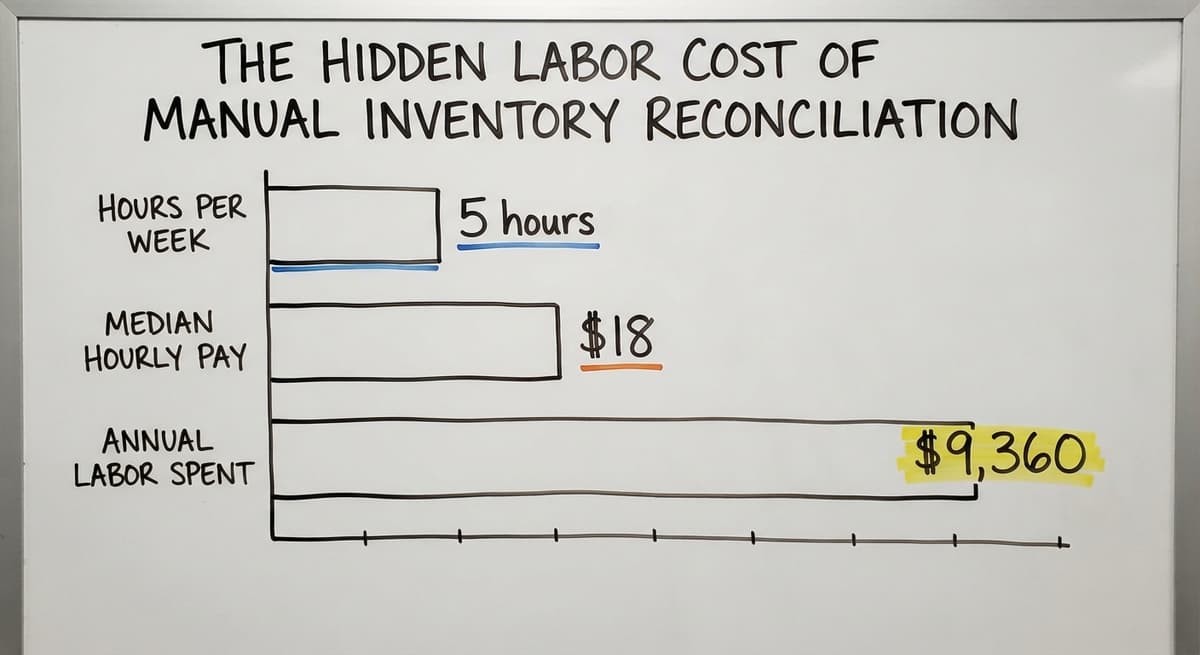
The time cost of poor inventory control is easy to calculate. Say 2 staff members spend 5 hours a week reconciling the accounting software to a spreadsheet.
The US Bureau of Labor Statistics puts median pay for stock clerks and order fillers at around $18 an hour. That is $9,360 a year in labor spent on a task that should take minutes. Find the BLS wage data at bls.gov.
Customer complaints follow errors. Each one costs time to resolve and trust that is hard to rebuild.
The Six Core Principles of Inventory Control
Six principles form a simple framework for inventory control. You do not need to master all of them at once. Start with the ones that match your biggest pain point.
- Accuracy: count what you actually have, not what the system says you have
- Visibility: see stock levels in real time, not at the end of the day
- Reorder points: know when to buy before you run out, not after
- Location tracking: know which bin or shelf holds each item
- Accountability: one person or system owns each step in the process
- Reconciliation: compare records to physical reality on a set schedule
These principles work at any scale. A 6-person team can apply all of them without any new software.
Start with a Physical Count Before Anything Else
Every improvement to your inventory control starts with a baseline. You cannot fix a number you do not trust. Before setting reorder points or running cycle counts, walk the warehouse and count what is physically there.
Compare that count to your system records and note every discrepancy. That gap is your starting problem. A one-time full count takes a day for most small operations and gives you a clean foundation to build from.
Is the comparison easier when one option is built for you?
Yes. Off-the-shelf means fitting your process to the software, and custom is the other way round. The first look costs nothing.
Book a callHow Do You Set Reorder Points Without Guessing?
A reorder point is the stock level that triggers a purchase order. When a product drops to that level, you buy more. You do not wait until you run out.
To set a reorder point, take your average daily sales for an item and multiply by your supplier's lead time in days. Add a small buffer for demand spikes. That number is your reorder point. Review it every quarter as sales patterns change.
Cycle Counting vs. Full Physical Inventory
Cycle counting means counting a small section of your inventory on a rotating schedule rather than counting everything at once. You might count your A items every 2 weeks and your C items once a quarter. This keeps records accurate without shutting down operations for a full count.
Most small businesses find that a consistent cycle counting schedule catches errors faster and with less disruption than an annual full inventory.
How Do You Run a Count Without Shutting Down?
You do not need to close for a day. Count one zone at a time. Freeze movements in that zone while the count runs.
Record the date and time for each section. That date matters: future comparisons are only useful if you know when the baseline was set.
When you find a discrepancy, record it immediately. Do not adjust the system until you have checked the physical count twice. Some errors are counting mistakes. Others reveal a real problem worth investigating.
The IRS is clear on why this matters. IRS Publication 538 states: "To figure taxable income, you must value your inventory at the beginning and end of each tax year." Read the full publication at irs.gov/publications/p538. A physical count is not optional. It is a legal requirement.

Set Up Simple SKUs and Item Codes
A SKU (stock keeping unit) is a short code that identifies one specific product. Think of it as a nickname your system uses so it never confuses two similar items.
Consistent naming prevents mix-ups. If one person calls a product "Blue Widget 12oz" and another calls it "Widget Blue Sm", the accounting software will treat them as different items. Your count will never match.
A Naming Convention Any Small Team Can Follow
Keep SKUs short and logical. A simple structure works well:
- Category code (2 to 3 letters)
- Brand or supplier code (2 to 3 letters)
- Size or variant (number or letter)
Example: a 12-ounce blue widget from supplier "Apex" becomes WID-APX-12B. Anyone on the team can read it and know what it refers to.
SKUs connect your the accounting software records to physical items. When a barcode scanner reads a label, it looks up the SKU.
The SKU pulls the right the accounting software item. That chain only works if the SKU is consistent from the start.
Choose the Right Inventory Valuation Method
Inventory valuation sets the dollar value of your stock for accounting and tax purposes. 3 methods are common.
| Method | What it does | Best for |
|---|---|---|
| FIFO (First In, First Out) | Sells oldest stock first on paper | Perishables, dated goods |
| LIFO (Last In, First Out) | Sells newest stock first on paper | Rarely used; not allowed under IFRS |
| Weighted Average Cost | Averages the cost of all units held | Simple operations, stable pricing |
FIFO suits most small distributors and wholesalers. It reflects how goods actually move and tends to produce accurate profit figures when supplier costs rise.
Pick one method and stay with it. Switching methods mid-year has tax consequences. IRS Publication 538 covers the rules for each method at irs.gov/publications/p538.
The accounting software supports FIFO and average cost natively. Set it once and let it run.
The Simple Formula
Reorder point = (average daily usage x lead time in days) + safety stock
Safety stock is a small buffer that covers unexpected demand or a late delivery from a supplier.
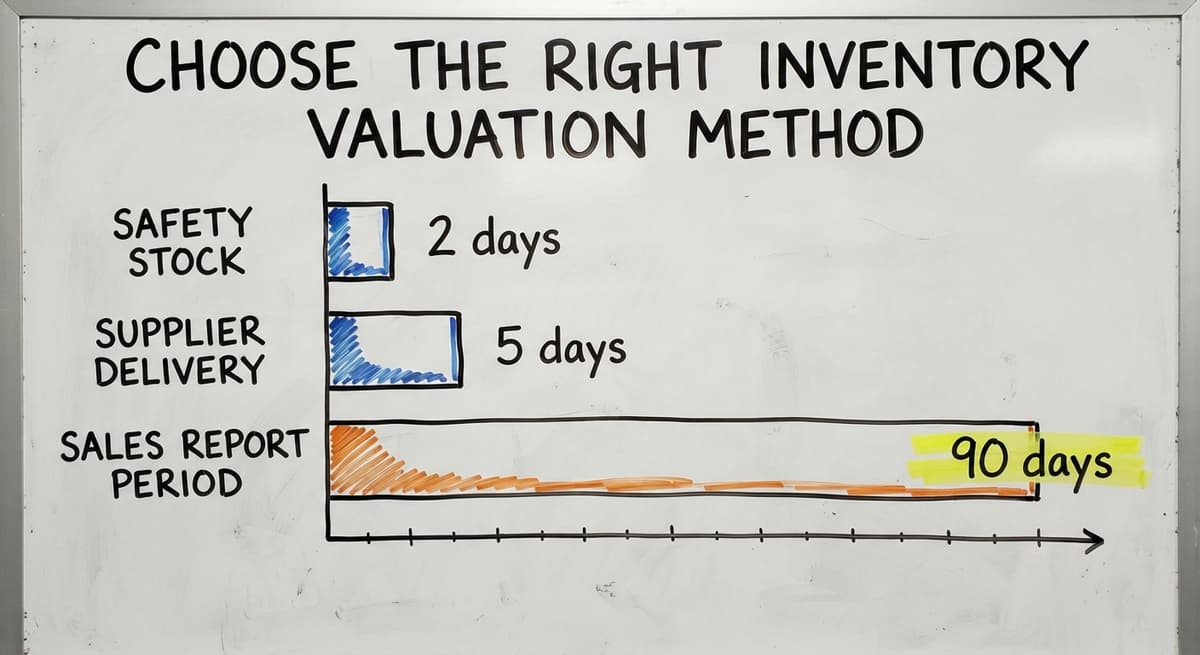
Here is a worked example. Say you sell 10 units a day of a product. Your supplier takes 5 days to deliver. You want 2 days of safety stock.
Reorder point = (10 x 5) + 20 = 70 units
When stock drops to 70, you place the order. By the time it arrives, you still have stock to sell.
Find your average daily usage in the accounting software. Pull a sales report for the last 90 days.
Divide total units sold by 90. That is your number. Review reorder points every season because demand shifts.
What Is ABC Analysis and How Do I Use It?
ABC analysis is a way to sort your products by value so you spend your attention where it counts most.
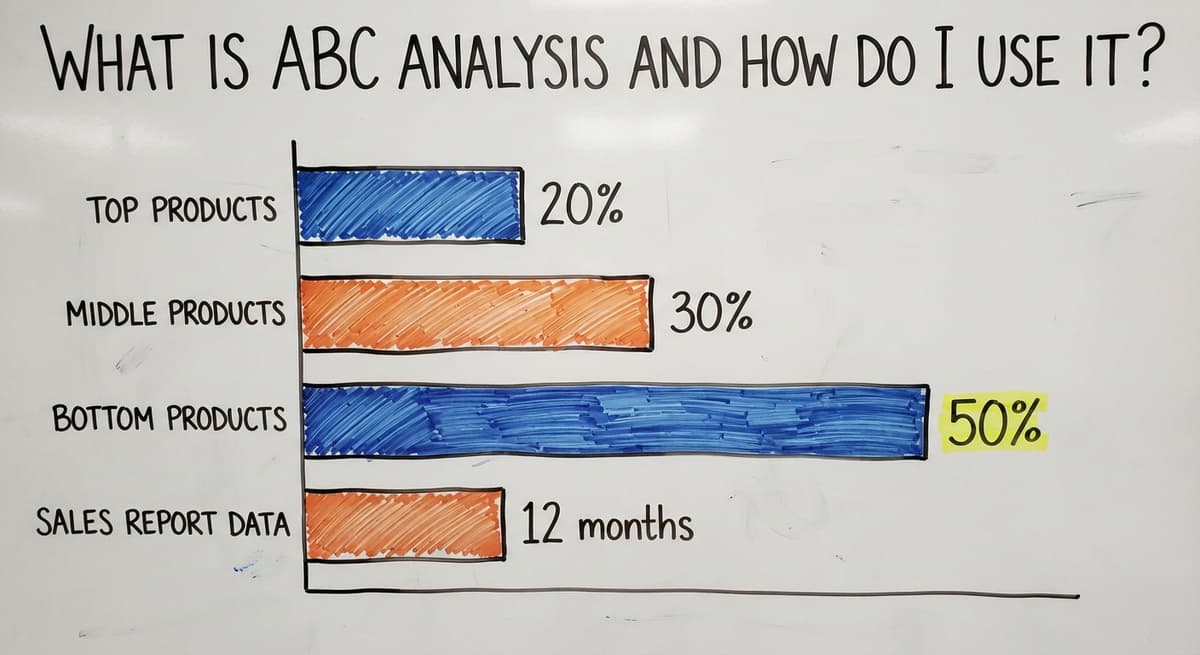
- A items: your top 20% of products by revenue. Count and monitor these most often.
- B items: the middle 30%. Check these monthly.
- C items: the bottom 50% by revenue. Count these less often.
This approach saves time without sacrificing accuracy on the items that matter. A stockout on an A item hurts far more than a stockout on a C item.
How Do You Find Your A, B, and C Items?
Pull a sales report from the accounting software for the last 12 months. Sort by revenue, highest to lowest.
The top fifth of that list is your A group. The next third is your B group. Everything else is C.
Review the list twice a year. A product that was a C item last year might be an A item now if a new customer account came on board.
The US Census Bureau tracks inventories-to-sales ratios for wholesale firms, which shows how quickly stock should be turning relative to sales. Find current data at census.gov/wholesale/index.html.
What does it look like running on your own process?
The first thing you see is it running on your own process, at no build cost. The subscription starts once it is live and doing the job, not before.
Book a callWhy Does Cycle Counting Work Better for Small Teams?
A full annual count disrupts operations. It takes staff off their normal work for a day or more. Errors found months after they happened are hard to trace.
Cycle counting catches errors fast. If your A items are counted every 2 weeks, a discrepancy surfaces within days. You can investigate while the trail is still warm.
A simple schedule for a small team:
- Monday: count zone A, rows 1 to 5
- Wednesday: count zone B, rows 1 to 5
- Friday: count zone C, rows 1 to 5
- Rotate through all zones over 4 weeks
A full physical count is still worth doing once a year. It catches systemic errors that cycle counting misses and satisfies the IRS requirement noted earlier.

Where Does the Accounting Software Help, and Where Does It Fall Short?
The accounting software is strong for what it was built to do: accounting, invoicing, and purchase orders. For many small businesses, it is the right tool for those tasks and should stay in place.
The gaps appear in real-time warehouse operations. the accounting software does not show you which bin an item is in. It does not track serial numbers well at scale. It does not handle multiple warehouse locations cleanly.
Most small businesses paper over these gaps with spreadsheet and email threads.
How Do You Extend the Accounting Software Without Replacing It?
The goal is not to replace the accounting software. It is to extend it where it breaks down. accounting integration for wholesale distributors is a common starting point: a lightweight layer that connects physical stock movements to the accounting software records without forcing a full system change.
NIST's Manufacturing Extension Partnership offers vendor-neutral guidance on supply chain process gaps at nist.gov/mep/supply-chain. Their framework is practical and does not assume a large IT budget.
Signs Your Spreadsheet System Has Outgrown Itself
Spreadsheets are not wrong. They are a smart first step. But they have a ceiling.
You have likely hit that ceiling if:
- Staff maintain 3 or more versions of the same sheet
- Errors surface only after a customer complaint
- Reconciling the accounting software to the spreadsheet takes more than 2 hours a week
- A new hire cannot learn the system without a long handover from one specific person
These are signals, not failures. They mean the business has grown. The system that worked at 50 orders a week cannot carry 300 orders a week without breaking.
Replacing spreadsheet with a custom database built around your actual workflow is a common and practical next step. It does not require starting over.

How Does Custom Software Fit into Inventory Control for Small Business?
Custom software for inventory control is not an ERP. It does not replace the accounting software or demand a 6-month rollout. It fills the specific gaps that cause the most pain.
For a small warehouse or distributor, that means:
- Barcode scanning at receiving and shipping
- Real-time stock levels visible to anyone on the floor
- Automated reorder alerts when a product hits its reorder point
- Bin location tracking so any staff member can find any item
Custom Software vs Off-the-Shelf ERP: Why the Difference Matters
Warehouse management software for small business built this way connects to the accounting software rather than replacing it.
The accounting stays where it is. The warehouse operations get a layer that the accounting software was never designed to provide.
Off-the-shelf platforms target a generic business. Custom software is built around the workflow already in place.
For a 10-person operation with specific processes, that difference matters. Implementation scopes down to 1 or 2 pain points, not a full-system overhaul.
Barcode Scanning on a Small Business Budget
A basic USB barcode scanner costs under $50. A Bluetooth model runs $80 to $150. Either one, paired with a simple database, cuts manual entry errors immediately.
Scanning works by reading a barcode on a product label and looking up the matching SKU in your system. That SKU connects to the accounting software item record. No typing. No transcription errors.
Start with receiving and shipping. Those are the 2 points where most errors enter and leave the system. Add scanning to those steps first. Expand to bin-level scanning once the basics are working.
GS1 barcode standards ensure that labels printed by your system can be read by any standard scanner. Their standards documentation at gs1.org/standards/barcodes covers label formats, barcode types, and data structures in plain terms.

Does Your Receiving Process Let Errors in at the Door?
Most inventory errors enter the system at receiving. A delivery arrives. Staff put items away. The paperwork catches up later, or not at all.
Match every delivery to a purchase order before items go to the shelf. Count what arrived. Compare it to what was ordered. Record any difference right then, not at the end of the day.
A simple receiving checklist cuts errors fast. It does not need to be digital to start. A printed form with 5 fields works:
- Purchase order number
- Supplier name
- Items received (count and SKU)
- Items missing or damaged
- Staff name and time
Once the team follows that process consistently, moving it to a digital form or operations software for fulfilment centres is straightforward. The process is already defined. The tool just makes it faster.
What is in a free first look?
A 30 minute call, your operation mapped, and a clear picture of what we would build. No obligation and nothing to install.
Book a callTraining Your Team to Follow the System
The best process fails if staff work around it. People work around systems that are hard to follow or that slow them down.
Keep procedures short and visual. One page per task is a good target. A laminated card at the receiving dock beats a 20-page manual in a binder nobody opens.
Assign clear ownership for each step. Receiving is one person's job. Putaway is another's. When an error happens, the process owns it, not the person.
Review mistakes by asking where the process broke down, not who made the mistake. That approach builds trust and gets better information.
New hires should be able to follow the system on day 2. If they cannot, the system is too complex.
Key Metrics to Track Inventory Control Performance
Tracking the right numbers tells you whether your inventory control is improving. Check these 4 metrics monthly.
| Metric | What it measures | Target direction |
|---|---|---|
| Inventory accuracy rate | How often records match physical counts | Higher is better |
| Stockout rate | How often an item is unavailable when ordered | Lower is better |
| Inventory turnover | How quickly stock sells through | Depends on category |
| Carrying cost | What it costs to hold unsold stock | Lower is better |
Inventory accuracy rate is the most direct measure of whether your system is working. Divide the number of correct SKU counts by the total SKUs counted.
An accuracy rate below 95% means errors are entering the system faster than you are catching them.
Track these numbers in a simple spreadsheet to start. The trend matters more than any single month's figure.

A Practical Action Plan to Improve Inventory Control This Month
You do not need a big project. Four weeks of focused effort moves the needle.
Week 1: Run a physical count of your top 20 products. Fix the item list in the accounting software so it matches what you counted. Record the date.
Week 2: Set reorder points for those same top 20 products using the formula above. Enter them into the accounting software or your tracking sheet.
Week 3: Build a cycle count schedule. Pick 1 zone to count each week. Assign a staff member to own it.
Week 4: Find the one manual step that causes the most errors. It is receiving or reconciliation. Fix that step first.
Progress beats perfection here. Small consistent steps compound. A team that counts accurately and reorders on time has a strong foundation. Everything else builds on that.
When Should You Ask for Outside Help with Inventory Control?
If the manual workarounds in your business take more than a few hours a week, the cost of fixing them is almost certainly lower than the cost of continuing.
Say 3 people each spend 4 hours a week on manual reconciliation.
At $22 an hour, that is $13,728 a year in labor spent on a process that better tooling could cut to under an hour. That number does not include the errors those hours still miss.
What Should You Look for in an Inventory Control Partner?
A local partner who understands small-scale operations is different from a vendor selling enterprise software. The right help builds around your workflow. It does not ask you to change how you work so the software fits.
A conversation about your specific pain points costs nothing and often reveals a faster path than you expected.
The Software Society builds custom workflow systems for growing businesses. The approach starts with the process you already have, removes the manual gaps, and connects the pieces without replacing what works.
If your inventory control has outgrown your current setup, that conversation is a good place to start.

Frequently Asked Questions
Frequently asked questions
Frequently asked questions
What is inventory control and why does it matter for a small business?
Inventory control means knowing what stock you have, where it is, and when to order more.
For a small business, it prevents lost sales from stockouts, stops cash from sitting in dead stock, and reduces the hours spent on manual counts and reconciliations. It is not only for large companies. Any business holding physical goods benefits from it.
How is inventory control different from inventory management?
Inventory management covers the full picture: suppliers, demand planning, warehouse layout, and strategy.
Inventory control is the day-to-day work inside that picture. It means keeping stock records accurate, setting reorder points, and counting regularly. Control is where most small businesses need to start.
What is cycle counting and is it better than an annual physical count?
Cycle counting means counting a small section of your inventory on a rotating schedule rather than everything at once. It catches errors faster, causes less disruption, and keeps your records accurate throughout the year.
An annual full count is still worth doing once a year to catch systemic problems, but cycle counting is the better day-to-day tool.
How does custom software help without replacing the accounting software?
Custom software fills the gaps the accounting software was not built to handle: bin locations, barcode scanning, real-time stock levels, and automated reorder alerts. It connects to the accounting software rather than replacing it.
Your accounting stays where it is. The warehouse operations get a layer that makes the daily work faster and more accurate.
What does poor inventory control actually cost a small business?
The costs show up in several places: lost sales when items are out of stock, cash tied up in overstock, staff time spent on manual reconciliation, and customer trust damaged by errors.
Two staff members spending five hours a week on reconciliation at $18 an hour costs over $9,000 a year in labor alone, before counting the errors that still slip through.
What metrics should I track to know if my inventory control is improving?
Track four numbers monthly: inventory accuracy rate (how often records match physical counts), stockout rate (how often an item is unavailable when ordered), inventory turnover (how quickly stock sells through), and carrying cost (what it costs to hold unsold stock).
Inventory accuracy rate is the most direct signal. Aim for 95% or above.
What can I do this month to improve inventory control without a big project?
Run a physical count of your top 20 products in week one and fix the item list in the accounting software. In week two, set reorder points for those same items.
In week three, build a simple cycle count schedule. In week four, find the one manual step causing the most errors and fix it first. Small consistent steps compound faster than a large one-time project.
How do I create an inventory spreadsheet?
One row per SKU with columns for SKU, description, location, quantity on hand, unit cost, reorder point, and supplier, and a second sheet that logs every receipt and sale by date.
Lock the SKU column and give the file one owner. That structure lasts to about 200 items and 1 person.
How often should a small business count inventory?
Count the A items weekly, B items monthly, C items quarterly, and the whole stockroom once a year for the accountant.
Cycle counting 20 items a day keeps the record within 2 percent without ever closing for a count.
What is the best inventory software for a small business?
The one that fits the receiving and picking process the team already runs and connects to the accounting package already in use.
Under 2 locations and 2,000 SKUs a packaged tool at $50 to $300 a month is enough; past that, or with a non-standard workflow, a build around your own process.
What are the most important inventory management KPIs?
Inventory accuracy from cycle counts, turnover, stockout rate, days of stock on hand, and the value of stock with no sale in 90 days.
Five numbers, reviewed monthly, tell you whether stock is earning its shelf space.
Not sure this is the right shape for your operation?
The call is free. Describe how the work runs today. We map it on a call and show you what it would look like built around that, before you spend anything.
Book a callRelated guides
The rest of this guide, for the parts of the job this page does not cover.
Guides
- Inventory Control Software for Small Business
- Inventory Tracking Software for Small Business
- Inventory Management Small Businesses
- Inventory Tracking Systems for Small Businesses
- Simple Inventory System for Small Business
- Best Inventory Management Software for Small Businesses
- Inventory Sales Software Small Business
- Small Business Inventory Management System
- Inventory System for Small Business
- Small Business Inventory Management
- Small Business Stock Management Software
- Wms for Small Business
- Accounting and Inventory Software for Small Business
- Free Inventory Management Software for Small Business
- Small Business Warehouse Management System
- Erp System for Small Businesses
- Warehouse Management System for Small Business
- Inventory Control with Excel
Common questions
- How to Organize Inventory for Small Business
- How to Keep Track of Inventory Small Business
- What is the Best Inventory Management Software for Small Business
- Why is Inventory Management Important for Small Businesses
- How to Manage Inventory for Small Business
- What is the Best Inventory Management System for Small Businesses?