


Wms For Small Business
A warehouse management system, or WMS, is the right next step if your team is losing time to mis-picks, manual counts, or the question "where is that order right now?" Most small operations can get a working WMS running in weeks, not months, without replacing the accounting software.
Reviewed August 2026. Each figure comes from the assumptions stated beside it, so you can substitute your own and the arithmetic still holds.
Published 4 August 2026. Reviewed and updated 15 September 2026.
Book a callWhat Is a WMS and Do I Actually Need One?
A warehouse management system (WMS) is software that tracks what you have, where it lives, and what is happening to it at every step. It covers receiving a shipment, putting stock in a bin, picking an order, packing a box, and handing it to a carrier. Every move is recorded in real time.
That is different from a spreadsheet, which only tells you what you had when someone last typed a number in.
Would you rather have it built around your operation?
The first look is free. If you would rather not compare products, describe how your operation already works and we build the system around it.
No build cost. You see it running on your own process first, and the monthly subscription starts only once it is live.
Book a callSigns You Probably Need a WMS
You probably need one if any of these sound familiar:
- Staff spend hours each week reconciling printed sheets or Spreadsheet files
- Shipping errors are climbing and you cannot pinpoint why
- A customer asks where their order is and no one can answer without making calls
- Receiving a truck takes twice as long as it should because there is no standard process
If none of those apply, a WMS may not be your next step. That is an honest answer, and the section near the end of this article covers it directly.
How Does a WMS Differ from Basic Inventory Software?
Inventory software counts things. A WMS tracks where things are and what is happening to them.
Your current tool might tell you that you have 200 units of item A.
A WMS tells you that 140 are in bin 3B, 45 are on a pick cart for order 1082, and 15 arrived this morning and have not been put away yet. That level of detail is what makes bin location tracking, receiving workflows, and pick-and-pack steps possible.
How Does a WMS Support Your Inventory Counting Obligation?
The IRS makes the counting obligation clear. IRS Publication 538 states: "To figure taxable income, you must value your inventory at the beginning and end of each tax year." A WMS does not replace that obligation. It makes meeting it faster and more accurate by keeping a live count rather than a periodic one.
If your pain is "I don't know how many I have," inventory software may be enough. If your pain is "I don't know where they are or who touched them," that is a WMS problem.
Are You Ready for a WMS, or Have You Outgrown Spreadsheets?
You have outgrown spreadsheets when the cost of the errors they cause is higher than the cost of replacing them. Here is one way to measure that.
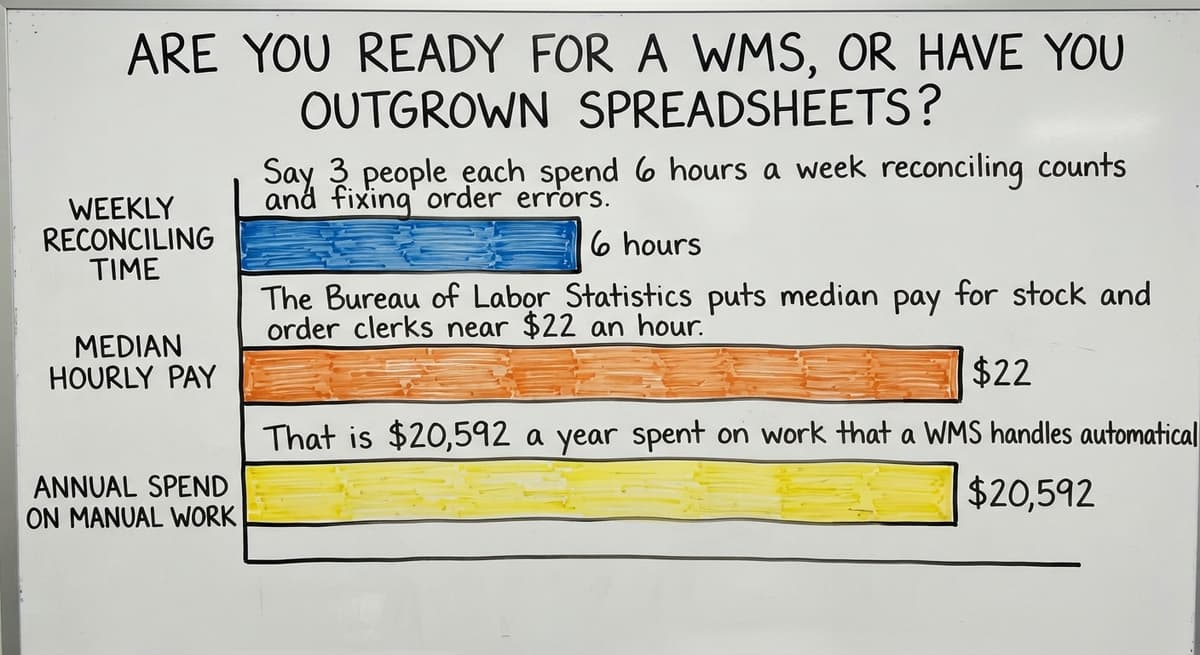
Say 3 people each spend 6 hours a week reconciling counts and fixing order errors.
The Bureau of Labor Statistics puts median pay for stock and order clerks near $22 an hour. That is $20,592 a year spent on work that a WMS handles automatically. That number does not include the cost of a mis-shipped order, a lost customer, or an emergency recount before a physical inventory.
Other Clear Signals the Spreadsheet Era Is Over
Other clear signals:
- Receiving a shipment requires someone to cross-reference a paper purchase order by hand
- You have had a customer receive the wrong item more than once in a quarter
- Your team cannot onboard a new picker without a week of shadowing
- You are about to add a second shift or a new product line and the current process will not scale
If 2 or more of those match, the spreadsheet era is over for your operation.
Is the comparison easier when one option is built for you?
Yes. Off-the-shelf means fitting your process to the software, and custom is the other way round. The first look costs nothing.
Book a call
What Does a WMS Actually Do Day to Day?
A typical day in a small warehouse with a WMS looks like this.
Receiving: A truck arrives. A staff member scans each item against the purchase order on a handheld device. The system flags any discrepancy right away. No paper, no manual tally.
Put-away: The system tells the worker which bin to use. Stock goes to a specific location, and that location is recorded. Nothing gets tucked somewhere and forgotten.
How Do Picking, Packing, and Shipping Work in a WMS?
Picking: An order comes in. The system generates a pick list sorted by bin location so the picker walks the shortest path. Each scan confirms the right item was pulled.
Pack and ship: The packer sees what goes in the box, confirms it, and prints the label. The carrier scan closes the order. The customer record updates.
Every step is guided and logged. If something goes wrong, you can trace it back to the exact moment and the exact person. That traceability is what makes order fulfillment reliable at scale.
What Features Does a Small Business Actually Need in a WMS?
Most small operations need a short list of core tools. More features do not mean better results.
The features that earn their place:
- Receiving workflow that checks incoming stock against a purchase order and flags short shipments or wrong items
- Bin or location tracking so every unit has a known address in the building
- Pick, pack, and ship steps that guide each worker through the task without guessing
- Real-time inventory counts that update the moment a scan happens, not at the end of the day
- Basic reporting on stock levels, order status, and receiving history

Features That Sound Impressive but Rarely Matter at Small Scale
Features that sound impressive but rarely matter at small scale:
- AI demand forecasting needs years of clean data before it gives useful output
- Multi-warehouse routing adds complexity you do not need if you run one location
- Wave picking, which groups hundreds of orders for a large team to pick at once, is built for 50-picker operations, not 5
Paying for those features drives up cost and forces your team to navigate menus built for problems you do not have. NIST's Manufacturing Extension Partnership consistently points smaller operations toward process fit over feature count when evaluating supply chain tools.
Will I Have to Replace the accounting software If I Get a WMS?
No. A good WMS works alongside the accounting software, not instead of it.
The accounting software handles the books well. It was built for that job. It was not built to manage bin locations, guide a picker through a warehouse, or track a shipment from dock to shelf. A WMS fills that gap.
The clean division: The accounting software owns the numbers, the WMS owns the floor. When an order ships, the WMS passes the transaction to the accounting software.
Your accountant still works in the same system. Your warehouse team works in the WMS. Neither group has to learn the other's tool.
accounting integration for wholesale distributors is one of the most common requirements we see. Most modern WMS platforms support it either natively or through a direct connector.
Before you sign anything, confirm the integration does not require a third-party middleware tool that adds its own monthly cost and its own failure point.
What does it look like running on your own process?
The first thing you see is it running on your own process, at no build cost. The subscription starts once it is live and doing the job, not before.
Book a callCloud WMS, On-Premise, or Custom Built: Which Fits a Small Operation?
The three main options each carry a different trade-off.
| Option | Upfront cost | Ongoing cost | Fits your process? |
|---|---|---|---|
| SaaS / cloud WMS | Low | Monthly per-user fee | Partially; you adapt to it |
| On-premise | Higher | IT and maintenance | More control, more burden |
| Custom built | Build cost | No license fee | Fully; built around you |
SaaS warehouse management software is the fastest to start. You pay a monthly fee, log in, and go. The trade-off is that the workflow is generic. You will adjust how your team works to match what the software expects.

When Does Custom or On-Premise Make More Sense?
Custom inventory software for small warehouses takes longer to build but maps to the process you already run.
There are no workarounds, no unused menus, and no staff frustration from a bad fit. It is especially worth considering when your operation has unusual product types, customer-specific rules, or a receiving workflow that off-the-shelf tools cannot replicate cleanly.
On-premise sits between the two. It gives more control but requires someone internal to manage updates and hardware. Few small teams have that bandwidth.
How Much Does a WMS Cost for a Small Business?
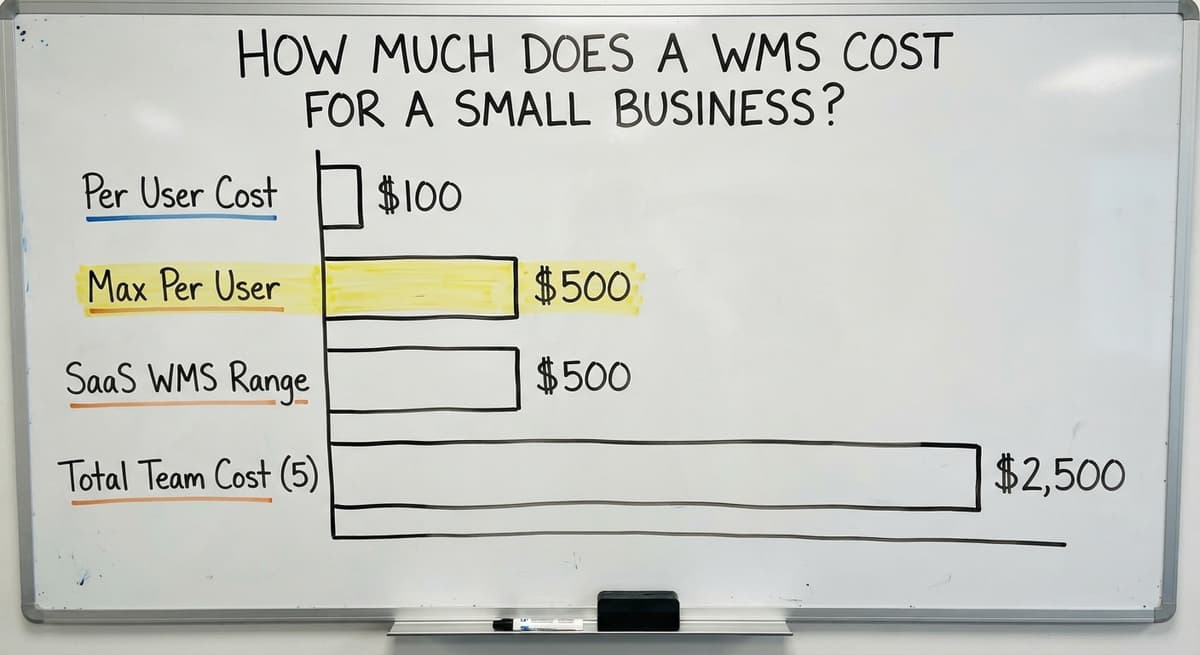
A SaaS WMS for a small team runs from $100 to $500 per user per month, depending on features and the vendor's pricing model. For a team of 5 users, that is $500 to $2,500 a month before any setup or integration fees.
Costs that go unmentioned in the initial quote:
- Implementation fees to configure the system for your workflow
- Training time, which is the biggest variable for small teams
- Integration work to connect the WMS to the accounting software or your shipping carrier
- Support contracts once the free onboarding period ends
How Do You Frame WMS Cost Against What You Are Already Spending?
A custom WMS carries a one-time build cost instead of a recurring license. For many small operations, that math favors custom within 18 to 24 months, especially when the SaaS tool required paid customization to fit the workflow anyway.
Frame any cost against what you are already spending. Replacing spreadsheet with warehouse software is not just a technology purchase. It is a way to stop paying for errors, overtime, and the occasional lost customer who did not come back after a mis-ship.

What Does Implementation Really Look Like, and What Mistakes Should You Avoid?
Many small teams expect a long, disruptive rollout. A phased approach avoids that.
- Start with receiving. Get the dock process clean and consistent before touching anything else.
- Add put-away and bin tracking once receiving is stable.
- Roll out picking and shipping last, when the team trusts the system.
For a 5 to 30 person operation, a phased rollout runs 6 to 12 weeks. Staff training is the biggest variable. Simpler systems train faster. A WMS with 40 screens takes longer to learn than one built around your 6 actual steps.
Mistakes That Slow Down or Kill WMS Adoption
The mistakes that slow things down or kill adoption:
- Choosing based on feature count rather than fit to your workflow
- Skipping data cleanup before go-live, so the system inherits bad counts
- Picking an enterprise platform because it looks credible, then spending months on configuration
- Leaving warehouse staff out of the decision, so the people who use it daily had no voice in choosing it
The last one matters most. A WMS your team does not trust gets worked around within a month.
Not sure this is the right shape for your operation?
The call is free. Describe how the work runs today. We map it on a call and show you what it would look like built around that, before you spend anything.
Book a callIs a WMS the Right Next Step, or Is Something Else Blocking You?
A WMS makes a good process faster. It does not fix a broken one.
Hold off on a WMS if:
- Inventory data in the accounting software is already wrong and no one has audited it
- Your current receiving and shipping steps are not written down anywhere
- The team is not bought in, because adoption fails before the software does
Clean your data first. Document your process second. Then automate it. Operations software for wholesale distributors works best when it is layered onto a process that already functions, not used as a substitute for one.
If the process is documented and the team is ready, the next step is preparation, not procurement.

How Do You Prepare, Go Live, and Measure Whether It Worked?
Before go-live, do three things:
- Audit current inventory counts and fix every discrepancy you find
- Label every bin location in the warehouse with a consistent naming system
- Name one internal champion who owns the rollout and has authority to make decisions
How Do You Measure Whether Your WMS Is Working?
After go-live, track a short list of metrics. Simple numbers work best for small teams:
- Pick accuracy rate, measured as correct orders shipped divided by total orders shipped
- Time to receive and put away a full shipment, from dock to bin
- Inventory shrinkage and count discrepancies over 30-day periods
- Order cycle time from receipt to carrier scan
Baseline those numbers before the WMS goes live. Check them at 30 and 90 days. If pick accuracy climbs and receiving time drops, the system is working. If neither moves, the issue is training or a process that was not fully mapped before go-live.
Fulfillment center software for small teams lives or dies on those first 90 days. The data you collect in that window tells you more than any vendor demo ever will.
How Does Local Support Change the WMS Experience?
A remote help desk can answer a ticket. A local partner can walk your floor.
That difference shows up when something does not work the way the demo suggested. A partner who has seen your dock, your bin layout, and your team can fix it in a conversation. A generic support queue cannot.
For businesses in the Columbus, Ohio area, working with a nearby team means faster iteration, a support contact who knows your setup, and someone accountable when the system needs to change as your operation grows.
Next Steps If You Are Ready to Explore a WMS
Start here, before you talk to any vendor:
- Write down your top 3 operational pain points in plain language
- Map your current receiving and shipping steps on a single sheet of paper
- Note where the process breaks down or where staff improvise
That document is worth more than any RFP template. It tells a real partner what to build around.
The Software Society builds warehouse and operations software around the process you already run, not the other way around. Request a no-pressure review and bring that one-page map with you. The conversation starts with your operation, not a product demo.
Frequently asked questions
Frequently asked questions
What is a WMS and do I actually need one for my small business?
A WMS, or warehouse management system, tracks inventory location and movement in real time across receiving, put-away, picking, and shipping. You need one when spreadsheets or basic inventory software can no longer tell you where stock is or why orders are going wrong.
If your team spends significant time reconciling counts or you cannot trace a mis-ship, a WMS is likely the right next step.
How is a WMS different from the inventory tracking I already do in the accounting software?
The accounting software tells you how many units you have. A WMS tells you where each unit is, who touched it, and what step it is in right now.
The accounting software is an accounting tool. A WMS is a floor operations tool. They are built to work together, not replace each other.
Will I have to replace the accounting software if I get a WMS?
No. A WMS integrates with the accounting software rather than replacing it. The accounting software handles the financial records. The WMS handles warehouse operations. When an order ships, the WMS passes the transaction data to the accounting software automatically. Your accounting workflow stays the same.
How much does a WMS cost for a small business?
SaaS WMS platforms run $100 to $500 per user per month. For a 5-person team, that is $500 to $2,500 a month before setup, training, and integration fees.
A custom-built WMS carries a one-time build cost with no ongoing license fee, which makes it less expensive over 18 to 24 months.
How long does it take to implement a WMS with a small team?
A phased rollout for a 5 to 30 person operation takes 6 to 12 weeks. Starting with receiving, then adding put-away, then picking and shipping keeps disruption low.
Staff training is the biggest variable. Simpler systems built around your actual steps train faster than feature-heavy platforms.
What mistakes do small businesses make when picking a WMS?
The most common mistakes are choosing based on feature count rather than workflow fit, skipping data cleanup before go-live, picking an enterprise platform that requires months of configuration, and leaving warehouse staff out of the decision.
The people who use the system daily should have a voice in choosing it.
Is a custom WMS better than an off-the-shelf product for a small operation?
The answer depends on how standard your workflow is. Off-the-shelf WMS software is faster to start but requires you to adapt your process to fit the software.
A custom WMS maps to how you already work, with no unused features and no workarounds. For operations with unusual product types, customer-specific rules, or non-standard receiving steps, custom is the better fit.
How do I measure whether the WMS is working after we go live?
Track pick accuracy rate, time to receive and put away a shipment, inventory shrinkage, and order cycle time from receipt to carrier scan. Baseline those numbers before go-live and check them at 30 and 90 days.
If accuracy climbs and receiving time drops, the system is working. If neither moves, the issue is training or an unmapped process step.
What is the best WMS for a small ecommerce business?
For under 5,000 orders a month and one building, an entry-level cloud WMS at $100 to $500 a month that pulls orders from the store, prints carrier labels, and pushes tracking back.
Past that, or with kitting and returns rules of your own, a build around the operation costs less over 3 years.
How much does warehouse management software cost?
Entry-level cloud WMS runs $100 to $500 a month; mid-market platforms $1,000 to $5,000 a month plus $10,000 to $50,000 implementation. A custom build scoped to one warehouse runs $10,000 to $40,000 once with a smaller monthly fee. Scanners add $150 to $400 per station.
Do small businesses need a WMS or just inventory software?
Inventory software if the question is how many; a WMS if the question is where and in what order. One room and under 500 SKUs, inventory software. Bin locations, pick paths, and packing stations, a WMS, even a small one.
How do I implement a WMS in a small warehouse?
Label the bins first, then the products, load both lists, and run one full count scanning product and bin together.
Go live on receiving in week 1, picking in week 2, and cycle counts in week 3. A 5-person floor is fully live in 4 to 6 weeks.
How do I set up barcode scanning in a small warehouse?
One cordless 2D imager per active worker at $150 to $400, a thermal label printer at $150 to $500, Code 128 labels on every bin and product, and a WMS that treats each scan as a stock movement. The software decides accuracy; the scanners are the cheapest part.
What is in a free first look?
A 30 minute call, your operation mapped, and a clear picture of what we would build. No obligation and nothing to install.
Book a callRelated guides
The rest of this guide, for the parts of the job this page does not cover.
Guides
- Small Business Stock Management Software
- Inventory Tracking Software for Small Business
- Inventory Control Software for Small Business
- Inventory Management Small Businesses
- Inventory Tracking Systems for Small Businesses
- Simple Inventory System for Small Business
- Best Inventory Management Software for Small Businesses
- Inventory Sales Software Small Business
- Small Business Inventory Management System
- Inventory Control for Small Business
- Inventory System for Small Business
- Small Business Inventory Management
- Small Business Warehouse Management System
- Accounting and Inventory Software for Small Business
- Free Inventory Management Software for Small Business
- Erp System for Small Businesses
- Warehouse Management System for Small Business
- Best 3pl Wms Software
Common questions
- How to Organize Inventory for Small Business
- How to Keep Track of Inventory Small Business
- What is the Best Inventory Management Software for Small Business
- Why is Inventory Management Important for Small Businesses
- How to Manage Inventory for Small Business
- What is the Best Inventory Management System for Small Businesses?