


Inventory Sales Software Small Business
Inventory sales software for small business connects your stock levels directly to your sales process. It stops overselling, cuts manual data entry, and keeps your team quoting from live numbers. This article was reviewed in July 2025 and addresses warehouse owners and operations managers, not IT departments.
Published 25 August 2026. Reviewed and updated 15 September 2026.
Book a callWhat Does Inventory Sales Software Do for a Small Business?
Inventory sales software is a tool that links what you have in stock to what your team can sell and ship.
When a sale goes through, stock drops. When a delivery arrives, stock rises. Every person on your team sees the same number at the same time.
Reviewed August 2026. Each figure comes from the assumptions stated beside it, so you can substitute your own and the arithmetic still holds.
Right now, you may track stock in a spreadsheet, take orders by email, and push invoices into the accounting software.
None of those tools talk to each other. That gap is where errors live. This software closes the gap without asking you to throw out what already works.
This article is for owners and operations managers running lean teams. You do not need an IT department to read it or to act on it.
Would you rather have it built around your operation?
The first look is free. If you would rather not compare products, describe how your operation already works and we build the system around it.
No build cost. You see it running on your own process first, and the monthly subscription starts only once it is live.
Book a callWhy Do Spreadsheets Stop Working as You Grow?
The pattern is familiar. Stock counts live in a spreadsheet. Orders come in by email. Invoices go into the accounting software.
Someone has to copy data between all three by hand, and that person makes mistakes.
Errors compound fast when data lives in multiple places. You sell 10 units. The spreadsheet still shows 10. A second rep sells the same 10. Now you have a problem.
This is not a failure of your team. It is a natural limit of manual tools. As GS1, the global body behind barcode standards, explains on its barcode standards page, accurate item identification is the foundation of any reliable count.
Without a system that reads and records each movement, the count drifts the moment a human skips a step.
Small business inventory tracking built on spreadsheets works at low volume. Past a certain point, the spreadsheet becomes the bottleneck.
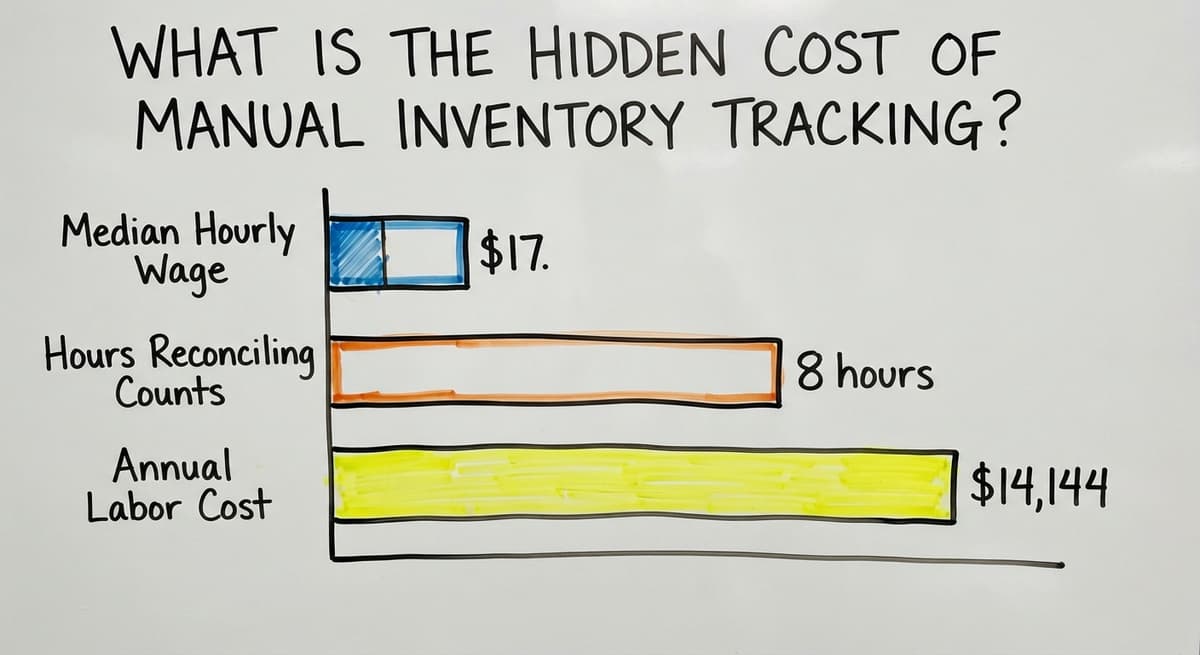
What Is the Hidden Cost of Manual Inventory Tracking?
Manual tracking costs more than most owners realise. The damage shows up in 4 places:
- Overselling stock that is not available, which forces you to cancel or delay orders
- Staff time spent reconciling counts instead of picking and packing orders
- Slow quote turnaround because reps have to call the warehouse to check stock before they can answer a buyer
- Customer trust lost to wrong shipments or surprise back-orders
Consider the staff cost alone. The US Bureau of Labor Statistics reports that stock clerks and order fillers earn a median hourly wage around $17.
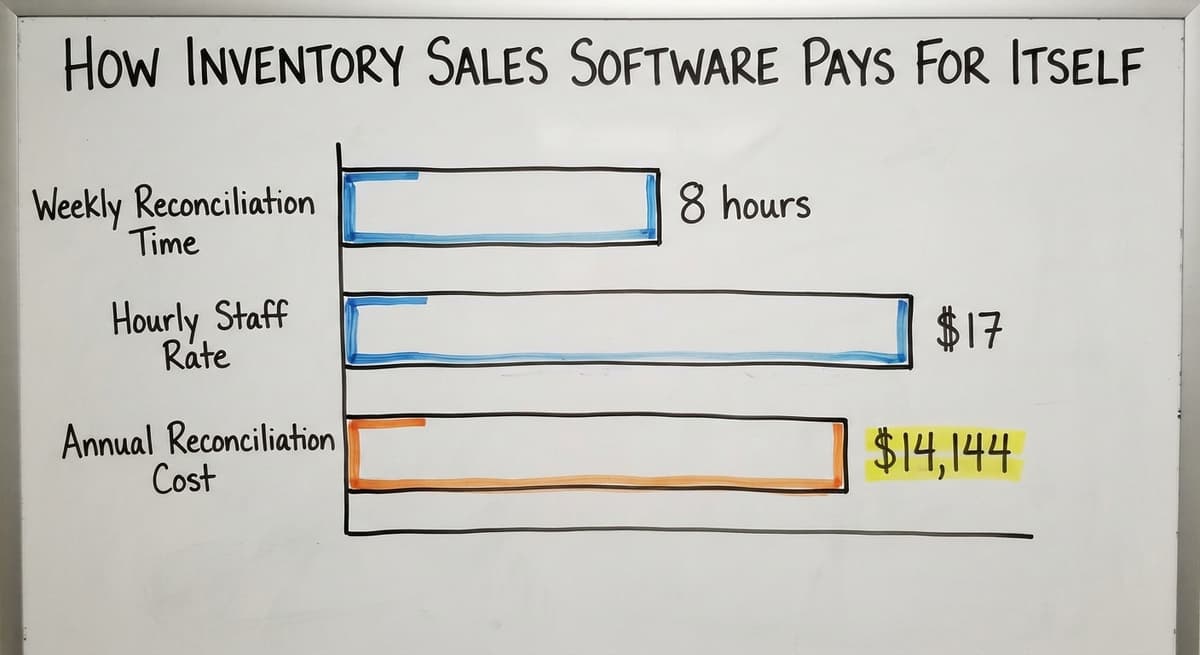
If 2 people spend 8 hours a week each reconciling counts, that is $14,144 a year in labour doing work that software handles in seconds.
The US Federal Trade Commission also makes clear that sellers must ship when they said they would or notify the buyer promptly.
An accurate stock count is not just good practice. It is what keeps you on the right side of that rule.
Who Needs Inventory Sales Software
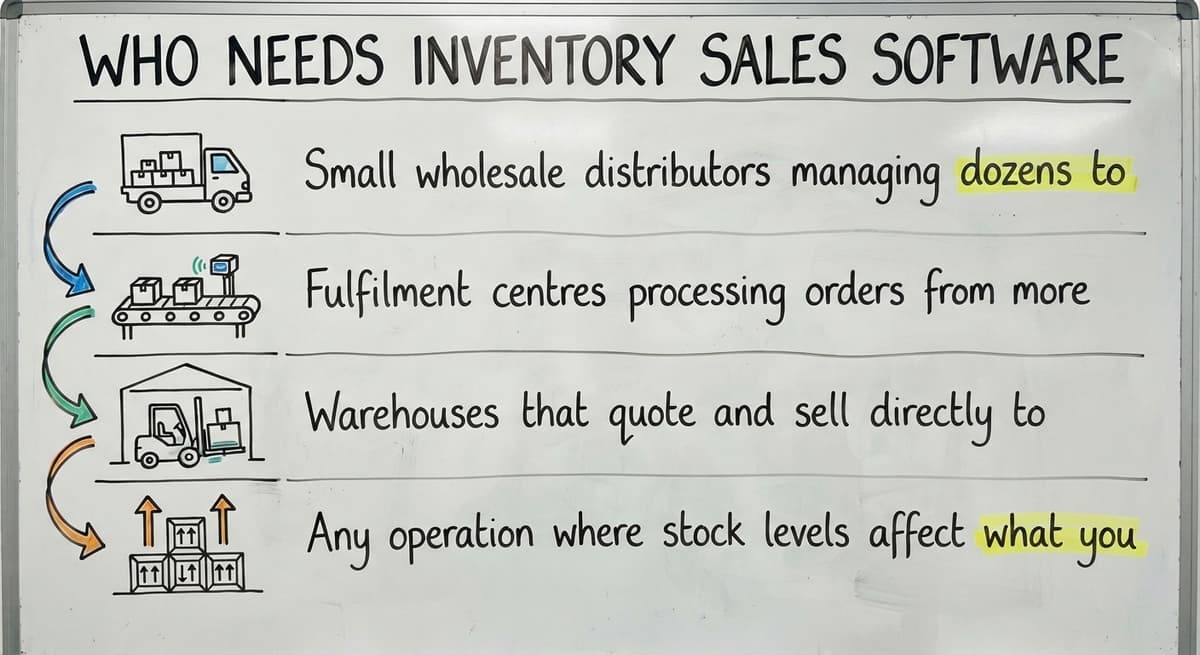
Not every small business needs this. But if your operation matches any of the following, the manual approach is already costing you:
- Small wholesale distributors managing dozens to thousands of SKUs
- Fulfilment centres processing orders from more than one sales channel
- Warehouses that quote and sell directly to business buyers
- Any operation where stock levels affect what you can promise on a sales order
The US Census Bureau tracks the inventories-to-sales ratio for wholesale firms each month. When that ratio climbs, it means stock is sitting longer than it should.
Better visibility into what moves and what sits is one of the clearest ways to tighten that ratio.
Core Features to Look for in Small Business Inventory Sales Software
Use this as a checklist when you evaluate options. Each feature is described in plain terms.
Real-Time Stock Visibility
Every sale should immediately reduce available stock. Every receipt should immediately add to it. Staff should see the same number whether they are in the warehouse or on a sales call.
If the number is only updated at the end of the day, you are still flying blind for most of your working hours.
Sales Order Management Tied to Inventory
Orders should check stock before confirming. Back-order and partial shipment handling should be automatic, not a manual note someone might miss.
Sales reps should be able to quote from live stock without calling the warehouse first. This single feature removes the most common source of overselling.
Reorder Alerts and Low-Stock Warnings
The software should tell you when to buy before you run out, not after. Reorder points can be set by SKU or by category.
Alerts should go to the right person automatically, not sit in a shared inbox that no one owns.
Is the comparison easier when one option is built for you?
Yes. Off-the-shelf means fitting your process to the software, and custom is the other way round. The first look costs nothing.
Book a callWhat Reports Should Inventory Sales Software Give You?
The most useful reports are the 3 that show sales and stock together in one view. Look for:
- Which products sell fastest and which sit on the shelf
- Gross margin by SKU or product line, so you know what is worth reordering
- Fill rate and on-time shipment trends over time
NIST's Manufacturing Extension Partnership offers vendor-neutral supply chain guidance that reinforces this point: knowing your fill rate is one of the clearest signals of whether your stock management is working.
Accounting Integration Without Replacing the accounting software
Most small businesses already use a standard accounting package for accounting. They do not want to abandon it, and they should not have to.
Good inventory sales software pushes invoices and payments to the accounting software rather than duplicating them or replacing them.
Your books stay in the accounting software. The manual middle, the copying, the reconciling, the phone calls, gets replaced by the software.
Keeping the accounting software in place reduces risk. Your accountant already knows it. Your staff already knows it.
Training time stays short. This is a key reason why accounting integration for wholesale distributors matters so much when you are evaluating options. A full ERP migration carries months of disruption. A connected system does not.

Off-the-Shelf Software vs Custom-Built Software
There are 2 main paths. Neither is always right.
| Off-the-Shelf | Custom-Built | |
|---|---|---|
| Speed to start | Fast, days | Longer build time |
| Upfront cost | Low | Higher |
| Fits your process | Only if your process is standard | Built around your process |
| Ongoing cost | Subscription grows with users | Predictable after build |
| Support | Help articles, ticket queues | A team that knows your setup |
| The accounting software fit | Varies by product | Designed to your exact use |
What Does Off-the-Shelf Inventory Software Get Right?
Off-the-shelf tools are fast to start and carry low upfront cost. They work well when your workflow matches what the software was built for.
If your process is simple and unlikely to change, a packaged tool may be all you need.
Where Does Off-the-Shelf Software Fall Short for Small Distributors?
The problem is the day your process stops matching the software's assumptions. You end up changing how your team works to fit the tool, rather than the other way around.
Subscription costs grow quickly as you add users or features. Support is a help article, not a person who knows your operation. Customisation through third-party developers adds cost and time.
When Does Custom Inventory Sales Software Make Sense?
Custom operational software for warehouses makes sense in 4 specific situations. Consider it when:
- Your workflow has steps that generic software cannot handle without workarounds
- You have outgrown spreadsheets but do not need a full ERP
- You want software built around how your team already works, not how a vendor imagined you work
- You need it to connect to the accounting software and your existing tools, not replace them
- You want a local team that understands your scale, not a vendor pitching to Fortune 500 companies
The IRS is also clear on why inventory records matter at all.
IRS Publication 538 states directly: "To figure taxable income, you must value your inventory at the beginning and end of each tax year." A system that keeps accurate records is not optional. The question is only whether a manual one is good enough.
What does it look like running on your own process?
The first thing you see is it running on your own process, at no build cost. The subscription starts once it is live and doing the job, not before.
Book a call
What Does a Good Implementation Actually Look Like?
A good rollout does not require a big IT project. It starts with mapping how your operation works today, on paper, before any software is involved.
The build replaces only the manual parts. It does not touch what already works.
Staff training stays short because the software matches steps the team already knows. Go-live does not require a big-bang cutover where everything changes on one day.
A phased rollout reduces disruption for small teams. Start with the part of your process that causes the most errors. Get that right.
Then expand. Replacing spreadsheet and small desktop databases with purpose-built software works best when it happens in stages, not all at once.
Red Flags to Watch for When Choosing a Vendor
Some vendors are worth walking away from before you sign anything. Watch for:
- Leading with a demo before asking how your operation works
- Asking you to sign a long contract before any scoping is done
- Promising the software fits your industry without asking about your process
- No clear answer on how accounting integration actually works
- An implementation team with no local presence and no accountability

Questions to Ask Before You Buy Inventory Sales Software
Bring these to every vendor conversation:
- Does the software connect to the accounting software or replace it?
- Can it handle the way we currently process orders, or do we have to change our process?
- What does rollout actually look like, and how long does it take?
- Who do we call when something breaks?
- What happens to our data if we stop using the software?
How Does Inventory Sales Software Pay for Itself?
The return is real, and it shows up in places a small business owner will recognise:
- Fewer stockouts mean fewer lost sales and fewer angry customers
- Less time spent on manual reconciling frees staff for picking, packing, and selling
- Faster order processing improves the buyer experience and drives repeat business
- Better margin data by SKU helps you price and buy more profitably
Return to the earlier arithmetic. 2 staff spending 8 hours a week each on reconciling, at $17 an hour, is $14,144 a year.
Software that removes that work pays for itself before you count a single recovered sale.

Common Mistakes Small Businesses Make When Buying Inventory Software
Avoid these before you commit:
- Buying based on a feature list instead of fit to your actual workflow
- Underestimating the time needed to clean and move existing data
- Choosing the cheapest option and then paying more for workarounds
- Leaving warehouse and fulfilment staff out of the decision
- Assuming the software will train itself into the team with no change plan
Start with a free first look
A 30 minute call, your operation mapped, and a clear picture of what we would build. No obligation and nothing to install.
Book a callHow Are Small Businesses in Columbus and Beyond Using Inventory Sales Software?
A wholesale distributor with 20 staff was running on printed pick sheets and email orders. Stock counts lived in a spreadsheet one person updated each morning.
Reps called the warehouse before quoting. Orders sometimes went out for stock that was already gone.
The accounting software stayed in place. The manual middle, the spreadsheet, the email chain, the phone calls, was replaced by a connected system. Reps quote from live stock.
Pick sheets generate automatically. Invoices push to the accounting software without anyone copying a number by hand. The warehouse team runs the same process they always did, just without the paper.
Fulfilment centre software solutions built this way fit the team rather than forcing the team to fit the software.

How Do You Get Started Without a Big IT Project?
You do not need a dedicated IT team; the first step is mapping your current process on paper before you talk to any vendor.
Write down each step from the moment an order comes in to the moment it ships.
Find the 1 or 2 manual steps that cause the most errors or delays. Those are the starting points.
A good partner will scope the project around those pain points first, not sell you a full platform on day one.
Distribution inventory software built this way fits into your operation rather than demanding you rebuild around it.
Frequently Asked Questions About Inventory Sales Software for Small Business

Ready to Replace Your Manual Inventory Process?
Is your operation still running on spreadsheets, email orders, and manual the accounting software entries?
The right inventory sales software for small business does not ask you to start over. It keeps the accounting software in place and replaces only the manual parts that are causing errors today.
The goal is a connected system that fits how your team already works. Not a six-month ERP project. Not a subscription that grows faster than your margins.
If you want to talk through where your process breaks down and what a practical fix looks like, The Software Society works at small scale with local accountability. Start with a conversation, not a form.
Frequently asked questions
Frequently asked questions
What is the best inventory software for small businesses?
There is no single best option. The right fit depends on your order volume, how many SKUs you manage, and whether your workflow matches what packaged software assumes.
The packaged tools work well for standard workflows. Custom-built software works better when your process has steps those tools cannot handle without workarounds.
What is the best software for managing inventory and sales?
The best software is the one that connects your stock levels to your sales orders without forcing your team to change how they work.
For most small businesses, that means a tool that integrates with the accounting software rather than replacing it. Evaluate options by testing them against your actual order process, not a vendor demo.
What is the best inventory management system for small businesses?
No single system wins for every business. Two or three packaged tools are widely used by small distributors, and the entry-level apps suit smaller operations.
Custom-built systems suit businesses whose workflows do not fit packaged tools. Start by listing the manual steps that cause the most problems, then find a system that addresses those first.
What is the best free inventory tracking software for small businesses?
The free tiers of the inventory apps and the basic plans of the point-of-sale systems cover basic needs at very low volume. They tend to hit limits quickly on SKU counts, users, or integrations.
Most small businesses with more than a handful of SKUs and a the accounting software account will find that a paid tool pays for itself faster than free workarounds do.
Is inventory sales software worth it for a small business?
Yes, if manual tracking is causing errors, delays, or lost sales. The cost of the software is less than the cost of the problems it solves. The right fit matters more than the price.
How long does it take to implement inventory sales software?
Off-the-shelf tools can be set up in days but may take weeks to configure properly.
Custom software takes longer to build but requires less change to your process. A phased rollout reduces disruption for small teams and gets value into your hands faster.
Do I need an ERP or will inventory sales software be enough?
Most small businesses with under 100 staff do not need a full ERP. Inventory sales software that connects to the accounting software covers most operational needs at a fraction of the cost and complexity.
An ERP makes sense when you outgrow multiple separate systems and need one unified platform across finance, HR, and operations.
What is the cheapest inventory management software for a small business?
A free tier for one user and a few hundred items, then $30 to $100 a month for the entry-level tools.
The cheapest sticker price is rarely the cheapest cost: per-user fees, a second location, and barcode scanning are where the entry tools climb past $300.
Which inventory software integrates best with accounting and e-commerce platforms?
Any current inventory system syncs with the mainstream accounting packages and pulls orders from the store platforms through their APIs.
The difference is depth: some post a daily stock value, some post every receipt and sale as it happens. Ask to see the sync running on your own accounts.
How should a small business set reorder points?
Average daily sales multiplied by supplier lead time in days, plus safety stock.
A product selling 4 a day on a 10-day lead time with 3 days of safety stock reorders at 52 units. Review the numbers each quarter, because both sales and lead times drift.
What inventory software supports barcode scanning?
Nearly all of it, because a USB or Bluetooth scanner types the code like a keyboard and the mobile apps scan with the phone camera.
What varies is whether a scan does more than look an item up: a receipt, a move, a pick, a count. Ask for those 4 in the demo.
Not sure this is the right shape for your operation?
The call is free. Describe how the work runs today. We map it on a call and show you what it would look like built around that, before you spend anything.
Book a callRelated guides
The rest of this guide, for the parts of the job this page does not cover.
Guides
- Inventory Tracking Software for Small Business
- Inventory Control Software for Small Business
- Best Inventory Management Software for Small Businesses
- Small Business Stock Management Software
- Inventory Management Small Businesses
- Inventory Tracking Systems for Small Businesses
- Simple Inventory System for Small Business
- Small Business Inventory Management System
- Inventory Control for Small Business
- Inventory System for Small Business
- Small Business Inventory Management
- Accounting and Inventory Software for Small Business
- Free Inventory Management Software for Small Business
- Wms for Small Business
- Small Business Warehouse Management System
- Erp System for Small Businesses
- Warehouse Management System for Small Business
- Warehouse Inventory Management Software
Common questions
- What is the Best Inventory Management Software for Small Business
- How to Organize Inventory for Small Business
- How to Keep Track of Inventory Small Business
- Why is Inventory Management Important for Small Businesses
- How to Manage Inventory for Small Business
- What is the Best Inventory Management System for Small Businesses?