


Small Business Inventory Management
Small business inventory management means knowing what stock you have, where it is, and when to reorder, so orders ship on time and cash does not sit on shelves. It is different from enterprise inventory management because you do not need a six-figure system or a dedicated IT team. You need accurate counts, clear reorder points, and a process your team will actually follow.
Reviewed August 2026. Each figure comes from the assumptions stated beside it, so you can substitute your own and the arithmetic still holds.
Published 6 July 2026. Reviewed and updated 15 September 2026.
Book a callWhat Does Small Business Inventory Management Actually Mean?
Inventory management, at its core, is the practice of tracking what you have so you can sell it, ship it, or reorder it at the right time.
For a business with 5 to 100 staff, that means something very specific. It means one place for stock counts. It means reorder alerts that fire before you run out. It means a receiving process that logs goods correctly the first time.
Enterprise systems do all of this too, but they also do hundreds of things you will never need. They cost more to buy, longer to set up, and require staff who do nothing else.
A small warehouse or distributor does not need that. The goal is accuracy and speed, not complexity.
The IRS makes the case plainly. IRS Publication 538 states: "To figure taxable income, you must value your inventory at the beginning and end of each tax year." Counting your stock is not optional. The question is whether you do it well or badly.
Would you rather have it built around your operation?
The first look is free. If you would rather not compare products, describe how your operation already works and we build the system around it.
No build cost. You see it running on your own process first, and the monthly subscription starts only once it is live.
Book a callWhy Does Inventory Get Hard as You Grow?
Most small businesses start with a simple setup. One person knows where everything is. A single spreadsheet tracks what comes in and goes out. That works fine at 20 SKUs and 10 orders a week.
Growth breaks it. More SKUs mean more rows in the spreadsheet. More orders mean more chances for the count to drift.
More staff mean more people editing the same file, at the same time. The system that felt easy at startup becomes a source of daily errors.
GS1, the global body that sets barcode standards, notes that "barcodes are the world's most widely used product identification system," and explains exactly why at gs1.org/standards/barcodes.
When your volume grows, manual entry cannot keep pace with scan-based receiving and picking. The tipping point is not a specific number. It is the moment when your team spends more time fixing count errors than moving product.
What Are the Most Common Inventory Problems Small Warehouses and Distributors Face?
The most common inventory problems are stockouts, overstock, count mismatches, and no single source of truth. Each one costs money in a different way.
- Stockouts stop orders from shipping. The US Federal Trade Commission requires businesses to ship within the time stated at the point of sale, or notify the customer and offer a refund. A stockout can put you in breach of that rule. See the FTC's Mail, Internet, or Telephone Order Merchandise Rule for the full obligation.
- Overstock ties up cash that could fund growth. Goods sitting on a shelf are not earning anything.
- Count mismatches happen when the system says you have 40 units and the shelf has 27. Someone has to stop and reconcile, which costs time and delays orders.
- No single source of truth means different staff work from different numbers. One person checks the spreadsheet. Another checks the whiteboard. A third calls the warehouse. None of them agree.
These problems compound. A mismatch leads to a stockout. A stockout leads to an emergency reorder at a higher price. The emergency reorder arrives late and the customer complains.
How Do Most Small Businesses Track Inventory Today?
The typical setup is a patchwork. The accounting software handles invoicing and basic item counts. A spreadsheet tracks what is actually on the shelf. Printed pick lists go to the warehouse floor. Emails or texts fill the gaps when something is unclear.
This feels normal because it grew organically. Each tool was added to solve a specific problem at the time. No one sat down and designed it.
The patchwork works until it doesn't, and by the time it stops working, it has been the system for years.
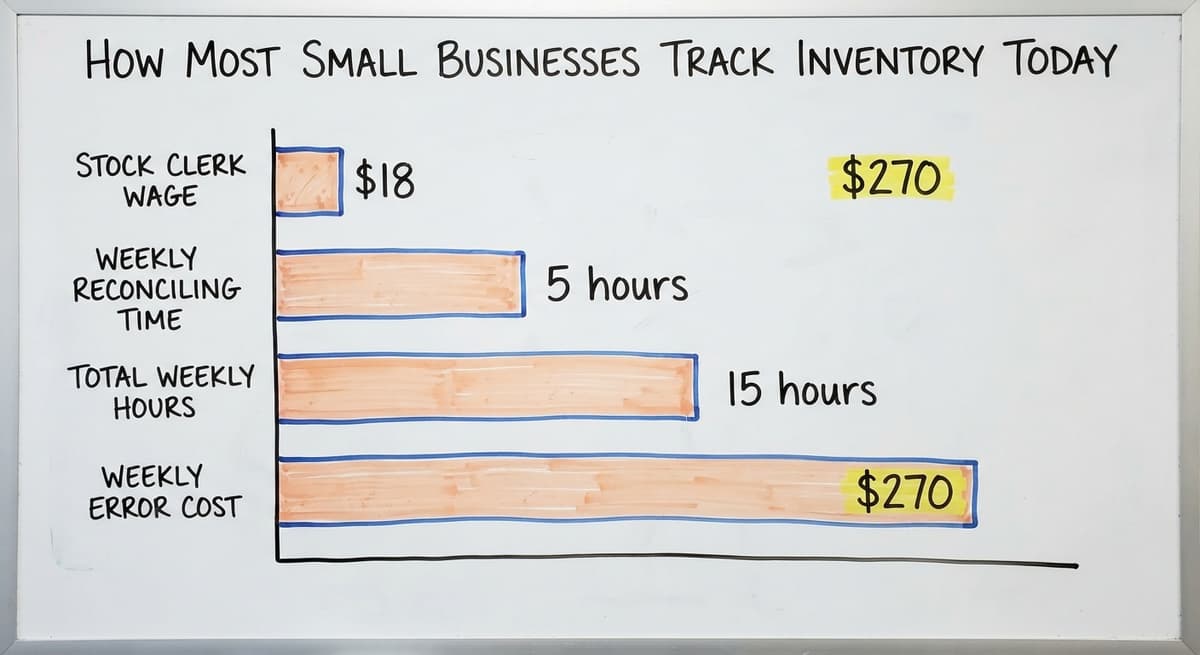
The hidden cost is labor. According to the US Bureau of Labor Statistics, stock clerks and order fillers earn a median wage of around $18 an hour.
If 3 staff members each spend 5 hours a week reconciling counts and fixing errors, that is 15 hours at $18, or $270 a week. Over a year, that is $14,040 in labor spent on a problem a better system would eliminate.
You got here by solving problems as they appeared. That is good management. The question now is whether the patchwork is still the cheapest option.
What Does Good Inventory Management Look Like at Small Scale?
A working system has three parts. One place for counts that everyone can see. Clear reorder points that trigger a purchase order before stock runs out. A pick list tied to actual inventory levels, not a number someone typed in yesterday.
Good does not mean expensive. A small distributor with 200 SKUs and 3 warehouse staff does not need the same system as a national retailer. The right system fits your operation, not the other way around.
The mental model is a tidy warehouse where the receiving clerk logs goods as they arrive, the picker pulls from a list that reflects live counts, and the owner can see stock levels from a phone without calling anyone. That is the target. It is achievable without an enterprise platform.
Is the comparison easier when one option is built for you?
Yes. Off-the-shelf means fitting your process to the software, and custom is the other way round. The first look costs nothing.
Book a callThe Role of the accounting software in Small Business Inventory
The accounting software is already in place for most small businesses, and that is worth respecting. It handles accounting, invoicing, and basic item tracking well. Many teams have years of data in it and staff who know how to use it.
Where the accounting software falls short is the warehouse floor. It does not show real-time stock counts by bin or shelf location. It does not support a pick-and-pack workflow. It does not alert you when a SKU drops below its reorder point.
The accounting software inventory is built for accountants, not warehouse managers.
The answer is not to replace the accounting software. It is to extend it. A accounting integration for wholesale distributors can sync accounting data while a separate, purpose-built layer handles the warehouse work. The books stay accurate. The floor gets the tools it needs.
Can I Use the accounting software for Inventory Management?
Yes, but with limits. The accounting software tracks item quantities and costs, which satisfies basic stock management and tax reporting needs. For a business with fewer than 50 SKUs and low order volume, it may be enough.
As SKU counts and order volume grow, the gaps in the accounting software become daily friction. Real-time counts, location tracking, and pick workflows require a system built for those tasks.

When Does the Spreadsheet Stop Being Enough?
Spreadsheets fail in predictable ways. 2 people edit the same file and one overwrites the other's work. A formula breaks and no one notices for a week.
Someone saves a copy to their desktop and the shared version falls behind. Version confusion is not a user error. It is a structural limit of the tool.
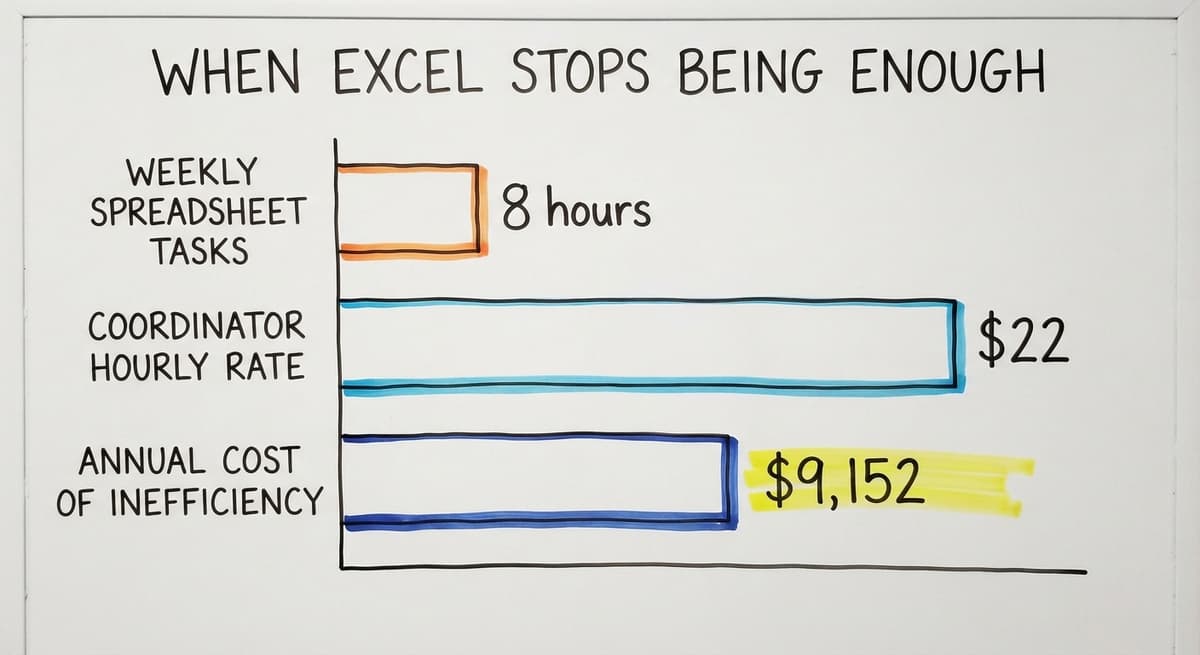
The labor cost compounds fast. If a warehouse coordinator spends 8 hours a week maintaining and reconciling spreadsheets at $22 an hour, that is $9,152 a year.
Replacing spreadsheet with a custom operations tool that automates those reconciliations pays for itself quickly when you run the numbers that way.
The sign that spreadsheet has become the bottleneck is not a single dramatic failure. It is the slow accumulation of small ones: the order that shipped wrong, the reorder that came too late, the count that no one trusts.
Key Features Every Small Business Inventory System Needs
Before evaluating any software, agree on the minimum your operation requires. These 4 features are non-negotiable for a business at this scale.
- Real-time stock counts visible to everyone who needs them, from the warehouse floor to the owner's phone, so decisions are based on current data.
- Reorder alerts that fire automatically when a SKU drops to its reorder point, removing the need for anyone to monitor levels manually.
- A simple receiving workflow that logs incoming goods at the dock, so counts update the moment stock arrives rather than hours later.
- A pick list tied to live inventory, so the picker pulls from what is actually on the shelf, not a number that was accurate yesterday.
These are not advanced features. They are the floor. Any inventory software for small business that cannot deliver all 4 is not ready for a working warehouse.

Are There Features Worth Adding Later, Once the Core System Works?
Yes. Several features deliver real value but are not day-one requirements. Get the core right first, then consider these second-phase additions.
- Barcode scanning removes the manual entry step that causes most receiving errors, and it speeds up picking significantly on high-volume days.
- Multi-location tracking matters if you store goods in more than one area, building, or site. Without it, a warehouse inventory system cannot tell you which location holds the stock.
- Supplier lead time tracking lets your reorder points account for how long each supplier actually takes, not a round number someone estimated.
These are worth planning for, even if you do not need them immediately. A system that cannot add them later will force a replacement sooner than you want.
What does it look like running on your own process?
The first thing you see is it running on your own process, at no build cost. The subscription starts once it is live and doing the job, not before.
Book a callHow Do You Choose the Right Inventory System for Your Business?
Start with your biggest pain point, not a feature checklist. If stockouts are costing you customers, focus on reorder alerts and accurate counts.
If receiving errors are your problem, focus on the intake workflow. Matching the solution to the specific break in your operation is faster and cheaper than buying everything at once.
Ask whether the system fits how you already work. A platform that forces you to rebuild every process from scratch will face resistance from staff and take months to stabilize.
The closer the new system is to the old one in daily feel, the faster your team will adopt it.
Warn against over-buying. A system built for 500 staff will frustrate a team of 20. The menus are deeper, the setup is longer, and the features you do not need get in the way of the ones you do.
The US Census Bureau tracks inventories-to-sales ratios for wholesale firms at census.gov/wholesale, and the data shows that lean, well-managed inventory outperforms bloated stock regardless of business size. The same principle applies to software.
Off-the-Shelf Software vs Custom-Built Solutions
Off-the-shelf inventory software covers the common cases well. If your workflows match what the software expects, setup is fast and cost is predictable. Where it falls short is unusual workflows: non-standard pricing structures, specific receiving steps, or integrations with tools the vendor never planned for.
Custom warehouse management software follows your actual operation. It sounds expensive, but at small scale the scope is narrower than most owners expect.
A custom build that handles your 3 core workflows is faster to implement and easier to train on than a platform with 200 features you will never touch. The Software Society builds these kinds of targeted systems, matching the tool to the operation rather than asking the operation to match the tool.

Why Are Small Businesses Wary of Big ERP Systems?
The fear is justified. Enterprise resource planning systems target large organizations with dedicated implementation teams, months of setup time, and budgets that most small businesses cannot justify. Staff retraining alone can stall a business for weeks.
Small businesses do not need an ERP to fix their inventory problems. NIST's Manufacturing Extension Partnership offers vendor-neutral supply chain guidance at nist.gov/mep/supply-chain and consistently points smaller firms toward targeted process improvements rather than full platform replacements.
The smarter path is a lighter, focused solution that fixes the specific break without touching what already works.
How Do You Get Your Team to Actually Use a New System?
Adoption fails more often than software does. A system your team ignores is worth nothing, no matter how well it was built.
Keep the new process as close to the old one as possible during the switch.
If your team is used to a printed pick list, give them a printed pick list that the new system generates. Change the source of the data, not the feel of the work.
Find one person on the floor or in the office who will champion the change. That person learns the system first, answers questions from colleagues, and gives feedback to whoever manages the rollout.
Start with one workflow, get it working, then expand. A receiving process that works reliably builds more trust than a full launch that half-works.

Setting Up Reorder Points That Actually Work
A reorder point is the stock level that triggers a purchase order. When a SKU drops to that number, a new order goes out.
The goal is to reorder early enough that stock arrives before you run out, but not so early that you accumulate excess.
The basic calculation is: daily usage multiplied by supplier lead time in days. If you sell 10 units a day and your supplier takes 7 days to deliver, your reorder point is 70 units. Add a safety buffer if demand is unpredictable.
Set reorder points when you set up the system, then review them when a supplier changes lead times or when a product's demand pattern shifts.
A reorder point that was right in January may be wrong in October. Reviewing them twice a year catches most of the drift.
Not sure this is the right shape for your operation?
The call is free. Describe how the work runs today. We map it on a call and show you what it would look like built around that, before you spend anything.
Book a callHow Do You Do a Physical Inventory Count Without Shutting Down?
Cycle counting lets you count inventory in sections, on a rolling schedule, without stopping operations. Instead of a full annual count that closes the warehouse for a day, you count a portion of your SKUs each week until you have covered everything, then start again.
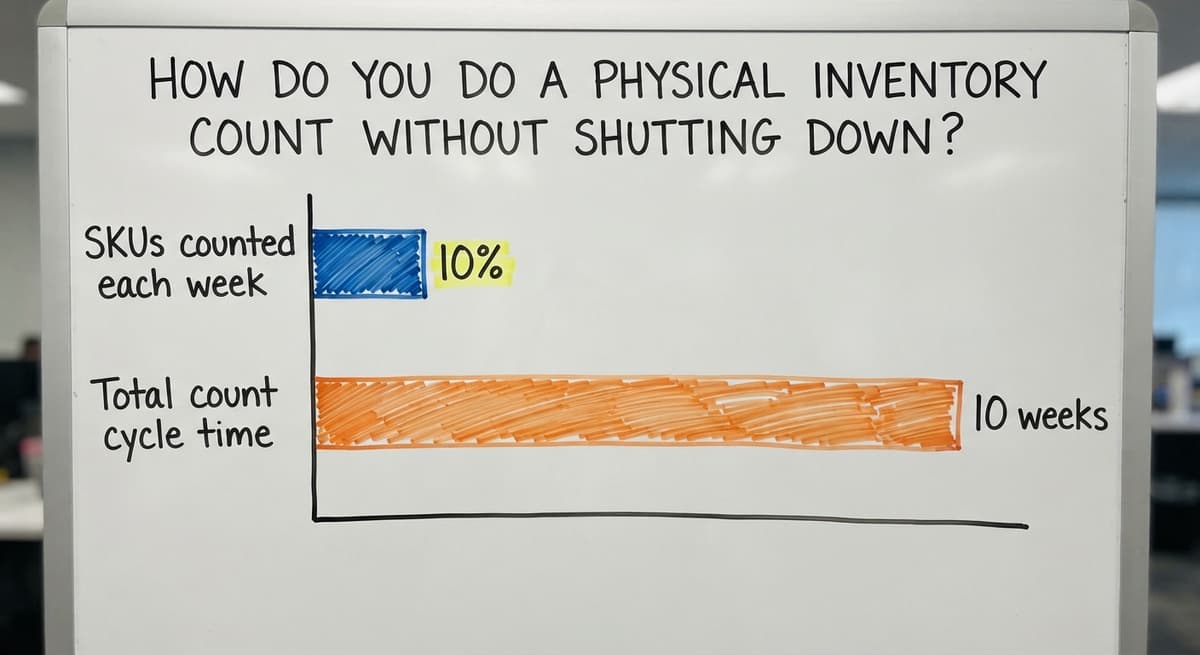
A simple schedule: count 10% of SKUs each week. Over 10 weeks, every SKU has been counted once. Flag any count that does not match the system and investigate before moving on. This keeps inventory accuracy high without the disruption of a full shutdown.
Cycle counting also catches problems earlier. A mismatch found in week 3 is easier to trace than one found at year-end when the cause is months old. Most inventory software for small business supports cycle counting as a built-in workflow.

Inventory Management for Wholesale Distributors Specifically
Wholesale distribution has needs that standard retail tools miss. High SKU counts, bulk receiving in mixed lots, and customer-specific pricing are normal in distribution and rare in retail. A tool built for a retail shop will create workarounds from day one.
Wholesale distributor inventory requires receiving workflows that handle partial pallets and multiple units of measure. It requires pricing logic that applies different rates to different customers for the same SKU. It requires reporting that shows which customers are buying which lines and at what margin.
Owners and ops managers at distributors should look for systems built with distribution in mind, or work with a partner who can build around the specific operation. A generic platform adapted to distribution is almost always harder to use than one designed for it.
Inventory Management for Fulfillment Centers and Warehouses
Fulfillment inventory centers on one workflow: pick, pack, ship. Every failure in that chain traces back to an inventory error.
The picker pulls the wrong item because the location is wrong in the system. The wrong item ships. The customer returns it. The cost is the return, the reship, and the relationship.
Location-based tracking is the core need in a warehouse environment. Each SKU lives in a specific bin or zone, and the system knows it.
The pick list tells the picker exactly where to go, not just what to pull. Fulfillment center software for small teams does not need to be complex. It needs to be accurate and fast to navigate on the floor.
Inventory accuracy directly affects fulfillment speed. A team that trusts its counts moves faster than one that double-checks every pull.

Signs Your Current Inventory System Is Costing You Money
Some costs are visible. Most are not. These are the signals that the current setup is more expensive than it looks.
- Emergency reorders at premium prices because a SKU ran out before anyone noticed the level dropping.
- Staff time spent reconciling counts rather than moving product, a cost that shows up in payroll but not in any inventory report.
- Customer complaints or lost orders tied to shipping the wrong item or missing a line.
- Cash tied up in overstock that does not move, sitting on shelves while the business borrows to fund operations.
If 2 or more of these are familiar, the system is already costing more than a fix would.
Next Steps for Improving Your Inventory Management
The path forward is not complicated. Identify the single biggest pain in your current operation. Match a solution to your actual scale, not to the scale you hope to reach in 5 years. Start with one workflow, get it right, then build from there.
Do not wait for the perfect system. A working system that is 80% right and fully adopted beats a perfect system that is still being configured.
The goal is fewer errors, faster fulfillment, and less guessing, and that is achievable without a long implementation or a large budget.
If your operation has grown past what an accounting package and spreadsheets can handle, and you are not ready to buy an ERP, there is a practical middle path.
How custom software implementation works at small scale is different from what most owners expect. The scope is narrower, the timeline is shorter, and the result is a system built around how your team actually works.
Start a conversation about what your operation actually needs. Bring a description of your biggest inventory problem, not a feature list, and the right solution becomes much easier to find.
Frequently asked questions
Frequently asked questions
What is the best inventory management system for a small business?
There is no single best system. The right choice depends on your workflow, SKU count, and whether you need warehouse location tracking. The accounting software works for basic item tracking at low volume. Purpose-built inventory software handles pick-pack-ship workflows better.
Custom-built systems are worth considering when your operation has unusual workflows that off-the-shelf tools do not fit. Start with your biggest pain point and match the system to that, not to a feature list.
What is the 80/20 rule in inventory?
The 80/20 rule in inventory means that roughly 80% of your revenue comes from 20% of your SKUs. In practice, it tells you to focus your tightest controls on that top 20%.
Count those items more often, set tighter reorder points for them, and investigate mismatches in that group first. The remaining 80% of SKUs still need managing, but errors there cost less.
What is the best way to manage inventory for a small business?
The best way is to pick one system, get everyone using it, and keep it current. That means one place for stock counts, reorder points set for every active SKU, and a receiving process that logs goods the moment they arrive.
Cycle counting keeps the numbers accurate between full counts. The system does not need to be expensive. It needs to be used consistently by everyone who touches stock.
Can I use the accounting software for inventory management?
Yes, within limits. The accounting software tracks item quantities and costs, which covers basic stock management and satisfies tax reporting requirements under IRS Publication 538. For businesses with low SKU counts and simple workflows, it may be enough.
As order volume grows, the accounting software gaps become daily friction: no real-time bin locations, no pick-list workflow, no automatic reorder alerts. At that point, extending the accounting software with a purpose-built inventory layer is more practical than replacing it.
What is cycle counting and how does it keep inventory accurate?
Cycle counting is the practice of counting a portion of your SKUs on a rolling schedule rather than shutting down for a full annual count. A common approach is to count 10% of SKUs each week, so every item is counted once every 10 weeks.
Any count that does not match the system gets investigated immediately. This keeps inventory accuracy high without stopping operations, and it catches errors while the cause is still traceable.
How do you set reorder points that prevent stockouts without creating overstock?
Multiply your average daily usage by your supplier's lead time in days. If you use 10 units a day and the supplier takes 7 days to deliver, your reorder point is 70 units.
Add a safety buffer if demand varies. Review reorder points whenever a supplier changes lead times or a product's sales pattern shifts. A reorder point set once and never reviewed will eventually be wrong.
Do small businesses need an ERP to manage inventory properly?
No. Most small businesses do not need an ERP. Enterprise resource planning systems target large organizations with long implementation timelines and dedicated IT staff.
A small warehouse or distributor with 5 to 100 staff needs accurate counts, reorder alerts, and a pick workflow. A purpose-built inventory system or a custom-built tool delivers those outcomes faster and at a fraction of the cost of an ERP.
What are the signs that your current inventory system is costing you money?
Watch for emergency reorders at premium prices, staff hours spent reconciling counts instead of moving product, customer complaints tied to wrong or missing items, and cash sitting in overstock that does not sell.
Any one of these is a signal. Two or more together means the current system is more expensive than a fix would be.
What inventory metrics should a small business track?
Inventory accuracy from cycle counts, turnover, stockout rate, days of stock on hand, and the value of stock with no sale in 90 days. Five numbers, reviewed monthly, tell you whether stock is earning its shelf space.
How can I reduce excess and obsolete inventory?
Flag anything with no sale in 90 days, mark it down or bundle it before it reaches 180, and cut the reorder point on any item that has been marked down twice. Most excess is a reorder point that was set once and never revisited.
How do I calculate reorder points and safety stock?
Reorder point is average daily sales multiplied by lead time in days, plus safety stock. Safety stock is maximum daily sales multiplied by maximum lead time, minus the average of each.
A product selling 4 to 6 a day on a 10 to 14 day lead time carries 36 units of safety stock and reorders at 76.
How often should a small business count inventory?
Count the fast movers weekly, everything else monthly, and the whole stockroom once a year for the accountant. Cycle counting 20 items a day keeps the record within 2 percent without ever closing for a count.
Should I use a spreadsheet or inventory software?
A spreadsheet until the second person needs to update it or the first physical count disagrees with it, which for most businesses is under a year.
Software from then on, because the spreadsheet's errors cost more in a month of emergency orders than the software does.
What is in a free first look?
A 30 minute call, your operation mapped, and a clear picture of what we would build. No obligation and nothing to install.
Book a callRelated guides
The rest of this guide, for the parts of the job this page does not cover.
Guides
- Inventory Management Small Businesses
- Best Inventory Management Software for Small Businesses
- Small Business Inventory Management System
- Small Business Stock Management Software
- Inventory Tracking Software for Small Business
- Inventory Control Software for Small Business
- Inventory Tracking Systems for Small Businesses
- Simple Inventory System for Small Business
- Inventory Sales Software Small Business
- Inventory Control for Small Business
- Inventory System for Small Business
- Wms for Small Business
- Free Inventory Management Software for Small Business
- Small Business Warehouse Management System
- Warehouse Management System for Small Business
- Accounting and Inventory Software for Small Business
- Erp System for Small Businesses
- Business Distributors
Common questions
- What is the Best Inventory Management Software for Small Business
- Why is Inventory Management Important for Small Businesses
- How to Manage Inventory for Small Business
- How to Organize Inventory for Small Business
- How to Keep Track of Inventory Small Business
- What is the Best Inventory Management System for Small Businesses?