


Inventory Management Small Businesses
Inventory management for small businesses means knowing what stock you have, where it is, and when to buy more. Done well, it stops stockouts, frees up cash, and saves your team hours of manual work every week. This guide covers the core concepts, the most common methods, and how to improve your system without blowing up what already works.
Published 13 August 2026. Reviewed and updated 15 September 2026.
Reviewed August 2026. Each figure comes from the assumptions stated beside it, so you can substitute your own and the arithmetic still holds.
Last reviewed: June 2025
Book a callWhat Does Inventory Management Mean for a Small Business?
Inventory management is the practice of tracking stock from the moment it arrives to the moment it leaves. That includes receiving, storing, counting, reordering, and shipping.
At its simplest, it is knowing what you have on hand right now.
Tracking stock is passive. You write down what came in and what went out.
Actively managing inventory means using that data to make decisions: when to reorder, how much to hold, which items are slow, and where your cash is tied up.
When a business carries fewer than 50 SKUs and one person touches all the stock, tracking is usually enough.
Past that point, gaps appear fast. Items go missing. Counts drift. Orders arrive late because no one noticed the bin was empty.
The system that worked at 10 SKUs breaks quietly at 200. That is when active management stops being optional.
Would you rather have it built around your operation?
The first look is free. If you would rather not compare products, describe how your operation already works and we build the system around it.
No build cost. You see it running on your own process first, and the monthly subscription starts only once it is live.
Book a callWhy Do Small Businesses Struggle with Inventory?
Most inventory problems are process problems, not people problems. They start with a system that was never built for the volume it now handles.
The 4 most common pain points are:
- Stockouts: you run out of an item and lose the sale or delay the shipment
- Overstock: you buy too much of a slow item and tie up cash for months
- Shrinkage: stock disappears between counts with no clear cause
- Counting errors: manual tallies drift from reality every time someone makes a typo
Each problem starts small. One missed reorder. One mislabelled box. Over time, small errors stack into a gap between what the records say and what is actually on the shelf.
Why Is Accurate Labelling the Foundation of Stock Control?
GS1, the global standards body behind barcodes and product identification, notes that consistent, standards-based labelling is the foundation of accurate stock control: "Barcodes are the most widely used automatic identification technology in the world," as stated on the GS1 barcodes standards page.
Without that foundation, every count starts with a manual step that can go wrong. The fix is a better system, not better people.
What Does Getting Inventory Wrong Actually Cost?
Getting inventory wrong costs more than most small business owners expect, and the damage shows up in 2 places.
Direct costs are easy to see:
- Lost sales when an item is out of stock
- Emergency orders at higher prices to fill a gap
- Carrying costs on dead stock that sits for months
Indirect costs are harder to see but just as real:
- Staff time spent reconciling counts instead of doing productive work
- Customer trust that erodes after a late or wrong shipment
- Cash locked in slow-moving stock that could fund better buys
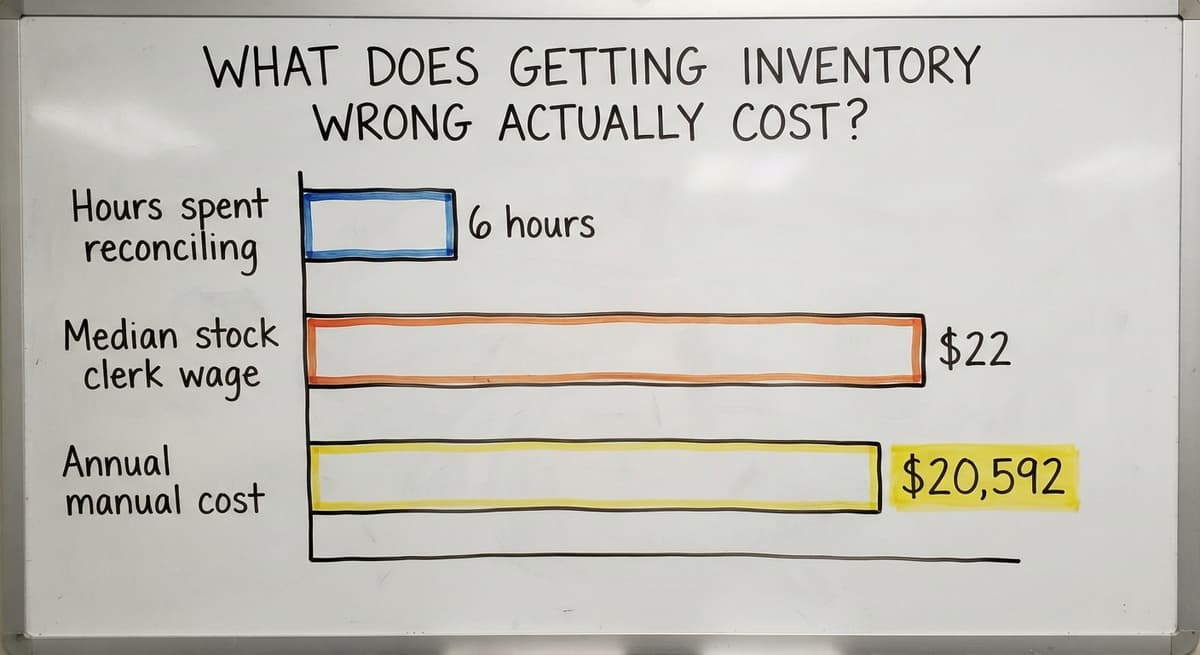
Here is a simple calculation. Say 3 warehouse staff each spend 6 hours a week reconciling spreadsheets and chasing stock discrepancies.
At the current median wage for stock clerks of around $22 an hour, according to BLS occupational data, that is roughly $20,592 a year spent on manual reconciliation alone. That number does not include the cost of the stockouts those errors cause.
The Legal Reasons Inventory Counting Is Not Optional
The US Federal Trade Commission requires businesses to ship orders when promised. An inaccurate count is what breaks that promise. There is also a tax reason to count carefully.
The IRS states plainly in Publication 538: "To figure taxable income, you must value your inventory at the beginning and end of each tax year." Counting is not optional. The question is whether you do it well or badly.
How Do Most Small Businesses Track Inventory Today?
The typical setup looks like this: QuickBooks handles the accounting. A shared spreadsheet tracks stock levels. Someone prints a pick sheet each morning. Receiving notes go into an email thread.
This works at first. Each tool does one job adequately. The team learns the workarounds. Orders go out.
The breakdown comes when volume grows. The spreadsheet has 3 versions and no one knows which is current.
The pick sheet was printed yesterday and does not show this morning's receiving. QuickBooks shows a quantity that no one trusts.
This is a normal starting point, not a failure. Almost every small warehouse or distributor gets here. The goal is to recognise when the patchwork stops working and have a clear path forward.
The Problem with Spreadsheets as Your Main Inventory Tool
Spreadsheets show a snapshot. They do not update when stock moves. The moment someone receives a pallet or ships an order, the sheet is already out of date.
Version control is the second problem. When 3 people edit the same file on different days, you get 3 different realities.
There is no way to know which row was changed, when, or by whom.
Spreadsheets also have no alerts. They will not tell you when a bin hits its reorder point. They will not flag a receiving error. They will not stop a pick from going out against stock that is not there.
For a business with fewer than 50 SKUs and 1 person touching inventory, a spreadsheet is fine. Past that, it becomes the source of the problem rather than the solution.
Where Does QuickBooks Help, and Where Does It Fall Short?
QuickBooks is excellent at what it was built for: accounting, invoicing, and basic item tracking. It records what you bought and what you sold. It keeps your books clean.
The gaps appear in the warehouse. QuickBooks does not handle real-time stock movements well. It was not built for receiving workflows, multi-location tracking, or pick-and-ship operations.
Adjustments are manual. Location data is limited. There is no scan support built in.
The goal is not to replace QuickBooks. It handles the accounting side well, and replacing it means migrating years of financial data.
The better path is to fill the gaps around it with a tool that handles warehouse movements and syncs the results back to QuickBooks.
Many small distributors and warehouses benefit from QuickBooks integration for wholesale operations, where a purpose-built inventory layer handles the physical side and QuickBooks stays in place for finance.
Is the comparison easier when one option is built for you?
Yes. Off-the-shelf means fitting your process to the software, and custom is the other way round. The first look costs nothing.
Book a callCore Concepts Every Small Business Owner Should Know
Before choosing a method or a tool, it helps to know the terms. These definitions are short and plain. Each one will come up again as you build or improve your system.
Inventory valuation sets the cost of goods sold and the value of stock on your balance sheet. Your accountant or QuickBooks setup may already dictate which method you use. The 3 main options are FIFO (first in, first out), LIFO (last in, first out), and weighted average cost.
FIFO assumes the oldest stock sells first and is the most common choice for businesses with perishable or dated goods. LIFO assumes the newest stock sells first and is less common outside the United States. Weighted average cost smooths out price fluctuations by averaging the cost of all units on hand.
Tracking methods
Inventory management methods control how often you count, how much you know in real time, and how much work your team does. Periodic counting happens on a fixed schedule, such as monthly or quarterly.
Perpetual tracking updates stock levels with every transaction. Cycle counting splits the full count into smaller, rolling counts so no single count disrupts the whole operation. Pick the method that fits your current size, then upgrade when it breaks.
Software types
Inventory management software splits into 4 broad categories: standalone inventory tools, warehouse management systems, ERP platforms with inventory modules, and custom-built solutions.
The right choice depends on your current tools, your team size, and how different your operation is from a standard retail model.
SKU: The Building Block of Inventory
A SKU (stock keeping unit) is a unique code you assign to each distinct product you carry.
One code, one product. If the same item comes in 2 sizes, each size gets its own SKU.
Consistent SKU discipline stops a long list of downstream errors. When staff use different names for the same item, counts split across rows and nothing adds up.
Assign SKUs before you need them. Do not wait until you have a picking problem to create a naming system.
When Should You Reorder?
A reorder point is the stock level that triggers a purchase order. When a bin drops to that number, it is time to buy more.
The basic formula is: lead time demand plus safety stock. Lead time demand is how much you sell during the time it takes to get more stock. Safety stock is the extra buffer you hold against surprises.
Manual reorder tracking is where most small businesses lose control. No one checks the bin until it is empty. A simple reorder point, even a rough one, fixes that.
Safety Stock: Your Buffer Against Surprises
Safety stock is extra inventory held against demand spikes or late supplier deliveries. It is the gap between your reorder point and zero.
Too little safety stock causes stockouts. Too much ties up cash. A simple starting rule: hold enough stock to cover your longest recent lead time for each item. Refine from there once you have real data.
Lead Time: The Clock That Controls Your Orders
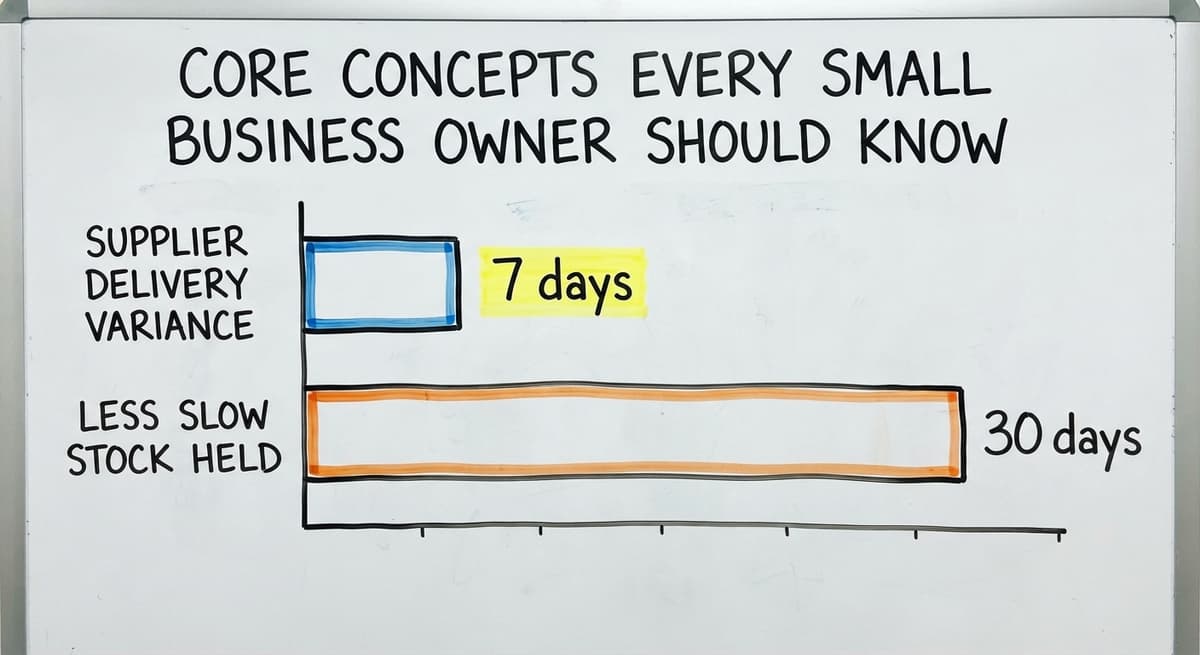
Lead time is the gap between placing an order and receiving goods. If a supplier says 7 days but consistently delivers in 10, your reorder points are wrong.
Track actual lead times per supplier, not estimated ones. A simple log of order date and receipt date is enough to start.
Underestimating lead time is one of the top causes of stockouts in small warehouses.
Carrying Cost: What It Costs to Hold Inventory
Carrying cost is every expense tied to holding stock: storage space, insurance, the risk of obsolescence, and the cash you cannot spend on anything else while it sits on a shelf.
Reducing carrying cost is as valuable as increasing sales. A business that holds 30 days less of slow stock frees real cash.
Most small businesses underestimate this number because the costs are spread across several budget lines.
Shrinkage: The Inventory That Disappears
Shrinkage is the gap between what your records say you have and what is actually on the shelf. It has 4 main causes:
- Receiving mistakes: the wrong quantity was booked in
- Picking errors: the wrong item or quantity went out
- Damage: stock was written off informally or not at all
- Theft: internal or external
A good tracking system surfaces shrinkage faster. The sooner you see the gap, the sooner you find the cause.

Inventory Valuation Methods Explained Simply
Inventory valuation sets the cost of goods sold and the value of stock on your balance sheet.
Your accountant or QuickBooks setup may already dictate which method you use. Here are the 3 main options.
What Does FIFO Mean and Should I Use It?
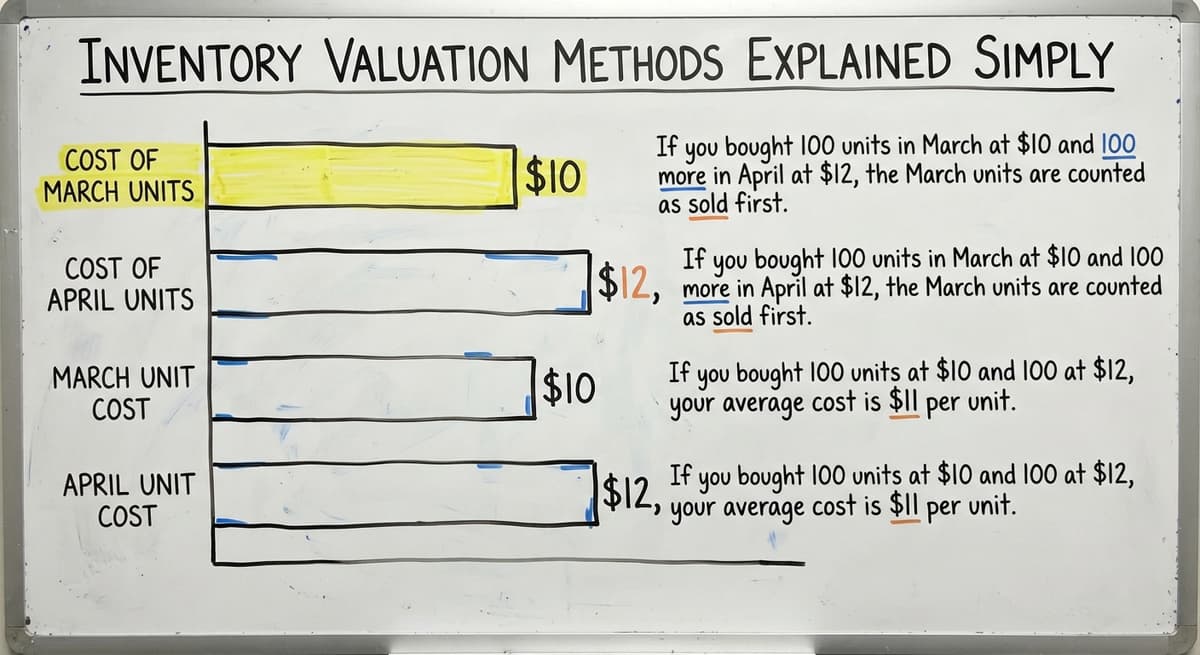
FIFO (first in, first out) means the oldest stock sells first. If you bought 100 units in March at $10 and 100 more in April at $12, the March units are counted as sold first.
FIFO is the most common choice for small product businesses. It matches how most physical stock actually moves. It is required for perishables and products that change over time.
LIFO: Last In, First Out
LIFO (last in, first out) means the newest stock sells first. In practice, this means your cost of goods sold reflects the most recent purchase prices.
LIFO has specific tax implications and is less common in small businesses. It is not allowed under international accounting standards (IFRS), so if you sell internationally or plan to, it is worth discussing with your accountant before choosing it.
Weighted Average Cost
Weighted average cost blends all purchase costs into one average unit cost. If you bought 100 units at $10 and 100 at $12, your average cost is $11 per unit.
This method suits businesses that buy the same item repeatedly at fluctuating prices. It is simpler to manage than FIFO in some software setups and smooths out cost swings over time.
Inventory Management Methods for Small Businesses
The method you choose controls how often you count, how much you know in real time, and how much work your team does.
Pick the one that fits your current size, then upgrade when it breaks.
What does it look like running on your own process?
The first thing you see is it running on your own process, at no build cost. The subscription starts once it is live and doing the job, not before.
Book a callHow Do You Choose the Right Method for Your Operation?
The right method is the one that matches your current reality, not your ideal state.
| Operation size | SKU count | Best starting method |
|---|---|---|
| 1 to 5 staff | Under 100 | Periodic with a spreadsheet |
| 5 to 20 staff | 100 to 500 | Perpetual with basic software |
| 20 to 100 staff | 500 plus | Perpetual with cycle counting and scan support |
Start simple. Add complexity only when the current method breaks. Most small distributors and warehouses benefit most from perpetual inventory paired with cycle counting once they pass a few hundred SKUs.

Inventory Management Software Options for Small Businesses
The software market splits into 4 broad categories. The right choice depends on your current tools, your team size, and how different your operation is from a standard retail model.
Standalone Inventory Apps
Standalone apps handle stock tracking without being part of a larger accounting or ERP system. They suit simple product businesses with light warehouse activity.
Most require a manual sync with QuickBooks or your accounting tool, which creates a step that can fall behind.
Good fit for: small retail or e-commerce sellers with a single location and straightforward pick-and-ship.
Do I Need a Special Add-On to Improve QuickBooks Inventory?
Several tools bolt directly onto QuickBooks to extend its inventory features, at $50 to $300 a month. They add real-time stock tracking, receiving workflows, and sometimes scan support while keeping QuickBooks as the accounting engine.
This is the right first step for a small distributor or warehouse that wants better tracking without a full system change.
Watch for sync lag between the add-on and QuickBooks, and check whether the tool duplicates data in ways that create reconciliation work.
QuickBooks integration for wholesale operations works best when the add-on handles warehouse movements and pushes clean data back to QuickBooks rather than trying to replace it.
Warehouse Management Systems
A warehouse management system (WMS) is software built specifically for physical warehouse operations: receiving, put-away, picking, packing, and shipping. It handles location tracking, scan-based workflows, and pick accuracy at scale.
Most enterprise WMS tools are expensive and complex to implement. They target operations with large teams and high order volumes.
For a 10 to 30 person warehouse, many WMS platforms are more than you need and harder to implement than the benefit justifies.
Operations software built for wholesale and distribution sits between a QuickBooks add-on and a full enterprise WMS. It is worth evaluating if you have outgrown basic add-ons but are not ready for an enterprise platform.
Custom-Built Inventory Software
Custom software makes sense when every off-the-shelf tool you try requires you to change how you work rather than fitting how you already operate.
A custom tool takes shape around your existing workflow. It keeps QuickBooks in place and replaces only the manual, error-prone parts: receiving, picking, stock counts, and reorder alerts.
Custom warehouse management software for small distributors does not have to mean a long, expensive project. A builder who works at small scale can deliver a working system faster than most enterprise implementations.
This is the right fit for small distributors and warehouses that have outgrown spreadsheets but do not need a full ERP.
What Should You Look for in Any Inventory System?
Regardless of category, any system worth using should do these 5 things:
- Show real-time stock levels without a manual update step
- Send reorder alerts before you run out, not after
- Create or link to purchase orders from within the system
- Connect to QuickBooks or your accounting tool without manual exports
- Support barcode scanning for receiving and picking
Ease of use for warehouse staff matters as much as features for managers. A system your team will not use consistently is not a system.
Red Flags When Evaluating Inventory Software
There are 5 red flags in tools that claim to serve small businesses and do not fit them. Watch for these warning signs:
- Implementation timelines measured in months, not weeks
- Requires replacing QuickBooks or migrating all historical data
- Priced for a 500-person operation, not a 10-to-50-person team
- The vendor cannot walk you through their implementation process in plain terms
- No local or dedicated support once the sale is closed
A vendor who cannot explain clearly how you will go live is a vendor who has not done it at your scale before.

Barcodes and Scanning in Small Business Inventory
Barcode scanning is the step that removes manual data entry from receiving and picking. Instead of typing a quantity or a SKU, a staff member scans a label and the system updates instantly.
The basic hardware is straightforward: a barcode scanner, a label printer, and pre-printed labels on your shelves and products.
The NIST Manufacturing Extension Partnership points to scan-based processes as a core element of accurate supply chain management.
Scanning pays for itself quickly. A single receiving error that ships the wrong item to a customer costs far more than a label printer.
Barcode scanning setup for small warehouses is a practical first step for any operation moving toward perpetual inventory.
How Do You Set Up an Inventory System Without Disrupting Operations?
Setting up an inventory system does not have to mean a shutdown week or a big-bang migration. A phased approach keeps the business running while you improve the system underneath it.
What is in a free first look?
A 30 minute call, your operation mapped, and a clear picture of what we would build. No obligation and nothing to install.
Book a callCommon Inventory Mistakes Small Businesses Make
Small warehouses and distributors that have not yet formalized their systems repeat the same 6 errors:
- Counting too infrequently, so errors build up between counts
- Trusting the system number without checking it against physical stock
- Buying large quantities of slow-moving items to chase a volume discount
- Not tracking actual supplier lead times, only estimated ones
- Sharing one spreadsheet across multiple staff with no version control
Each mistake is fixable. The first step is knowing which one is costing you the most right now.

Inventory Management for Wholesale Distributors
Wholesale distributors are the businesses that buy in bulk and sell in smaller units. Inventory moves fast, and errors compound across customer orders quickly.
The priorities for a distributor are:
- Lot tracking: knowing which batch a product came from, especially for regulated goods
- Supplier lead time records: per supplier, per item, updated after every order
- Purchase order management: a clear link between what was ordered and what arrived
The US Census Bureau's Monthly Wholesale Trade data shows that inventories-to-sales ratios in wholesale fluctuate with demand conditions, meaning distributors who track stock tightly can respond faster when ratios shift.
A distributor with 200 active SKUs and 3 suppliers can manage with a good perpetual system and cycle counting. Past 500 SKUs or 10 suppliers, a dedicated tool becomes necessary.
Inventory Management for Fulfilment Centres and Warehouses
Fulfilment centres and warehouses receive, store, pick, and ship for others. The stakes on accuracy are higher because errors affect multiple customers and brands.
The priorities here are different from a distributor:
- Location tracking: knowing exactly which bin or shelf holds which item
- Pick accuracy: confirming the right item and quantity before it ships
- Real-time stock visibility: so clients can see their stock levels without calling you
Manual processes break down fast when daily order volume grows past what one person can manage from memory.
How to replace manual pick sheets with a digital system is the first practical step for a fulfilment operation moving away from paper.
How Do You Know You Have Outgrown Your Current System?
The signs are clear before the crisis:
- Stockouts are increasing despite reorders
- A full count takes more than 1 day to complete
- Staff spend hours each week reconciling spreadsheets
- QuickBooks inventory is consistently wrong
- Customer complaints about order accuracy are rising
This is the moment to evaluate a better system. Waiting for a major failure, a lost account, or a large write-off makes the upgrade harder and more expensive.

How Do You Upgrade Without Disrupting Operations?
A phased approach reduces risk. Keep your existing tools running while the new system is tested in parallel on a subset of SKUs or one warehouse area.
Choose a system or partner that builds around your current workflow rather than forcing a full migration.
The goal is to replace only the parts that are broken: manual receiving, paper pick sheets, spreadsheet counts. QuickBooks stays. The accounting history stays. The new layer handles the physical side.
Local implementation support makes a real difference for small teams. A vendor who can sit with your staff, watch how you work, and configure the system to match is more valuable than a feature-rich tool with a help desk in a different time zone.

Frequently Asked Questions About Inventory Management for Small Businesses
Small business owners and operations managers ask the following questions most often. The answers are direct and honest, not promotional.
Frequently asked questions
Frequently asked questions
What is the best way to manage inventory for a small business?
There is no single best way. The right approach depends on your SKU count, order volume, and team size. For most small businesses, the best starting point is a clean SKU list, manual reorder points for top items, and a consistent counting schedule.
As volume grows, perpetual inventory with barcode scanning becomes the practical standard. Start with what you can actually maintain, then add tools when the current method breaks.
What is the best inventory management system for a small business?
No single system is best for every small business. The right choice depends on whether you need to stay within QuickBooks, how many SKUs you carry, and how your warehouse operates. Standalone apps suit simple retail.
QuickBooks add-ons suit businesses that want to stay in QuickBooks but need better tracking. A custom-built tool suits operations whose workflow does not fit standard software. Evaluate on fit, not feature count.
What is the 80/20 rule in inventory?
The 80/20 rule in inventory is the observation that roughly 80% of your revenue comes from about 20% of your SKUs. This is the foundation of ABC analysis.
Your A items deserve the most attention: tighter reorder points, more frequent counts, and better location management. The rule is a starting point, not a law, but it helps small teams focus limited time on what matters most.
What is the best free inventory management app for small businesses?
Several free tools exist, including the basic inventory features built into QuickBooks Online and free tiers from apps like Sortly or inFlow. Free tools work for very small operations with low SKU counts.
The trade-off is almost always limited features, no scan support, or a cap on items you can track. If your operation has more than 100 SKUs or more than 2 staff touching inventory, a paid tool is worth the cost.
Do I need to replace QuickBooks to get better inventory control?
No. QuickBooks handles accounting well and replacing it means migrating years of financial data. The better path is to add a tool that handles warehouse movements and syncs back to QuickBooks.
The right inventory layer fills the gaps in receiving, picking, and real-time tracking without touching the accounting side.
How often should a small business count its inventory?
A full physical count at least once a year is a legal minimum for tax purposes. For an active warehouse, that is not enough.
Cycle counting your top items monthly or weekly catches errors before they compound. A business with 300 or more active SKUs should count some portion of its inventory every week.
What causes inventory shrinkage and how do I reduce it?
The main causes are receiving errors, picking errors, damage, and theft. Better processes at receiving and picking reduce shrinkage more than any single technology. A scan at receiving confirms the right quantity arrived.
A scan at picking confirms the right item is going out. A good tracking system surfaces shrinkage faster so you can find the root cause rather than writing it off.
Is custom inventory software worth it for a small business?
The answer depends on how different your operation is from what standard tools assume. If every tool you evaluate requires you to change how you work, custom is worth a serious look.
Custom does not mean expensive or slow if the builder works at small scale. A custom tool built around your existing workflow can be faster to implement and easier to use than a large off-the-shelf platform designed for a different kind of business.
How do I calculate reorder points and safety stock?
Reorder point is average daily sales multiplied by lead time in days, plus safety stock. Safety stock is maximum daily sales multiplied by maximum lead time, minus the average of each.
A product selling 4 to 6 a day on a 10 to 14 day lead time carries 84 minus 48, or 36 units of safety stock, and reorders at 76.
Should a small business use spreadsheets or inventory software?
A spreadsheet until the second person needs to update it or the first count disagrees with it, which for most businesses is under a year.
Software from then on, at $50 to $300 a month, because the spreadsheet's errors cost more than that in a month of emergency orders.
Which inventory management metrics should I track?
Inventory accuracy from cycle counts, turnover, stockout rate, days of stock on hand, and the value of stock with no sale in 90 days.
Five numbers, reviewed monthly, tell you whether stock is earning its shelf space.
How do I create an inventory spreadsheet?
One row per SKU with columns for SKU, description, location, quantity on hand, unit cost, reorder point, and supplier, and a second sheet that logs every receipt and sale by date.
Lock the SKU column, and hand the file to one owner. That structure lasts to about 200 items and 1 person.
Not sure this is the right shape for your operation?
The call is free. Describe how the work runs today. We map it on a call and show you what it would look like built around that, before you spend anything.
Book a callRelated guides
The rest of this guide, for the parts of the job this page does not cover.
Guides
- Best Inventory Management Software for Small Businesses
- Small Business Inventory Management System
- Small Business Inventory Management
- Small Business Stock Management Software
- Inventory Tracking Software for Small Business
- Inventory Control Software for Small Business
- Inventory Tracking Systems for Small Businesses
- Simple Inventory System for Small Business
- Inventory Sales Software Small Business
- Inventory Control for Small Business
- Inventory System for Small Business
- Wms for Small Business
- Free Inventory Management Software for Small Business
- Small Business Warehouse Management System
- Warehouse Management System for Small Business
- Accounting and Inventory Software for Small Business
- Erp System for Small Businesses
- Warehouse Inventory Management Software
Common questions
- What is the Best Inventory Management Software for Small Business
- Why is Inventory Management Important for Small Businesses
- How to Manage Inventory for Small Business
- How to Organize Inventory for Small Business
- How to Keep Track of Inventory Small Business
- What is the Best Inventory Management System for Small Businesses?