


Best Inventory Software
The best inventory software for a small wholesale distributor is the one that fits how your operation already runs. For most teams running on QuickBooks with stock tracked in Excel, that means software that connects to QuickBooks, handles real-time inventory tracking, and replaces manual steps without forcing a full system overhaul.
Reviewed and updated: October 2026
Book a callWhat Makes Inventory Software the Best Fit for Your Operation
Fit matters more than brand recognition. The best inventory software is not the one with the longest feature list. It is the one your team will actually use on a normal workday.
Small and mid-size distributors have different needs than enterprise warehouses. A tool built for a 500-person company can create more problems than it solves for a 20-person team. Features your team will never touch still cost money. Complex setup still takes time. And a system that does not match your workflow will be worked around, not used.
The right question is not "what is the most popular platform?" It is "what solves the specific problems slowing us down today?" Start there, and the list of real options gets much shorter.
We build it for your operation, and the first look is free
If you would rather not compare products, describe how your operation already works and we build the system around it.
No build cost. You see it running on your own process first, and the monthly subscription starts only once it is live.
Book a callWho This Guide Is For
Owners and operations managers at wholesale distributors, fulfillment centers, and warehouses are the intended audience for this guide. It assumes your business runs on QuickBooks, with overflow handled in Excel, printed sheets, or email chains. It is not aimed at enterprise buyers shopping for a full ERP.
Barcode-based tracking is a foundation of any modern warehouse system. As GS1 explains on their barcode standards page, "barcodes are the global language of business," enabling the scan-based counts that replace manual entry errors at receiving and picking. If you are not yet scanning, that is a practical starting point, not a major investment.
What Does Inventory Software Actually Do?
Inventory software is a system that tracks what you have, where it is, and what is moving in and out. That definition sounds simple, but the daily reality it replaces is anything but.
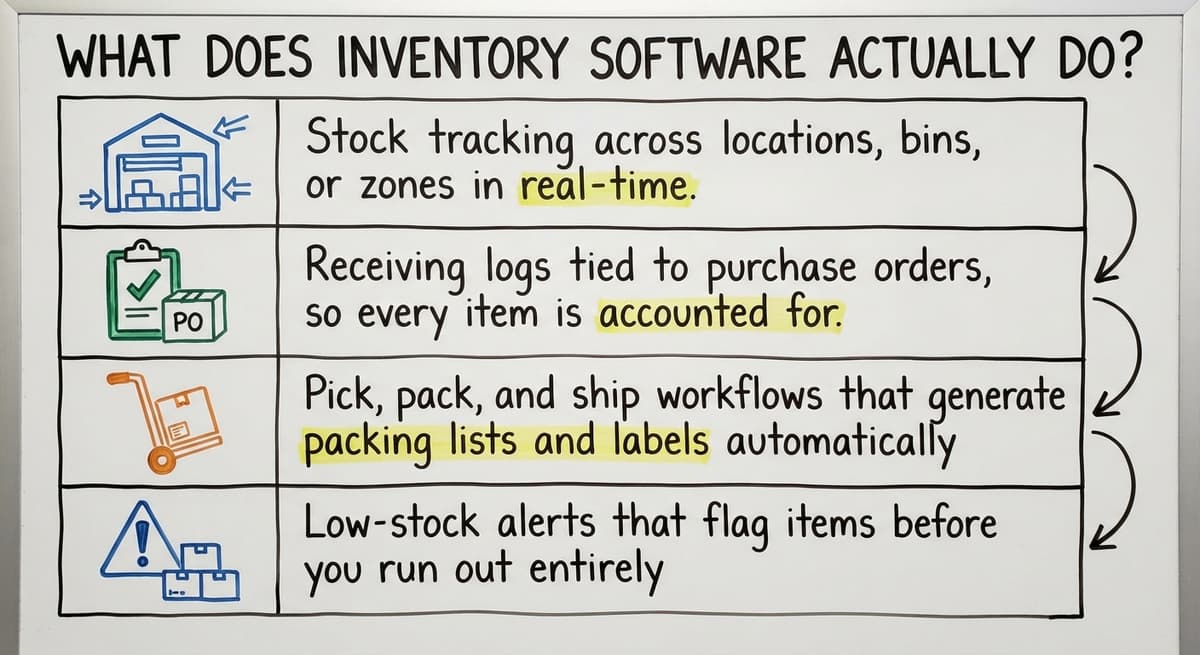
Core functions include:
- Stock tracking across locations, bins, or zones in real time
- Receiving logs tied to buy orders, so every item is counted on arrival
- Pick, pack, and ship workflows that generate lists from orders rather than typed by hand
- Low-stock alerts that flag items before you run out, not after
Good inventory management software replaces manual counting, spreadsheet updates, and paper pick lists. It does not need your team to learn an entirely new way of working. It takes the steps they already do and makes each one faster and more accurate.
Signs Your Current System Is Holding You Back
Most operations do not decide to change until the pain becomes visible. These are the signs that a current process has outgrown its tools.
- Staff spending hours each week reconciling spreadsheets against QuickBooks
- Orders shipping wrong or late because stock counts are a day behind
- No single place to see what is in stock across all locations
- Managers making decisions on numbers that are already out of date
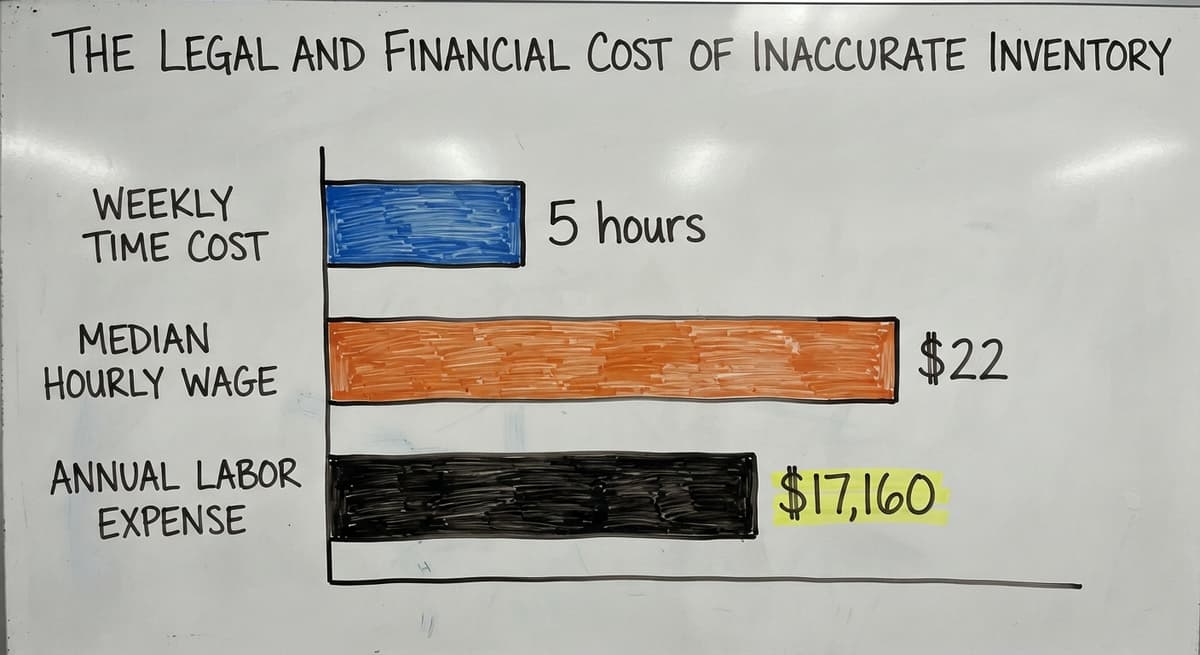
The Legal and Financial Cost of Inaccurate Inventory
The IRS is direct about why accurate counts matter beyond operations. IRS Publication 538 states: "To figure taxable income, you must value your inventory at the beginning and end of each tax year." That is a legal obligation, not a preference. A spreadsheet that drifts between QuickBooks updates does not meet that standard reliably.
Consider the cost of doing it manually. 3 people spending 5 hours a week on spreadsheet matching, at the median stock clerk wage of around $22 an hour per the Bureau of Labor Statistics, adds up to roughly $17,160 a year. That is before counting the cost of a single mis-shipped order.
The comparison is easier when one option is built for you
Off-the-shelf means fitting your process to the software. We do it the other way round, and the first look costs nothing.
Book a callThe Problem With Off-the-Shelf Inventory Platforms
Most packaged inventory platforms are built for the average business. They are not built for yours.
They often need you to change your workflows to match the software, rather than the other way around. Long setup timelines and high costs are common complaints among small distributors. Many platforms push toward a full ERP migration even when you only need to fix one part of the operation.
Why Small Distributors Are Not the Target Market for Big Platforms
Enterprise inventory platforms are designed and priced for companies with large IT teams and big budgets. A 10- to 50-person distributor does not have the staff to manage a complex rollout or the time to sit through months of setup calls.
Support and training at big vendors are built around large accounts. Small operations end up paying for features they will never use and waiting in line behind customers who spend ten times as much. The platform was not built for you, and that shows up the moment something does not work the way your warehouse actually runs.
The NIST Manufacturing Extension Partnership offers vendor-neutral guidance on supply chain process, and one consistent theme is that tool complexity should match working complexity. A tool that outpaces your operation creates drag, not lift.

Core Features to Look For in Inventory Software
Focus on features that solve real daily problems, not features that look impressive in a demo. For a warehouse or distribution operation, these are the ones that matter.
- Real-time stock visibility across all locations or bins, so any team member can answer a stock question in seconds
- Receiving tied to buy orders, so every delivery is logged against what was ordered
- Pick, pack, and ship workflow support that generates lists from sales orders automatically
- Low-stock alerts and reorder triggers that flag items before a stockout happens
- Reporting on movement, turnover, and dead stock that any manager can pull without IT help
QuickBooks Integration: What to Expect
Many small distributors rely on QuickBooks for accounting and do not want to abandon it. The best inventory software for this group connects to QuickBooks rather than replacing it.
Syncing inventory transactions with QuickBooks removes double entry and keeps the books accurate without extra steps. Look for software that treats QuickBooks as the accounting layer and handles warehouse operations separately. That split is the right one: QuickBooks is good at accounting. It was not built to run a warehouse floor. A clean QuickBooks inventory integration means your accountant sees accurate numbers and your warehouse team sees accurate stock, with neither team doing the other's data entry.
How Does Custom-Built Inventory Software Work Differently?
Custom inventory software is built around the workflows your team already uses, rather than asking the team to adapt to a new system. That difference in direction changes everything about how fast the tool gets used.
Instead of forcing a migration, a custom build fits into the existing operation and replaces only the manual parts. Staff adoption is faster because the screens match the job, not a generic template. The build is sized for the actual business, not for a hypothetical enterprise customer.
A custom build usually replaces:
- Printed pick lists and paper receiving logs with digital, scannable workflows
- Excel spreadsheets used to track stock between QuickBooks updates
- Email threads used to tell order status across the warehouse floor
- Access databases that only one person knows how to open or fix
See it running on your own process first
No build cost. The subscription starts once it is live and doing the job, not before.
Book a callWhat a Custom Build Keeps in Place
A good custom build keeps what is working. QuickBooks stays in place for accounting, invoicing, and vendor payments. Existing relationships with carriers, suppliers, and customers are not disrupted. Staff roles do not have to change just to fit a new system. The goal is to remove friction from the parts that cause errors, not to rebuild the entire business.

Multi-Location and Barcode Scanning in the Warehouse
Distributors with more than 1 location need visibility across all of them in one place. The best inventory software lets you see stock by location, bin, or zone without switching between systems. Transfers between locations should be tracked automatically, not handled by phone calls or email.
This is an area where off-the-shelf tools often fall short for operations that grew organically. A system designed for a single warehouse rarely handles a second location cleanly without a workaround.
How Barcode Scanning Cuts Count Errors at the Source
Barcode scanning removes manual entry errors at receiving and picking. Barcode inventory software that works on standard handheld scanners or mobile devices your team already owns does not need a large technology buy. Mobile access lets warehouse staff update inventory from the floor without walking to a desktop, which cuts the lag between a physical action and a system update. That lag is where most count errors are born.
The US Census Bureau's Monthly Wholesale Trade data tracks national inventories and the inventories-to-sales ratio for wholesale firms, and the pattern is consistent: tighter inventory control correlates with better ratios. Multi-location visibility is not a luxury feature. It is how you stay competitive as you grow.
Inventory Reporting That Helps You Make Decisions
Reports are only useful if a manager can pull them without filing a request. The best inventory software makes standard reports available to anyone who needs them.
Four reports every distributor should be able to run in under 2 minutes:
- Stock-on-hand: what you have right now, by location or SKU
- Inventory turnover: what is selling fast and what has been sitting for 60 or 90 days
- Reorder point flags: items approaching the level where you need to buy more
- Dead stock: items tying up cash that could be freed or written off
These reports answer the questions the US Federal Trade Commission's Mail, Internet, or Telephone Order Merchandise Rule makes urgent: you are obligated to ship when you said you would. Accurate stock data is what makes that promise keepable. A report you cannot pull is a decision you cannot make.

How Does Inventory Software Connect to Order Fulfillment?
Inventory and fulfillment are two sides of the same process, and software that handles one but not the other leaves a gap where errors happen.
When a sales order comes in, inventory should update automatically. Pick lists should generate from the order, not be typed by hand. Shipping confirmation should close the loop and update stock counts in real time. Inventory and order management working together cuts fulfillment time and removes the manual handoffs where mistakes happen most.
For a small distributor processing 30 to 100 orders a day, that connection is the difference between a warehouse that keeps up and one that is always catching up. Order fulfillment software that shares a data layer with your inventory system means one source of truth for stock, orders, and shipments, rather than 3 separate files that have to be reconciled.
Not sure this is the right shape for your operation
Describe how the work runs today. We map it on a call and show you what it would look like built around that, before you spend anything.
Book a callWhat Implementation Really Looks Like, and What to Watch Out For
A good rollout starts with understanding how the operation actually runs today. The software is then built or configured to match that process. Staff training focuses on the specific screens and tasks relevant to each role. A phased rollout lets the team adjust without shutting down operations.
For a 10- to 50-person team, a realistic timeline for a focused inventory software rollout is weeks, not months. The goal is a working system, not a long consulting engagement.
Red Flags and Questions to Ask Before Committing to a Vendor
Watch for these red flags when evaluating vendors:
- Vendors who cannot give a clear price until after a lengthy discovery process
- Platforms that need you to abandon QuickBooks before you see any value
- Rollout timelines measured in months before basic features are usable
- Contracts that lock you in before the software has proven it works for your operation
- Demo environments that look nothing like a real warehouse workflow
Ask these questions before committing to any platform:
- Will this work with QuickBooks, or will it need us to replace it?
- Can it be configured to match our current receiving and picking process?
- How long before the team can use it on a normal workday?
- Who supports it after go-live, and how do we reach them?
- What happens when our process changes and we need the software to change with it?
A vendor who cannot answer question 5 clearly has not thought about your operation past the sale.

Inventory Software vs. a Full ERP: What Is the Actual Difference?
An ERP system manages every part of a business from one platform: accounting, HR, sales, operations, and more. Most small distributors do not need that level of complexity, and buying it ahead of need means paying for capability that sits unused while the team struggles to learn a system built for a much larger organization.
Distribution inventory software solves a specific set of working problems. It tracks stock, connects to QuickBooks, supports warehouse workflows, and produces the reports a manager needs. That is a defined scope, and a defined scope is easier to implement, easier to learn, and easier to keep.
How Right-Sized Software Grows With the Business
Starting with the right-sized tool lets the business grow into more ability over time. A custom-built system can be updated as the operation changes without starting over. Good wholesale distribution software does not become obsolete when you add a product line or a second location. It grows with the business rather than forcing the business to grow around it.

Next Steps: Finding the Best Inventory Software for Your Operation
Start by listing the manual steps that cause the most errors or delays today. That list is your real requirements document. Any software you evaluate should address those specific points, not just check boxes on a feature sheet.
If off-the-shelf options do not match your process, a custom-built solution is often a better investment for a 10- to 50-person operation. The rollout cost is offset quickly when the tool actually gets used and the errors actually stop.
The Software Society builds inventory and working tools for distributors and warehouses that run on QuickBooks and need software that fits their workflow, not the other way around. If you want to talk through what your operation needs before committing to anything, reach out for a direct conversation. No lengthy discovery process, no pressure toward a platform you do not need.
Frequently asked questions
What are the top 5 inventory management software?
There is no single answer because the best fit depends on your operation size and workflow. That said, the platforms most commonly evaluated by small and mid-size distributors are Fishbowl (strong QuickBooks integration), inFlow Inventory (good for small teams), Cin7 (multi-channel with broader features), Sortly (simple and mobile-friendly), and custom-built systems for operations with specific workflows that packaged tools do not cover. Each has genuine strengths and genuine limits. Fishbowl and inFlow are often the right starting point for QuickBooks-dependent distributors. Cin7 fits better when you sell across multiple sales channels. A custom build is worth considering when your process does not match what any packaged tool does out of the box.
What is the best inventory software for home use?
For personal or home use, Sortly is a practical choice. It is free at the basic tier, works on a phone, and handles photos, categories, and simple stock counts without any warehouse setup. Airtable with a pre-built inventory template is another option for people comfortable with spreadsheets who want something more structured. Neither is designed for a business with buy orders or multi-location stock, but for tracking personal items, a small collection, or a home-based hobby business, both work well without any cost or complexity.
Is Zoho Inventory completely free?
Zoho Inventory has a free plan, but it is limited. The free tier allows 1 user, 1 warehouse, and up to 50 orders per month. For a small business processing more than 50 orders monthly or operating from more than 1 location, a paid plan is required. Paid plans start at around $29 per month and scale up based on order volume and features. Zoho Inventory integrates with Zoho Books rather than QuickBooks natively, which matters if your accounting stays in QuickBooks. Check current pricing directly on the Zoho website, as tiers change.
Can I use Excel for inventory management?
Excel works for inventory tracking up to a point. For a business with a small number of SKUs, a single location, and low order volume, a well-built spreadsheet can handle the basics. The problems start when more than 1 person needs to update it at the same time, when stock changes faster than the sheet gets updated, or when the data needs to connect to QuickBooks or a shipping system. At that point, Excel becomes the source of errors rather than the solution to them. Most distributors who outgrow Excel know it because matching starts taking hours every week.
How do I choose inventory software that works with QuickBooks?
Look for software that treats QuickBooks as the accounting layer and handles warehouse operations separately. The integration should sync transactions automatically so neither team does double entry. Ask the vendor specifically whether the sync is two-way, how often it updates, and whether it works with your version of QuickBooks (Desktop vs. Online). Fishbowl is built specifically around QuickBooks Desktop. inFlow and Cin7 connect to QuickBooks Online. A custom-built system can be integrated with either version to match your exact workflow.
What features should I look for in warehouse inventory software?
The features that matter most in a real warehouse are real-time stock visibility across all locations, receiving tied to buy orders, pick and pack workflow support, barcode scanning on handheld devices, low-stock alerts, and reporting on turnover and dead stock. Features that look impressive in a demo but rarely get used include advanced forecasting modules, built-in CRM tools, and marketplace connectors you do not currently sell through. Focus on what your team will use every day, not what the platform can theoretically do.
How long does it take to implement inventory software for a small operation?
For a 10- to 50-person operation, a focused rollout should take weeks, not months. The timeline depends on how complex your current process is, how many locations or SKUs are involved, and whether the software needs to be configured or custom-built. A phased rollout, where one part of the workflow goes live at a time, lets the team adjust without stopping operations. Be cautious of any vendor whose baseline estimate is more than 3 months before you can use basic features.
When is a business ready to invest in inventory software?
A business is ready when manual processes are causing measurable problems: fulfillment errors are increasing, staff spend large hours each week on spreadsheet matching, or managers cannot answer basic stock questions without digging through multiple files. Any one of those signals means the current system has hit its limit. The cost of a software solution is usually smaller than the ongoing cost of the errors and labor the manual process needs.
Start with a free first look
A 30 minute call, your operation mapped, and a clear picture of what we would build. No obligation and nothing to install.
Book a callRelated guides
The rest of this guide, for the parts of the job this page does not cover.
- Multi Location Inventory Management Software
- Hvac Inventory Management Software
- Inventory Management Software for Schools
- Inventory Management Software Costs
- Cloud Stock Management Software
- Stock Software
- Warehouse Inventory Management Software
- Warehouse Inventory Tracking Software
- Quickbooks Inventory Management Software
- Inventory and Warehouse Management Software
- Custom Inventory Management Software
- Warehouse Inventory Software Programs
- Manufacturing Inventory Management Software
- Cost of Inventory Management Software
- Inventory Software Warehouse
- Inventory Management Software Freeware
- Inventory Tracking Software for Small Business
- Accounting and Inventory Software for Small Business
- Inventory Metrics
- Inventory Formulas
- Healthy Inventory
- Is Inventory a Short Term Investment
- Additional Inventory
- Inventory Valuation Fifo