

How To Create A Barcode System For Inventory
To create a barcode system for inventory, you need 4 things: a barcode format, printed labels, a scanner, and software to record the data. Pick a format like Code 128, assign a unique number to each item, generate the barcodes, print and apply the labels, scan them with a handheld device, and connect the scanner to your inventory software. That is the whole process.
Reviewed September 2026. Each figure comes from the assumptions stated beside it, so you can substitute your own and the arithmetic still holds.
Published 2 August 2026. Reviewed and updated 15 September 2026.
Book a callWhat Does a Barcode Inventory System Actually Do?
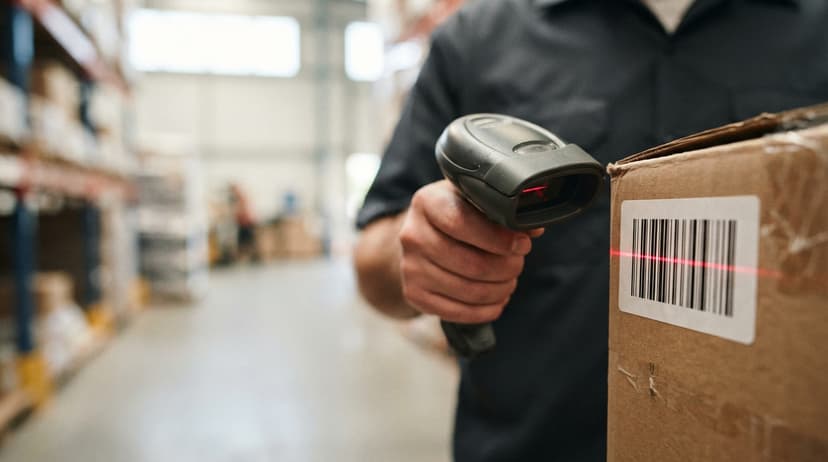
A barcode links a physical item to a digital record. Each label holds a number. When a scanner reads that number, your software finds the matching record and updates it. That is all a barcode inventory system does. No counting by hand. No updating a spreadsheet from memory. No chasing down which staff member last touched the item.
The scan does the work in under a second. For warehouses and distributors managing dozens of SKUs across multiple shelf locations, that speed and accuracy changes daily operations fast. The IRS is direct about why counts matter: "To figure taxable income, you must value your inventory at the beginning and end of each tax year," per IRS Publication 538. Barcodes make that count reliable.
Would you rather have it built around your operation?
The first look is free. If you would rather not compare products, describe how your operation already works and we build the system around it.
No build cost. You see it running on your own process first, and the monthly subscription starts only once it is live.
Book a callWhat Do You Need Before You Start a Barcode Inventory System?
Four things are required before you scan a single item.
- A barcode format: the standard that defines how the lines or dots encode your number
- Labels: printed stickers that carry the barcode image
- A scanner: the device that reads the label
- Software: the system that receives the scanned number and does something with it
You do not need an enterprise system to begin. A small or mid-size operation can start with free tools and a basic scanner under $100. If you already run the accounting software, your existing item list is a ready-made starting point.
As GS1 explains, "GS1 standards are the most widely used supply chain standards system in the world," which means the format you choose today will work with almost any scanner or software you add later.
Which Barcode Format Should I Use for a Small Warehouse?
Code 128 is the right starting point for most internal warehouse and distribution operations. It handles letters and numbers, fits on a small label, and every commercial scanner reads it without any setup. UPC codes target retail shelf scanning and need a paid GS1 registration.
QR codes and Data Matrix codes are 2D formats that store more data in a smaller space, which suits parts with tiny labels or items that need a web link embedded. For internal inventory tracking where the barcode just needs to carry your item number, Code 128 does the job cleanly and costs nothing extra to generate. Start there and move to a 2D format only if label space becomes a real constraint.
Step 2: Assign a Unique Number to Every Item
The barcode is only as good as the number inside it. That number is your SKU, meaning stock keeping unit, a unique code you assign to each distinct product, size, or variant you carry.
Without a clean numbering system, 2 items can end up sharing a code or a code can point to nothing at all.
A simple naming convention works well. Examples:
PROD-001for your first productWH-A-042for bin 42 in warehouse zone AELEC-SM-007for a small electronics item
Is the comparison easier when one option is built for you?
Yes. Off-the-shelf means fitting your process to the software, and custom is the other way round. The first look costs nothing.
Book a call
Clean Your Item List Before You Generate a Single Barcode
If you already manage items in the accounting software or an spreadsheet file, pull that list first. Clean it before you generate a single barcode. Remove duplicates, fill gaps, and agree on a format your whole team will follow.
A numbering system that two people interpret differently will create duplicate records within weeks. Fixing bad data after labels are printed costs far more time than setting the rules once at the start.
Step 3: Generate Your Barcodes
Once every item has a unique number, generating the barcode image is straightforward. Free tools like Barcode Generator or Online Barcode Generator let you type in an item number and download a barcode image in seconds. No coding needed. For operations with large item counts, most tools offer bulk generation: upload a spreadsheet column of item numbers and download a matching set of images.
The input is your item number. The output is a barcode image ready to drop into a label template. That is the entire step. Paid tools add features like batch printing and direct label software integration, but free options are a fine place to start.

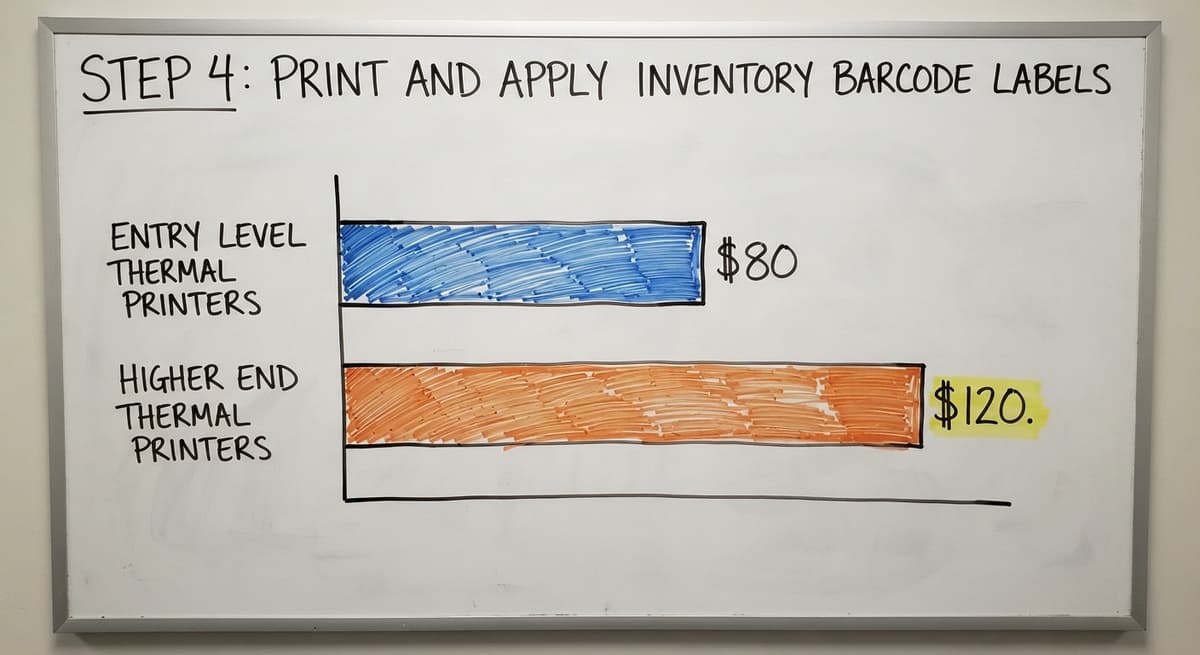
Step 4: Print and Apply Inventory Barcode Labels
Label quality matters more than most people expect. A barcode that smears, fades, or peels off a shelf bin is worse than no barcode at all.
Thermal label printers are the standard choice for warehouse barcode labels. They print without ink, so labels do not smear when handled.
Entry-level thermal printers start around $80 to $120. A standard laser printer works for low-volume or office use, but the labels wear faster in a warehouse environment.
For label material, consider:
- Paper labels for clean, dry, indoor storage with low handling
- Polyester or polypropylene labels for shelves, bins, or items exposed to moisture or abrasion
- Freezer-grade labels for cold storage environments
Where Should Labels Go So Scanning Stays Fast?
Place labels where a scanner can reach them without moving the item. On products, the front face works best.
On shelf bins, the front lip at eye level keeps scanning fast. Consistent placement across every location cuts the time staff spend hunting for the label on each pick.
What does it look like running on your own process?
The first thing you see is it running on your own process, at no build cost. The subscription starts once it is live and doing the job, not before.
Book a call
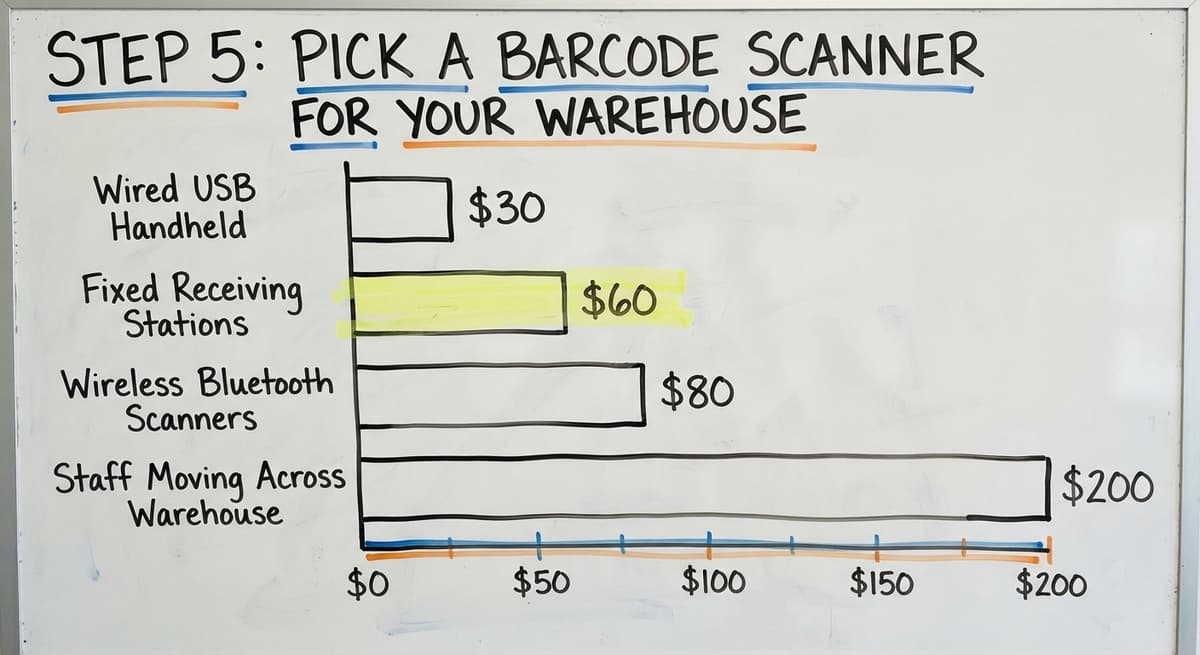
Step 5: Pick a Barcode Scanner for Your Warehouse
Most modern barcode scanners are plug-and-play. Connect a wired USB scanner to a computer and it types the scanned number directly into whatever field is active on screen. No driver install, no setup.
The main options are:
- Wired USB handheld scanners for fixed receiving stations, starting around $30 to $60
- Wireless Bluetooth scanners for staff moving across a warehouse floor, $80 to $200
- Mobile phones with a scanning app for the lowest-cost entry point, though slower in busy pick environments
Match the Scanner to Your Space and Volume
A small warehouse with good lighting and short scan distances works fine with a basic handheld. A large distribution floor with high shelving or dim lighting needs a scanner rated for longer range.
3 staff members spending 20 minutes each per shift re-entering data by hand, at the current median wage for stock clerks of around $18 per hour per BLS data, costs roughly $11,232 a year. A $150 scanner pays for itself in the first week.
Step 6: Connect Barcodes to Your Inventory Software
A scanner alone does nothing useful. The number it reads has to land somewhere that acts on it. That is the job of your inventory management software.
When a scanner reads a label, it sends a number to the active software field.
The software matches that number to a record and updates it: a stock count goes up or down, a location changes, a movement gets logged. The range of options is wide.
- A spreadsheet with a lookup formula is the simplest setup and works for very small operations
- Entry-level inventory apps handle scanning with a phone camera
- A custom inventory software build connects scanning to your exact workflows
Bridging the Gap When the accounting software Is Not Enough
The accounting software handles accounting well but does not natively support warehouse scanning or bin-level location tracking. This is the gap most operations managers hit first.
A accounting integration for warehouse operations can bridge that gap without replacing the accounting system you already depend on. The goal is a setup where one scan updates the right record without anyone retyping anything.
How Do I Track Item Locations with Barcodes?
Location tracking works the same way item tracking does: every shelf, bin, or zone gets its own barcode label. When a staff member receives a shipment, they scan the item barcode and then the bin barcode. The software records which item is in which location.
When someone picks an order, they scan the bin first and the item second. That 2-scan workflow answers the "where is it?" question before it becomes a search party. For a small to mid-size distribution operation, this removes the single biggest source of pick errors. Scan-in, scan-out is the whole system. No memory required, no whiteboard, no shouting across the floor.
Not sure this is the right shape for your operation?
The call is free. Describe how the work runs today. We map it on a call and show you what it would look like built around that, before you spend anything.
Book a call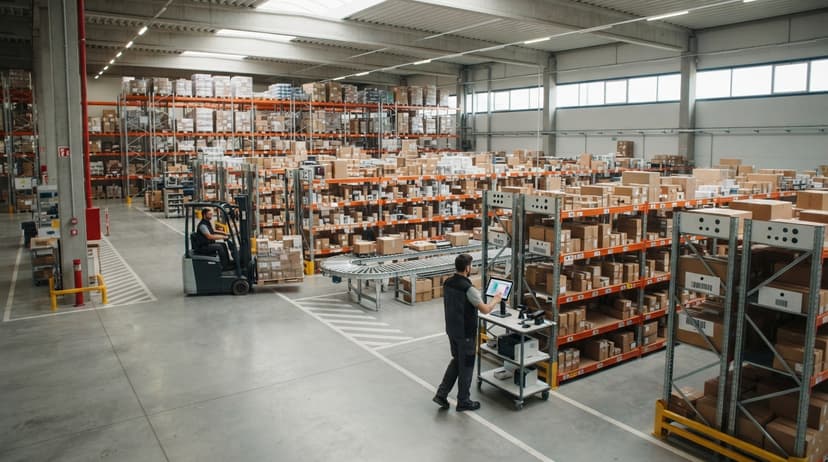
Common Mistakes When Setting Up a Barcode System
Most setup problems trace back to a few avoidable errors.
- Skipping the item list cleanup: generating barcodes from a messy spreadsheet bakes the mess into every label you print
- Inconsistent numbering: two staff members who name items differently will create duplicate records that corrupt your counts
- Buying hardware before confirming software compatibility: not every scanner works with every app, and returns are a waste of time
- Scanning everything at once on day one: starting with one product category or one warehouse zone lets you find problems before they multiply across the whole operation
A barcode inventory system that launches clean and small scales well. One that launches fast and messy creates more work than it saves.
When Is a Spreadsheet Setup Not Enough?
Some signs are hard to ignore. Stock counts are still wrong after a full cycle count. Staff have built their own workarounds because the official system does not match how work actually flows. Data lives in 3 places and no one trusts any of them.
At that point, the problem is not the barcode. The problem is that the software underneath it was never built for the way your operation runs.
Off-the-shelf tools make assumptions about your workflows. When those assumptions are wrong, the tool creates friction instead of removing it.
The Fix Is Software Shaped to the Operation
A custom inventory software build for distributors does not mean replacing the accounting software or running a year-long ERP project. It means building the scanning, location tracking, and movement logic around your actual process, then connecting the result to the accounting system you already use.
Operations managers who have tried 3 different apps and abandoned each one are not bad at software. They picked tools built for someone else's warehouse. The fix is software shaped to the operation, not an operation reshaped to fit the software.
Getting Started Without Overcomplicating It
Choose a barcode format, assign clean item numbers, generate the labels, print and apply them, pick up a scanner, and connect it to software that records the data. Six steps. None of them need a developer or a long rollout.
Start with one product line or one zone. Get that working before you expand. The goal on day one is not a perfect system. It is fewer errors and less manual work than yesterday.
A barcode system for inventory that covers 20% of your items correctly beats a full rollout that nobody trusts.
If your operation has outgrown spreadsheets and the off-the-shelf tools have not fit, a custom workflow built around your real process is the next step, not a bigger off-the-shelf tool.
Talk to The Software Society about what a connected inventory system looks like for the way your warehouse actually runs.
Frequently asked questions
How do I set up a barcode inventory system?
Choose a barcode format (Code 128 is the standard starting point for most warehouses), assign a unique item number to every product, generate barcode images using a free online tool, print and apply labels, connect a scanner to your inventory software, and scan items as they move in or out.
Start with one product category to test the setup before rolling it out across your whole operation.
How can I create a DIY barcode inventory system?
A DIY barcode inventory system needs 4 things: a numbering scheme for your items, free barcode images generated from a tool like Online Barcode Generator, labels printed on a basic thermal or laser printer, and a scanner that feeds data into a spreadsheet or simple inventory app.
For very small operations, a phone camera with a free scanning app and a Google Sheet can serve as the whole system. The main risk is skipping the item list cleanup before you generate any barcodes.
How can I create my own barcode system?
Start by building a clean list of every item you stock, with a unique number for each one. Use a free barcode generator to turn those numbers into barcode images.
Print the images as labels, apply them to your products and shelf locations, and use a scanner to feed the data into whatever software tracks your stock. You do not need to buy GS1 numbers for an internal-only system. Those are only required if your barcodes need to be read by outside retailers or trading partners.
How to create a barcode inventory system in a spreadsheet?
In spreadsheet, create a column for item numbers and a second column for item names. Generate barcode images from a free tool using those item numbers, then paste or link the images into a third column.
Use a USB barcode scanner set to keyboard mode: when you scan a label, the scanner types the number into the active spreadsheet cell. A VLOOKUP formula can then pull the matching item name and quantity from your list. This works for small operations but breaks down when multiple people need to update the file at the same time.
Can I use barcodes with the accounting software without buying a full ERP?
Yes. The accounting software does not natively support warehouse scanning, but you can connect it to a separate inventory or warehouse management tool that handles the scanning layer and syncs data back to the accounting software for accounting. This keeps your financial records intact without replacing the system your team already knows.
A custom integration built around your specific workflows is more practical than a large off-the-shelf ERP for a small or mid-size distribution operation.
What kind of scanner do I need to read inventory barcodes?
A basic wired USB handheld scanner handles most small warehouse setups and costs $30 to $60. Wireless Bluetooth scanners give staff freedom to move and run $80 to $200.
For very low-volume use, a smartphone with a free scanning app works. Match the scanner to your environment: long distances or dim lighting need a higher-range model. Most scanners are plug-and-play and need no special software to connect.
What are the most common mistakes when setting up a barcode inventory system?
The 4 most common mistakes are: starting with a messy item list and baking those errors into every label, using inconsistent item numbering that creates duplicate records, buying hardware before confirming it works with your chosen software, and trying to scan your entire inventory at once on day one.
Each one is avoidable. Clean the item list first, agree on a numbering format, test hardware with your software before ordering in bulk, and launch with one product line or zone.
What barcode type is best for a small business?
Code 128 for internal labels: it holds letters and numbers, prints compactly, and every scanner reads it. Use a UPC only on products sold through retailers, and a QR code where a label has to carry a lot number or a URL.
Can I use my phone as an inventory barcode scanner?
Yes, for a small stockroom. A phone camera and a scanning app read 1D and 2D codes and post to inventory software. Past about 50 scans a day, a dedicated scanner is faster and reads worn labels a camera misses.
What is the difference between a SKU and a barcode?
A SKU is the code you assign to a product so your own records can name it.
A barcode is the machine-readable print of a number, which can be that SKU or a manufacturer's UPC. The SKU is the identity; the barcode is how a scanner reads it.
What equipment do I need for a warehouse barcode system?
Four things: a label printer ($150 to $500), labels that survive the environment, one scanner per active station ($80 to $400 each), and inventory software that records each scan. A 5-person warehouse starts under $1,500 in hardware.
What is in a free first look?
A 30 minute call, your operation mapped, and a clear picture of what we would build. No obligation and nothing to install.
Book a callRelated guides
More on the same work.
Guides
- Create a Barcode
- Barcode Scanner Inventory System
- Barcode System for Inventory Free
- Barcode Systems for Warehouse
- System Id Barcode Solutions
- Inventory Management Software Barcode Scanner
- Inventory Management Software with Barcode
- Free Inventory Management Software with Barcode Scanner
- Inventory Software Barcode
- Inventory Tracking Barcode
- Barcode Abbreviation
- Barcode Scan Machine
- Tracking Number Barcode
Common questions
- How to Create a Barcode
- How Do I Create My Own Barcodes
- How to Use a Barcode Scanner
- How to Read a Barcode Number
- How to Barcode Scanners Work
- How Barcode Scanning Works
- How Are Barcodes Read
- How to Make Your Own Barcode
- How Do Barcodes Work
- How to Create an Inventory Tracking System?
- What Does a Barcode Look Like