

Inventory Management System For Manufacturing
An inventory management system for manufacturing is software that tracks raw materials, work-in-progress, and finished goods across every stage of production. It replaces spreadsheets and manual counts with live data. Small manufacturers use it to stop stockouts, cut emergency orders, and keep production moving. This guide was reviewed in July 2025.
Published 12 July 2026. Reviewed and updated 15 September 2026.
Book a callWhat Does an Inventory Management System for Manufacturing Actually Do?
A basic stock list tells you how many units sit on a shelf. A manufacturing inventory tracking system tells you how many units you can build, what materials you are missing, and where every component is right now.
Reviewed September 2026. Each figure comes from the assumptions stated beside it, so you can substitute your own and the arithmetic still holds.
The difference matters on the shop floor. A spreadsheet is a snapshot from the last time someone updated it. A live system updates the moment a worker scans a barcode, records a receipt, or moves material to a work cell.
The IRS makes inventory counting a legal obligation, not a preference. IRS Publication 538 states: "To figure taxable income, you must value your inventory at the beginning and end of each tax year." A system that tracks stock continuously makes that requirement easier to meet and harder to get wrong.
Would you rather have it built around your operation?
The first look is free. If you would rather not compare products, describe how your operation already works and we build the system around it.
No build cost. You see it running on your own process first, and the monthly subscription starts only once it is live.
Book a callHow Does Manufacturing Inventory Differ from Retail or Warehouse Inventory?
Retail inventory moves in one direction. A store buys finished goods, stores them, and sells them. The count goes down when something sells.
Manufacturing inventory transforms. Raw materials become components. Components become subassemblies. Subassemblies become finished goods inventory. Each stage is a place where stock can go missing, get scrapped, or sit idle.
That complexity is why scan-based counting matters so much on a production floor. GS1, the global standards body behind barcodes, sets the specifications that make it possible for a single scan to update a record reliably across systems and locations.
Without a common standard, a barcode read at receiving means something different than one read at shipping.
A manufacturer also needs to track materials before, during, and after production. Retail software was not built for that. Neither was a warehouse inventory management system focused only on storage and movement.
What Is a Bill of Materials and Why Does It Sit at the Center?
A bill of materials (BOM) is the list of every component needed to build one finished unit. Think of it as a recipe.
If you make steel brackets, the BOM lists the steel bar stock, fasteners, coating materials, and any subassemblies that go into each bracket.
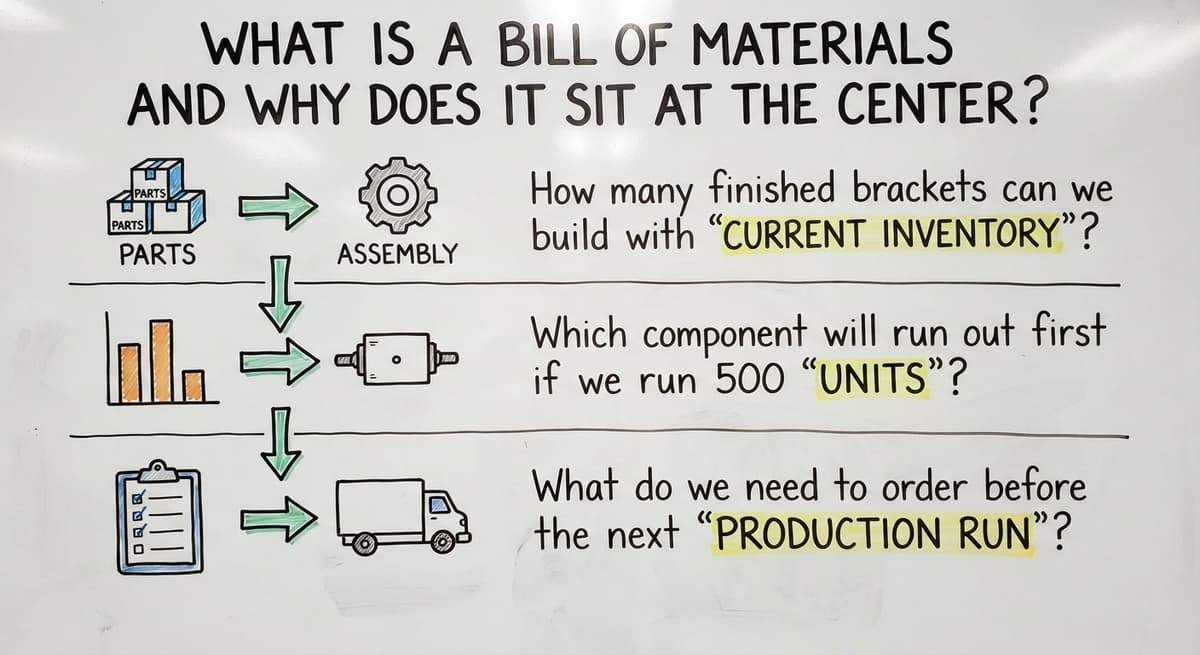
When the inventory system knows the BOM, it can answer questions a spreadsheet never could:
- How many finished brackets can we build with current stock?
- Which component will run out first if we run 500 units?
- What do we need to order before the next production run starts?
Without BOM integration, inventory counts are just numbers. They tell you what you have, not what you can do with it. That gap is where production stoppages hide.
How Does Work-in-Progress Inventory Tracking Help Production Managers?
Work-in-progress inventory (WIP) is material that has left the raw stock shelf but has not yet become a finished product. It is the steel that has been cut but not welded, or the subassembly waiting for a coating step.
WIP tracking shows how much material is tied up in unfinished jobs at any moment.
A manager can see where jobs are moving slowly before a delay becomes a missed ship date. It also feeds accurate job costing, because the system knows what went in and at what stage.
Is the comparison easier when one option is built for you?
Yes. Off-the-shelf means fitting your process to the software, and custom is the other way round. The first look costs nothing.
Book a callThe Problems That Signal You Need a Better System
Do any of these sound like your shop right now? If 2 or more do, a better system will pay for itself quickly.
- Production stops without warning because a part ran out and no one caught it in time.
- Staff spend hours each week reconciling spreadsheets against what is physically on the floor.
- The accounting software shows one stock number and the warehouse shows another.
- Finished goods ship late because a component shortage was invisible until assembly started.
- Purchasing runs on gut feel rather than actual consumption data.
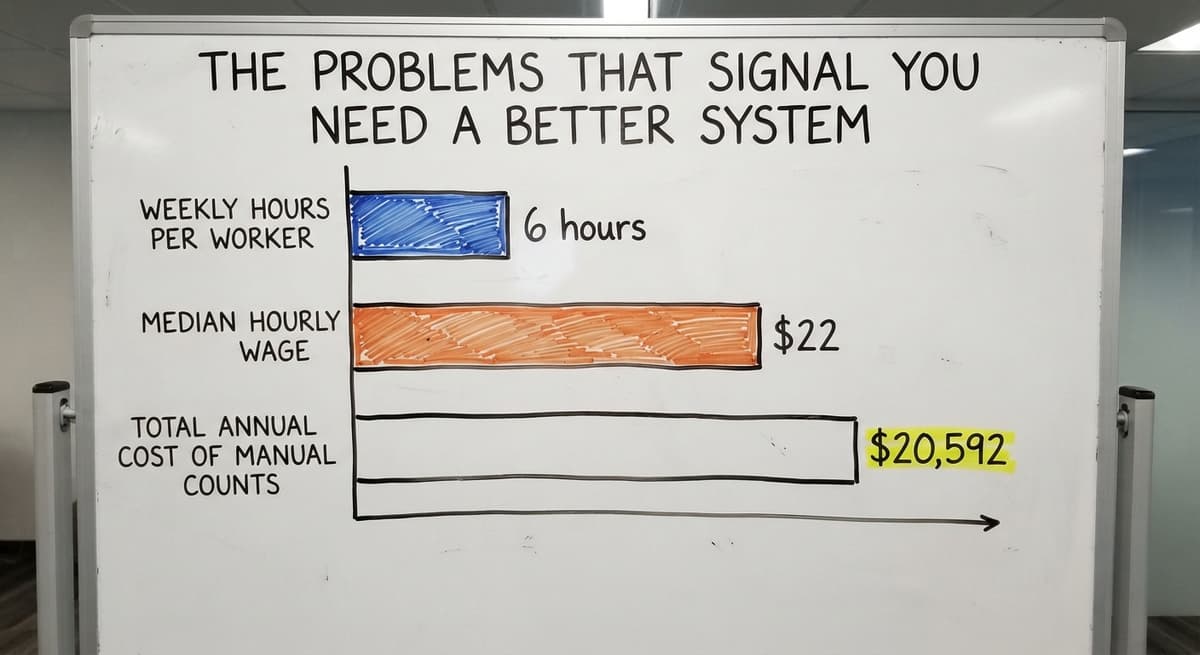
Consider the labor cost alone. 3 workers each spending 6 hours a week on manual counts, at a median wage of $22 an hour (Bureau of Labor Statistics, stock clerks and order fillers), adds up to $20,592 a year. That figure does not include emergency freight, scrapped material, or the cost of a delayed shipment.
The US Federal Trade Commission needs sellers to ship when promised. An accurate count is what makes that promise keepable.
Core Features a Small Manufacturer Should Look For
Not every system fits every shop. These features, though, are the ones that solve the problems above without requiring a full enterprise rollout.
- Real-time raw materials tracking so stock levels update with every transaction, not at the end of the day.
- BOM integration so the system knows what each production run consumes before it starts.
- Reorder point alerts that trigger a draft buy order when stock drops to a set level, removing the guesswork from purchasing.
- Lot and batch tracking so every finished unit can be traced back to the specific material batch it came from.
- Barcode scanning inventory support so workers update records with a scan rather than a keyboard.
- Mobile access so supervisors can check stock from the floor, not just from a desk.
A reorder point is the stock level that tells the system to act. Set it correctly and emergency orders become rare. Set it wrong and you are back to guessing.
Barcode Scanning and Mobile Access on the Shop Floor
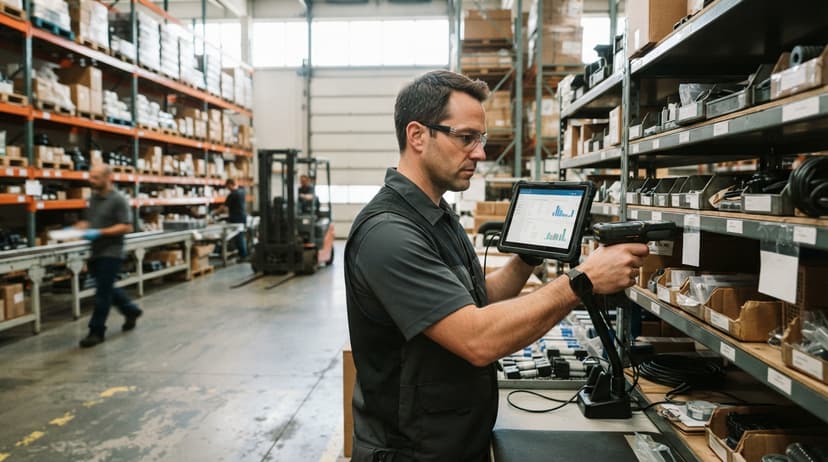
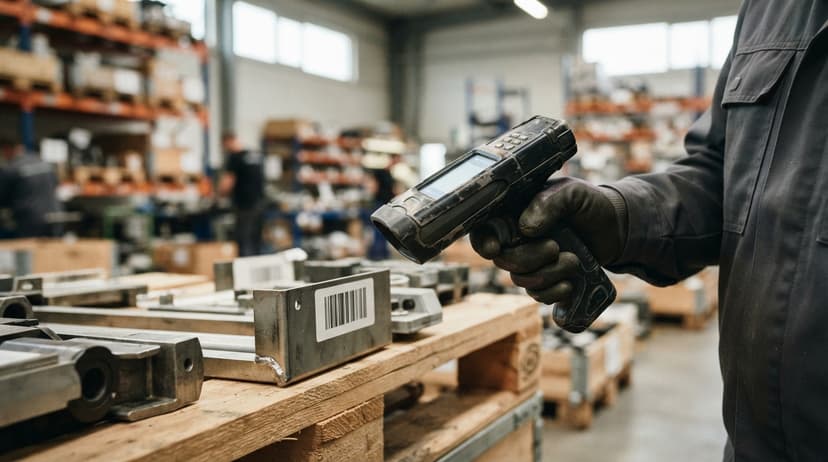
Scanning a barcode at receiving, at each production stage, and at shipping creates a live trail without extra paperwork. Workers do not write things down to enter later. That step, writing then entering, is where most data errors enter a system.
Mobile access extends that accuracy across the whole facility. A supervisor walking the floor can pull up current stock on a phone rather than walking back to a terminal. Small changes in habit, scanning instead of noting, compound into much cleaner data over weeks.
Can a Small Manufacturer Use an Inventory System Without Buying a Full ERP?
Yes, and for most shops under 50 people, a full ERP is the wrong tool. Enterprise resource planning systems target large, complex operations. They take months to stand up, cost significantly more, and often need changing processes that already work.
A focused production inventory control system delivers most of the value at a fraction of the cost and time. The NIST Manufacturing Extension Partnership offers free, vendor-neutral guidance to help small manufacturers evaluate options without being steered toward the most expensive one.
The goal is a system built around how your floor runs today, not one that asks your floor to change so the software fits.
What does it look like running on your own process?
The first thing you see is it running on your own process, at no build cost. The subscription starts once it is live and doing the job, not before.
Book a call
How Does a Manufacturing Inventory System Connect to the accounting software?
The accounting software handles accounting well. It was not built to track what happens on a production floor, but there is no reason to replace it. A manufacturing inventory system can sit alongside the accounting software and sync financial data in both directions.
When a buy order closes, the cost posts to the accounting software. When finished goods inventory ships, the revenue entry follows.
Staff do not enter the same transaction twice. The accounting integration for operations handles the handoff so the accounting team sees accurate numbers without touching the shop-floor system directly.
This matters for small manufacturers who built their accounting process around the accounting software and do not want to start over. The inventory layer adds what the accounting software lacks without touching what the accounting software does well.
Custom Inventory Software versus Off-the-Shelf Tools
Off-the-shelf inventory software is built for an average manufacturer. If your operation matches that average closely, it may be a reasonable fit. If your process has steps, materials, or workflows that fall outside the standard model, the software will fight you.
Custom inventory software is built around how your floor actually runs. That does not always mean expensive. It means the system fits the work rather than the other way around.
Here is a concrete example. A small fabricator receives steel bar stock, cuts it to spec, welds subassemblies, coats finished parts, and ships brackets to 3 customers on different schedules. An off-the-shelf tool may handle receiving and shipping but treat everything in between as a black box.
A custom system tracks each stage: stock received, material cut and moved to WIP, subassemblies completed, coating applied, finished goods ready. No extra manual entry at each step. The system knows where everything is because it was built to know.
This is the kind of outcome a custom working software for small businesses partner can deliver, and it is why the fit matters more than the feature count.

Lot Tracking, Reporting, and Signs the System Is Working
Lot Tracking for Quality Control
Lot tracking records which batch of raw material went into which finished unit. If a defect appears after shipment, the system traces it to the source in minutes rather than days. For manufacturers with quality certifications or regulated materials, that traceability is not optional.
Are Your Reports Actually Helping Decisions?
Good reporting shows stock value, turnover rates, and slow-moving materials in plain language. A dashboard visible to the owner and operations manager removes the need for daily status meetings.
Reports should be readable by anyone running the business, not only by someone trained to interpret them.
The NIST MEP supply chain guidance points to data visibility as one of the highest-value improvements a small manufacturer can make. A dashboard that shows current stock, open buy orders, and WIP by job gives that visibility without a data analyst in the room.
How Do You Know the System Is Working?
The signs are practical, not technical. Production runs without last-minute material scrambles. Purchasing decisions come from data, not from whoever walked the floor most recently.
Staff spend less time counting and more time building. Owners can see stock levels and costs without asking anyone. When those 4 things are true, the system is doing its job.
Not sure this is the right shape for your operation?
The call is free. Describe how the work runs today. We map it on a call and show you what it would look like built around that, before you spend anything.
Book a callImplementation, ROI, and Questions to Ask Before You Choose
How Long Does Implementation Take?
A focused system built around existing processes can go live in weeks. A large off-the-shelf platform with many integrations may take months. The variable is complexity: number of SKUs, number of integrations, and how clean the existing data is.
Phased rollouts work well for small shops. Start with receiving and raw materials tracking. Add WIP tracking in the second phase. Add reporting and purchasing triggers in the third. Staff learn one step at a time and habits form before the next layer arrives.
How Do You Calculate the Return on Investment?
Start with what you can measure today. Count the hours staff spend on manual inventory tasks each week. Multiply by their hourly rate. Add the cost of emergency freight orders from the last 12 months. Add any scrapped material tied to a stockout or overorder.
Compare that total to the cost of the system. For most small manufacturers, the math closes inside the first year. The savings are not theoretical. They come from fewer emergency orders, less counting time, and fewer production stoppages.
Questions to Ask Before You Choose a System
Before signing anything, get clear answers to these:
- Does it handle your specific production steps or only generic stock in and stock out?
- Can it connect to the accounting software or your current accounting tool without a custom bridge?
- Who supports it when something breaks or the business changes?
- Is the rollout team local or offshore, and what does ongoing support look like?
- Can it grow with your operation without requiring a full replacement in 2 years?
A vendor who cannot answer question 3 clearly is worth pausing on.
How Does a Local Software Partner Differ from a SaaS Vendor?
A SaaS vendor sells the same product to thousands of businesses. Support is a ticket queue. Changes to the system follow a product roadmap built for the average customer, not your shop.
A local partner builds around your operation and stays involved after go-live. When a new product line adds complexity, or a customer needs a new traceability report, the system changes with the business. That flexibility is what separates a tool from a partner.
The inventory management software overview that fits a 12-person fabricator looks different from the one that fits a 200-person contract manufacturer. A partner who has seen both knows which parts of the build matter most at your current size.
Next Steps for Small Manufacturers Ready to Fix Inventory
Start by naming the biggest pain point. Is it stockouts that stop production? Overstock that ties up cash? Hours lost to manual counting each week? One clear answer makes the first conversation much shorter.
Talk to a builder who will look at your actual workflow before recommending anything. A short discovery conversation costs nothing and often reveals the fastest fix, which is sometimes a single integration rather than a full new system.
The NIST Manufacturing Extension Partnership also offers free assessments for small manufacturers who want a vendor-neutral starting point before talking to any software provider.
If you are ready to stop guessing and start building on real data, reach out to The Software Society. We look at how your shop runs before we recommend anything.
Frequently asked questions
What is the best inventory management software for manufacturing?
There is no single best answer. The right system depends on your production process, team size, existing tools like the accounting software, and budget. A small fabricator needs different features than a regulated medical device maker.
Evaluate fit with your actual workflow first, then compare tools. The off-the-shelf options split into general inventory apps and manufacturing-specific suites. A custom-built system is worth considering if your process does not match standard software well.
What are the top 5 inventory management software?
For small manufacturers, 5 packaged options come up most often, and each has different strengths: 2 are built specifically for production environments, 1 suits smaller operations, 1 handles multi-channel distribution well, and 1 is open-source and highly customizable but needs more setup.
Custom-built systems are also worth considering when none of these fit the operation closely.
How do you manage inventory in manufacturing?
Managing inventory in manufacturing means tracking raw materials when they arrive, monitoring material as it moves through production as work-in-progress, and recording finished goods when they are ready to ship.
A system built around your bill of materials can calculate what you have, what you can build, and what to order next. Barcode scanning at each stage keeps records accurate without extra manual entry.
What are the four types of WMS?
Warehouse management systems are grouped into 4 types: standalone systems focused only on warehouse operations, ERP-integrated modules built into larger platforms, cloud-based SaaS systems accessible via browser, and supply chain management suites that include warehouse functions alongside procurement and logistics.
For small manufacturers, a standalone or cloud-based system is the fastest to implement and the easiest to connect to existing accounting tools.
What is a bill of materials and why does it matter for inventory?
A bill of materials lists every component needed to produce one finished unit. When your inventory system knows the BOM, it can calculate how many units you can build with current stock, which material will run out first, and what to order before the next production run.
Without BOM integration, stock counts tell you what you have but not what you can actually produce.
How does work-in-progress inventory tracking help production managers?
WIP tracking shows how much material is tied up in unfinished jobs at any moment.
Managers can spot bottlenecks before they cause a missed ship date. It also feeds accurate job costing because the system records what material went in and at what stage, rather than estimating after the fact.
How do reorder points prevent production stoppages?
A reorder point is a stock level you set inside the system. When a material drops to that level, the system sends an alert or creates a draft buy order automatically.
The order goes out before the shelf is empty, so production never stops waiting for a part that should have been ordered a week earlier.
Can a small manufacturer implement an inventory system without replacing the accounting software?
Yes. A manufacturing inventory system can run alongside the accounting software and sync financial data in both directions. Buy order costs post to the accounting software when orders close.
Shipments trigger revenue entries. Staff do not enter the same transaction twice. There is no need to replace accounting software that already works.
What is the difference between inventory management software and MRP?
Inventory software tracks what you have and where. MRP adds the planning: it turns a production schedule and a bill of materials into what to buy and when. A small manufacturer needs inventory with MRP on top, not a separate system for each.
How do I track raw materials and work-in-progress inventory?
Raw material is scanned into stock at receiving, issued to a work order when production starts, and held as work in progress until the order completes, when the finished quantity is booked and the components consumed. Three scans, and the count is right at every stage.
How much does a manufacturing inventory management system cost?
Packaged tools with a bill of materials and production orders run $100 to $500 a month for a small shop.
A build scoped to one operation runs $15,000 to $40,000 once with $200 to $600 a month for hosting and support. Scanners add $150 to $400 per station.
How can I integrate inventory software with accounting and production systems?
Through the accounting package's API for items, stock values, and bills, and through the production system's work orders for issues and completions. When the inventory system owns both links, the shop floor and the books read the same number without a spreadsheet in between.
What is in a free first look?
A 30 minute call, your operation mapped, and a clear picture of what we would build. No obligation and nothing to install.
Book a callRelated guides
The rest of this guide, for the parts of the job this page does not cover.
Guides
- Automated Inventory Management System
- Manufacturing Inventory Management Software
- Manufacturing Inventory Management
- Hospital Stock Management System
- Inventory Bin System
- Manual Inventory System
- Manufacturing Inventory Software
- Warehouse Inventory Management Systems
- Warehouse Inventory Management System
- Retail Inventory Management Systems
- Small Business Inventory Management System
- Multi Location Inventory Management Software
- Inventory Management for Multiple Locations
- Inventory Management Pics
- B2b Inventory Management
Common questions
- What is Kanban System of Inventory Management
- What is Online Inventory Management System
- What is Sales and Inventory Management System
- What is Inventory Management System Project
- What is the Best Inventory Management System for Small Businesses?
- What is the Difference Between Aggregate and Item Inventory Management
- What is Jit Inventory Management
- What is the Definition of Inventory Management
- What is an Important Factor in Inventory Management