


What Is The Best Warehouse Inventory Management System?
The best warehouse inventory management system is the one that fits the operation in front of you, not the one with the longest feature list. For a team of 5 to 100 people on mainstream accounting software, that means a system that connects to the books instead of replacing them, tracks stock by bin, and updates counts on every scan.
This guide, reviewed in September 2026, covers the 4 main types of warehouse inventory management system, what to look for at each stage of growth, the red flags in demos, and a cost check to run before any vendor call. It ends with a plain way to choose between an off-the-shelf tool and a custom build. The advice here applies to wholesale distributors, small fulfilment operations, and any warehouse where a spreadsheet is still the working system of record.
Published 10 August 2026. Reviewed and updated 15 September 2026.
Book a callWhy does the best warehouse inventory management system depend on your operation?
There is no single best warehouse inventory management system. The right system for a 10-person team running basic accounting software is not the right system for a 500-person distribution center on a large enterprise resource planning system.
Buying the most popular name is one of the most common and costly mistakes small warehouse operations make.
The obligation behind all of this is not optional. OSHA states: “The warehousing and storage industry includes establishments operating facilities for general merchandise, refrigerated goods, and other products.” Without a reliable count, that number is just a guess.
Reviewed August 2026. Each figure comes from the assumptions stated beside it, so you can substitute your own and the arithmetic still holds.
The guide does not push one platform. It helps you figure out which type of system fits how your team actually works, what your current tools can and cannot do, and where your real pain is. Once you know that, the choice gets much clearer.
Would you rather have it built around your operation?
The first look is free. If you would rather not compare products, describe how your operation already works and we build the system around it.
No build cost. You see it running on your own process first, and the monthly subscription starts only once it is live.
Book a callWhat does a warehouse inventory management system actually do?
A warehouse inventory management system, called a WMS, is the record of stock levels, locations, and every movement, kept current as the work happens. It replaces manual counting, spreadsheets, and paper pick lists with a single connected workflow that runs from receiving through to shipping.
When your receiving team logs a pallet, the system updates available stock immediately. When a picker pulls an item, the count drops. When an order ships, the record closes. Every step connects, so nothing falls through the gaps between tools.
OSHA notes that "the warehousing and storage industry includes establishments operating facilities for general merchandise, refrigerated goods, and other products," and outlines the specific hazards that come with people moving through those spaces.
A good WMS reduces the need for staff to walk the floor counting by hand, which directly cuts exposure to those hazards.
Why are accurate inventory counts a legal obligation?
The IRS is direct about why accurate counts matter. IRS Publication 538 states: "To figure taxable income, you must value your inventory at the beginning and end of each tax year." That is not optional.
A system that gives you a reliable count at any point in the year makes that obligation much easier to meet.
Disconnected tools create the most common problems: spreadsheet files that do not match the shelf, printed pick lists that go stale by midday, and email chains that no one can trace back. A warehouse inventory management system pulls all of that into one place.
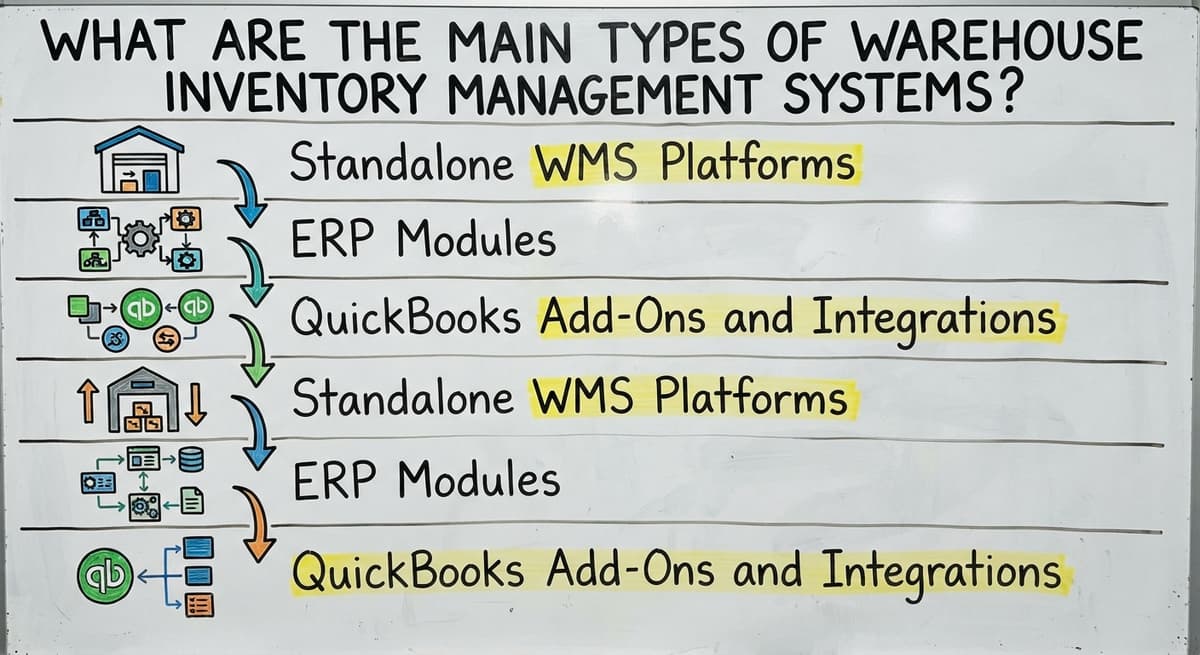
What Are the Main Types of Warehouse Inventory Management Systems?
The main types of warehouse inventory management systems fall into 4 broad categories, and knowing which one you are looking at changes everything about how you evaluate it.
Is the comparison easier when one option is built for you?
Yes. Off-the-shelf means fitting your process to the software, and custom is the other way round. The first look costs nothing.
Book a call
What should you look for if you already use your accounting software?
Most 5 to 100 staff warehouse operations run their finances in mainstream accounting software. That is not a problem. It is a starting point.
The goal is not to replace your accounting software. The goal is to fill the gaps it cannot handle.
Accounting software tracks money well. It does not track bin locations, pick sequences, or real-time stock movement well. That is where a dedicated warehouse inventory tracking layer adds value.
Look for systems that sync with your accounting software instead of running beside it as a separate record. Double entry is the enemy. If your team has to post the same transaction in two places, errors multiply and staff stop trusting either system.
Why do retail-first systems fail wholesale operations?
Replacing spreadsheets and manual processes in your warehouse is a natural step once you have an accounting-connected WMS in place. The two goals go together.
Avoid tools built for retail point-of-sale that bolt on an accounting software connection as an afterthought. Wholesale and distribution workflows are different. A retail-first system will create workarounds from day one.

Red Flags to Watch for When Evaluating Systems
Not every system that looks good in a demo will work in your building. There are 6 warning signs to watch for before you sign anything.
- Long implementation timelines that stretch past 90 days for an operation your size. A 20-person warehouse does not need a 9-month rollout.
- Enterprise pricing built for teams of 500. If the vendor cannot quote a flat number for your size, the contract will grow after you sign.
- Vendors who tell you to change your workflow to fit their software rather than the other way around.
- Hidden costs for integrations, training, or support after go-live. Ask for a full cost breakdown in writing before you agree to anything.
- Systems built for retail that do not translate to wholesale distribution software needs. Retail counts units at a register. Wholesale moves pallets, cases, and lots. The logic is different.
What does it look like running on your own process?
The first thing you see is it running on your own process, at no build cost. The subscription starts once it is live and doing the job, not before.
Book a callYour Fulfillment Obligations Make System Accuracy Non-Negotiable
The US Federal Trade Commission's guidance on order fulfillment makes clear that you are obligated to ship when you said you would.
An inaccurate inventory count puts that obligation at risk. Software that creates more confusion than it solves is worse than none at all.

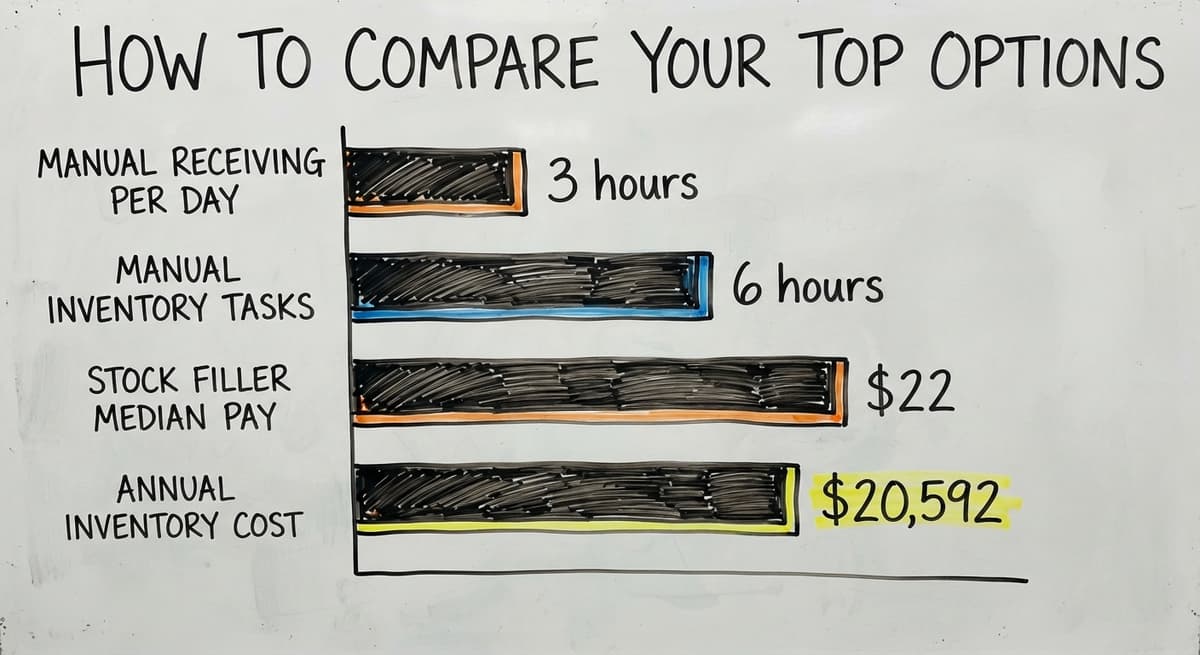
How do you compare your top options?
Start with your biggest warehouse pain point, not a feature checklist. If your team spends 3 hours a day on manual receiving, that is the problem to solve.
If orders ship wrong twice a week, start there instead. A system that fixes your actual bottleneck is worth more than one with 40 features you will never use.
Questions to Ask Every Vendor
- How does the system handle our current receiving and picking process, specifically?
- Can we see a demo using our actual SKU count and order volume?
- Where is your support team located, and what is the response time on a business day?
- What does it cost to change a workflow after go-live?
- How long does implementation take for an operation our size?
A Simple Cost Check
Before any demo, run this number. If 3 staff members spend 6 hours a week on manual inventory tasks, and the Bureau of Labor Statistics shows median pay for stock and order fillers near $22 per hour, that is $20,592 a year in labor on tasks a system could handle in minutes. That number gives you a real budget floor for what a system is worth.
Comparing System Types Side by Side
| System Type | Best For | your accounting software Friendly | Typical Setup Time | Cost Range |
|---|---|---|---|---|
| Standalone WMS | Mid-size to large ops | Varies by vendor | 30 to 90 days | $200 to $2,000/month |
| ERP Module | Full business integration | Replaces your accounting software | 3 to 12 months | $1,000 to $10,000+/month |
| your accounting software Add-On | 5 to 50 staff ops | Yes, by design | 1 to 4 weeks | $50 to $500/month |
| Custom-Built | Unique workflows | Built to spec | 4 to 16 weeks | Project-based |
The Warehousing Education and Research Council publishes benchmark metrics for distribution center performance. Reviewing those before a vendor demo gives you a set of real numbers to compare against vendor claims.
When does a custom-built system make more sense?
Off-the-shelf systems target standard operations, and they work well there. They struggle when your workflow does not match the assumptions baked into them.
Here is the signal to watch for: if your team has built workarounds on top of every tool you have tried, the tools are wrong, not the team. A custom system is built around how you already work. It does not ask you to change a process that runs well just because the software expects something different.
Custom warehouse software for small and mid-size operations is a different category than enterprise custom development. A local builder who has worked with 20 to 80 staff distribution operations understands the scale. The project does not need to cost what a large enterprise implementation costs.
What is in a free first look?
A 30 minute call, your operation mapped, and a clear picture of what we would build. No obligation and nothing to install.
Book a call
How do you scope a custom build, and what standards should it meet?
Scope first, then timeline
Custom does not mean slow. A well-scoped project for a focused problem, such as a receiving workflow, a pick list engine, or a sync with your accounting software, can go live in 4 to 8 weeks.
The key is scoping to the real problem rather than trying to build everything at once.
Fulfillment center software solutions that are custom-built also tend to age better. When your process changes, a custom system changes with it. An off-the-shelf system may require a new tier, a new module, or a new vendor.
GS1 standards for barcodes make it possible for a label printed in your warehouse to scan at a customer's dock. Any custom system worth building should support those standards from day one.
The Auburn University RFID Lab has published independent research on how RFID technology performs in real supply chain environments. If your operation handles high volumes of similar items, RFID is worth asking about whether you go custom or off the shelf.
Questions to Ask Before You Buy Any System
Five questions cut through most vendor pitches quickly, and the answers are short.
- Does it connect to your accounting software without replacing it? If the answer is unclear, ask for a technical spec sheet.
- How long does setup take for an operation my size, with my SKU count?
- Who handles training, and what does support look like after the first 30 days?
- Can the system grow with us, or will we outgrow it in 2 years?
- What does it cost to change something after go-live?
The US Census Bureau's Monthly Wholesale Trade data tracks the national inventory-to-sales ratio for wholesale firms. When that ratio rises, it means inventory is sitting longer relative to sales. That is exactly when a warehouse inventory management system pays for itself fastest.
Wholesale distribution software built for your scale should answer all 5 questions cleanly. If a vendor hedges on any of them, that is a signal worth taking seriously.

What Is the Best Warehouse Inventory Management System for Your Operation?
The best warehouse inventory management system is the one your team will actually use every day. That sounds simple, but it rules out most of the platforms that rank highest on software review sites.
Those platforms target large teams with dedicated IT staff and long implementation budgets. Small and mid-size operations deserve software built to their scale, not a stripped-down version of an enterprise tool with features removed.
Match the System to Your Bottleneck, Not the Other Way Around
Focus on solving your specific bottlenecks. If receiving is the problem, fix receiving. If pick accuracy is the problem, fix that.
Solving the real problem in week one is worth more than every feature on a roadmap that takes 6 months to go live.
If nothing off the shelf fits, a custom-built solution from a local partner is worth a serious look. Warehouse management software for wholesale distributors built around your workflow is a practical option, not a last resort.
The Software Society builds custom operational software for small and mid-size warehouses.
When your staff are running on spreadsheets and workarounds, and nothing you have tried has stuck, that is exactly the situation a custom-built system exists to fix. Reach out to talk through what your operation actually needs.
Frequently asked questions
Frequently asked questions
What does a warehouse inventory management system actually do?
A warehouse inventory management system tracks stock levels, locations, and movement in real time. It connects receiving, storage, picking, packing, and shipping into one workflow, so the clipboard and the tally sheet retire together.
The goal is one accurate record that every team member works from.
Can I keep using your accounting software and still get a proper inventory management system?
Yes. Many small and mid-size warehouses run their finances in mainstream accounting software and add a dedicated warehouse inventory tracking layer on top.
Look for systems that sync with that accounting package and leave it in place. The key is avoiding double entry, where the same transaction has to be posted in two places.
What is the difference between a WMS, an ERP, and a custom-built system?
A WMS, or warehouse management system, focuses on warehouse operations: receiving, picking, packing, and shipping. An ERP manages the whole business, with inventory as one module among many.
A custom-built system follows your specific workflow instead of asking you to adapt to a standard template. Each fits a different operation size and complexity level.
How long does it take to implement a warehouse inventory management system?
The answer depends on the system type and your operation size. An accounting-software add-on for a small warehouse can go live in 1 to 4 weeks.
A standalone WMS takes 30 to 90 days. An ERP implementation can run 3 to 12 months. A well-scoped custom build for a focused problem can go live in 4 to 8 weeks.
What are the warning signs that a warehouse inventory system is not the right fit?
Watch for implementation timelines that stretch past 90 days for a small operation, enterprise pricing built for teams of 500, vendors who ask you to change your workflow to match their software, hidden costs for integrations or support, and systems built for retail that do not translate to wholesale or distribution workflows.
When does it make more sense to build a custom warehouse system than buy an off-the-shelf one?
When your crew has built workarounds on top of every tool you have tried, that is the clearest signal. Off-the-shelf systems work well for standard workflows.
When your process is specific to your operation, a custom-built system fits better and tends to age better as your process changes over time.
What should I look for when comparing warehouse inventory software options?
Start with your biggest pain point, not a feature list. Ask each vendor how the system handles your specific receiving and picking process. Request a demo using your actual SKU count and order volume.
Check support response times and ask what it costs to change something after go-live. The tool that fixes your real problem in week one beats the full-featured one that takes 6 months to roll out.
How much does warehouse inventory management software cost?
Cost depends on the type of system. A simple add-on that connects to your existing accounting software runs about fifty to five hundred dollars a month.
A standalone warehouse system falls between two hundred and two thousand dollars a month. A full business system that replaces your accounting software entirely can run from one thousand to well over ten thousand dollars a month, depending on scale.
What is the best warehouse management system for a small business?
There is no single best system: the right fit depends on team size and current tools. Small operations do best with a system that connects to their existing accounting software rather than replacing it, filling gaps like bin locations and real-time stock movement.
Avoid retail-focused tools. Wholesale and distribution workflows move pallets and lots, and a register that counts units cannot see them.
What is the difference between WMS and inventory management software?
Inventory management software mainly tracks stock quantities and values across locations, tied closely to accounting records.
A warehouse management system goes further, tracking bin locations, pick sequences, and real-time movement from receiving through shipping. It gives operational visibility that basic inventory tracking alone cannot, because every count, pick, and receipt lands in one connected record.
How do you choose a WMS for multiple warehouses?
Start with your biggest operational pain point rather than a feature checklist: fixing your actual bottleneck matters more than extra features you will not use.
Ask vendors how they handle your specific receiving and picking process, request a demo using your real order volume, confirm support response times, and get implementation timelines and post-launch costs in writing before committing.
What is the difference between inventory management software and a WMS?
Inventory management software focuses on tracking stock quantities and values, often as an extension of accounting records.
A warehouse management system covers the full operational picture: it follows pallets from the dock through pick sequences to the truck, so locations are never a guess. It connects every step into one workflow.
Basic inventory software mainly reports counts and never manages the physical process.
Not sure this is the right shape for your operation?
The call is free. Describe how the work runs today. We map it on a call and show you what it would look like built around that, before you spend anything.
Book a callRelated guides
The rest of this guide, for the parts of the job this page does not cover.
Guides
- Warehouse Inventory Management Software
- Warehouse Inventory Management Systems
- Inventory and Warehouse Management Software
- Warehouse Inventory Management System
Common questions
- What is the Most Popular Warehouse Management System?
- What is a Simple Warehouse Management System?
- What is the Difference Between Warehousing and Inventory Management
- What is B Type of Inventory in Warehouse Management
- What is Warehousing and Inventory Management
- What Are the Benefits of Warehouse Management System
- What is the Point of Warehouse Management System
- What Are the Top 5 Warehouse Management Systems?
- What is Asn in Warehouse Management System
- What is a Warehouse Management System
- What is a Warehouse Management System Used For
- What is the Purpose of a Warehouse Management System
- What is a Warehouse Management System Pdf
- What is a Warehouse Management System Example
- What Warehouse Management System Does Amazon Use
- Why is Warehousing and Inventory Management Important
- How to Manage Inventory in a Warehouse
- What is the Most Important Part of Warehouse Organization
- What is Warehousing Operations
- What is Warehouse Operation