

Warehouse Inventory
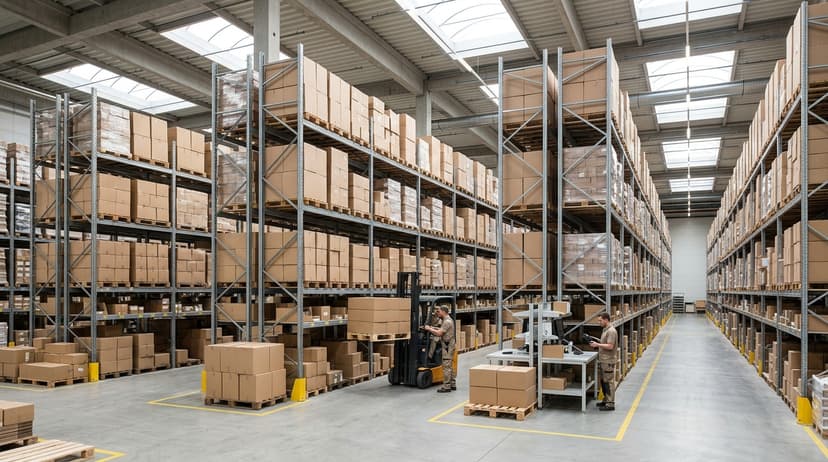
Warehouse inventory is the stock a warehouse holds. Warehouse inventory management software is the record of it: what you have, where it sits, and what moves in and out. It replaces printed pick lists, the spreadsheet, and the walk to the shelf with one count that updates on every scan. This guide, reviewed in September 2026, covers what the software does, the signs a warehouse has outgrown manual tracking, and what a custom warehouse inventory system looks like for 5 to 100 people.
Published 2 August 2026. Reviewed and updated 15 September 2026.
Book a callWhat Does Warehouse Inventory Management Software Actually Do?
Tracking Stock in Plain Language
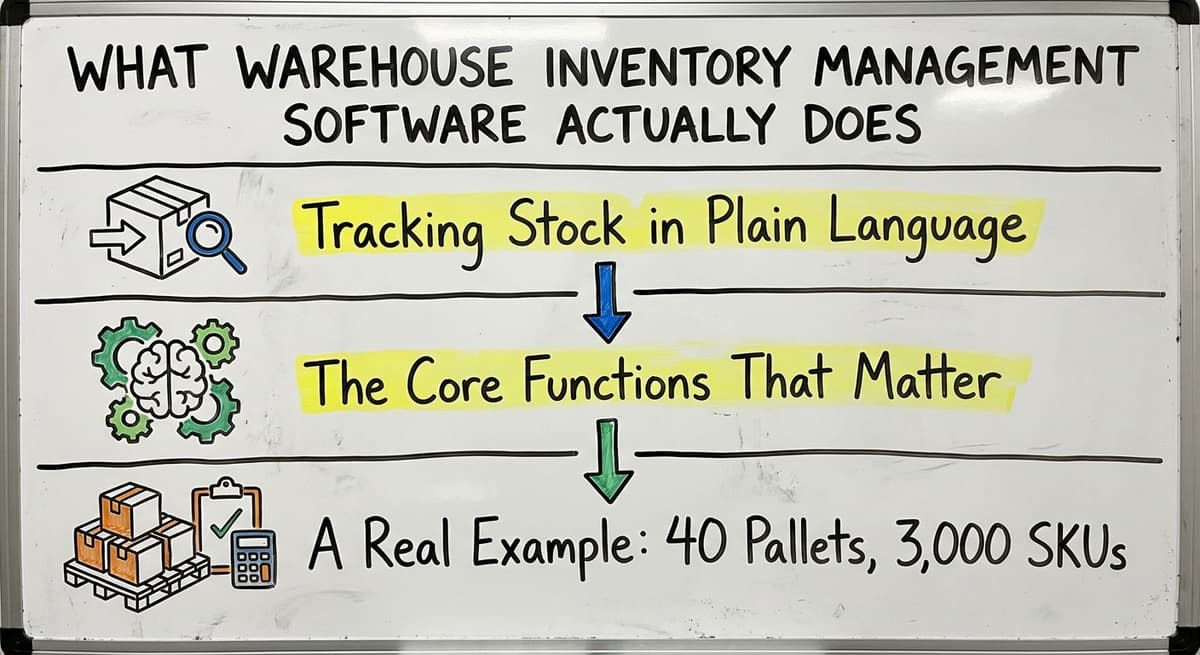
Warehouse inventory management software does three things. It records what you have. It records where each item sits. It records every move in and out. That is the whole job.
When a pallet arrives, the software logs it. When a picker pulls a case, the software updates the count. When an order ships, the stock level drops. Every step is visible, live, and searchable.
Manual methods break at scale. Printed pick lists go stale the moment ink hits paper. Spreadsheets require someone to update them, and that someone is already doing two other jobs.
Email chains lose context. Desktop database tools freeze. None of them tell you what is happening right now.
The Core Functions That Matter
A solid warehouse management system covers six core steps: receiving, putaway, picking, packing, shipping, and stock counts. Each one is a point where errors enter. Each one is also a point where software can catch those errors before they cost you money.
Receiving confirms that what arrived matches what was ordered. Putaway tells staff where to place it. Picking tells them where to find it.
Packing checks the order before it leaves. Shipping updates the customer record. Stock counts become a quick scan rather than a full-day shutdown.
A Real Example: 40 Pallets, 3,000 SKUs
Picture a wholesale distributor taking in 40 pallets on a Tuesday morning.
Without software, someone writes down pallet contents on a clipboard, walks the floor to find open bin space, and updates a spreadsheet later. By Thursday, no one is sure where pallet 27 went.
With inventory tracking software, a staff member scans each pallet at the dock. The system assigns a bin location. The count updates instantly.
Anyone on the floor can find that SKU in 10 seconds. The software does not have to replace every process. It just has to fix the broken ones.
We build it for your operation, and the first look is free
If you would rather not compare products, describe how your operation already works and we build a custom warehouse management system around it.
No build cost. You see it running on your own process first, and the monthly subscription starts only once it is live.
Book a callSigns Your Warehouse Has Outgrown Manual Tracking
Operational Warning Signs to Watch For
Operational warehouse inventory warning signs are not failures. They are normal growing pains for any operation running 5 to 100 staff. Watch for these signs.
Reviewed August 2026. Each figure comes from the assumptions stated beside it, so you can substitute your own and the arithmetic still holds.
- Stock counts take a full day or more and still come back wrong
- Staff spend time hunting for product instead of moving it
- Orders ship with wrong items or wrong quantities more than once a month
- Your accounting software numbers and the physical count never match
- New employees take weeks to learn where things are stored
- You are running a second spreadsheet to double-check the first one
If 3 of those 6 are true, you have outgrown your current system. If all 6 are true, every day you wait is costing you in mis-ships, overtime, and lost trust with customers.
The Real Cost of Doing Nothing
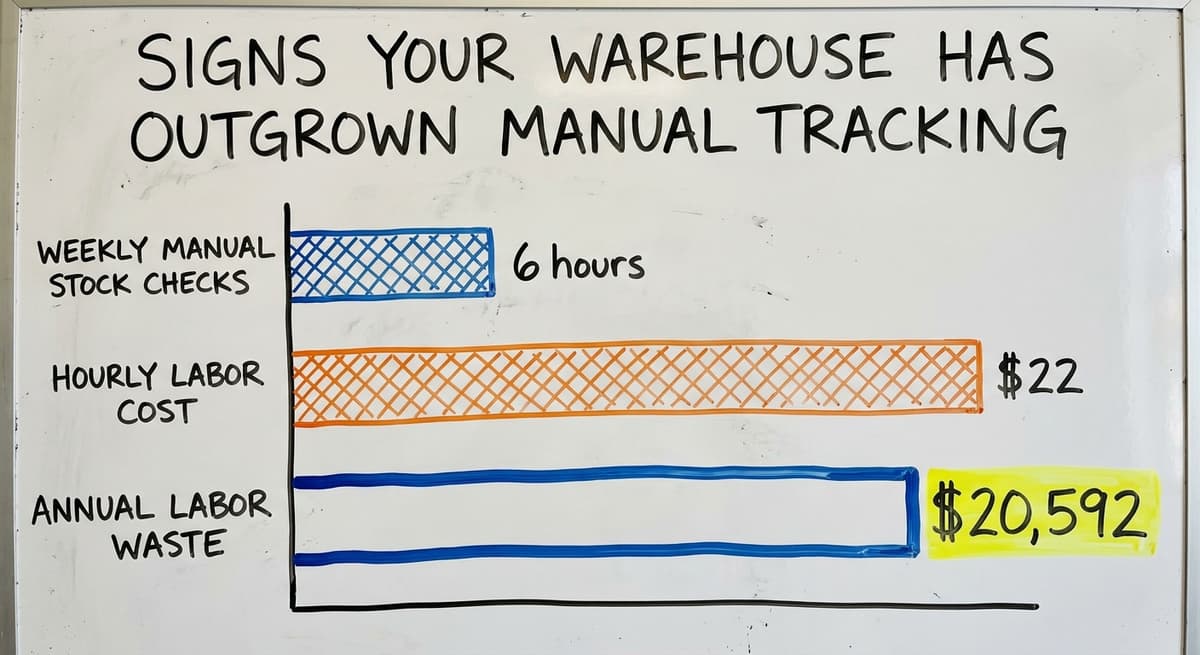
The cost of staying with manual processes is easy to calculate. Say 3 staff members each spend 6 hours a week on manual stock checks and corrections.
At $22 an hour, that is $20,592 a year in labor that produces no output. That figure does not include the expense of a mis-ship, a return, or a lost account.
The US Bureau of Labor Statistics tracks wages for warehouse roles, and the numbers confirm that manual correction work is expensive at any scale. Beyond cost, there is a safety angle.
OSHA notes that "The warehousing and storage industry includes establishments operating facilities for general merchandise, refrigerated goods, and other products," and its guidance makes clear that cluttered, disorganized floors increase injury risk.
A system that puts stock in the right place the first time is also a safer floor.
Core Features to Look For in Warehouse Inventory Software
Visibility and Scanning
Real-time warehouse inventory means the count you see on screen matches the count on the shelf right now. Not yesterday. Not after the end-of-day update.
Right now. That requires barcode scanning warehouse staff can use at the dock and on the floor, not just at a desktop.
Look for mobile scanning on a device that works in a cold room or a loading bay. The scan should update the system instantly.
GS1 standards define how barcodes are structured so that a label printed by one company scans correctly at another. Any system you choose should support GS1-compliant barcodes.
Reorder Alerts and Lot Tracking
Warehouse inventory reorder alerts fire when stock drops below a level you set. You choose the threshold. The system sends the alert. No one has to remember to check.
Lot, batch, or serial number tracking matters if you handle food, medical supplies, or any product with a recall risk. It also matters for wholesale distributor software where customers need proof of origin.
Not every warehouse needs this. If you do, confirm the system handles it before you buy.
Pick, Pack, and Reporting
Pick-and-pack workflows are the warehouse inventory step that reduces mis-ships: pickers get a clear, verified list and prompting a scan confirmation before the box closes. That one step alone cuts error rates sharply.
Reporting should show you stock movement over time, turnover by SKU, and dead inventory sitting in your bins. Dead inventory is cash you cannot spend. A good report surfaces it fast.
Accounting software integration means your financial data stays in the tool your accountant already trusts. The inventory system handles the floor. Your bookkeeping software handles the books. The two talk to each other without manual re-entry.
The comparison is easier when one option is built for you
Comparing warehouse software is easier when one option is built specifically for your operation. We do it the other way round, and the first look costs nothing.
Book a callHow Does Warehouse Inventory Software Work With Your Accounting Software?
Why Is the Fear of Leaving Your Accounting Software Valid?
Many small distributors worry that adding inventory software means leaving their accounting software behind. That fear is reasonable. That software holds years of financial history, your accountant knows it, and your payables process runs through it. Walking away from that is not a small ask.
The good news is that you do not have to. Your accounting software handles invoicing, payables, and financial reporting well.
Where it struggles is real-time stock management at scale. It was not built to track bin locations or run pick-and-pack workflows. That is not a flaw. It is just a boundary.
How Does the Data Handoff Work?
A purpose-built warehouse inventory layer is one that sits alongside your bookkeeping software rather than replacing it. The inventory software manages every stock movement across the warehouse floor.
At set intervals, or in real time, it sends a financial summary to that software. Invoices post. Cost of goods updates. Your accountant sees clean numbers without touching the warehouse system.
This is accounting software integration for warehouse operations done right. The inventory system does the heavy lifting day to day. That software does the heavy lifting on the books. Neither system tries to do the other's job.
What Should You Avoid?
Avoid tools that force a full migration away from your accounting software if your business is not ready for that.
Some vendors push an all-in-one platform because it benefits them, not you. If a vendor cannot describe how their system syncs with that software in plain terms, that is a warning sign.
The right solution is additive. It adds capability to what you already have. It does not demand that you rebuild your financial stack to earn the benefit on the floor.

Types of Warehouse Inventory Management Software
Off-the-Shelf SaaS and ERP Systems
Off-the-shelf SaaS warehouse inventory platforms are fast to start. You sign up, import your SKUs, and begin. The tradeoff is fit. These tools target a generic warehouse. If your workflow is standard, they work well.
If you have unusual receiving steps, catch-weight items, or multi-location stock rules, you will spend time working around the tool rather than with it. Subscription costs also add up. At scale, monthly fees can exceed what a custom build would have cost.
ERP systems are powerful and expensive. They target enterprise scale, with implementation timelines measured in months and price tags that reflect it. For a 20-person distributor, an ERP is almost always the wrong tool.
Custom-Built Warehouse Software
Custom warehouse software is built around how your operation already works. There are no forced process changes. The software fits your workflow, not a generic template.
Fulfilment centres, wholesale distributors, and specialty warehouses have workflows that generic tools handle poorly. A fulfilment centre inventory system needs to handle multi-client stock, custom labeling, and client-specific pick rules.
A wholesale distributor might need catch-weight receiving, lot tracking, and route-based delivery confirmations. Off-the-shelf tools make you compromise on these. Custom software for wholesale distributors does not.
The tradeoff is time and upfront cost. A focused custom build takes weeks, not days. But it does not carry ongoing subscription fees that grow with your headcount, and it does not force you to change your process to match someone else's assumptions.
| Type | Speed to Start | Fit for Unusual Workflows | Long-Term Cost | Best For |
|---|---|---|---|---|
| SaaS platform | Fast | Low to medium | Subscription grows with scale | Standard workflows, smaller SKU counts |
| ERP system | Slow | High, but rigid | High upfront and ongoing | Enterprise, 100+ staff |
| Custom software | Medium | High | Lower at scale, no per-seat fees | Distributors with specific workflows |
What does it look like running on your own process?
The first thing you see is it running on your own process, at no build cost. The subscription starts once the system is live and doing the job, not before.
Book a call
What Does a Custom Warehouse Inventory System Look Like in Practice?
The Before State: A Columbus-Area Distributor
Picture a wholesale distributor near Columbus, Ohio, with 40 pallets of warehouse inventory. Twenty staff. Three thousand SKUs. Receiving is logged in a spreadsheet by whoever is at the dock.
Pick lists are printed each morning from a spreadsheet that was last updated the night before. The accounting software is updated manually each evening, after someone reconciles the paper records.
Errors are common. A picker pulls from the wrong bin because the location sheet is two weeks old.
A shipment goes out short because the spreadsheet count was not updated after a return came in. The operations manager spends Friday afternoons fixing what the week broke.
The After State: What Changes and What Does Not
After a custom warehouse inventory system goes live, the receiving dock has 1 mobile scanner and no clipboard. Staff scan each item as it arrives. The system assigns a bin location and updates the count instantly.
Pick lists are generated by the software, not printed from a spreadsheet. Each pick is confirmed with a scan before the box closes.
The accounting software syncs automatically after each shift ends. The accountant sees the same clean data she always did. Nothing changed on her end. Staff kept their existing roles. No big ERP rollout. No retraining on a new financial system.
What Stayed the Same?
What stayed the same is the part that matters most. The software was built around the operation, not the other way around. The team did not change how they think about their work. They just stopped doing the manual steps that were causing errors.
Replacing spreadsheets and old desktop databases with purpose-built software does not mean rebuilding your business. It means removing the parts that were slowing it down. The IRS is clear that inventory records are not optional.
As IRS Publication 538 states: "To figure taxable income, you must value your inventory at the beginning and end of each tax year." Accurate records are a legal need, not just an operational one. A system that keeps those records automatically is worth the investment.

Questions to Ask Before Choosing a System
Questions That Protect You From Expensive Mistakes
Before you sign anything for warehouse inventory software, there are 6 questions to ask. Write down the answers. If a vendor stumbles on any of them, that tells you something.
- Will this work with our accounting software, or do we have to leave it?
- How long does implementation take, and who does the actual work?
- Can it handle our specific workflow, such as lot tracking, multi-location stock, or catch-weight items?
- What happens when we need a change 6 months after launch?
- Is there a local team or a real support contact we can reach?
- What does it cost when we grow from 20 to 60 staff?
These are not trick questions. A vendor with a real product will answer them without hesitation.
What Should the Answers Sound Like?
On accounting software, the right answer is a clear description of the sync, not a vague one.
On implementation time: a focused custom build for a small warehouse should take weeks, not months. On support: you should be able to name a person, not just a ticket system.
On cost at scale: SaaS tools charge per user or per order. That cost grows. A custom build has a fixed development cost and low ongoing fees.
At 60 staff, the math favors custom. Ask the vendor to show you the 3-year total cost, not just the monthly fee.
The Warehousing Education and Research Council publishes standard benchmarks for distribution centre performance. Use those benchmarks to measure what a vendor promises against what the industry actually achieves.

Implementation: What to Expect and How to Prepare
What Does a Realistic Timeline Look Like?
For a tailored warehouse inventory build sized to a small warehouse, implementation is a matter of weeks, not months. The first week covers discovery: mapping your workflows, your SKU list, your bin structure, and your accounting setup.
The second and third weeks cover build and test. Week four is go-live, with a phased rollout that starts in one area of the warehouse before expanding.
Be wary of any vendor who promises a full build in a single day with no discovery process. That vendor is selling a template, not a system built for your operation.
The custom software implementation process should start with someone asking how you work, not showing you a demo and calling it done.
What is in a free first look?
A 30 minute call, your operation mapped, and a clear picture of what we would build. No obligation and nothing to install.
Book a callHow Do You Prepare Your Team and Your Data?
Before warehouse inventory implementation starts, your team needs to prepare 3 things.
- A clean SKU list: every item you stock, with a consistent naming format
- A current location map: every bin, rack, and storage zone, labeled
- A written description of your current workflows: how receiving actually happens today, not how it is supposed to happen
The implementation team handles the build. Your warehouse team handles the floor knowledge. Both sides need to show up.
Phased rollouts and parallel running reduce go-live risk. Run the new system alongside the old one for a week. Confirm the numbers match. Then cut over fully.
The best implementations start narrow, prove value fast, and then expand. Start with receiving. Get that right. Then add picking. Then reporting. Small steps with clear wins build confidence and reduce risk.
What is warehouse inventory?
Warehouse inventory is the total stock a warehouse holds at any given time. It includes raw materials, finished goods, and items in transit between locations.
Accurate inventory records are a legal requirement. As IRS Publication 538 states, businesses must value inventory at the start of each tax year and at its close to calculate taxable income.
What are four types of inventory?
The 4 main types of inventory are raw materials, work-in-progress, finished goods, and maintenance, repair, and operations (MRO) stock. Raw materials are inputs not yet used.
Work-in-progress is stock part way through production. Finished goods are ready to ship. MRO covers supplies that keep the warehouse running, such as packaging and equipment parts.
What is the 80/20 rule in inventory?
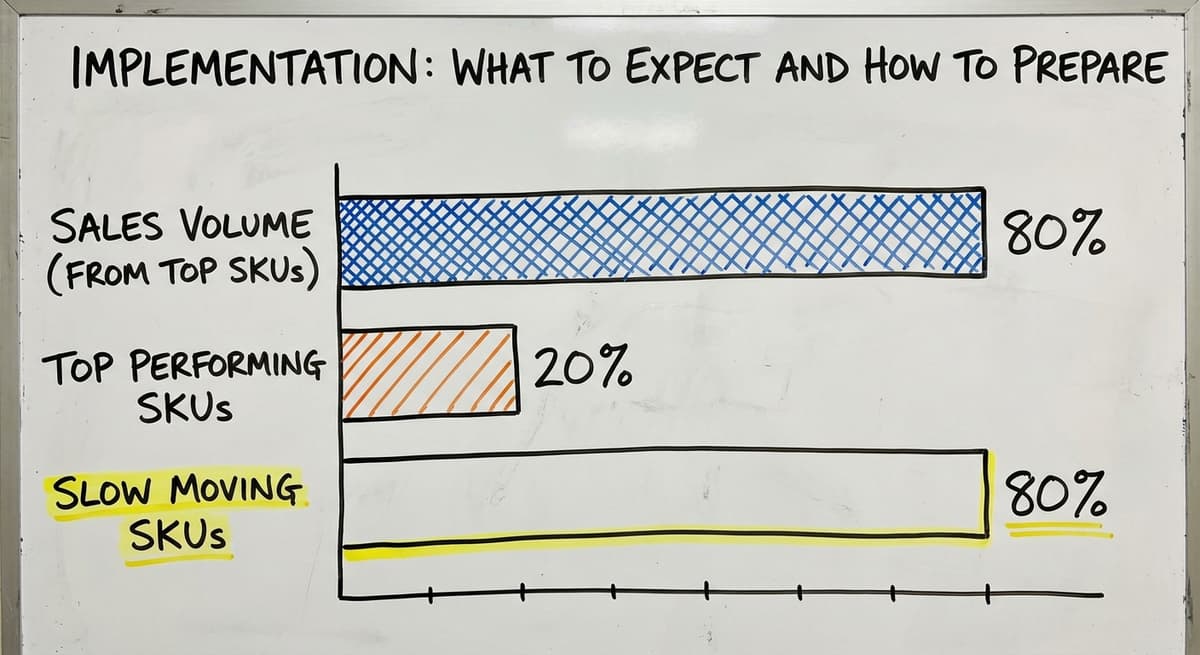
The 80/20 rule in inventory means that roughly 80% of your sales come from 20% of your SKUs.
In practice, this tells you which items to store in the most accessible bin locations and which to track most closely. It also helps you spot dead inventory: the 80% of SKUs that move slowly and tie up cash.
What are the 5 KPIs for a warehouse?
The 5 most common warehouse KPIs are: order accuracy rate, inventory turnover, on-time shipment rate, receiving accuracy, and carrying cost of inventory.
The Warehousing Education and Research Council publishes standard benchmarks for each. Use those benchmarks to set realistic targets before you choose a software system.
Frequently Asked Questions About Warehouse Inventory Management Software

The Straightforward Path Forward
You do not have to blow everything up to fix your inventory problem. The right warehouse inventory management software fits around how you already work. It keeps your accounting software in place. It replaces only the parts that are actually breaking.
And it gives your team a system they can trust day in and day out, not a tool they have to work around.
The US Federal Trade Commission is clear that businesses must ship orders when promised. Accurate inventory is what makes that promise possible.
A system that shows you exactly what you have, where it is, and what is moving is not a luxury. It is the foundation of a reliable operation.
If your current process is breaking more than once a month, fixing it almost certainly costs less than leaving it alone. Start with a conversation about how the operation actually works today. The right implementation partner will listen before they build anything.
Frequently asked questions
Frequently asked questions
What is warehouse inventory?
Warehouse inventory is the total stock a warehouse holds at any given time. It includes raw materials, finished goods, and items in transit between locations.
Accurate inventory records are a legal requirement. IRS Publication 538 states that businesses must value inventory at the start of each tax year and at its close to calculate taxable income.
What are four types of inventory?
The 4 main types are raw materials, work-in-progress, finished goods, and maintenance, repair, and operations (MRO) stock. Raw materials are inputs not yet used.
Work-in-progress is stock part way through production. Finished goods are ready to ship. MRO covers supplies that keep the warehouse running, such as packaging and equipment parts.
What is the 80/20 rule in inventory?
The 80/20 rule in inventory means that roughly 80% of your sales come from 20% of your SKUs. This tells you which items to store in the most accessible bin locations and which to track most closely. It also helps you identify dead inventory: the 80% of SKUs that move slowly and tie up cash.
What are the 5 KPIs for a warehouse?
The 5 most common warehouse KPIs are: order accuracy rate, inventory turnover, on-time shipment rate, receiving accuracy, and carrying cost of inventory. The Warehousing Education and Research Council publishes standard benchmarks for each. Use those benchmarks to set realistic targets before choosing a software system.
Do I need to replace your accounting software to use warehouse inventory management software?
No. The right system integrates with your finance software rather than replacing it. That software handles invoicing and financials. The inventory system handles stock movements as they happen.
The two sync automatically so your accountant keeps working in that software and your warehouse team works in the inventory system.
How long does it take to implement warehouse inventory management software?
A tailored system built for a small warehouse takes weeks, not months. Discovery and workflow mapping takes about a week. Build and testing takes two to three weeks.
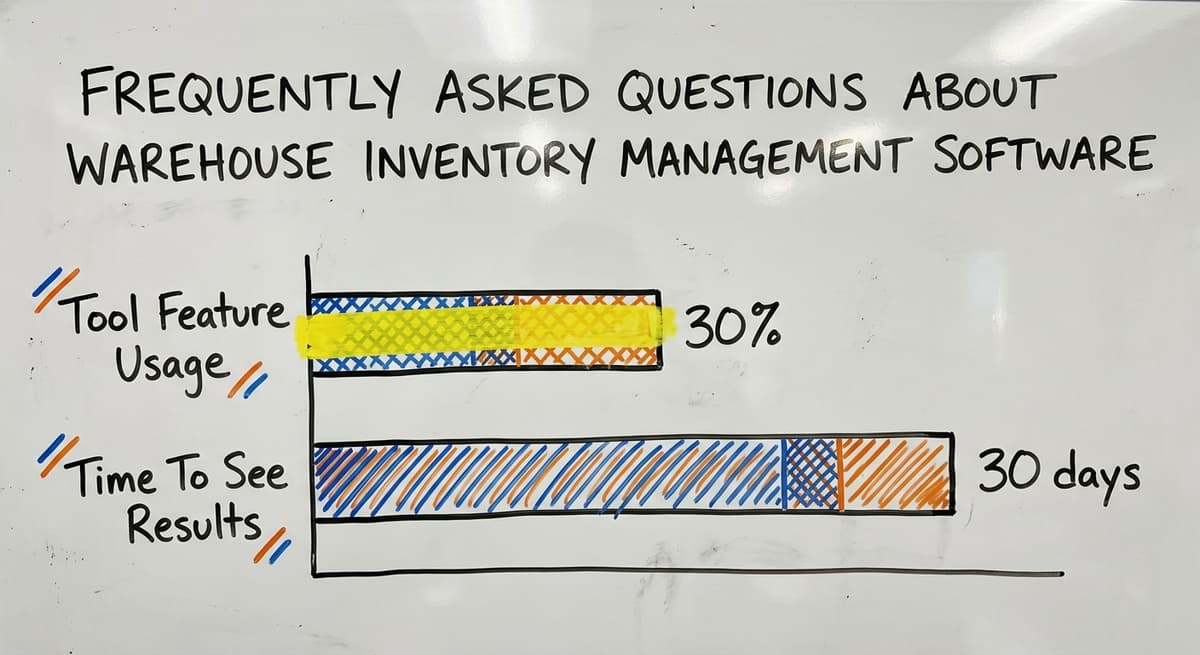
Go-live uses a phased rollout starting in one area before expanding. Most operations see measurable improvement in pick accuracy and stock count time within the first 30 days.
What is the difference between an ERP and a warehouse inventory system?
An ERP is a large, enterprise-grade platform that manages finance, HR, production, and inventory in one system. It is expensive, takes months to implement, and is built for 100-plus staff operations.
A warehouse inventory system focuses specifically on stock management: intake, putaway, picking, packing, and shipping. For most small distributors, a focused inventory system is the right fit.
What should I prepare before implementing a new inventory system?
Prepare 3 things before warehouse inventory implementation starts: a clean SKU list with consistent naming, a current location map of every bin and storage zone, and a written description of how your current workflows actually operate today.
Having these ready speeds up the discovery phase and reduces the risk of building a system around outdated assumptions.
What is the best warehouse inventory management system?
The best system is the one that fits how your operation already works rather than a single named product.
Look for software that covers receiving, putaway, picking, packing, shipping, and stock counts, updates in real time, and works alongside your existing accounting tool instead of forcing a full migration.
A system built around your current process, rather than a rigid one size fits all platform, tends to deliver the most accurate and least disruptive results.
How do I calculate warehouse inventory turnover?
Inventory turnover is calculated by dividing the cost of goods sold over a period by the average inventory value held during that same period.
A higher number means stock moves quickly, while a lower number suggests items are sitting too long, which ties up cash and space.
Tracking turnover by individual SKU, rather than only at the warehouse level, helps identify slow moving or dead stock that quietly drains working capital.
How often should warehouse inventory be counted?
Warehouse inventory should be counted often enough that discrepancies are caught before they cause bigger problems, which means frequent partial or cycle counts rather than one massive count each year.
Cycle counting checks a rotating subset of items on a regular schedule, so no single count requires shutting down operations for a full day. This approach keeps physical stock and system records aligned continuously rather than only at scattered checkpoints.
How can I improve warehouse inventory accuracy?
Warehouse inventory accuracy improves most through real-time barcode scanning at receiving, putaway, picking, and shipping, so the recorded count always matches what is physically on the shelf.
Adding a scan confirmation step before an order is packed catches mismatches before they leave the building. Setting reorder alerts, using standardized barcodes, and running regular cycle counts also help close gaps between system records and actual stock levels.
Not sure this is the right shape for your operation?
The call is free. Describe how the work runs today. We map it on a call and show you what it would look like built around that, before you spend anything.
Book a callRelated guides
The rest of this guide, for the parts of the job this page does not cover.
Guides
- Warehouse Inventory Management Software
- Warehouse Inventory Tracking Software
- Warehouse Inventory Management Systems
- Warehouse Inventory Systems
- Inventory and Warehouse Management Software
- Warehouse Inventory Management System
- Warehouse Inventory Software Programs
- Warehouse Inventory Tracking System
- Inventory Software Warehouse
- Pick and Pack in Warehouse
- Warehouse Receiving Software
- Warehouse Stock Management Software
- Warehouse Management System Top 10
- Software for Warehouse Management System
- Warehouse Shipment
Common questions
- Why is Warehousing and Inventory Management Important
- How to Manage Inventory in a Warehouse
- What is the Best Warehouse Inventory Management System?
- What is the Difference Between Warehousing and Inventory Management
- How to Keep Track of Inventory in Warehouse
- What is B Type of Inventory in Warehouse Management
- What is Warehousing and Inventory Management
- What is the Most Important Part of Warehouse Organization
- What Are the Benefits of Warehouse Management System