


Warehouse Inventory Tracking System
A warehouse inventory tracking system is the live record of where stock is, how much you have, and where it moves. It replaces clipboards, spreadsheets, and guesswork with a count that updates on every scan, across 500 to 20,000 SKUs. This guide, reviewed in September 2026, covers what it does, the 4 types, and how a custom one gets built in 6 to 12 weeks.
Published 22 July 2026. Reviewed and updated 15 September 2026.
Book a callWhat Does a Warehouse Inventory Tracking System Actually Do?
A warehouse inventory tracking system is software that logs every move your stock makes. Items arrive, get placed in a location, get picked for an order, and go out the door.
The system records each step. At any moment, you can see what you have and where it is.
The Core Loop: In, Located, Picked, Out
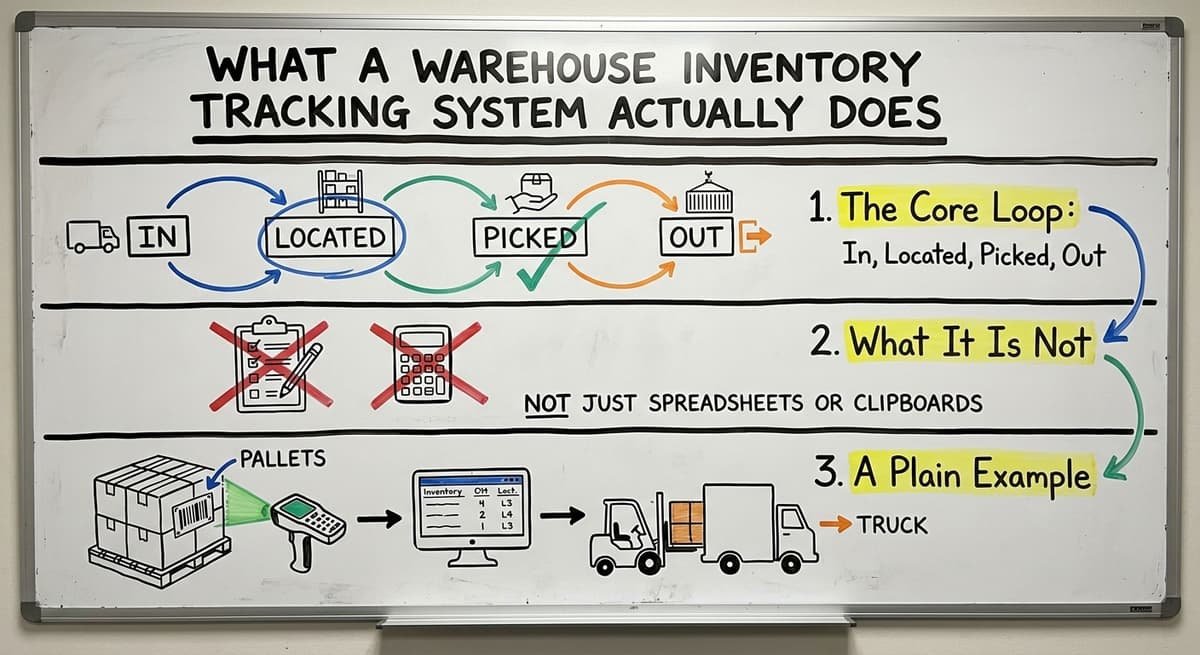
A warehouse management system runs one core loop. The system logs the receipt and assigns a location. A picker gets an order. The system tells them where to go. They pick the item.
The system marks it as picked. It ships. The system marks it as gone. That loop runs for every item, every day. Nothing falls through the cracks.
What Is It Not?
A warehouse inventory tracking system is not accounting software. That kind of tool tracks money: it records what you invoiced and what you paid.
A tracking system tracks physical goods. It knows that pallet 14 holds 48 cases of product A and they are in bin C3. Accounting software does not know that. The two tools do different jobs.
A Plain Example
A wholesale distributor receives a pallet of 60 cases. Each case gets scanned on arrival. The system assigns them to bin D7.
When an order comes in for 10 cases, a picker goes to D7, scans them out, and the system updates the count to 50. The manager sees 50 in real time. No phone call needed. No clipboard math.
We build it for your operation, and the first look is free
Rather than comparing off-the-shelf products, describe how your operation already works and we build the system around it.
No build cost. You see it running on your own process first, and the monthly subscription starts only once it is live.
Book a callWhy Do Spreadsheets and Paper Stop Working?
Spreadsheets are not a bad tool. They work well at small scale. The problem is that most warehouses grow past them without noticing until something breaks.
The Breaking Point
Most small warehouses hit trouble when staff count reaches 5 to 20 people or when SKU counts climb past a few hundred.
At that point, a single shared spreadsheet becomes a liability. Two people update it at the same time and one version overwrites the other. Nobody knows which number is right.
Common failure modes at this stage include:
- Overselling stock that is not there
- Underselling stock that is sitting in the wrong bin
- Lost items found weeks later during a physical count
- Double-counting during cycle counts because two people worked the same row
The Time Cost of Manual Work
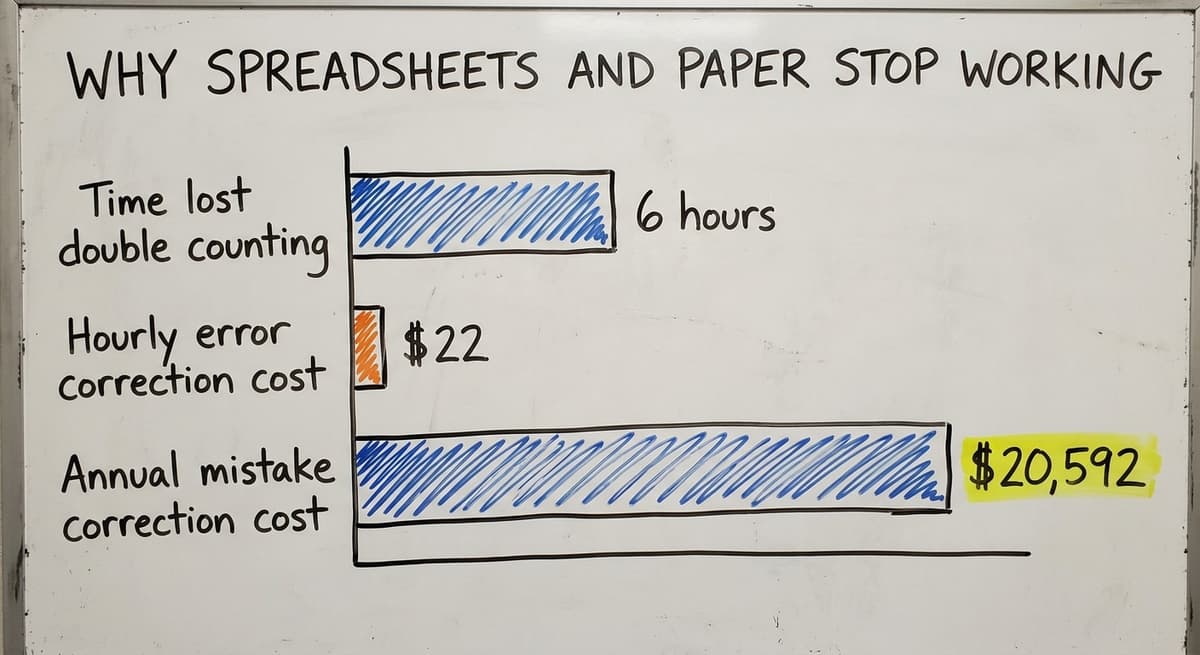
Consider 3 staff members each spending 6 hours a week fixing inventory errors. At $22 an hour, that is $20,592 a year spent correcting mistakes rather than moving product. The IRS also requires accurate counts.
As IRS Publication 538 states: "To figure taxable income, you must value your inventory at the beginning and end of each tax year." That is a legal obligation, not a preference.
The Spreadsheet Problem
A basic spreadsheet has no live updates. A file saved at 9 a.m. is wrong by 10 a.m. There is no audit trail. You cannot see who changed a number or when. There is no alert when stock drops to zero.
OSHA notes that "the warehousing and storage industry includes establishments operating facilities for general merchandise, refrigerated goods, and other products." When workers are moving goods across a busy floor, relying on a stale spreadsheet to guide decisions creates real risk. A live system removes that gap.
Reviewed August 2026. Each figure comes from the assumptions stated beside it, so you can substitute your own and the arithmetic still holds.
Core Features of a Warehouse Inventory Tracking System
Not every system needs every feature. But a solid warehouse inventory tracking system covers the basics that stop the most common problems.
Receiving, Location, and Real-Time Stock Levels
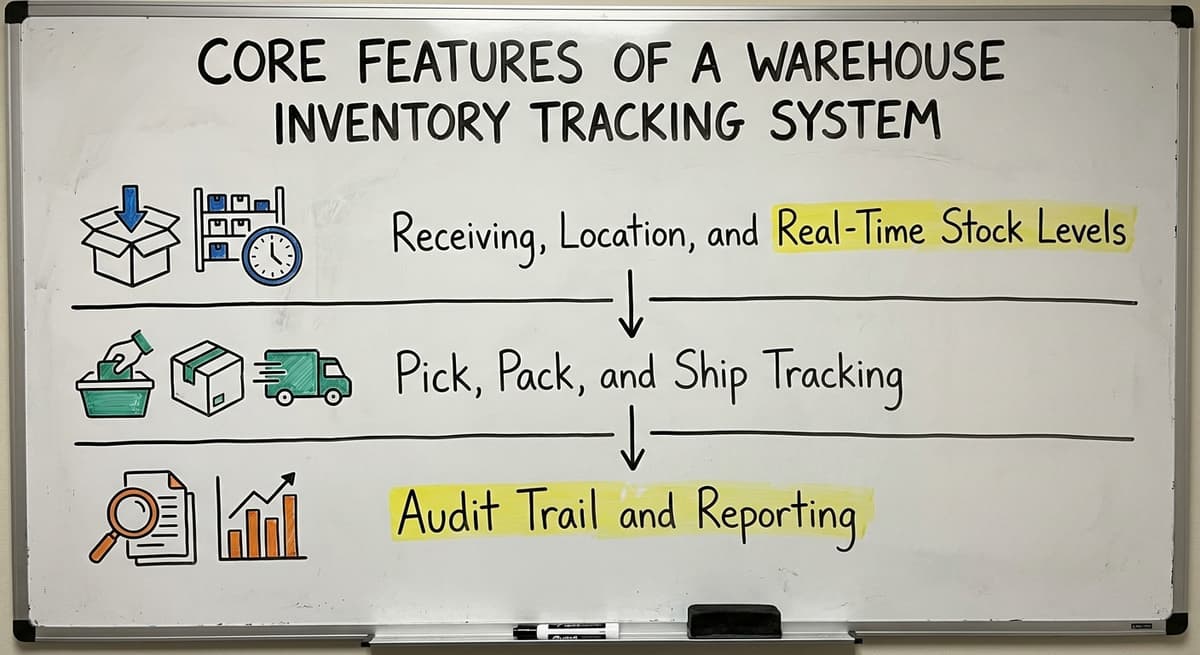
Good inventory control starts at the dock. The system logs items when they arrive and assigns them a bin or zone. From that point on, stock levels update in real time.
Managers see current counts without asking the floor team. GS1 barcode standards make it possible for a barcode printed by one supplier to scan correctly at your dock, so receiving is fast and accurate.
Key features in this group:
- Real-time stock levels by location, bin, or zone
- Receiving and put-away workflows
- Barcode inventory tracking to cut manual keying errors
- Low-stock alerts and reorder triggers
Is the comparison easier when one option is built for you?
Yes. Off-the-shelf means fitting your process to the software, and custom is the other way round. The first look costs nothing.
Book a callPick, Pack, and Ship Tracking
Pick and pack accuracy is where most small warehouses lose money. A wrong item ships. A return comes back. A customer is unhappy.
The system gives pickers a clear task, confirms the scan, and logs the action. The Warehousing Education and Research Council publishes standard benchmarks for distribution center performance, and pick accuracy is near the top of every list.
Audit Trail and Reporting
Every move gets logged. Who picked it. When. From where. That audit trail is useful when something goes missing and essential when a customer disputes a shipment.
Reports show stock on hand, stock movement, slow movers, and shrinkage. You stop guessing and start managing with real numbers.
How Does It Connect to Your Accounting Software Without Replacing It?
Most small distributors already run a bookkeeping platform. They are not looking to replace it. They do not need to.
Two Systems, Two Jobs
A warehouse inventory tracking system handles the physical side. Your accounting software handles the financial side. They target different things.
A good accounting integration for warehouses lets the two systems share data. Purchase orders flow in. Invoices flow out. Item records stay in sync. Nobody does double entry.
What Does a Clean Integration Look Like?
When a shipment arrives, the tracking system logs the receipt. That receipt can update a purchase order in your accounting software automatically. When an order ships, the tracking system records the movement.
The accounting side gets the invoice data it needs. No one types the same number into 2 systems. Inventory management for wholesale distributors works best when the physical and financial records agree without manual effort.
The Middle Path
A custom inventory system built alongside your accounting software gives you a practical middle ground between a spreadsheet and a full ERP. It sits next to your bookkeeping tool and handles the physical work that software was never designed to do. It costs less than an ERP to run, it goes live faster than a full rollout, and it does not force you to change how your team already works.
What does it look like running on your own process?
The first thing you see is it running on your own process, at no build cost. The subscription starts once it is live and doing the job, not before.
Book a call
Types of Warehouse Inventory Tracking Systems
There are 4 main categories. Each fits a different size and type of operation.
Off-the-Shelf Warehouse Software
Off-the-shelf warehouse management software is built for general use. It works for many operations. The risk is a poor fit. You may pay for features you never use and find that the ones you need are missing.
Setup can take longer than expected because you are adapting your process to the software rather than the other way around.
Enterprise WMS and ERP Platforms
Enterprise warehouse and ERP platforms are powerful. They are also expensive and slow to implement. They target operations with hundreds of staff and complex, multi-site needs.
A warehouse with 15 staff does not need a giant ERP suite built for a multinational. The cost and time required to implement an enterprise platform outweigh the benefit for small operations.
Custom-Built and Hybrid Systems
Custom warehouse software for small distributors follows how your warehouse already works. No forced process changes. No features you do not need.
A hybrid approach puts custom logic on top of existing tools like your accounting software. This is the right call for small and mid-size operations. It is faster to build, easier to adopt, and cheaper to run than an enterprise platform.
| System Type | Best For | Cost Range | Time to Go Live |
|---|---|---|---|
| Off-the-shelf WMS | General use, standard workflows | Low to mid | Weeks to months |
| Enterprise WMS/ERP | Large, complex operations | High | Months to years |
| Custom-built system | Specific workflows, small teams | Mid | Weeks |
| Hybrid (custom + your accounting software) | your accounting software users, lean teams | Low to mid | Weeks |

What Should You Look for When Choosing a System?
The right warehouse software fits your operation. It does not ask you to fit it.
Fit, Scale, and Speed
Look for a system built for your size. Small warehouse software should not feel like a stripped-down version of something built for 500 staff. It should feel right for 10 to 50 people.
Ask how long setup takes. A focused build should go live in weeks, not months. Avoid any system that requires expensive consultants just to change basic settings.
Workflow Match and Integration
Your operation may need lot tracking, serial number tracking, multi-location support, or FIFO (first in, first out) costing. FIFO means you sell the oldest stock first.
Make sure the system handles your specific needs before you commit. It also needs to connect to your accounting setup. Syncing with your accounting software should be part of the conversation from day one.
Support That Knows Warehouses
Software support matters. The team behind the system should understand warehouse operations, not just code.
When something breaks at 7 a.m. on a shipping day, you need someone who knows what a pick list is and why it matters. Ask who you call and what they know.

How Does a Custom Warehouse Inventory Tracking System Get Built?
A well-run custom build follows clear steps. None of them should take years.
Discovery and Design
- Discovery: Map how stock moves in your operation today. Where does it come in? Where does it go? What breaks most often? This step takes days, not weeks.
- Design: Decide what the system needs to do and what it does not need to do. A tight scope keeps the build fast and the cost low.
Build and Test
- Build: Create workflows that match your operation. Not a generic template. Your bins, your zones, your pick process.
- Test: Run the new system alongside your current process before you cut over. Staff use both for a short period. Errors get caught before they matter.
Go Live and Adjust
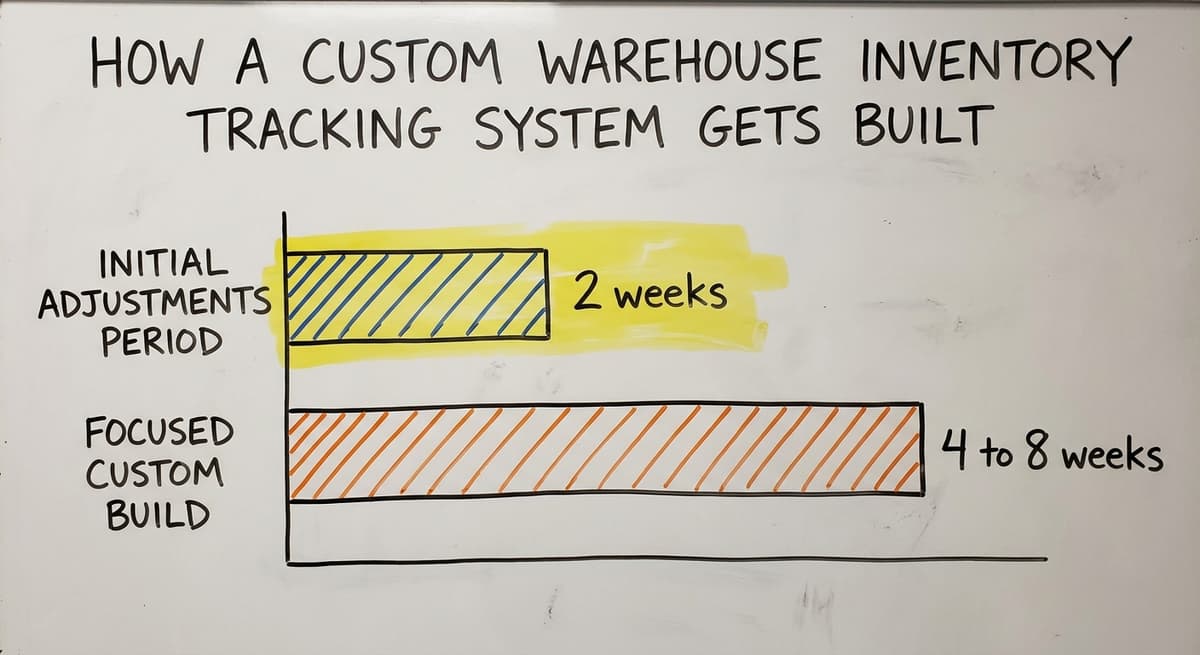
- Go live: Train staff. Keep the support team close. Expect small adjustments in the first 2 weeks. That is normal and planned for.
A focused custom build sized for a compact team can go live in 4 to 8 weeks. Warehouse management software for fulfillment centers with standard workflows can move even faster. The key is a clear scope agreed on in the design phase.
What is in a free first look?
A 30 minute call, your operation mapped, and a clear picture of what we would build. No obligation and nothing to install.
Book a call
Real Results Small Warehouses See After Implementation
Small warehouses see real gains after implementation. They are also practical rather than dramatic.
Faster Counts and Fewer Errors
Physical inventory counts take less time when the system is already tracking locations. Staff know where to look. The count confirms the record rather than building it from scratch.
Picking errors drop because the system tells pickers exactly where to go and confirms the scan before they move on. Mis-ships fall.
Better Visibility and Less Emergency Buying
Real-time inventory tracking gives managers visibility into stock levels without walking the floor or calling a team member. Low-stock alerts fire before you run out. That cuts emergency purchases made at short notice and at higher cost.
The US Federal Trade Commission requires businesses to ship when they say they will. Accurate real-time inventory is what makes that promise reliable.
Staff Confidence in the Numbers
Staff confidence in the numbers is underrated, and inventory accuracy depends on it.
When staff trust the system, they stop keeping their own side records. They stop second-guessing counts. They move faster because they are not checking and rechecking. Inventory accuracy becomes a team habit rather than a management project.
Common Questions About Warehouse Inventory Tracking Systems

Ready to Replace the Spreadsheet?
Spreadsheet-based inventory management has carried many operations a long way. The spreadsheet got you here. The point is that a better way is available now, one that skips the need for a massive system or a long implementation.
This team builds custom inventory tracking systems designed around how your warehouse already works. We link them to your accounting software, keep the scope tight, and go live in weeks.
If you are ready to see what that looks like for your operation, start with a straightforward conversation about what is breaking and what you need it to do instead.
Frequently asked questions
Frequently asked questions
How to keep track of inventory in a warehouse?
The most reliable way is a dedicated warehouse inventory tracking system. It logs every item on arrival, assigns it a bin or zone, and tracks it through picking and shipping.
Barcode scans cut keying errors. Real-time updates mean your count is always current. Spreadsheets work at very small scale but break down as SKU counts and staff numbers grow.
What is the best system to track inventory?
There is no single best system. The right answer depends on your size, your workflows, and what you already use. A small warehouse running a cloud bookkeeping service does well with a custom or hybrid system that connects to that service rather than replacing it.
Larger operations may need a full WMS. The best system is the one that fits how you actually work, not the one with the most features.
What Is a Warehouse Management System vs an Enterprise Resource Planning System?
A WMS (warehouse management system) handles physical warehouse operations: receiving, put-away, order picking, and outbound shipping. A large enterprise ERP platform covers finance, HR, supply chain, and more across big organizations. That kind of platform includes WMS features but is built for complex, multi-site operations.
Most small and mid-size warehouses have no use for a system that size and would find it costly and slow to set up.
What is the best inventory software for warehouse management?
For small operations already on a bookkeeping platform, a custom-built or hybrid system is the best fit. It links directly to that platform, handles your specific workflows, and goes live faster than most off-the-shelf platforms.
For larger operations, dedicated WMS platforms built for bigger scale may suit better. The criteria that matter most are fit with your workflow, integration with your accounting setup, and how fast you can go live.
Do I need barcode scanners to use a warehouse inventory tracking system?
No. Barcode inventory tracking improves accuracy and speed, but it is not required to start. Many small warehouses begin with manual entry and add scanners once the system is running. A good system supports both approaches and lets you add hardware when you are ready.
Can a warehouse inventory tracking system work with your accounting software without replacing it?
Yes. A well-built system shares data with your accounting platform rather than replacing it. Purchase orders, invoices, and item records stay in sync. You keep that platform for accounting and add the inventory tracking layer on top. No double entry. No ERP migration required.
How long does it take to implement a warehouse inventory tracking system?
For a focused custom build at a small operation, 4 to 8 weeks is realistic. Off-the-shelf platforms vary depending on configuration needs.
Enterprise systems can take months or longer. Scope drives timeline. A clear, tight scope agreed on in the design phase is the fastest path to go-live.
How much does a warehouse inventory tracking system cost for a small operation?
Cost varies widely. Enterprise systems run into six figures. Off-the-shelf platforms charge monthly fees that add up over time.
A custom build scoped for a small operation is more affordable than people expect, especially when you compare it to the annual cost of staff hours spent fixing manual inventory errors.
What is the difference between WMS and inventory management software?
A warehouse management system focuses on the physical flow of goods: receiving, put-away, order picking, and outbound shipping within a facility. Inventory management software, especially accounting-linked tools, tracks the financial side, such as what was invoiced and paid.
The two do different jobs. A WMS knows a pallet holds a certain count in a specific bin, while financial software only tracks money tied to that stock.
What is the best warehouse inventory tracking software for a small business?
The best option for a small business is one that matches your actual process rather than forcing you to adapt to generic software. Off-the-shelf tools work for many operations but can include unused features or miss ones you need.
A system built around receiving, location tracking, real-time stock levels, and simple reporting tends to serve small warehouses best without the cost of enterprise platforms.
How do barcode scanners integrate with warehouse inventory software?
Barcode scanners integrate by capturing item data at each step of the core loop: receiving, location assignment, picking, and shipping. When a case or item is scanned, the software instantly logs the action and updates stock counts in real time.
Standardized barcode formats let labels printed by different suppliers scan correctly at your dock, which cuts manual keying errors and speeds up receiving and order fulfillment.
What are the best warehouse inventory tracking software options?
The best options fall into a few categories: off-the-shelf warehouse software, enterprise warehouse management and ERP platforms, and custom-built systems designed around your existing process.
Off-the-shelf tools suit general use but may not fit perfectly. Enterprise platforms suit larger operations. A custom system built alongside existing accounting tools offers a practical middle ground between a spreadsheet and a full ERP.
Not sure this is the right shape for your operation?
The call is free. Describe how the work runs today. We map it on a call and show you what it would look like built around that, before you spend anything.
Book a callRelated guides
The rest of this guide, for the parts of the job this page does not cover.
Guides
- Warehouse Tracking System
- Warehouse Inventory Tracking Software
- Warehouse Inventory Management Systems
- Warehouse Inventory Systems
- Warehouse Inventory Management System
- Inventory Tracking Systems for Small Businesses
- Warehouse Management System Top 10
- Software for Warehouse Management System
- Small Business Warehouse Management System
- Warehouse Management System Types
- Warehouse Management System Examples
- Warehouse Management System Implementation
- Cloud Warehouse Management System
Common questions
- How to Keep Track of Inventory in Warehouse
- What Are the Benefits of Warehouse Management System
- What is the Point of Warehouse Management System
- How to Choose a Warehouse Management System
- What is Asn in Warehouse Management System
- How to Create a Warehouse Management System
- What is a Warehouse Management System
- Which Warehouse Management System Would a Jeweler Most Likely Use
- How to Build a Warehouse Management System
- What is a Warehouse Management System Used For
- Warehouse Management System vs Warehouse Control System